

Sales and Marketing Intelligence: Definition, Framework, and How to Implement It
Most "intelligence" never makes it into a rep's next action. It dies in a spreadsheet, a dashboard nobody trusts, or a CRM full of stale contacts.
Sales and marketing intelligence only works when it's built like an operating system: signals trigger context, context drives action, and action writes back to the system.
Here's the hook: you don't need 12 tools or a six-month "RevOps transformation" to get there. You need a tight loop, a shared scoreboard, and the discipline to keep your data from rotting.
What you need (quick version)
Use this as your "don't overthink it" checklist. If you implement only these pieces, you'll still be ahead of most teams.
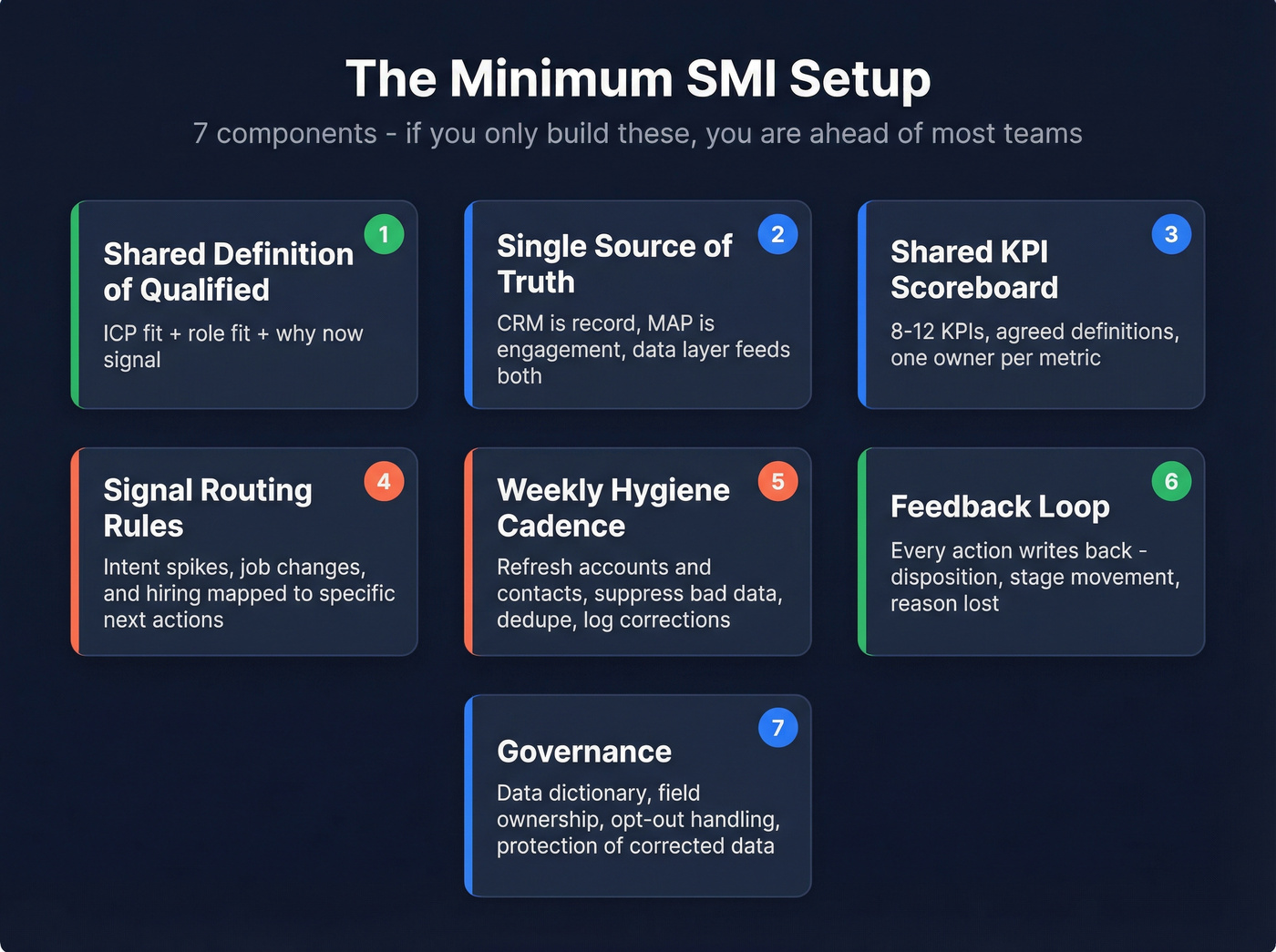
The minimum SMI setup (checklist)
- One shared definition of "qualified"
- ICP fit (account) + role fit (person) + "why now" signal (timing)
- A single source of truth
- CRM is the system of record
- MAP/automation is the system of engagement
- Data layer feeds both (and gets corrected by both)
- A shared KPI scoreboard
- 8-12 KPIs total, agreed definitions, one owner per KPI
- Signal routing rules
- What happens when intent spikes, a champion changes jobs, or a target account starts hiring?
- Where does it go: SDR task, sequence, ad audience, or nurture?
- Weekly hygiene cadence
- Refresh accounts + contacts weekly, suppress bad data, dedupe, and log corrections
- A feedback loop
- Every action writes back: disposition, meeting outcome, stage movement, reason lost, unsubscribe/opt-out
- Governance
- Data dictionary, field ownership, opt-out handling, and "don't overwrite corrected data" rules
3 things to implement first (in this order)
- Shared KPI scoreboard (so you stop arguing about whose numbers are "right")
- Signal routing rules (so signals turn into tasks, not Slack messages)
- Verified data + weekly refresh (so your actions don't bounce or misfire)
For the verified-data + weekly-refresh step, use a verification/enrichment layer (for example, Prospeo).

Sales and marketing intelligence: what it is (and isn't)
Sales and marketing intelligence (SMI) is the shared system that helps Sales and Marketing make better decisions about who to target, when to engage, and what to do next. In practice, it's the overlap that prevents chaos: one account view, one set of definitions, shared signals, and coordinated plays.
Here's the definition I've used with RevOps teams for years: intelligence = data -> insights -> decisions.
- Data is raw inputs: firmographics, web activity, intent topics, job changes, campaign responses.
- Insights are interpretations: "This account fits our ICP and is showing buying signals this week."
- Decisions are actions: "Route to SDR + launch Sequence B + add to retargeting audience + enrich missing contacts."
SMI fails when teams stop at "data" or "insights." A dashboard that says "traffic is up" isn't intelligence. It's trivia unless it changes what you do today.
SMI also isn't "a tool." It's an operating model that uses tools, and when it's implemented well, it behaves like a system that coordinates work across CRM, MAP, and your engagement stack.
I've watched teams buy an expensive platform, wire up ten integrations, and still create less pipeline because nobody agreed on routing rules or field ownership. The tech didn't fail. The operating model never existed.
A quick definitions callout
Sales and marketing intelligence (SMI): a cross-functional system that turns signals into coordinated actions and writes outcomes back into your CRM/MAP.
SMI isn't a dashboard: dashboards are a delivery mechanism. Intelligence is the end-to-end loop.
SMI vs sales intelligence vs marketing intelligence
- Sales intelligence is rep-first: contacts, direct dials, org charts, triggers, and workflows that help an SDR/AE book meetings.
- Marketing intelligence is campaign-first: audience insights, channel performance, attribution, and account-level engagement for targeting and spend decisions.
- Sales and marketing intelligence is the overlap that prevents chaos: one account view, one set of definitions, shared signals, and coordinated plays.

If Sales is working "accounts showing intent" while Marketing's optimizing "MQL volume," you don't have SMI. You've got two departments doing their best with incompatible scoreboards.
SMI vs revenue intelligence vs sales analytics
- Sales analytics measures the sales process: pipeline coverage, win rate, cycle length, rep activity, forecast accuracy.
- Revenue intelligence is broader: it pulls in signals and outcomes across Sales, Marketing, and Customer Success to optimize the full revenue cycle (including retention and expansion).
- SMI sits between them: it's the shared intelligence layer that aligns Sales and Marketing on targeting + timing + activation.
If you're early-stage, don't jump straight to "revenue intelligence." Get SMI working first.
Why sales and marketing intelligence matters in 2026 (market + operating reality)
The category's growing because the operating reality changed: buyers self-educate, signals are everywhere, and static contact lists decay faster than your team can clean them.

Grand View Research pegs sales intelligence at $2.95B (2022) -> $6.68B (2030), a 10.8% CAGR. Mordor Intelligence sizes the market at $4.99B (2026) and $9.15B (2031) at a 12.89% CAGR (2026-2031).
- https://www.grandviewresearch.com/industry-analysis/sales-intelligence-market
- https://www.mordorintelligence.com/industry-reports/sales-intelligence-market
What's driving it isn't "more dashboards." It's three things:
- Signal explosion: intent topics, web behavior, hiring, funding, tech changes, product usage, ad engagement.
- Tool sprawl: every team has 8-20 systems producing "truth," and none agree.
- Data decay: your best list starts rotting the day you export it.
Improvado estimates teams spend 10-20 hours/week on manual reporting, and automated dashboards can cut that by 80%+ when definitions and data hygiene are consistent.
Look, in 2026, SMI's the difference between "we're busy" and "we're coordinated."
How to implement sales and marketing intelligence (Signals -> Context -> Action -> Feedback)
If you want SMI to work, stop thinking "database" and start thinking "loop."
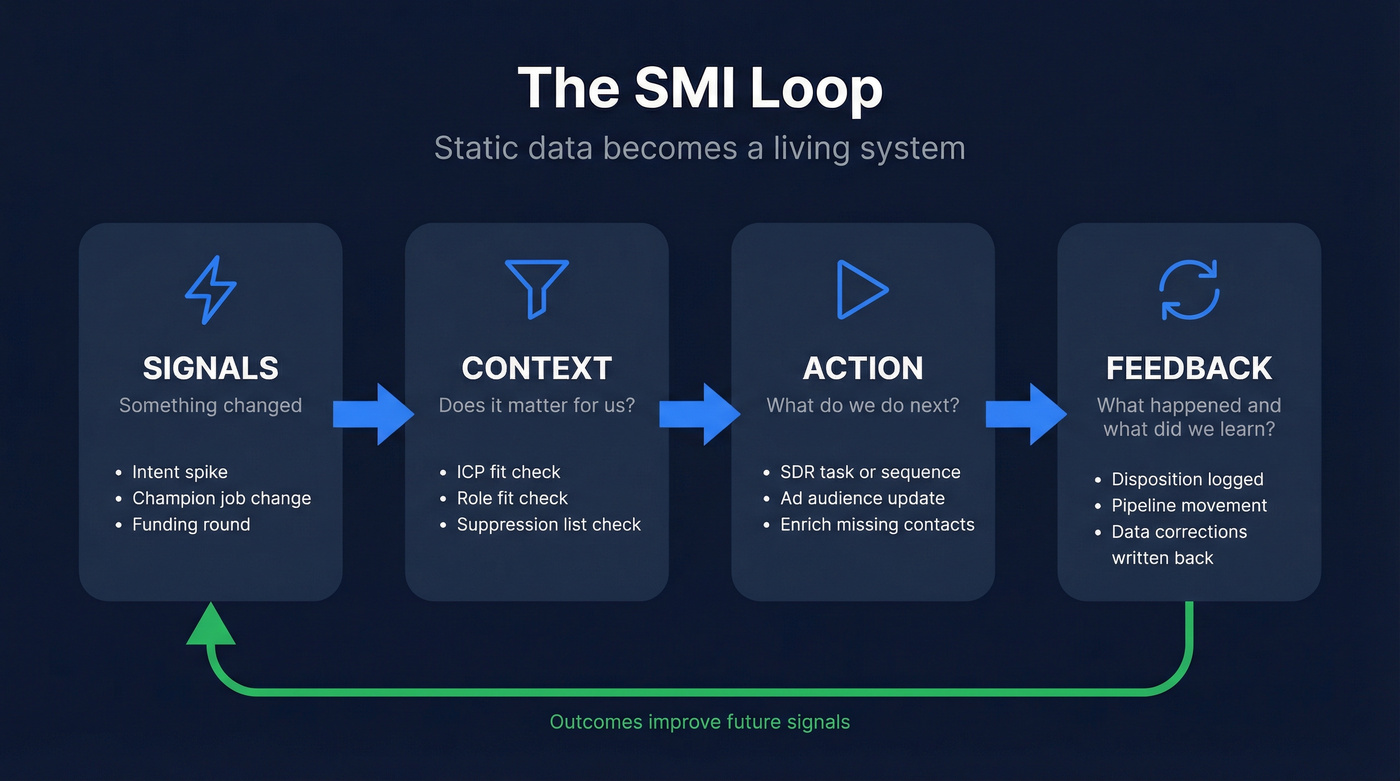
The loop is:
- Signals (something changed)
- Context (does it matter for us?)
- Action (what do we do next?)
- Feedback (what happened, and what do we learn?)
This is the shift from static data to "why now" triggers. The best teams also layer AI briefs on top: short summaries that explain why the signal matters and what to do next, not just "intent score = 87." (If you're building this, see signal-based selling mechanics and scoring.)
Signals (what counts as a signal; "why now" examples)
A signal is any event that changes the probability of a near-term conversation.
Good "why now" signals:
- Funding (new budget + new urgency)
- Leadership change (new VP wants to make a mark)
- Hiring spike (team scaling, new tooling needs)
- Tech stack change (rip-and-replace windows)
- Intent spike (topic consumption increases)
- Website behavior (pricing page visits, competitor comparisons)
- Product usage (for PLG: activation, expansion triggers)
Bad signals are the ones that don't change timing. "Company is in SaaS" is useful context, not a trigger.
Define signal thresholds so you don't spam Sales with noise. Example: "Intent spike" only routes when (a) ICP fit is true and (b) the spike is above a defined baseline for 7 days.
Context (ICP fit, role, tech stack, territory rules, suppression lists)
Context is the filter that prevents dumb actions.
At minimum, context includes:
- ICP fit: industry, size, geo, business model, maturity
- Role fit: titles/functions that actually buy (use a simple buyer persona map)
- Technographics: must-have/must-not-have tech
- Territory rules: who owns the account and why
- Suppression lists: current customers, open opps, do-not-contact, active sequences
- Data confidence: verified email/phone, last refreshed date, source reliability
Here's where most teams quietly fail: they route "hot accounts" to SDRs without checking if the account's already in late-stage pipeline, or if the contact's unsubscribed, or if the territory's wrong. Then they blame the signal provider.
Action (next-best-action: sequence, ad audience, SDR task, enrichment)
Action is the output of SMI. It must be specific and owned.
Common next-best-actions:
- Sales sequence: enroll the right persona into the right play (see sales sequence best practices)
- SDR task: "Call CFO within 2 hours" beats "follow up"
- Ad audience: add account to retargeting, exclude customers
- Enrichment: fill missing contacts, verify deliverability, append mobiles
- Content/nurture: route to a track based on topic + stage
A pattern that wins: define 3-5 plays only. Don't build 25 plays. You won't maintain them.
Feedback loop (what gets written back to CRM/MAP and why)
Feedback is what turns SMI from activity into learning.
Write back:
- Signal -> action mapping: which signal triggered which action
- Disposition: connected, no answer, wrong person, not now
- Meeting outcome: qualified, disqualified, next step
- Pipeline movement: stage changes, amount, close date shifts
- Marketing outcomes: engagement, form fills, unsubscribes
- Data corrections: title changes, company changes, opt-outs
Store this in a way you can query later. If outcomes live in Slack and call notes, your intelligence never improves.

Your SMI loop breaks the moment signals route to stale contacts. Prospeo's 7-day data refresh and 98% email accuracy ensure every action in your Signals → Context → Action → Feedback loop actually lands.
Stop building intelligence on data that's already decaying.
Worked example: one account, one signal, what happens over 48 hours
Here's what sales and marketing intelligence looks like when it's real, not theoretical.
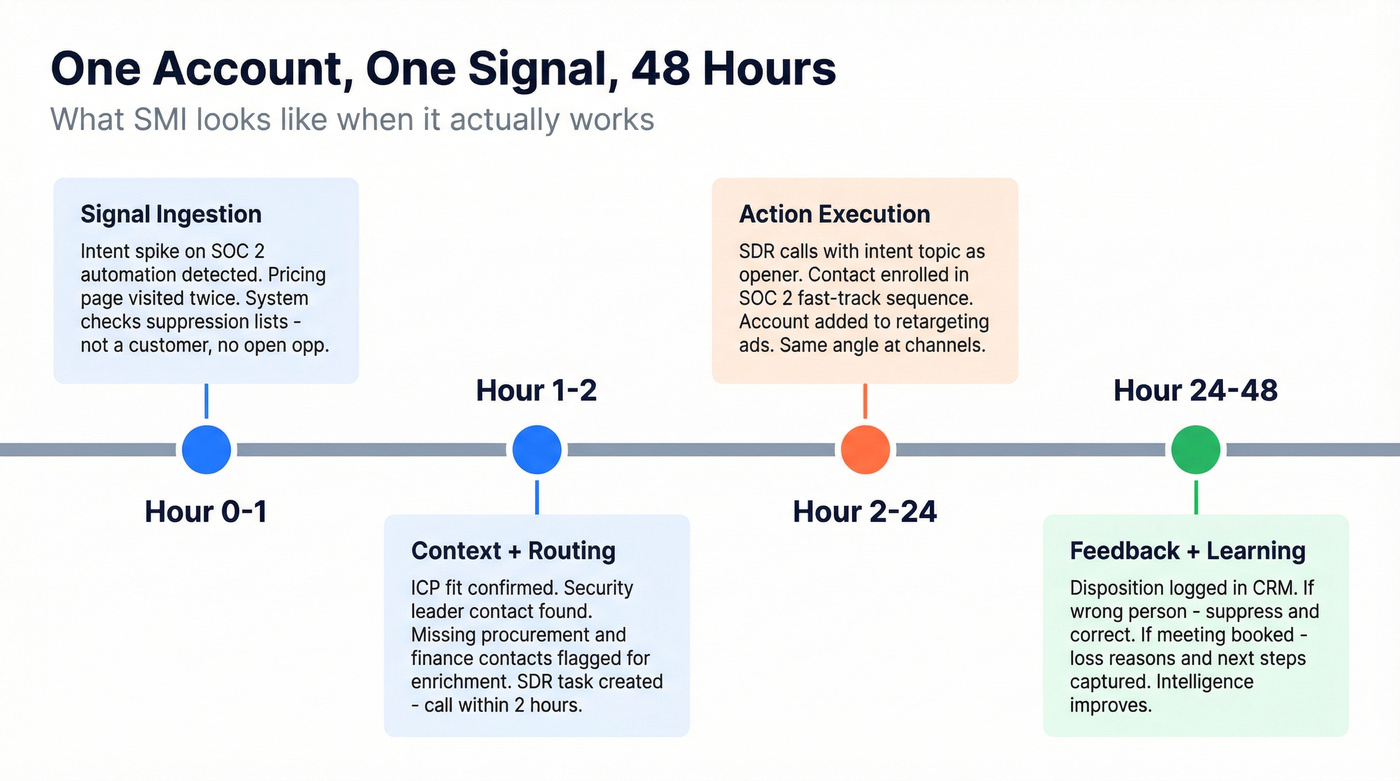
Scenario: A target account spikes on "SOC 2 automation" intent and visits your pricing page twice.
Hour 0-1 (Signal ingestion) Intent spike and web visits land on the account record with timestamps. The system checks suppression: not a customer, no open opp, no active sequence.
Hour 1-2 (Context + routing) ICP fit is true. Role coverage check shows you have a security leader contact, but you're missing procurement/finance. Routing rule fires: create an SDR task ("Call security leader within 2 hours"), enroll that contact into the "SOC 2 fast-track" sequence, and add the account to retargeting while excluding customers.
Hour 2-24 (Action execution) SDR calls and emails with the intent topic as the opener (not fake personalization). Marketing runs retargeting with the same angle: SOC 2 timelines, proof points, and a clear next step.
Hour 24-48 (Feedback + learning) Disposition is required. If it's "wrong person," that contact gets flagged and suppressed from future sequences until corrected. If a meeting's booked, the system writes back the signal, the play used, the meeting outcome, and the opportunity source mapping.
That's the loop. No heroics. No Slack archaeology.
Failure modes (and the fix)
Most SMI failures are predictable. Here are five I see constantly:
Intent before identity
- Symptom: "Hot accounts" list, but no reachable contacts.
- Fix: build contact coverage + verification first; then scale intent.
No lead-to-account matching
- Symptom: Marketing reports leads; Sales works accounts; nobody agrees on conversion.
- Fix: enforce matching rules and make account the primary reporting unit.
Routing without suppression
- Symptom: SDRs hit customers, open opps, or opted-out contacts.
- Fix: suppression checks are mandatory in every automation.
Overwriting corrected fields
- Symptom: reps stop trusting CRM because "it changes back."
- Fix: field ownership + "rep-corrected wins" policy.
Too many plays
- Symptom: 20+ sequences nobody maintains; performance decays quietly.
- Fix: 3-5 plays, reviewed monthly, ruthlessly pruned.
What data sales and marketing intelligence includes (the practical taxonomy)
Most teams argue about "what counts as intelligence" because they never agree on the data model.
A clean, practical taxonomy is: firmographic, technographic, contact, intent data unified into a single view for activation. The labels matter less than the coverage: these four types drive the bulk of Sales + Marketing decisions.
"Single source of truth" doesn't mean "one tool." It means one canonical record per account and contact, with lead-to-account matching so you can operate at the account level.
Data taxonomy table (definition, examples, who uses it, how it activates)
| Data type | Definition | Examples | Who uses it most | How it activates |
|---|---|---|---|---|
| Firmographic | Company attributes | industry, employee band, revenue band, HQ/regions | RevOps, Marketing, Sales leadership | ICP filters, routing, segmentation, territory assignment |
| Technographic | Installed tech + stack signals | CRM/CDP, cloud, security tools, data warehouse | Sales (messaging), Marketing (targeting), Partnerships | plays by stack, integration angles, competitive displacement, ABM audiences |
| Contact | People + reachability | title/function, seniority, email, mobile, location | SDRs/AEs, RevOps | sequences, calling, personalization, contact coverage gaps |
| Intent | Buying signals (topic + recency) | topic spikes, pricing page visits, competitor comparisons | Sales + Marketing jointly | "why now" plays, prioritization, retargeting, nurture branching |
Trigger events vs static attributes (tie back to the framework)
Static attributes answer "who are they?" Trigger events answer "why now?"
You need both, but they live differently in your system:
- Static attributes belong in stable fields (industry, employee band, region).
- Trigger events belong as time-stamped events (funding date, job change date, intent spike window).
If you store triggers as overwritten fields ("intent score = 92"), you lose history. And you lose the ability to learn which signals correlate with pipeline.
External intelligence inputs (competitors + VoC) that actually change plays
Most stacks ignore two inputs that change outcomes fast: competitor moves and voice of customer (VoC). These aren't fluffy brand exercises. They're play fuel.
Practical external inputs worth operationalizing:
- Competitor pricing/packaging changes -> update objection handling + landing pages + retargeting copy within a week.
- Review mining (your category + competitors) -> build a "top 5 reasons people switch" battlecard and a "top 5 reasons people churn" save play.
- Win/loss notes (from AEs) -> turn into structured fields: primary competitor, top objection, decisive feature, decision timeline. (If you want a system for this, use a win-loss analysis template.)
- Support tickets + CS call tags -> surface expansion triggers and risk triggers (especially for PLG and land-and-expand).
- Analyst reports / market maps -> update positioning and target segments quarterly.
- Social listening (category keywords, competitor outages) -> short-lived spikes that can justify a targeted campaign.
Map them into the same loop:
- Signal: competitor raises price in SMB tier
- Context: accounts in your SMB segment evaluating alternatives
- Action: launch a "price lock" offer + SDR task to top 50 accounts + update retargeting creative
- Feedback: meeting rate, opp creation, win rate vs competitor over 30 days
This is the difference between "we have intel" and "we changed the play."
Intent data explained (7 types) + what to trust
Intent data's useful, but it's also where teams get sold a dream.
Bombora's taxonomy is a clean way to think about it: first-party, second-party, third-party, co-op, bidstream, behavioral, contextual intent. https://bombora.com/blog/7-types-of-intent-data/
Here's how I've seen it play out in the real world: first-party intent drives the best timing, third-party/co-op helps you find accounts you would've missed, and bidstream needs strict filtering or it'll flood your SDRs with junk.
If you don't want to build your own intent pipeline, consume intent topics as an activation input and route "topic + ICP fit" into plays. (More on operationalizing it: intent signals.)
The 7 types, in plain language (and what to do with them)
First-party intent: actions on your owned properties (pricing page, demo page, webinar attendance). Use it for: fast routing, prioritization, and personalization.
Second-party intent: a partner's first-party data shared with you (publisher, event partner). Use it for: targeted campaigns when the partner's audience matches your ICP.
Third-party intent: aggregated behavior across the web. Use it for: finding new accounts and building in-market lists at scale.
Co-op intent: shared network model (multiple publishers contribute). Use it for: broader coverage with better topic modeling than random scraping.
Bidstream intent: ad exchange data. Use it for: top-of-funnel discovery only, with strict filters.
Behavioral intent: observed actions (clicks, visits, content consumption). Use it for: scoring and sequencing triggers.
Contextual intent: content/topic context (what they're reading, what keywords appear). Use it for: messaging angle and content recommendations.
Intent decision matrix: signal -> best channel -> SLA -> suppression rules
This is the part most teams skip. It's also why intent turns into noise.
| Signal | Best channel | SLA (do this fast) | Suppression rules (non-negotiable) |
|---|---|---|---|
| Pricing page visit (2+ in 7 days) | SDR task + short sequence | < 2 hours | customers, open opps, opted-out, active sequence |
| Competitor comparison page | AE task + targeted ad | < 24 hours | same as above + exclude "closed-lost < 30 days" unless new champion |
| Third-party topic spike (ICP-fit) | SDR sequence + retargeting | < 24 hours | same as above + require verified email before enrollment |
| Leadership change (VP/Head) | AE task + personalized outreach | < 48 hours | same as above + suppress if role's non-buying function |
| Hiring surge in buying dept | Marketing audience + SDR research task | < 72 hours | suppress if hiring's in non-relevant dept; exclude customers |
| Funding event | SDR + AE coordinated play | < 72 hours | suppress if already in late-stage pipeline; route to owner |
Three hard calls that save teams months:
- If you don't have lead-to-account matching, don't buy intent yet. You'll create activity, not pipeline.
- If bounce rate's above 5%, stop scaling outbound and fix verification. Anything else is lighting money on fire. (Run a quick email verification list SOP first.)
- If you're not running true ABM, Demandbase is overkill. You'll pay for orchestration you won't operationalize.
Dashboards vs reports + the shared KPI scoreboard (stop the attribution fights)
If Sales and Marketing don't share a scoreboard, you'll keep replaying the same argument:
- Sales: "These leads were junk."
- Marketing: "We hit the MQL target."
A shared KPI scoreboard is the peace treaty. It forces you to define what matters and how it's calculated.
Dashboards and reports also aren't the same thing. Mixing them creates confusion and wasted time.
Dashboard vs report (definitions + when to use each)
- Dashboard: dynamic, interactive, near real-time. It answers "What's happening now?"
- Report: static, period-based deep dive. It answers "What happened over this period, and why?"
A dashboard should be boring. If it's "interesting," it's probably not actionable.
KPI table (Exec/RevOps vs Sales vs Marketing; daily vs weekly cadence)
You want 8-12 KPIs total. More than that and you'll spend your life debating definitions.
| Audience | Daily (3-5) | Weekly | Monthly |
|---|---|---|---|
| Exec/RevOps | pipeline created | pipeline coverage | forecast vs actual |
| Sales | meetings set | opps created | win rate by source |
| Marketing | ICP accounts engaged | lead-to-opp rate | CAC + payback |
Cross-functional SMI KPIs that stop the fighting:
- Lead-to-opportunity conversion rate
- Opportunity-to-win conversion rate
- Win rate by source
- Pipeline velocity (speed + conversion through stages)
- Pipeline contribution by channel and by segment
- Sales cycle length by source/segment
- Meeting-to-opportunity rate
Opinion: I've watched teams "fix" alignment by renaming MQLs, then keep missing pipeline because they never agreed on lead-to-opp and opp-to-win definitions. Rename nothing. Define everything.
Role-based dashboard layout (3-5 daily metrics + drill-down)
A dashboard works when it's role-based:
SDR dashboard (daily):
- tasks due today
- connects
- meetings set
- bounce rate (by list/source)
- top 20 accounts by signal score
Marketing dashboard (daily):
- ICP accounts engaged
- form fills / demo requests
- cost per qualified meeting (or equivalent)
- pipeline created this week
- audience size changes (suppression included)
RevOps dashboard (daily):
- data freshness (last refresh date distribution)
- duplicate rate
- routing SLA compliance
- lead-to-opp conversion trend
- opt-out / unsubscribe trend
Pick one dashboard tool and commit. Lightweight options like Geckoboard, Databox, or Looker Studio work fine if your definitions are solid. (If you need examples, see revenue dashboards.)
Data quality is the bottleneck (decay, verification, refresh cadence)
Real talk: most SMI programs fail because the data's wrong.
Not "a little off." Wrong enough to break trust. And once Sales stops trusting the data, your whole Signals -> Context -> Action loop collapses.
The proof: data decays faster than your process
Two benchmarks matter:
- B2B databases decay 2.1% per month, or 22.5% per year: https://www.hubspot.com/database-decay
- In a study of 1,000 business cards, 70.8% had at least one change within 12 months:
- 65.8% title/function changed
- 42.9% phone changed
- 37.3% email changed
- 29.6% changed companies
That's why "we enriched the CRM last quarter" isn't a strategy. It's a moment in time.
ROI box: a simple way to justify verification + routing (without fantasy math)
Use this quick model to estimate whether your SMI hygiene work pays off.
Inputs (plug in your numbers):
- Prospects emailed per month: N
- Current bounce rate: B%
- Target bounce rate after verification: T%
- Meetings per 1,000 delivered emails: M
- Close rate from meeting: C%
- Average ACV: $A
- Ops hours spent on manual reporting per week: H
- Fully loaded hourly cost (Ops): $R
Outputs (back-of-napkin):
- Extra delivered emails/month =
N x (B% - T%) - Extra meetings/month =
(Extra delivered emails / 1,000) x M - Extra closed-won/month (expected) =
Extra meetings x C% - Revenue lift/month (expected) =
Extra closed-won x $A - Ops cost saved/month (if dashboards reduce manual reporting) =
H x 4 x $R x 0.8
This model's intentionally conservative: it ignores downstream benefits like domain reputation, reply-rate lift, and SDR time saved on bad numbers, which are often the biggest wins.
The playbook: verification + refresh cadence + field ownership
1) Define freshness SLAs
- Contacts in active sequences: refresh weekly
- Target account lists: refresh weekly to biweekly
- Full CRM: refresh monthly (minimum)
2) Verify before you activate
- Verify emails before sending sequences (use a repeatable verify-this-email workflow)
- Validate mobiles before loading into dialers
- Suppress invalid/unknown from activation lists
3) Enrich only what you'll use
- Don't append 200 fields "because you can"
- Append fields tied to routing, personalization, and segmentation
4) Don't overwrite corrected data
- If a rep corrects a title or a contact flags "wrong person," that correction persists
- Store vendor updates as "suggested" unless confidence is high and the field owner approves
5) Dedupe like your pipeline depends on it (because it does)
- Lead-to-account matching rules
- Duplicate contact rules (email + domain + name)
- Merge policies that preserve activity history
A practical "verification + weekly refresh backbone" example
In our experience, the teams that get SMI working fastest add a dedicated verification/enrichment layer early, then build routing and dashboards on top of data they can actually trust.
Prospeo ("The B2B data platform built for accuracy") is built for that backbone: 98% email accuracy, a 7-day data refresh cycle, 300M+ professional profiles, 143M+ verified emails, and 125M+ verified mobile numbers. It also supports enrichment that returns 50+ data points per contact, with an 83% enrichment match rate and a 92% API match rate, so you can keep CRM and MAP records fresh without babysitting exports.
Pricing is credit-based and self-serve at roughly $0.01/email, with a free tier that includes 75 emails + 100 Chrome extension credits/month.
Mini-workflow that works:
- Export your next 500-2,000 prospects from CRM/MAP
- Verify + enrich (email validity, title, company, mobile where available)
- Suppress invalids, push verified contacts into your sequencer
- Refresh the same cohort weekly for 30 days and track bounce + meeting lift
ZoomInfo reality check (because everyone compares to it)
ZoomInfo's the default reference point because it's massive and broad. At enterprise scale, it can function as a real system.
Here's the thing that frustrates teams: if you don't budget time for QA and verification, you'll end up arguing about "data quality" instead of fixing it, and the argument will last longer than the contract.
Minimal-stack architecture (SMB vs mid-market vs enterprise) + budget expectations
Hot take: most teams don't need more tools. They need fewer tools with clearer responsibilities.
SMI stacks get messy when one tool tries to be the database, the intent engine, the workflow router, the dashboard, and the governance layer. That's how you end up paying for modules nobody uses, while the basics (suppression, matching, freshness) quietly break.
A minimal architecture looks like this:
- Prospecting layer (find accounts/people)
- Data layer (verify/enrich/refresh)
- Engagement layer (sequences, ads, nurture)
- System of record (CRM)
- Dashboard layer (KPI scoreboard)
Minimal stack by stage (SMB / Mid-market / Enterprise)
| Layer | SMB | Mid-market | Enterprise |
|---|---|---|---|
| Prospecting | Sales Navigator | Sales Navigator + data provider | data provider + ABM |
| Data layer | verification/enrichment tool | verification/enrichment + API | enterprise data + QA layer |
| Intent | first-party + light third-party | 6sense | Demandbase / 6sense |
| Dashboards | Looker Studio | Power BI | Tableau |
| Activation | sequencer | MAP + sequencer | MAP + ABM |
Tool anchors (with pricing signals you can budget for):
- Sales Navigator: ~$99/user/mo (Core) and ~$159/user/mo (Advanced).
- 6sense Sales Intelligence: free tier with 50 credits/month; paid plans often land in the low-to-mid five figures/year depending on seats and scope.
- Demandbase One: typically $30k-$100k+/year depending on scope. Skip this if you're not running true ABM across multiple teams.
- ZoomInfo: commonly $15k-$40k+/year and climbs fast with seats/modules.
Dashboard pricing anchors:
- Databox: $49/mo
- Geckoboard: $39/mo
- Power BI: $10/user/mo
- Tableau: $75/user/mo
- Looker Studio: free
One practical recommendation: keep integrations boring. If your stack can't reliably sync suppression lists and field ownership rules, you don't have an integration. You've got a future incident.
Compliance and governance checklist (2026-ready)
SMI touches personal data. Governance can't be an afterthought.
If you operate in the US, California privacy rules are the practical baseline because they're operationally strict and they influence how vendors behave globally.
CCPA/CPRA thresholds you can't ignore
CCPA applies if you meet any of these thresholds:
- $26.6M+ annual gross revenue, or
- 100,000+ consumers/households/devices handled annually, or
- 50%+ revenue from selling/sharing personal information
Penalties are real: up to $2,663 per unintentional violation and $7,988 per intentional violation.
Operational requirements that hit SMI workflows:
- Honor Global Privacy Control (GPC) as a valid opt-out
- Keep records for 24 months
- Support opt-out confirmation (people can check status)
- Run risk assessments for high-risk practices (targeted ads, sale/share, sensitive PI)
- Governance rule that matters for enrichment: don't overwrite corrected data with later third-party updates
Operational DSR workflow (intake -> verify -> suppress -> log)
This is the workflow most teams say they have, then fail during the first real request.
Intake
- Single intake path (web form + email alias).
- Auto-create a case/ticket with timestamp.
Verify identity
- Verify the requester matches the data subject (email/domain checks; additional verification if needed).
Locate
- Search CRM, MAP, sequencer, enrichment logs, data warehouse, ad platforms (where applicable).
Suppress immediately
- Add to a global suppression list that syncs everywhere.
- Stop all sequences and exclude from ad audiences.
Fulfill request
- Access: provide the data you have.
- Deletion: delete where required; where deletion isn't possible, de-identify and suppress.
Log for 24 months
- Request type, date, systems touched, action taken, confirmation sent.
Data broker/enrichment-specific checklist (what changes in your workflows)
Compliance isn't a policy doc. It's routing logic.
Where GPC is enforced
- Website tracking: treat GPC as opt-out for sale/share where applicable.
- Forms: store GPC/opt-out flags at contact level.
- Enrichment imports: if a contact's opted out, enrichment updates must not re-activate them.
How opt-out propagates
- CRM opt-out field is the master.
- Sync to MAP, sequencer, and ad platforms daily (or near real-time if you can).
- Suppression checks run before any "signal -> action" automation.
How to log enrichment events
- Store: vendor/source, fields changed, timestamp, and whether a field was protected by ownership rules.
- Keep logs queryable for 24 months.
Governance checklist (do this, don't do that)
Do:
- Maintain a data dictionary (field definitions + owners)
- Track data lineage (where key fields came from)
- Store consent/opt-out status at the contact level and honor it everywhere
- Log enrichment events (what changed, when, and why)
- Create a vendor management folder: DPA, subprocessors, security docs
Don't:
- Don't let every tool write to CRM fields freely
- Don't overwrite rep-corrected fields automatically
- Don't route signals to outreach without suppression checks (customers, open opps, opt-outs)
30-day implementation plan (week-by-week) + SLAs
A 30-day rollout's realistic if you keep scope tight: one segment, a handful of signals, and a scoreboard you can defend.
You don't need an all-in-one platform to get SMI working. The rollout pattern below works with any stack, including most modern marketing and sales intelligence stacks where Marketing Ops and Sales Ops share ownership of routing and hygiene.
Week 1: define ICP + shared KPIs + data dictionary
Outputs by end of week:
- ICP definition (firmographic + technographic + exclusions)
- Role map (3-5 core personas)
- Shared KPI scoreboard (8-12 KPIs) + owners
- Data dictionary for the fields that power routing and reporting
Hard SLA decisions (write them down):
- Hot signal response time: 2 hours (business hours), 24 hours max
- Speed-to-lead for demo requests: 5 minutes target, 15 minutes max (see speed to lead metrics)
- Definition of "worked" SDR task: at least 3 touches in 3 business days (call + email + follow-up)
Handoff definition (stop the "we thought you had it" problem):
- Marketing hands off when: ICP-fit + verified contact + signal threshold met.
- Sales accepts when: task's acknowledged within SLA and disposition's logged.
Week 2: pick signals + routing rules + suppression + owners
Pick 3 signals only:
- Intent spike (topic-based)
- Leadership change
- Hiring surge
Define routing rules (example defaults):
- If ICP fit + signal threshold met -> create SDR task + enroll in sequence
- If not ICP fit -> suppress or nurture
- If open opp exists -> route to AE, not SDR
- If customer -> route to CS/AM, not net-new
Owners (no shared ownership):
- Marketing Ops owns: signal ingestion, audience updates, suppression sync to ad platforms
- Sales Ops/RevOps owns: routing logic, field governance, lead-to-account matching
- Sales leadership owns: SLA enforcement and disposition hygiene
Week 3: enrichment/verification pilot + dashboard v1 + QA
Pilot scope:
- 500-2,000 contacts in one segment
- One sequencer + one CRM integration path
- Weekly refresh for 4 weeks
Dashboard v1 (ship it ugly, ship it real):
- 3-5 daily metrics per role
- One weekly exec view
- Drill-down to source lists and segments
QA cadence (non-negotiable):
- Weekly dedupe check
- Weekly suppression sync audit
- Weekly field overwrite audit (especially titles/emails)
- Weekly bounce-rate review by list source
Week 4: automate workflows + governance + operating cadence
Automations to ship:
- Signal -> task creation
- Signal -> audience updates (add/exclude)
- Enrichment -> CRM updates with field ownership rules
- Disposition required fields (no blank outcomes)
Governance to lock:
- "Do not overwrite corrected data" enforcement
- Opt-out propagation everywhere
- 24-month record retention plan for key events and requests
Operating cadence (simple and durable):
- Daily: SDR task queue + hot signal response
- Weekly: KPI review (Sales + Marketing + RevOps), data hygiene checks
- Monthly: segment performance, play tuning, compliance spot-check
Weekly hygiene cadence is on your checklist - but manual refreshes don't scale. Prospeo enriches your CRM with 50+ data points per contact at a 92% match rate, so your routing rules fire on real people, not ghosts.
Replace your weekly cleanup with a data layer that never goes stale.
FAQ: sales and marketing intelligence
What's the difference between sales intelligence, marketing intelligence, and revenue intelligence?
Sales intelligence helps reps find and reach buyers. Marketing intelligence helps marketers target, measure, and improve campaigns. Revenue intelligence unifies insights across Sales, Marketing, and Customer Success to optimize the full revenue cycle. Sales and marketing intelligence is the shared layer that aligns Sales + Marketing on targeting, timing signals, and coordinated actions.
What data should be in a "single source of truth" for sales and marketing intelligence?
Your CRM holds the canonical account/contact record, plus firmographic, technographic, contact, and intent data; time-stamped trigger events (funding, job changes, intent spikes); and outcomes (dispositions, meetings, stage movement). Add lead-to-account matching and suppression lists (customers, open opps, opt-outs) so activation doesn't create routing or compliance chaos.
How often should you refresh and verify B2B contact data?
Refresh and verify weekly for any contacts you're actively sequencing or calling, and run a monthly refresh across your full CRM at minimum. B2B databases decay about 2.1% per month (22.5% per year), so a quarterly cleanup guarantees stale titles, broken emails, and wasted touches. Keep invalid and opted-out contacts suppressed before any outreach.
What tool helps you verify emails and enrich contacts for activation?
Prospeo verifies and enriches contacts with 98% email accuracy, a 7-day refresh cycle, and enrichment that returns 50+ data points with an 83% enrichment match rate and 92% API match rate. It's self-serve with a free tier (75 emails + 100 Chrome extension credits/month), which makes it ideal for a small pilot before you scale.
Summary: make the loop real
If you want sales and marketing intelligence to produce pipeline (not trivia), build the loop: signals -> context -> action -> feedback. Start with a shared KPI scoreboard, enforce suppression and routing rules, and fix data quality with verification plus a weekly refresh cadence, then scale intent and orchestration once the operating model's actually working.