

7 Video Prospecting Examples You Can Steal Today
A personalized 45-second video costs about 5 minutes of rep time. Send it to a bounced email and you've just lit $5 on fire. That's the part nobody shows you in video prospecting examples - the waste.
The format works. Teams report 3x reply rates versus plain text, and using video in sales emails can boost open-to-reply rates by 8x. Video influences over 40% of B2B sales pipeline on average. But only if the video reaches a real inbox.
What You Need to Start
Three things to get going this week:
- Keep videos under 60 seconds. Place them in step 2 of your sequence, not step 1.
- Steal one of the 7 scripts below and send 10 videos this week. Don't overthink the setup.
7 Scripts That Earn Replies
The Hiring-Trigger Congratulations
When to use: Prospect just posted a new role or made a key hire.
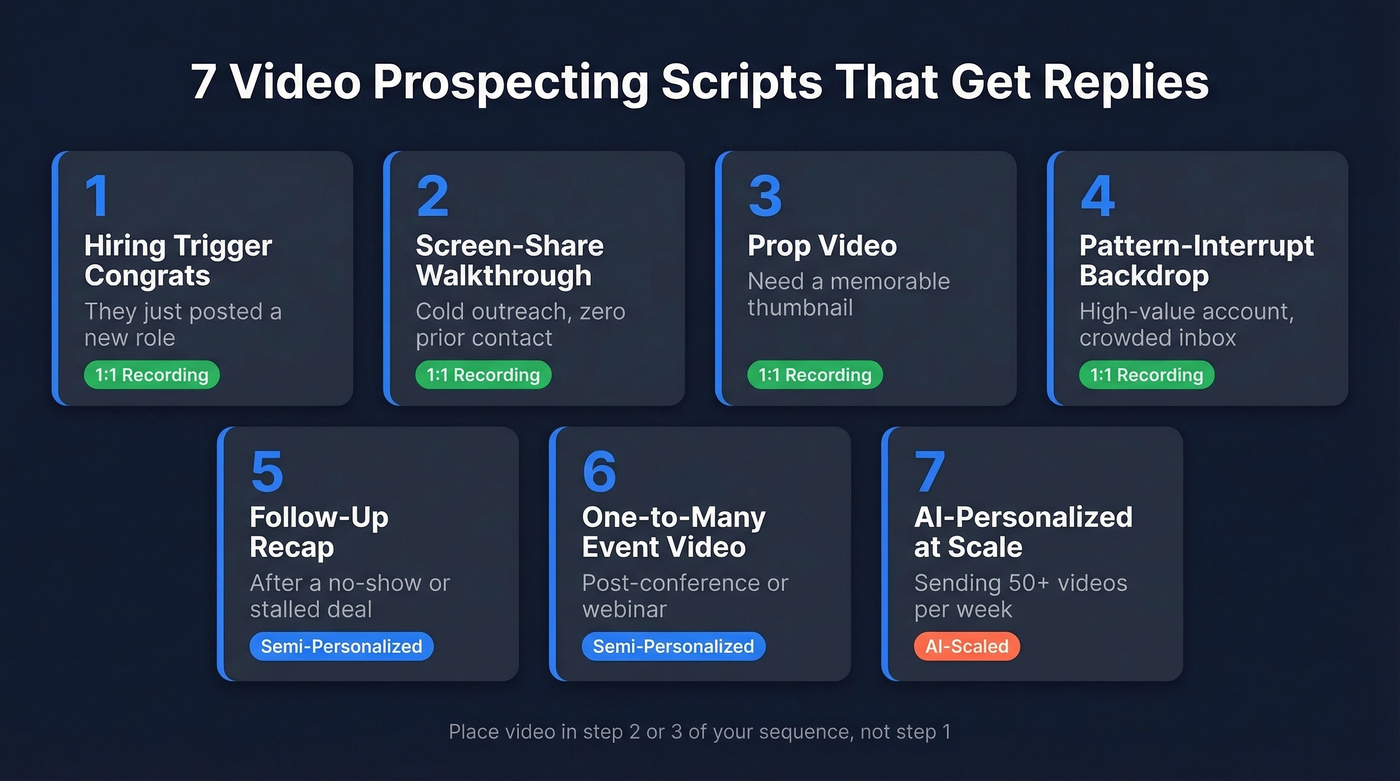
"Hey [Name], saw you're hiring a [role] - congrats, that's a great signal. When we helped [similar company] scale that same function, they cut ramp time by 40%. Worth a 15-minute chat?"
Mention the specific job title you saw. It proves you did your homework and aren't blasting a template.
The Screen-Share Profile Walkthrough
When to use: Cold outreach to someone you've never interacted with.
Open their company website or About page on screen, then narrate what you notice. "I pulled up [Company] and noticed you're expanding into EMEA - here's why that matters for what we do..."
Screen-share is one of the highest-engagement formats because the prospect literally sees their own name on screen. The focus stays on them, not you.
The Prop Video
When to use: You want a memorable thumbnail that earns the click.
Hold a physical object tied to the prospect's product or industry. Selling to a coffee brand? Hold a bag of their coffee. "I bought your Colombian roast last week - and it got me thinking about how you're handling [specific problem]."
Here's the thing: your thumbnail is the real hook. Use an animated GIF preview or a frame showing the prospect's product - it's the difference between a play and a skip. The script is secondary.
The Pattern-Interrupt Backdrop
When to use: You need to break through a crowded inbox for a high-value account.
A rep at Vouris recorded a chalkboard video from a literal mountaintop with the prospect's name written on it. Result: 23% reply rate. The script was simple - congratulate, connect, offer value. The setting did the heavy lifting.
You don't need a mountain. A unique backdrop - your rooftop, a whiteboard wall, a busy coffee shop - signals effort. That's what earns the reply.
The Follow-Up Recap
When to use: After a no-show or a stalled deal.
"Hey [Name], I know things get busy. Here's a 30-second recap of what we discussed and the one thing I think would move the needle for [Company]. No pressure - just didn't want it to get lost."
This works because it's generous, not pushy. You're saving them time instead of asking for more of it. Structure it around empathy first, then value, then a single clear action. If you need more options, pair this with proven sales follow-up templates.
The One-to-Many Event Video
When to use: Post-conference, post-webinar, or after a product launch.
Record one video referencing the shared event, then send it to every attendee. "Hey, I was at [Event] too - the panel on [topic] was solid. Here's a quick thought on how that applies to [their vertical]..."
You get the feel of personalization without recording 50 individual videos. Swap in the prospect's name and company in the email body, keep the video itself event-specific.
The AI-Personalized Template at Scale
When to use: You're sending 50+ videos per week and can't record each one.
Tools like Sendspark let you record a single template, then auto-generate personalized versions with the prospect's name, company, and custom variables. One practitioner on r/salesdevelopment described running this stack - Clay for data, Sendspark for video, Smartlead for sequencing - and seeing 3x reply rates versus text-only. Teams have also reported up to 500% increases in response rates with video outreach.
The tradeoff is real: AI-personalized videos feel slightly less human than a true 1:1 recording. But at volume, the math wins.
Verify Your List Before You Record
Look, this is the hill I'll die on: the biggest variable in video outreach isn't your script, your backdrop, or your tool. It's whether the email lands. If you're building a repeatable outbound motion, start with the fundamentals of email deliverability.
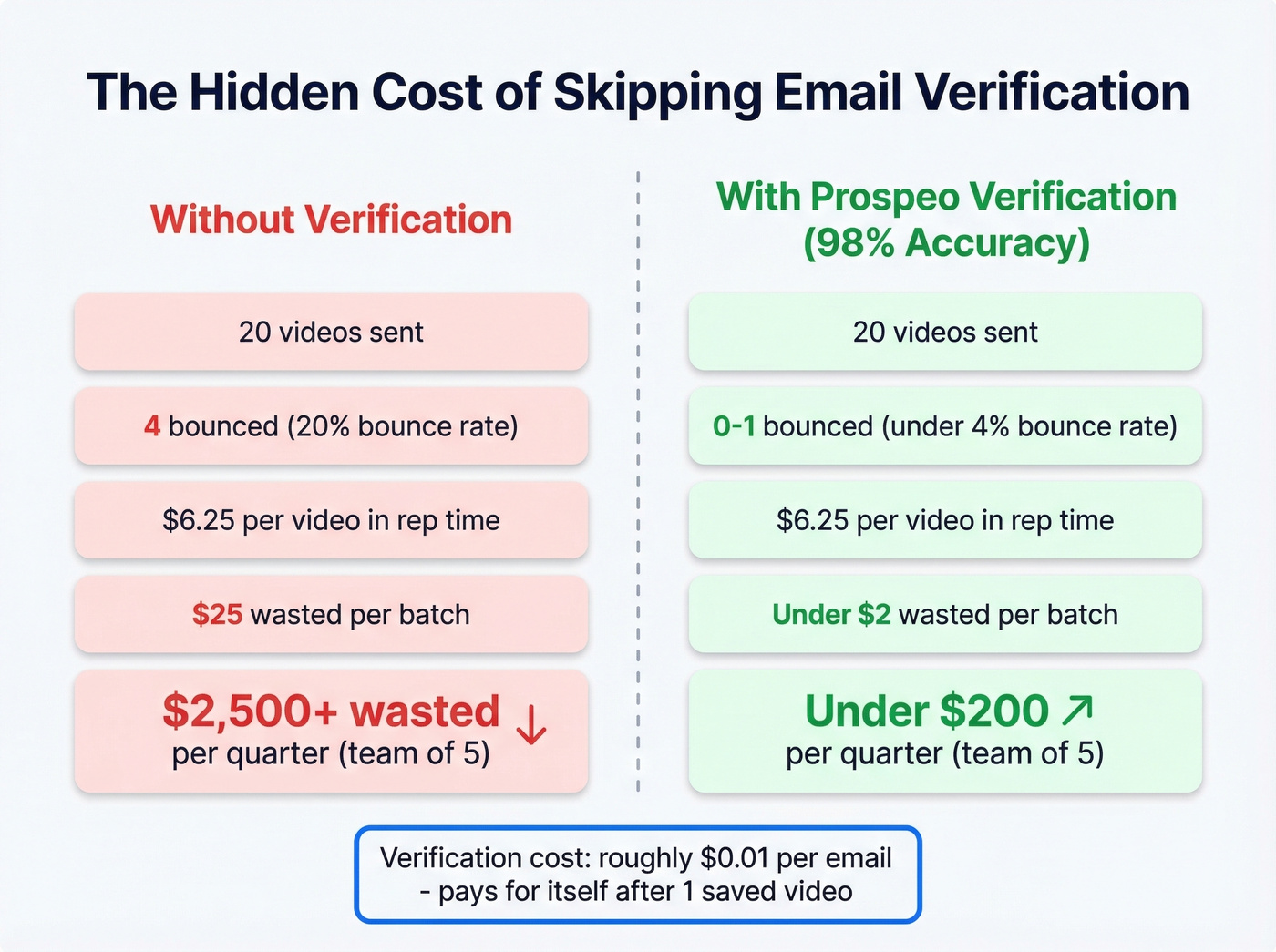
Most guides skip this entirely, and it's why so many reps burn out on video after two weeks. A personalized video takes about 5 minutes of SDR time. At a fully loaded cost of ~$75/hr, that's $6.25 per video. Send 20 videos to unverified emails, bounce 4 of them, and you've wasted $25 on nothing. Scale that across a team and a quarter, and you're burning thousands.
Run your prospect list through Prospeo's email verification before you record a single video. With 98% email accuracy and a 7-day data refresh cycle, you're not sending personalized content into the void. The 5-step verification catches catch-all domains, spam traps, and honeypots - the exact issues that tank deliverability and waste your recording time. If you're diagnosing issues, it also helps to understand email bounce rate benchmarks and fixes.

A 5-minute personalized video sent to a bad email is $6.25 in the trash. Prospeo's 5-step verification - with catch-all handling, spam-trap removal, and honeypot filtering - delivers 98% email accuracy on a 7-day refresh cycle. Verify your entire prospect list before you hit record.
Start free at ~$0.01/email. No contracts, no sales calls.
Running Clay + Sendspark + Smartlead for video at scale? The stack breaks the moment your contact data decays. Prospeo refreshes 300M+ profiles every 7 days - not every 6 weeks - so your AI-personalized videos actually reach real inboxes. Teams using Prospeo see bounce rates drop from 35% to under 4%.
Plug verified emails into your video stack and stop burning send volume.
Video Prospecting Tools Compared
| Tool | Best For | Starting Price | Free Tier? |
|---|---|---|---|
| Sendspark | AI personalization | $39/mo (annual) | Limited free |
| Loom | Quick screen records | $15/user/mo | Yes (25 videos) |
| Vidyard | Analytics + AI Agent | $59/user/mo (annual) | Yes (5 videos/mo) |
| HeyGen | AI avatar videos | $24/mo (annual) | Yes (3 videos/mo) |
| BombBomb | Email-native video | Not public | 14-day trial |
| Covideo | Video + landing pages | Not public | 7-day trial |
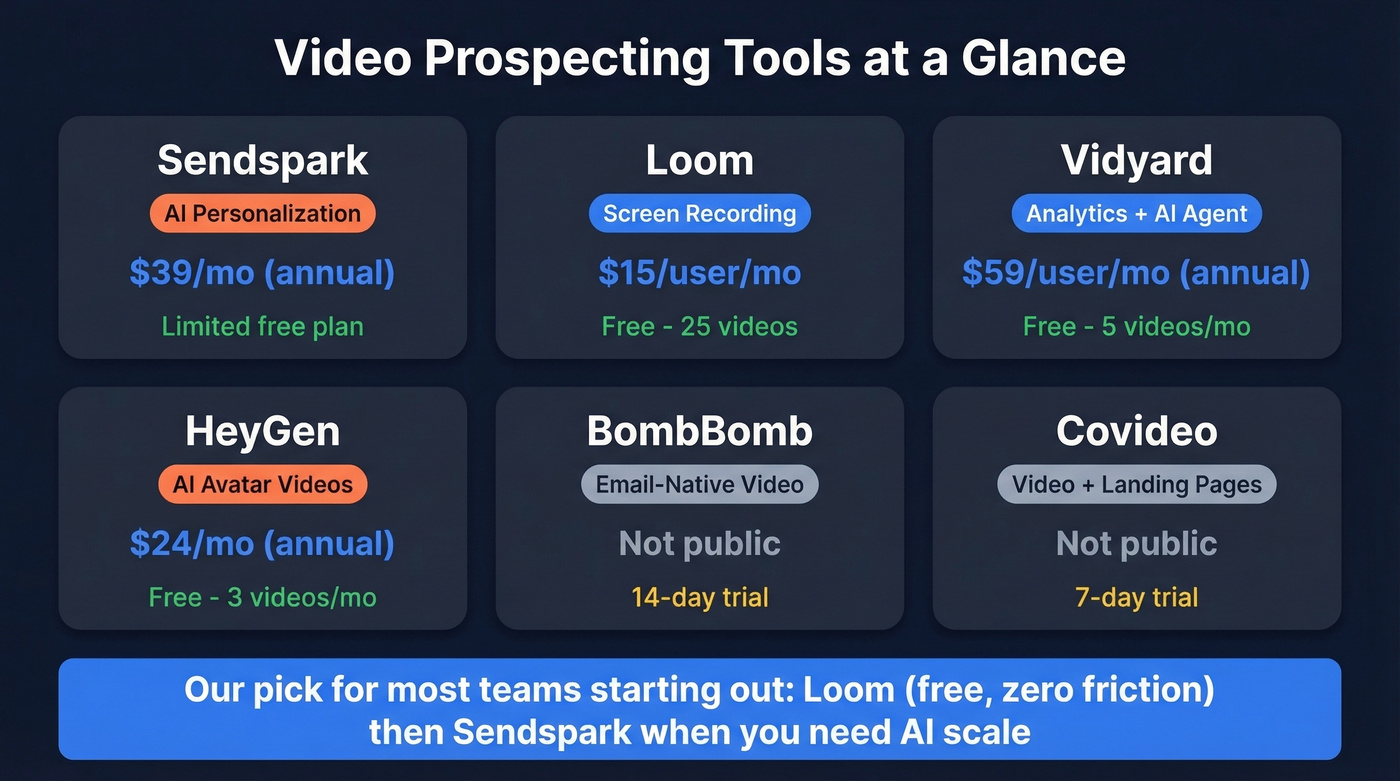
We've tested dozens of combinations. Our pick for most teams starting out is Loom for recording - free, zero friction - plus Sendspark when you're ready to scale with AI personalization. The recording tool doesn't matter if the email bounces, though, so verify your list first regardless of which platform you choose. For more stack ideas, compare common SDR tools and free lead generation tools.
Is AI Video Prospecting Worth It?
AI adoption in video workflows jumped from 18% to 41% year-over-year, and it's still accelerating. Vidyard's internal data shows their Video Agent helped reps reclaim ~40 hours per month and push from 75 to 100+ sales-accepted leads per week.
Use AI video if you're sending 50+ videos a week and need throughput more than intimacy. HeyGen at $24/mo or Synthesia at $64/mo are reasonable entry points for teams that want to experiment without a massive commitment.
Skip AI video if you're targeting C-suite at enterprise accounts. The "uncanny valley" effect is real - reviewers flag it consistently for AI avatar platforms. A genuine 45-second Loom will outperform a polished AI clone for high-stakes outreach every time. If you're building a broader outbound motion, anchor it in proven sales prospecting techniques.
5 Mistakes That Kill Results
- Videos over 90 seconds. Completion rates for sub-60-second videos hit 30%+. Every second past that mark costs you viewers.
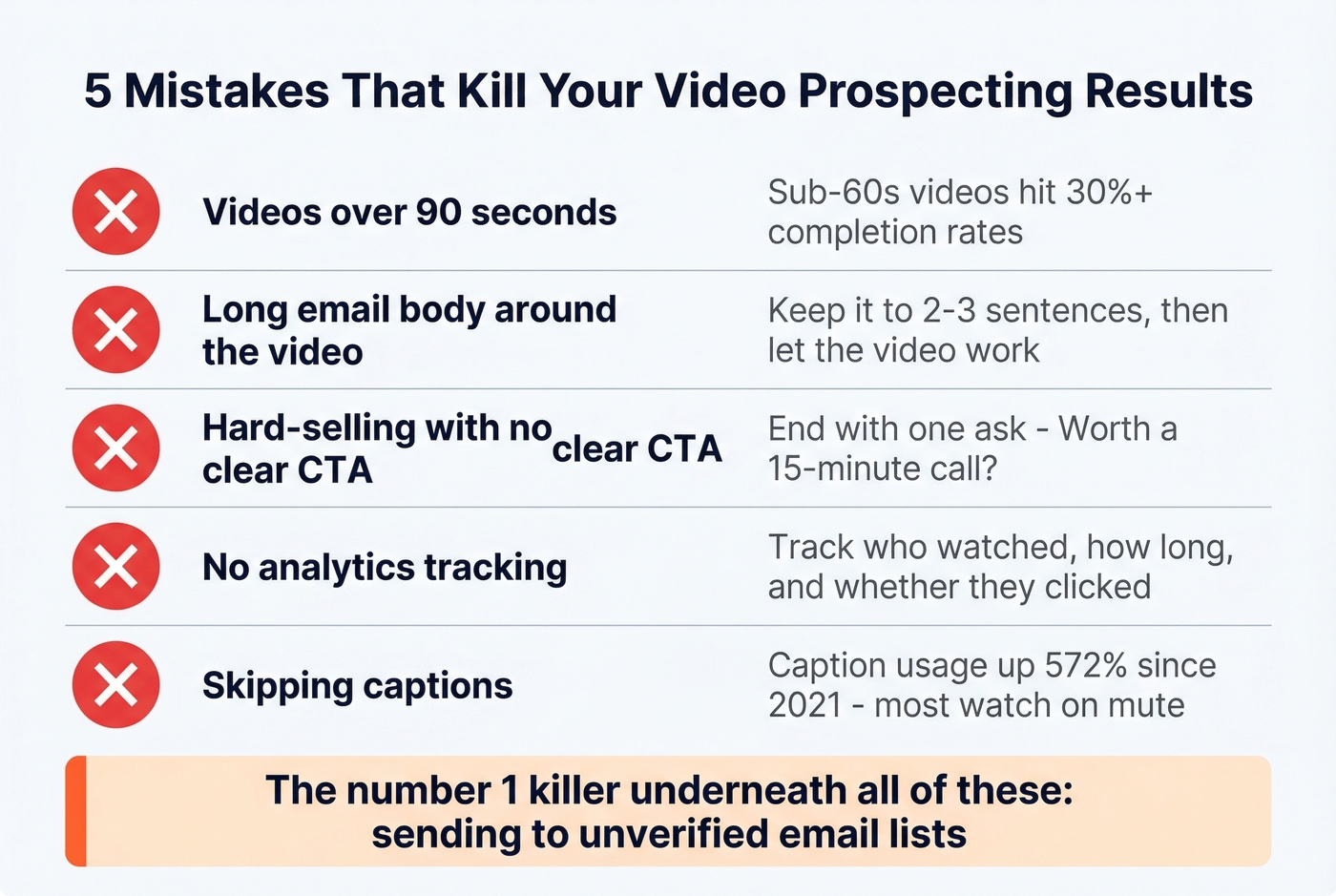
Long email body around the video. Walls of text reduce the likelihood someone clicks play. Keep the email to 2-3 sentences, then let the video work. Tighten the opener with better prospecting email subject lines.
Hard-selling with no clear CTA. Don't pitch your product in the video. End with one specific ask - "worth a 15-minute call?" beats a feature dump. (More examples: email call to action.)
No analytics tracking. If you aren't tracking who watched, how long, and whether they clicked, you're flying blind. Every platform on the list above includes view tracking so you can prioritize follow-up based on actual engagement, not guesswork.
Skipping captions. Caption usage has increased 572% since 2021 - most people watch with sound off at work. Add captions or lose viewers who never hear your pitch.
In our experience, the #1 killer that sits underneath all five of these is sending to unverified lists. You can nail the script, the thumbnail, and the CTA, and still get zero replies if half your emails bounce.
FAQ
What makes the best prospecting videos effective?
They're under 60 seconds, focused entirely on the prospect's situation, and end with a single clear CTA like "worth a 15-minute call?" Effective videos mention a specific trigger - a job posting, funding round, or shared event - within the first 5 seconds to prove relevance.
Should I use video in the first email or later?
Place video in step 2 or 3 of your sequence. Lead with a short text email to earn the open, then use video to earn the reply. A/B tests shared on r/salesdevelopment confirm this sequencing outperforms video-first by a wide margin.
How do I make sure my video reaches the right person?
Verify every email before recording. Bounced personalized videos waste $6+ each in rep time, so verification isn't optional. Prospeo's free tier covers 75 verifications per month at 98% accuracy - enough for a focused video campaign.
What's the cheapest way to start video outreach?
Loom's free plan (25 videos) plus Prospeo's free tier (75 email verifications) costs $0. Record screen-share walkthroughs in Loom, verify recipients, and send via your existing sequencer. Upgrade to Sendspark at $39/mo only when you need AI personalization at scale.