


Vidyard Pricing, Reviews, Pros and Cons (2026)
You just got the Vidyard renewal quote forwarded from your VP of Sales. Five seats on Teams, $5,940/year - and that's before the Video Agent add-on. The CFO wants to know why you're paying this much when half the team just uses Loom anyway.
Let's break it down with real numbers.
30-Second Verdict
Vidyard is the best video recording experience purpose-built for sales. The Chrome extension is slick, the analytics are genuinely useful, and AI Avatars are a real differentiator. But the pricing punishes you for scaling.
Starter begins at $59/seat/month and lacks CRM integration, which makes it a silo. Teams is where it gets useful - CRM/MAP integrations and the more "sales-team-ready" workflow - but it's typically quoted around $99/user/month and often sold via custom pricing. Ratings are solid: 4.5/5 on G2 across 832 reviews, 4.5/5 on Capterra with 125 reviews, and 8.2/10 on TrustRadius with 500+ reviews.
Budget tight? Loom at $15/user/mo covers most of the same ground.
What Vidyard Actually Is
Vidyard is a video messaging and recording platform built for sales teams. You record via a Chrome extension, send personalized videos to prospects, and track who watched and how long. It's not a general-purpose video tool - it's designed for outbound.
The platform is growing fast: 943,305 videos were created in 2024, a 241% year-over-year increase. Their benchmark data shows videos under one minute retain 65% of viewers to the end. Over 20 minutes, that drops to 20%. Keep your prospecting videos short.
Pricing Breakdown for 2026
Vidyard's pricing page shows four tiers: Free, Starter, Teams, and Enterprise.
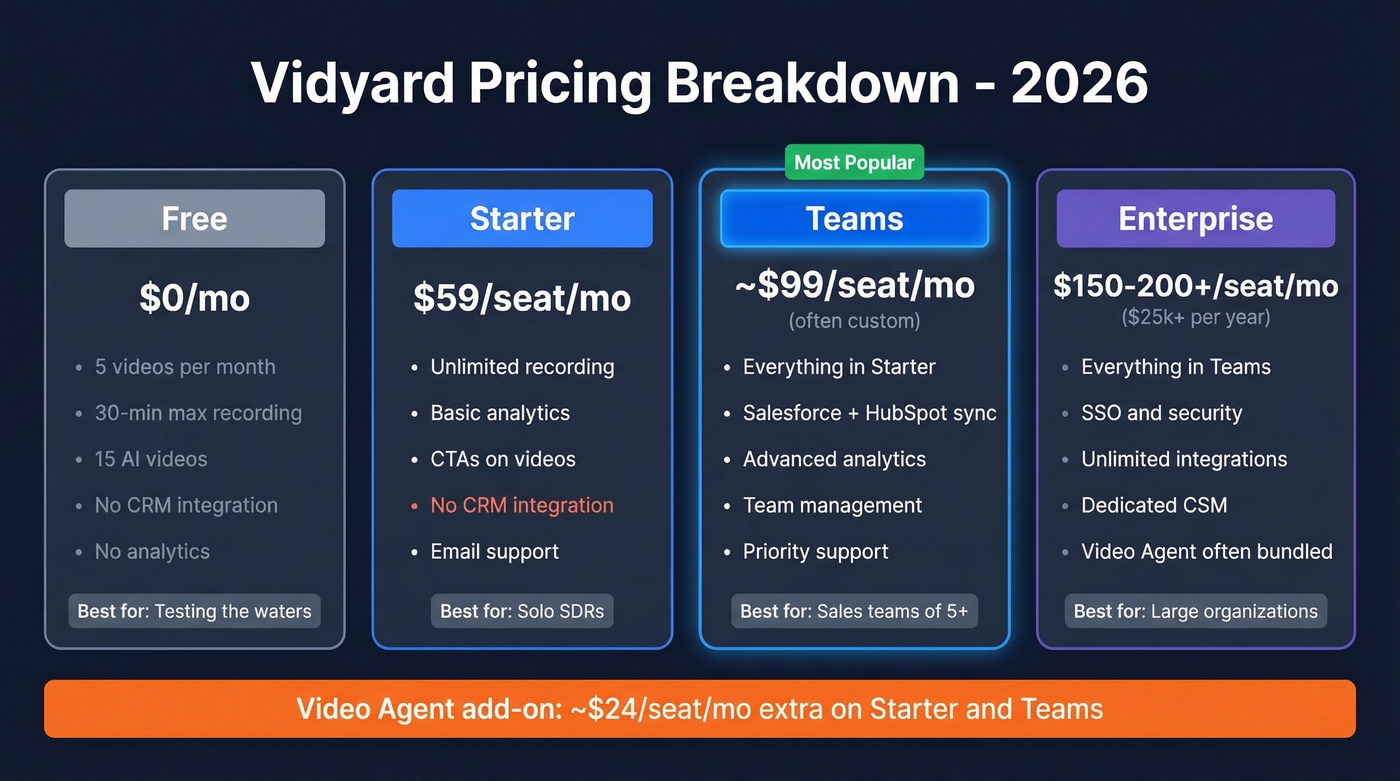
| Plan | Price | Key Features | Best For |
|---|---|---|---|
| Free | $0 | 5 videos/mo, 30-min max, 15 AI videos | Testing the waters |
| Starter | $59/user/mo | Unlimited recording, analytics, CTAs | Solo SDRs |
| Teams | ~$99/user/mo (often custom) | CRM/MAP integrations, advanced analytics | Sales teams of 5+ |
| Enterprise | ~$150-200+/user/mo | SSO, unlimited integrations | Large orgs, $25k+/yr |
Video Agent is an add-on that unlocks automated, trigger-based personalized video creation and delivery. In practice, it's often priced starting around ~$24/seat/month on top of Starter/Teams, and it's commonly bundled into Enterprise packages.
Five SDRs on Starter costs $3,540/year. Five on Teams runs $5,940/year. Scale to 10 reps on Teams and you're at $11,880/year - before sequence management tools, dialers, or data platforms. Annual billing saves roughly 30%, so push for that if you commit.
Here's the thing: Starter doesn't include Salesforce or HubSpot integration. Your video analytics sit in a complete silo. That's not an oversight - it's a deliberate upsell to Teams.

Vidyard Starter doesn't include CRM integration - so your video analytics sit in a silo. But there's a bigger silo problem: if the email address is wrong, your prospect never sees the video at all. Prospeo's 98% email accuracy across 143M+ verified emails means every personalized recording you send actually reaches a real inbox. At $0.01 per email, verification costs less than a single wasted minute of recording time.
Stop recording videos for inboxes that don't exist.
What Users Love
Across 832 G2 reviews, the praise clusters around four themes:
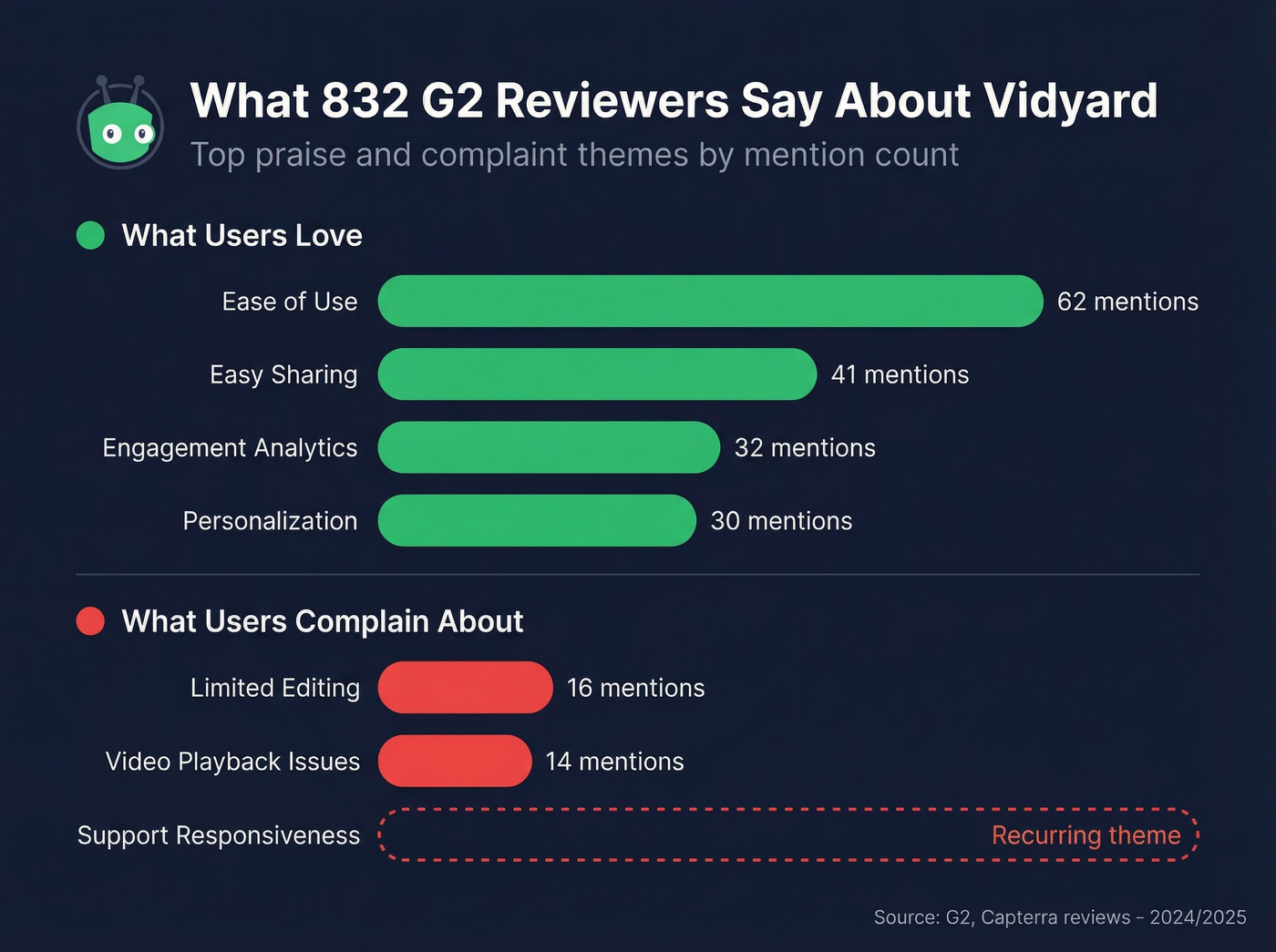
Ease of use (62 mentions) - in our testing, the Chrome extension is genuinely the fastest record-to-send workflow available. Zero learning curve.
Easy sharing (41 mentions) - one-click links, embedded thumbnails in emails, branded pages. It just works.
Engagement analytics (32 mentions) - real-time notifications when a prospect watches, plus view duration data that actually tells you something useful about intent.
Personalization (30 mentions) - custom thumbnails, AI Avatars, and dynamic video pages. Terminus reported a 40% higher open rate, 37% higher CTR, and 216% higher response rate using video as a first touch. That's a vendor case study, so take it directionally - but a 3x reply rate is hard to ignore even with generous rounding.
What Users Complain About
The negatives are just as consistent.
Limited editing (16 mentions) - the built-in editor feels like an afterthought. We've seen teams abandon Vidyard within 90 days because editing limitations slow down production so much that reps stop recording altogether.
Video issues (14 mentions) - playback friction and rendering inconsistencies across browsers. One Capterra reviewer flagged that "links would not work or would stop working depending on the browser."
Support responsiveness - Capterra reviews include complaints that support can be difficult to reach, which stings when you're paying Teams-level pricing.
Trial friction - Starter includes a 14-day trial, but Teams and Enterprise are sales-led. Expect demos, procurement, and a rollout plan before you can test the features you actually need.
And here's a frustration we hear constantly from sales leaders: if the email address is wrong, that personalized video you spent three minutes recording bounces entirely. High-effort outreach demands accurate contact data. Otherwise you're wasting the most expensive asset in your sequence - your reps' time.
Alternatives Worth a Look
| Tool | Price | Best For | Caveat |
|---|---|---|---|
| Loom | $15/user/mo | General async video | Lighter sales analytics |
| Zoom Clips | Free (any Zoom plan) | Teams already on Zoom | Basic engagement data |
| Hippo Video | $20/user/mo | Budget sales video | Smaller ecosystem |
| BombBomb | $39/mo (starting) | Relationship-driven sales | Dated UI, email-focused |
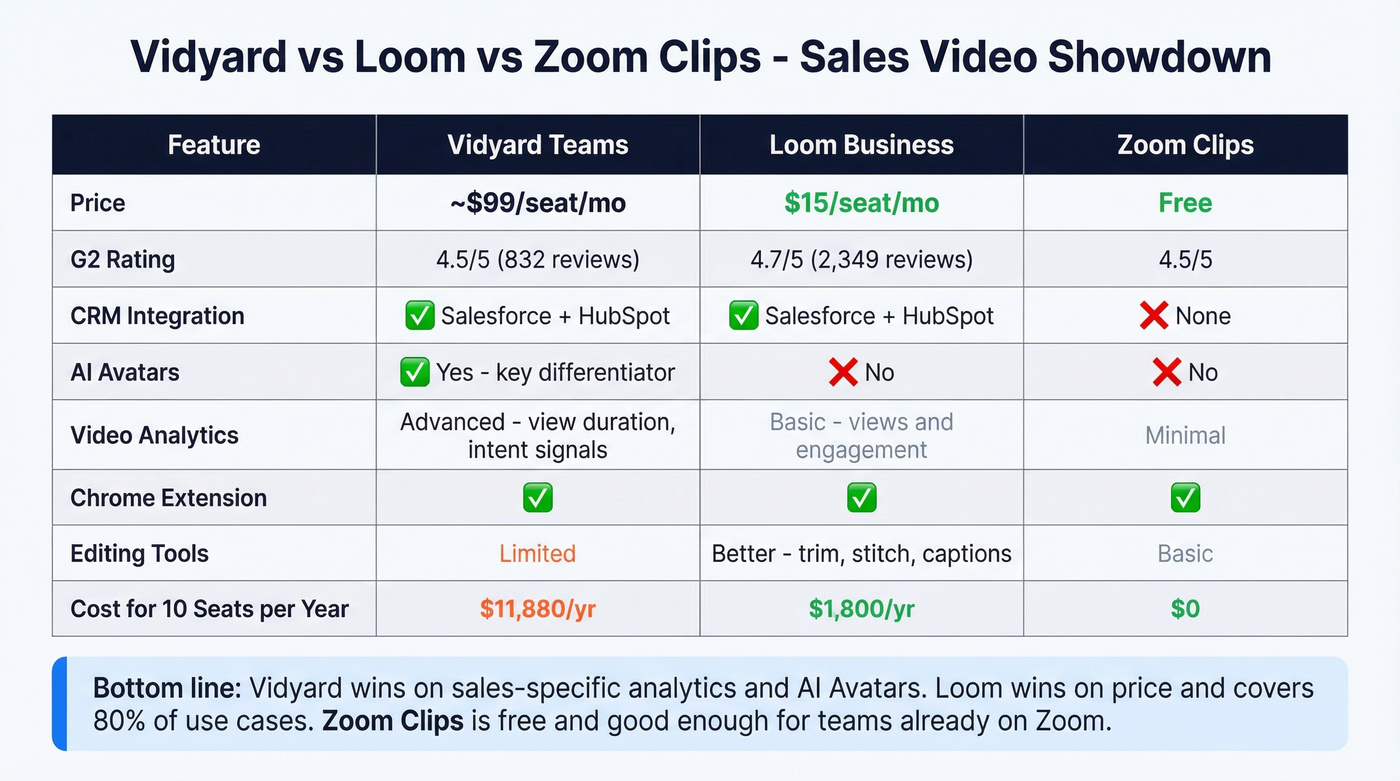
Loom is cheaper, rated 4.7/5 with 2,349 reviews, and covers most of what most sales teams use Vidyard for. If you don't need AI Avatars or deep CRM-level video analytics, it's the pragmatic choice. The consensus on r/sales leans the same way - most reps say Loom gets the job done at a fraction of the cost.
Skip Hippo Video and BombBomb if your team is already embedded in Salesforce or HubSpot workflows. Their integration depth doesn't match Vidyard or Loom.
The Verdict
Use Vidyard if personalized video is a core part of your outbound motion and you have the budget for Teams. The analytics and AI Avatars justify the premium when video is already driving pipeline. If you're still building the motion, start with proven sales prospecting techniques first, then layer video on top.
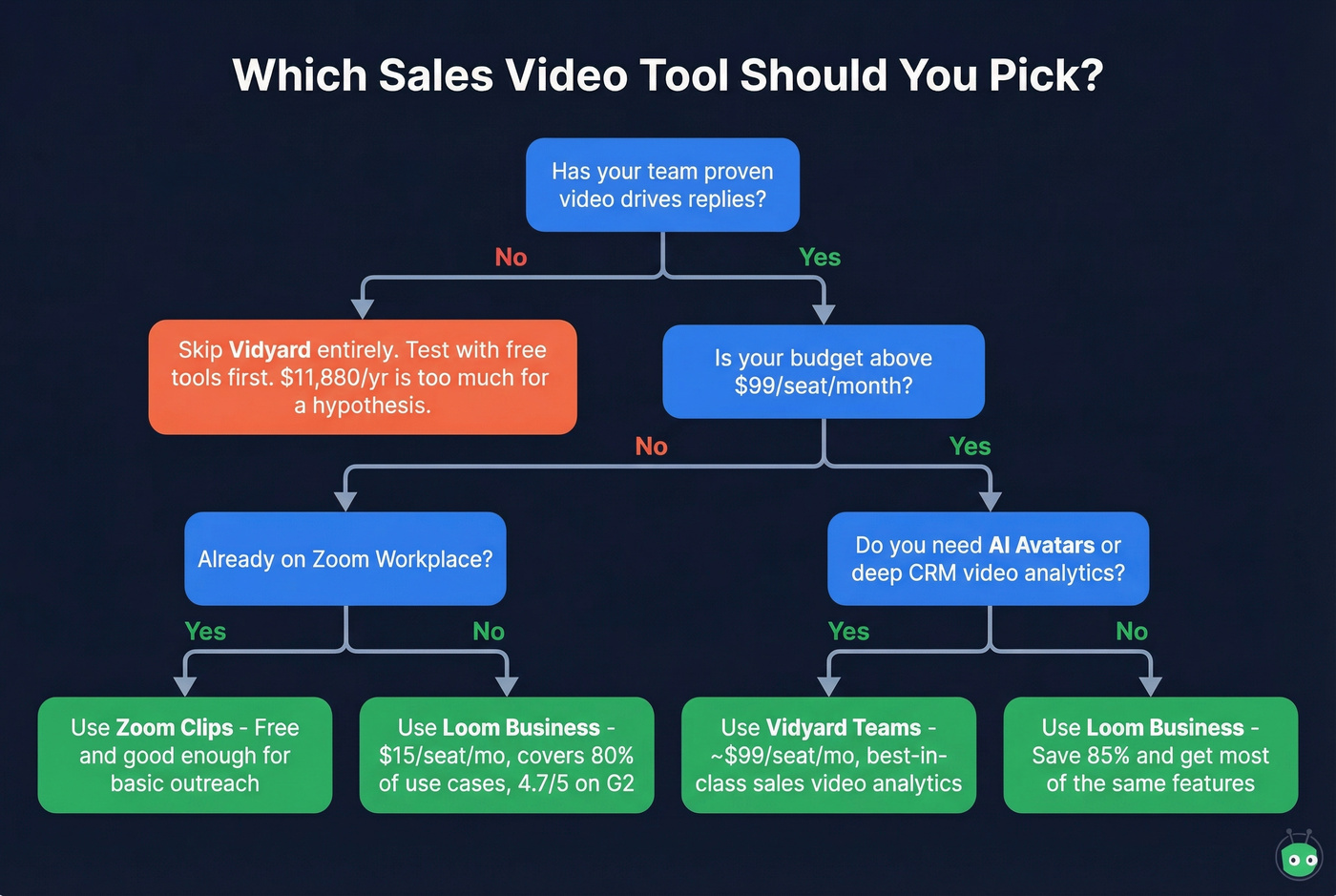
Use Loom if budget matters more than sales-specific features. $15 vs ~$99 per seat is a massive gap, and for 80% of use cases, Loom handles it. If you're using Loom inside cold outreach, this Loom video cold email playbook is a good starting point.
Use Zoom Clips if you're already on Zoom Workplace. Free and good enough for basic prospect outreach.
Skip Vidyard entirely if your team hasn't proven video drives replies yet. $11,880/year on Teams is a lot to spend on a hypothesis. Vidyard is a tool, not a strategy - if your team hasn't committed to video as a channel, no pricing tier fixes that.
Weighing Vidyard's pricing, reviews, pros and cons comes down to one question: is video already working for your pipeline, or are you hoping it will? The numbers above should make the decision clear.
Whatever video tool you pick, your videos only work if they reach real inboxes. Prospeo verifies emails in real time with 98% accuracy, so that three-minute personalized recording actually lands where it should. If you're diagnosing bounces, start with email bounce rate benchmarks and fixes, then tighten your process with an email deliverability guide.
You're weighing $59-$99/seat/month on Vidyard to boost reply rates. But Terminus's own case study showed 216% higher response rates only work when emails land. Bad data turns your highest-effort outreach channel into your highest-waste channel. Prospeo verifies emails in real time on a 7-day refresh cycle - so the contacts you personalize videos for are current, accurate, and reachable.
Your video outreach is only as good as your contact data.
FAQ
Is Vidyard's free plan enough for sales prospecting?
No. Five videos per month and zero CRM integration make it a trial, not a workflow. Use it to test the recording experience, then upgrade to Starter ($59/mo) or Teams (~$99/mo) for real pipeline work.
Does Vidyard integrate with Salesforce and HubSpot?
CRM and MAP integrations are locked to the Teams tier and above. Starter users get no CRM sync, so video analytics stay completely siloed from your pipeline data.
What's the cheapest alternative for sales videos?
Zoom Clips is free with any Zoom Workplace plan. Loom Business costs $15/user/month and covers most sales video use cases with a 4.7/5 rating across 2,349 G2 reviews - roughly 85% cheaper than Vidyard Teams.
How do I make sure my video emails actually get delivered?
Verify every email address before sending. Prospeo's real-time verification catches invalid addresses before your personalized video bounces. The free tier includes 75 verifications per month - enough to validate a week's worth of outbound targets.