

How to Use Loom Video in Cold Email Without Killing Your Domain
You recorded 20 Loom videos last week. Three bounced, two landed in spam, and the rest got ignored. Here's the thing about Loom video cold email: the video itself accounts for maybe 20% of the outcome. Data quality, inbox placement, and a permission-first approach handle the other 80%.
One practitioner on r/b2bmarketing jumped from a 4% reply rate with text emails to 22% with 90-second Loom videos - same targeting, same offer, same volume. But that happened because the infrastructure was already solid. In 2026, enterprise targets are more like 8-10% and that feels like a win, warmup timelines have stretched to 6-8 weeks, and M365 spam filters are brutal. A personalized Loom video for sales outreach won't save you if your list is dirty.
Most teams don't need a better video tool. They need a cleaner list and the discipline to stop recording videos for people who never asked for one.
What You Need Before Recording
Don't send a Loom in your first email. Use a permission-first approach - record only for people who reply. Verify your list before anything else, because one bounce cascade tanks your domain; a 5% bounce rate is 5x over the safe 1% threshold (see email bounce rate benchmarks and fixes).
Keep cold videos short. Sixty to 90 seconds for cold outreach, 3-5 minutes absolute max if you truly need more time. Open on the prospect's website, deliver three recommendations, close with a specific meeting time (more email wording to schedule a meeting examples help here).
The Permission-First Workflow
ListKit's Trojan Horse strategy captures the scalable approach well. Instead of recording a video for every prospect and hoping it lands, you flip the sequence entirely.
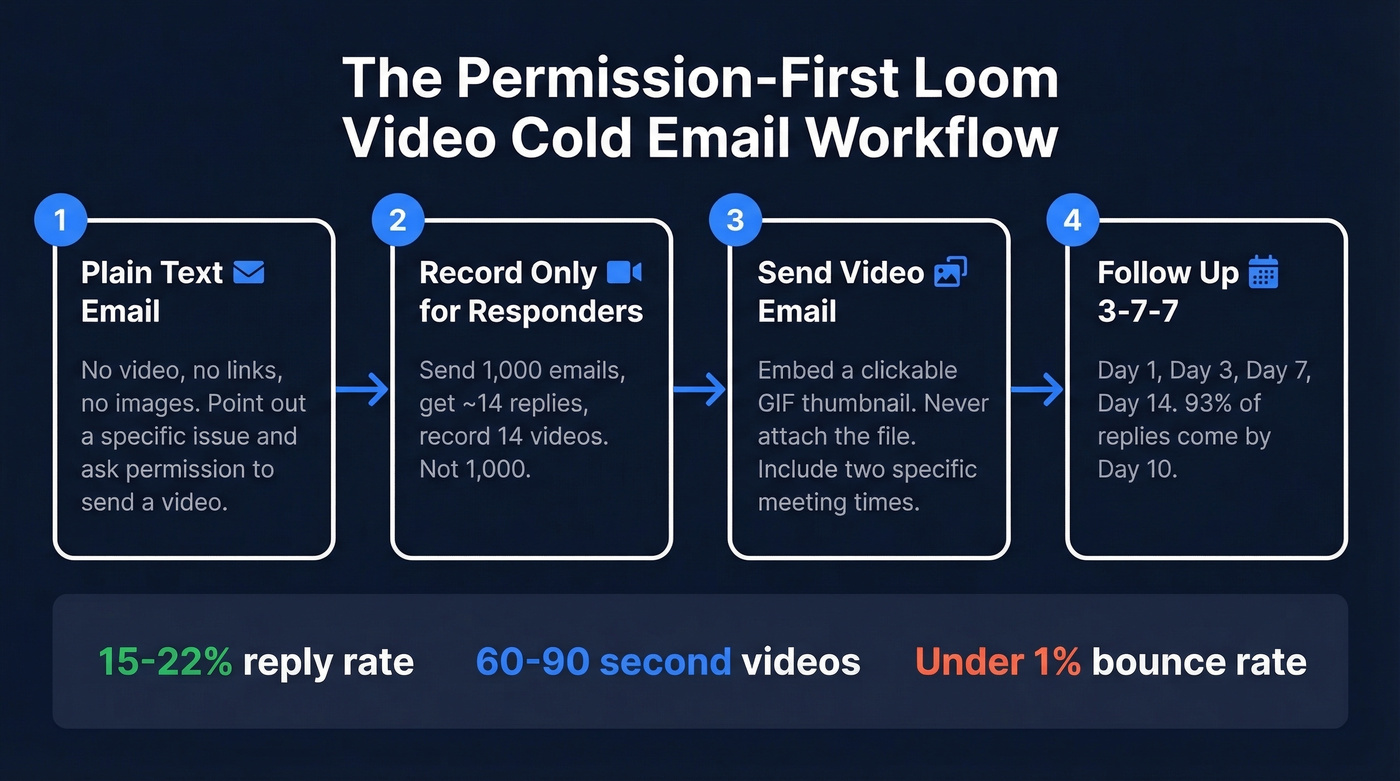
Step 1 - Send the Permission Email
Your first touch is plain text. No video, no links, no images. Point out something specific about their business and ask if they'd like a short video walkthrough (use proven cold email subject line examples if you need ideas).
Subject: Quick question about [Company]'s checkout flow
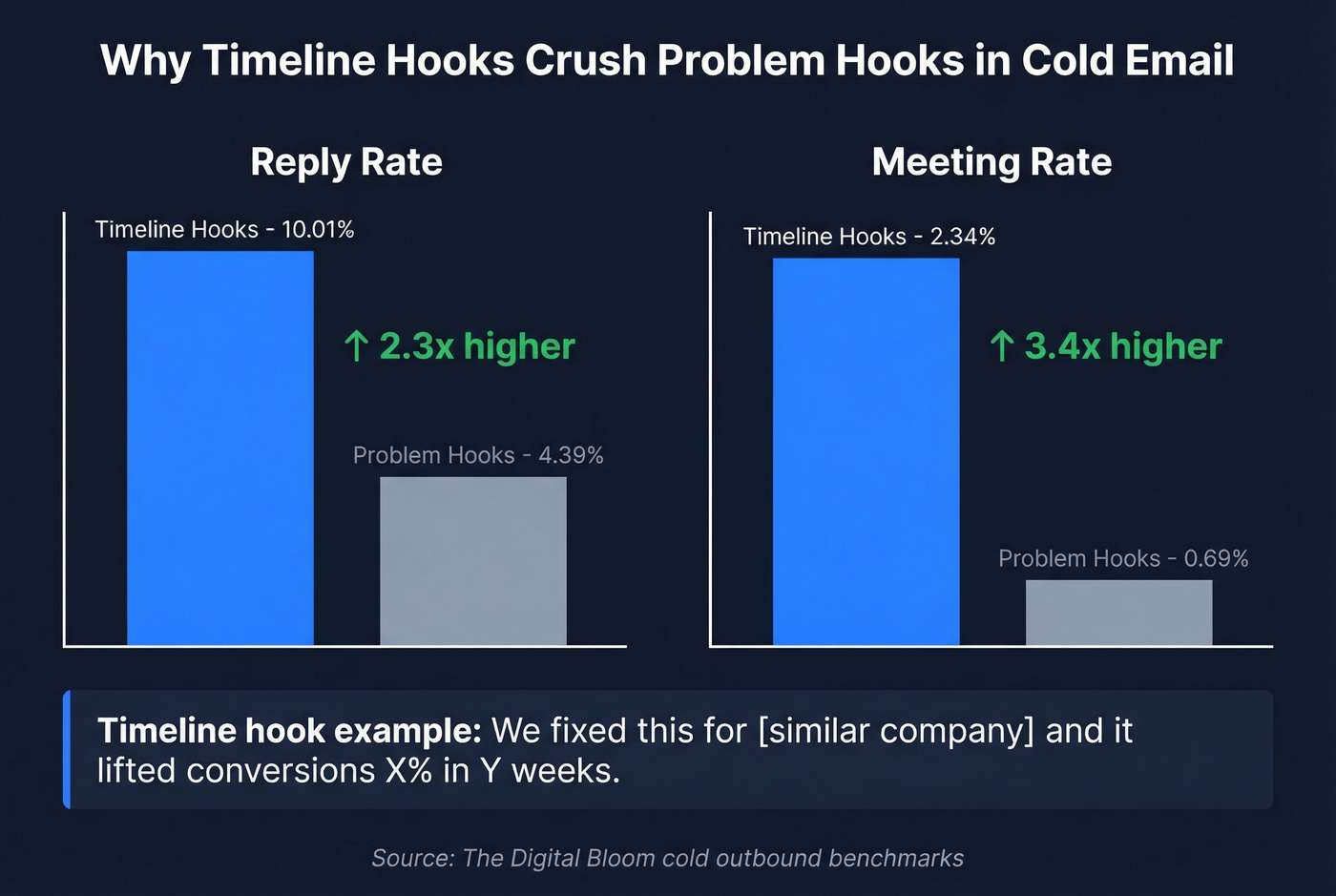
Hey [First Name], I noticed [specific issue - e.g., your pricing page doesn't load on mobile]. We fixed this for [similar company] and it lifted conversions [X]% in [Y] weeks.
Mind if I send a quick 60-second video showing what I'd change?
Why a timeline hook? Timeline-based hooks average a 10.01% reply rate versus 4.39% for problem-focused hooks - a 2.3x gap. The meeting rate gap is even wider: 2.34% versus 0.69%. Anchor your outreach to a timeframe, not just a pain point.
Step 2 - Record Only for Responders
Here's where the math gets interesting. Send 1,000 permission emails, get roughly 14 replies, record 14 videos. Not 1,000. You're investing recording time only in warm prospects who've already raised their hand.
This works at real scale. One campaign generated 607 positive replies over 13 months using Loom video outreach pitches for custom merchandise. Another pulled 75 unique replies from 19,000 leads in a web design campaign. The common thread across every successful campaign we've studied: specificity. Open on the prospect's website, give three actionable recommendations, and keep it tight. If you're running high volume, tools like Magic Hour can assemble prospect-specific clips without manual editing - worth testing (and pairing with solid personalized outreach fundamentals).
Step 3 - Send the Video Email
Embed a clickable GIF thumbnail - never attach the video file. Gmail caps attachments at 25MB, Outlook at 20MB, and large attachments trigger spam filters. When you send a Loom video via email, the thumbnail link is what keeps your message lightweight and inbox-friendly.
Hey [First Name], here's the video I mentioned - [clickable thumbnail].
Timestamps: 0:15 - your mobile checkout issue, 0:42 - the fix, 1:05 - expected impact.
Would Thursday at 2pm or Friday at 10am work for a quick call?
Two specific meeting times. Vague CTAs like "let me know when works" kill momentum (use these sales follow-up templates to keep the thread moving).
Step 4 - Follow Up with a 3-7-7 Cadence
Day 1 (video send), Day 3, Day 7, Day 14. 93% of replies come by Day 10, so anything beyond two weeks has diminishing returns. Teams that segment into cohorts of 50 or fewer contacts see reply rates jump by 2.76x - smaller batches let you personalize follow-ups and catch deliverability issues before they cascade (more on cold email follow-up templates if you need a system).
Deliverability Guardrails for Video Outreach
None of this works if your emails don't reach inboxes. Gmail filters about 99.9% of spam before it reaches users. Here's your checklist:
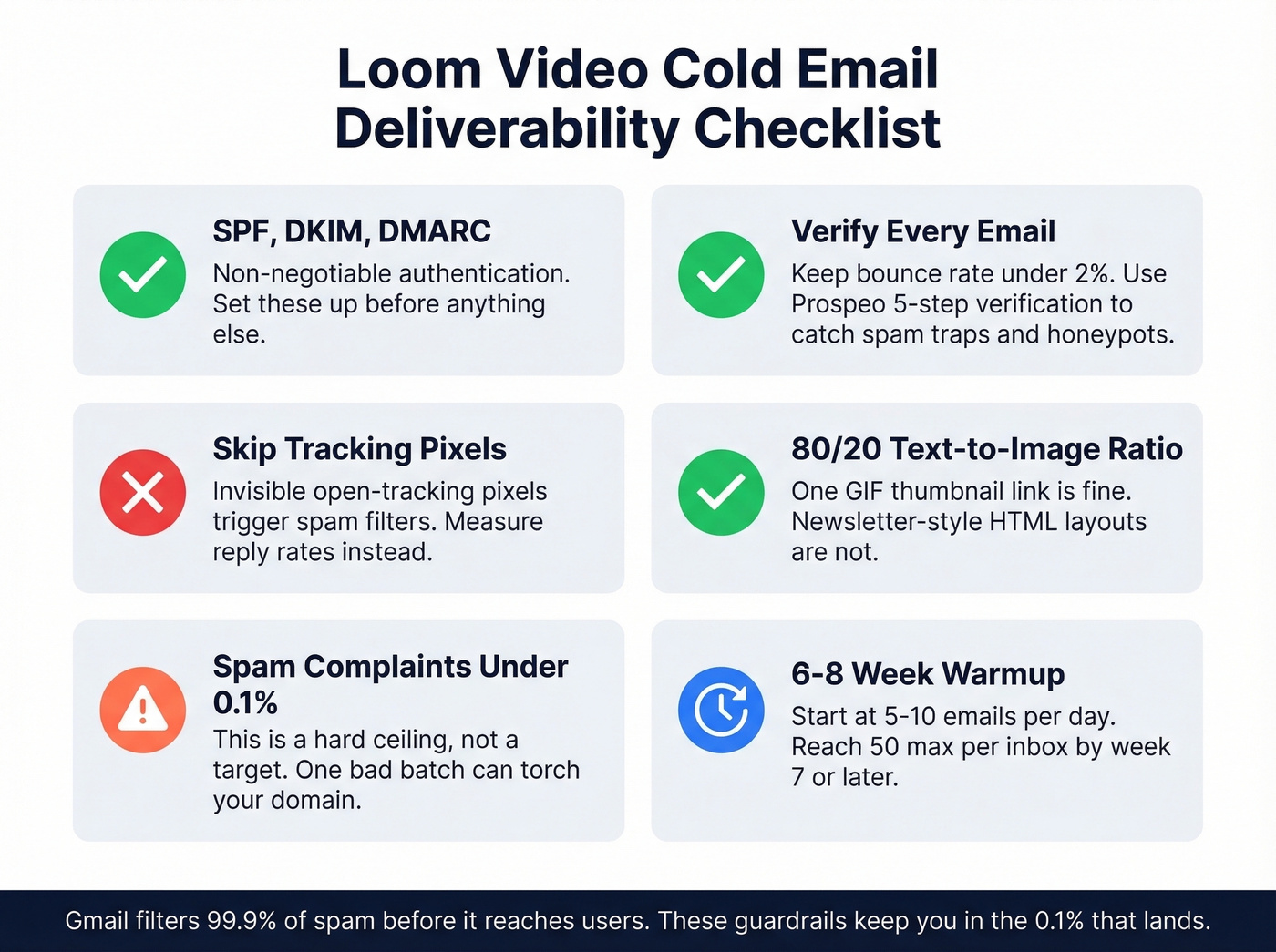
SPF, DKIM, DMARC - non-negotiable. If these aren't configured, stop reading and go set them up (this email deliverability guide breaks down the practical setup). Skip tracking pixels too; invisible open-tracking pixels trigger spam filters, and you don't need open rates when you're measuring reply rates (see email tracking pixels for why).
Maintain an 80/20 text-to-image ratio. One thumbnail link is fine. A newsletter-style HTML layout isn't. Keep bounce rate under 2% and spam complaints under 0.1% - these are hard ceilings, not targets.
Run every list through a verification tool before launching any Loom campaign. We use Prospeo's email finder because its 5-step verification process flags catch-all domains, spam traps, and honeypots - the invisible killers that torch your sender reputation overnight. At roughly $0.01 per email, it's the cheapest insurance your domain reputation can buy. If you want a broader comparison, see Bouncer alternatives. Warmup ramp schedule:
| Weeks | Daily Volume |
|---|---|
| 1-2 | 5-10 |
| 3-4 | 15-20 |
| 5-6 | 30-40 |
| 7+ | 50 max/inbox |
Domains that used to be ready in about 3 weeks now take 6-8 weeks before you can trust them with real volume. Budget for that timeline (and monitor email velocity as you ramp).

You're spending 5 minutes per Loom video. A single bounce wastes that time and damages your domain. Prospeo's 5-step verification - spam traps, honeypots, catch-all domains - keeps your bounce rate under 1% so every recording reaches a real inbox.
Stop recording Loom videos for email addresses that don't exist.
Tools and Pricing
| Tool | Best For | Starting Price |
|---|---|---|
| Loom | Quick async video | Free / $15/user/mo |
| Prospeo | Ensuring video emails reach inboxes | Free (75 emails + 100 extension credits/mo) / ~$0.01/email |
| Sendspark | Record once, scale to many | $39/mo |
| HeyGen | AI avatar personalization | $24/mo |
| Vidyard | Enterprise video analytics | From $59/user/mo |
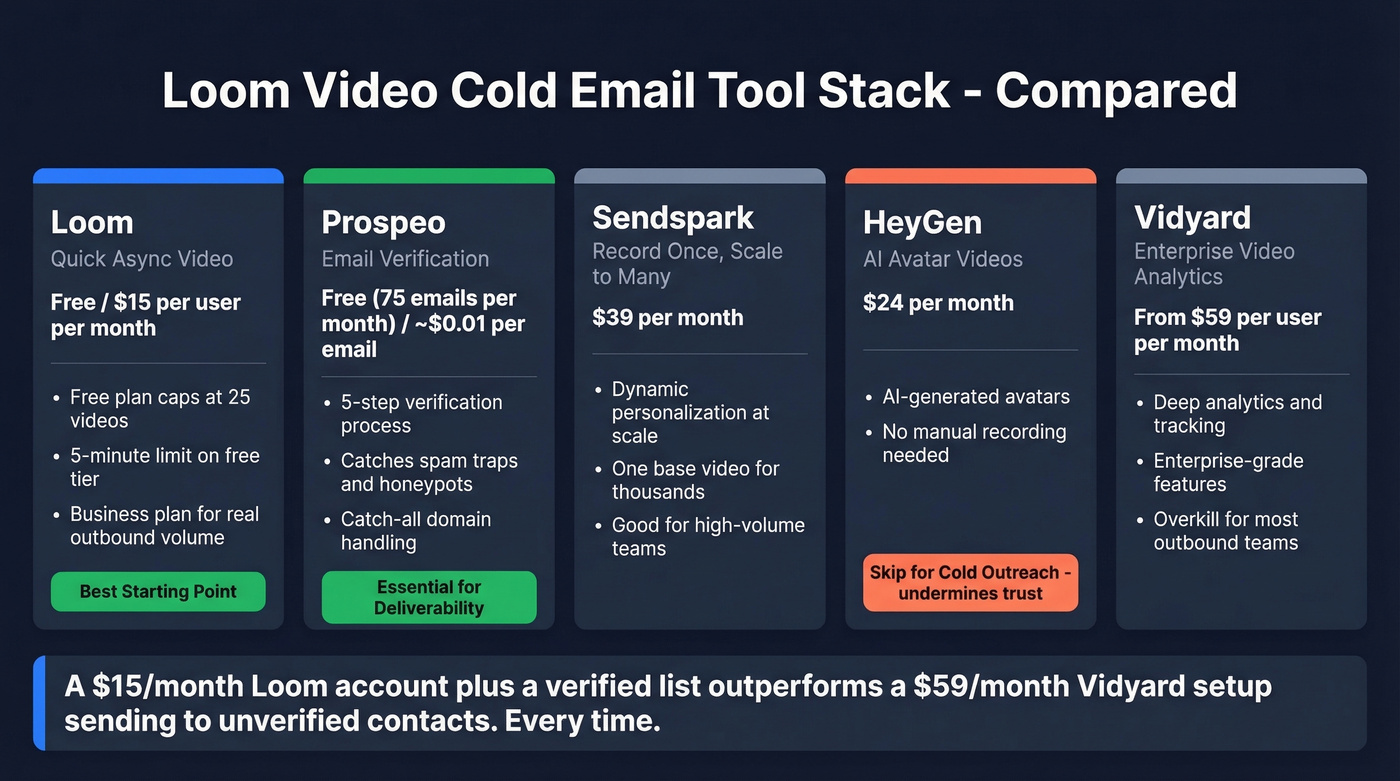
Loom's Free Starter plan caps you at 25 videos with a 5-minute limit - fine for testing, but you'll hit the wall fast at real volume. The $15/user/month Business plan is where most outbound teams land.
Sendspark is the move if you want to record one base video and dynamically personalize it for thousands of prospects. HeyGen takes a different approach with AI-generated avatars that let you "record" without recording. Skip it for cold outreach though - AI avatars undermine the trust-building that makes personalized video effective in the first place. Vidyard is the enterprise play with deep analytics, but at $59/user/month it's overkill for most outbound teams.
We've tested enough campaigns to know this: a $15/month Loom account paired with a verified list outperforms a $59/month Vidyard setup sending to unverified contacts every single time.
Video Email Marketing vs. Cold Outreach
Let's be clear about the distinction. Loom video email marketing - where you embed video in newsletters or nurture sequences sent to opted-in subscribers - is a completely different game from cold outreach. Marketing emails go to people who already know you. Cold emails don't.
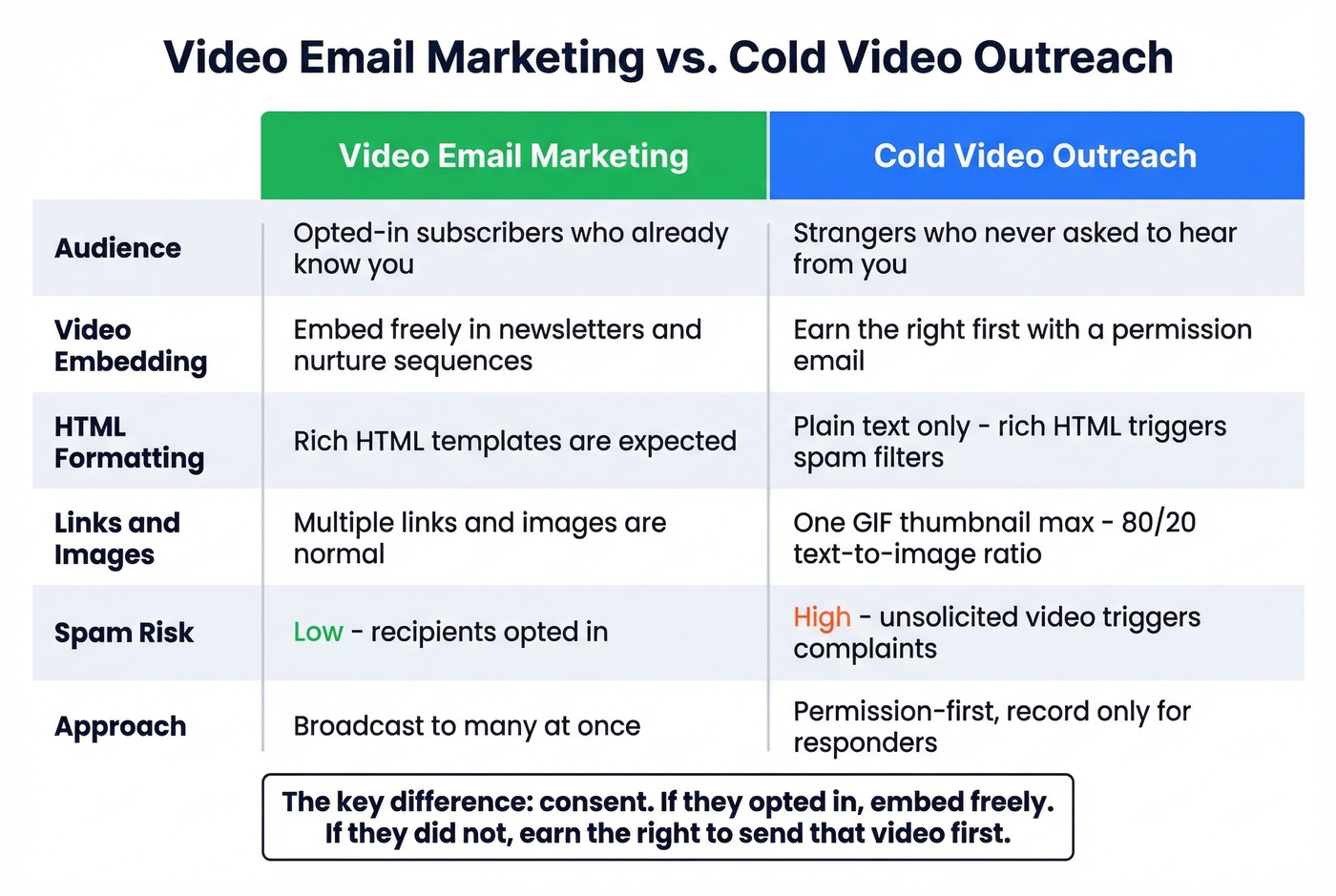
The permission-first workflow above exists specifically because embedding videos in messages to strangers without context triggers spam complaints and erodes trust. If your recipients opted in, embed freely. If they didn't, earn the right to send that video first.
Compliance Quick-Check
- CAN-SPAM: up to $50,120 per violation. Every email needs a working unsubscribe link and a physical address. Honor opt-outs within 10 business days.
- GDPR: up to EUR 20M or 4% of global revenue. If you're emailing EU prospects, document your legal basis (legitimate interest, typically).
- CCPA: up to $7,500 per violation. California residents can request data deletion.
FAQ
Should I send a Loom video in my first cold email?
No. Send a short text email pointing out a specific issue and ask if they'd like a video walkthrough. You'll only record for people who reply, saving hours and protecting deliverability. Permission-first sequences see 15-22% reply rates versus 3-4% for unsolicited video drops.
How long should a cold outreach video be?
Sixty to 90 seconds. Open on their website, deliver three recommendations, and close with a specific meeting time. If you truly need more time, cap it at 3-5 minutes - anything longer and watch-through rates collapse below 30%.
What reply rate can I expect?
With clean data and a permission-first approach, 15-22% reply rates are realistic. Top performers with deeply personalized video can hit around 30%. Without proper list verification and warmup, expect closer to the 3.43% B2B average.
Does embedding a Loom link hurt deliverability?
Not if you do it correctly. Use a clickable GIF thumbnail linking to your Loom page rather than attaching the video file. Keep the rest of the email mostly plain text, skip tracking pixels, and maintain an 80/20 text-to-image ratio. It's bloated HTML templates and unverified lists that cause deliverability problems, not the Loom link itself.
What's the best free tool for verifying emails before a Loom campaign?
Prospeo offers 75 free email verifications per month with its 5-step verification process - enough to test a permission-first campaign. Hunter gives 25 free searches but doesn't include catch-all domain handling. For teams running real volume, Prospeo's paid tier with spam-trap and honeypot removal is the most cost-effective option to protect your sender reputation.