The Best Website Email Address Finder Tools in 2026
Most website email address finder tools claim 95%+ accuracy on their landing page. The benchmarks tell a different story - 10 of 14 tools tested had true finding rates below 40%. A separate benchmark updated in February 2026 tested 15 tools against 20,000 real contacts using live sending verification and confirmed the same reality: performance varies wildly depending on the provider and dataset. That gap between marketing copy and real-world performance is where your bounce rate lives, and where your sender reputation goes to die.
Here's our hot take: most teams don't need the most expensive tool. They need the most accurate one - and those aren't always the same thing.
Our Picks (TL;DR)
- Prospeo - Best overall for accuracy and data freshness. 98% email accuracy, 7-day data refresh, free tier with 75 emails/month.
- Hunter - Best verification layer. Strong brand, transparent sourcing, but the database is smaller than you'd expect.
- Snov.io - Best for international leads + built-in outreach. Solid coverage outside North America with sequencing baked in.
Quick Comparison
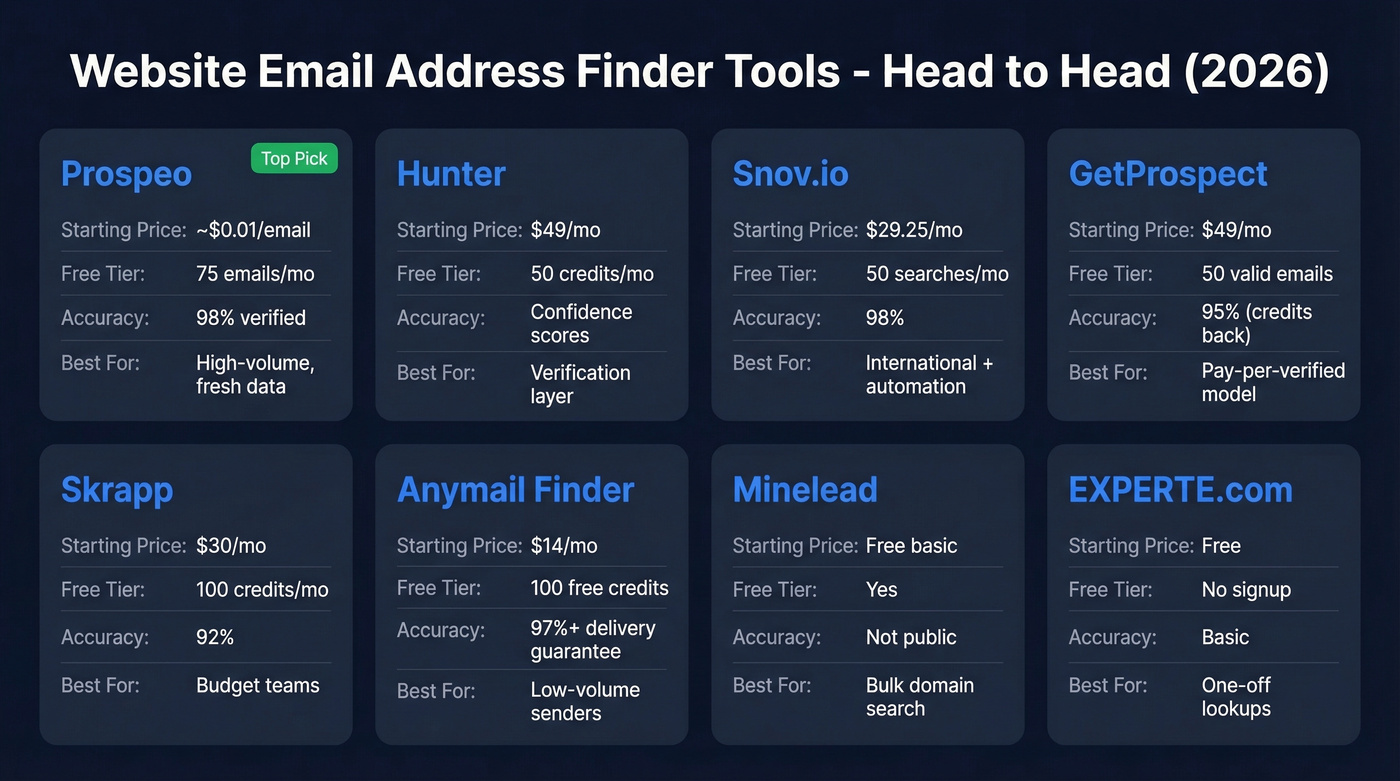
| Tool | Starting Price | Free Tier | Accuracy Claim | Best For |
|---|---|---|---|---|
| Prospeo | ~$0.01/email | 75 emails/mo | 98% verified | High-volume, fresh data |
| Hunter | $49/mo | 50 credits/mo | Confidence scores | Verification layer |
| Snov.io | $29.25/mo | 50 searches/mo | 98% | International + automation |
| GetProspect | $49/mo | 50 valid emails + 100 verifications | 95% (credits back) | Pay-per-verified model |
| Skrapp | $30/mo | 100 credits/mo | 92% | Budget teams |
| Anymail Finder | $14/mo | 100 free credits | 97%+ delivery guarantee | Low-volume senders |
| Minelead | Free basic / paid plans | Yes | Not public | Bulk domain search |
| EXPERTE.com | Free | No signup | Basic | One-off lookups |

The benchmarks don't lie - 10 of 14 email finder tools tested below 40% accuracy. Prospeo scored 81.6% validated accuracy in the hardest segment tested, with 98% overall email accuracy and a 7-day data refresh that keeps your lists from rotting. At $0.01 per email, bad data costs more than good data.
Stop burning your sender reputation on stale emails. Start free with 75 verified emails.
Best Email Finder Tools for Any Website
Prospeo
Use this if you're running outbound at scale and can't afford bounces tanking your domain.
Prospeo's email finder runs on proprietary infrastructure - no reliance on third-party email providers, which is why the accuracy numbers hold up in production. The 5-step verification process handles catch-all domains, strips spam traps, and filters honeypots before you ever see a result. The database covers 300M+ professional profiles with 143M+ verified emails, all refreshed on a 7-day cycle. The industry average refresh? Six weeks. In six weeks, people change jobs, companies restructure, and your "verified" list starts rotting.

In a third-party benchmark testing email finders against Financial Services CEOs - one of the hardest segments - Prospeo scored 81.6% validated accuracy, outperforming Dropcontact at 58% and Leadmagic at 63.5%. One customer, Meritt, saw bounce rates drop from 35% to under 4% after switching, and their pipeline tripled from $100K to $300K per week.
The Chrome extension with 40,000+ users lets you pull verified emails from any website or professional profile in one click. Pricing is credit-based at roughly $0.01 per email, with a free tier of 75 emails/month. No contracts, no sales calls.
Skip this if you only need a handful of one-off lookups per month - the free tier covers that, but the real value kicks in at scale.
Hunter
Use this if you already have a list and need a verification layer on top.
Hunter's the name everyone knows. 100M+ professional email addresses, clean UX, and a useful distinction between "found" emails sourced publicly on the web and "deduced" emails generated from patterns. That transparency tells you how confident to be in each result. Hunter also shows the source URL and discovery date for publicly found emails - a provenance feature no other tool offers.
The consensus on r/sales is clear: Hunter is a great verifier, but the database is smaller than competitors. We've found the same pattern in our testing. If you're sourcing net-new contacts, you'll hit coverage gaps. For verifying a list you built elsewhere, though, Hunter's one of the best.
Pricing starts at $49/mo for Starter, scaling to $299/mo for Scale. Free tier gives you 50 credits/month.
Skip this if you need a primary sourcing tool with deep coverage.
Snov.io
Snov.io is the pick for teams working international leads. Coverage outside North America is noticeably better than most US-centric tools, and the built-in email sequencing means you don't need a separate outreach platform. Starter plans run $29.25/mo for 1,000 credits, and the automation add-on is $69/mo per slot.
One thing worth knowing: Snov.io restructured its plans in mid-2025. Starter no longer includes teamwork features, so multi-user teams need Pro ($74.25/mo) or higher.
Skip this if you only prospect in the US and already have a sequencer like Instantly or Smartlead.
GetProspect
GetProspect's billing model is the differentiator. You only pay for verified emails, with a 95% accuracy guarantee or credits back. Credits roll over for a month, and duplicates don't cost you. There's a free tier offering 50 valid emails plus 100 verifications, and add-on verification packs start at $29 for 10K verifications - useful for teams that need bulk verification without upgrading their plan.
Starter is $49/mo for 1,000 valid emails, scaling to $399/mo for 50K.
Skip this if you need phone numbers - the mobile data is thin.
Skrapp
Budget-friendly at $30/mo for 1,000 credits, and you're only charged for Valid and Catch-all results - Invalid and Unknown come free. The vendor states a 92% average email search success rate. For small teams that need basic email finding without a big commitment, Skrapp gets the job done. Nothing flashy, but it works.
Anymail Finder
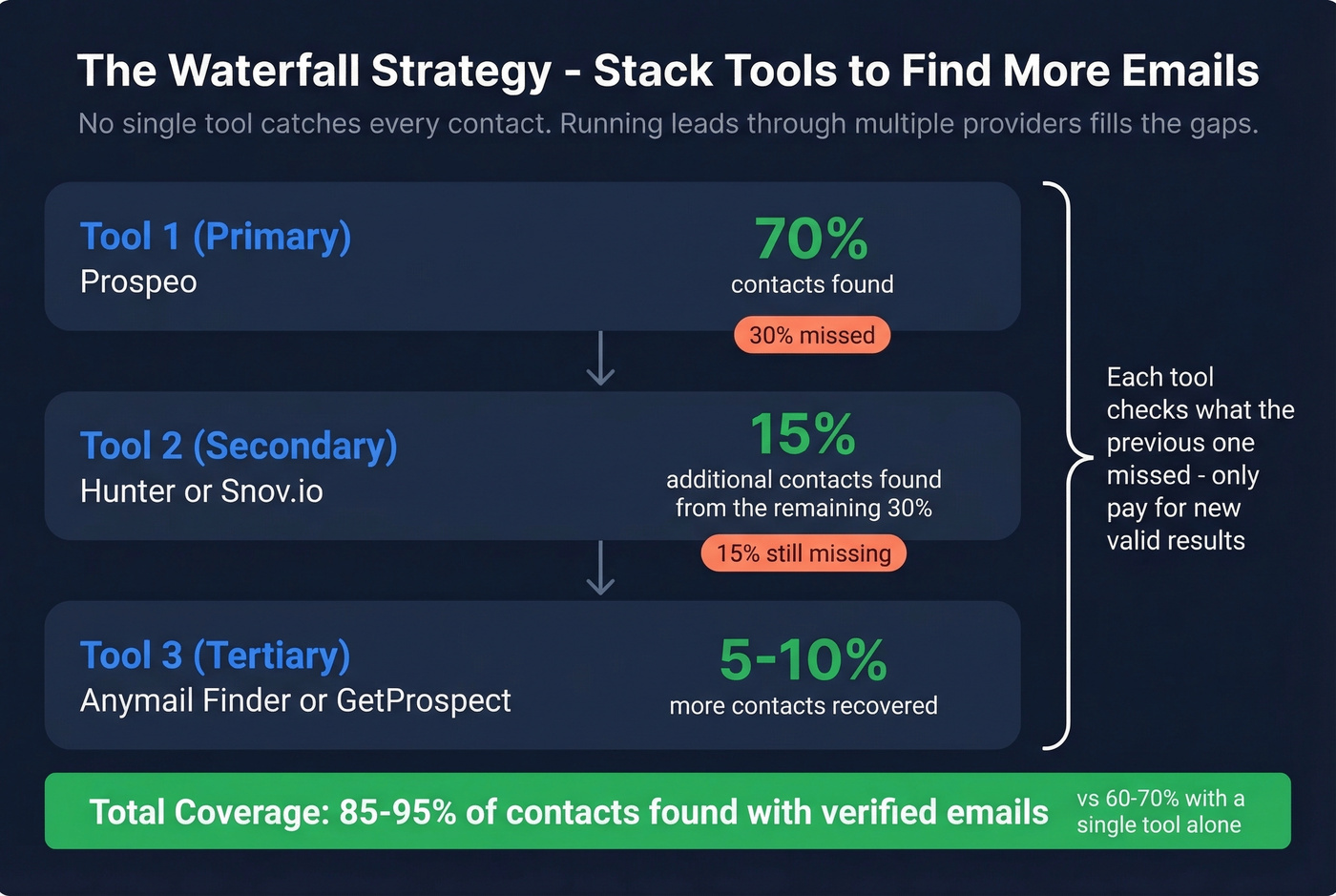
Valid-only billing starting at $14/mo. You don't pay unless the tool returns a valid address, and it comes with a 97%+ delivery guarantee. That low entry price makes it worth testing alongside a primary tool in a waterfall setup - where a second tool picks up what the first missed. We've seen teams increase valid email coverage by 30-50% by running contacts through two or three tools sequentially.
Minelead
Minelead offers a free browser extension and a bulk domain search feature that's useful for scraping emails across an entire company website. There's a free account, plus paid plans for higher volumes. Best for quick domain-level sweeps when you need every publicly listed address from a target company.
EXPERTE.com
Free, no signup required. Useful for one-off lookups when you need a quick email and don't want to burn credits from a paid tool. Don't rely on it for production outbound.
How These Email Lookup Tools Actually Work
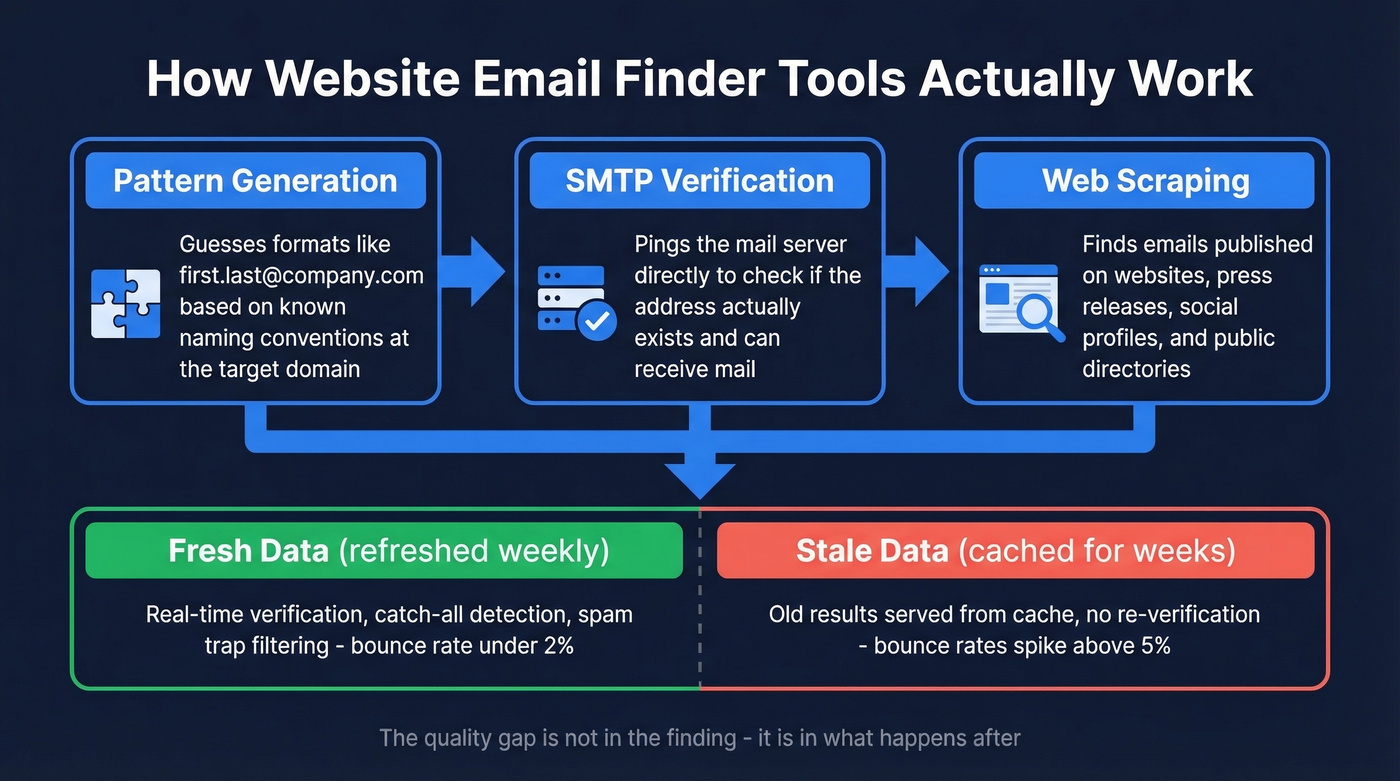
Most tools combine three methods. Pattern generation guesses formats like first.last@company.com based on known naming conventions. SMTP verification pings the mail server to check whether the address exists. Web scraping finds emails published on websites, press releases, and directories.

The quality gap comes down to what happens after the initial find. Hunter distinguishes between "found" and "deduced" results - a useful transparency layer. But the real differentiator is freshness. Most tools serve cached results that could be weeks or months old. Stale data is the fastest way to burn a domain. Let's be honest: if your tool isn't refreshing data at least monthly, you're building on sand.
If you're building lists as part of a broader outbound motion, pair your finder with a repeatable lead generation workflow and a clear ideal customer profile so you’re not verifying the wrong people.
Protect Your Domain
Here's the thing - none of these tools matter if you wreck your sender reputation in the process.
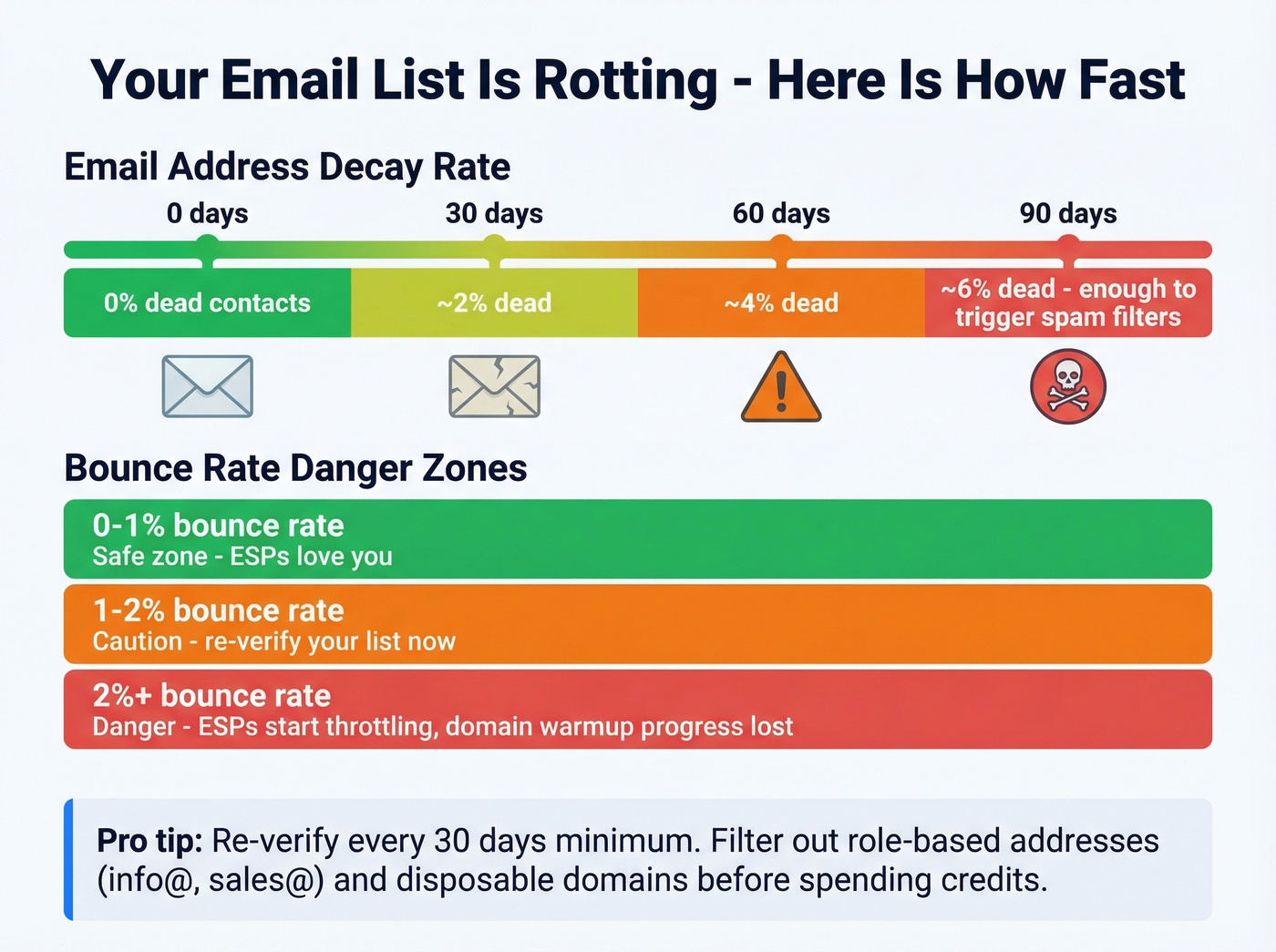
Re-verify before every send. Email addresses decay at roughly 2% per month. A 90-day-old list has ~6% dead contacts - enough to trigger spam filters.
Target under 2% bounce rate. Anything above that and ESPs start throttling you. Ideally stay at 0-1%. We've watched teams lose months of domain warmup progress from a single bad send. (If you need bounce benchmarks and fixes, start with bounce rate and the broader email deliverability checklist.)
Filter before you verify. Strip out role-based addresses like info@ and sales@, disposable domains, and inactive contacts before spending credits. Verify only what you'll actually send to. For deeper remediation, keep a playbook for spam trap removal and monitor with email reputation tools.
Meritt dropped their bounce rate from 35% to under 4% and tripled pipeline to $300K/week after switching their website email finder to Prospeo. The difference: proprietary infrastructure with 5-step verification that catches spam traps, honeypots, and catch-all domains before they hit your inbox.
Find verified emails from any website in one click - no contracts, no sales calls.
FAQ
Are free email finder tools accurate enough?
Free tiers are useful for evaluating a tool's interface and coverage, but benchmarks show most tools find valid emails for under 40% of contacts. Use free credits to test - not to build production lists. Prospeo's free tier (75 emails/month) and Hunter's (50 credits/month) both let you validate accuracy before committing.
How do email finder tools get their data?
They combine web scraping, pattern generation, and SMTP verification. The best tools verify in real time rather than serving cached results from weeks ago. Hunter distinguishes between emails "found on the web" and "deduced" via patterns - both get verified, but the confidence level differs.
What's a catch-all email address?
A catch-all domain accepts all incoming mail regardless of whether the specific address exists - so SMTP checks can't confirm validity. Sending to catch-all addresses is risky because some bounce silently while others land in dead inboxes. Keep them in a separate segment and monitor bounce rates closely.
How often should I re-verify my lists?
Re-verify every 30 days minimum. Email addresses decay at roughly 2% per month, so a 90-day-old list has ~6% dead contacts - enough to damage deliverability and trigger ESP throttling.
Does stacking multiple tools improve results?
Yes. No single website email address finder tool catches every contact. Running leads through two or three providers in a "waterfall" - where the second picks up what the first missed - can increase valid email coverage by 30-50%. Many outbound teams use a primary high-accuracy source, then pass misses through a secondary tool like Anymail Finder to fill gaps.