

What Is a Shared IP Address - and Should You Care?
Most explanations of shared IPs give you a vague "it depends" and move on. That's not helpful. Here's what a shared IP address actually is, whether it affects your email deliverability or SEO, and a 30-second method to check whether your IP is shared right now - with real volume thresholds and pricing ranges instead of hand-waving.
The Quick Version
A shared IP address means multiple users, websites, or email accounts route traffic through one public IP. It's the default for most internet users, web hosts, VPNs, and email senders. For the vast majority of use cases, it's fine - and often better than the alternative.
Your home internet, your web host, and your ESP almost certainly use one. SEO, email deliverability, browsing - a communal IP doesn't hurt you unless someone else on the address is behaving badly. And for email senders specifically, bounce rates and list hygiene damage your reputation faster than sharing an IP ever will.
How a Shared IP Address Works
The technology behind shared IPs is NAT - Network Address Translation. Your home router performs the first layer: it takes your laptop, phone, and smart TV, each with a private IP like 192.168.1.x, and funnels all their traffic through one public IP assigned by your ISP.
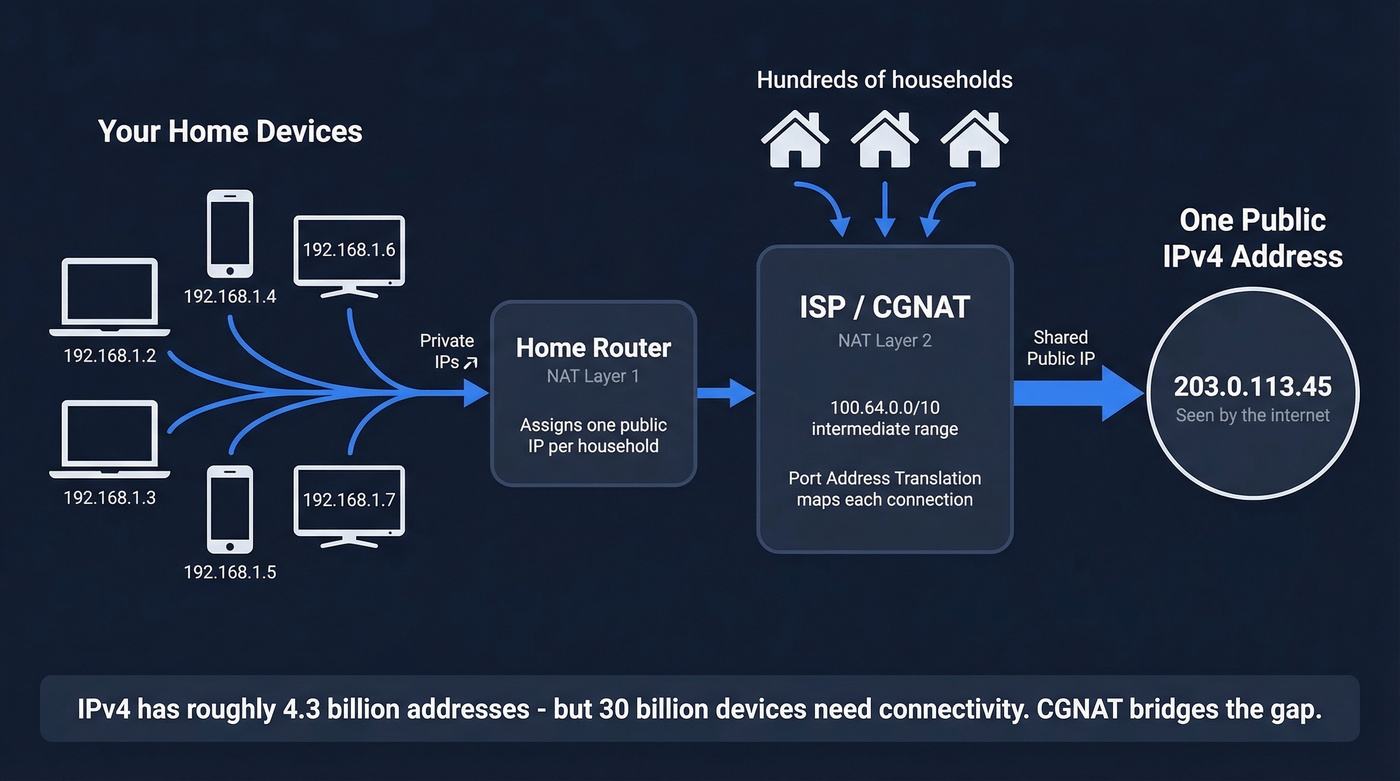
But there's often a second layer. Your ISP may perform Carrier-Grade NAT (CGNAT), which takes hundreds or thousands of households and routes them through a smaller pool of public IPv4 addresses. A single IPv4 address can represent hundreds or even thousands of users behind CGNAT. The ISP uses Port Address Translation to keep track of which traffic belongs to which subscriber, mapping each connection to a unique port number on the shared public IP. CGNAT uses a reserved address range - 100.64.0.0/10, defined in RFC 6598 - for the intermediate layer between your router and the public internet.
Why does this exist? IPv4 exhaustion. The 32-bit IPv4 address space caps out at roughly 4.3 billion addresses. As of late 2025, about 3.687 billion were allocated, and NAT is squeezing roughly 30 billion connected devices into about 3 billion advertised IPv4 addresses. IPv6 was supposed to fix this, but global adoption sits at just 43% - the US is around 50%, France leads at 80%. Until IPv6 is universal, shared IPs via CGNAT aren't going anywhere.
Where You'll Encounter Shared IPs
Home Internet
If you're a residential internet user, you're almost certainly on a shared IP. CGNAT is common with many ISPs, and you didn't choose it - your provider did. You'll never notice unless an IP-based blocklist catches your address because someone else on your CGNAT pool was misbehaving. This "collateral damage" problem is real. Cloudflare has documented how IP-based blocklists under CGNAT can penalize entire subscriber bases, citing a 2015 UK Ofcom note that blacklisting a spam-source IPv4 can affect every customer sharing that address.
VPNs
Shared IPs are a feature, not a bug, in VPN land. The whole point is blending your traffic with other users so nobody can single you out. The tradeoff? Reddit VPN threads are full of complaints about shared VPN IPs triggering CAPTCHAs, temporary blocks, and verification loops on banking and streaming sites. Dedicated VPN IP add-ons typically run $3-10/month and eliminate most of that friction.
Web Hosting
Shared hosting means a communal IP. Your site and dozens - sometimes hundreds - of others resolve to the same address. SNI lets each site serve its own SSL certificate on a shared IP, so there's no security downside. And a shared IP doesn't mean a shared server; many hosting providers use shared load balancers with isolated per-site resources. Dedicated hosting IP add-ons usually cost $3-5/month.
Email and Outbound
ESPs and cold email platforms pool senders onto shared IPs. Your deliverability rides partly on everyone else's behavior. If a provider offers Google Workspace at $4/account/month while Google's listed price is higher, that's reseller pricing, and it often means shared infrastructure you didn't choose.
This is where the shared-vs-dedicated debate gets heated, and where the numbers actually matter.

Shared IPs aren't the deliverability villain - bad data is. Prospeo's 5-step verification catches spam traps, honeypots, and invalid addresses before they ever touch your sending infrastructure. One customer dropped bounce rates from 35% to under 4% without switching to a dedicated IP.
Fix your list hygiene before you spend $200/month on a dedicated IP.
Shared vs Dedicated IP Comparison
| Shared IP | Dedicated IP | |
|---|---|---|
| Cost | ~$2-4/account/mo (email infra) | $109-200+/IP/mo |
| Warm-up | Pre-warmed (pool) | Required (weeks) |
| Reputation | Shared with others | Fully yours |
| Best for | Under 50k emails/mo | 150k+ emails/mo |
| Risk | Neighbor's spam | Your own inconsistency |
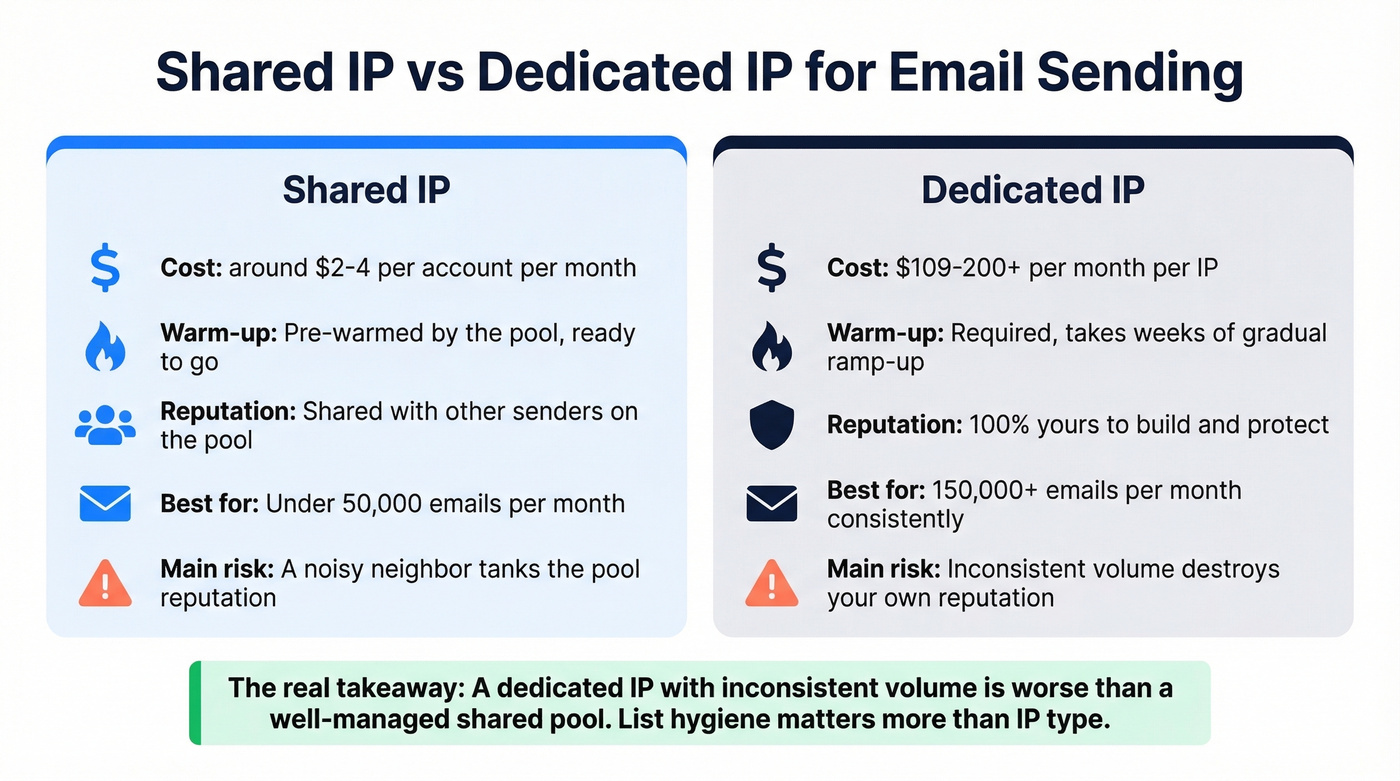
The pricing gap is real. Shared email infrastructure through providers like Maildoso runs ~$2.25/account/month. A dedicated IP through Inframail starts at $109/month, and typical dedicated IP costs land at $200+/month. For web hosting, the gap is smaller - a dedicated IP add-on is usually $3-5/month.
Here's the thing most people miss: a dedicated IP with inconsistent volume is worse than a well-managed shared pool. Send 50,000 emails one week and 5,000 the next, and your dedicated IP's reputation tanks. Shared pools stay warm because other senders keep the volume steady.
Does a Shared IP Hurt SEO?
No. Full stop.
Google's John Mueller addressed this directly in April 2024: "There are a limited number of IP addresses, it's normal for them to be shared." When someone asked whether sharing an IP with spammy sites would hurt rankings, Mueller's response was blunt: "tldr: no."
CDNs and shared hosting are standard infrastructure. IPs change by time and location. Search engines have handled this for decades. If someone tells you to get a dedicated IP for SEO, they're selling you something you don't need.
Email Deliverability on Shared IPs
This is where shared IPs actually matter - and where most advice gets it wrong.
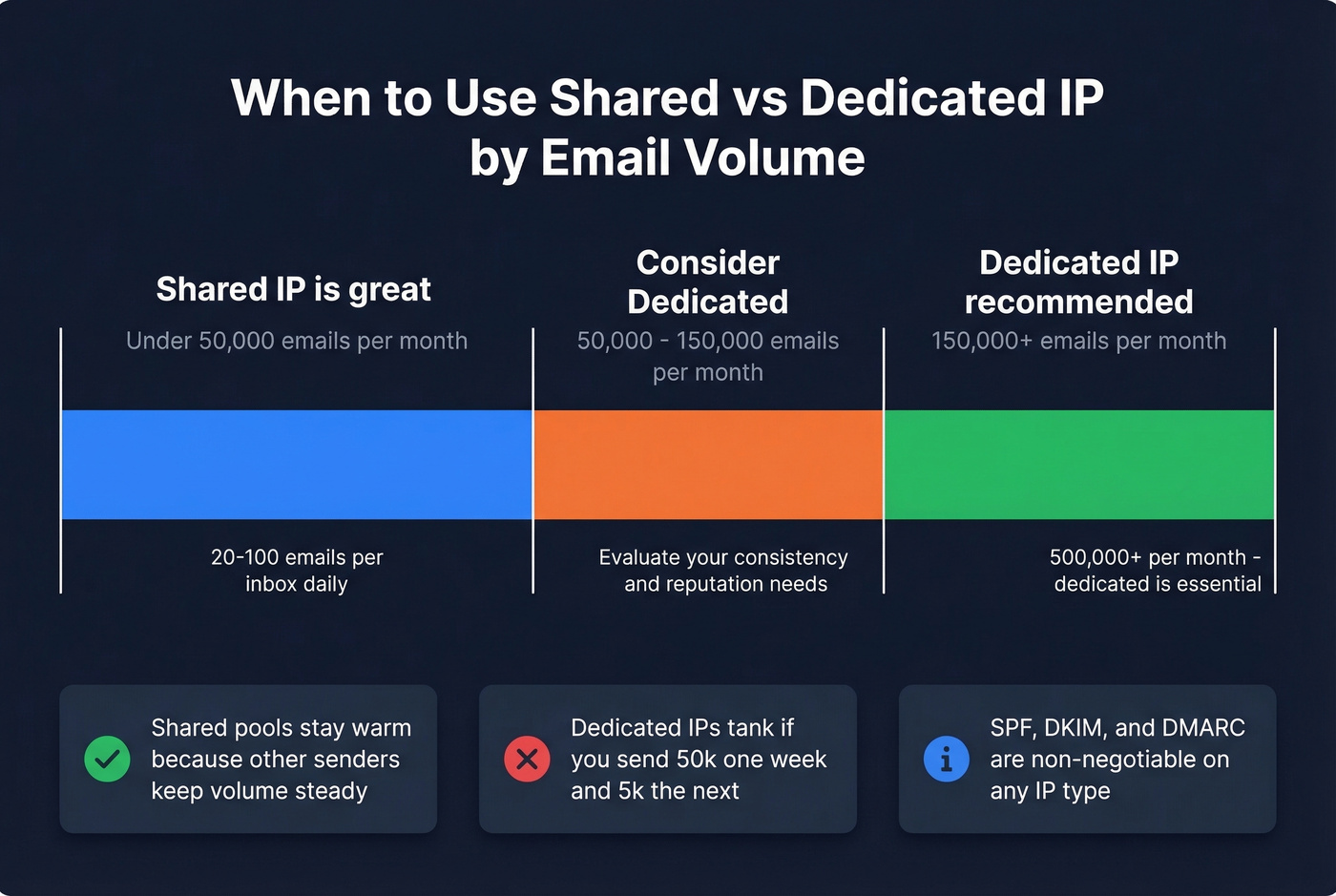
Shared IPs work well under 50,000 emails per month, with 20-100 emails per inbox daily. Consider dedicated when you're consistently above 150,000/month and want full reputation control. It becomes necessary at 500,000+/month. One sender on Reddit runs 500 emails/day on a shared IP with solid deliverability - warming and list hygiene mattered more than IP type. That tracks with everything we've seen in production.

Authentication is non-negotiable regardless of IP type. SPF, DKIM, and DMARC should be configured before you send a single email. But even perfect authentication can't save you from a 15% bounce rate caused by stale contact data.
Let's be honest: most teams agonizing over shared vs. dedicated IPs are solving the wrong problem. Bounce rates and invalid addresses damage sender reputation faster than a shared IP ever will. Sending to spam traps or honeypots can get your entire domain blacklisted on any IP. Verifying contacts before hitting send is the actual lever - Prospeo's 5-step verification catches invalid addresses, spam traps, and honeypots before they touch your sending infrastructure. One customer cut bounce rates from 35% to under 4%.
If you want a deeper playbook, start with an email deliverability guide and then focus on how to improve sender reputation with consistent volume and clean lists.
How to Check If Your IP Is Shared
Three steps, thirty seconds.
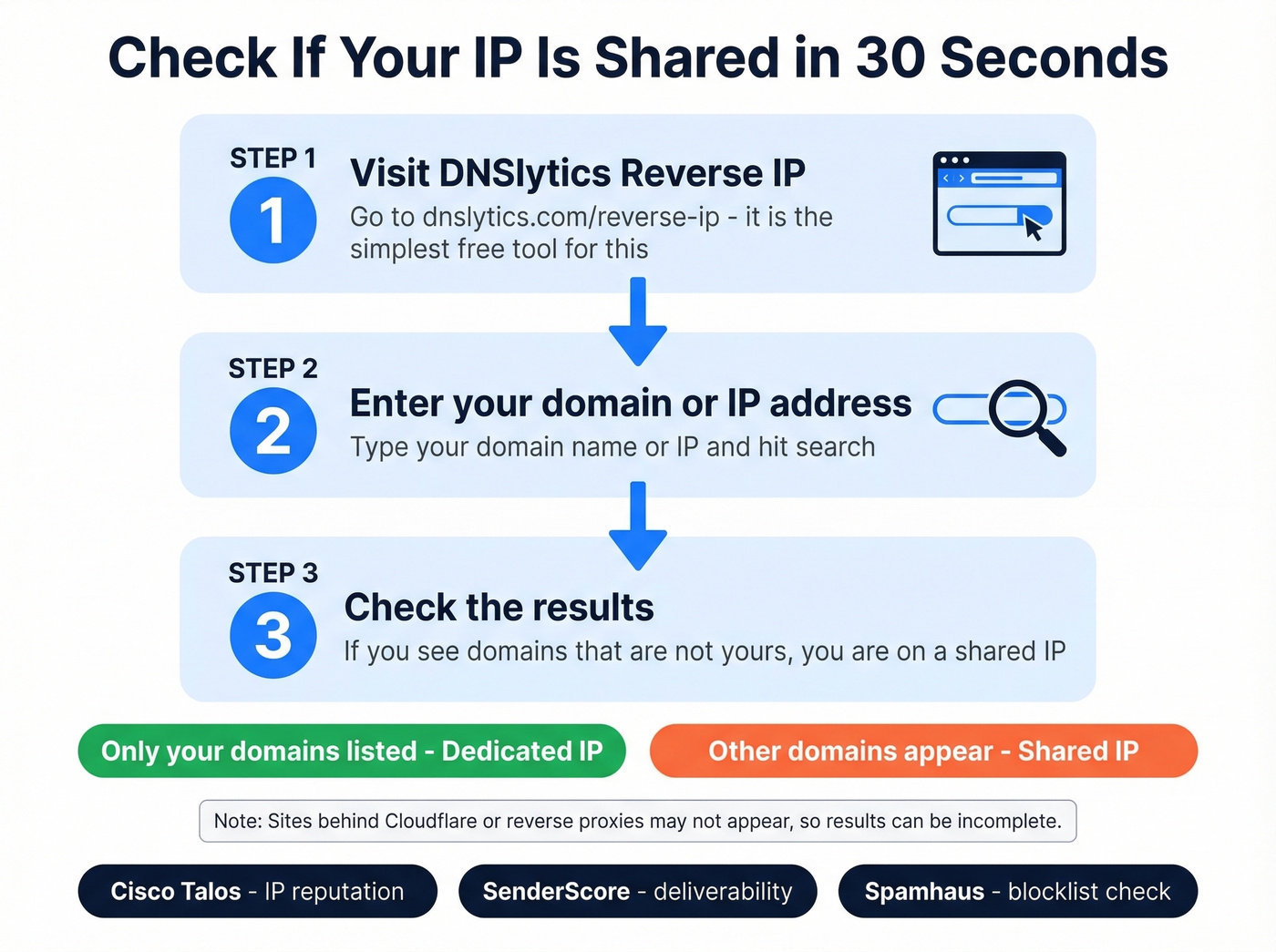
- Go to DNSlytics Reverse IP. It's the simplest free tool for the job.
- Enter your domain or IP address and hit search.
- Check the results. If you see domains that aren't yours, you're on a shared IP.
One caveat: sites behind Cloudflare or reverse proxies won't always appear in reverse IP results, so the list can be incomplete.
For email-specific reputation monitoring, use Cisco Talos Intelligence for sender IP and domain reputation, SenderScore for deliverability benchmarks, or Spamhaus for blocklist checks. If you're on a shared IP and your reputation score looks bad, the problem is likely a noisy neighbor - talk to your provider about moving to a cleaner pool.
If you're scaling outbound, it also helps to understand email velocity and the bulk email threshold so you don't spike volume in a way that looks suspicious.
Whether you're on a shared or dedicated IP, sending to stale contacts tanks your sender reputation overnight. Prospeo refreshes 300M+ profiles every 7 days and delivers 98% email accuracy - so your outbound hits real inboxes, not spam traps that blacklist your domain.
Clean data protects your IP reputation better than any infrastructure upgrade.
FAQ
Is a shared IP address safe?
Yes - it's the default for most internet users, hosts, and email senders. The main risk is reputation spillover from other users on the same address. Monitor your IP with tools like Cisco Talos or SenderScore to catch problems early.
When should I switch to a dedicated IP?
When you consistently send 150,000+ emails per month and need full reputation control. Below that threshold, a shared IP with proper SPF/DKIM/DMARC authentication and clean lists performs just as well - often better, since the pool stays warm.
Does bad contact data hurt more than a shared IP?
Almost always. Invalid addresses spike bounce rates and damage reputation on any IP type. Verifying your list before every send protects your reputation more effectively than upgrading to a dedicated IP - we've seen teams drop bounces from 35% to under 4% just by cleaning their data.