


Zenvia Pricing, Reviews, Pros and Cons (2026)
Every review aggregator for Zenvia says the same thing: "contact vendor for pricing." The irony? Zenvia actually publishes its pricing. The two-part billing model - software plan plus channel package - confuses people, and aggregators don't bother explaining it. We dug through Zenvia's pricing pages, support docs, and hundreds of reviews to break down the real costs, what users love, and what frustrates them.
You'll see references to "Zenvia Conversion" and "Sirena" across review sites. These are legacy names for the same product line. The current name is Zenvia Customer Cloud.
30-second verdict: Zenvia is purpose-built for WhatsApp-centric teams in Latin America. If that's your use case, it's one of the strongest options at a reasonable price. If you need deep analytics, responsive support, or operate outside LatAm - look elsewhere.
How Zenvia's Two-Part Billing Works
Zenvia doesn't charge a single flat fee. You pick a software plan covering features, users, and InteractionZ, then add a channel package on top covering actual message volume across seven channels. Both are required. Unused channel volume doesn't roll over month to month, though you can reallocate between channels within a package.
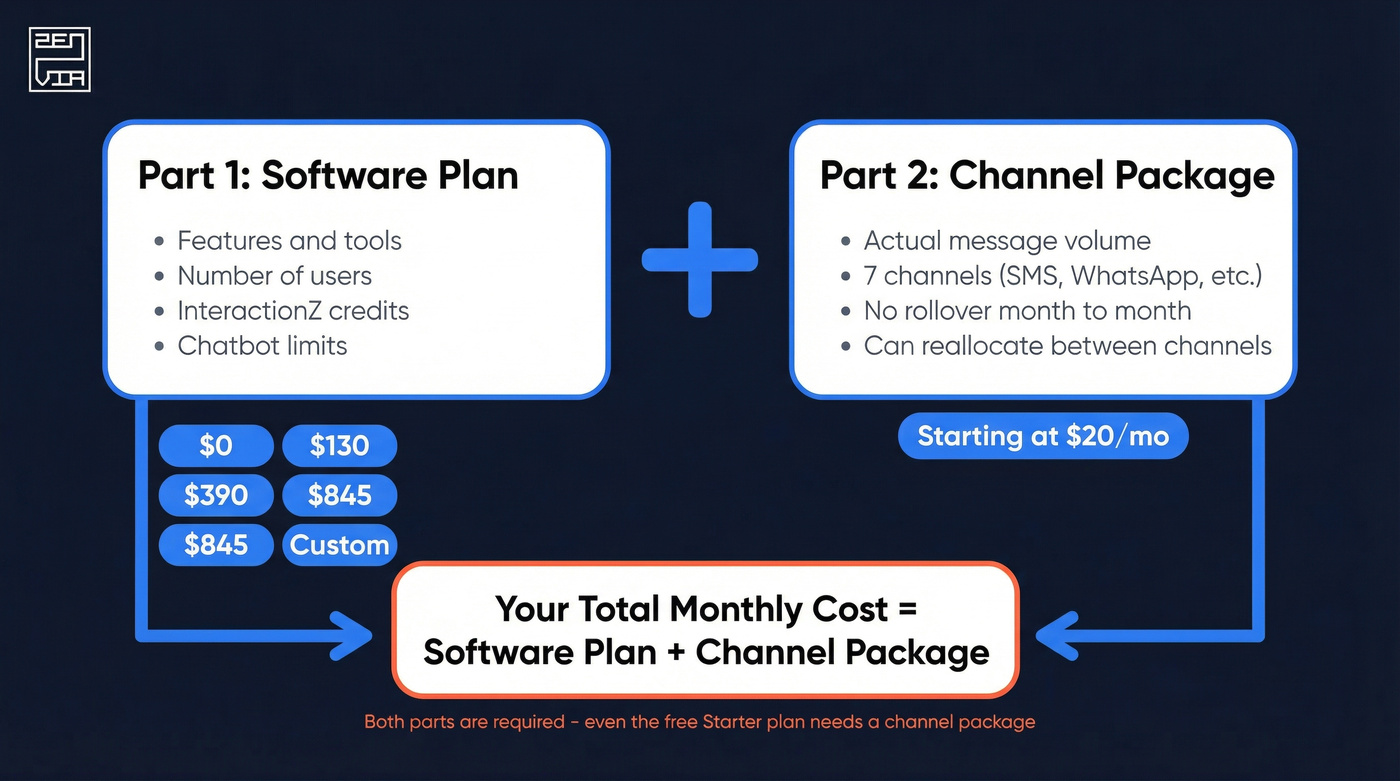
This means even the "free" Starter plan isn't truly free. The software fee is $0/month, but you still need a channel package. The cheapest example on Zenvia's pricing page totals $20/month and covers roughly 1,088 SMS or 362 WhatsApp messages within Brazil. Third-party pricing data from OMR independently confirms these tier prices, so the numbers are current heading into 2026.
Plan Basics
| Plan | Monthly Fee | Users | InteractionZ | Chatbots |
|---|---|---|---|---|
| Starter | $0 | 1 | 100 | 1 |
| Specialist | $130 | 10 | 500 | 5 |
| Expert | $390 | 30 | 2,000 | 10 |
| Professional | $845 | 50 | 5,000 | 100 |
| Enterprise | Custom | Custom | Custom | Unlimited |
Add-On Costs
| Plan | Extra User | Extra InteractionZ | Setup Fee |
|---|---|---|---|
| Starter | $53 | $1.00 | $137 (WhatsApp only) |
| Specialist | $32 | $0.28 | $137 |
| Expert | $22 | $0.21 | $421 |
| Professional | $22 | $0.19 | $842 |
| Enterprise | Custom | Custom | Custom |
Setup fees are first-month-only charges ranging from $137 to $842 - easy to miss in the fine print. The Starter plan's $137 setup only kicks in if you enable WhatsApp, which is why most people are here in the first place. All plans support up to 40 messages processed per second for bulk sends.
The WhatsApp Billing Shift
Here's something that caught us off guard. Effective July 1, 2025, Meta changed how WhatsApp Business API billing works. The old 24-hour conversation window pricing is gone. Now you're charged per template message sent - every marketing, utility, or authentication template costs money individually. Customer-initiated free-form messages remain free within the 24-hour window, but sending a template during that window still incurs a charge.
For teams running automated sequences through Zenvia's API, expect higher consumption than under the old model.
Pros of Using Zenvia
Easy to use. Ease-of-use scores run 4.2-4.5 across Capterra and GetApp. The learning curve is gentle, especially for non-technical teams who just need to get WhatsApp conversations organized.
WhatsApp formalization. Zenvia turns messy WhatsApp conversations into a structured workflow. For teams running customer comms through personal phones, this alone justifies the cost. One Capterra reviewer noted they could "serve clients via WhatsApp with 3 agents simultaneously at a very reasonable cost."
Auto-assignment routing. Incoming conversations get routed to available agents automatically, which keeps response times tight without manual queue management.
LatAm-native integrations. Zenvia connects with Ploomes CRM, Bitrix24, Bling, and other tools popular in the Brazilian and Latin American market - an ecosystem no global competitor matches.
Cons and Drawbacks
Let's be honest: Zenvia has some real gaps.
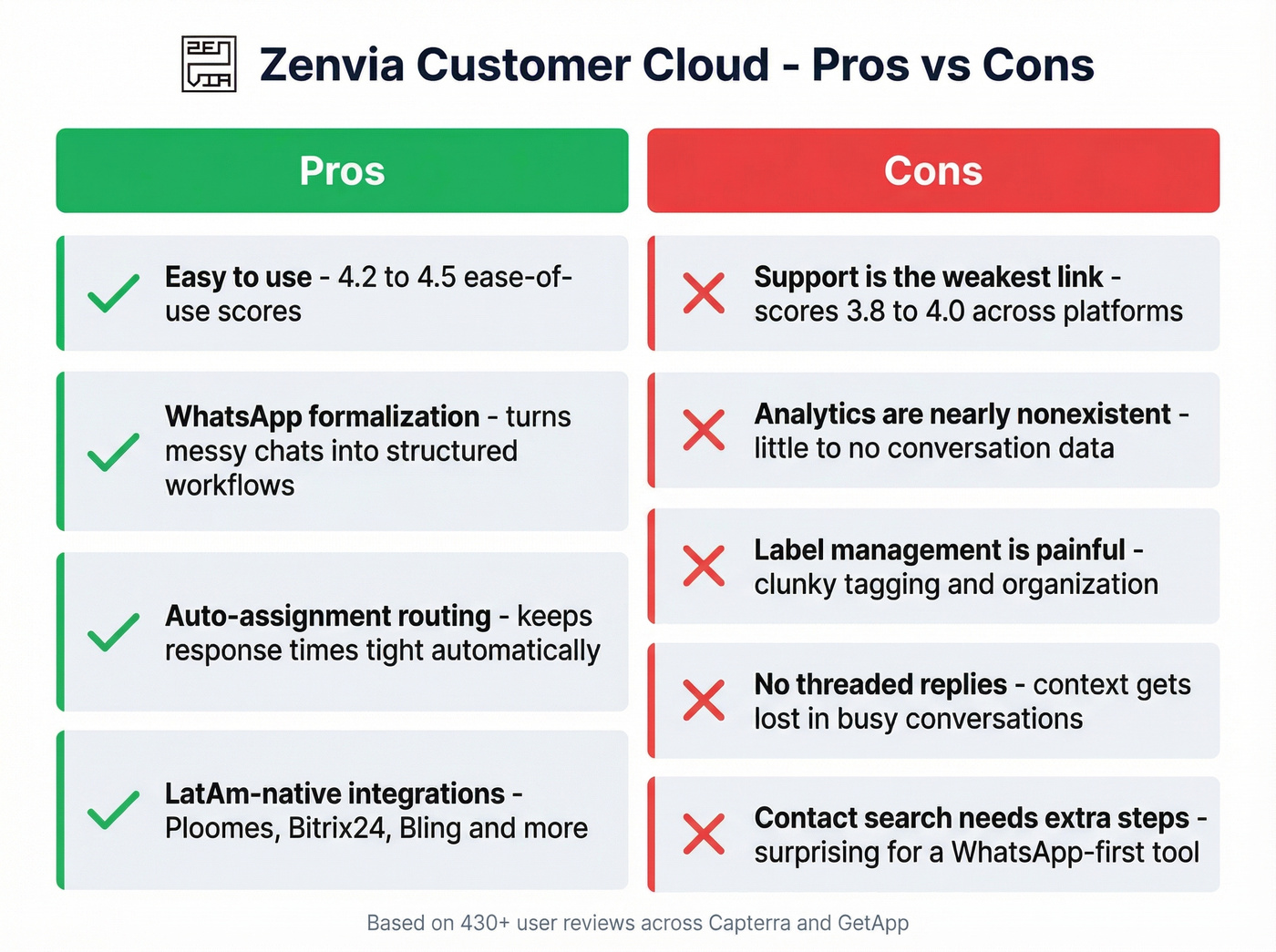
Support is the weakest link. Support scores are the lowest sub-rating across both review platforms (3.8-4.0). Users report slow response times and agents who "don't have the knowledge or decision power" to resolve issues. In our experience testing the platform, getting a substantive answer took multiple follow-ups over several days.
Analytics are nearly nonexistent. One reviewer put it bluntly: "little to no data on conversations." If you need reporting beyond basic volume metrics, you'll be disappointed. If analytics are a core requirement, it helps to map what you need to track (volume, response time, conversion) using a simple funnel metrics framework.
Label and badge management is painful. Organizing conversations with tags and labels is clunky. Multiple reviewers flag this as a daily frustration, and it's the kind of thing that grinds on you over weeks of use.
No threaded replies. You can't select a specific message and reply to it directly. In busy conversations, context gets lost fast. Contact search requires extra steps. Searching contacts by phone number instead of name takes more clicks than it should - a surprising gap for a WhatsApp-first tool.

Every bad phone number or email in your Zenvia import is a wasted InteractionZ credit and a wasted channel message. Prospeo's 5-step verification delivers 98% email accuracy and 125M+ verified mobile numbers - so every message you send through Zenvia actually reaches a real person.
Stop burning Zenvia credits on contacts that don't exist.
Zenvia Reviews Across Platforms
| Platform | Rating | Reviews | Weakest Area |
|---|---|---|---|
| Capterra | 4.1/5 | 359 | Customer service (4.0), Features (3.8) |
| GetApp | 4.5/5 | 71 | Customer support (3.9), Features (4.3) |
| G2 | No rating | 0 | No reviews at all |
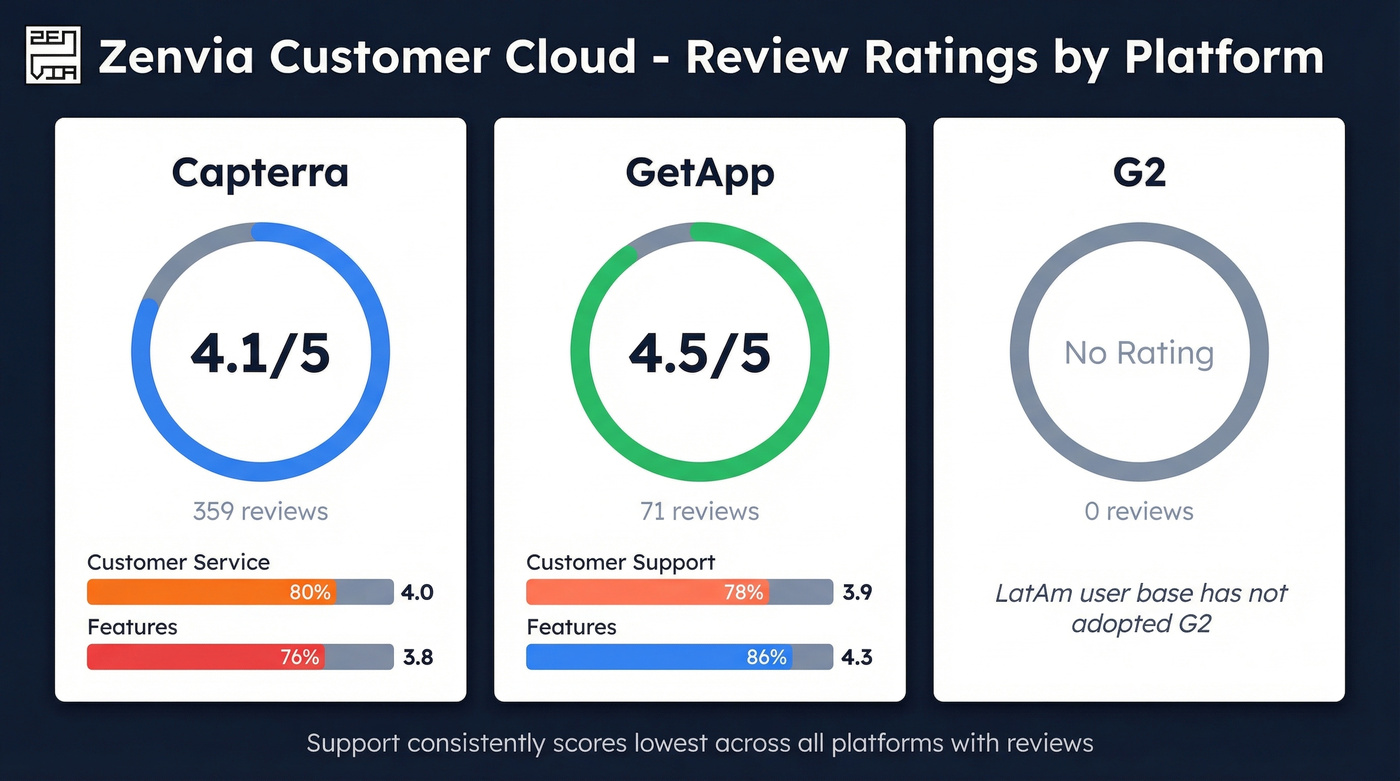
The gap between Capterra and GetApp is mostly sample size. GetApp's 71 reviews skew higher; Capterra's 359 include older "Sirena"-era reviews that drag the average down. Support consistently scores lowest, with features close behind on Capterra.
The G2 gap tells you everything about Zenvia's market. This is a LatAm-first product with a LatAm-first user base. If your buying committee expects G2 badges and peer reviews from North American SaaS teams, Zenvia won't pass the vendor review. That's not a flaw - it's a market reality.
Who Zenvia Is (and Isn't) For
Use Zenvia if you're a Brazilian or LatAm SMB running WhatsApp-first customer communication, you need a turnkey multichannel inbox without heavy technical setup, and your team is small - under 10 agents - and cost-sensitive.
Skip Zenvia if you need deep conversation analytics or custom reporting, enterprise-grade support responsiveness is non-negotiable, or you operate primarily outside Latin America.
One thing worth flagging: if you're paying per InteractionZ and per template message, every invalid contact in your list is money burned. A bad phone number still costs you a channel credit. Verify your contact data with a tool like Prospeo before importing - the free tier handles 75 verifications per month, which is a fraction of what wasted InteractionZ cost on the Starter plan. If you’re building a repeatable process, it’s worth pairing verification with a lightweight lead generation workflow so bad data doesn’t enter your system in the first place.

Zenvia charges per template message and per InteractionZ. At $0.19-$1.00 per extra interaction, even a small percentage of invalid contacts adds up fast. Prospeo verifies emails and phone numbers before they hit your messaging platform - starting free at 75 verifications per month.
Clean data in, zero wasted credits out. Start verifying for free.
Alternatives Worth a Look
If Zenvia doesn't fit, here are three paths depending on your situation.
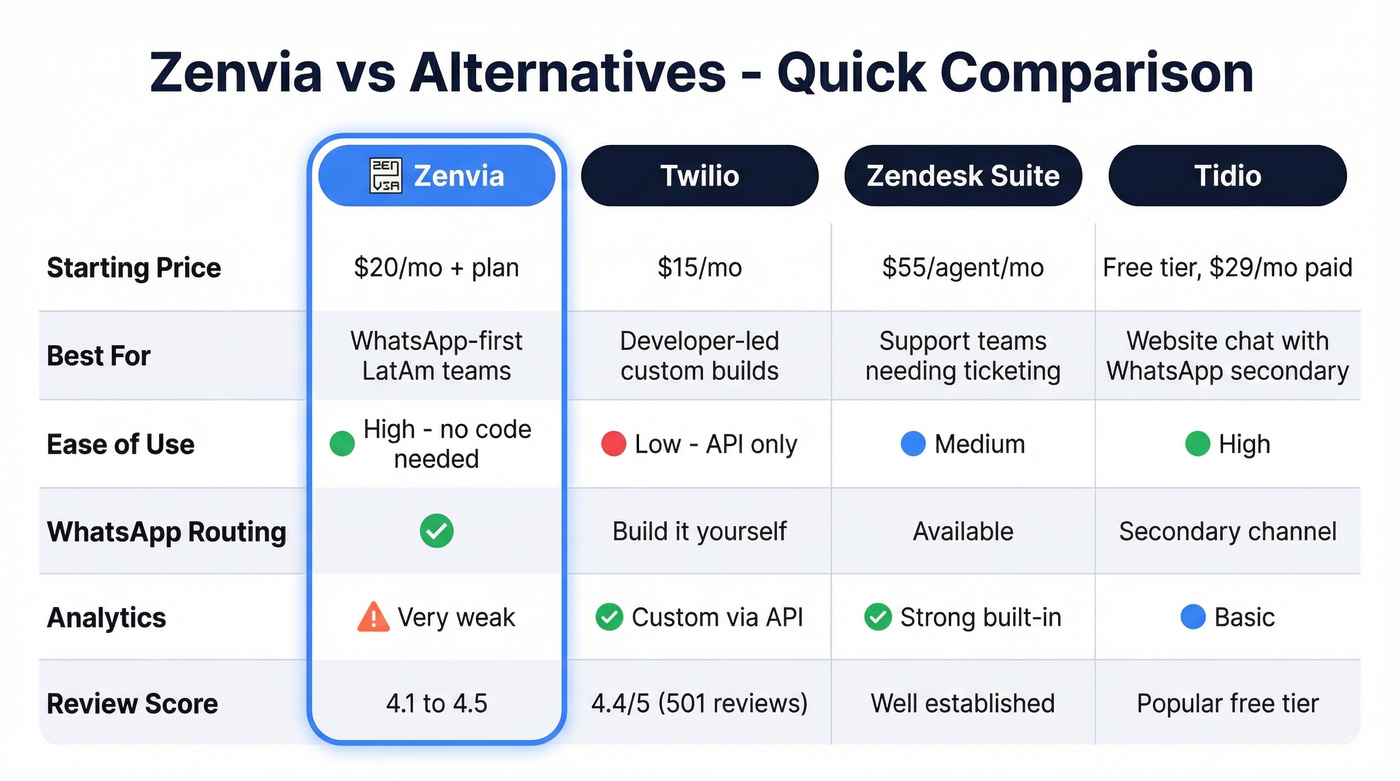
Twilio is the opposite of Zenvia in philosophy: no turnkey inbox, pure API building blocks. It starts at $15/month and scores 4.4/5 on Software Advice with 501 reviews. Pick Twilio if you have engineering resources and want total control over your messaging stack. Skip it if "API-first" makes you nervous - there's no drag-and-drop inbox waiting for you.
Zendesk Suite at $55/agent/month makes more sense for support-heavy teams that need ticketing, knowledge bases, and omnichannel routing beyond WhatsApp. It's overkill for pure sales messaging, but strong for post-sale support workflows where you need audit trails and SLA tracking. If you’re evaluating tools like this, it helps to compare them against your broader sales process optimization goals.
Tidio offers a free tier with paid plans from ~$29/month and leans chatbot-first. Worth a look if your primary need is website chat with WhatsApp as a secondary channel rather than the main event.
Community coverage of Zenvia alternatives on Reddit is essentially nonexistent - the user base just isn't there. One Capterra reviewer summed up the switching calculus well: they stayed with Zenvia because "no other tool offered WhatsApp routing at this price point for a small team."
If your main pain is list quality (not the inbox), you may get more ROI from data enrichment services or a dedicated verifier than from switching messaging platforms.
FAQ
Is Zenvia Customer Cloud really free?
No. The Starter software plan is $0/month, but you need a channel package ($20+/month) and a $137 setup fee for WhatsApp activation. Real floor: ~$157 in month one, then $20+/month ongoing.
What do users say in Zenvia reviews?
Reviewers consistently praise ease of use (4.2-4.5 scores) and WhatsApp routing capabilities. The biggest complaints are weak analytics, slow support response times, and clunky label management for organizing conversations.
How do I avoid wasting Zenvia credits on bad contacts?
Verify your contact list before importing into any messaging platform. Prospeo's email finder checks addresses at 98% accuracy with a free tier of 75 verifications per month, so you're only spending InteractionZ on real, reachable people.
Does Zenvia work outside Latin America?
Technically yes - it supports seven messaging channels globally. Practically, its integrations, support hours, and user community are LatAm-focused. Teams outside Brazil and Latin America will find better-supported alternatives like Twilio or Zendesk.