

How to Fix "550 Permanent Failure for One or More Recipients"
You just sent a proposal to a client you've emailed dozens of times, and the reply comes back instantly - not from them, but from your mail server. "550 permanent failure for one or more recipients." The email didn't just fail to arrive. The receiving server looked at it and said no.
Per RFC 5321, a 550 code means "requested action not taken: mailbox unavailable." The key word is permanent. Unlike 4xx temporary failures, a 5xx code means the server won't retry. That makes 550 a hard bounce, and hard bounces are what destroy your sender reputation.
What Does This Error Actually Mean?
Before you start pulling apart DNS records, figure out which bucket you're in:
- Bouncing to one domain? The recipient's security gateway (Barracuda, Mimecast, Symantec) is blocking you. Contact their IT admin.
- Bouncing to everyone? Your DNS authentication (SPF/DKIM/DMARC) is broken, or your sending IP is blacklisted. Check MxToolbox.
- Sent a cold campaign and got mass bounces? Your list has bad data. Verify every address before sending.
That single question - one domain or all domains? - saves you hours of misdiagnosis.
Quick Triage
Most guides jump straight to "check your SPF record." That's step 7, not step 1. The first question is simpler: is this your problem or theirs?
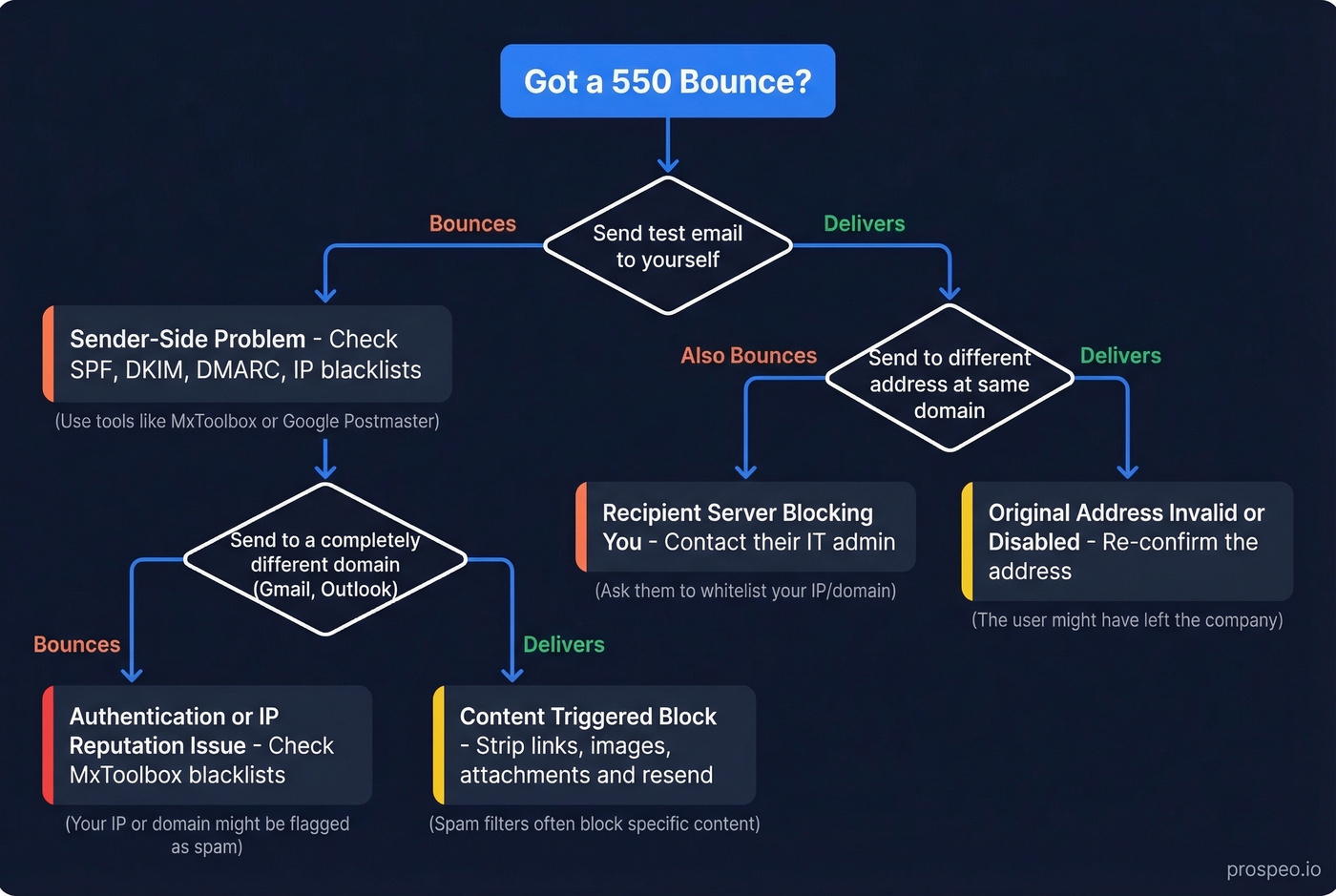
- Send a test email to yourself. If it delivers, your sending infrastructure is fine. If it bounces, you've got a sender-side problem - skip to Common Causes below.
- Send to a different address at the same domain. If that also bounces, the recipient's server is blocking you. If it delivers, the original address is invalid or disabled.
- Send to a completely different domain (Gmail, Outlook). If those bounce too, it's a sender-side issue: authentication, IP reputation, or content.
- Strip your message down. Remove all links, images, and attachments. Send plain text. If the stripped version delivers, you've got a content-triggered block.
You can also run quick CLI diagnostics to confirm DNS health:
dig MX example.com +short          # Check recipient MX records
nslookup -type=txt example.com     # View SPF record
telnet mail.example.com 25         # Test SMTP connectivity
If dig MX returns nothing, the domain has no MX records published, and mail delivery will fail for that domain regardless of anything else you do.
Enhanced Status Codes Explained
Not all 550 bounces are the same. The enhanced status code tells you what went wrong.
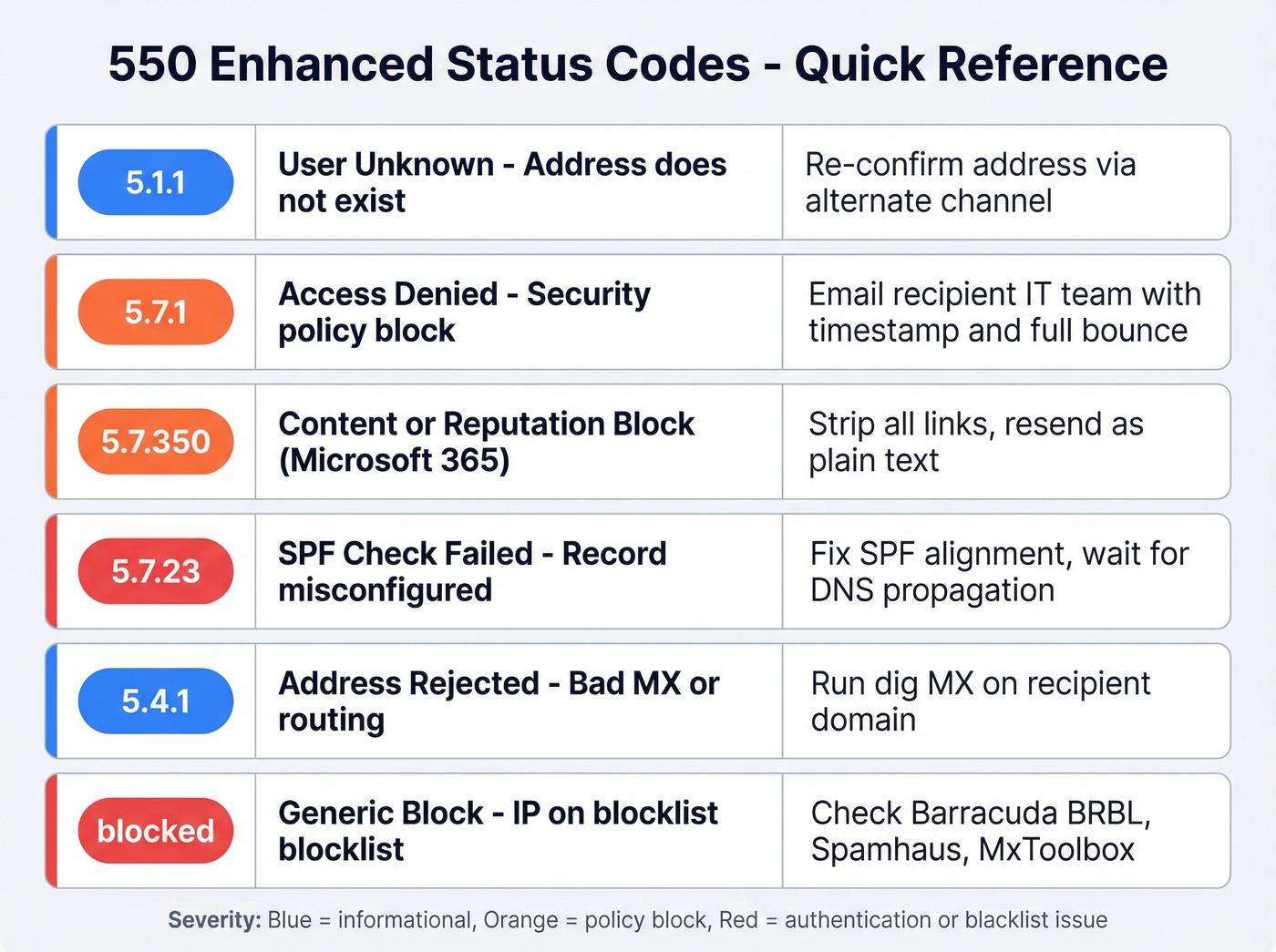
| Code | Meaning | Likely Cause | First Fix |
|---|---|---|---|
| 550 5.1.1 | User unknown | Address doesn't exist | Re-confirm address via alternate channel |
| 550 5.7.1 | Access denied | Security policy block | Email recipient's IT team with timestamp + full bounce |
| 550 5.7.350 | Content/reputation block (common in Microsoft 365) | URLs or images flagged | Strip links, resend plain text |
| 550 5.7.23 | SPF check failed | SPF record misconfigured | Fix SPF alignment |
| 550 5.4.1 | Address rejected | Bad MX or routing issue | Run dig MX on recipient domain |
| 550 ...blocked | Generic block | IP on Barracuda BRBL or Spamhaus | Check BRBL, Spamhaus, MxToolbox |
A 550 5.1.1 is the most common variant - it simply means the mailbox doesn't exist on the receiving server. The generic "550 ...blocked" message with no enhanced code is the most frustrating. It's common with Barracuda-protected domains and tells you almost nothing. When you see it, skip straight to the Barracuda section below.
What 550 is NOT: Don't confuse it with 553, which means invalid address format - you've got a syntax error in the address itself. A 550 means the server received your message, evaluated it, and actively refused it.

Most 550 errors trace back to one root cause: bad email data. Prospeo's 5-step verification - with catch-all handling, spam-trap removal, and honeypot filtering - delivers 98% email accuracy. Teams that switch cut bounce rates from 35%+ to under 4%.
Fix the data and you fix the bounces. It's that simple.
Common Causes
Sender-Side
Broken SPF/DKIM/DMARC is the most common sender-side cause. If you added a new sending service but forgot to update SPF, receiving servers will reject your mail outright. A 550 5.7.23 error almost always points here.
If you need a refresher on syntax, start with an SPF record example and then confirm DMARC alignment is correct.
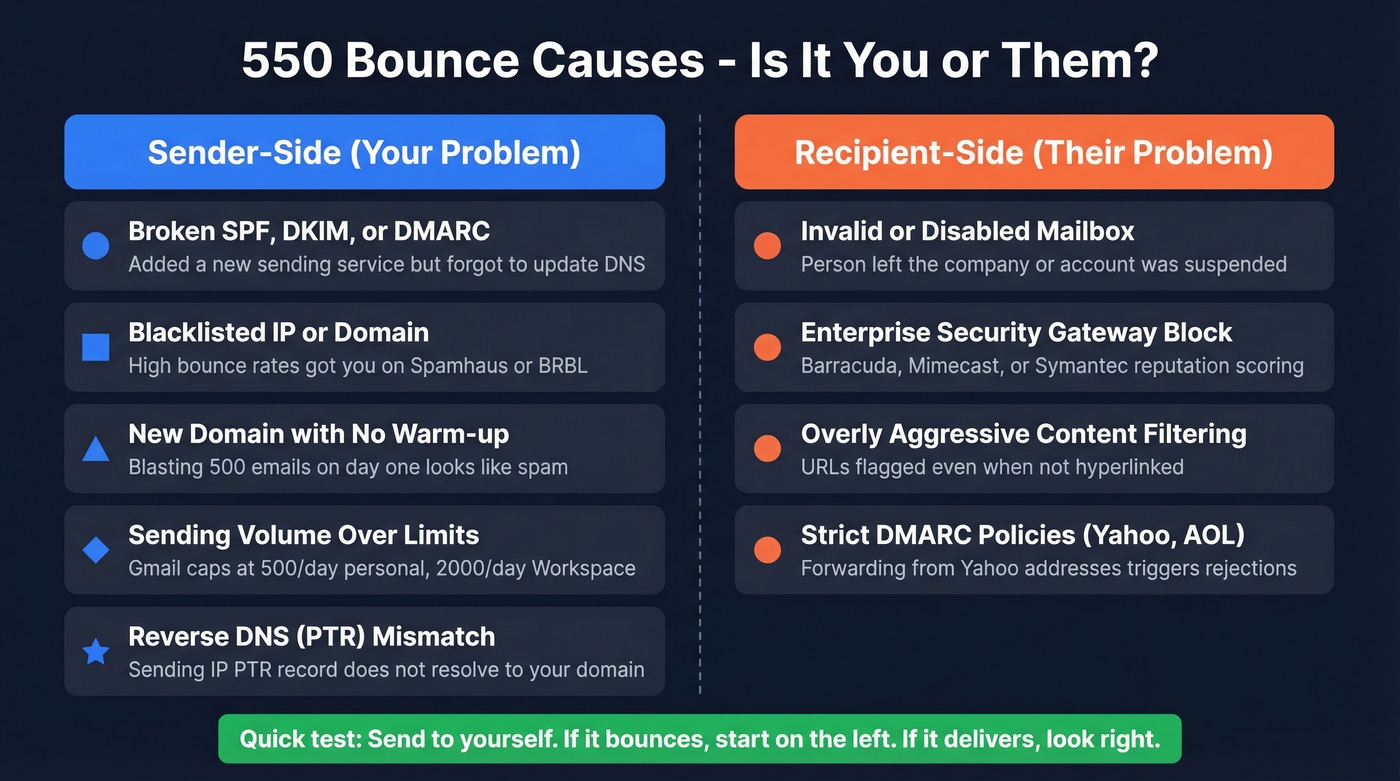
Blacklisted IP or domain means your sending infrastructure landed on a blocklist like Spamhaus or BRBL. This often follows high bounce rates and elevated complaint rates. Once listed, every server that consults that blocklist will reject you.
New domain with no warm-up is a classic cold outreach mistake. You register a domain on Monday, blast 500 emails on Tuesday, and everything bounces by Wednesday. Mail servers treat unknown domains with zero reputation as suspicious by default - and they're right to, because most of the time those domains are spammers.
Sending volume exceeding limits catches teams off guard. Gmail caps at 500/day for personal accounts, 2,000/day for Workspace. Exceed these and temporary blocks cascade into permanent ones.
Reverse DNS (PTR) mismatch is subtler. If your sending IP's PTR record doesn't resolve back to your domain, some gateways reject with a 550.
Recipient-Side
Invalid or disabled mailbox is straightforward - the person left the company, the account was suspended, or you've got a typo. This triggers a 550 5.1.1.
Enterprise security gateways like Barracuda, Mimecast, and Symantec add their own filtering layer. Legitimate mail gets caught by reputation scoring, content analysis, or overly aggressive policies. A thread on r/Office365 captures this well - one user reported 550 5.7.350 errors triggered by URLs that weren't even hyperlinked. SPF/DKIM/DMARC were all passing. The block was purely content-based.
Yahoo and AOL enforce strict DMARC policies. If you're spoofing or forwarding from a Yahoo address, expect 550 rejections.
Provider-Specific Fixes
Google Workspace / Gmail
Open Google Admin Toolbox - Check MX and run your domain. It flags missing DKIM, DMARC, SPF, and MTA-STS records in seconds.
If you're sending through an SMTP relay, verify the config: Admin Console > Apps > Google Workspace > Gmail > Routing > SMTP relay service. Confirm your allowed IPs, authentication method, and TLS settings match the sending application. Mismatched relay configs are easy to overlook - everything looks fine until you check the routing rules.
For content-triggered blocks, strip to plain text and send to an alternate recipient. If it delivers, add elements back one at a time until you find the trigger. Monitor ongoing reputation through Google Postmaster Tools.
Microsoft 365 / Exchange Online
Microsoft's NDR messages are verbose but useful. Scroll past the user-friendly summary to "Diagnostic information for administrators" - that's where the actual error code lives.
For 550 5.7.23, you're looking at an SPF check failure. Fix the record, wait for DNS propagation (15-60 minutes), and retry. If the NDR contains "Client host [IP] blocked using Blocklist 1," forward the full NDR to delist@microsoft.com or use Microsoft's delist portal. Resolution typically takes 24-48 hours.
One thing to watch: Exchange Online retries failed deliveries for 24-48 hours before generating a final NDR, so if you're troubleshooting in real time, check message trace in the Exchange admin center for the actual rejection code. Also check whether Directory Based Edge Blocking is enabled - it rejects mail to non-existent recipients at the edge, triggering 550 5.1.1 for addresses removed from your directory.
Barracuda-Protected Domains
Here's the thing about Barracuda bounces: they're maddening. The error reads "550 permanent failure for one or more recipients (user@domain.org:blocked)" with zero explanation. We've seen cases where SPF, DKIM, and DMARC all pass and the block is still triggered by internal reputation scoring.
First, check if your IP or domain is on the Barracuda Reputation Block List (BRBL). If listed, fix the root cause first, then submit a removal request through Barracuda Central. Don't submit the request first - they'll re-list you. Verify your reverse DNS (PTR) record matches your sending domain. PTR mismatches are a common Barracuda rejection trigger. Expect 24-72 hours for delisting to propagate.
If you're stuck in a loop of blocks, it usually comes down to how to improve sender reputation and reducing bad addresses at the source.
Other Gateways (Symantec, Mimecast)
Enterprise gateways from Broadcom (Symantec) and Mimecast often return generic 550 blocks with minimal detail. The fix is coordination: contact the recipient's IT admin, share the exact timestamp and error message, and request a whitelist or log review. Skip this if you're cold emailing - you won't get a response from an IT admin who doesn't know you. In that case, verify the address is valid and move on.
How to Prevent 550 Bounces
Let's be honest: if your bounce rate is above 5%, no amount of DNS configuration will save you. The problem is your data, not your infrastructure. Fix the data first.
Verify your email list before every campaign. This is the single highest-leverage action you can take. Unverified lists lead to hard bounces, hard bounces tank your sender reputation, damaged reputation triggers blacklisting, and blacklisting causes 550 errors across the board. It's a vicious cycle, and verification is the only thing that breaks it.
If you're building lists from scratch, use a name to email workflow and then validate before you send.

Prospeo's 5-step verification catches invalid addresses, spam traps, and honeypots before you send - 98% email accuracy with catch-all domain handling built in. Stack Optimize built to $1M ARR running client campaigns through Prospeo with deliverability above 94%, bounce rates under 3%, and zero domain flags. Meritt cut their bounce rate from 35% to under 4%.
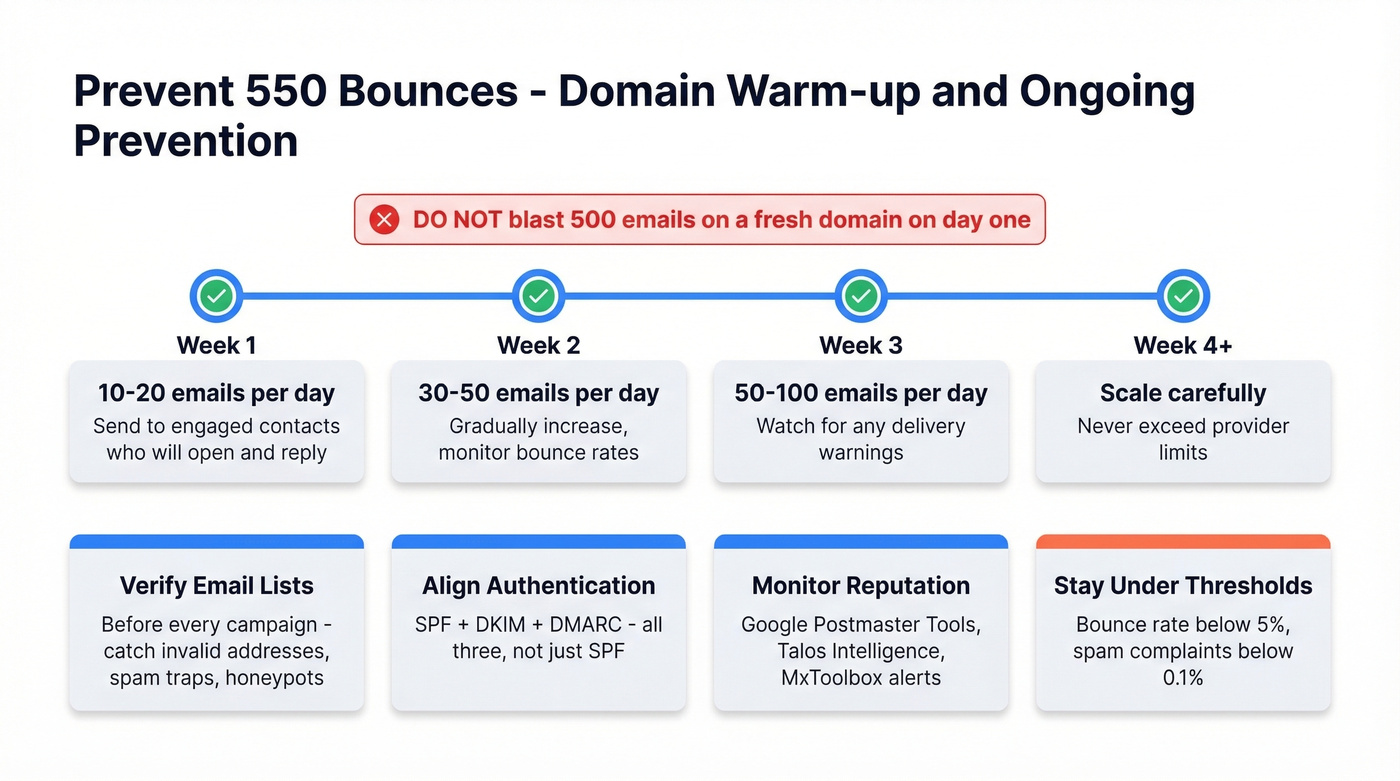
Align SPF + DKIM + DMARC. All three. Not just SPF. DMARC alignment is what tells receiving servers your authentication is trustworthy, not just present. Test with MxToolbox or Google Admin Toolbox after every DNS change.
Warm up new domains properly. Week 1: 10-20 emails per day to engaged contacts who'll open and reply. Week 2: scale to 30-50 per day. Week 3: 50-100 per day. Jumping straight to 500/day on a fresh domain is asking for blocks.
To keep your sending safe as you scale, track email velocity and follow a playbook for the best time to send cold emails.
Monitor your reputation continuously. Google Postmaster Tools for Gmail delivery, Talos Intelligence for IP reputation, MxToolbox for blacklist monitoring. Set up alerts so you catch problems before they cascade.
Keep bounce rates below 5% and spam complaints below 0.1%. Above 0.1-0.3% complaint rate, blacklist systems start paying attention. Above that, you're on borrowed time.
Every hard bounce chips away at your domain reputation, making the next 550 error more likely. Prospeo refreshes all 300M+ records every 7 days - not the 6-week industry average - so you're never sending to addresses that went dark last month.
Stop diagnosing bounces. Start sending to emails that actually exist.
FAQ
What is a 550 permanent failure?
It's a hard bounce - the receiving mail server evaluated your message and permanently refused delivery. Unlike temporary 4xx errors that retry automatically, a 550 means the server won't attempt delivery again. Causes range from invalid addresses (5.1.1) to blacklisted IPs (5.7.1) or failed SPF checks (5.7.23).
Can I fix a 550 error myself?
Yes, if it's sender-side - broken SPF, blacklisted IP, or content triggering filters. Follow the triage steps above and most issues resolve within hours. If the recipient's gateway is blocking you, contact their IT admin with the full bounce message and request a whitelist. You can't override someone else's mail server policies.
How long does blacklist delisting take?
Expect 24-72 hours after you fix the root cause and submit a removal request. Barracuda Central and Microsoft's delist portal are the fastest. Fix the underlying problem first - submitting a removal request while you're still sending bounced mail gets you re-listed immediately.
Will verifying emails prevent 550 errors?
Verification eliminates the most common cause - hard bounces from invalid addresses that destroy sender reputation. It won't fix content-triggered blocks, but it prevents the data-quality spiral behind most 550 bounces in outbound campaigns. We've seen teams go from 35%+ bounce rates to under 5% just by verifying before every send.