

AI Email Response Tools in 2026: What Actually Works
It's 4:47 PM on a Friday. You've got 23 unread emails, a client waiting on a proposal response, and your manager just forwarded a thread with "thoughts?" as the entire message. UK workers spend almost nine hours per week writing emails - and 62% of companies don't respond to every customer email, even though 90% of customers expect a reply in under ten minutes. The average corporate response time? Twelve hours.
AI email response tools promise to fix this. Some actually do. Most are glorified text boxes sitting on top of the same LLM you already have access to, charging you a monthly fee for the privilege.
What You Actually Need
Before you install anything, run through this quick decision tree:
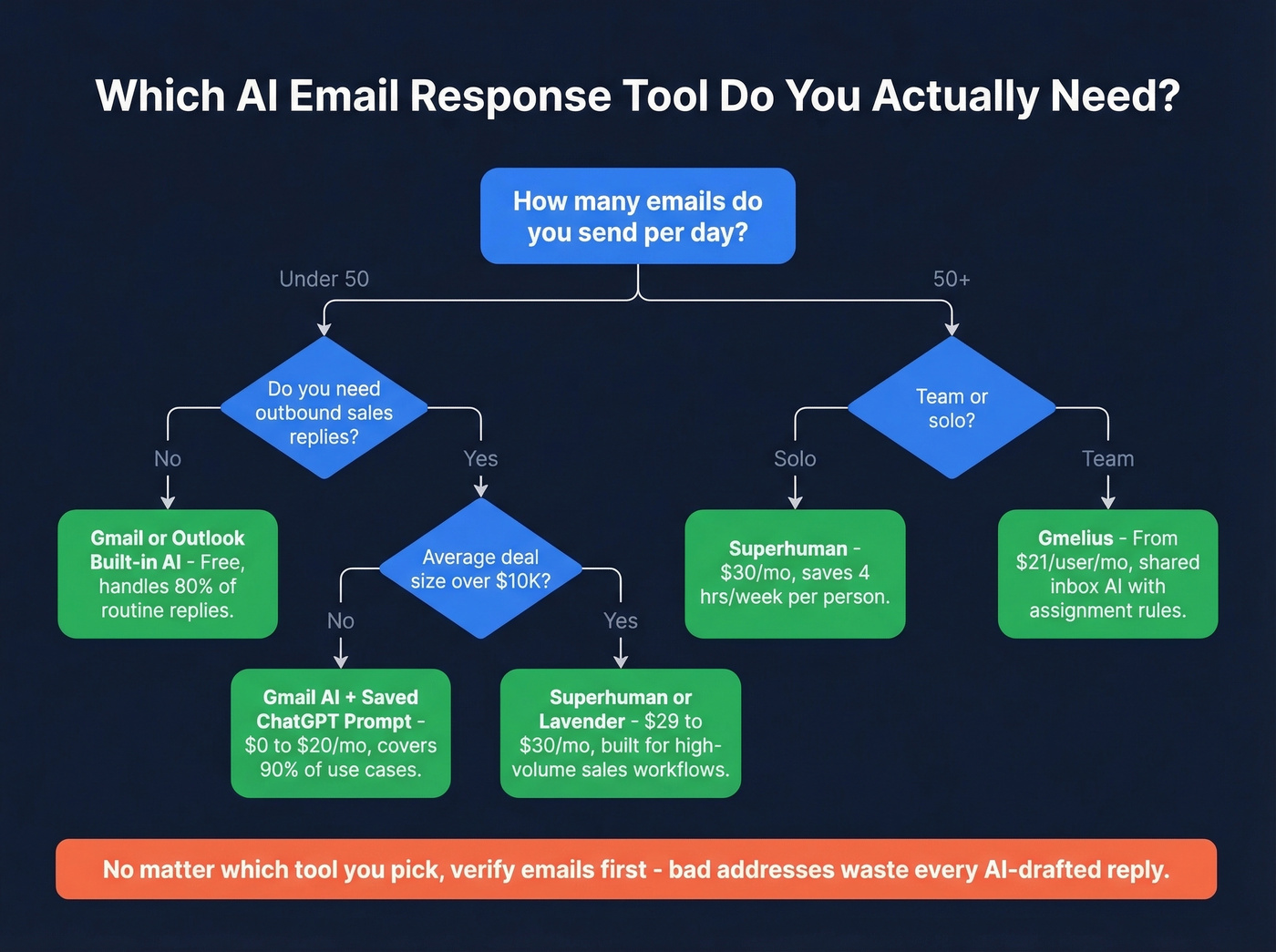
- Already have Gmail or Outlook? Turn on the built-in AI first. Gmail's personal AI features are free for US users, and they handle 80% of routine replies without a new subscription.
- Need more control or send 50+ emails a day? Try Superhuman ($30/mo) or ChatGPT with a saved prompt template ($20/mo). Both give you significantly more flexibility than native tools.
- Using AI for outbound sales replies? The reply quality is the easy part. The hard part is making sure your emails actually arrive. Prospeo verifies emails at 98% accuracy, so your AI-crafted replies reach real inboxes instead of bouncing. The free tier includes 75 email credits per month plus 100 Chrome extension credits.
What AI Reply Tools Actually Do
Every AI email tool works the same way under the hood. An LLM reads the incoming message, extracts context - who sent it, what they're asking, what tone they used - and generates a draft reply. The differences come down to where that happens and how much control you get.
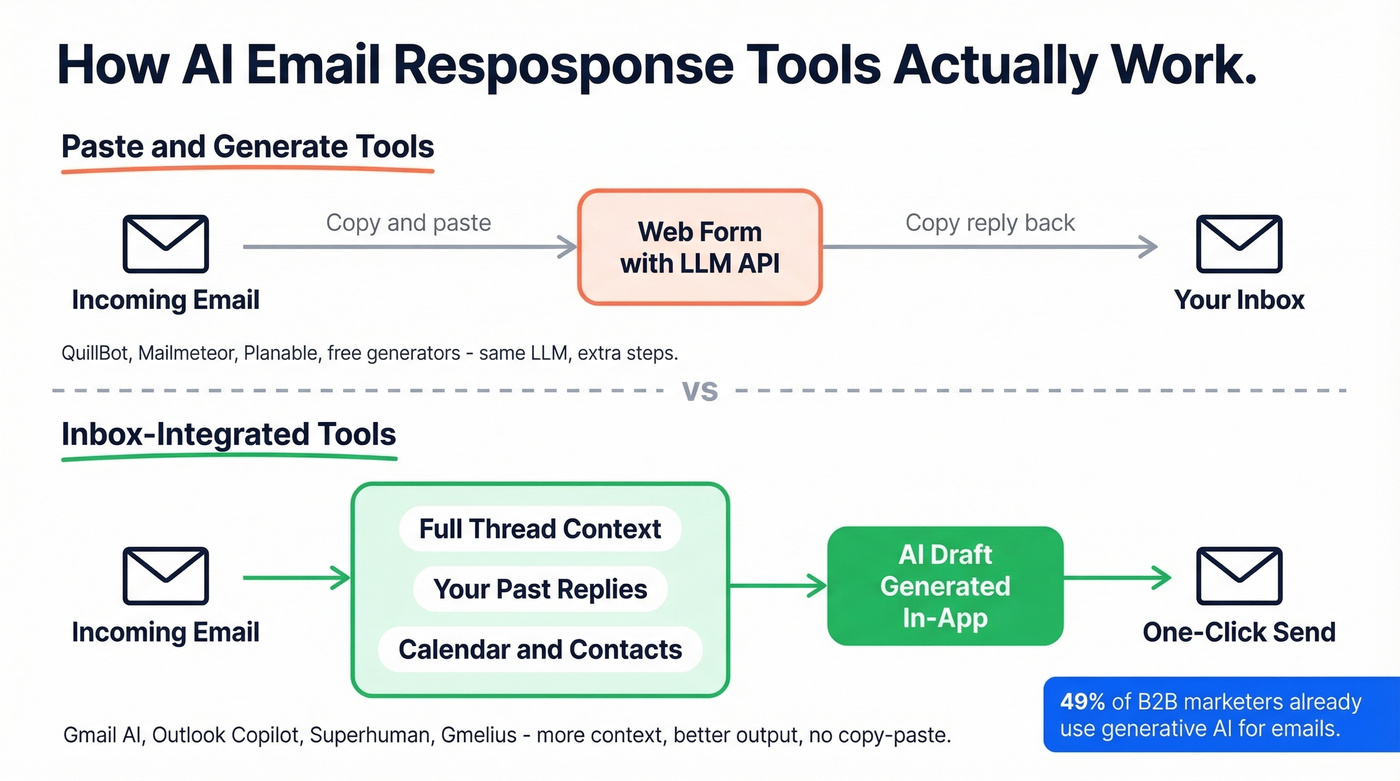
There are two broad categories. "Paste-and-generate" tools, where you copy an email into a web form, get a response, and copy it back. And inbox-integrated tools, where the AI sits inside Gmail or Outlook and drafts replies with access to the full thread. The second category saves you the copy-paste step entirely and produces better output because it has more context - the full conversation history, your past replies, sometimes even your calendar. 49% of B2B marketers already use generative AI for emails, and the ones getting real value are almost always using integrated tools.
Here's the thing: most standalone "AI email generators" are thin wrappers around the same GPT or Claude APIs you can access directly. The wrapper adds a nice UI and maybe some tone presets, but it doesn't add intelligence.
What Your Email Client Already Does
Before you pay for anything, check what's already in your inbox. Both Gmail and Outlook have shipped significant AI features in the past year, and most users haven't turned them on.
Gmail's Built-In AI (Free)
Gmail is rolling out three AI features to all personal users in the US, with global availability following:
- Help Me Write - tap the pen icon in any compose window and describe what you want to say. Gmail generates a full draft. You can refine it with Formalize, Elaborate, Shorten, or Polish controls.
- AI summaries - long threads get an AI Overview card at the top so you don't have to re-read 14 messages to find the actual ask.
- Personalized Suggested Replies - these aren't the old three-word Smart Replies. Gmail uses conversation context and your writing style to draft specific, relevant responses.
For Workspace users on Business or Enterprise plans, Google added Gemini-powered contextual Smart Replies that consider the full email thread. No separate Gemini add-on required. Just enable "Smart features and personalization" in your Gmail settings.
Outlook + Microsoft 365 Copilot
Copilot in Outlook handles email summaries, full draft generation, and writing coach suggestions. The newer workflow accelerators are genuinely useful: one-tap prompts like "Triage my inbox," "What needs my reply?" and "Summarize and reply" work across Windows, web, iOS, Android, and classic Outlook.
The catch? Copilot runs around $30/user/month as an add-on, and the licensing is confusing. We've seen users toggle Copilot on in settings and then wonder why nothing shows up - it's almost always a license or tenant gating issue. If you're on a GoDaddy-hosted Microsoft 365 plan or a non-standard configuration, expect friction before you get value.

AI can draft the perfect reply in seconds. But it's worthless if that reply bounces. Prospeo's 98% email accuracy and 7-day data refresh mean your AI-crafted responses land in real inboxes - not spam folders or dead addresses.
Start with 75 free verified emails. No credit card, no contract.
Best AI Email Response Tools
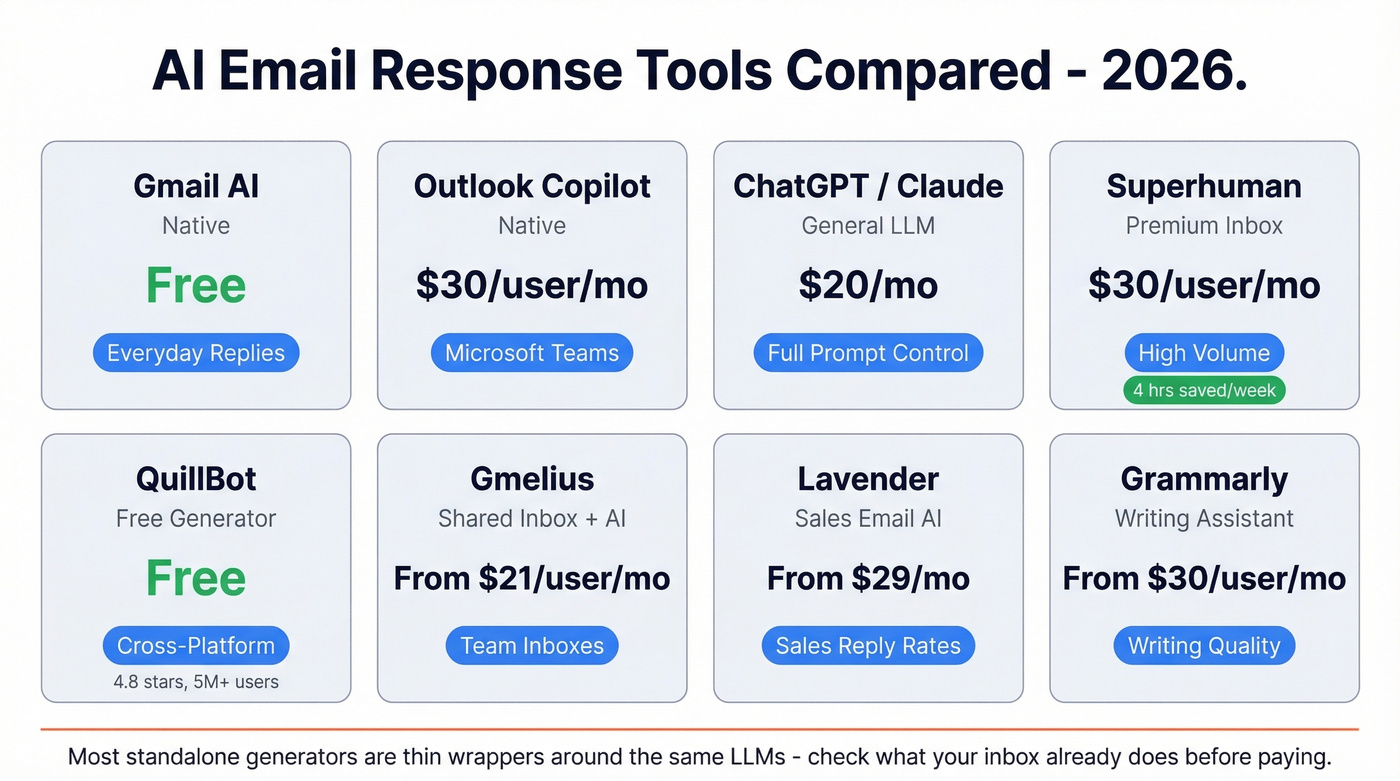
| Tool | Type | Price | Best For |
|---|---|---|---|
| Gmail AI | Native | Free | Everyday replies |
| Outlook Copilot | Native | ~$30/user/mo | Microsoft shops |
| ChatGPT / Claude | General LLM | $20/mo (Plus) | Full prompt control |
| Superhuman | Premium inbox | $30/user/mo | High-volume email |
| QuillBot | Free generator | Free (Premium avail.) | Cross-platform |
| Gmelius | Shared inbox + AI | From $21/user/mo | Team inboxes |
| Lavender | Sales email AI | From $29/mo | Sales reply rates |
| Grammarly | Writing assistant | From $30/user/mo | Writing quality |
ChatGPT or Claude
Look - most "AI email generators" are wrappers around these same models. If you're comfortable writing a prompt, you don't need a dedicated tool. ChatGPT Plus runs $20/mo; Claude has a comparable tier. The free versions handle email drafting fine for moderate volume.
The move is to create a saved prompt template. Something like: "You're my email assistant. Match my tone: direct, friendly, concise. Reply to this email: [paste]." That gets you 90% of what any dedicated email AI offers. The tradeoff is no inbox integration - you're copying and pasting. For 5-10 emails a day, that's fine. For 50+, it's a workflow killer.
If you want a deeper breakdown of dedicated tools vs general LLMs, see our guide to AI email writers.
Superhuman
At $30/user/mo, Superhuman is the only paid email tool we'd recommend if email is genuinely your primary work surface. The AI isn't bolted on - it's built into the full inbox workflow: triage, draft, send, follow-up. Superhuman reports teams save 4 hours per person per week and respond twice as fast to important messages. Those are vendor numbers, but the product experience backs them up. If you're processing 50+ emails daily and speed matters, this is the tool. If you handle fewer than 20 emails a day, skip it - you're paying for horsepower you won't use.
QuillBot
Free to try, available across Edge, macOS, Windows, and a Word add-in - used by 5M+ people. QuillBot's response generator is a copy-paste workflow, not inbox-integrated, but it's solid for quick one-off replies when you're working outside your email client. It holds a 4.8-star rating on Trustpilot. Think of it as a better text expander, not an inbox replacement.
Gmelius
Starting at $21/user/mo, Gmelius makes sense specifically for teams sharing inboxes. The AI sits inside Gmail and drafts replies with full thread context, turning your shared inbox into an automated reply system. Solo user? Skip it. The value is entirely in shared workflows, assignment rules, and collaborative drafting.
Lavender ($29/mo) focuses on sales email coaching - reply rate optimization, not general inbox management. Grammarly ($30/user/mo) is a writing quality layer that improves what you've already drafted rather than generating replies from scratch.
If you're evaluating tools specifically for outbound, compare options in our roundup of AI email outreach tools.
Free Generators
Mailmeteor, Planable, and Amie all offer free reply generators. Planable's tool requires no sign-up. They're fine for occasional one-off replies - paste an email in, get a response back. But they're glorified text boxes over the same LLM APIs. If you're using these more than twice a day, just open ChatGPT.
If you're building a repeatable outbound system (not just one-off replies), start with AI email automation and then layer in AI email sequencing.
You just optimized your reply speed with AI. Now optimize who you're replying to. Prospeo gives you 300M+ verified contacts with 30+ filters - so your outbound replies go to real decision-makers, not outdated addresses that tank your domain reputation.
Bad data costs more than bad copy. Fix the foundation first.
How to Get Better AI Replies
The tool matters less than the prompt. Here's a framework we've refined over months that consistently produces replies you won't have to rewrite from scratch.
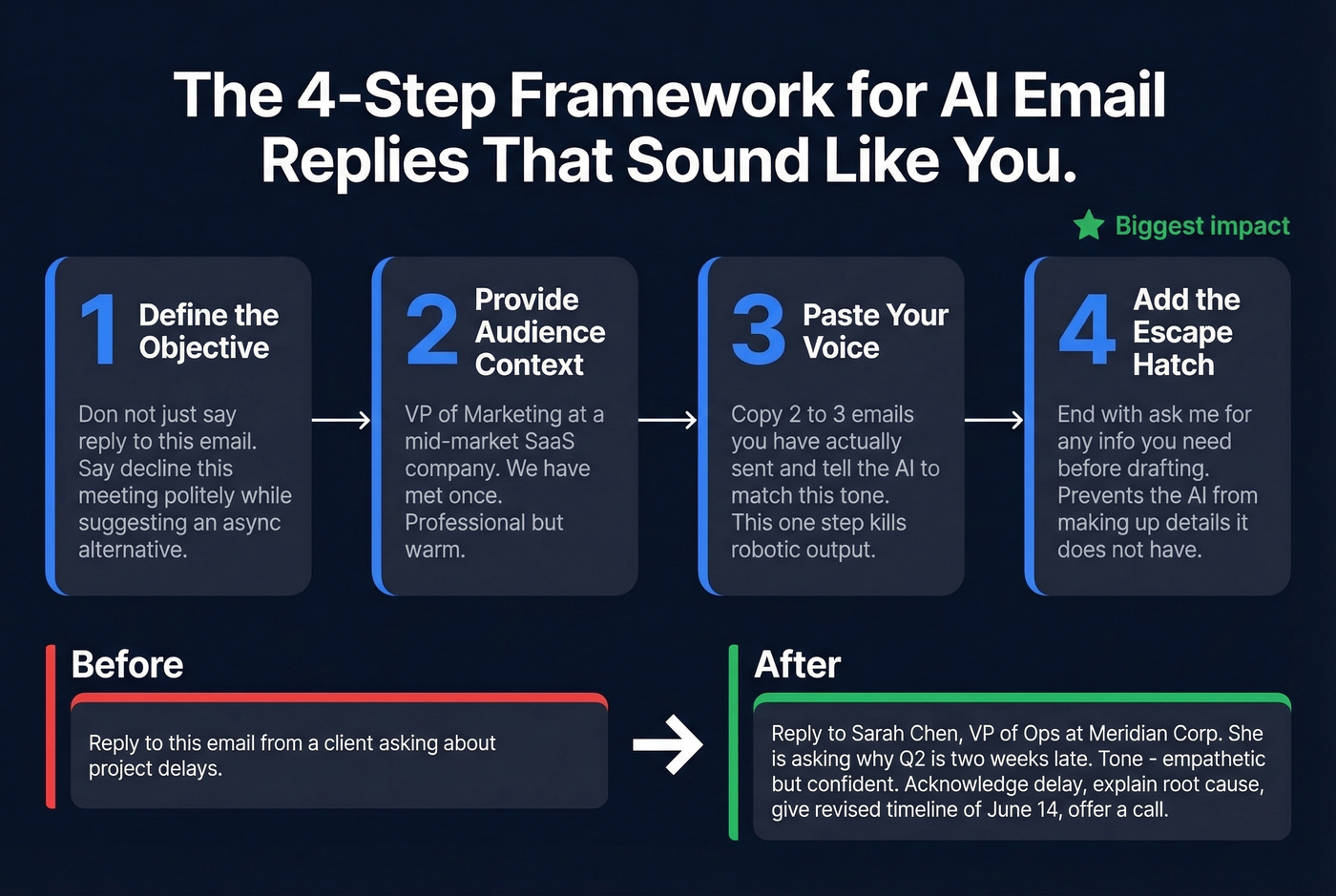
Step 1: Define the objective. Don't just say "reply to this email." Say "decline this meeting request politely while suggesting an async alternative."
Step 2: Provide audience context. "This is from a VP of Marketing at a mid-market SaaS company. We've met once. Keep it professional but warm."
Step 3: Paste your voice. Copy two or three emails you've actually sent and tell the AI "match this tone." This single step eliminates most of the robotic-sounding output people complain about. AI defaults to generic, over-polished prose unless you feed it examples of your actual writing.
Step 4: Add the escape hatch. End your prompt with "ask me for any more information you need before drafting." This prevents the AI from hallucinating details it doesn't have - a tip Forbes highlighted that genuinely works.
Before: "Reply to this email from a client asking about project delays."
After: "Reply to Sarah Chen, VP of Operations at Meridian Corp. She's asking why the Q2 deliverable is two weeks late. Tone: empathetic but confident. Acknowledge the delay, explain the root cause - vendor dependency - give a revised timeline of June 14, and offer a 15-min call this week. Match my writing style: [paste example]."
Night and day. The DEPTH method - popular on r/PromptEngineering - takes this further with multiple perspectives, success metrics, and human feedback loops. It's overkill for a quick reply, but for high-stakes client emails, the structured approach pays off.
If you want more plug-and-play templates, use our library of ChatGPT email prompts.
AI Sales Replies: The Uncomfortable Truth
Here's my hot take: if your average deal size is under five figures, you probably don't need any dedicated AI email tool. Gmail's free AI plus a saved ChatGPT prompt covers 90% of use cases. The remaining 10% doesn't justify another subscription.
And the data backs up a broader concern. An ActivTrak study analyzed 10,584 users across 180 days before and after AI adoption. Time spent on email increased 104%. Messaging went up 145%. Focused, uninterrupted work sessions dropped 9%. The quote from the report is blunt: "The data is unambiguous: AI does not reduce workloads."
What's happening? People add AI tools, then spend more time tweaking outputs, experimenting with prompts, and managing new workflows than they saved on drafting. The takeaway isn't "don't use AI for email." It's this: pick one or two tools, integrate them deeply into your existing workflow, and build the discipline to use them consistently without tinkering endlessly. The teams we've seen get real value from automated sales replies are the ones that standardized on a single approach and stopped experimenting after week two.
If you're using AI specifically to drive pipeline, pair replies with a real outbound system: AI cold email outreach plus AI sales outreach.
Privacy: What Happens to Your Emails
When you use an AI email tool, at least two companies see your data: your email provider and the tool vendor. For native tools like Gmail AI and Outlook Copilot, those are the same company. For third-party extensions, you're sending email content to an additional server.
Three principles worth following:
- Minimal access - don't grant full inbox scanning permissions if the tool only needs to read the current thread. Check what you're actually granting.
- Local-first when possible - tools that process on-device reduce your exposure to breaches and data misuse.
- Know how your data trains the AI - some tools share model updates, not raw data. That's generally fine, but reconstruction risks exist.
Gartner predicts that by 2028, 40% of large enterprises will use AI to monitor employee moods and behaviors. Your email content is training data for someone.
If you're doing outbound at scale, privacy and compliance also intersect with deliverability - see our guide on email contact management.
When to skip AI replies entirely: sensitive HR conversations, legal matters, high-stakes negotiations, anything involving financial details you wouldn't want on a third-party server. Type those yourself.
FAQ
Is AI email response free?
Yes. Gmail's Help Me Write and Suggested Replies are free for personal US accounts. Browser-based generators like Mailmeteor and Planable also cost nothing - Planable doesn't even require sign-up. ChatGPT's free tier handles email drafting too. Paid tools like Superhuman ($30/mo) and Gmelius (from $21/mo) add inbox integration and team features.
Can AI reply to emails in Gmail?
Gmail includes AI-powered Suggested Replies and Help Me Write for personal US users, with Workspace plans getting Gemini-powered contextual Smart Replies. No third-party extension needed - enable "Smart features and personalization" in settings and reply suggestions appear automatically in your compose window.
Do AI email replies sound robotic?
They default to generic and over-polished, but you can fix that. Paste two or three real emails you've sent and instruct the AI to match your tone. General LLMs like ChatGPT and Claude with good prompts typically outperform purpose-built generators that rely on rigid templates. Always edit before hitting send.
What's the best free tool for AI email replies?
For most people, Gmail's built-in AI. No install, no copy-pasting. If you need a standalone generator, Planable is free with no sign-up. For outbound sales, Prospeo's free tier handles email verification so your replies actually land in real inboxes - 75 emails/month plus 100 Chrome extension credits.
How do I use AI for sales email replies?
Write the reply with any AI tool - ChatGPT, Gmail AI, Superhuman - but verify your contact list first. Bounced emails destroy domain reputation fast. Pair verified data with a solid prompt template and you'll outperform most dedicated sales email platforms.