

Email Contact Management: What Actually Works in 2026
You just exported your "clean" contact list, loaded it into your sequencer, and 40% bounced. The domain reputation you spent six months building? Gone in one send. That's not a tool problem - it's an email deliverability contact management problem, and no CRM on earth fixes it by itself.
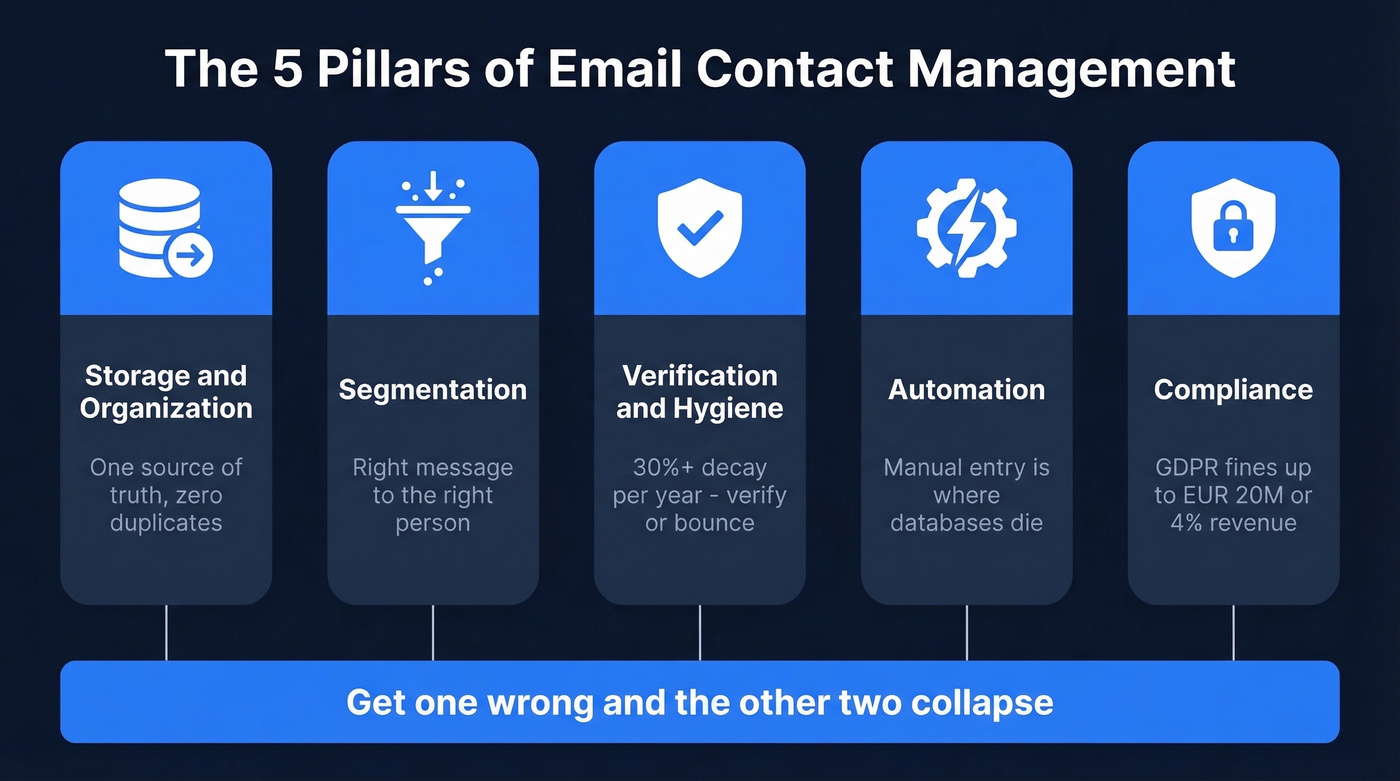
Effective email contact management sits on three pillars: systems, strategy, and data. Get one wrong and the other two collapse. Your CRM is the system. Your segmentation and workflows are the strategy. And the data - verified, fresh, properly structured - is what makes everything else work. Email marketing often returns around $8-$9 for every dollar spent, but only when your messages actually reach real inboxes.
What You Need (Quick Version)
Before you evaluate a single tool, nail three things: a single source of truth for contact records, a verification layer that keeps emails deliverable, and a documented process for segmentation and hygiene. Everything else is optimization.
Quick picks by use case:
- Email verification + data quality: Prospeo (free tier, 98% email accuracy, 7-day refresh)
- Free CRM + contact storage: HubSpot (free plan includes 2 users)
- Budget CRM: Bigin by Zoho ($7/user/month)
- Google Workspace teams: ContactsFlow
- Outlook-native teams: eWay-CRM
What Is Email Contact Management?
It isn't just storing names and email addresses. It's the practice of organizing, verifying, segmenting, and maintaining your contact data so every email you send reaches a real person who's relevant to your business.
It's also not the same as CRM. Contact management is the digital address book - names, emails, phones, companies, tags, notes. A CRM layers pipeline tracking, automation, analytics, and multi-user collaboration on top. If you're a solo operator or a small team that just needs organized, searchable contacts, you don't need a full CRM. If you're tracking deals through stages and reporting on pipeline velocity, you do.
The distinction matters because most "contact management" advice is really CRM marketing in disguise.

Five Pillars That Actually Matter
Storage and Organization
Every contact needs a home - one home. The moment you're editing contacts in Gmail, your phone, and your CRM independently, you've created three sources of truth and zero reliable ones.
If you're still deciding what that "home" should be, start with a shortlist of contact management software and pick the one your team will actually use daily.
Here's a failure mode we've seen repeatedly: cross-platform syncing creates duplicates when platforms use different organizing primitives, like iPhone "Groups" vs. Gmail "Labels." The fix is boring but effective. Pick a primary system, and make everything else sync from it. Tags, custom fields, and consistent naming conventions aren't glamorous, but they're the difference between a searchable database and a junk drawer.
Segmentation
Segmentation determines who gets which message. Start simple - new contacts vs. existing customers - then layer in demographic, behavioral, engagement, and lifecycle data. Dynamic segments that update automatically based on real-time behavior are the goal.
Someone who opened your last five emails and visited your pricing page shouldn't sit in the same bucket as someone who hasn't engaged in six months. Even basic segmentation dramatically improves deliverability and response rates.
If you want a more tactical playbook, build your segments around intent based segmentation rather than static tags.
Verification and Hygiene
Your database decays 30%+ per year. People change jobs, companies rebrand, domains expire. Without a verification layer, you're sending into the void and tanking your sender reputation.
If you're diagnosing bounces, start with email bounce rate benchmarks and codes so you know what you're actually seeing.
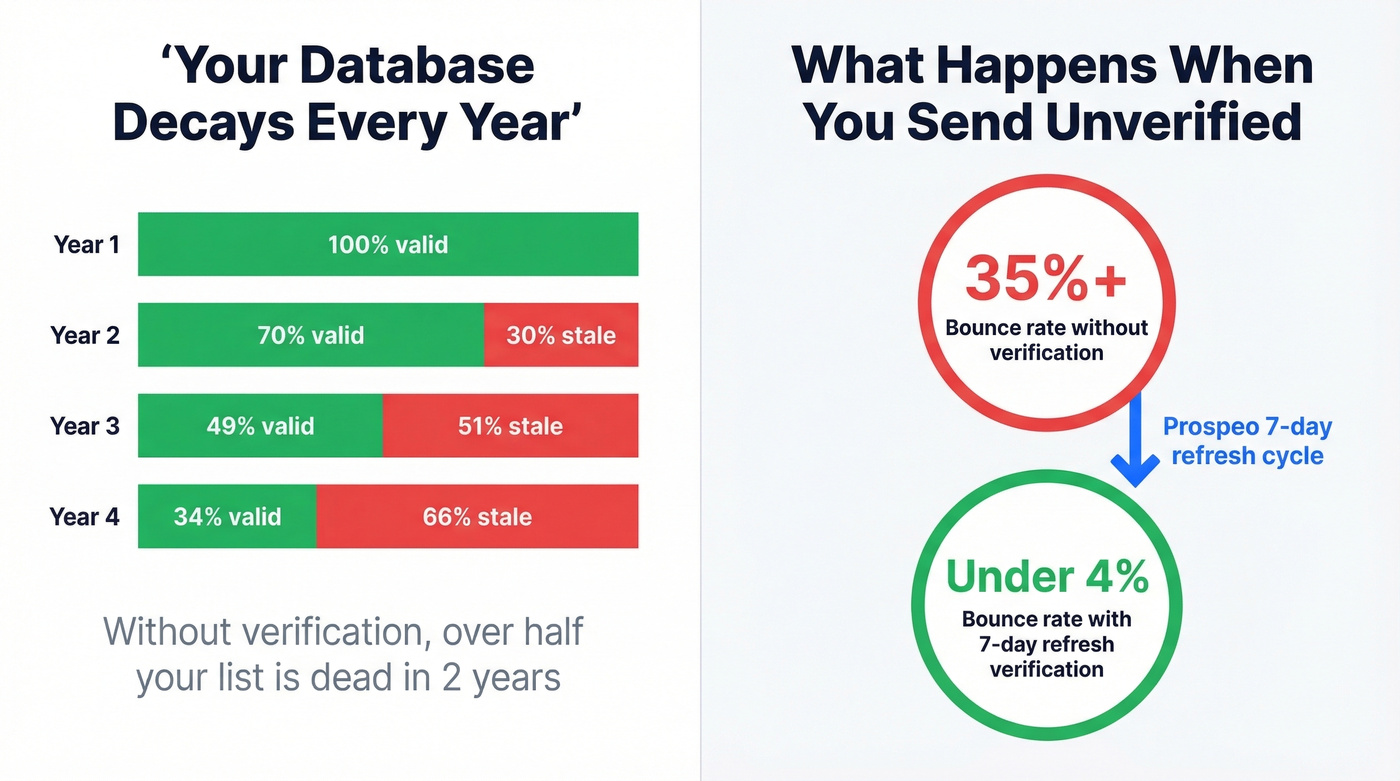
We've watched teams triple their bounce rates overnight by importing unverified lists from trade shows. The fix is straightforward: run every segment through a verification tool before you hit send. A 7-day data refresh cycle catches changes far faster than a monthly or quarterly check.
If you're building a verification stack, compare options in our guide to Bouncer alternatives.
Automation
Manual data entry is where databases go to die. Auto-log calls, meetings, and email interactions. Set reminders for follow-ups. Use workflow triggers to move contacts between segments based on behavior. The less your team touches contact records by hand, the cleaner your data stays.
If you're running outbound sequences, tighten your process with a simple sequence management framework.
Compliance
GDPR isn't optional, and it isn't just for EU companies. If you process EU residents' data, it applies to you. Fines reach EUR 20M or 4% of global turnover. Build consent tracking, unsubscribe mechanisms, and permission-level distinctions into your process from day one - not after your first complaint.
Contact Hygiene Checklist
Use this before every major campaign:
- All contacts live in one primary system - no rogue spreadsheets
- Active segments verified for email deliverability within the last 30 days
- Contacts who haven't engaged in 90+ days moved to a re-engagement or suppression segment
- Consent records include timestamps and source documentation
- Role-based access controls set - no intern has full export permissions
- Duplicate detection run and merged since last import

Your hygiene checklist is only as good as your data source. Prospeo verifies every email through a 5-step process - catch-all handling, spam-trap removal, honeypot filtering - and refreshes all 300M+ records every 7 days. That's why teams using Prospeo see bounce rates drop from 35%+ to under 4%.
Stop sending into the void. Verify every contact before you hit send.
Mistakes That Wreck Your Database
1. No single source of truth. iPhone Groups and Gmail Labels use different organizing primitives. Edit a contact in both, and you've got duplicates, conflicting data, and sync nightmares. Pick one platform as primary. Everything else reads from it.
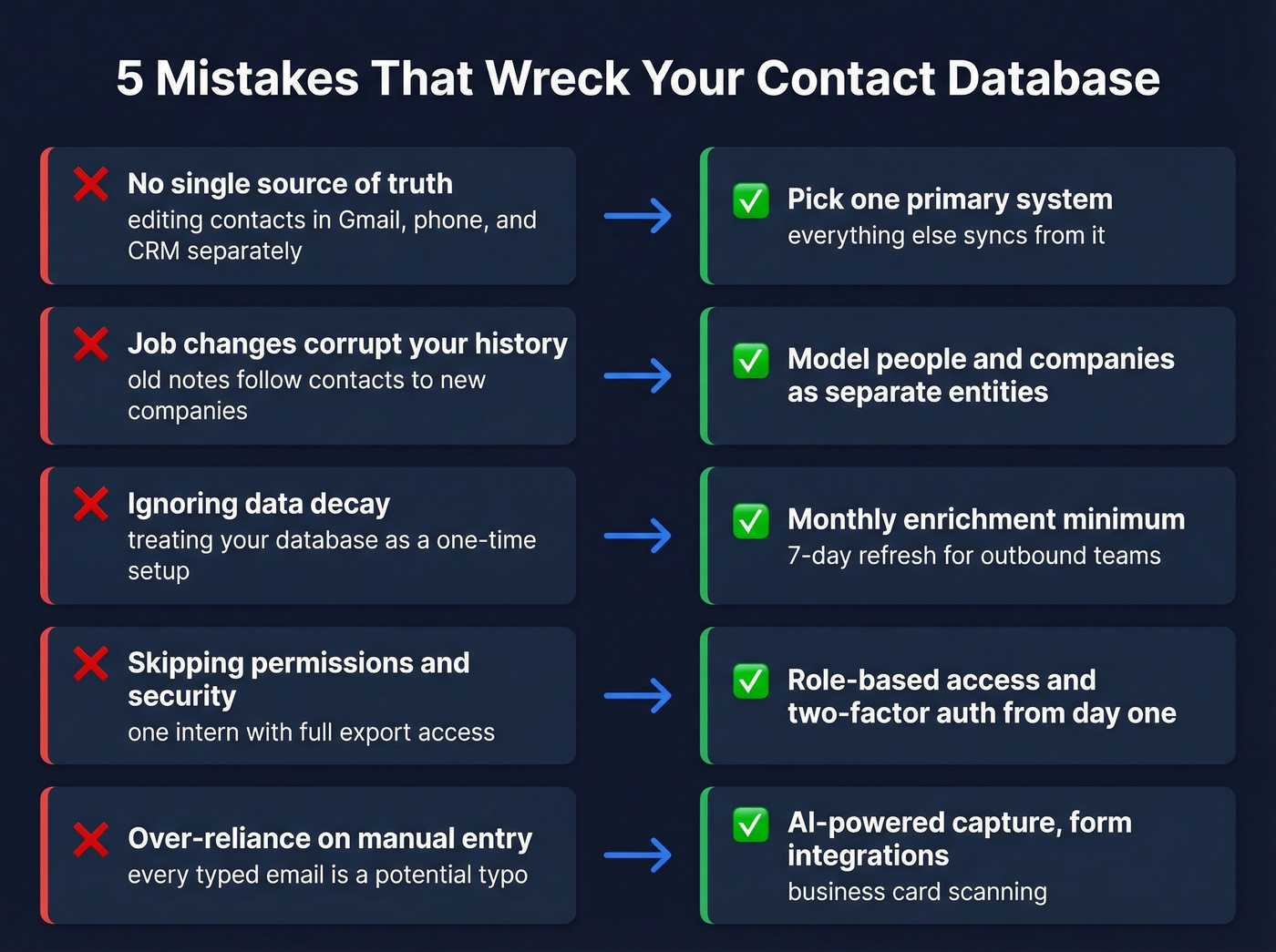
2. Letting job changes corrupt your history. When a contact moves companies, their old notes and opportunities shouldn't follow them to the new employer. Model people and companies as separate entities. Some teams create a new contact record per company relationship - extra work, but it saves months of confusion down the line.
3. Ignoring data decay. Contacts go stale faster than most teams realize. In our experience, quarterly enrichment is the minimum, and monthly is better for high-volume outbound teams. Treating your email database as a one-time setup task instead of an ongoing process is the root cause of most deliverability problems.
If you're doing enrichment at scale, use a dedicated data enrichment services workflow instead of ad-hoc CSV uploads.
4. Skipping permissions and security. Role-based access and two-factor authentication aren't enterprise luxuries. One intern with full export access can create a compliance nightmare.
5. Over-reliance on manual entry. Every manually typed email address is a potential typo. Use AI-powered capture, form integrations, and business card scanning to reduce human error at the point of entry.
AI in Contact Management
"AI-powered CRM" gets thrown around a lot. Here's what it actually does right now:
- Auto-logging interactions - calls, meetings, and emails get attached to contact records without manual input
- Flagging at-risk accounts - engagement drops and missed follow-ups surface automatically
- Drafting emails from CRM context - AI pulls deal stage, recent notes, and contact history into a draft
- Natural language queries - "Which deals haven't been touched in 30 days?" returns a filtered list
- Next-best-action suggestions - based on patterns from closed-won deals
Here's the thing: AI is only as good as your data. If your contact records are riddled with outdated titles, wrong companies, and unverified emails, the AI layer just automates bad decisions faster. Fix the data first. Then let AI accelerate what's already working.
If you're using AI to improve outreach, pair this with an AI email checker so quality doesn't slip as volume rises.
GDPR and Your Contact Data
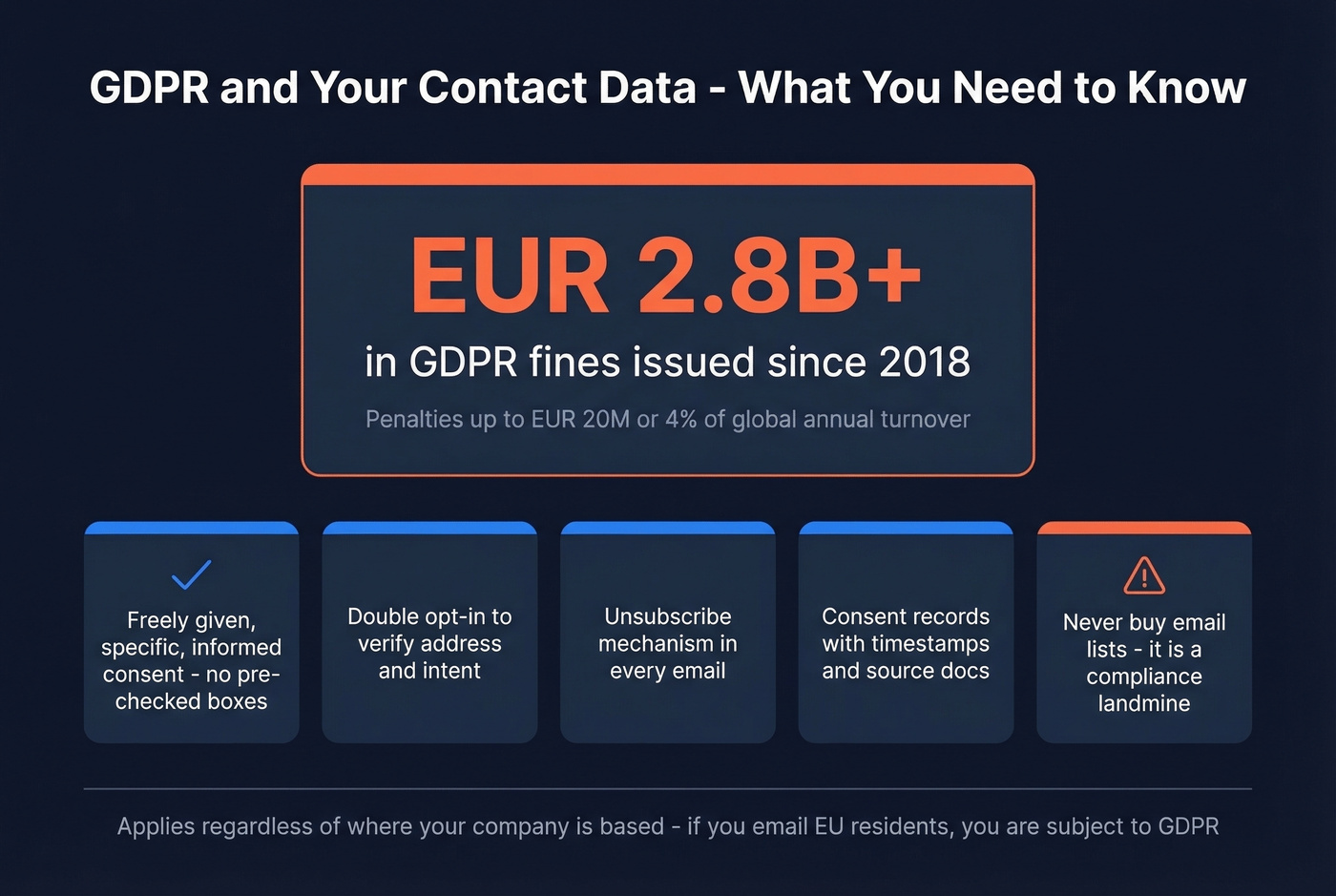
EU data protection authorities have issued EUR 2.8B+ in GDPR fines since 2018. This isn't theoretical risk.
What your process needs:
- Consent that's freely given, specific, informed, and unambiguous - pre-checked boxes don't count
- Double opt-in to verify both the address and the intent
- An unsubscribe mechanism in every communication
- Consent records with timestamps and source documentation
- No purchased email lists - buying contacts is a compliance landmine
GDPR applies regardless of where your company is headquartered. If you're emailing EU residents, you're subject to penalties up to EUR 20M or 4% of global annual turnover, whichever is higher. The GDPR enforcement tracker is worth bookmarking if you want to see how regulators are actually applying fines across industries.
Best Tools for 2026
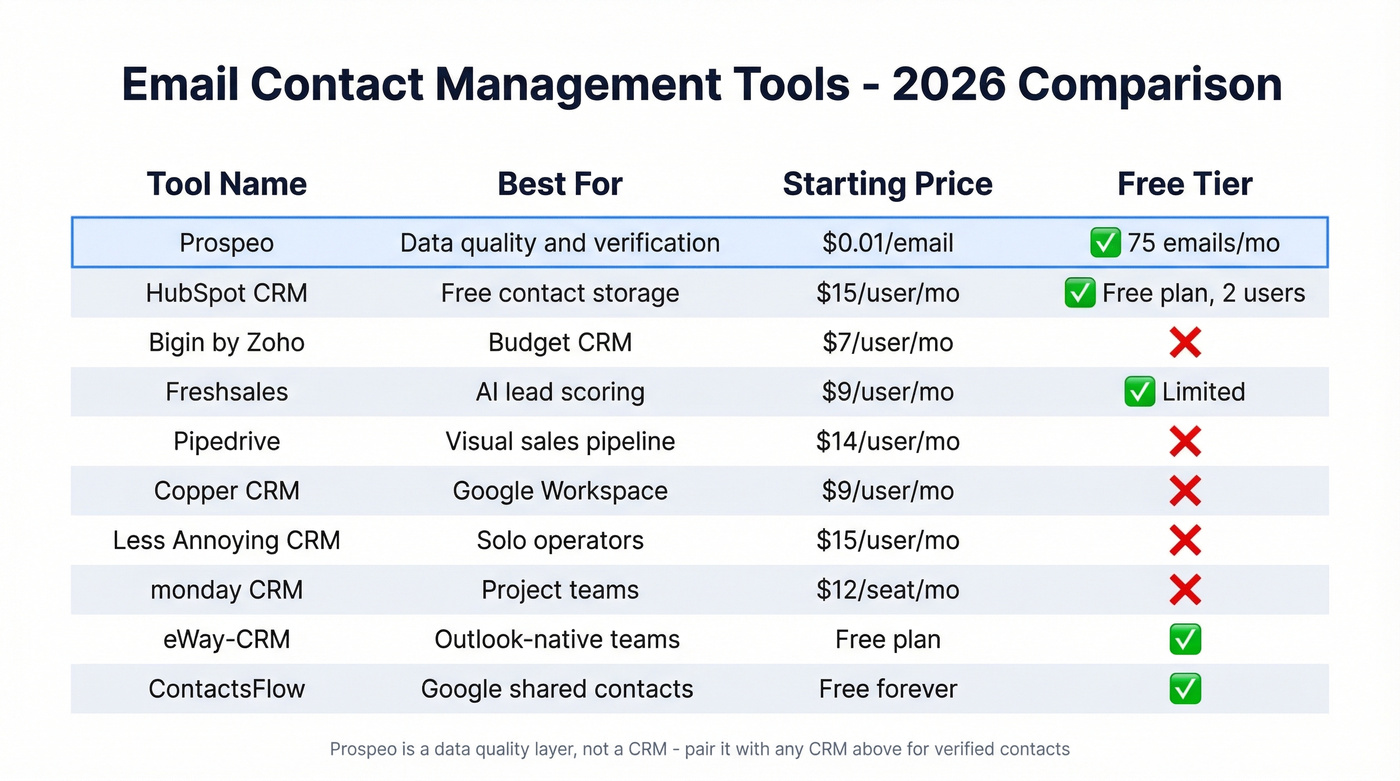
| Tool | Best For | Starting Price | Free Tier? |
|---|---|---|---|
| Prospeo | Data quality & verification | ~$0.01/email | Yes (75 emails/month) |
| HubSpot CRM | Free contact storage | $15/user/mo | Yes (free plan, 2 users) |
| Bigin by Zoho | Budget CRM | $7/user/mo | No |
| Freshsales | AI lead scoring | $9/user/mo | Yes (limited) |
| Pipedrive | Visual sales pipeline | $14/user/mo | No |
| Copper CRM | Google Workspace | $9/user/mo | No |
| Less Annoying CRM | Solo operators | $15/user/mo | No |
| monday CRM | Project teams needing CRM | $12/seat/mo | No |
| eWay-CRM | Outlook-native teams | Free plan | Yes |
| ContactsFlow | Google shared contacts | Free forever | Yes |
Prospeo
Prospeo isn't a CRM - it's the data quality layer that makes any CRM work. The platform covers 300M+ professional profiles with 143M+ verified emails and 125M+ verified mobile numbers. A 7-day data refresh cycle means you're not working with stale records, and 98% email accuracy keeps bounce rates under control.
Native integrations with Salesforce, HubSpot, Smartlead, Instantly, Lemlist, Clay, Zapier, and Make mean verified data flows directly into whatever system you're already using. For teams that have a CRM but can't trust the data inside it, this is the fix.
HubSpot CRM
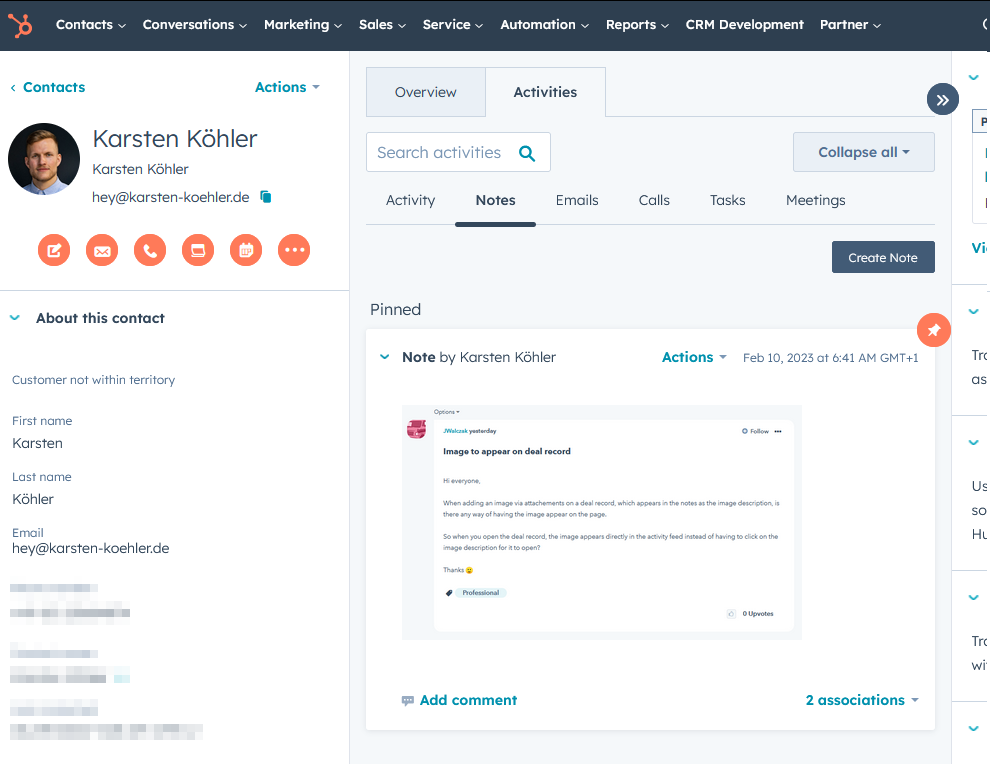
The default free option for a reason. The free plan lets you create up to 1,000 contact and company records with 2 users. You get contact storage, basic deal tracking, and email tools inside contact records.
HubSpot also improves data quality with AI-powered validation, duplicate detection, intelligent field completion, and enrichment of company details from its business database. The limitation is that it's not a dedicated email verification layer - so if outbound deliverability matters, pair it with a verification tool and verify before you send. HubSpot's free CRM overview breaks down what's included.
Bigin by Zoho
At $7/user/month, Bigin is one of the cheapest CRMs with pipeline management. It's stripped down compared to full Zoho CRM, which is the point - you get contact management, deal tracking, and basic automation without the complexity tax. Good for teams under 10 who don't need enterprise features.
Who Should Skip What
Freshsales starts at $9/user/month with AI-powered lead scoring and built-in phone and email. The AI scoring is mediocre for the first few months and genuinely helpful once you have enough data to train it. If you're a small sales team wanting one platform for calls, email, and scoring, it's a solid pick. For teams that need deep customization, look elsewhere.
Pipedrive starts at $14/user/month and has the best visual pipeline in the mid-market CRM space. It's built for salespeople who think in deals, not for marketing teams who think in segments. Skip it if email campaigns are your primary use case.
Copper CRM starts at $9/user/month. If your team lives in Google Workspace, Copper integrates with Gmail and Google Calendar in a way that feels native rather than bolted on. The tradeoff: it's less powerful outside the Google ecosystem.
The Rest in 30 Seconds
Less Annoying CRM charges $15/user/month flat - no tiers, no upsells. monday CRM ($12/seat/month) is better at project management than contact management, so skip it if you don't need both. eWay-CRM lives inside Outlook with a free plan, ideal for Microsoft-native teams. ContactsFlow handles shared contacts across Google Workspace with a free forever tier. The consensus on r/sales is that most teams under 20 people are better off with a simple, cheap CRM plus solid data than an expensive all-in-one they'll never fully configure.
AI can't fix bad data. Prospeo's enrichment returns 50+ data points per contact at a 92% match rate - titles, companies, verified emails, and direct dials that are actually current. At $0.01 per email, cleaning your entire database costs less than one bounced campaign.
Give your CRM data it can actually work with.
What It Actually Costs
The sticker price on a CRM is never the real price. Hidden costs - add-ons, integrations, onboarding, premium support - inflate the total by 20-40%. An SMB typically pays $10-30/user/month for a mid-tier CRM. Enterprise deployments run $90-150+/user/month before customization.
Let's be honest: if your deals average under five figures, you probably don't need a CRM that costs more than $15/user/month. A free CRM with verified data will outperform an expensive one full of garbage contacts every single time. Budget separately for verification - it runs about $0.01 per email with no contracts, which is a rounding error compared to what you're spending on the CRM itself.
FAQ
What's the difference between contact management and CRM?
Contact management is an organized, searchable database of names, emails, phones, and notes - a digital address book. CRM adds pipeline tracking, automation, analytics, and multi-user collaboration on top. Solo operators and very small teams often need only contact management. Once you're tracking deals through stages or running automated sequences, you need a CRM.
How often should I clean my contact database?
Quarterly at minimum - monthly for high-volume outbound teams. B2B contact data decays 30%+ per year as people change jobs and domains expire. Run verification on active segments before every major campaign; waiting until bounce rates spike means sender reputation damage is already done.
Do I need GDPR compliance if I'm not in the EU?
Yes, if you process EU residents' data. GDPR applies regardless of your company's location. Fines reach EUR 20M or 4% of global annual turnover. If anyone on your contact list has an EU email address, you need consent records, unsubscribe mechanisms, and a documented data processing basis. The ICO's guide to international transfers is a useful starting point for non-EU companies.
What's a good free tool for email contact management?
Prospeo's free tier includes 75 email verifications per month with 98% accuracy - enough to audit a small list or test data quality before committing. HubSpot CRM offers free contact storage for up to 2 users. ContactsFlow provides free shared contacts for Google Workspace. Combine a free CRM with a free verification layer for a zero-cost stack that actually works.