

ChatGPT Email Prompts: 25 Templates That Actually Work in 2026
Your Emails Sound Like AI. Here's the Fix.
You sent 200 cold emails last week. Three replies - one was "please remove me from your list." Average cold email response rates sit between 1-8.5%, and most AI-written outreach lands on the wrong end of that range. The reps consistently hitting 10%+ reply rates aren't using better ChatGPT email prompts. They're structuring them differently.
The problem isn't ChatGPT. It's that you're prompting it like a search engine instead of briefing it like a senior copywriter who needs context, constraints, and a clear deliverable. Feed it "write me a cold email" and you'll get something that reads like a LinkedIn post crossed with a fortune cookie. Feed it a structured brief and you'll get something your prospects actually reply to.
Here's the thing: we've tested dozens of prompt structures across our own outreach and for this guide, and the gap between lazy prompts and structured ones isn't incremental. It's night and day. Below you'll find the framework that makes the difference, 25 steal-ready templates across cold outreach, follow-ups, internal comms, and marketing campaigns, plus the workflow details most prompt guides skip - like making sure your emails actually reach real inboxes.
What You Need (Quick Version)
Learn the 5-part prompt framework - Persona + Context + Task + Constraints + Format. It's the difference between generic slop and emails that sound like you wrote them.
Start with the cold outreach prompt below. Practitioners report 15-20% reply rates with it. Use it as your base template and adapt from there.
The 5-Part Prompt Framework
Every bad AI-generated email traces back to the same root cause: vague input produces generic output. A common complaint is that ChatGPT "dramatizes everything" and sounds "stagnant and monotonous" without strict constraints. The fix is structure. Use this framework every time:
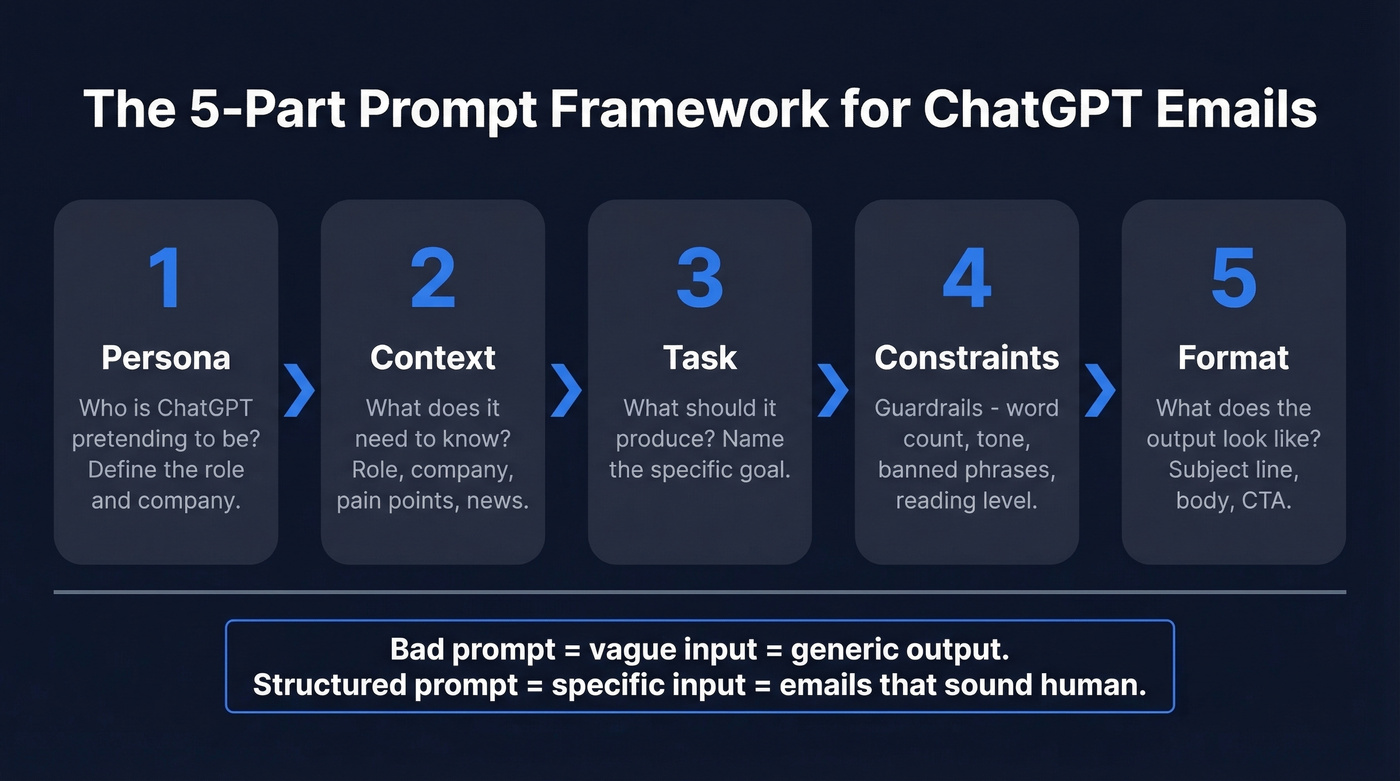
- Persona - Who is ChatGPT pretending to be? ("You're an SDR at a Series B cybersecurity company.") (If you're building a repeatable outbound system, start from an Ideal Customer Profile so the persona stays consistent.)
- Context - What does ChatGPT need to know? Recipient's role, company, recent news, pain points.
- Task - What exactly should it produce, and what's the behavioral goal? A cold email designed to convert is different from one designed to reactivate a lost lead. Name the objective.
- Constraints - What are the guardrails? Under 100 words, no exclamation points, 5th-grade reading level.
- Format - What should the output look like? Subject line + body + one-line CTA.
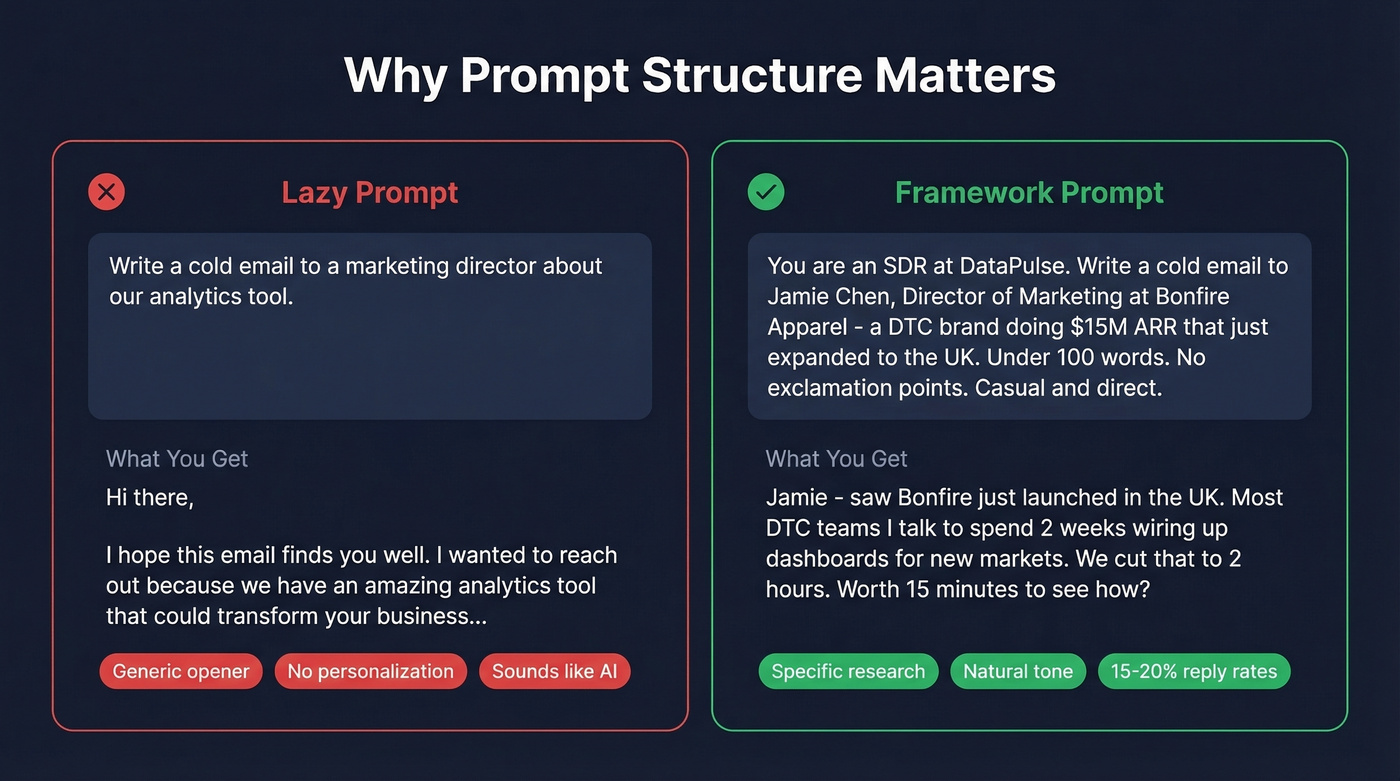
Here's the difference in practice:
Bad prompt: "Write a cold email to a marketing director about our analytics tool."
Framework prompt: "You're an SDR at DataPulse, a product analytics platform for e-commerce brands. Write a cold email to Jamie Chen, Director of Marketing at Bonfire Apparel - a DTC brand doing $15M ARR that just expanded to the UK. Our platform cuts dashboard setup time from 2 weeks to 2 hours. Goal: book a 15-minute demo. Keep it under 100 words. No exclamation points. Don't open with 'I hope this finds you well' or 'just reaching out.' Write like it's the 3rd email you've sent today - casual, direct, human. Output: subject line + body + one CTA question."
The second prompt takes 90 seconds longer to write. It produces an email that's far more usable - and actually sounds like a human sent it.
Cold Outreach Prompts
These are the prompts that move pipeline. Subject lines with the recipient's name hit 43.41% open rates versus 16.67% for non-personalized ones - so every prompt below includes subject line instructions with personalization baked in. (If you want more subject-line patterns, see our guide to professional email subjects.)
The "Doesn't Sound Like AI" Cold Email
This prompt comes from a Reddit thread where the OP tested it across 200+ outreaches and reported 15-20% reply rates. The constraints are what make it work:
You're [Your Name], [Your Title] at [Your Company]. Write a cold email to [Recipient Name], [Their Title] at [Their Company].
Company context: [2-3 sentences about their business, recent news, or a specific challenge].
Value prop: [One sentence describing what you solve].
Constraints: Under 100 words total. No exclamation points. Don't use these openers: "I hope this finds you well," "just reaching out," "wanted to see if," "I came across your profile." Write like it's the 3rd or 4th email you've sent today - not the first. Casual, direct, human.
Output: Personalized subject line (under 60 characters, include their company name) + email body + one closing question.
Referral-Based Intro
You're [Your Name] at [Company]. [Mutual Connection Name] suggested I reach out to [Recipient Name] at [Their Company] about [specific topic]. Write a warm intro email that leads with the referral, explains our value in one sentence - [value prop] - and asks for 15 minutes this week. Under 80 words. No exclamation points. Conversational tone.
Personalized First Touch (Research-Heavy)
You're an SDR researching [Recipient Name], [Title] at [Company]. Here's what you found: [paste 2-3 bullet points - recent post, company news, job posting, tech stack detail]. Write a cold email that opens with a specific observation from this research, connects it to [your product's value], and closes with a low-friction question. Under 90 words. Subject line references their company by name.
Scaling With Few-Shot Prompting
The prompts above work great for one-off emails. When you need to write 50 personalized emails in an afternoon, use few-shot prompting: give ChatGPT 2-3 examples of your best-performing emails, then ask it to generate new ones following the same pattern for different prospects.
Paste your top-performing cold email as "Example 1," a second strong email as "Example 2," then add "Now write a new email following this exact style for [new prospect details]." ChatGPT picks up on your sentence rhythm, CTA style, and tone far better than any set of written instructions can convey. We've run this approach across entire prospect lists and the output quality stays remarkably consistent from email #1 to email #50. (To operationalize this at scale, pair it with a sales outreach strategy so your prompts map to a real cadence.)
Follow-Up & Re-Engagement Prompts
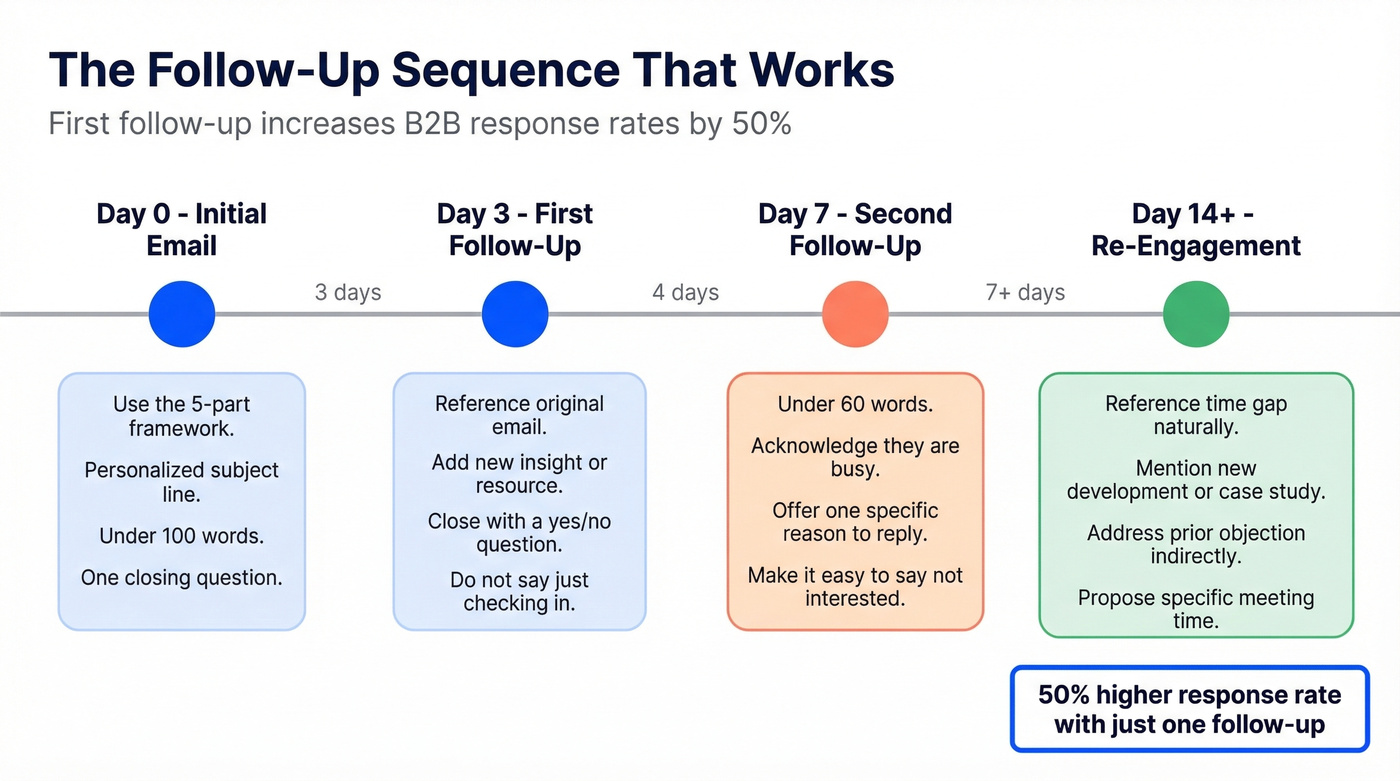
The first follow-up alone increases B2B response rates by 50%, with optimal timing at three days after initial contact. Most reps either never follow up or send something that reads like "just bumping this to the top of your inbox." Both are pipeline killers. (For a full cadence, use this follow up email sequence strategy.)
Follow-Up After No Reply (3 Days)
I sent [Recipient Name] at [Company] this email [paste original email]. They didn't reply. Write a follow-up that: references the original email in one sentence, adds a new insight or resource - [describe it] - stays under 100 words, and closes with a yes/no question. Don't apologize for following up. Don't say "just checking in." Tone: helpful, not desperate.
Follow-Up After No Reply (7 Days)
It's been a week since my first follow-up to [Recipient Name]. Write a final-touch email that's under 60 words, acknowledges they're busy without being passive-aggressive, offers one specific reason to reply - a new case study, relevant stat, or mutual connection - and makes it easy to say "not interested." That's a valid response too.
Re-Engagement for Lost Leads
[Recipient Name] at [Company] went cold [X weeks/months] ago. Their original objection was [describe it]. Since then, we've [launched new feature / published case study / signed competitor]. Write a re-engagement email that references the time gap naturally, mentions the new development, addresses their prior objection indirectly, and proposes a specific meeting time. Warm tone. Under 100 words.
Personalization Tokens for Sequencing
When scaling follow-ups across dozens of prospects, use personalization tokens - placeholders you fill manually or via your sequencing tool. Here's the token set that covers 90% of outbound use cases:
| Token | What It Pulls | Example |
|---|---|---|
[First Name] |
Recipient's first name | Jamie |
[Company] |
Their company name | Bonfire Apparel |
[Pain Point] |
Their primary challenge | Dashboard setup takes 2 weeks |
[Recent News] |
Company event or trigger | Just expanded to UK market |
[Mutual Connection] |
Shared contact name | Sarah from Acme |
[Case Study] |
Relevant proof point | "Cut onboarding by 60%" |
Map these before you build your sequence. The prompt quality is only as good as the data you feed into the tokens. (If your tokens are thin, add AI email personalization inputs like technographics, hiring signals, and intent.)

The best ChatGPT email prompt in the world won't save you if your emails bounce. Prospeo gives you 98% verified email accuracy with a 7-day refresh cycle - so every AI-crafted cold email actually reaches a real inbox.
Stop perfecting prompts for emails that bounce. Fix the data first.
Professional & Internal Prompts
Not every email is outbound. Sometimes you're staring at a blank compose window for 15 minutes trying to figure out how to tell your VP that the project is two weeks behind. These prompts handle the internal stuff - and honestly, they're the ones I use most often.
| Use Case | Key Constraint | Tone Target | Word Limit |
|---|---|---|---|
| Meeting request | Include 2-3 proposed times | Collegial, not stiff | 80 words |
| Status update | Lead with status, then details | Confident, concise | 120 words |
| Difficult conversation | Acknowledge impact, state the fix | Accountable, forward-looking | 100 words |
| Escalation | Name what's blocked + specific ask | Respectful urgency | 100 words |
Difficult Conversation / Apology
This is the one people agonize over.
Write an email to [Name] addressing [situation - missed deadline, miscommunication, error]. Acknowledge the impact without over-apologizing. Explain what happened in 1-2 sentences. State the fix and timeline. Tone: professional, accountable, forward-looking. Under 100 words.
Pro tip: Add "Don't use the word 'sorry' more than once" as a constraint. ChatGPT's default is to apologize in every other sentence, which undermines the confidence you're trying to project.
Escalation Email
Write an email escalating [issue] to [Name, Title]. Context: [what's been tried, what's blocked]. What you need from them: [specific ask]. Deadline: [date]. Tone: respectful urgency - this matters, but you're not panicking. Under 100 words.
Email Marketing Prompts
Marketing emails are a different animal. You're writing to lists, not individuals, and the constraints from Twilio's prompt engineering research apply here more than anywhere else: specify your deliverables, include customer personas, and add explicit tone rules. Without these guardrails, ChatGPT produces marketing copy that sounds like every SaaS newsletter you've ever unsubscribed from. (If you’re sending to lists, you’ll also want these email blast templates to stay out of spam.)
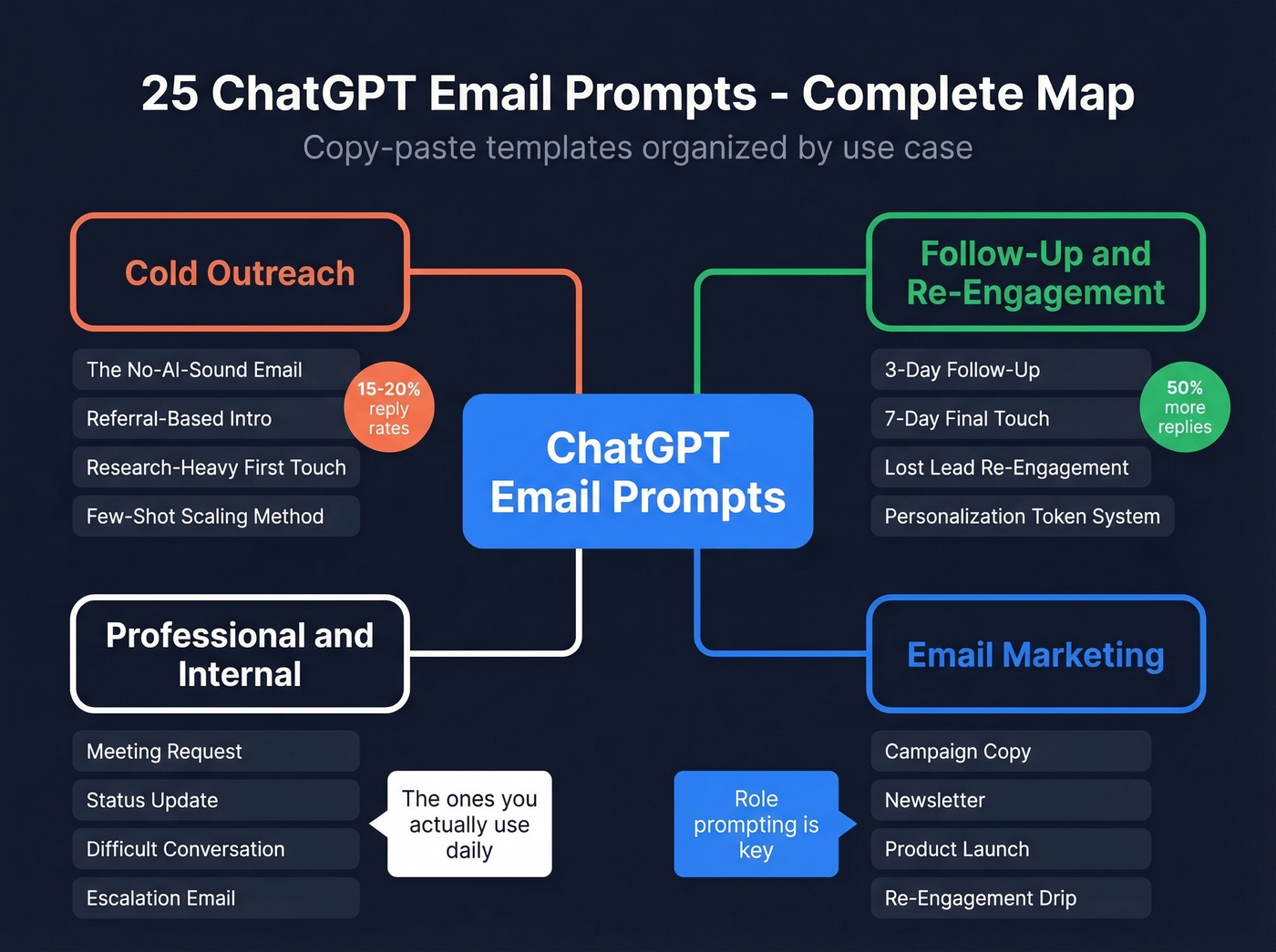
Role prompting shines here. Instead of "write a marketing email," try "You're a senior email copywriter at a DTC brand known for irreverent, punchy copy. You've written 500+ campaigns." That persona constraint alone transforms the output.
Welcome Sequence (3 Emails)
Write a 3-email welcome sequence for new subscribers to [Brand], a [describe business]. Persona: [describe ideal customer - role, pain points, goals]. Email 1: Welcome + brand story + one quick win. Email 2 (Day 3): Most popular resource or feature. Email 3 (Day 7): Social proof + CTA to [desired action]. Each email: subject line under 60 characters, body under 150 words, one clear CTA. Use a problem-solution framework. No exclamation points.
Cart Abandonment
Write a cart abandonment email for [Brand]. The customer left [product type] in their cart. Include: personalized subject line with product name, reminder of what they left, one benefit-driven reason to complete the purchase, urgency element that isn't fake scarcity, and a direct link CTA. Under 100 words. Tone: helpful, not pushy. No exclamation points.
Multi-Email Campaign (Event/Launch)
Write a 4-email campaign for [event/product launch] at [Brand]. Emails: announcement (2 weeks out), reminder (3 days out), day-of, and thank-you/recap. Consistent constraints across all: subject line under 60 characters, body under 120 words, benefits-driven framework. Persona: [describe target audience]. Each email should have: subject line, preview text, body, CTA, and H1 header. No exclamation points.
Make ChatGPT Sound Like You
All the prompts above produce decent emails. But they'll sound like ChatGPT's version of professional, not yours. The permanent fix comes from Forte Labs' style guide extraction method, and it takes about 10 minutes.
Step 1: Pick a signature sample. Find 2-3 emails you've written that sound most like you - the ones where a colleague would read it and say "yep, that's definitely from [your name]." Copy the full text.
Step 2: Extract your style guide. Paste this prompt into ChatGPT:
Analyze the following writing sample from a linguistics, NLP, and prompt engineering perspective. Create a detailed style guide covering: tone, mood, sentence structure, transition patterns, rhythm and pacing, vocabulary level, signature phrases or patterns, and any distinctive stylistic choices. Be specific - I'll use this guide to replicate my voice in future prompts.
[Paste your sample emails here]
Step 3: Reuse the guide everywhere. Save ChatGPT's output. From now on, start every email prompt with: "Use the following style guide for tone and voice: [paste guide]." Then add your framework prompt as usual.
Step 4: Build a Custom GPT. This is the move that saves real time. Create a Custom GPT with your style guide baked into the system prompt. Every new chat starts with your voice built in - no copy-pasting required. We've seen teams do this so every SDR writes in the same voice without thinking about it. One user in r/ChatGPT noted that custom instructions alone eliminated the "stagnant and monotonous" tone they'd been fighting for months.
Let's be honest - context windows have gotten big enough that this is no longer a constraint for most people. GPT handles 128K tokens, Claude handles 200K. You can feed entire email threads, multiple samples, and your style guide in a single prompt without hitting limits.
Which AI Model for Email?
All three major models cost $20/month at the consumer tier. Here's where each one earns its keep for email specifically.
| Model | Best For | Context Window | Price |
|---|---|---|---|
| ChatGPT | Versatility + Custom GPTs | 128K tokens | $20/mo |
| Claude | Natural cold email tone | 200K tokens | $20/mo |
| Gemini | Long threads and long context | Up to 1M tokens | $20/mo |
We've run the same cold email prompt through all three. Claude's output needed the fewest edits - it produces more natural "casual professional" language without heavy guardrails. The consensus on r/ChatGPTPromptGenius backs this up. ChatGPT wins on breadth: broad integrations and Custom GPTs make it the better all-rounder. Gemini's edge is context - if you're dealing with long email chains, its 1M token window handles them without the screenshot workarounds users resort to with shorter-context models.
Look, if your average deal size is under $10K and you're sending fewer than 500 emails a month, Claude at $20/month plus a free email verification tier is all you need. The elaborate multi-tool stacks most guides recommend are overkill for many teams. Skip those unless you're running a 10-person SDR floor.
If you only subscribe to one, go with ChatGPT. If you write a lot of cold email and tone is your biggest struggle, test Claude for a month. The $20 is worth the experiment.
Verify Before You Send
Most prompt guides stop at "here's how to write the email." They skip what happens when a big chunk of those emails bounce because your contact list is stale. This is the part that frustrates us most about other guides - they treat email writing and email delivery as separate problems when they're really two halves of the same workflow.
Writing the email is half the job. Reaching a real inbox is the other half.
A high bounce rate doesn't just waste your sends - it damages your sender reputation, which means your future emails, even the good ones, land in spam. Upload your prospect list to Prospeo, verify every address, and only send to confirmed inboxes. (If you’re comparing tools, start with our breakdown of the best email verifier options.) The numbers: 98% email accuracy, 7-day data refresh cycle, and a free tier that covers 75 emails plus 100 Chrome extension credits per month. No contracts, no sales calls, fully self-serve. One customer, Meritt, dropped their bounce rate from 35% to under 4% after switching their verification - and tripled their pipeline from $100K to $300K per week. (If deliverability is the bottleneck, also audit email reputation and your sender authentication setup.)
Scaling personalized outreach with few-shot prompting? You need verified contact data for every prospect on your list. Prospeo's 300M+ profiles with 30+ filters let you build targeted lists in minutes - at $0.01 per email.
Build your prospect list, then let ChatGPT write the emails.
FAQ
Can ChatGPT write professional emails?
Yes, but only with structured prompts. Use the Persona + Context + Task + Constraints + Format framework to get output that sounds human and matches your tone. Without constraints, ChatGPT defaults to generic, over-formal language that recipients immediately flag as AI-generated.
How do I stop AI emails from sounding robotic?
Extract a style guide from your best emails, then reference it in every prompt. Add explicit constraints like "no exclamation points," "5th grade reading level," and ban openers like "I hope this finds you well." Building a Custom GPT with your style guide baked in makes this automatic.
Is Claude better than ChatGPT for cold email?
For cold email tone specifically, Claude produces more natural output without heavy guardrails. For general versatility, broad integrations, and Custom GPTs, ChatGPT wins. Both cost $20/month - test both if tone is your primary struggle.
What reply rate should I expect from AI-written outreach?
Average cold email response rates run 1-8.5%. With structured prompts and personalization, practitioners report 15-20%. Verified contact lists and multi-touch sequences push top performers consistently into double digits.
How do I verify emails before sending?
Prospeo verifies addresses at 98% accuracy with a 5-step process including catch-all handling and spam-trap removal. Upload your list, remove invalid contacts, and only send to confirmed inboxes. The free tier covers 75 verifications per month - enough to test the workflow before scaling.