

30 Email Blast Templates (Plus How to Keep Them Out of Spam)
You spent two hours designing in Canva, sent to 5,000 subscribers, and 40% bounced. Domain reputation wrecked in a single afternoon. The right email blast template was never the problem - the list was. Here are 30 copy-paste templates, each with a subject line, body, CTA, and the deliverability rules that determine whether your blast reaches an inbox or a spam folder.
What Is an Email Blast?
An email blast is a single message sent to a large audience at once with minimal segmentation. You write one email, pick a list, and hit send. No drip logic, no behavioral triggers, no branching sequences.
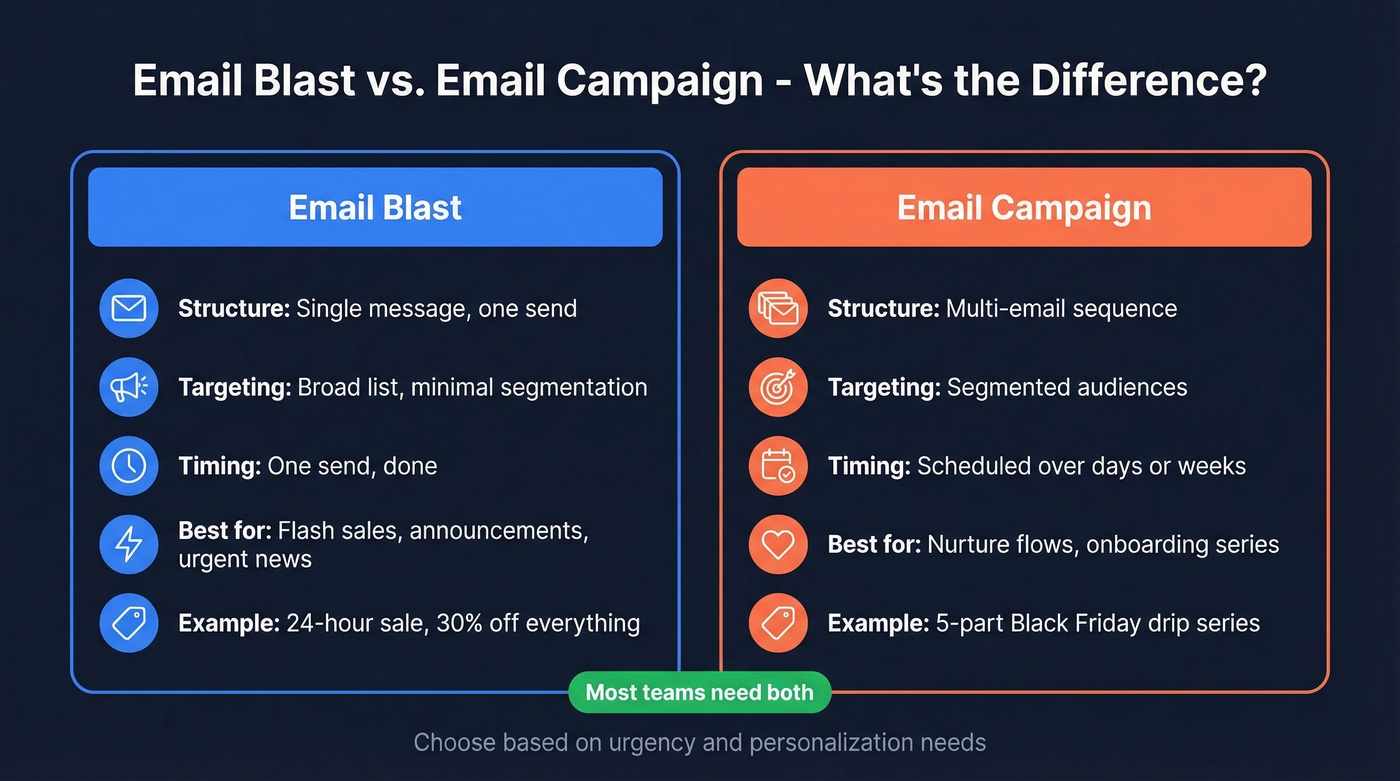
The term gets a bad reputation because people confuse "blast" with "spam." A blast to an opted-in list with a clear CTA and proper authentication is perfectly legitimate. A blast to a purchased list with no unsubscribe link is a lawsuit waiting to happen.
| Email Blast | Email Campaign | |
|---|---|---|
| Structure | Single message | Multi-email sequence |
| Targeting | Broad list | Segmented audiences |
| Timing | One send | Scheduled over days/weeks |
| Best for | Flash sales, announcements | Nurture, onboarding |
| Example | "24-hour sale - 30% off" | 5-part Black Friday series |
Use blasts for time-sensitive, broad-appeal messages. Use campaigns when you need personalization and sequencing. Most teams need both.
Before You Send a Single Template
Before you scroll through 30 templates:
- Grab a template below, customize in 10 minutes. A common complaint on r/emailmarketing is that email design eats 2-3 hours even with assets ready. These templates fix that.
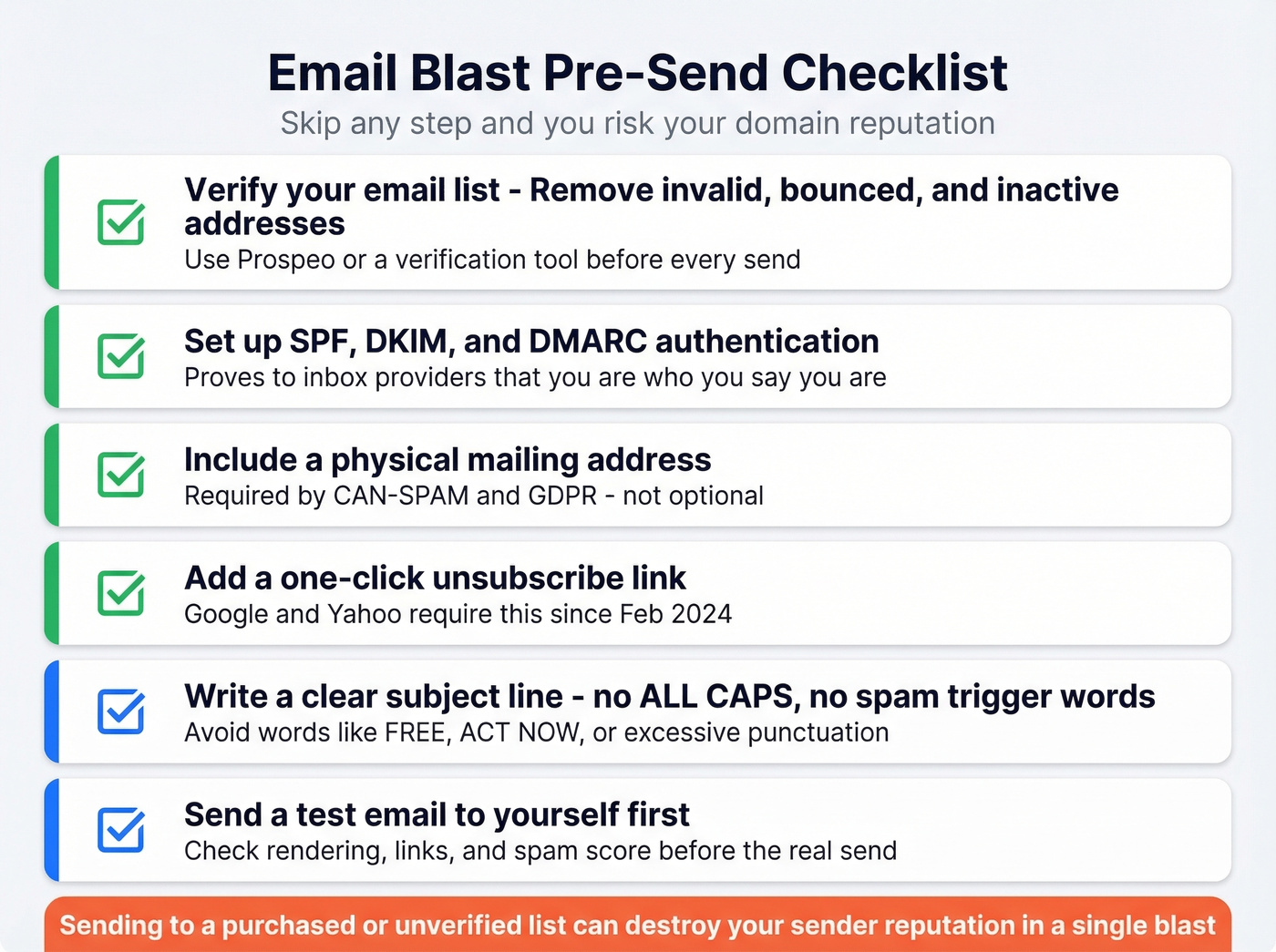
- Verify your list, set up SPF/DKIM/DMARC, include a physical address and one-click unsubscribe. Skip any of these and you're gambling with your domain.
- Use a free tool to send. Brevo (9,000 emails/month free), MailerLite (best editor), or Sender (most generous subscriber limit). Comparison table in the tools section below.
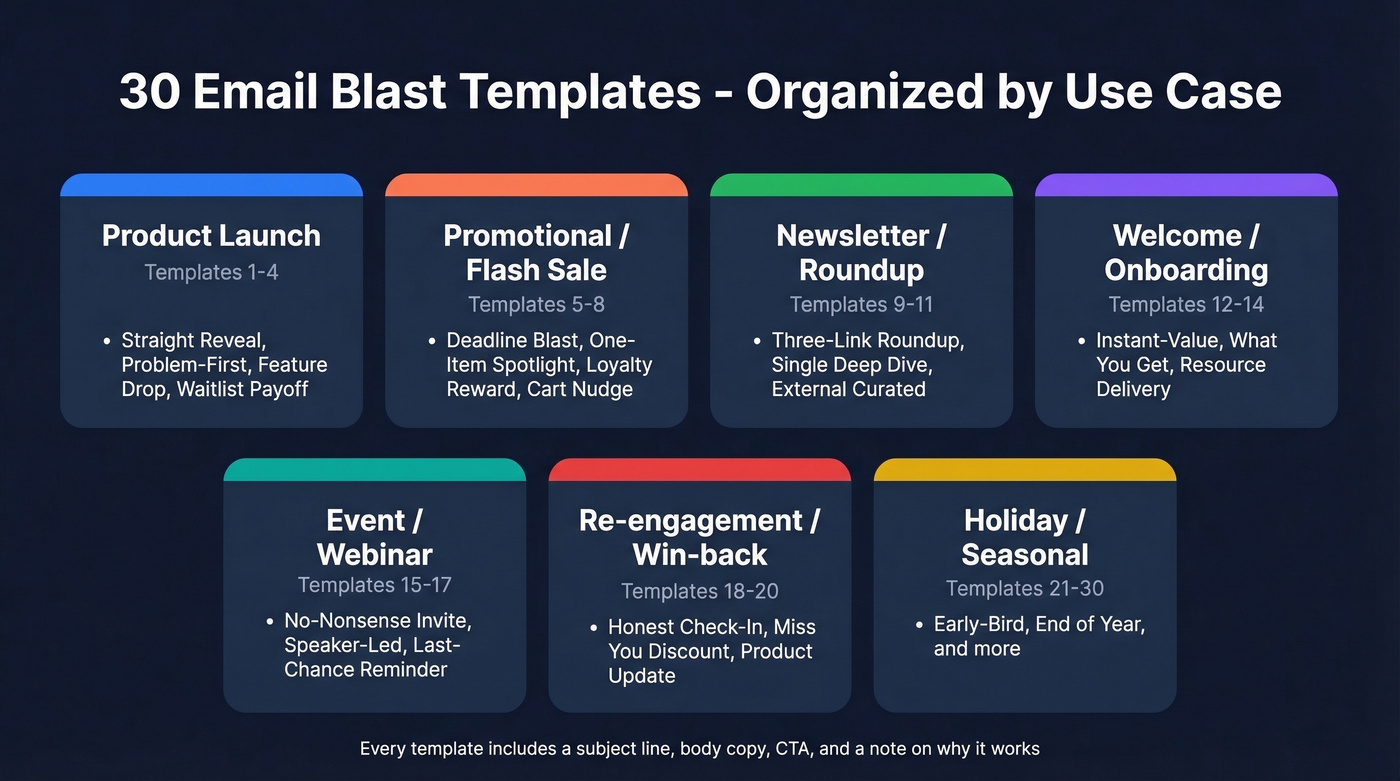
30 Copy-Paste Email Blast Templates
Every template includes a subject line, body copy, CTA, and a note on why it works. Copy them. Edit them. These are intentionally direct and hype-free - a good-enough email sent today beats a perfect email sent never. In our experience, the shortest templates consistently outperform the ones people spend hours polishing.
Product Launch / Announcement
Template 1 - The Straight Reveal
Subject: We built something new. Here's what it does.
Hi {{first_name}},
We've been working on {{product_name}} for the past few months, and it's live today. It does one thing really well: {{core benefit in one sentence}}.
What that means for you: {{specific outcome like "50% faster exports" or "no more manual data entry"}}.
[See it in action →]
Why this works: No hype, no countdown. Product launches don't need drama - they need a reason to click.
Template 2 - The Problem-First Launch
Subject: {{Pain point}}? We fixed it.
Hi {{first_name}},
You've told us {{specific complaint like "the dashboard is too slow"}}. Fair. We rebuilt it from scratch.
{{Product_name}} is now live with {{2-3 key improvements}}.
Try it now - your existing login works.
[Open {{product_name}} →]
Pro tip: Acknowledging frustration before pitching the solution makes this feel like a conversation, not a press release.
Template 3 - The Feature Drop
Subject: New: {{feature_name}} is live in your account
{{First_name}}, quick one --
We just shipped {{feature_name}}. It lets you {{what it does in plain English}}.
No setup required. It's already in your {{dashboard/settings/toolbar}}.
[Try {{feature_name}} →]
Why this works: "It's already there" removes every objection.
Template 4 - The Waitlist Payoff
Subject: You're in. {{Product_name}} is ready for you.
Hi {{first_name}},
You signed up for early access to {{product_name}} on {{date}}. Today's the day.
Your account is active. Here's what to do first: {{one specific first step}}.
[Get started →]
The specific date callback makes this personal - it rewards patience with exclusivity.
Promotional / Flash Sale
Template 5 - The Deadline Blast
Subject: 30% off everything. Ends midnight.
{{First_name}},
We're running our biggest sale of the quarter - 30% off every plan, no code needed. It ends tonight at midnight {{timezone}}.
This won't come back until {{next sale period}}.
[Grab 30% off →]
Real scarcity with a specific deadline. No fake urgency - just a window that actually closes.
Template 6 - The One-Item Spotlight
Subject: Our best-seller is ${{sale_price}} today only
Hi {{first_name}},
{{Product_name}} is our most popular {{category}} - and today it's ${{sale_price}} instead of ${{regular_price}}.
One day. One product. No code.
[Shop now →]
Focus beats choice paralysis every time.
Template 7 - The Loyalty Reward
Subject: You've been here since the beginning. This is for you.
{{First_name}},
You joined us {{timeframe}} ago. To say thanks, here's an exclusive {{discount/offer}} - just for subscribers who've been with us since {{date/period}}.
Use code {{CODE}} at checkout. Valid through {{date}}.
[Claim your reward →]
Segmented by tenure. Makes the recipient feel recognized, not mass-marketed.
Template 8 - The Cart Nudge Blast
Here's a weak version vs. a strong version of this template:
❌ Weak: "You left something in your cart! Come back and finish your purchase!"
✅ Strong:
Subject: Still thinking about it? Here's 15% off.
Hi {{first_name}},
You left {{product_name}} in your cart. No pressure - but we can take 15% off if you grab it today.
Code: {{CODE}}
[Complete your order →]
The weak version is vague and pushy. The strong version names the product and leads with a discount.
Newsletter / Content Roundup
Template 9 - The Three-Link Roundup
Subject: 3 things worth your time this week
Hi {{first_name}},
Here's what we published this week - no fluff, just the pieces our team actually shared internally:
- {{Title 1}} - {{one-sentence summary}} [Read →]
- {{Title 2}} - {{one-sentence summary}} [Read →]
- {{Title 3}} - {{one-sentence summary}} [Read →]
See you next week.
Three links is a clean, scannable format that keeps the email focused.
Template 10 - The Single-Story Deep Dive
Subject: We spent 3 weeks researching {{topic}}. Here's what we found.
{{First_name}},
Our team just published the most comprehensive guide we've ever written on {{topic}}. It covers {{2-3 key angles}}.
It's a 12-minute read. Worth it if you're dealing with {{specific challenge}}.
[Read the full guide →]
One link, one story, one CTA.
Template 11 - The Curated External Roundup
Subject: 5 articles we didn't write (but wish we did)
Hi {{first_name}},
Every month we share the best stuff we've read from other people in {{industry}}:
- {{Article 1 + source}} [Link]
- {{Article 2 + source}} [Link]
- {{Article 3 + source}} [Link]
- {{Article 4 + source}} [Link]
- {{Article 5 + source}} [Link]
Got something we should read? Reply and tell us.
Curating external content builds trust faster than self-promotion. The reply CTA boosts engagement signals too.
Welcome / Onboarding
Template 12 - The Instant-Value Welcome
Subject: You're in. Here's your first step.
Welcome, {{first_name}}.
You just joined {{list/product/community}}. Here's the one thing to do right now: {{single specific action}}.
That's it. We'll send more over the next few days, but start here.
[{{CTA matching the action}} →]
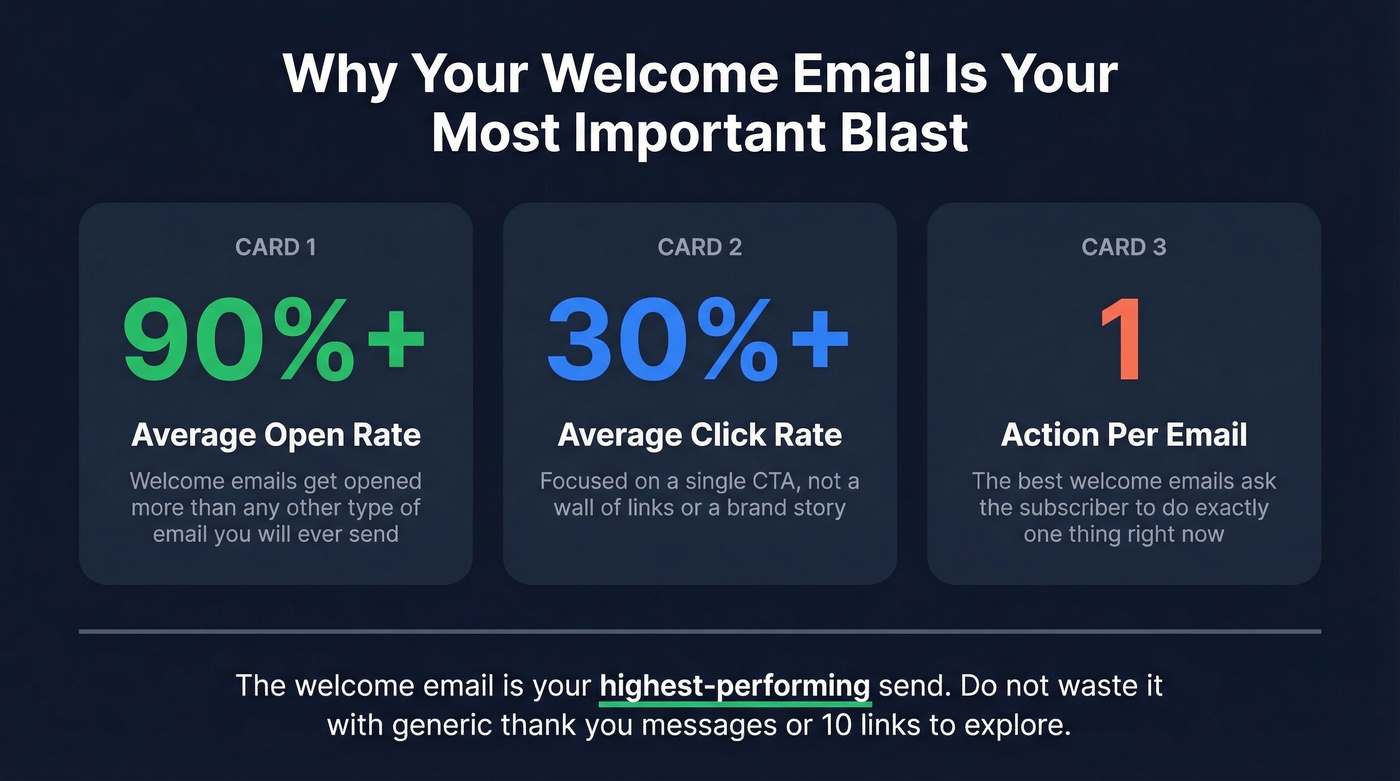
Welcome emails can hit 90%+ open rates and 30%+ click rates when they're focused on a single action. Don't waste this moment with a wall of links.
Template 13 - The "Here's What You Get" Welcome
Subject: What to expect now that you're subscribed
Hi {{first_name}},
Thanks for signing up. Here's what you'll get from us:
- {{Frequency}} emails about {{topic}}
- No spam. No selling your info.
- An unsubscribe link in every email (we mean it)
First up: {{preview of next email or resource}}.
[Check it out →]
Sets expectations immediately. Subscribers who know what's coming are less likely to mark you as spam.
Template 14 - The Resource Welcome
Subject: Your free {{resource}} is ready
Hi {{first_name}},
Here's the {{ebook/template/guide}} you signed up for:
[Download {{resource_name}} →]
While you're here - our most popular post on {{related topic}} might be useful: [Link]
Delivers the promise immediately. The secondary link captures extra engagement without cluttering the primary CTA.
Event / Webinar Invitation
Template 15 - The No-Nonsense Invite
Subject: {{Event_name}} - {{date}}. Save your spot.
Hi {{first_name}},
We're hosting {{event_name}} on {{date}} at {{time}} {{timezone}}.
What you'll learn: {{2-3 bullet points}} Who's presenting: {{speaker name + title}}
It's free. Seats are limited to {{number}}.
[Register now →]
Every question the reader has - what, when, who, how much - answered in under 100 words.
Template 16 - The Speaker-Led Invite
Subject: {{Speaker_name}} is joining us live on {{date}}
{{First_name}},
{{Speaker_name}}, {{their title/credential}}, is doing a live session with us on {{topic}}. They'll cover {{specific angle}} and take questions live.
{{Date}} | {{Time}} {{timezone}} | Free
[Save your seat →]
Speaker credibility does the selling. The template just gets out of the way.
Template 17 - The Last-Chance Reminder
Subject: Tomorrow: {{event_name}} starts at {{time}}
Quick reminder - {{event_name}} is tomorrow at {{time}} {{timezone}}.
If you haven't registered yet, there are still a few spots open.
[Register before it fills →]
Reminder emails are a major driver of registrations. Send this exactly 24 hours before.
Re-engagement / Win-back
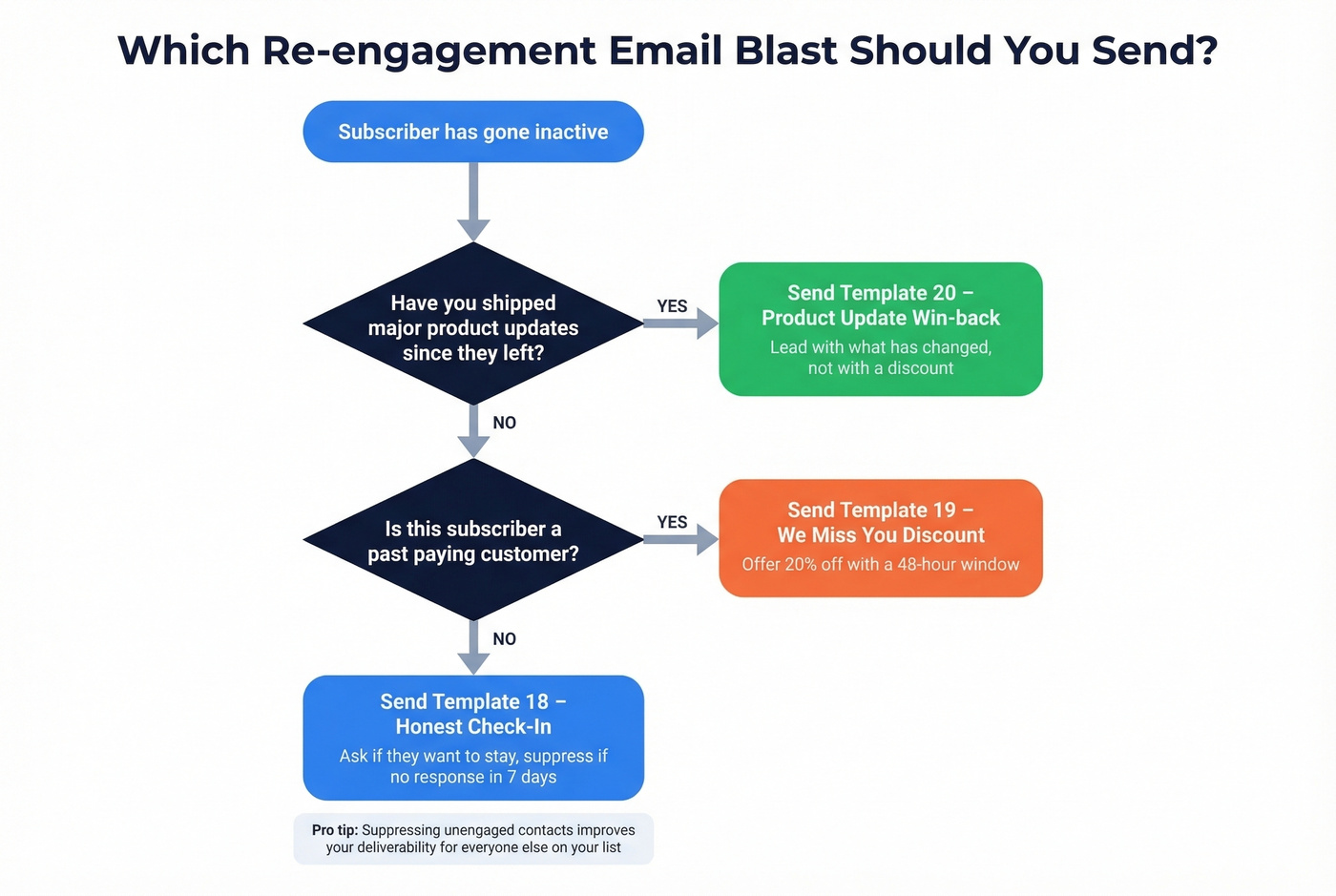
Template 18 - The Honest Check-In
Subject: Still interested? (No hard feelings either way)
Hi {{first_name}},
We noticed you haven't opened our last few emails. Totally fine - but we don't want to keep cluttering your inbox if you're not interested.
Want to stay? Click below.
[Yes, keep me subscribed →]
If we don't hear from you, we'll remove you in 7 days. No hard feelings.
People who don't click get suppressed - your deliverability improves.
Template 19 - The "We Miss You" Discount
Subject: It's been a while. Here's 20% off to come back.
{{First_name}},
You haven't visited in {{timeframe}}. We get it - life's busy.
But if you're ready to come back, here's 20% off your next order: {{CODE}}. Valid for 48 hours.
[Shop with 20% off →]
The 48-hour window creates urgency without being pushy.
Template 20 - The Product Update Win-back
Subject: A lot has changed since you left
Hi {{first_name}},
Since you last logged in, we've shipped {{2-3 major updates}}. The product you tried isn't the product we have now.
Worth another look?
[See what's new →]
Addresses the most common reason people leave - the product didn't do what they needed.
Holiday / Seasonal
Template 21 - The Early-Bird Holiday
Subject: Holiday shopping starts now. Beat the rush.
{{First_name}},
We're launching our holiday deals early - before the inbox chaos starts in December.
{{Offer details like "Free shipping on everything through Nov 15"}}
[Shop early →]
Getting ahead of peak-season inbox volume helps your offer stand out.
Template 22 - The Year-End Thank You
Subject: Thank you for an incredible 2026
Hi {{first_name}},
This year, our community grew to {{number}} members. We shipped {{number}} updates. And you were part of it.
As a thank you, here's {{offer or exclusive content}} - just for subscribers.
[Claim your gift →]
Gratitude emails earn strong engagement because they don't feel like a pitch.
Template 23 - The New Year Reset
Subject: New year, new {{relevant thing}}. Start here.
{{First_name}},
If {{relevant goal}} is on your list for 2027, we built something to help: {{one-sentence description}}.
[Start your 2027 →]
Ties your product to the reader's existing motivation. January emails ride the resolution wave.
B2B / SaaS-Specific
Template 24 - The Feature Adoption Nudge
Subject: You're using {{product}} but missing {{feature}}
Hi {{first_name}},
Most {{product}} users don't know about {{feature_name}}. It {{what it does}} - and it's already included in your plan.
Here's a 2-minute walkthrough: [Watch →]
"Already included" removes the cost objection. This drives feature adoption without feeling like a sales pitch.
Template 25 - The Benchmark Blast
Subject: How does your {{metric}} compare?
{{First_name}},
We analyzed {{number}} companies in {{industry}} and found the average {{metric}} is {{number}}.
Where do you stand?
[Download the report →]
Benchmarks trigger competitive instinct. B2B buyers can't resist comparing themselves to peers.
Template 26 - The Integration Announcement
Subject: {{Product}} now connects to {{integration}}
Hi {{first_name}},
We just launched our {{integration_name}} integration. If you're using both tools, you can now {{specific workflow like "sync contacts automatically"}}.
Setup takes about 5 minutes.
[Connect {{integration}} →]
Integration announcements are high-intent because the reader already uses (or wants) both tools.
Nonprofit / Education
Template 27 - The Impact Update
Subject: Your donation helped {{specific outcome}}
Hi {{first_name}},
Last month, {{number}} donors like you contributed ${{amount}} to {{cause}}. Here's what that made possible:
- {{Specific outcome 1}}
- {{Specific outcome 2}}
- {{Specific outcome 3}}
[See the full impact report →]
Nonprofits see 40%+ open rates and 3%+ click rates - the highest of any industry in Mailchimp's published benchmarks. Impact updates are why.
Template 28 - The Fundraising Ask
Subject: We're ${{amount}} away from our goal
{{First_name}},
Our {{campaign_name}} campaign has raised ${{current}} of our ${{goal}} target. We need help closing the gap by {{deadline}}. Every dollar goes directly to {{specific use}}.
[Donate now →]
Progress toward a goal is one of the strongest motivators in fundraising emails.
Template 29 - The Back-in-Stock Blast
Subject: {{Product_name}} is back - and it won't last
Hi {{first_name}},
{{Product_name}} sold out in {{timeframe}} last time. It's back in stock as of today, but we have limited inventory.
No code needed. Just click below.
[Shop {{product_name}} →]
Scarcity that's actually real. Back-in-stock blasts outperform generic promotional emails because the demand is already proven.
Template 30 - The Alumni/Community Update
Subject: What {{number}} graduates are doing now
Hi {{first_name}},
Since completing {{program_name}}, our alumni have {{impressive collective stat like "launched 47 companies" or "raised $12M in funding"}}.
Three stories from your cohort:
{{Story 1 - name + one-line outcome}} {{Story 2 - name + one-line outcome}} {{Story 3 - name + one-line outcome}}
[Read all alumni stories →]
Social proof from peers is more compelling than any marketing copy.
Industry Benchmarks for 2026
Your boss asks why last week's blast got 12% open when the average is 35%. Here's the data you need to answer that question, pulled from Mailchimp's benchmark report:
| Industry | Open Rate | Click Rate | Unsub Rate |
|---|---|---|---|
| All Users | 35.63% | 2.62% | 0.22% |
| Ecommerce | 29.81% | 1.74% | 0.19% |
| Nonprofits | 40.04% | 3.27% | 0.18% |
| Education | 35.64% | 3.02% | 0.18% |
| Business/Finance | 31.35% | 2.78% | 0.15% |
Open rates are inflated by Apple's Mail Privacy Protection, which pre-loads tracking pixels. Click rate is the metric that actually matters - it's harder to fake and directly tied to revenue.
If your blast is getting weak clicks, the problem is usually wrong audience, weak CTA, or deliverability issues. The templates above handle the first two. The sections below handle the third.

You read it above: 40% bounce rates wreck domains in a single afternoon. Every email blast template in the world won't save you if your list is garbage. Prospeo's 5-step verification delivers 98% email accuracy - so your blasts hit inboxes, not spam folders.
Stop blasting into the void. Start with verified emails at $0.01 each.
5 Design Mistakes That Tank Results
Here's the thing: the best-performing mass email template might be one with zero images. Plain-text-style emails with minimal formatting often outperform image-heavy designs. Most template galleries online are useless design showcases. The design mistakes matter more than the design itself.
1. Image-heavy emails that get clipped or blocked. Gmail clips emails after 100KB. If your blast is a giant image with a thin text wrapper, half your audience sees a truncated mess. Corporate email clients block images by default. Aim for at least 60% live text and 40% images - not the other way around.
2. Image-based CTAs instead of HTML buttons. If your CTA is an image and images are blocked, your CTA disappears. Use a bulletproof HTML/CSS button that renders regardless of image settings. This is the single easiest fix that most marketers ignore.
3. Multi-column layouts on mobile. The majority of emails are opened on mobile. A three-column desktop layout becomes an unreadable mess on a phone screen. Use a single-column layout with a 480px breakpoint and 16px minimum font size. Your designer might not love it. Your click rates will.
4. No preheader text. The preheader is the preview text next to your subject line in the inbox. If you leave it blank, email clients pull the first line of your HTML - usually "View in browser" or some navigation text. Write a deliberate preheader that complements your subject line. For more ideas, see our Email Preview Text A/B Testing guide.
5. Too many CTAs competing for attention. Every additional link dilutes click-through on your primary CTA. One primary CTA per blast. If you absolutely need a secondary link, make it visually subordinate - plain text, not a button.
Deliverability Checklist
Your template doesn't matter if it lands in spam. Here's the deliverability baseline that Gmail and Yahoo's bulk sender requirements enforce (and a deeper email deliverability guide if you want the full playbook):
- ☐ SPF, DKIM, and DMARC configured at the domain level. If you're sending 5,000+ messages/day to Gmail recipients, all three are mandatory.
- ☐ Spam complaint rate below 0.10%. Gmail's hard cap is 0.3%, but they recommend staying under 0.10%. Cross that threshold and inbox placement drops fast. (More on this in our email spam checker breakdown.)
- ☐ One-click unsubscribe via List-Unsubscribe header (RFC 8058). The unsubscribe link in your footer isn't enough - your email headers need to support one-click unsubscribe natively.
- ☐ Process opt-outs within 2 days. Not 10 days. Not "next batch." Two days.
- ☐ Sunset unengaged subscribers. If someone hasn't opened or clicked in 3-5 sends, suppress them. Sending to dead addresses tanks your sender reputation. (See: How to Improve Sender Reputation.)
- ☐ Verify your list before every blast. Run your list through a verification tool before you hit send. Prospeo catches spam traps, honeypots, and catch-all domains with 98% accuracy - upload a CSV, get a clean list back. The free tier covers 75 verifications/month, enough to validate a segment before a major send. If you’re troubleshooting bounces, start with our email bounce rate guide.
- ☐ Monitor with Google Postmaster Tools. It shows you exactly how Gmail views your domain reputation. You can also pair this with email reputation tools to spot issues earlier.
- ☐ Set up BIMI to display your brand logo in supported inboxes. Not required, but it boosts recognition in crowded inboxes.
We've seen teams wreck their domain reputation in a single blast because they skipped list verification. You spend months building sender reputation. One bad send to a stale list undoes all of it. For teams sending at higher volume, ask your ESP about a dedicated IP - shared IPs mean your reputation is partially at the mercy of other senders.
Legal Requirements
CAN-SPAM
CAN-SPAM applies to every commercial email - not just bulk, and not just B2C. B2B blasts are covered too. Penalties run up to $53,088 per email in violation. Your blast needs:
- ☐ Accurate "From," "To," and "Reply-To" headers
- ☐ Subject line that reflects the actual content (use these email subject line examples if you need a starting point)
- ☐ Clear identification that the message is an ad
- ☐ A valid physical postal address
- ☐ A clear, easy opt-out mechanism
- ☐ Honor opt-outs within 10 business days
- ☐ Opt-out mechanism must work for 30 days after the send
- ☐ You can't sell or transfer email addresses of people who opted out
The physical address requirement catches people off guard. If you're a solo founder working from home, get a registered PO box. It's often ~$10-$30/month depending on location and keeps you compliant without publishing your home address.
GDPR
GDPR applies to any organization processing data of EU residents - regardless of where your company is based. The key difference from CAN-SPAM: GDPR requires explicit opt-in consent before you send.
- ☐ Obtain "freely given, specific, informed, and unambiguous" consent
- ☐ Pre-checked boxes don't count
- ☐ Record when and how consent was given
- ☐ Provide a clear way to withdraw consent at any time
If even a small percentage of your list includes EU residents, treat the entire blast as GDPR-compliant. It's easier than trying to segment by geography and hoping you got it right.
Pre-Send Checklist
You've got your template. You've picked your sending tool. Before you hit send:
- Authentication check - SPF, DKIM, DMARC all passing? Use MXToolbox to verify.
- Rendering test - Preview in Litmus or Email on Acid across Gmail, Outlook, Apple Mail, and mobile. We test every blast against all four before sending - you should too.
- Link verification - Click every link. Broken links kill credibility and waste your one shot.
- Unsubscribe mechanism - Working? One-click? List-Unsubscribe header present?
- Physical address - Included in the footer? Still valid?
- List verification - For B2B blasts, data freshness matters as much as copy. Tools like Prospeo refresh records every 7 days vs. the 6-week industry average, so you're not blasting addresses that churned last quarter. If you need a broader system, start with how to generate an email list.
- Subject line A/B test - Send two variants to 10% of your list each. Send the winner to the remaining 80%.
- Send-time optimization - Tuesday through Thursday, 9-11am in the recipient's timezone is the safe bet.
- File size check - Is the total email under 100KB? If not, cut images or simplify the HTML.
- Seed test - Send to yourself and 2-3 colleagues on different email providers before the full blast.
Free Tools to Send Your Blast
You don't need to pay for an ESP to send a blast. Here are the free tiers worth considering:
| Tool | Free Subscribers | Free Emails/Mo | Daily Limit | Best For |
|---|---|---|---|---|
| Brevo | 100,000 | 9,000 | 300 | Volume + contacts |
| MailerLite | 500 | 12,000 | None | Best drag-and-drop editor |
| Sender | 2,500 | 15,000 | None | Most generous free tier |
| EmailOctopus | 2,500 | 10,000 | None | Simple, clean interface |
| HubSpot | Unlimited (CRM) | 2,000 | None | CRM + email in one |
| Mailchimp | 250 | 500 | 250 | Brand recognition only |
Brevo is the pick if you have a large contact list but moderate send volume - 100,000 contacts on the free tier is unmatched. The 300/day limit means you'll need multiple days to blast a big list, but for most small teams that's fine.
MailerLite has the best email editor of any free tool, and the template library is genuinely good, not just "good for free." If design matters and your list is under 500, start there. Sender flies under the radar but offers the most generous combination: 2,500 subscribers and 15,000 emails/month with no daily cap. For a startup running weekly blasts to a growing list, it's the obvious choice.
Skip Mailchimp's free plan unless you're just testing. 250 subscribers and 500 emails/month is barely enough to run a single A/B test.
If you’re sending higher volume, also review your email velocity so you don’t trip provider limits.
These 30 templates give you the copy. Prospeo gives you the list. With 143M+ verified emails refreshed every 7 days, you're never blasting to stale or dead addresses. Teams using Prospeo data see bounce rates under 4%.
Great templates deserve a list that won't torch your domain reputation.
FAQ
How often should I send email blasts?
Once per week works for most lists. Stay below Gmail's recommended 0.10% complaint threshold - if complaints spike after increasing frequency, pull back immediately.
What's the difference between a blast and a newsletter?
A blast is a one-time message to a broad audience for a specific purpose - a sale, an announcement, an event. A newsletter is recurring and content-driven. Blasts prioritize urgency; newsletters prioritize relationship building.
Do email blasts work for B2B?
Yes - for announcements, product launches, event invitations, and benchmark reports sent to opted-in contacts. List quality matters more than template quality in B2B. A 5-step verification process with spam-trap and honeypot removal keeps bounce rates under 4%, which protects the sender reputation you need for ongoing campaigns.
How do I keep my blast out of spam?
Authenticate your domain with SPF, DKIM, and DMARC. Verify your list before sending. Include a one-click unsubscribe. Keep spam complaints under 0.10%. Stay under Gmail's 100KB clipping threshold. Sunset subscribers who haven't engaged in 3-5 sends.
Can I reuse one mass email template for every type of blast?
You can start from a single layout as a base, but you'll get better results customizing for each use case. A flash-sale blast needs urgency and a deadline; a newsletter needs scannable links. The 30 templates above give you a purpose-built starting point so you're not retrofitting the same design every time.