

How to Write Professional Email Subjects That Actually Get Opened
You sent a carefully written email to a department head, subject line: "Quick question." It sat unopened for three days. Meanwhile, a messy-looking internal thread with "Action required: invoice approval" got answered in 12 minutes.
Nobody taught you the actual skill here: writing professional email subjects that are searchable, scannable on mobile, and clear about what you want. We've watched teams overthink subject lines for 20 minutes and underthink them for 20 seconds - both fail. Once you get the mechanics right, your emails stop feeling like noise and start getting treated like work.
The Whole System in Three Bullets
- Every subject line needs a topic and a purpose (what you want them to do).
- Front-load the key message in the first 33 characters - that's all Gmail shows on some common phone setups, and it's the safest "works everywhere" target from device testing.
- Personalized subjects get a 46% open rate vs. 35% without personalization in a 5.5M-email study.
That's it. The rest of this article gives you the formulas and examples.
The One Rule: Topic + Purpose
Chris Fenning's framework is the cleanest: state the topic, then state the purpose. Most subject lines fail because they only do one - or neither.
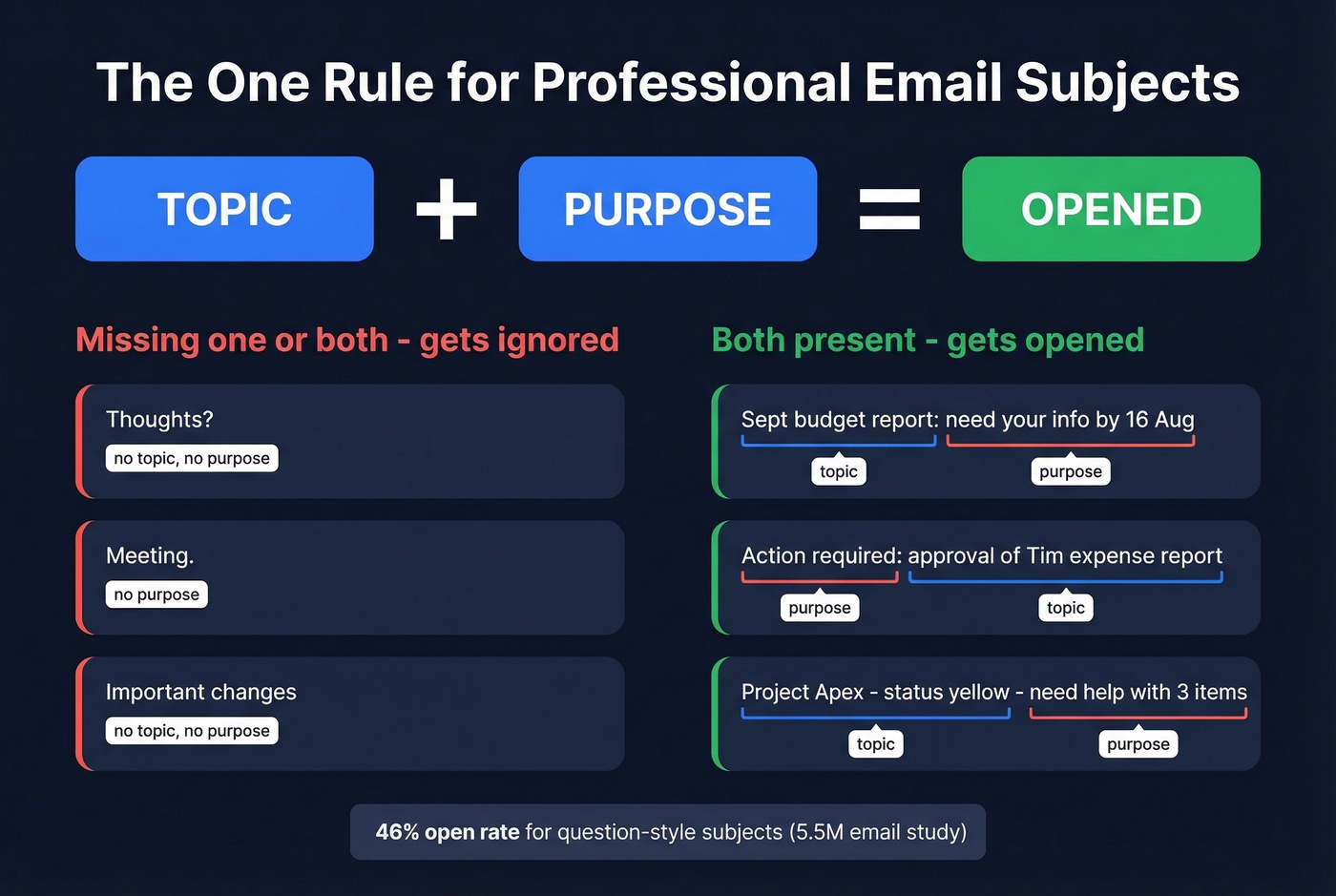
"Thoughts?" "Meeting." "Follow-up." Too short, no purpose. "Issue with order," "Important changes," "Some updates." Unclear - the reader has no idea what you need from them. Both categories get ignored for the same reason: they ask the recipient to open the email just to figure out why they should care.
Good subject lines nail both halves:
- "Sept budget report: need your info by 16 Aug"
- "Action required: approval of Tim's expense report"
- "Project Apex - status is yellow - need help with three items"
Question-style subjects perform unusually well in cold contexts: Belkins saw a 46% open rate for question-style subjects in their dataset. The trick is making the question real and specific, not "Quick question."
How Many Characters Do People Actually See?
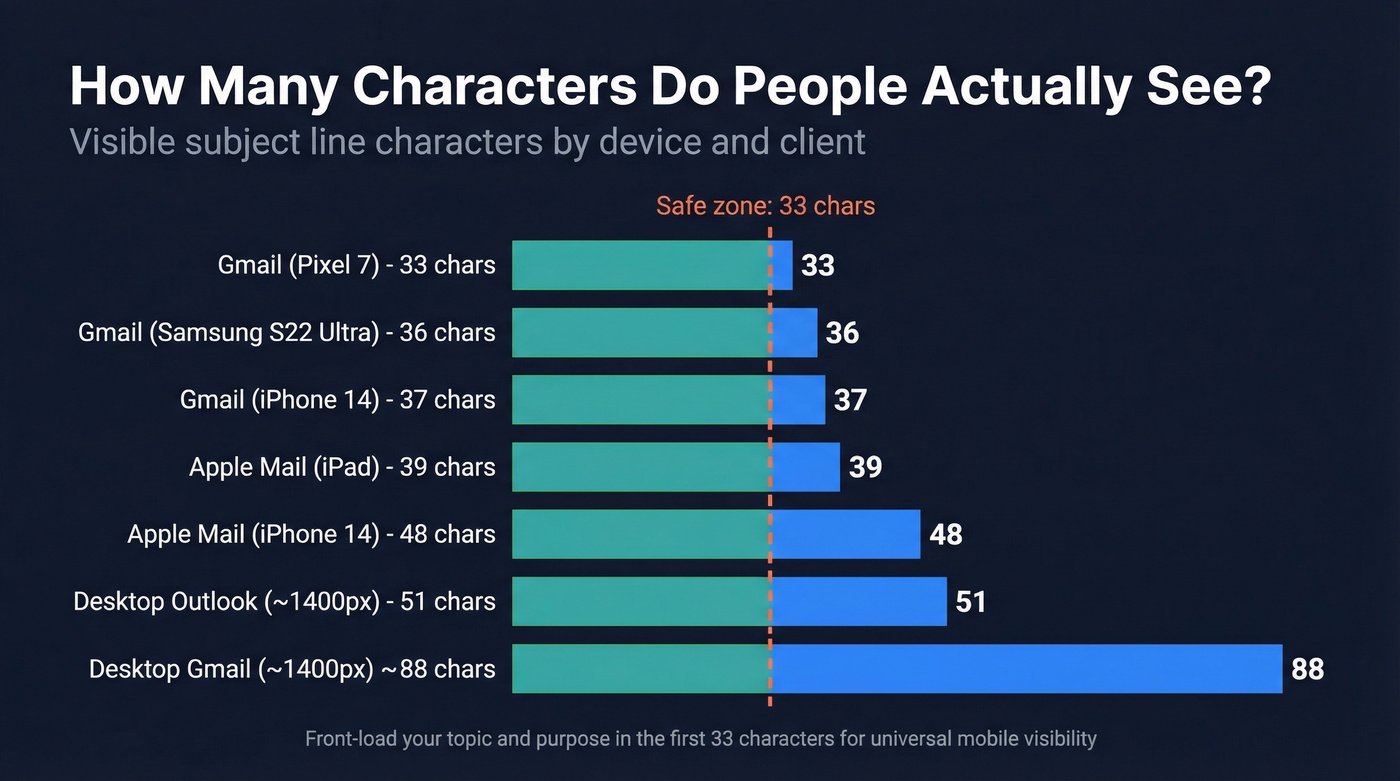
Email subject lines don't "have" a limit - inboxes just truncate them. A hands-on test from EmailToolTester is the most practical reference we've found because it's device-by-device, not generic advice.
| Client / Device | Visible Chars |
|---|---|
| Gmail (Pixel 7) | 33 |
| Gmail (iPhone 14) | 37 |
| Gmail (Samsung S22 Ultra) | 36 |
| Apple Mail (iPhone 14) | 48 |
| Apple Mail (iPad) | 39 |
| Desktop Gmail (~1400px) | ~88 |
| Desktop Outlook (~1400px) | ~51 |
Write like you only get 33 characters. You can add detail after that, but the first 33 must carry the topic and purpose on their own. Wide letters ("M") eat space faster than narrow ones ("i"), so don't get precious about exact counts.
Preheader text - the gray preview after the subject - gives you another 37-99 characters across the common clients tested. Use it to extend your subject's message, not repeat it.

You just spent time crafting the perfect subject line. Don't waste it on a dead email address. Prospeo's 5-step verification delivers 98% email accuracy - so your carefully written subject actually lands in a real inbox, not a bounce report.
Great subject lines deserve verified email addresses behind them.
Seven Formulas That Work
These are cold email patterns, but they translate perfectly to internal comms, client work, and partner emails. Belkins found the length sweet spot is 2-4 words at a 46% open rate, with drop-off after 7+ words.
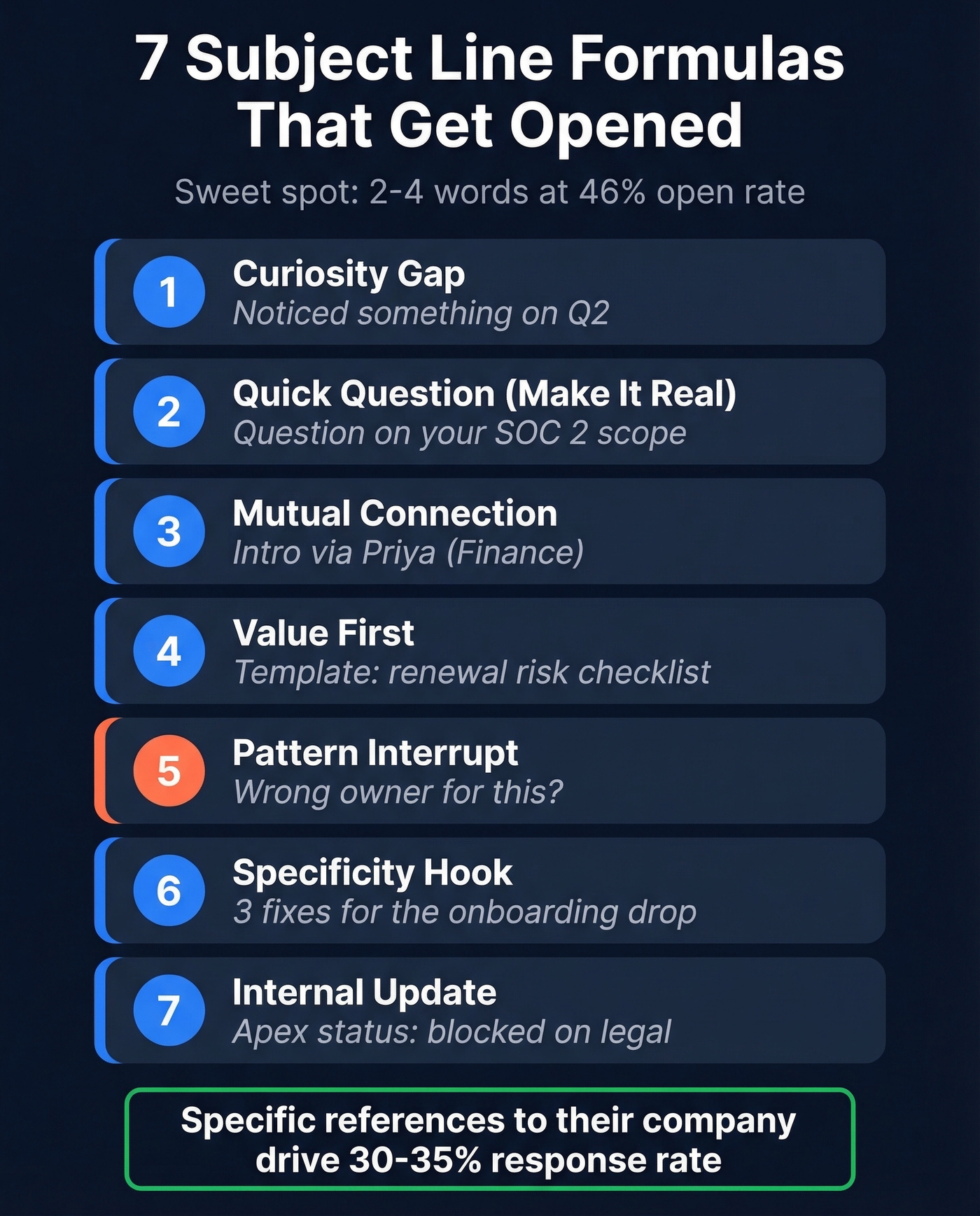
- Curiosity gap (professional) - "Noticed something on Q2"
- Quick question (make it real) - "Question on your SOC 2 scope"
- Mutual connection - "Intro via Priya (Finance)"
- Value-first - "Template: renewal risk checklist"
- Pattern interrupt - "Wrong owner for this?"
- Specificity hook - "3 fixes for the onboarding drop"
- Internal update - "Apex status: blocked on legal"
One Reddit field report is blunt about what works: specific references like "[Specific thing they posted about]" drive 30-35% response, because it proves you're not blasting a list. From the same thread, "[Their Company] and [Your Company]" pulls 20-25% response when the email is genuinely about a relevant connection, not a fake partnership tease.
Examples by Scenario
Internal Updates
MIT's convention uses simple prefixes that match intent: Action Required, FYI, Respond By, CONFIDENTIAL (MIT guidance). If the entire message fits in the subject, use the EOM (End of Message) technique and leave the body blank:
- "Action Required: approve Q3 headcount plan"
- "FYI: vendor outage resolved (root cause)"
- "Approved: Tim's expense report [EOM]"
Cold Outreach
Here's the thing: cold outreach subjects live or die on specificity. A vague "Let's connect" gets deleted; a subject that references something real about the recipient's company gets read. And before you send, verify the address with a tool like Prospeo - 98% email accuracy means your subject line actually reaches someone instead of bouncing into the void.
If you're building a repeatable outbound motion, pair these with proven sales prospecting techniques and a tighter B2B cold email sequence.
- "[Their Company] x [Your Company]: onboarding idea"
- "Noticed your hiring for RevOps - 2 ideas"
- "Quick question: who owns renewals?"
Meeting Requests and Job Applications
If you're trying to book time, the subject line is only half the battle - your body copy and ask matter too. Use a clean structure from email wording to schedule a meeting.
- "15 min on Q4 forecast assumptions?"
- "Application: Senior Analyst - Maria Gomez"
- "Referral from Dan Wu: Product Ops role"
Client Emails and Deadlines
UMN's internal comms guidance pushes consistent, searchable formats and keeping subjects tight - under ~40 characters (UMN tips). One non-obvious etiquette rule: avoid personalizing the subject line when cc'ing others, since it can feel oddly targeted.
For more swipeable patterns, keep a library of sales follow-up templates and emails that get responses.
| Instead of | Write |
|---|---|
| "Touching base on invoice" | "Invoice #1842: approval needed today" |
| "Quick update" | "Renewal: confirm users + billing contact" |
| "Changes to the project" | "Project Apex: change request for scope" |
| "Need this ASAP" | "Respond By 3 PM: legal redlines on MSA" |
Mistakes That Kill Open Rates
Beyond open rates, poor subject lines train inbox algorithms to deprioritize your domain - every spam complaint or mass-delete chips away at deliverability. The fastest wins come from what you stop doing.
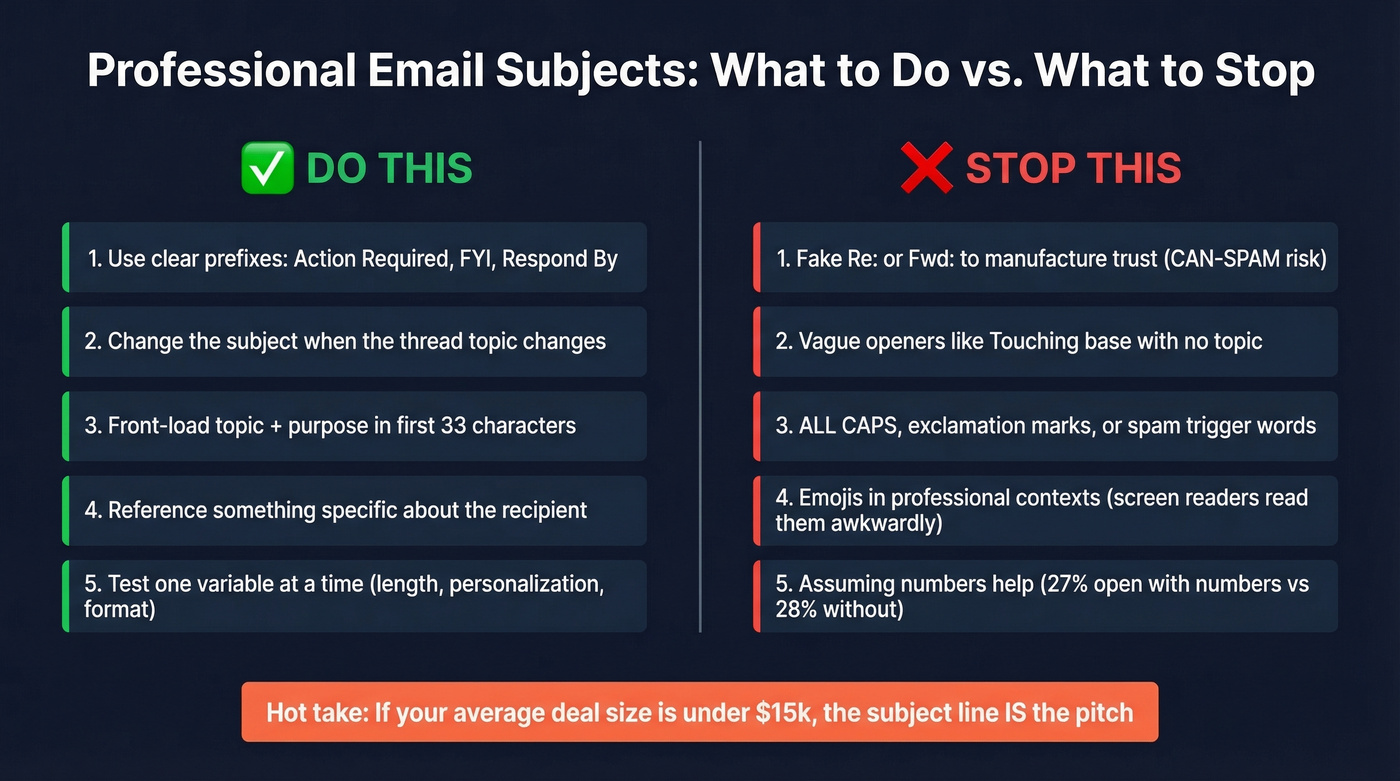
Use clear prefixes when it's internal: "Action Required," "FYI," "Respond By." Change the subject when the thread topic changes - MIT's rule is right: don't bury new topics in old threads. Keep it readable for accessibility; screen readers announce emojis awkwardly, so skip them in professional email subjects unless your culture explicitly supports them, and even then, limit to one.
Stop using fake "Re:" or "Fwd:" to manufacture trust - it's deceptive and can create CAN-SPAM risk around misleading header information. Drop vague openers like "Touching base" with no topic. Kill ALL CAPS, "!!!", and spam-trigger words: "Free," "Act now," "Guaranteed," "No obligation," and "Full refund" can trip corporate and consumer spam filters.
If you're seeing opens drop across the board, it's often not the subject - it's your sender health. Audit your email deliverability and watch your email bounce rate before you rewrite everything.
Numbers don't help as much as you'd think: Belkins saw 27% open with numbers vs. 28% without - slightly worse, not better.
Hot take: If your average deal size is under $15k, subject line optimization matters more than your email body. At lower ACVs, you don't get a second chance. The subject line IS the pitch.
How to Test Your Subjects
In our experience, the biggest open-rate gains come from specificity, not cleverness. Test one variable at a time - length, personalization, prefix, question vs. statement. That's the core A/B discipline MailerLite teaches in their testing examples. Expect 1-5 percentage point swings when you're already writing decent subjects.
If you want more structured testing, use a subject line tester and run a dedicated email preview text A/B testing plan alongside it.
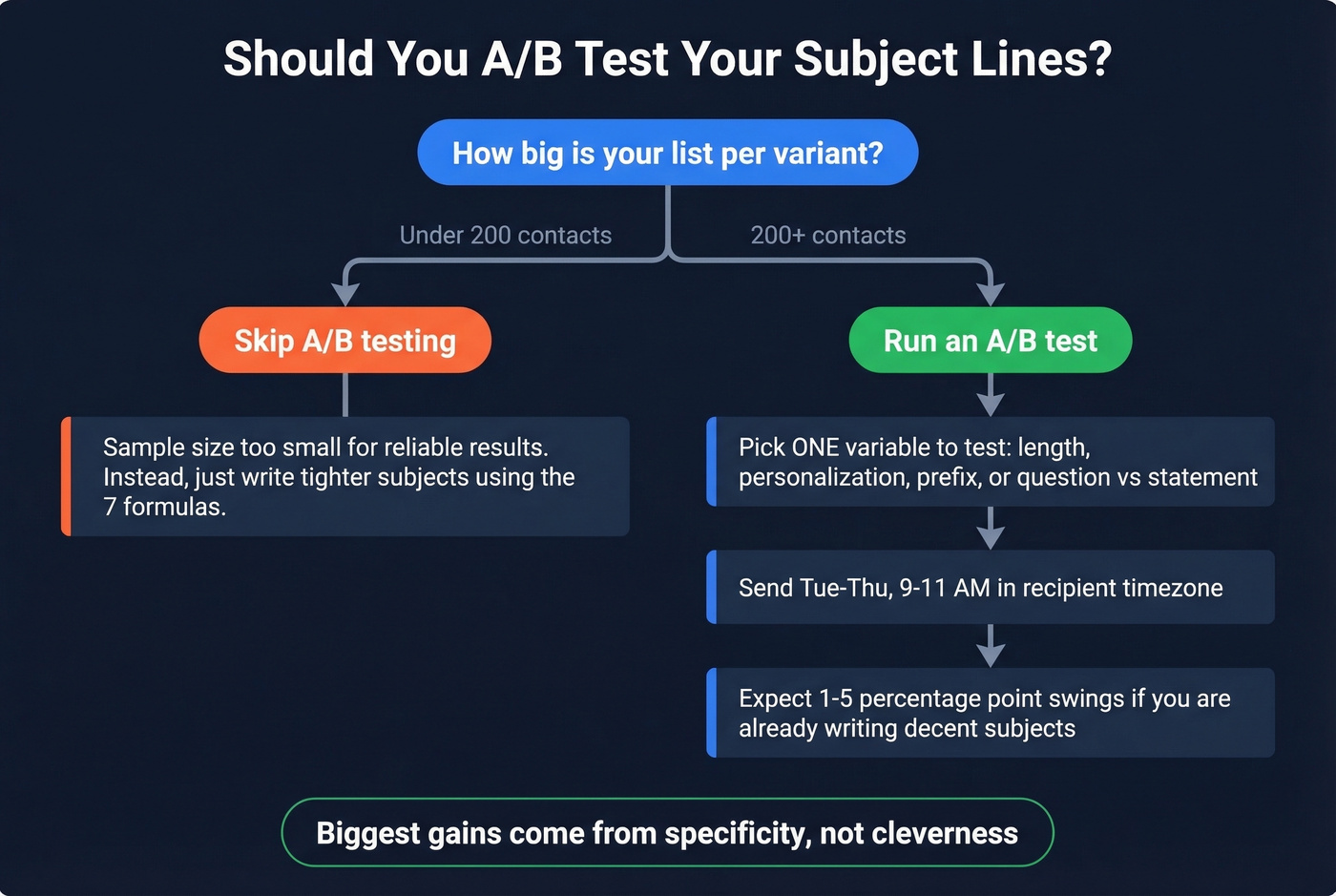
Let's be honest about timing, too. The consensus on r/sales is that Tue-Thu, 9-11 AM in the recipient's timezone is the practical starting window. It's not magic, but it keeps you out of the Monday avalanche and the Friday checkout.
If you want a more data-driven send window, use a dedicated guide on the best time to send cold emails.
Skip A/B testing entirely if your list is under 200 contacts per variant - the sample size won't tell you anything reliable, and you're better off just writing tighter subjects based on the formulas above.
Cold outreach subjects work best when they reference something specific about the recipient's company. Prospeo gives you 50+ data points per contact - job title, tech stack, funding, headcount growth - so every subject line you write is specific, not generic.
Stop guessing. Write subject lines backed by real prospect data.
FAQ
What's the ideal email subject line length?
33 characters ensures full visibility across the major mobile devices tested. Desktop gives you up to ~88 in Gmail or ~51 in Outlook. Front-load topic and purpose within those first 33 characters regardless.
Should I use emojis in professional email subjects?
Skip them in most business contexts. Screen readers announce them awkwardly, and they read as informal. If your company culture supports one, pair it with clear text so meaning doesn't depend on the emoji.
How do I verify the right email address before sending?
Use a real-time verification tool so you're not guessing formats or burning deliverability on bounces. Prospeo's free tier includes 75 verified emails per month - enough for targeted outreach without committing to anything.