

Best Free Subject Line Testers in 2026 (Honest Review)
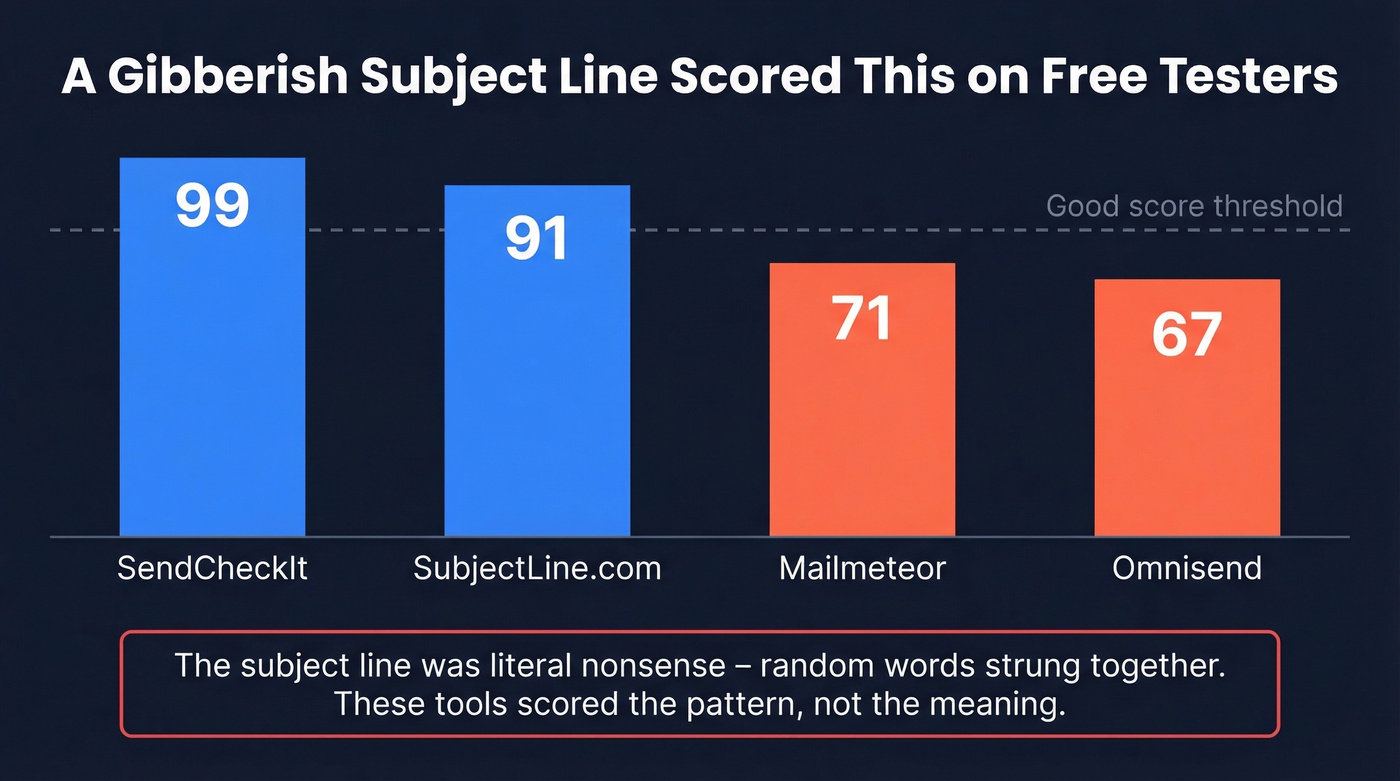
A gibberish subject line scored 99 on one of these tools. Not a typo - a string of nonsense words hit near-perfect marks because it happened to contain a number, a question mark, and a "power word." That's the state of free subject line testers in 2026: useful guardrails wrapped in misleading confidence scores.
Here's the thing: 69% of recipients mark emails as spam based on the subject line alone, and 64% decide whether to open based on it. Subject lines matter enormously. The question is whether these tools actually help you write better ones - or just make you feel like you did.
Our Picks (TL;DR)
If you're short on time, here are the three worth bookmarking:
- SendCheckIt - best for detailed, actionable feedback. Scores across roughly 17 dimensions and explains why something scored low.
- MailerLite - best for readability and mobile truncation. Flesch-Kincaid scoring, no signup required.
- Mailmeteor - best for AI-generated alternatives. GPT-powered rewrites when you're stuck staring at a blank field.
That gibberish subject line? It scored 99 on SendCheckIt, 91 on SubjectLine.com, 71 on Mailmeteor, and 67 on Omnisend. We'll explain why that matters - and what actually predicts open rates.
8 Best Free Email Subject Line Testers
SendCheckIt
SendCheckIt is the most useful free tester because it doesn't just hand you a number - it tells you what's wrong and why. This subject line grader scores across roughly 17 dimensions: readability grade level, scannability, sentiment, emoji usage, personalization tokens, punctuation, character count, and more. Each dimension comes with an explanation, not just a red/green indicator. SendCheckIt benchmarks your subject line against 100,000+ marketer-sent emails, so the scoring has real data behind it.
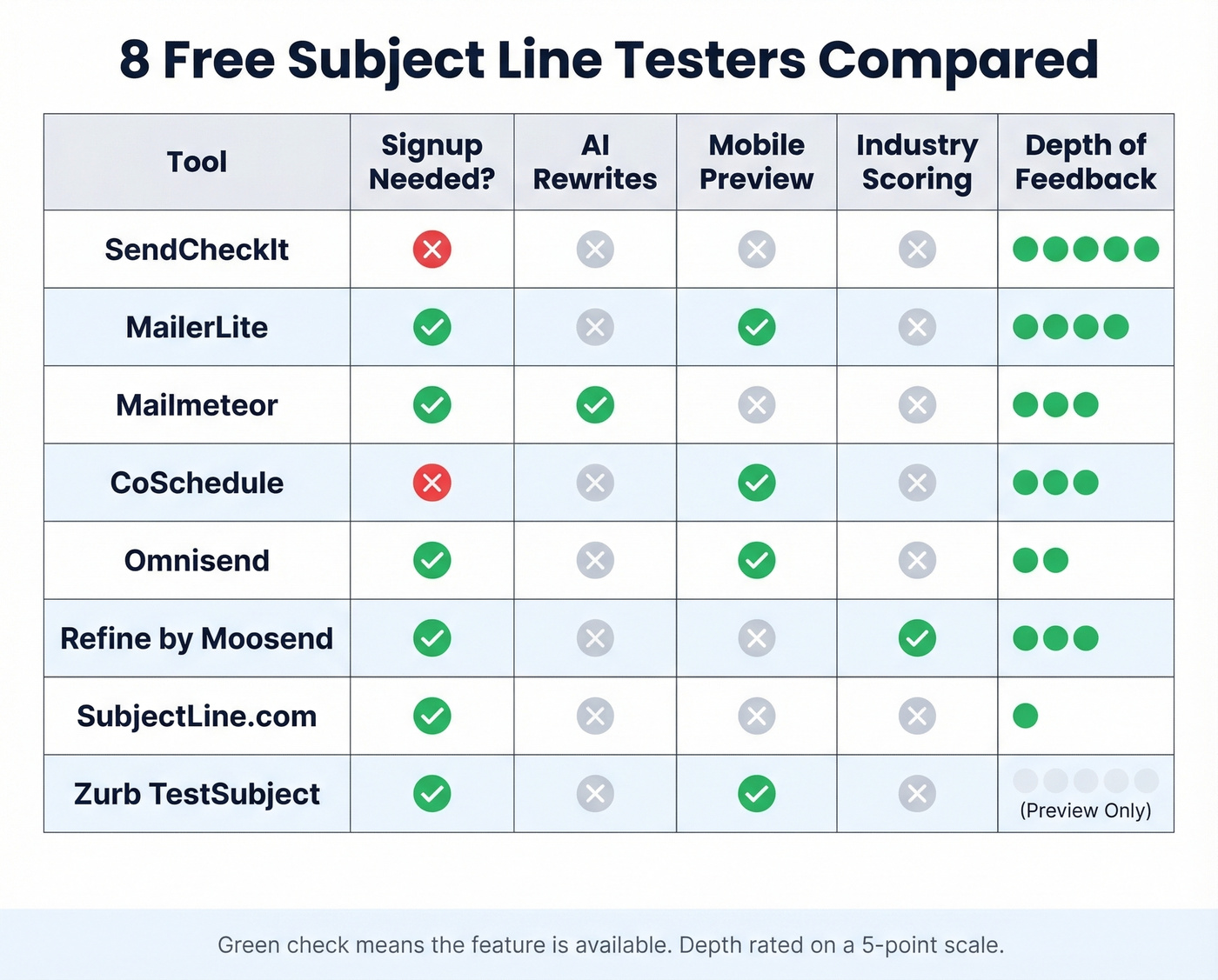
The tradeoff: you need to provide your name and email to access it. That's minor friction, but the depth of analysis justifies the signup. If you're only going to use one tester, this is the one. No other free tool gives you this level of diagnostic detail.
MailerLite
MailerLite's tester is the one we'd recommend for anyone focused on mobile-first email. It scores across 9 dimensions including Flesch-Kincaid readability, helpful vs. negative word detection, capitalization, numbers, emojis, questions, and personalization. No signup required.
The standout feature is its mobile truncation analysis. MailerLite flags that most mobile devices display only the first 30 characters of a subject line, so this tool verifies whether your key message lands within that window. It also notes that emojis can boost open rates by up to 6.4% in certain industries - a useful nudge when you're debating whether to add that 🔥. On top of the scoring, MailerLite offers a free swipe file with 500+ subject line examples segmented by industry and occasion, which is genuinely handy when you need inspiration rather than just a grade.
Mailmeteor
Use this if: You're staring at a blank subject line field for the fifth time today and need fresh angles. Skip this if: You want granular diagnostic feedback on why a subject line works or doesn't.
Mailmeteor gives you a numeric score plus something no other free tester offers: GPT-powered AI that generates 5 alternative subject lines on the spot. The AI suggestions are hit-or-miss - some feel generic, others land on something better than what you started with. Daily GPT limits apply, but for most users that's not a real constraint. No signup required.
CoSchedule
CoSchedule's tester delivers infographic-style results with a feature few others match: multi-device preview. It shows you how your subject line renders across common screen sizes, which alone makes it worth a run-through.
Access typically requires creating a free CoSchedule Calendar account (their Free Calendar plan is $0 forever), which adds friction. The scoring covers length, keywords, tone, and spam language. The UX leans toward cheerleading - lots of encouragement, less critical feedback. But the device preview is worth the extra click.
Omnisend
Omnisend's tester is a solid quick sanity check. No signup, instant results. It scores character count, wording insights, scannability, and includes desktop/mobile preview.
One quirk: Omnisend uses discrete score buckets - 100, 92, 83, 75, 67, 58, 33 - rather than a continuous scale. Changing a single word can cause your score to jump 8-17 points in either direction. Don't read too much into small score shifts here.
Refine by Moosend
Refine stands out for one reason: industry-specific scoring. If you're writing B2B outreach, publishing, or nonprofit fundraising emails, generic scoring rules can penalize subject lines that work perfectly well in your world. Refine adjusts its suggestions based on your industry, which makes it a strong option when retail-style "flash sale" language isn't your baseline. No signup required.
SubjectLine.com
Fun but opaque. SubjectLine.com uses gamified scoring that can exceed 100 with "extra credit" bonuses. They claim 800+ scoring rules and 3B+ tracked messages behind the methodology, but they don't explain how individual scores are calculated. Think of it as a "rate my subject line" experience - use it for motivation, not strategy.
Zurb TestSubject
Not a scorer at all. Zurb TestSubject is a pure mobile preview tool that shows how your subject line renders on iPhone, iPad, and Android devices. No signup, no score, no feedback. Just a visual check for truncation on specific devices. Pair it with a scoring tool for the full picture.
Honorable mention: Email Subject Line Grader focuses on "word mixture and balance" scoring - worth a look if you want yet another data point, but it doesn't add much beyond what SendCheckIt already covers.
| Tool | Score Type | Key Dimensions | Signup? | Best For |
|---|---|---|---|---|
| SendCheckIt | 0-100 | ~17 with explanations | Yes | Detailed feedback |
| MailerLite | Multi-dimension | 9 inc. Flesch-Kincaid | No | Readability + mobile |
| Mailmeteor | Numeric + AI | Score + 5 AI rewrites | No | Rewrite ideas |
| CoSchedule | Visual report | Length, tone, device preview | Free account | Device preview |
| Omnisend | Discrete buckets | Count, wording, scannability | No | Quick check |
| Refine (Moosend) | Industry-adjusted | Industry-specific suggestions | No | Non-retail industries |
| SubjectLine.com | Gamified (100+) | 800+ undisclosed rules | No | Fun/motivation |
| Zurb TestSubject | Preview only | Mobile rendering | No | Device preview |
What These Tools Actually Measure
Most free testers evaluate some combination of the same core dimensions. Understanding what they check helps you interpret scores - and know when to ignore them.
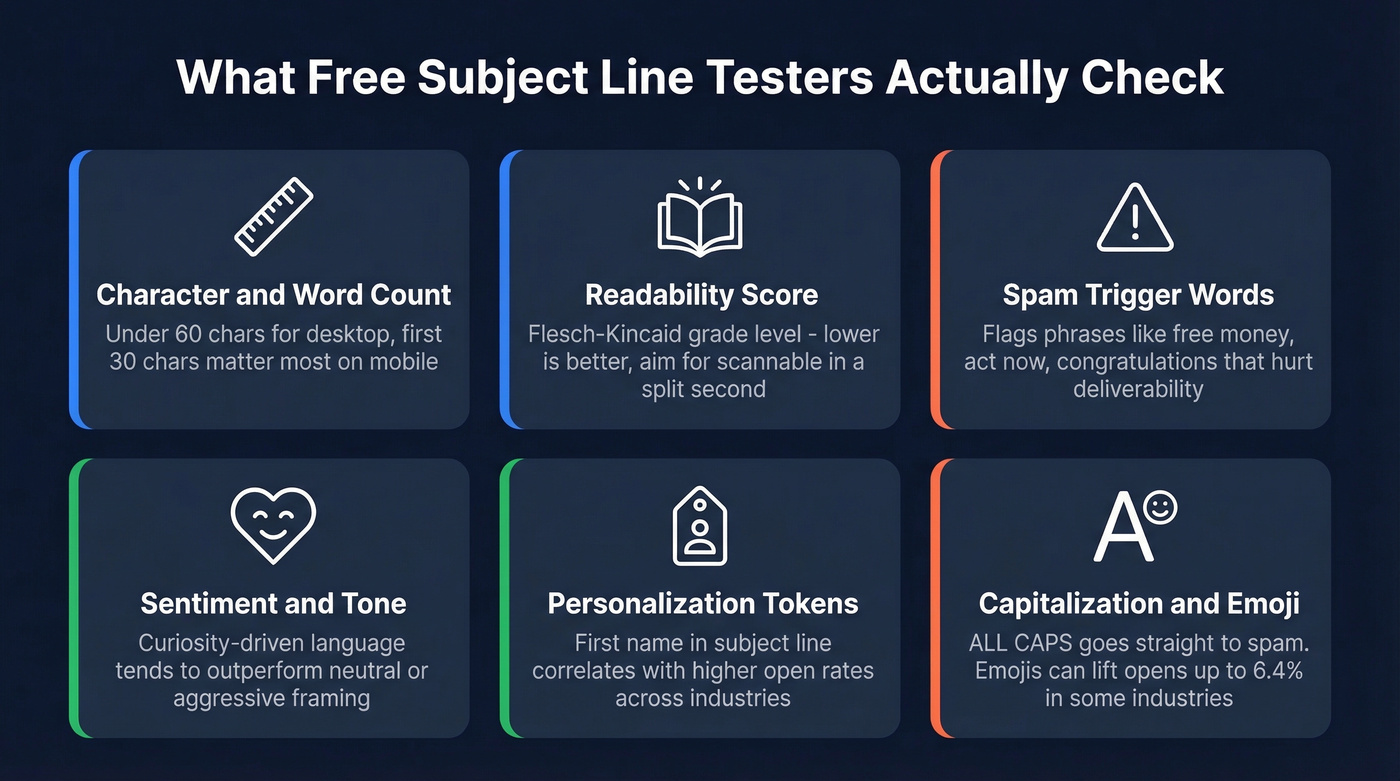
Character and word count is the baseline check. Short subject lines tend to outperform longer ones. Aim for 60 characters or fewer for full desktop display, and front-load your key message within the first 30 characters for mobile.
Readability matters more than people think. Tools like MailerLite use Flesch-Kincaid scoring, and lower grade levels correlate with higher engagement. Your subject line should be scannable in a split second, not parsed like a legal brief.
Spam trigger words get flagged by nearly every tester - words like "free money," "act now," and "congratulations." We cover these in detail below.
Sentiment and emotional tone is where things get interesting. Curiosity-driven language tends to outperform neutral or aggressive framing, and understanding the psychology behind subject lines - curiosity gaps, urgency, personalization - matters more than any single score.
Personalization tokens like a first name in the subject line correlate with higher-than-average opens. Emoji impact varies wildly by audience - up to 6.4% open rate lift in some industries, negligible in others. And capitalization? ALL CAPS is a fast track to the spam folder. Almost universally flagged.

You're optimizing subject lines to lift open rates - but none of that matters if your emails never reach the inbox. Prospeo delivers 98% verified email accuracy with a 7-day data refresh cycle, so every crafted subject line actually lands in front of a real person.
Stop perfecting subject lines for emails that bounce.
Do These Testers Actually Work?
Let's be honest about what these tools can and can't do.
Subject line testers are the email marketing equivalent of a spell checker. They catch obvious mistakes - spam words, excessive length, all-caps - but they can't tell you if your message resonates with your audience. A Campaign Monitor analysis found that the subject line "What's really happening between the US and Turkey?" achieved a 28.1% open rate, yet a tester flagged it as needing "a lot of work."
The gibberish problem makes this even clearer. A nonsense subject line - literally incoherent words strung together - scored 99 on SendCheckIt, 91 on SubjectLine.com, 71 on Mailmeteor, and 67 on Omnisend. The tools scored the pattern, not the meaning.
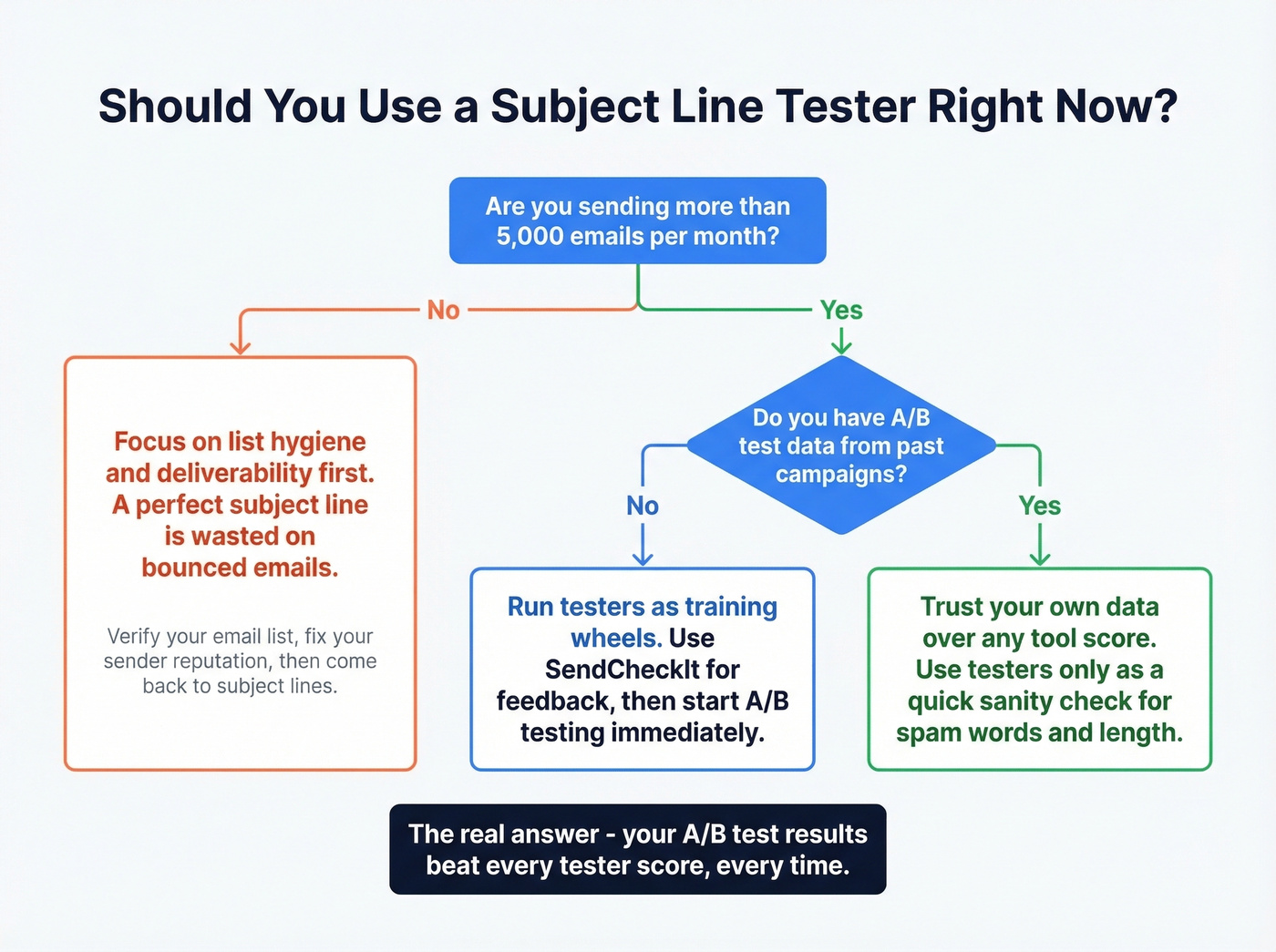
The consensus on r/emailmarketing echoes this: use testers for quick sanity checks, but trust your own campaign data over any score. Subject line teardowns of real campaigns - analyzing what actually drove opens and clicks - teach you far more than any automated grader.
There's also an industry calibration problem. Most testers are implicitly tuned for retail and ecommerce language. For teams running B2B cold outreach or nonprofit fundraising, generic scoring rules penalize perfectly effective subject lines. And if you need to localize subject lines for international audiences, none of these tools account for cultural or linguistic nuance.
Treat tester scores as directional. Your A/B test data is the truth.
Here's my frustration with the whole category: if your average deal size is under $15k and you're sending fewer than 5,000 emails a month, you probably don't need to obsess over subject line optimization at all. Your time is better spent making sure those emails actually reach inboxes. A perfect subject line is wasted on a bounced email - and if 30% of your list bounces, your sender reputation craters and future emails land in spam regardless of what your subject line says.
Stop optimizing for a tester score. Optimize for your audience.
How to Write Sales Subject Lines That Convert
Knowing how to write effective sales subject lines is more valuable than any tool score. The best email headlines share a few traits: they're specific, they signal relevance, and they create a reason to open right now.
Use social proof. Referencing a mutual connection, a recognizable customer, or a specific result builds instant credibility. Lines like "How [Company] cut onboarding time by 40%" outperform generic pitches because they anchor the claim in reality.
Lean into loss aversion. People fear losing something more than they value gaining it. "Your competitors already switched" creates more urgency than "Try our new feature."
Keep it short. For sales email subject lines in 2026, brevity wins. The most effective ones are 6-8 words. Anything longer gets truncated on mobile and loses impact.
Personalize beyond first name. Reference a prospect's company, role, or recent activity. SDR subject line training should emphasize contextual personalization over template-based tokens. We've found that referencing a specific company initiative or recent funding round consistently outperforms generic "Hi {first_name}" openers.
Consider localization. If you're selling internationally, subject lines that resonate in English can fall flat in other markets. Adapting tone, idioms, and cultural references for each region can meaningfully lift open rates.
These principles matter more than any score a free subject line grader can give you. Build your own playbook from real campaign data and iterate from there.
Spam Words to Avoid
Spam filters process 160 billion spam emails daily - they've gotten aggressive. Modern filtering uses multiple layers: content analysis, sender reputation, recipient engagement history, blacklist databases, and authentication checks like SPF, DKIM, and DMARC. Keywords alone won't land you in spam, but they're still one signal in a larger pattern.
Here are common trigger words and what to write instead:
| Instead of | Write |
|---|---|
| Act now | Get started today |
| Limited time only | Available through [date] |
| Cheap | Cost-effective |
| Free money | No-cost trial |
| Buy now | See the details |
| Don't miss out | Here's what's coming |
| Congratulations, you won | Your results are in |
| $$$ / 💰💰💰 | [Specific dollar amount] |
| Urgent | Time-sensitive |
| Click here | See the breakdown |
The broader principle: specificity beats hype. "Save 22% on Q2 licenses" will always outperform "HUGE SAVINGS ACT NOW!!!" - both with spam filters and with humans.
The Real Workflow
Running a subject line through a free tester takes 30 seconds. But a tester score isn't a strategy. Here's the workflow that actually moves open rates.
Step 1: Run through 2-3 testers. Pick SendCheckIt for depth, MailerLite for readability, and one wildcard. Total time: 90 seconds. If all three flag the same issue, fix it. If scores conflict wildly, trust your A/B test data over any single score.
Step 2: Verify your email list. A perfect subject line is wasted on a bounced email. Prospeo verifies emails with 98% accuracy and catches spam traps, honeypots, and catch-all domains through its 5-step verification process. The free tier covers 75 verifications per month - enough for a pre-campaign spot check before you hit send. If you want the deeper mechanics, start with this email deliverability breakdown and the benchmarks in our email bounce rate guide.
Step 3: A/B test with real volume. Most teams get tripped up here. A Dynamic Yield analysis showed that a 4,000-person A/B test with open rates of 13.25% vs. 12.5% yields only 76% certainty - meaning the "winner" could be wrong roughly 1 in 4 times. You need 50,000+ recipients for statistically reliable results. The only score that matters is your actual open rate with your actual audience. (If you need benchmarks, see what is a good email open rate and the standard email open rate data.)
Step 4: Analyze real performance, not tester scores. Close the loop. Track which subject lines drove opens, clicks, and replies over time. Build a swipe file of what works for your list. That's how you compound improvements quarter over quarter. For a head start, pull from these email subject line examples and the data-backed subject lines that get opened playbook.
Teams using Prospeo cut bounce rates from 35%+ to under 4% - meaning your A/B-tested subject lines reach real inboxes, not dead ends. 143M+ verified emails at $0.01 each, no contracts, no sales calls.
Great subject lines deserve deliverable email addresses behind them.
FAQ
Are subject line testers accurate?
They catch obvious issues like spam words, excessive length, and all-caps, but they don't predict open rates. A Campaign Monitor analysis found a subject line with a 28.1% open rate was flagged as "needs work." Use testers for sanity checks, not performance predictions. Your own A/B test data is the only reliable signal.
What's the ideal subject line length?
Aim for 60 characters or fewer for full desktop display. For mobile, the first 30 characters matter most - that's all many devices show. Front-load your key message within those 30 characters so recipients see the hook before truncation kicks in.
Do emojis improve open rates?
In some industries, emojis boost open rates by up to 6.4%. The effect varies significantly by audience - B2B recipients respond differently than retail shoppers. Test with your own list before committing to emojis in every campaign.
Which free tester should I start with?
Start with SendCheckIt for the deepest feedback - it covers roughly 17 scoring dimensions with explanations for each. For a faster, no-signup option, MailerLite gives you strong readability and mobile analysis. Running your subject line through both takes under two minutes.
What if my emails bounce despite a great subject line?
A high bounce rate (above 5%) destroys sender reputation, pushing future emails to spam regardless of subject line quality. Verify your list before sending. Prospeo's free tier includes 75 email verifications per month with 98% accuracy - enough to spot-check a campaign list and remove invalid addresses before they do damage.