

B2B Email Marketing ROI in 2026 (Benchmarks, Formula, Calculator)
"Email returns $36-$42 for every $1 spent" sounds great right up until you're in a pipeline review and nobody agrees on what "return" means. In B2B, ROI lives or dies in the micro-drops: emails that never hit the inbox, clicks that never become meetings, and "influenced" deals finance won't let you count.
Here's the angle that holds up under scrutiny: pipeline-first math, full cost accounting, and a calculator you can paste into Sheets in five minutes.
If you can't fill in each arrow with a rate you trust, your ROI number's theater.
What you need (quick version)
- Pick your ROI definition upfront (or you'll argue forever):
- Revenue ROI (closed-won only)
- Pipeline ROI (created pipeline value)
- Contribution ROI (sourced + influenced)
- Use the pipeline-first chain (one line): Revenue = Sent → Delivered → Inboxed → Replies → Meetings → Opportunities → Wins × ACV
- Reality check: ROI's a distribution, not a single number. Litmus' State of Email 2025 distribution shows:
- 35% get $10-$36 per $1
- 30% get $36-$50 per $1
- 5% get >$50 per $1
- 21% don't measure ROI (down from 36% in 2023)
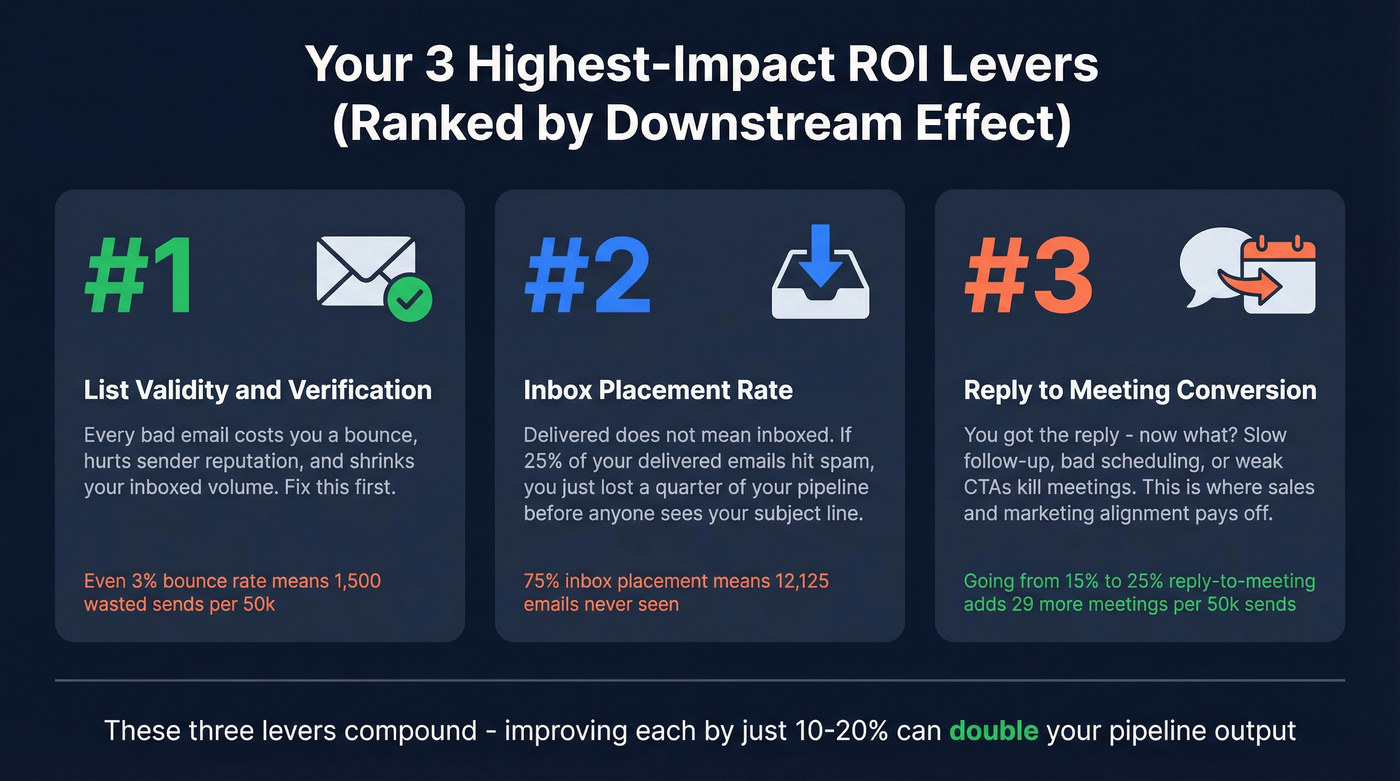
- Your 3 highest-impact levers (in order): list validity/verification, inbox placement, reply→meeting conversion.
- Don't let open rate drive budget decisions. It's a diagnostic, not an ROI driver.
- Report both sourced and influenced so you don't undercount email's role in B2B.
- Jump to the calculator template: [Ungated B2B email ROI calculator template](#b2b-email-marketing-roi-calculator-template-copypaste - formulas)
Look, if your average deal size's in the low five figures, you probably don't need "perfect attribution." You need clean deliverability, fast iteration, and a pipeline ROI trendline that moves the right way.
What "B2B email marketing ROI" actually means (3 ROI types)
Most teams say "email ROI" when they mean three different things. Pick the wrong one and you'll either over-credit email (and get laughed out of finance) or under-credit it (and get your budget cut).
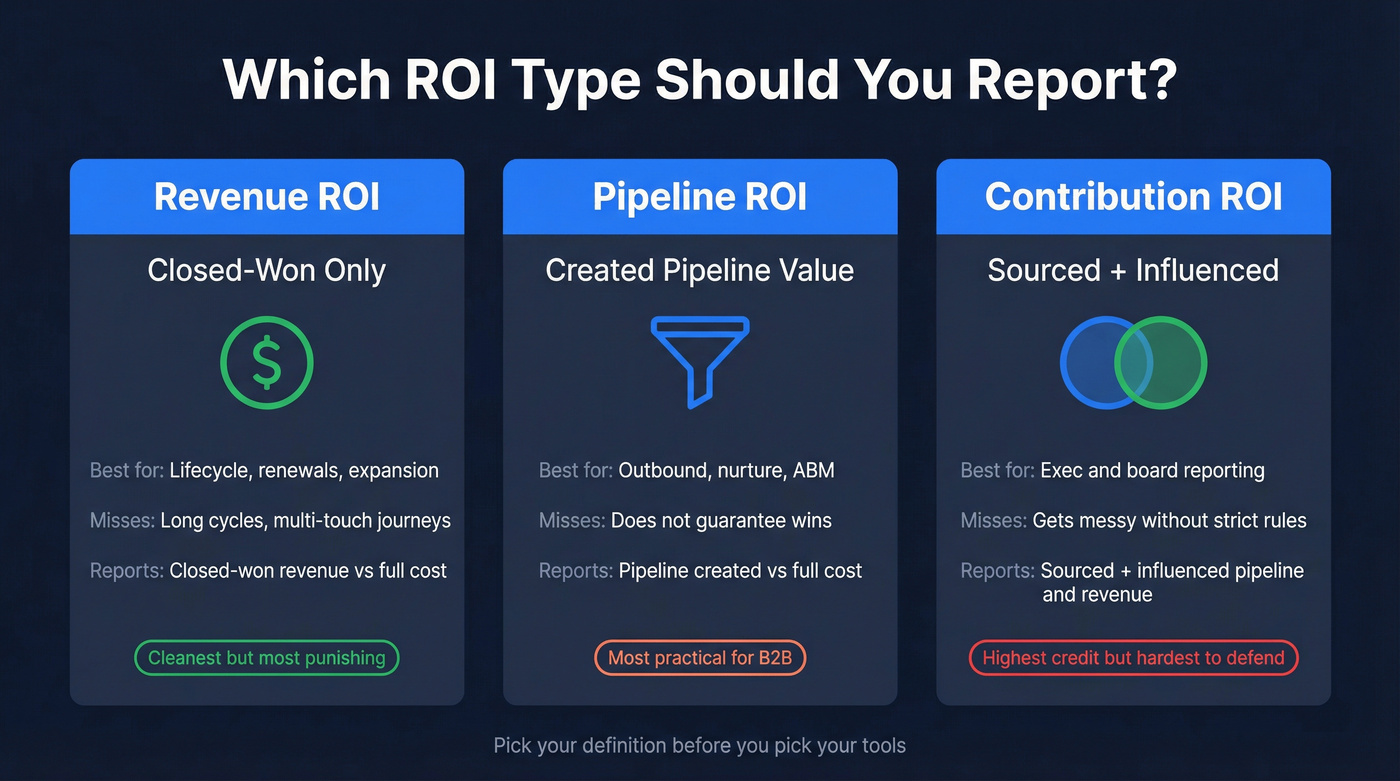
To keep this simple and CFO-proof, here's the whole picture in one view:
| ROI type | Best for | What it misses | What to report |
|---|---|---|---|
| Revenue ROI (closed-won) | Lifecycle/customer email, renewals, expansion | Long cycles + multi-touch journeys | Closed-won revenue (or gross profit) vs full cost |
| Pipeline ROI (created pipeline) | Outbound, nurture, webinar follow-up, ABM | Doesn't guarantee wins | Pipeline created vs full cost + conversion rates |
| Contribution ROI (sourced + influenced) | Exec/board reporting across channels | Gets messy without rules | Sourced pipeline/revenue + influenced pipeline/revenue with strict definitions |
Revenue ROI (closed-won ROI)
This is the cleanest definition: money in vs money out. It's also the most punishing for top-of-funnel email, because it ignores the messy middle where B2B deals actually happen.
Pipeline ROI (pipeline created per $1)
Pipeline ROI answers: "Did email create sales opportunities we can work?" It's the most practical definition for B2B because it respects long cycles and gives you a leading indicator you can optimize weekly.
Contribution ROI (sourced + influenced)
This is the exec-friendly version: email gets credit when it sources pipeline and when it influences pipeline that was sourced elsewhere.
Litmus' State of Email framing matters here too: for B2B, customer engagement emails drive the highest ROI. Translation: the easiest ROI wins often come from sending to people who already know you (customers, active opportunities, warm leads), not blasting cold lists.

Your ROI formula starts with deliverability. If bounces eat your send volume, every number downstream is fiction. Prospeo's 98% email accuracy and 7-day data refresh cycle mean fewer bounces, higher inbox placement, and a pipeline chain you can actually trust.
Stop calculating ROI on emails that never hit the inbox.
B2B email marketing ROI benchmarks in 2026: the "$36-$42" headline (and why it misleads)
The internet loves the headline: "Email returns $36-$42 for every $1 spent." It's not useless, but it's easy to misuse.
Two clarifications that save a lot of pointless arguing:
- Litmus' State of Email 2025 data is best read as a distribution, not a single average.
- The "42:1" figure you see quoted in charts is commonly tied to an industry breakout table Litmus publishes that's derived from its 2020 State of Email Survey (2,000+ marketing professionals), where marketing/PR/agencies show 42:1.
Average vs distribution (the part people ignore)
Litmus' State of Email 2025 distribution is the useful bit:

- 35%: $10-$36 per $1
- 30%: $36-$50 per $1
- 5%: >$50 per $1
- 21%: don't measure
That's not one benchmark. That's four different realities.
And if you're in the "don't measure" bucket, you don't have an ROI problem - you've got an instrumentation problem.
The mixed-year trap (and the mixed-sample trap)
On the same Litmus infographic page, there's also an industry ROI table (software/tech 36:1, agencies 42:1, etc.). That table's explicitly from Litmus' 2020 State of Email Survey of 2,000+ marketing pros.
The same page also references a separate nearly-500-professional sample used for infographic highlights. So treat the headline ROI as survey-reported and context-dependent, not a universal constant.
People quote "software is 36:1" as if it's a law of physics, then wonder why their number doesn't match. It's because they're blending a 2025 distribution with a 2020 industry breakout and a separate highlight sample like it's one dataset. It isn't.
Why the headline misleads B2B teams
In B2B, ROI swings based on stuff the average number hides:
- Deliverability and inbox placement (delivered isn't the same as inboxed)
- List freshness (job changes and role shifts kill conversion)
- Sales capacity (meetings don't matter if nobody works them)
- Attribution rules (sourced-only vs sourced+influenced)
I've watched teams "hit" a great ROI number on paper while pipeline stayed flat because they counted influenced revenue with a 180-day window and no touch threshold. Finance shut it down, and the number became political overnight.
If you want a benchmark that survives scrutiny, you need transparent math.
The pipeline-first email ROI formula (with full cost accounting)
The canonical ROI formula's a solid starting point:
ROI % = (Revenue generated - Marketing investment) / Marketing investment × 100
For B2B email, it's usually clearer to express it as return per $1 and model pipeline stages explicitly. That's where the micro-drops show up, and it's also where you can actually improve things week to week without waiting for closed-won.
Step 1: Model the funnel from delivered emails (not sent)
Start with Delivered and Inboxed as separate stages:
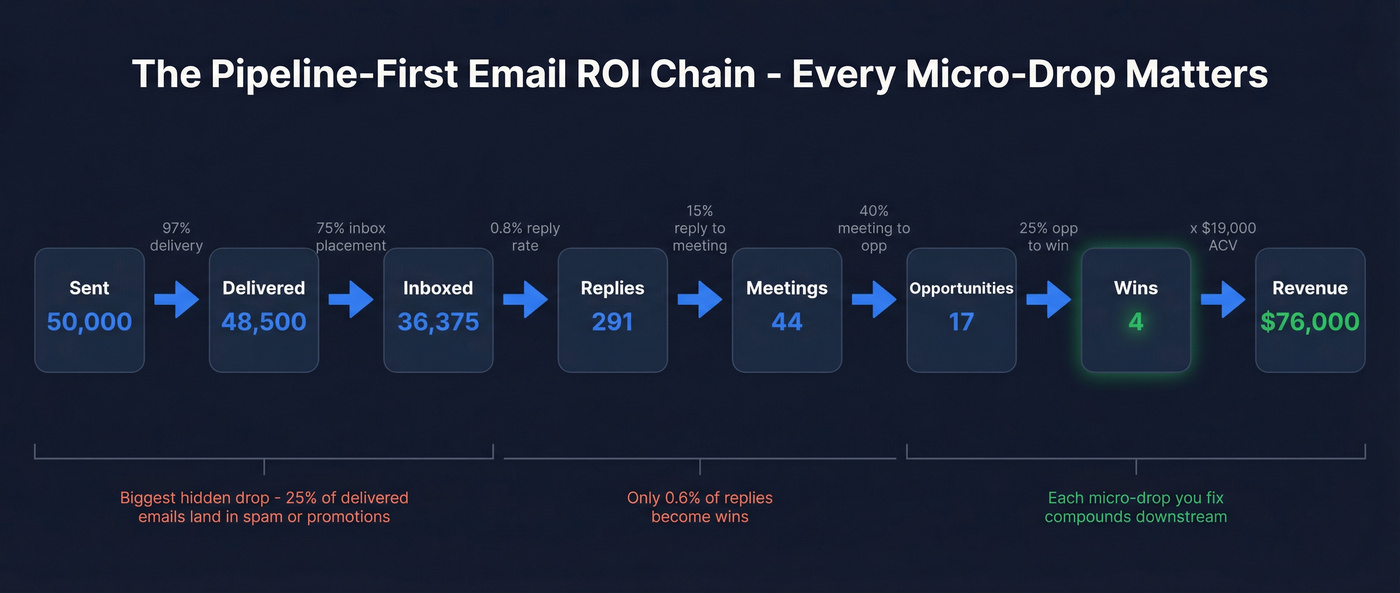
- Sent
- Delivered = Sent × (1 - bounce rate)
- Inboxed = Delivered × inbox placement rate
Why? Because "delivered" can still land in spam/promotions and never create a real chance at a reply.
Step 2: Convert inboxed volume into pipeline
Define your conversion chain:
- Replies = Inboxed × reply rate
- Meetings = Replies × reply→meeting rate
- Opportunities = Meetings × meeting→opp rate
- Wins = Opportunities × opp→win rate
- Revenue = Wins × ACV
- Optional: Gross profit = Revenue × gross margin
If you're doing lifecycle email, swap "Replies/Meetings" for "Trials/Activations/Expansion events." Same math.
Step 3: Calculate pipeline ROI and revenue ROI
Two outputs you'll actually use:
- Pipeline ROI ($ per $1) = Pipeline created / Total email investment
- Revenue ROI ($ per $1) = Closed-won revenue / Total email investment
If you want the classic formats:
- Return per $1 = Revenue / Investment
- ROI % = (Revenue - Investment) / Investment × 100
Step 4: Full cost accounting (this is where most models lie)
If your model excludes labor, you're not measuring ROI - you're measuring software efficiency.

I split costs into fixed vs variable so you can do sensitivity analysis, and because it makes budget conversations less emotional: you can point to a line item and decide whether it's worth it.
Fixed-ish (monthly/annual):
- ESP / marketing automation
- Sending infrastructure (mailboxes, domains, warmup)
- Analytics/attribution tooling
- Copy/design tools
- Data/enrichment tools
Variable (scales with volume):
- Per-contact data costs
- Verification costs
- Agency/contractor hours per campaign
- Sales engagement seats if you're scaling outbound
Labor (the cost everyone "forgets"):
- Copywriting + QA
- List building + cleaning
- Deliverability ops (auth, monitoring, remediation)
- Ops time pushing data into CRM/sequencers
- Sales time handling replies and booking meetings (yes, it counts if you're measuring true ROI)
B2B email marketing ROI calculator template (copy/paste + formulas)
This template's built to survive a CFO conversation. It forces you to model the micro-drops practitioners complain about: emails that don't land, replies that don't become meetings, meetings that don't become opps, and the very real constraint of mailbox throughput.
Make the formulas paste-ready in 60 seconds: after you paste the tables into Google Sheets, create Named ranges for each Input value (Data → Named ranges) using the exact names in the "Key" column (e.g., SentEmails, BounceRate). Then the formulas below work as-is.
Pricing anchor (so your spreadsheet doesn't float away): for outbound sending, Instantly's a common baseline with plans like $37/mo, $97/mo, and $358/mo. Instantly's page also shows SuperSearch examples like $9/mo (150 credits) and $197/mo (10,000-200,000 credits, as stated on the page) - use those as rough add-on anchors.
Table 1 - Inputs (paste this first)
| Key (use as Named range) | Input | Example |
|---|---|---|
| PeriodMonths | Months | 1 |
| SentEmails | Sent emails | 50,000 |
| BounceRate | Bounce rate | 3% |
| InboxPlacementRate | Inbox placement rate | 75% |
| ReplyRate | Reply rate (of inboxed) | 0.8% |
| ReplyToMeetingRate | Reply→meeting rate | 15% |
| MeetingToOppRate | Meeting→opp rate | 40% |
| OppToWinRate | Opp→win rate | 25% |
| ACV | ACV ($) | 19,000 |
| GrossMargin | Gross margin | 80% |
| AvgOppValue | Avg opportunity value ($) | 10,000 |
| CostESP | Cost: ESP/automation ($) | 800 |
| CostSendingTool | Cost: sending tool ($) | 97 |
| CostInboxInfra | Cost: inbox infra ($) | 300 |
| CostData | Cost: data/contacts ($) | 500 |
| CostVerification | Cost: verification ($) | 200 |
| CostCreative | Cost: creative/content ($) | 600 |
| CostAttribution | Cost: attribution/BI ($) | 300 |
| LaborHours | Labor hours | 40 |
| LoadedHourlyRate | Loaded hourly rate ($) | 75 |
| OverheadFactor | Overhead factor | 10% |
Table 2 - Calculations + outputs (paste this second)
| Metric | Type | Example | Formula (Sheets) |
|---|---|---|---|
| DeliveredRate | Calc | 97% | =1-BounceRate |
| DeliveredEmails | Calc | 48,500 | =SentEmails*(1-BounceRate) |
| InboxedEmails | Calc | 36,375 | =DeliveredEmails*InboxPlacementRate |
| Replies | Calc | 291 | =InboxedEmails*ReplyRate |
| Meetings | Calc | 44 | =Replies*ReplyToMeetingRate |
| Opportunities | Calc | 18 | =Meetings*MeetingToOppRate |
| Wins | Calc | 5 | =Opportunities*OppToWinRate |
| Revenue | Calc | 95,000 | =Wins*ACV |
| GrossProfit | Calc | 76,000 | =Revenue*GrossMargin |
| PipelineCreated | Calc | 180,000 | =Opportunities*AvgOppValue |
| LaborCost | Calc | 3,000 | =LaborHours*LoadedHourlyRate |
| SubtotalCost | Calc | 3,797 | =CostESP+CostSendingTool+CostInboxInfra+CostData+CostVerification+CostCreative+CostAttribution+LaborCost |
| TotalCost | Calc | 4,177 | =SubtotalCost*(1+OverheadFactor) |
| ReturnPerDollar | Output | 10.0 | =Revenue/TotalCost |
| ROIpercent | Output | 900% | =(Revenue-TotalCost)/TotalCost |
| PipelineROI | Output | 18.9 | =PipelineCreated/TotalCost |
Practitioner reality check #1: most "ROI calculators" quietly assume 100% inbox placement and 0% labor cost. That's not optimistic - it's wrong.
How to use it (without fooling yourself)
- Use inboxed as the base for reply rate. If you use "sent," you'll overestimate performance the moment deliverability slips.
- Define each stage operationally. A "meeting" is a scheduled call that happened. An "opportunity" is whatever your CRM requires (stage 1 with $ value, not "maybe").
- Add capacity constraints if you're outbound-heavy. If you can only send 15 emails/day/mailbox, your
SentEmailsinput's capped by mailbox count. That cap's real ROI friction. - Run two versions:
- Sourced-only (strict)
- Sourced + influenced (realistic for B2B)
We've reviewed dozens of ROI templates; most ignore inbox placement and labor. This one forces both into the math.
Attribution that won't get your budget cut (sourced vs influenced)
If you only report "email-sourced revenue," you'll undercount email in B2B. If you report "influenced revenue" with sloppy rules, finance will ignore you.
A 6sense 2025 benchmark captures the reality:
- 57% of teams use both sourced and influenced
- 90% report marketing ROI
- Under 25% rate their measurement as "fair"
That's the state of the union: everyone reports ROI, almost nobody trusts it.
The defensible way to define "influenced" (use this table)
Pick one row and stick to it for a full quarter. Consistency beats cleverness.
| Policy | Influence window | Touch threshold | What counts as a "meaningful touch" | Best for |
|---|---|---|---|---|
| Strict | 30 days | 2 touches | Reply, meeting booked, form submit, demo request | CFO scrutiny, tight budgets |
| Balanced | 60 days | 2 touches | Click to key page, reply, meeting booked, high-intent form | Most B2B teams |
| Generous | 90 days | 3 touches | Any click + site revisit + reply/call | Long cycles, ABM-heavy motions |
My recommendation: Balanced (60 days, 2 touches) unless you've got a very short sales cycle.
What to report (and how to keep it defensible)
Sourced (tight definition):
- Email is the first known touch that created the lead/opportunity, or the campaign that created the meeting that created the opportunity.
- Conservative by design. Great for budget defense.
Influenced (still defensible if you set rules):
- Email touches occurred within your chosen window before opp creation or close.
- Require the minimum touch threshold from the table above.
- Exclude machine noise (opens; accidental clicks; bot traffic).
First/last touch vs multi-touch
- First/last touch is simple and wrong in B2B.
- Multi-touch is closer to reality and harder to operationalize.
- The compromise that works in real companies: report sourced + influenced, and keep multi-touch as an internal diagnostic.
Reporting cadence checklist (so it sticks)
- Weekly: delivered, inbox placement, replies, meetings (leading indicators)
- Monthly: pipeline created, pipeline influenced, cost per meeting, cost per opp
- Quarterly: revenue sourced, revenue influenced, ROI range (best/base/worst)
If your exec team only sees ROI quarterly, you're flying blind for 10 weeks at a time.
The ROI levers that move the model the most (ranked)
If you want better ROI, don't start with subject lines. Start with the variables that multiply through the whole funnel.
Kickbox's 2025 deliverability report gives you the uncomfortable baseline:
- ~9% of webform emails are invalid (nearly 1 in 10)
- Only 23.6% verify lists before every campaign
- 64.6% say deliverability issues impacted revenue or retention
No surprise ROI "benchmarks" feel fake. Too many teams leak value before the email even has a chance.
1) List validity + verification (fastest ROI win)
If 9% of your addresses are invalid, you're paying to send emails that can't create pipeline - and you're also training mailbox providers to distrust you.
This lever's fast because it improves:
- delivered rate (fewer bounces)
- inbox placement (healthier sender reputation)
- downstream conversion (you're reaching real people)
One compounding effect most teams miss: better enrichment improves segmentation, segmentation improves relevance, relevance reduces complaints and unsubscribes, and that pushes inbox placement up again. Data quality isn't just "less bounce." It's targeting that doesn't annoy people.
In our experience, tools like Prospeo ("The B2B data platform built for accuracy") pay for themselves quickest when you're doing any meaningful outbound volume, because 98% verified email accuracy and a 7-day refresh cycle cut the decay-driven bounces that quietly wreck both deliverability and ROI.
Do this next:
- Verify new leads at capture (forms, imports, event lists)
- Re-verify anything older than 30-60 days if you're doing outbound
- Suppress risky segments (catch-alls, role accounts) unless you've got a reason
Skip this if you only email active customers and your bounce rate's already consistently under 1%. Otherwise, you're leaving money on the table.

2) Inbox placement fundamentals (SPF/DKIM/DMARC + complaint/bounce control)
Inbox placement's the silent ROI killer because it doesn't show up in "delivered." You can be 97% delivered and still have half your volume buried in spam/promotions.
The basics that move the needle:
- SPF + DKIM aligned
- DMARC enforced (start with p=none, move to quarantine/reject when stable)
- Keep bounces low (verification helps)
- Keep complaints low (targeting + frequency + easy unsub)
Guardrails (don't cross these):
- Treat a bounce rate above 2% as a sender reputation problem
- Treat spam complaints above 0.1% as a sender reputation problem
- Pause sends if either spikes - pushing volume through a reputation dip is how you torch a domain for weeks
Provider variance is real. Model inbox placement as a range (say 60-90%) and run sensitivity analysis. If your ROI only works at 90%, it doesn't work.
3) Segmentation (why it compounds downstream conversions)
Segmentation isn't just "higher opens." It compounds because it improves clicks, replies, and meeting acceptance - especially in B2B where relevance is everything.
Mailchimp's segmentation study (2,000 users, 11,000 campaigns, 9M recipients) found segmented campaigns delivered:
- +14.31% opens
- +100.95% clicks
- -4.65% bounces
- -9.37% unsubscribes
Clicks aren't your goal, but they're a proxy for "this message matched intent." More intent usually means better reply→meeting conversion and less list decay from unsubscribes and complaints.
4) Offer + CTA + sequence design (reduce reply→meeting leakage)
The biggest micro-drop after deliverability is reply→meeting leakage.
You'll see it in the calculator as:
- Replies look fine
- Meetings are disappointing
- ROI collapses
Common causes:
- CTA asks for too much too soon
- No clear next step (time options, agenda, who it's for)
- Sequence doesn't handle "soft interest" replies
Do this next:
- Write CTAs that match intent level ("Worth a 10-min fit check?" beats "Book a demo.")
- Add a "soft yes" path (send a 2-line summary + 2 time options)
- Treat "not now" as a nurture trigger, not a dead end
5) Permission practices (SOI vs DOI)
Permission's a deliverability lever disguised as a compliance topic.
Litmus' ROI guide makes a spicy point: single opt-in (SOI) programs show an 80% higher return than double opt-in (DOI). That tracks with what you see in the wild - DOI reduces list growth and can choke volume.
But DOI exists for a reason.
Do this next:
- Use SOI when it's compliant and you need growth
- Use DOI when regulation, risk, or brand sensitivity requires it
- Either way: set expectations at signup so complaints stay low
Worked example: ROI per 1,000 delivered emails (and a sensitivity check)
Here's a scenario I've seen in the real world: a team scales outbound, gets a decent reply count, and still can't explain why ROI swings month to month.
Example inputs:
- 45,000 emails → 300 replies → 40 meetings → 5 deals
- $19k ACV
- Tools: $4.5k
- Labor: $3k-$9k
- Constraint: 138 mailboxes × 15 emails/day
Practitioner reality check #2: teams don't fail because they can't write subject lines. They fail because the math breaks at the inbox and meeting steps.
Pass 1: Convert it to "per 1,000 delivered" (simple, directional)
First, per 45,000 emails:
- Reply rate (on sent) = 300 / 45,000 = 0.67%
- Meeting rate (per reply) = 40 / 300 = 13.3%
- Win rate (per meeting) = 5 / 40 = 12.5%
- Revenue = 5 × $19,000 = $95,000
Per 1,000 emails (roughly linear for a first pass):
- Deals per 1,000 = 5 / 45 = 0.111
- Revenue per 1,000 = 0.111 × $19,000 ≈ $2,111
Now costs. If tools are $4.5k and labor is $3k-$9k, total cost is $7.5k-$13.5k.
Cost per 1,000 emails:
- Low cost: 7,500 / 45 = $167
- High cost: 13,500 / 45 = $300
So revenue return per $1 is:
- Low cost: 2,111 / 167 = 12.6x
- High cost: 2,111 / 300 = 7.0x
That's a huge ROI range from labor alone. This is why "email ROI" arguments get messy fast.
Pass 2: Correct for invalid emails + inbox placement (the micro-drop reality)
Now apply two real-world corrections:
- Invalid rate: 9% (Kickbox baseline)
- Inbox placement: 75% (a common "fine but not great" reality)
Start with 45,000 sent:
- Delivered = 45,000 × (1 - 0.09) = 40,950
- Inboxed = 40,950 × 0.75 = 30,712
If the observed 300 replies were actually driven by inboxed volume, the "true" reply rate is:
- Reply rate (of inboxed) = 300 / 30,712 = 0.98%
Now here's the point: your ROI doesn't just change - it becomes explainable. When someone asks "why did ROI drop this month?", you can say "inbox placement fell 10 points" instead of hand-waving about copy.
Convert to "per 1,000 inboxed" (more honest for outbound):
- Deals per 1,000 inboxed = 5 / 30.712 ≈ 0.163
- Revenue per 1,000 inboxed = 0.163 × $19,000 ≈ $3,097
That number's higher than the "per 1,000 sent" view because it removes dead volume you never had a chance to convert. That's exactly why inbox placement belongs in the model: it separates performance from the deliverability tax.
Sensitivity check (what moves ROI most)
| Change | What shifts | ROI impact |
|---|---|---|
| Inbox placement +10 pp | More inboxed | Big up |
| Inbox placement -10 pp | Less inboxed | Big down |
| Invalid rate 9% → 2% | Fewer bounces + better reputation | Big up |
| Reply→meeting +25% | More opps/wins | Medium up |
If you only do one sensitivity test, do inbox placement ±10 percentage points and invalid rate 2% vs 9%. In most B2B models, those two variables swing ROI harder than open-rate tinkering.
FAQ
What's a "good" B2B email marketing ROI in 2026?
A good number is one you can defend with transparent math: inboxed volume, a clear reply→meeting→opp chain, and full costs (tools + data + labor). As a sanity check, Litmus' 2025 distribution shows many teams reporting roughly $10-$50 returned per $1, but your 3-6 month trendline matters more than the headline.
How do I calculate ROI for cold outbound vs lifecycle emails?
Cold outbound's best modeled as pipeline-first (inboxed → replies → meetings → opps → wins) because cycles are long and attribution gets messy. Lifecycle email can lean closer to closed-won ROI because renewals, expansion, and activation tie to known accounts. Use the same cost model for both, then compare cost per meeting or cost per opportunity.
Should I measure email ROI by revenue or pipeline?
Operate weekly on pipeline ROI and report revenue ROI quarterly, because pipeline's the leading indicator you can actually steer. A practical setup is: pipeline created per $1 (weekly/monthly) plus closed-won return per $1 (quarterly). If pipeline rises but revenue doesn't, the fix's usually sales follow-up, qualification, or stage hygiene.
How does email verification affect ROI (and what's a good tool)?
Verification improves ROI by cutting bounces, protecting sender reputation, and stopping spend on dead addresses, so more of your volume becomes inboxed volume that can convert. Prospeo's a strong pick if you want accuracy and freshness to show up in the ROI model: 98% verified email accuracy, a 7-day refresh cycle, and a free tier (75 emails + 100 extension credits/month) for testing the workflow.
List decay is the silent ROI killer this article warns about. Prospeo refreshes 300M+ profiles every 7 days - not the 6-week industry average - so your sends reach real people in current roles. At $0.01 per verified email, the cost barely registers in your ROI denominator.
Turn your $36-per-$1 benchmark from theory into pipeline.
Final recommendations (the version I'd give a CFO)
If you can only fix one thing this quarter, fix verification + inbox placement instrumentation. That's where most ROI "mysteries" come from, and it's the fastest path to a stable return per $1.
Next, run reporting in two lanes: pipeline ROI weekly (so you can steer) and revenue ROI quarterly (so you can prove).
And if your CRM opportunity creation's inconsistent, stop pretending revenue-only ROI is "more rigorous." It's just noisier. Use pipeline ROI until pipeline hygiene's solid, then tighten the attribution rules and scale with confidence.