

The Best Email Trackers for Outlook in 2026
You sent a proposal on Tuesday. Your tracker says it was opened seven times. You're feeling good - until you realize some of those "opens" were security scanners hitting the tracking pixel. The others might be real. Or they might be automated link checks in a corporate M365 environment where tracking data is half-fiction.
Finding the best email tracker for Outlook means learning to separate signal from noise.
Our Picks (TL;DR)
Best for sales teams: Yesware Pro at $19/seat/mo - unlimited open, link, and attachment tracking. Premium and Enterprise add team features and Salesforce-specific capabilities.
Best free option: Boomerang for Outlook - a genuinely useful Basic plan with response tracking and read receipts, limited to 10 emails/month.
Best budget pick: Mailbutler at $4.95/mo - works across Outlook, Gmail, and Apple Mail if your team isn't standardized on one client.
How We Evaluated
We cross-referenced pricing, tracking reliability in Outlook and M365 environments, and user sentiment from G2 and Reddit. We also checked whether each tracker's redirect domains are shared (a spam risk) or dedicated. The goal: identify the strongest email tracking tools for Outlook across different budgets and team sizes.
How Outlook Email Tracking Works
Every tracker embeds a tiny invisible image - a 1x1 transparent GIF - into your message. When the recipient's email client loads that image, it pings the tracker's server, logging the open with a timestamp, approximate location, and device type. Click tracking rewrites your links through a redirect server to log clicks before forwarding recipients to the actual URL.
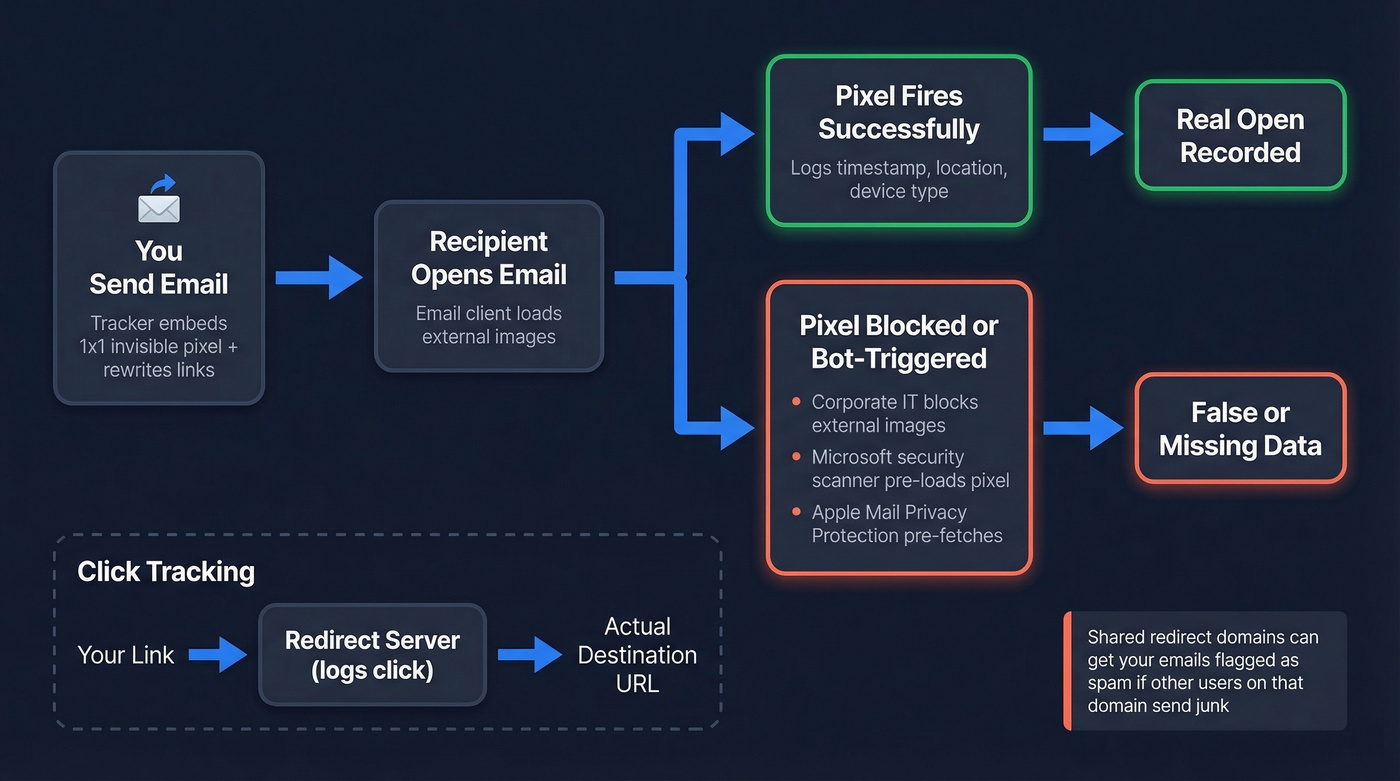
What matters for Outlook specifically:
- Outlook desktop (classic) often blocks external images in corporate environments. If IT hasn't allowed images, your pixel never fires.
- Outlook on the web tends to load images more freely, but Microsoft security scanning can trigger false opens and false clicks by pre-checking content.
- New Outlook behaves more like the web version, though corporate policies still override defaults.
Here's a risk most people miss: some trackers use shared redirect domains. If other users on that domain send spam, your emails get flagged too. Dedicated tracking domains, available on higher tiers of most tools, eliminate this problem entirely.
Open tracking in Outlook-heavy environments is directionally useful. It's not gospel.
Why Open Tracking Is Losing Reliability
Apple's Mail Privacy Protection pre-loads tracking pixels, registering an "open" whether the recipient read the email or not. Microsoft environments add their own noise - link scanning and security bots can trigger pixel loads and URL checks before a human ever sees the message.
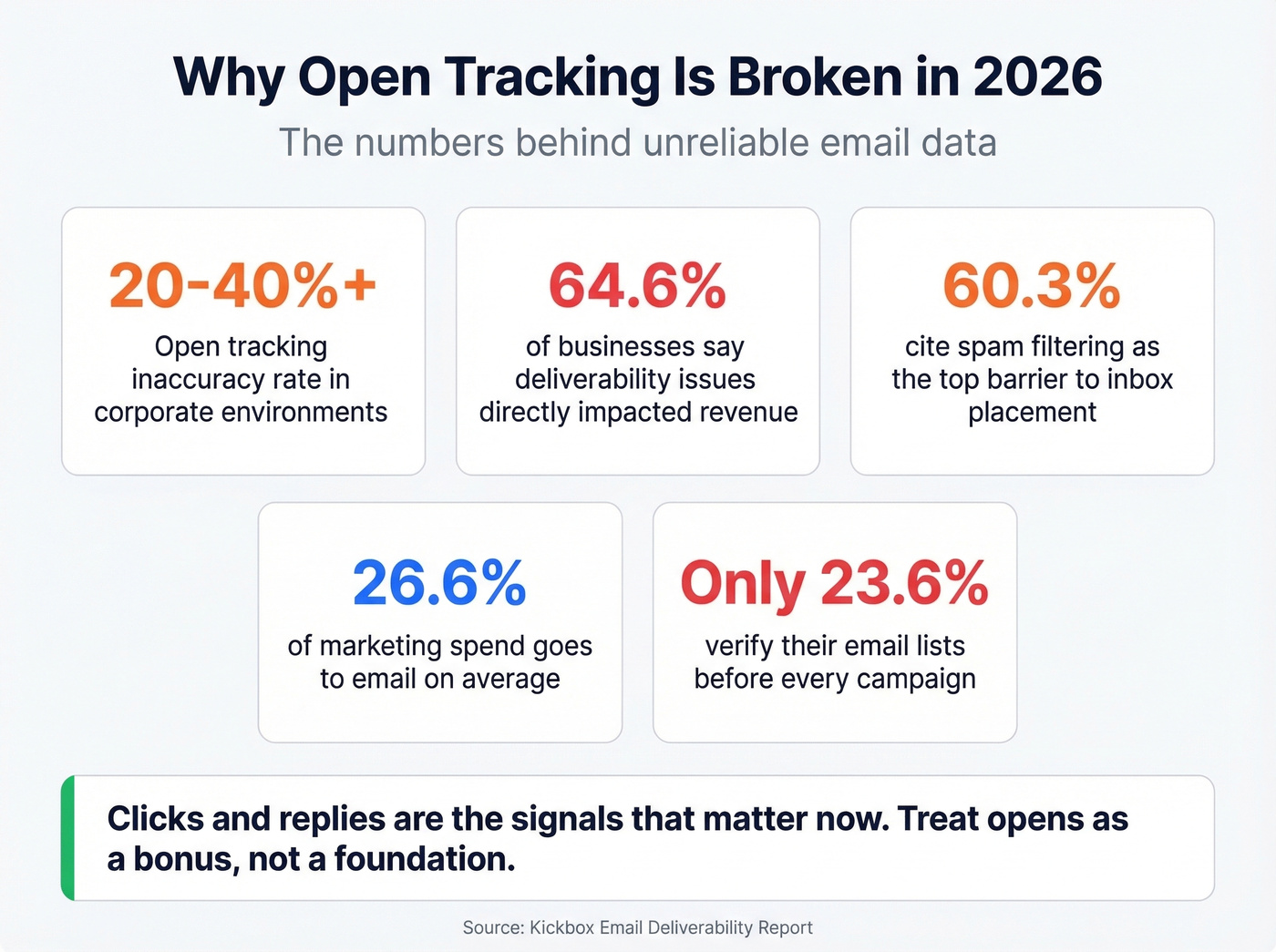
In corporate environments, open tracking runs 20-40%+ inaccurate. That's not a rounding error.
Businesses allocate roughly 26.6% of marketing spend to email on average - too much to base decisions on unreliable open data. Meanwhile, 64.6% of businesses say deliverability issues have directly impacted revenue, and 60.3% cite spam filtering as the top barrier to inbox placement. Yet only 23.6% verify their email lists before every campaign.
Clicks and replies are the signals that matter now. Treat open tracking as a bonus, not a foundation.

Open tracking runs 20-40% inaccurate in corporate Outlook environments. The real question isn't whether someone opened your email - it's whether you emailed the right person at all. Prospeo's 98% email accuracy and 7-day data refresh mean your outreach lands in real inboxes, not bounced folders.
Stop tracking ghosts. Start reaching verified buyers at $0.01 per email.
8 Top Email Tracking Tools for Outlook
Yesware
Use this if you're a sales team running sequences out of Outlook and need unlimited tracking without per-email caps. Pro at $19/seat/mo ($15/seat/mo annual) gives unlimited open, link, and attachment tracking - though Pro caps campaign recipients at 20/month. Premium ($45/$35) unlocks unlimited campaigns plus team features. Enterprise ($85/$65) adds Salesforce-specific capabilities like the Inbox Sidebar and advanced sync options.
Skip this if you're just testing the waters. The free tier limits tracking data to emails sent in the last 24 hours and caps campaign recipients at 10/month. That's barely enough to evaluate the tool, let alone use it.

One user on r/Outlook reported tracking hadn't worked for over three weeks with no response from support. Single data point, sure. But support responsiveness matters when tracking goes dark mid-quarter and your pipeline reviews depend on the data.
Boomerang for Outlook
Boomerang is built for Outlook.com and Office 365 accounts. The Basic plan is free after a 14-day Professional trial and includes response tracking and read receipts, with a 10 emails/month limit. Personal ($4.99/mo billed annually) and Pro ($14.99/mo billed annually) add more capabilities, including click tracking and broader account support.

Skip this if you need deep CRM integration or team analytics. Boomerang is excellent for individual contributors who want to know if their email was read. It's not a sales engagement platform, and that's a strength - fewer features means fewer things to break.
Mailbutler
Mailbutler's $4.95/mo Tracking plan is the cheapest paid option here, and it works across Outlook, Gmail, and Apple Mail - rare for email tracking add-ins. Professional ($8.95) and Smart ($14.95) add more productivity features, and Business ($32.95) adds team capabilities. The trade-off: cross-platform flexibility can mean shallower Outlook integration than Boomerang or Yesware. If your whole team lives in Outlook, a more Outlook-first tool will feel tighter.
Salesflare
Salesflare tracks emails, link clicks, and website visits through its Outlook sidebar. Growth starts at $29/user/mo annual ($39 monthly), Pro at $49 ($64 monthly), and Enterprise at $99 ($124 monthly) with a five-user minimum.
Let's be honest: if you just need email tracking, $29/month is absurd. You're buying a CRM. Salesflare makes sense if you need a CRM and tracking in one tool. For tracking alone, you're overpaying 5-6x compared to Mailbutler or Boomerang.
Cirrus Insight
If you're a Salesforce shop, Cirrus Insight syncs emails, calendar events, and tracking data directly into Salesforce objects. Salesforce Sync starts at $14/user/mo, Pro at $21, Expert at $49. It carries a 4.2/5 on G2 with 1,512 reviews.
Skip this unless you're already on Salesforce. And brace yourself for cancellation: you need 30 days' notice, the reminder comes just 15 days before renewal, and you can't cancel self-serve - you go through support chat or a ticket. That kind of friction makes you resent a vendor fast.
Mailsuite
The word "free" is doing heavy lifting here. Mailsuite's free tier offers "unlimited tracked emails" but caps open tracking to 10 emails and link click tracking to 10 emails. So yes, you can track unlimited emails - you just can't see meaningful data on more than 10 of them. That's a demo, not a free plan.
The Advanced plan at $11.99/user/mo unlocks unlimited opens, unlimited link click tracking, and campaign sending up to 60k emails/month. Worth noting: the pricing page emphasizes Gmail more than Outlook, which isn't confidence-inspiring for an Outlook-first team.
HubSpot Sales Hub
HubSpot's free CRM includes open tracking and limits notifications to 200/month. Click tracking requires a paid plan starting at $15/seat/mo. It's like buying a pickup truck because you need a cup holder. If you're already in HubSpot's ecosystem, the free tracking is a nice bonus. Otherwise, you're onboarding an entire platform for a feature Boomerang gives you for $5.
SalesHandy
SalesHandy offers free email tracking with no per-email caps, and paid plans start at $9/mo for deeper analytics and cold email features. For cold outreach as a primary use case, this is the tool to evaluate first. It's also the only free tier on this list that doesn't feel like a bait-and-switch.
Pricing at a Glance
| Tool | Free Plan | Paid From | Tracking | CRM Sync |
|---|---|---|---|---|
| Yesware | Yes (limited) | $19/seat/mo ($15 annual) | Opens + clicks | Salesforce (Enterprise tier) |
| Boomerang | Yes | $4.99/mo | Opens; clicks on higher tiers | No |
| Mailbutler | No | $4.95/mo | Opens + clicks | No |
| Salesflare | No | $29/user/mo | Opens + clicks | Built-in |
| Cirrus Insight | No | $14/user/mo | Opens + clicks | Salesforce |
| Mailsuite | Yes (capped) | $11.99/user/mo | Opens + clicks | No |
| HubSpot | Yes (200/mo) | $15/seat/mo | Opens + clicks | Built-in |
| SalesHandy | Yes | $9/mo | Opens + clicks | No |
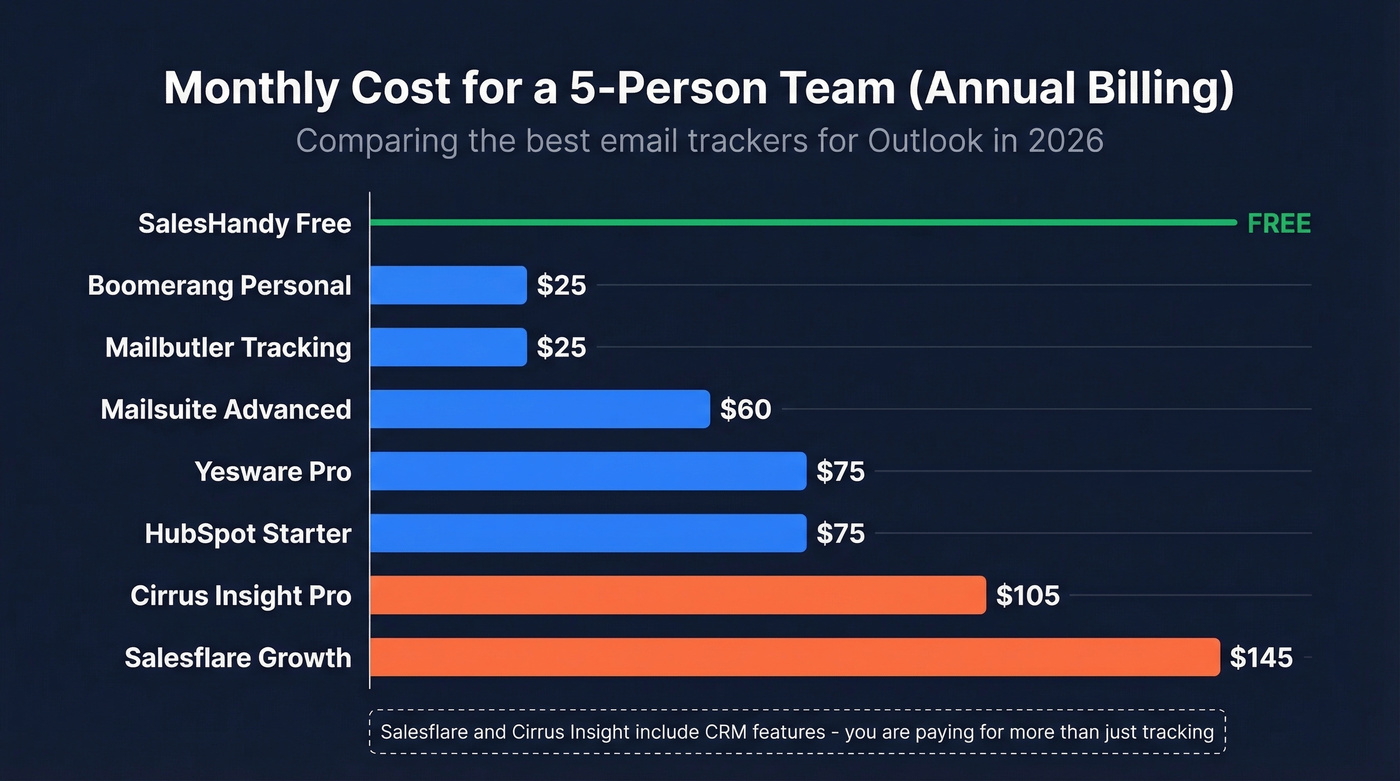
Five-person team, annual billing:
| Tool + Plan | Monthly Cost (5 seats) |
|---|---|
| SalesHandy Free | $0 |
| Boomerang Personal | $25 |
| Mailbutler Tracking | $25 |
| Mailsuite Advanced | $60 |
| Yesware Pro (annual) | $75 |
| HubSpot Starter | $75 |
| Cirrus Insight Pro | $105 |
| Salesflare Growth (annual) | $145 |
What You Actually Get for Free
| Tool | Free Tracking Limit | What's Actually Usable |
|---|---|---|
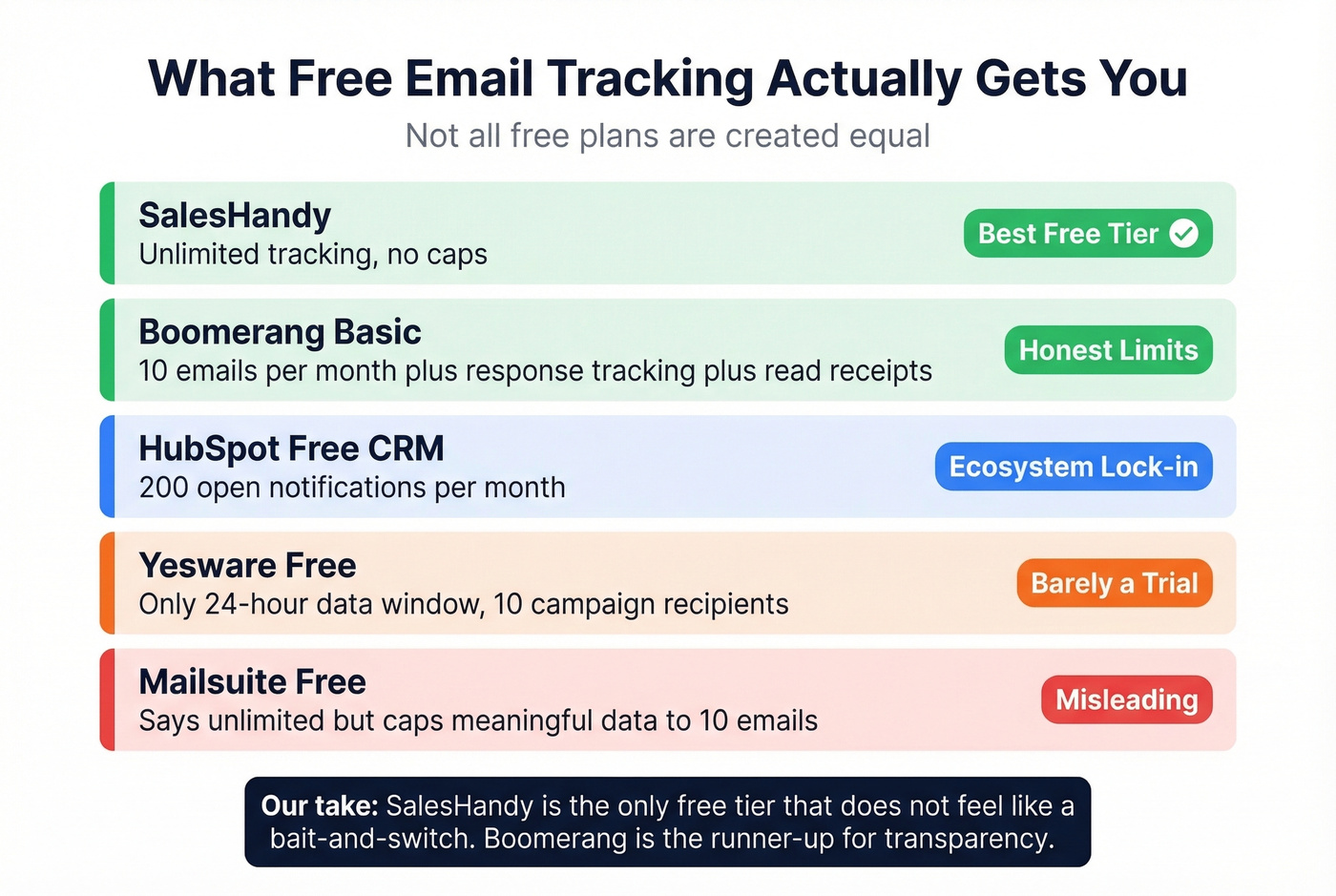
| SalesHandy | Unlimited | Full tracking, no caps - the only honest free tier |
| Boomerang Basic | 10 emails/month + response tracking + read receipts | Solid for light use; transparent limits |
| HubSpot Free CRM | 200 open notifications/mo | Useful inside HubSpot's ecosystem only |
| Yesware Free | 24-hour data window, 10 campaign recipients | You'll outgrow this in a day |
| Mailsuite Free | "Unlimited" sends, 10-email data cap | Dashboard is a teaser, not a tool |
Verify Your List Before You Track
You can't track an email that bounced. Roughly 9% of emails entered on webforms are invalid - nearly one in ten leads. If you're running sequences against an unverified list, your tracking dashboard is showing you a fantasy.
We've seen teams install a tracker, celebrate a 45% open rate, then discover their bounce rate was 12%. Fix the list first, then track. Prospeo runs every email through a 5-step verification process - catch-all handling, spam-trap removal, honeypot filtering - and delivers 98% email accuracy across 143M+ verified addresses. Data refreshes every 7 days versus the 6-week industry average, and the free tier gives you 75 emails/month, enough to audit your active pipeline before trusting a single open notification.
If you want to go deeper on deliverability fundamentals, start with bounce rate and an email deliverability guide before you obsess over opens.
You're paying $19-85/seat/month to track opens that might be security scanners. Meanwhile, 23.6% of teams don't even verify their lists before sending. Prospeo gives you 143M+ verified emails with 5-step verification and catch-all handling - so every tracked open is a real prospect, not a bot.
Verified data fixes what email trackers can't - bad contact lists.
Follow-Up Playbook
Multiple opens, no click or reply. Don't trust the count - likely security scanners. Wait 48 hours, then try a different subject line.
Clicked a link. This is the strongest signal short of a reply. Follow up within 24 hours referencing what they clicked. "Saw you checked out the pricing breakdown - happy to walk through the ROI model" beats "just checking in" every time.
No opens after 48 hours. Check if the email bounced. If it didn't, your subject line or spam placement is the problem. Try a different angle or channel entirely.
Opened but no reply after 5 days. Send a value-add - a case study, short video, or relevant data point. The "bumping this to the top of your inbox" email gets archived instantly, and we've all done it.
Build your follow-up cadence around actions, not impressions. If you need copy you can paste, use these sales follow-up templates and tighten your email subject line testing.
FAQ
Is email tracking legal?
Email tracking is generally legal in B2B contexts under most jurisdictions. GDPR requires a legitimate interest basis for processing tracking data; CCPA doesn't specifically prohibit tracking pixels. Regulated industries like healthcare and financial services often have stricter rules - check with compliance before deploying org-wide.
Can Outlook track emails without add-ins?
Outlook has built-in read receipts, but recipients can decline them - and most do. Native receipts send a visible prompt asking the recipient to confirm, which is awkward in a sales context. Third-party add-ins use invisible pixels that fire automatically when images load, requiring no recipient action. That's why most teams turn to dedicated tracking tools.
Why does my tracker show unexpected opens?
Microsoft security scanners and corporate email gateways pre-load images and check links before the recipient sees the message. These register as false opens and clicks. Focus on reply tracking and genuine link clicks for reliable engagement signals.
What's the best free email tracker for Outlook?
SalesHandy offers free tracking with no per-email caps - the only honest free tier on this list. Boomerang's Basic plan is solid for light use at 10 emails/month. Mailsuite and Yesware's free plans have caps that make them impractical for daily outreach.
Should I verify my list before tracking?
Yes. About 9% of webform emails are invalid, and tracking bounced addresses wastes credits while skewing your data. Prospeo's free tier handles 75 verifications/month - enough to audit active sequences before trusting open or click metrics.