

Best Boomerang Alternatives in 2026 (5 Picks)
Gmail added Snooze and Schedule Send years ago - the two features most people installed Boomerang for in the first place. If you're looking for Boomerang alternatives, there's a real chance you don't need one at all. The University of Michigan doesn't even encourage use of Boomerang anymore because Gmail handles the basics natively. So before you spend another hour comparing tools, ask yourself: are you paying for something your inbox already does for free?
What Boomerang Does (And Costs)
Boomerang covers Send Later, follow-up reminders, Inbox Pause, read receipts, response tracking, and meeting scheduling inside Gmail or Outlook. The company says it's powered over 233 million messages delivered across more than a million businesses, and it carries SOC 2 Type 2 certification.
New accounts get a free 30-day trial of Boomerang Professional - no credit card required. After that, you drop to the Basic plan with 10 message credits per month.
Pricing breaks down into four annual tiers:
- Basic: Free - 10 message credits/month
- Personal: $4.98/mo - unlimited credits, @gmail.com addresses only
- Pro: $14.98/mo - Inbox Pause, Respondable AI, recurring messages
- Premium: $49.98/mo - CRM integration, track-by-default, priority support
Those message credits get consumed whenever you schedule a message or use any combination of Send Later, Response Tracking, and Read Receipts. On the free plan, 10 credits vanish before lunch.
Why People Leave Boomerang
Here's the thing: we've seen the same complaints come up over and over in r/productivity threads and Chrome Web Store reviews. The pattern is consistent.
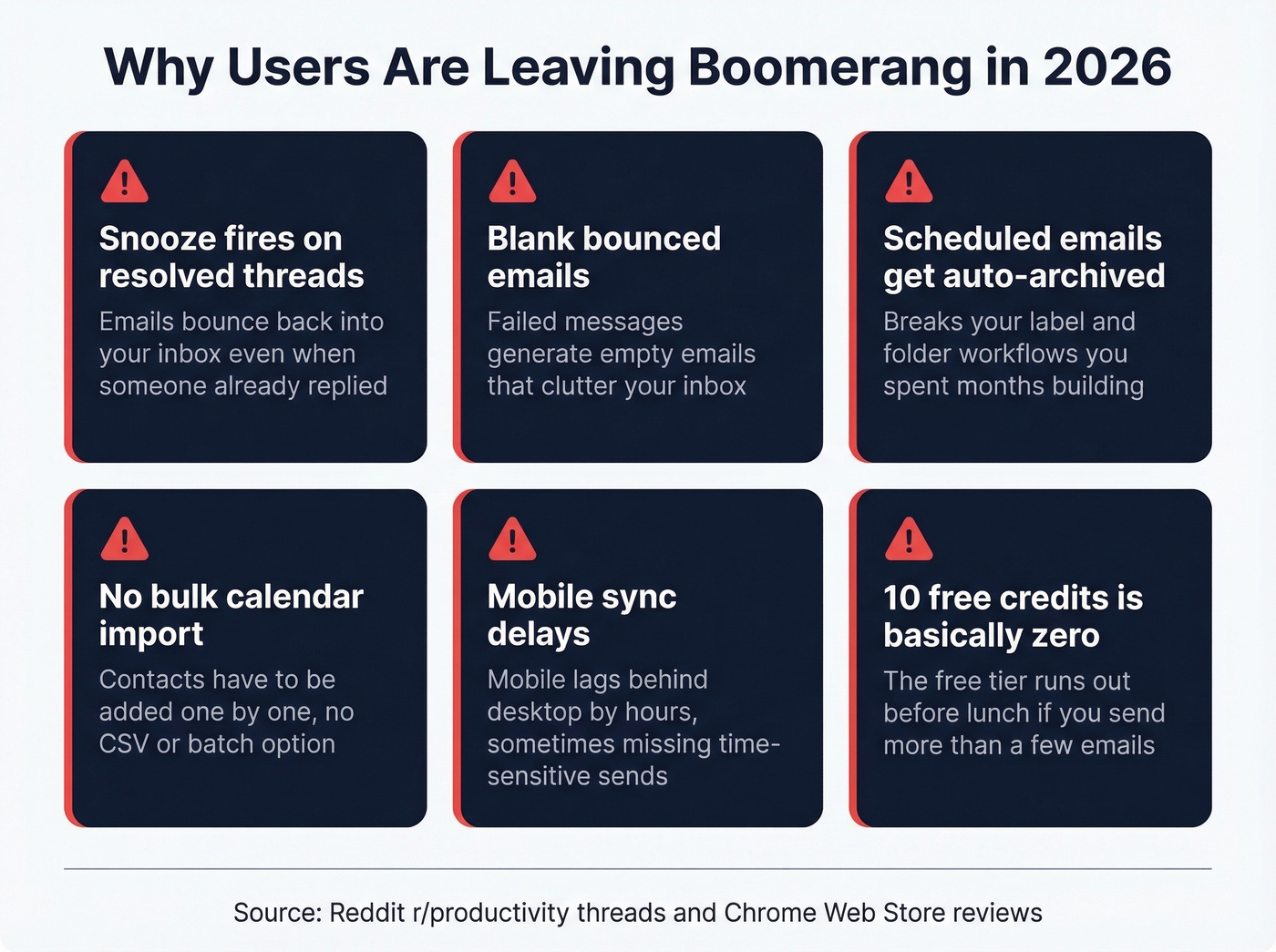
Emails ping back into your inbox even after the thread already has new activity, which defeats the entire purpose of snoozing. Bounced messages generate blank emails that clutter everything. Scheduled emails get auto-archived, breaking label and folder workflows you've spent months building. Calendar contacts have to be added one by one - no bulk import. Mobile sync lags behind desktop, sometimes by hours. And the 10-credit free tier is functionally useless for anyone sending more than a handful of emails per week.

Boomerang schedules emails. But who are you sending them to? If you've outgrown inbox productivity tools and moved into outbound sales, your bottleneck isn't timing - it's finding verified contact data. Prospeo gives you 300M+ professional profiles with 98% email accuracy at $0.01/email.
Stop optimizing send times for emails that bounce.
Our Picks (TL;DR)
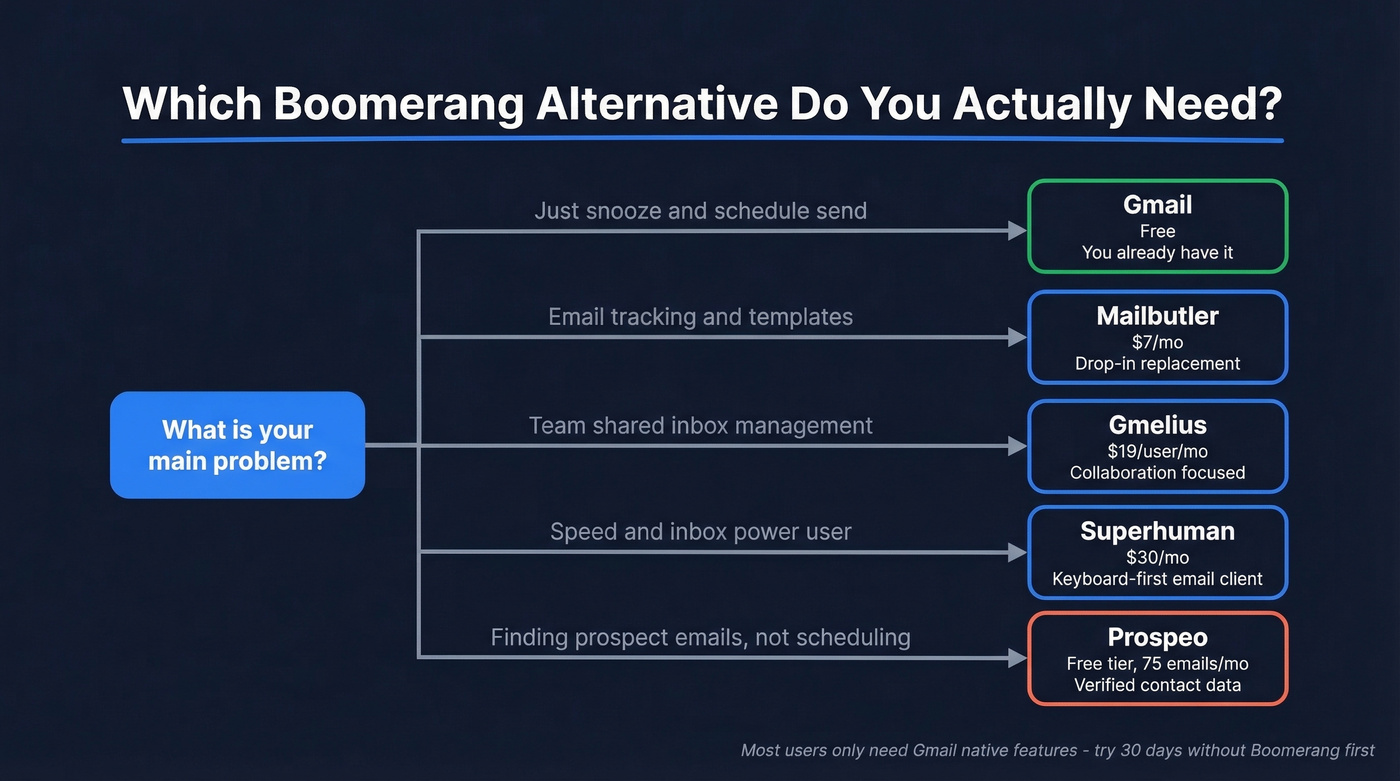
- Just snooze + send later? Cancel Boomerang. Use Gmail.
- Tracking + templates? Mailbutler ($7/mo).
- Team shared inbox? Gmelius ($19/user/mo).
- Speed freak? Superhuman ($30/mo).
- Finding prospects, not scheduling emails? Prospeo (free tier, 75 emails/mo).
The Best Boomerang Alternatives
Gmail - The One You Already Have
If you installed Boomerang for Snooze and Schedule Send and don't need anything else, stop here. Gmail handles both natively - zero extensions, zero credit limits, zero risk of a third-party tool accessing your inbox data.
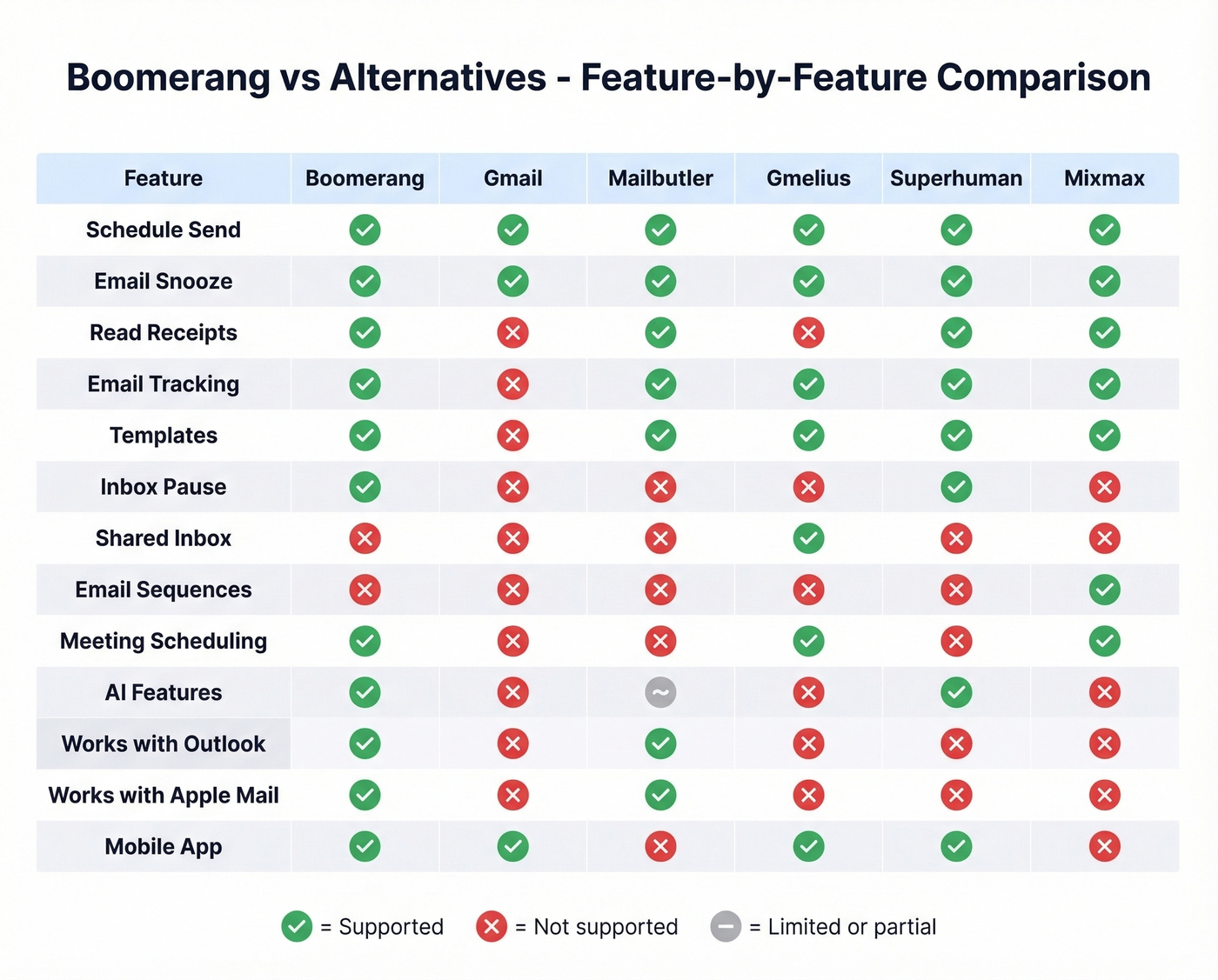
Skip this if you rely on Boomerang's workflow features like tracking, reminders, or Inbox Pause. But let's be honest: most people don't. We've talked to dozens of users who were paying $15/mo for Pro and only using Schedule Send, which Gmail does for free. That's a $180/year lesson in checking what your tools already include.
If you're doing outbound and care about deliverability, pair scheduling with an email deliverability checklist so your follow-ups land.
Mailbutler
In our experience, Mailbutler is the closest drop-in Boomerang replacement - and it works with Apple Mail and Outlook, not just Gmail. The Professional plan at $7/mo (annual) is the sweet spot: no watermark, full tracking, and templates.
The free Starter tier stamps a Mailbutler watermark on every outgoing email. Fine for testing, embarrassing for client-facing work. The Smart plan ($11/mo) adds AI features, but Professional covers what most Boomerang refugees actually need. There's a 14-day trial with no credit card required.
Skip this if you need team collaboration features like shared inboxes or delegation. Mailbutler is built for individuals, not teams.
If you mainly need better follow-ups (not more features), use these reminder email examples to tighten your sequences.
Gmelius
Gmelius isn't really a Boomerang replacement. It's the tool you graduate to when your problem shifts from "I need to schedule emails" to "our team needs to manage a shared inbox without losing messages." It turns Gmail into a collaborative workspace with shared inboxes, email delegation, internal notes, and Kanban boards.
Pricing starts at $19/user/mo (Meli plan, billed annually, up to 5 users, 5,000 conversations/mo). Growth runs $25/user/mo with up to 50 users and 10,000 conversations/mo. There's a 7-day trial, but no free plan - your account gets suspended if you don't subscribe.
If your problem is team email, this is the only serious option on this list.
If you're building a broader stack around team workflows, map it to a sales software stack so tools don’t overlap.
Superhuman
Superhuman isn't a feature-for-feature replacement for Boomerang - it's an entire email client overhaul. Keyboard-first, speed-optimized, designed for people who live in their inbox 6+ hours a day. It includes snooze, send later, and read receipts, but the real value is raw speed and the way it makes email triage feel almost effortless.
Superhuman Mail Starter runs $30/mo, Business is $40/mo. You might see a "$12/mo" number floating around - that's the Superhuman Suite bundle (billed annually), which packages Mail with Grammarly, Coda, and Go. Different product entirely.
For teams that process hundreds of emails daily and can justify $30/seat, it's genuinely worth it. For everyone else, it's overkill.
If you’re optimizing for replies, start with proven subject line templates before upgrading your client.
Mixmax
Mixmax Suite runs $89/user/mo (annual). If you're comparing it to Boomerang, you've already outgrown Boomerang - this is a sales execution platform with sequences, meeting booking, and engagement analytics. After the 14-day trial, you're automatically transferred to Mixmax Free, which still includes tracking, meeting scheduling, and basic sequences.
Skip this unless you're running structured outbound campaigns. For individual email productivity, it's like buying a semi-truck to commute.
If you’re moving into structured outbound, use a cold email drip campaign framework to avoid random one-offs.
SaneBox
SaneBox solves inbox overload, not email scheduling - it's a complement to Boomerang, not a replacement. AI-powered filtering and prioritization starting at ~$7/mo (Snack), ~$12/mo (Lunch), and ~$36/mo (Dinner). Worth pairing with Gmail's native features if your inbox is genuinely out of control.
Look, here's our honest take: if your deal sizes are modest and you're not managing a team inbox, you almost certainly don't need anything beyond Gmail's native features plus SaneBox. The productivity tool industry has convinced people they need $30/mo email clients when a free snooze button and better filtering would solve 90% of their problems.
If your real issue is bad data (not inbox clutter), switch to verified email checkers before you scale outreach.

Most Boomerang users graduate to outbound eventually. When you do, bad email data will burn your domain faster than any scheduling mistake. Prospeo's 5-step verification and 7-day data refresh keep bounce rates under 4% - just ask the teams that tripled their pipeline after switching.
75 free verified emails per month. No credit card, no contracts.
Pricing at a Glance
All prices reflect annual billing where available. Monthly rates run higher across the board.
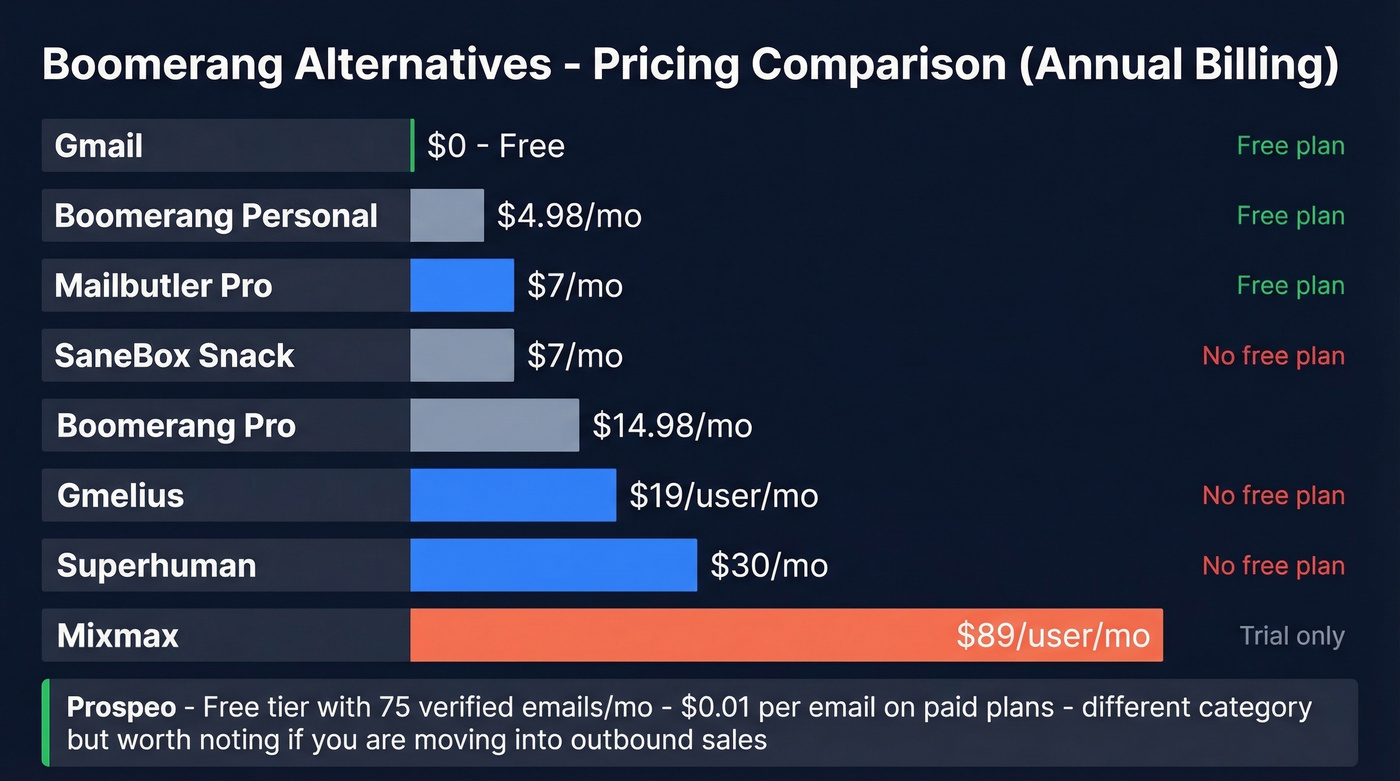
| Tool | Starting Price | Free Plan? | Best For |
|---|---|---|---|
| Boomerang | $4.98/mo | Yes (10 credits) | Send later + reminders |
| Gmail | $0 | Yes | Snooze + schedule send |
| Mailbutler | $7/mo | Yes (watermark) | Tracking + templates |
| Prospeo | $0 (75 emails/mo) | Yes | Finding verified contacts |
| Gmelius | $19/user/mo | No | Team shared inbox |
| Superhuman | $30/mo | No | Speed + UX |
| Mixmax | $89/user/mo | Yes (post-trial) | Sales sequences |
| SaneBox | ~$7/mo | No | Inbox filtering |
If you’re comparing tools because you’re prospecting, start with a better sales databases shortlist first.
FAQ
Is Boomerang for Gmail still worth it in 2026?
Only if you need Inbox Pause, recurring messages, or Respondable AI. Gmail's native Snooze and Schedule Send cover the two most common use cases for free, and the 10-credit free tier makes Boomerang impractical without a paid plan. We'd recommend trying 30 days without it before renewing - most people don't miss it.