

20 Reminder Email Examples That Actually Get Replies
It's 4 PM on a Tuesday. You've got a client meeting tomorrow morning and zero confirmation they'll show up. You open a blank compose window, type "Just checking in," stare at it, and delete the whole thing.
That hesitation costs more deals, delays more payments, and derails more projects than most people realize. Below you'll find 20 reminder email examples you can copy verbatim, plus 30+ subject lines, timing benchmarks, and the compliance details that keep you out of trouble.
What Every Reminder Email Needs
Before you grab a template, internalize the anatomy. Every effective reminder has five parts:
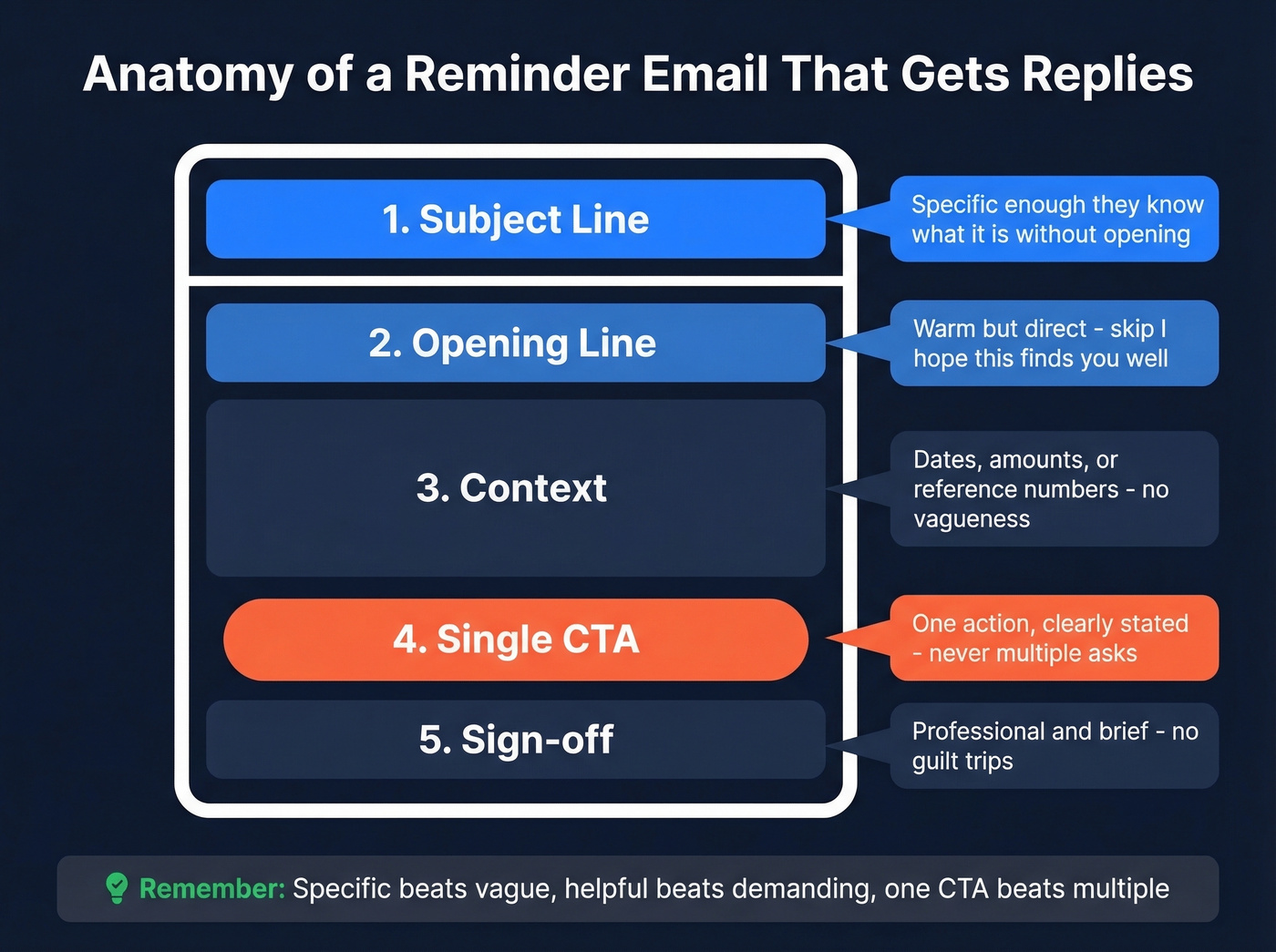
- Subject line - specific enough that the recipient knows what it's about without opening
- Opening line - warm but direct; skip "I hope this finds you well"
- Context - what you're reminding them about, with dates, amounts, or reference numbers
- Single CTA - one action, clearly stated
- Sign-off - professional, brief, no guilt trips
Specific beats vague, helpful beats demanding, one CTA beats multiple. There's a distinction worth knowing here: a reminder goes out before a deadline, while a follow-up goes out after someone missed an action. The tone shifts accordingly.
Quick-pick templates for the three most common scenarios:
- Meeting: Subject: Quick confirm - [Meeting Name] tomorrow at 10 AM -> "Hi [Name], confirming our meeting tomorrow at [time]. Here's the agenda link. Let me know if anything's changed."
- Payment: Subject: Invoice #1234 due Friday -> "Hi [Name], a quick heads-up that Invoice #1234 ($X) is due this Friday, [Date]. Payment link below."
- Deadline: Subject: [Project Name] deliverable due [Date] -> "Hi [Name], just a reminder that [deliverable] is due by [Date]. Let me know if you need anything from my end."
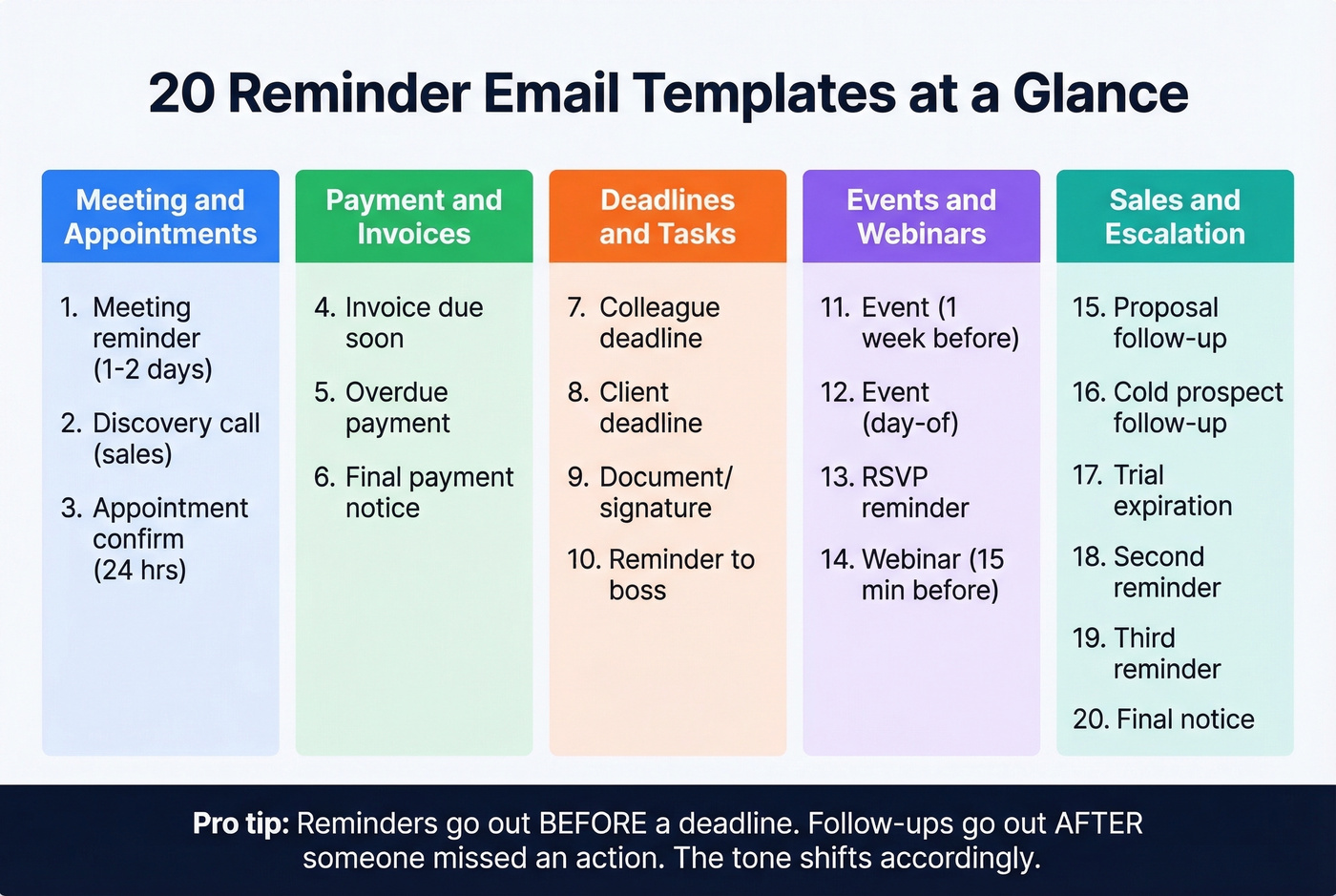
20 Copy-Paste Reminder Templates
Meeting & Appointment Reminders
1. Meeting reminder (1-2 days before)
Subject: Quick confirm - [Meeting Name] on [Day] at [Time]
Hi [Name],
Looking forward to our meeting on [Day] at [Time] in [Timezone]. Here's the agenda: [link or 2-3 bullet points].
If anything's changed on your end, just let me know. Otherwise, see you there.
Best, [Your Name]
Why this works: It gives them an easy out while reinforcing the commitment - and the agenda adds value so it's not just a ping.
2. Discovery call reminder (sales context)
Subject: Confirming our call - [Day] at [Time]
Hi [Name],
Just confirming our discovery call on [Day] at [Time]. I've done some homework on [Company] and have a few questions around [specific topic].
Here's the meeting link: [link]
Talk soon, [Your Name]
Why this works: Mentioning you've prepared signals the call will be worth their time and reduces no-shows without sounding pushy.
3. Appointment confirmation (24 hours before)
Subject: See you tomorrow - [Appointment Type] at [Time]
Hi [Name],
This is a quick confirmation for your [appointment type] tomorrow at [Time] at [Location/Link]. Please bring [any required documents].
Need to reschedule? Reply to this email or call [number].
Thanks, [Your Name]
Why this works: The reschedule option reduces ghosting. People who can't make it will tell you if you make it easy.
Payment & Invoice Reminders
4. Invoice due soon (before deadline)
Subject: Invoice #[Number] due [Date]
Hi [Name],
Friendly reminder that Invoice #[Number] for $[Amount] is due on [Date]. I've attached the invoice for reference.
Payment link: [link]
If you have any questions about the invoice, just reply here. Thanks!
[Your Name]
Why this works: The one-click payment link removes friction - they can pay without hunting for details.
5. Overdue payment (after deadline)
Subject: Invoice #[Number] - payment overdue
Hi [Name],
Invoice #[Number] for $[Amount] was due on [Date] and is now [X] days overdue. I've reattached the invoice below.
Could you confirm when we can expect payment? If already paid, please disregard this message.
Thanks, [Your Name]
Why this works: The "if already paid" line prevents awkward crossed-wire situations and shows professionalism.
6. Final payment notice (escalation)
Subject: Final notice - Invoice #[Number] overdue since [Date]
Hi [Name],
This is a final reminder regarding Invoice #[Number] for $[Amount], originally due [Date]. We haven't received payment or a response to our previous reminders.
Please process payment by [New Deadline] to avoid [consequence - late fee/service interruption/collections referral]. If already paid, please disregard.
[Your Name]
Why this works: Naming the specific consequence makes the urgency real, not performative.
Deadline & Task Reminders
7. Deadline reminder to a colleague
Subject: [Project Name] - deliverable due [Date]
Hey [Name],
Quick reminder that [deliverable] is due by [Date]. Let me know if you're blocked on anything - happy to help clear the path.
Thanks, [Your Name]
Why this works: "Happy to help clear the path" positions you as collaborative, not nagging.
8. Deadline reminder to a client
Subject: Need [item] by [Date] to stay on schedule
Hi [Name],
We need [specific item - copy, assets, approval] by [Date] to keep the [project] timeline on track. Without it, we'll likely need to push [next milestone] back by [timeframe].
Can you confirm you'll have it ready?
Best, [Your Name]
Why this works: Stating the downstream consequence makes the deadline feel real, not arbitrary.
9. Document/signature request
Subject: Signature needed - [Document Name]
Hi [Name],
The [document name] is ready for your signature. Here's the signing link: [link]. It should take about 2 minutes.
We need this by [Date] to [reason]. Let me know if you have questions.
Thanks, [Your Name]
Why this works: "About 2 minutes" sets expectations and lowers the perceived effort.
10. Reminder to your boss
Subject: Quick follow-up - [Topic]
Hi [Name],
Following up on [topic] from [our meeting/your email on Date]. I want to make sure I have what I need to [move forward/hit the deadline/prepare the deliverable].
When you get a chance, could you [specific action]? No rush if you need until [reasonable date].
Thanks, [Your Name]
Why this works: "No rush if you need until [date]" gives your manager an out while still anchoring a timeline.
Event & Webinar Reminders
11. Event reminder (1 week before)
Subject: [Event Name] is one week away
Hi [Name],
[Event Name] is coming up on [Date] at [Time/Location]. Here's a quick rundown:
- When: [Date, Time, Timezone]
- Where: [Location/Link]
- What to expect: [1-sentence summary]
Add it to your calendar: [calendar link]
See you there, [Your Name]
Why this works: The calendar link converts intent into action - without it, half your registrants forget.
12. Event reminder (day-of)
Subject: Today: [Event Name] at [Time]
Hi [Name],
Just a heads-up - [Event Name] starts today at [Time]. Here's your access link: [link].
Looking forward to seeing you.
[Your Name]
Day-of reminders are one of the highest-impact emails in an event sequence. Don't skip them.
13. RSVP reminder
Subject: Can you make it? RSVP for [Event Name] by [Date]
Hi [Name],
We're finalizing headcount for [Event Name] on [Date]. Could you confirm your attendance by [RSVP Deadline]?
RSVP here: [link]
Thanks, [Your Name]
Why this works: "Finalizing headcount" creates soft urgency without pressure.
14. Webinar starting soon (15 min before)
Subject: Starting in 15 minutes - [Webinar Name]
Hi [Name],
[Webinar Name] kicks off in 15 minutes. Join here: [link]. No downloads needed.
See you inside, [Your Name]
Why this works: "No downloads needed" removes the last-second friction that kills webinar attendance.
Sales & Outreach Reminders
15. Proposal follow-up (no response)
Subject: Thoughts on the proposal?
Hi [Name],
I sent over the [proposal/quote] on [Date] and wanted to see if you've had a chance to review it. Happy to walk through any questions or adjust the scope.
Would [Day] at [Time] work for a quick call?
Best, [Your Name]
Why this works: Offering to "adjust the scope" signals flexibility - it reframes the conversation from yes/no to how.
16. Sales follow-up (cold prospect)
Subject: [Specific benefit] for [Company Name]
Hi [Name],
I reached out last week about [specific problem you solve]. Didn't want this to get buried - [one sentence about the value prop tied to their company].
Worth a 15-minute call this week?
[Your Name]
Why this works: "Didn't want this to get buried" is honest and non-accusatory - it acknowledges inbox reality.
17. Trial expiration reminder
Subject: Your [Product] trial ends [Date]
Hi [Name],
Your free trial of [Product] expires on [Date]. You've [specific usage stat if available, like "sent 47 campaigns" or "verified 200 contacts"] so far.
To keep access, upgrade here: [link]. Questions? Just reply.
[Your Name]
Why this works: Reflecting their usage data back to them makes the loss feel concrete.
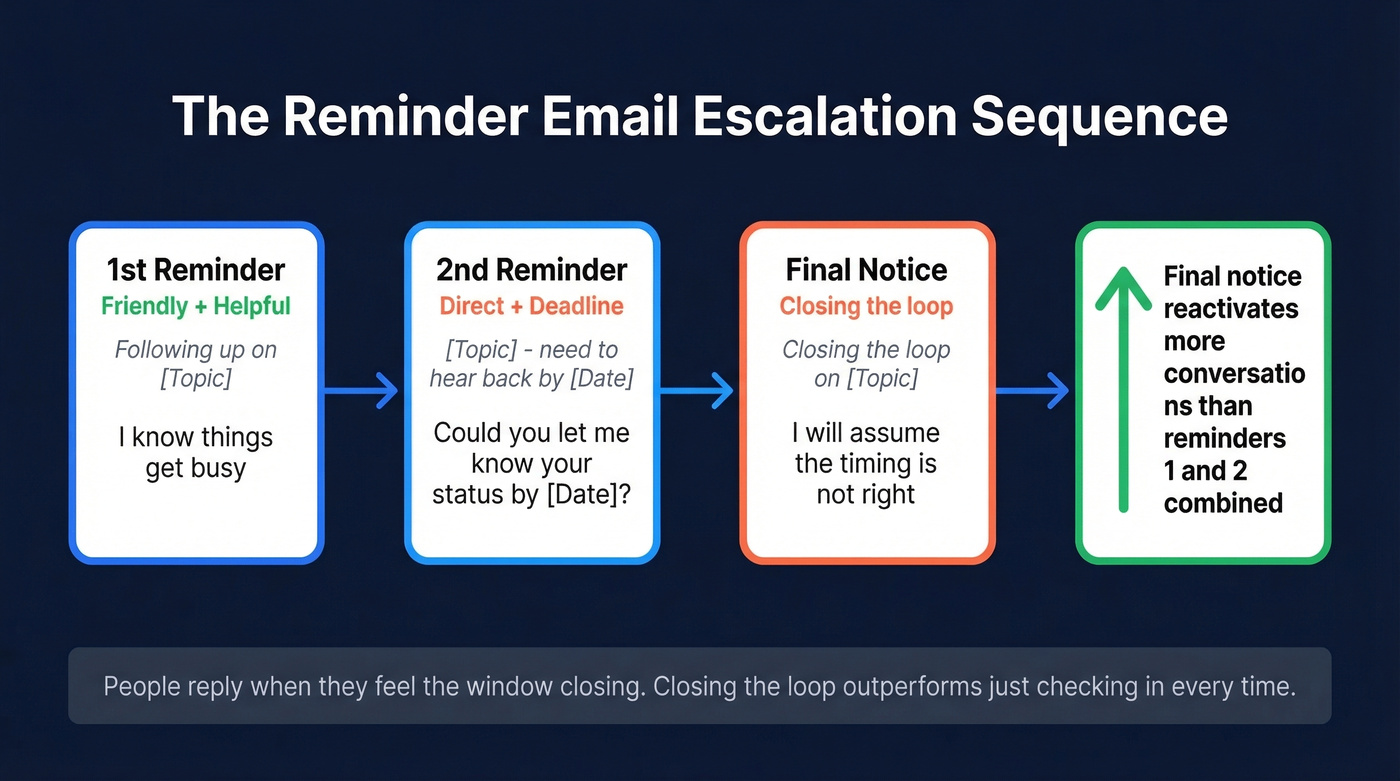
Escalation Sequence (2nd, 3rd, Final)
18. Second reminder (friendly nudge)
Subject: Following up - [Original Topic]
Hi [Name],
I know things get busy. Just circling back on [topic] from [Date]. [One sentence restating what you need].
Let me know if [Day] works to connect, or if there's a better time.
Thanks, [Your Name]
Why this works: "I know things get busy" acknowledges reality without guilt-tripping.
19. Third reminder (direct + deadline)
Subject: [Topic] - need to hear back by [Date]
Hi [Name],
I've reached out a couple of times about [topic]. I'd love to get this resolved - could you let me know your status by [Date]?
If priorities have shifted, no worries - just let me know and I'll close this out on my end.
Best, [Your Name]
Why this works: The "close this out" option gives them a guilt-free exit, which paradoxically makes them more likely to re-engage.
20. Final notice (closing the loop)
Subject: Closing the loop on [Topic]
Hi [Name],
I haven't heard back, so I'm going to assume the timing isn't right and close this out. If anything changes down the road, I'm here.
Thanks for your time, [Your Name]
In our experience, this template reactivates more conversations than the first two reminders combined. People reply when they feel the window closing. "Closing the loop" outperforms "just checking in" every single time.
30+ Subject Lines That Get Opened
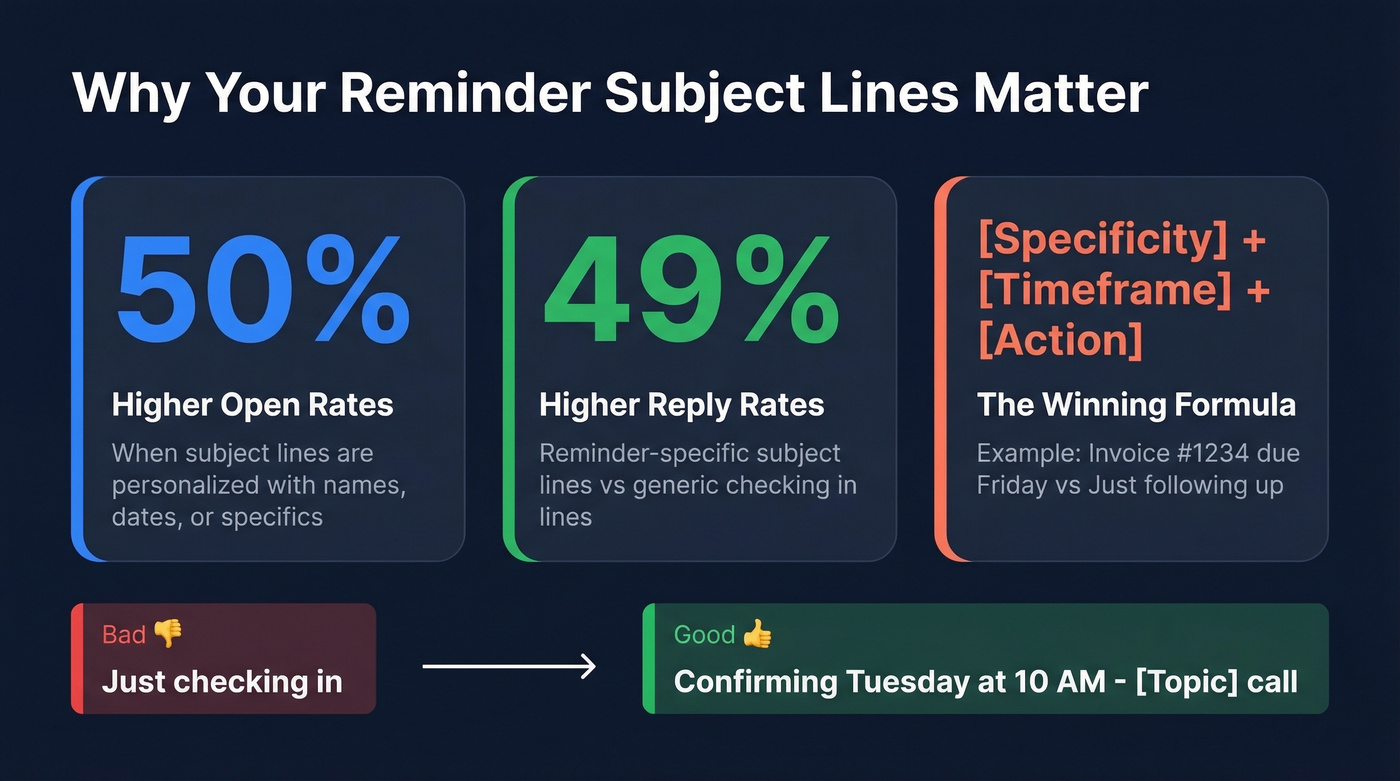
Instantly's reminder-email research found that personalized subject lines drive 50% higher open rates, and reminder-specific subject lines drive 49% higher reply rates compared to generic "checking in" lines. The formula: [Specificity] + [Timeframe] + [Action].
| Scenario | Subject Lines |
|---|---|
| Meeting | "Confirming [Day] at [Time]" - "Tomorrow: [Meeting] at [Time]" - "Quick confirm - [Topic] call" - "Agenda for our [Day] meeting" - "[Name], still on for [Day]?" |
| Payment | "Invoice #[X] due [Date]" - "Payment reminder - $[Amount] due [Day]" - "Overdue: Invoice #[X]" - "Final notice - Invoice #[X]" - "Quick reminder on your balance" |
| Deadline | "[Project] deliverable due [Date]" - "Need [item] by [Date]" - "Reminder: [Task] due tomorrow" - "[Date] deadline approaching" - "2 days left - [deliverable]" |
| Event | "[Event] is [timeframe] away" - "Today: [Event] at [Time]" - "RSVP by [Date] - [Event]" - "Your spot at [Event]" - "Starting in 15 min - join here" |
| Sales | "Thoughts on the proposal?" - "[Benefit] for [Company]" - "Following up - [Topic]" - "Quick question about [pain point]" - "Your trial ends [Date]" |
| Escalation | "Following up - [Topic]" - "Need to hear back by [Date]" - "Closing the loop on [Topic]" - "Last note on [Topic]" - "Should I close this out?" |
If you want more options, pull from our full library of subject lines and adapt them to reminders.
When to Send (Timing Cheat Sheet)
The best send window is Tuesday through Thursday, 9-11 AM in the recipient's timezone. Monday inboxes are flooded. Friday attention is already gone.
| Scenario | First Reminder | Second Reminder | Final Reminder |
|---|---|---|---|
| Meeting | 1-2 days before | Morning of | - |
| Payment | 7 days before due | Due date | 3 days after due |
| Deadline | 7 days before | 2-3 days before | Day of |
| Event | 1 week before | 24 hours before | 1 hour before |
| Webinar | 1 day before | 1 hour before | 15 min before |
| Sales follow-up | Day 3 | Day 7 | Day 14-21 |
| Escalation | Day 3 | Day 7 | Day 14 |
Sequences with 4-7 steps generate 3x the reply rate of 1-3 step sequences. But you don't need seven follow-ups. You need three good ones with escalating specificity. Each message should add new context or reframe the ask - not just repeat the last one with "bumping this to the top of your inbox."
Here's the thing: most people agonize over the perfect reminder wording when the real problem is cadence. A mediocre email sent at the right time beats a brilliant email sent once and forgotten. Build the sequence first, polish the copy second.
If you're building a multi-touch sequence, these sales follow-up templates can help you round out the in-between steps.

The perfect reminder email is worthless if it bounces. Prospeo delivers 98% email accuracy with 5-step verification - so your meeting confirmations, payment reminders, and deadline nudges actually land in the right inbox.
Stop crafting great reminders that nobody receives.
Reminder Email Benchmarks
Klaviyo's 2026 benchmarks across 183,000+ brands show a 31% average campaign open rate and a 1.69% click rate. Top 10% performers hit 45.1% opens and 3.38% clicks.
Here's where it gets interesting. Automated flows - the category reminder sequences fall into - blow one-off campaigns out of the water. Average flow click rate is 5.58%, with the top 10% hitting 10.48%. That's roughly 3x the engagement of a manual blast.
If you want to sanity-check your numbers, start with standard email open rate benchmarks and work backward from there.
ActiveCampaign's benchmark data confirms the pattern: 39.26% average open rate and 6.21% click rate. One caveat - Apple Mail Privacy Protection inflates open rates by pre-loading tracking pixels. Click rates and reply rates are the metrics that actually matter.
If you're sending polite reminder emails manually, you're leaving 3x the engagement on the table. Automate the sequence, personalize the content, and let the cadence do the work.
7 Mistakes That Kill Response Rates
1. Opening with "Just following up." It signals you have nothing new to say. Lead with context or value instead.
2. Passive-aggressive tone. "As per my last email" and "I'm sure you've been busy" read as guilt trips. Be direct without the edge.
3. Vague subject lines. "Quick reminder" tells the recipient nothing. "Invoice #1234 due Friday" tells them everything.
4. Multiple CTAs. One email, one ask. "Can you review the proposal, sign the NDA, and schedule a call?" guarantees none of those things happen.
5. No unsubscribe link on commercial email. Commercial reminder emails need a clear opt-out mechanism. Skipping it isn't just a legal risk - it trains spam filters to flag your domain.
6. Sending from an unwarmed domain or missing authentication. If SPF, DKIM, and DMARC aren't configured, your reminders land in spam before anyone sees them. Google's sender guidelines are clear: keep spam complaint rates below 0.3% or face throttling.
7. Sending to unverified email addresses. This is the mistake that compounds all the others. Hard bounces damage your sender reputation, and a batch of them can tank deliverability across your entire domain. We've seen teams lose months of domain warming progress because they skipped verification on a single reminder campaign. Run your list through an email verification tool like Prospeo before launching any reminder sequence - its 5-step verification catches invalid addresses, spam traps, and catch-all domains at 98% accuracy.
If you want a deeper fix, use a full email deliverability guide and a dedicated email spam checker before scaling volume.
Before you send that reminder, make sure you have the right contact. Prospeo's 300M+ verified profiles mean you're reaching decision-makers directly - not outdated addresses that bounce and tank your domain reputation.
Every bounced reminder is a missed deal. Fix your data at $0.01 per email.
Compliance Checklist
Not every reminder email is created equal in the eyes of regulators. The critical distinction: transactional reminders like appointment confirmations, invoice notices, and shipping updates face lighter requirements than commercial reminders like promotions, upsells, and cold outreach. Adding a promotional upsell to an invoice reminder reclassifies it as commercial email and triggers the full compliance stack.
| Regulation | Applies To | Key Requirements | Max Penalty |
|---|---|---|---|
| CAN-SPAM | US (B2B + B2C) | Physical address, opt-out, honest headers | $53,088/email |
| GDPR | EU residents | Affirmative opt-in, data access rights | EUR 20M or 4% revenue |
| CASL | Canada | Express consent, 10-day unsubscribe | $10M |
| PECR | UK | Prior consent for marketing emails | GBP 500,000 |
Look, CAN-SPAM applies to B2B emails, not just B2C. Every commercial reminder you send to a work address needs a physical mailing address and a working unsubscribe mechanism. The "it's B2B so it doesn't count" assumption has gotten companies fined. For GDPR, double opt-in is the gold standard for proving consent - if you're emailing EU residents, treat it as non-negotiable.
If you're doing cold outreach, read our breakdown of cold email marketing rules and benchmarks.
Best Tools for Automating Reminders
| Tool | Best For | Starting Price | Verdict |
|---|---|---|---|
| Brevo | Budget teams | $9/mo (free: 300/day) | Best value for small teams |
| MailerLite | Simple campaigns | $10/mo | Clean, cheap, no bloat |
| Mailchimp | Beginners | $13/mo (free: 500 contacts) | Easy but limited free automations |
| ActiveCampaign | Advanced automations | $15/mo | Powerful, steep learning curve |
| Omnisend | Ecommerce | $16/mo | Cart/restock reminders built in |
| Klaviyo | Shopify/Woo stores | $20/mo | Best ecommerce segmentation |
For budget-conscious teams, Brevo and MailerLite are the obvious starting points. Brevo's free tier gives you 300 emails per day, which is enough for most reminder workflows. The editor is basic - the consensus on r/emailmarketing is that it gets the job done but won't impress you - and that's fine for straightforward reminder sequences.
ActiveCampaign is the power tool. Deep behavioral automations, solid CRM, strong deliverability. The tradeoff is a learning curve that practitioners describe as "brutal," and pricing that ramps fast as your contact list grows. Skip HubSpot for simple reminder workflows - it's overkill and overpriced unless you're already deep in their CRM ecosystem.
Klaviyo dominates if you're running Shopify or WooCommerce. Cart abandonment and restock reminder flows are best-in-class. Outside ecommerce, it's overpriced for what you get.
FAQ
How many reminder emails should I send?
Three is the sweet spot: a friendly first nudge, a direct second message 3-5 days later, and a final "closing the loop" email after another week. Diminishing returns kick in fast after the third touch.
Is it rude to send a reminder email?
No - not if it's specific, helpful, and timely. Most people appreciate a well-timed nudge. Reference the original context, include a clear next step, and skip passive-aggressive language like "as per my last email."
Do reminder emails need an unsubscribe link?
Commercial reminders like promotions, upsells, and cold outreach require a clear opt-out mechanism under CAN-SPAM. Purely transactional messages like appointment confirmations and invoice notices generally don't - but adding promotional content reclassifies the email as commercial.
How do I write a reminder that actually gets a response?
Lead with context, include a single CTA, and offer an easy out. Every template in this guide follows that structure. Pair it with the timing cheat sheet above - the right cadence matters more than perfect wording.
How do I keep reminder emails out of spam?
Authenticate your domain with SPF, DKIM, and DMARC, and keep spam complaint rates below 0.3%. Verify your contact list before sending - hard bounces from bad addresses are the fastest way to wreck your sender reputation.