

8 Boomerang for Gmail Alternatives That Won't Slow Your Inbox
Boomerang's free plan gives you 10 credits a month. Ten. Meanwhile, Gmail's built-in Schedule Send costs nothing. If you're paying $15/mo for Boomerang Pro just to schedule emails and get reminders, you're overspending on a problem Google already solved half a decade ago.
We tested all eight of these alternatives - here's what's actually worth your time, from dead-simple replacements to tools that tackle the bigger problem Boomerang never touches.
Why People Leave Boomerang
Boomerang holds a 4.6/5 on G2 from 420 reviews - 75% five-star. It's not a bad product. But the complaints tell a clear story:
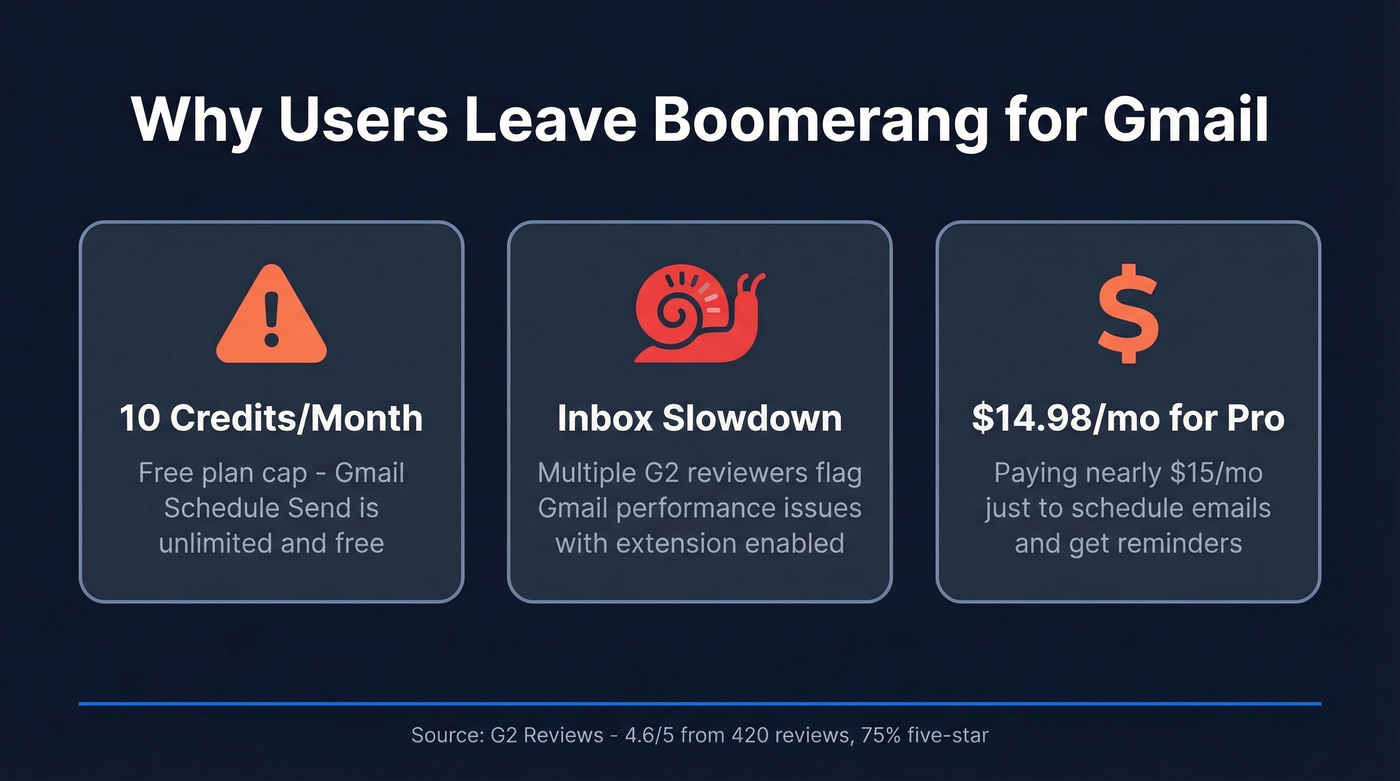
Inbox slowdown. Multiple reviewers flag Gmail performance issues, especially with advanced features enabled. An extension that makes your inbox laggy defeats the purpose. G2's review summary also highlights "interface cluttered and confusing" as a repeated theme, and the free tier's 10-credit limit pushes you to paid plans fast. Personal runs $4.98/mo, Pro $14.98/mo - and you're still just scheduling emails.
What Gmail Already Does for Free
Before you install anything, check whether Gmail's native features cover you. Schedule Send handles around 100 emails at a time with no extension. Snooze pushes messages out of your inbox until a specific date and time. Templates let you save and reuse canned responses from Settings.
The gaps: no recurring schedules, and editing a scheduled email means canceling the send (it bounces back to Drafts), then editing and rescheduling manually. But most people switching from Boomerang are looking for scheduling and reminders, so that's where we focused.

You're optimizing when emails land - but are they reaching real inboxes? 98% of Prospeo emails are verified and deliverable. Teams using Prospeo see bounce rates drop from 35% to under 4%.
Stop scheduling emails that bounce. Start with data that connects.
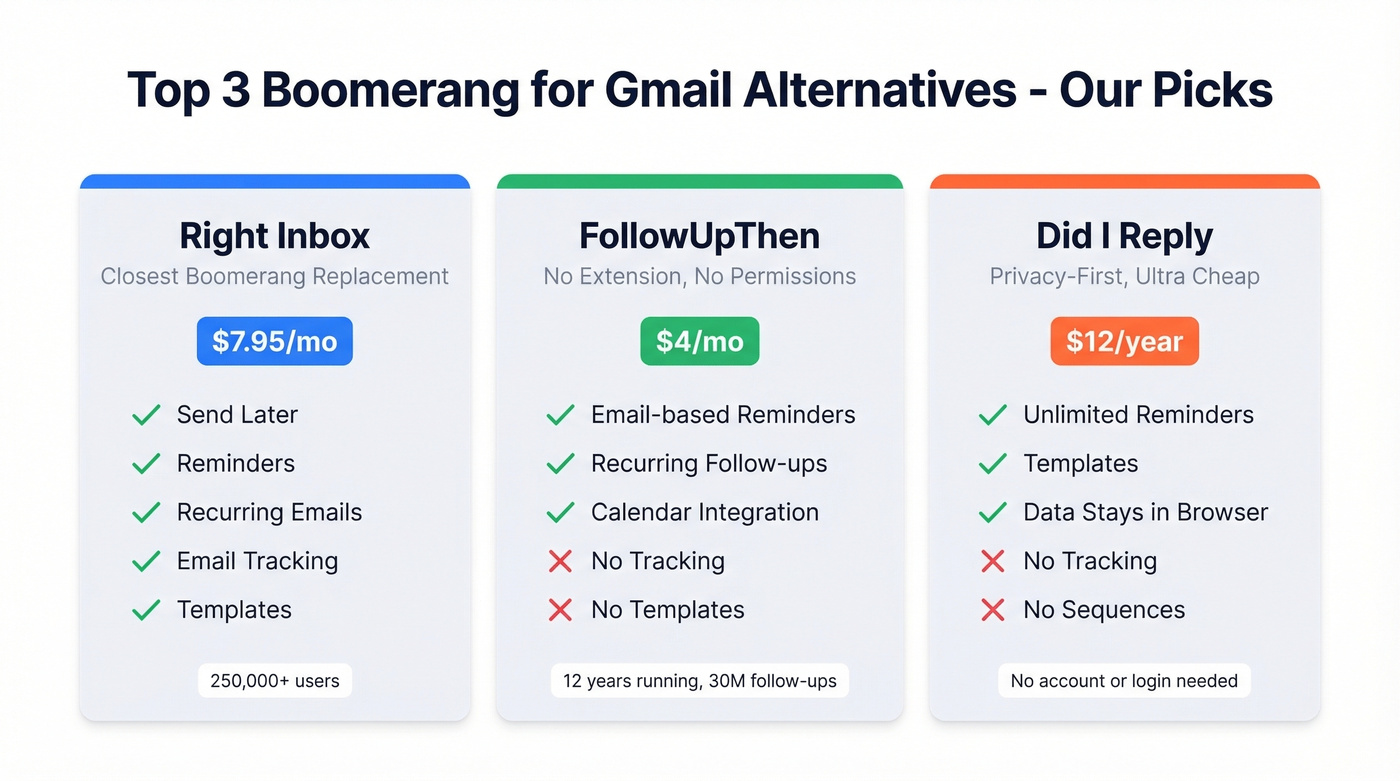
Our Picks (TL;DR)
| Need | Pick | Price |
|---|---|---|
| Closest Boomerang replacement | Right Inbox | $7.95/mo |
| No extension, no permissions | FollowUpThen | $4/mo |
| Privacy-first, dirt cheap | Did I Reply | $12/year |
Best Alternatives Compared
Right Inbox - Best Direct Replacement
In our experience, Right Inbox is the smoothest transition from Boomerang. It mirrors the feature set almost exactly - send later, reminders, recurring emails, tracking, templates - at roughly half the cost and without the bloat.
The Professional plan runs $7.95/mo on annual billing with unlimited usage across all features. The free tier gives you 5 emails per month per feature, which is tight but enough to test whether you like the interface. Over 250,000 professionals use it, backed by 12,000+ Chrome store reviews. If you're coming from Boomerang and want the same workflow with fewer headaches, start here.
Skip this if you don't actually need the full feature set. If all you want is reminders, FollowUpThen is cheaper and lighter. Right Inbox makes sense when you genuinely use scheduling, tracking, and templates together.
FollowUpThen - Best No-Install Option
No Chrome extension. No permissions. No install. FollowUpThen works by emailing a date-based address - BCC 2days@followupthen.com and you'll get a reminder in two days. That's it.
The service has been running for 12 years with 30 million follow-ups processed. The free plan covers 50 reminders per month. The Base plan at $4/mo adds unlimited reminders, recurring follow-ups, and calendar integration. Optional "Skills" add-ons ($2-$20/mo) layer on extras like SMS reminders and response detection.
Here's the thing: FollowUpThen does one thing and does it well - but it's only that one thing. No tracking, no templates, no scheduling. If reminders are your whole problem, this is the answer.
Did I Reply - $12/Year, Data Never Leaves Your Browser
Twelve dollars a year for unlimited reminders and templates. Not a typo. Did I Reply is the cheapest option on this list by a mile, and it comes with a privacy model most extensions can't match: your data never leaves your browser. No accounts, no logins, no server-side processing.
The free plan gives you 5 reminders and 5 templates. For anyone uncomfortable with extensions that read their entire inbox, this is the one. It won't work for power users who need tracking, recurring emails, or sequences - but at $12/year, that's a fair trade.
Mailbutler - Tracking + Templates Combined
Right Inbox's closest competitor. Mailbutler gives you open/click tracking alongside scheduling and templates in a single extension. The free Starter plan works indefinitely but adds a visible Mailbutler watermark to your emails - fine for internal use, awkward for client-facing messages. Professional at $7/user/mo on annual billing removes the watermark and unlocks everything. A 14-day trial lets you test before committing.
If you need tracking as your primary feature and templates as a bonus, Mailbutler edges out Right Inbox slightly. If you need the full Boomerang replacement experience, Right Inbox is still the better pick.
Yesware - Best for Salesforce Teams
Use this if you're a sales team that needs email tracking, campaigns, and CRM sync in one tool. Yesware's Pro plan starts at $15/seat/mo annually. Unlimited campaigns require Premium at $35/seat/mo, and Salesforce sync is gated to Enterprise at $65/seat/mo.
The free plan limits tracking to emails sent in the last 24 hours and caps you at 10 campaign recipients per month - nearly useless for real workflows. Yesware is overkill if you just want to schedule a few emails. It's built for teams running structured outbound campaigns, and the pricing reflects that.
Skip this if you're an individual user or don't use Salesforce. You'll pay for capabilities you'll never touch.
Mixmax - Overkill for Most Users
Mixmax is a full sales engagement platform, not a Gmail scheduling extension. Individual Copilots start at $29/user/mo on annual billing and climb to $49-$65/user/mo depending on the module. The full Suite runs $89/user/mo. A free tier exists after the 14-day trial. Unless you need sequences, a dialer, and Salesforce insights, Mixmax is solving problems you don't have.
Gmelius - Best for Shared Inboxes
Gmelius starts at $19/user/mo and is built for team delegation, shared inboxes, and collaborative workflows - SOC 2 Type II certified. It's a different category entirely from Boomerang's individual productivity focus. If you're managing support@ or sales@ as a team, it's worth a look. For personal email scheduling, it's the wrong tool.
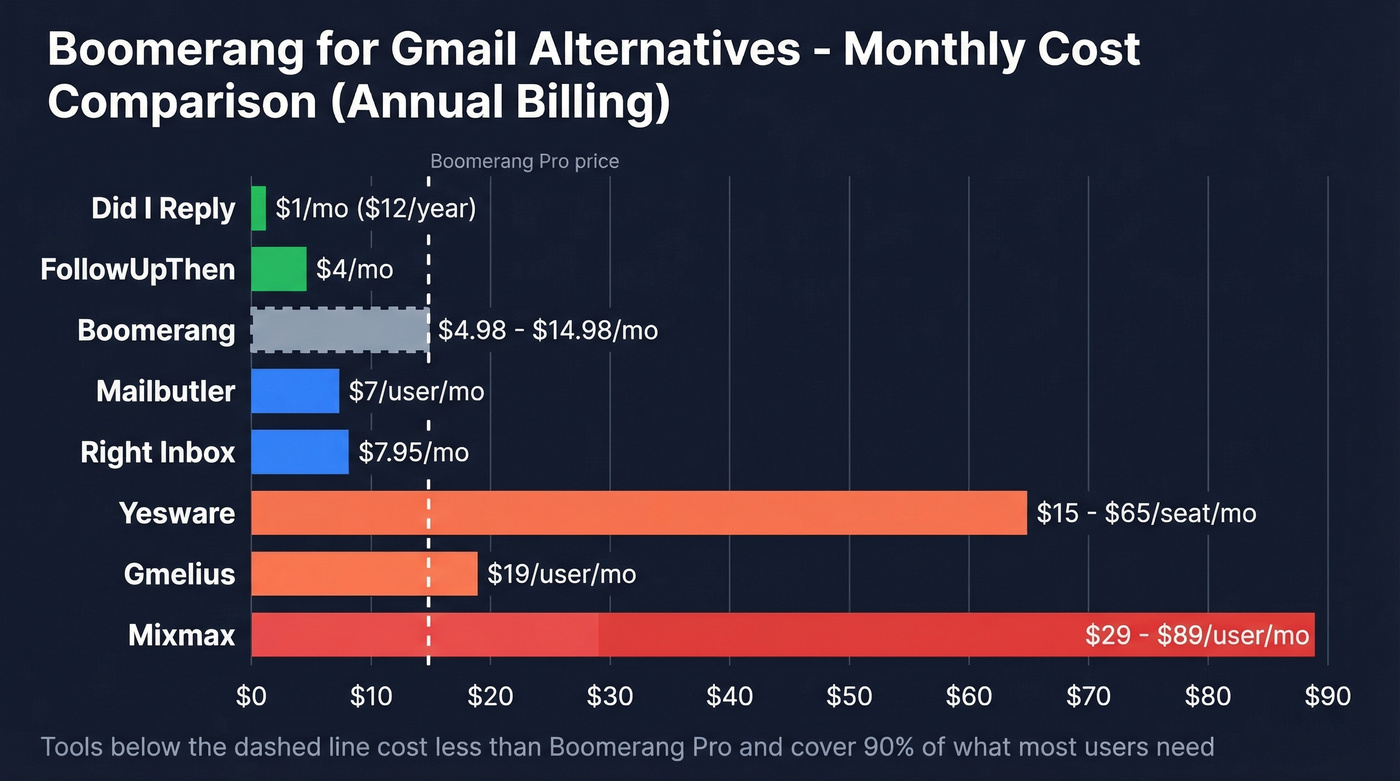
Let's be honest: if your deal sizes are modest and you're a solo operator, you probably don't need anything beyond Right Inbox or FollowUpThen. The tools below $8/mo solve 90% of what Boomerang users actually use Boomerang for. Save the $29-$89/mo platforms for when your outbound operation genuinely demands them.
When the Real Problem Isn't Scheduling
If you're hunting for a Boomerang alternative because your outbound has scaled past a few follow-ups, the bottleneck probably isn't your Gmail extension - it's your contact data. We've seen this pattern repeatedly: someone upgrades their scheduling tool, then realizes they're still emailing the same stale list. If you're building a repeatable follow-up system, start with proven sales follow-up templates and a clear sequence management process.
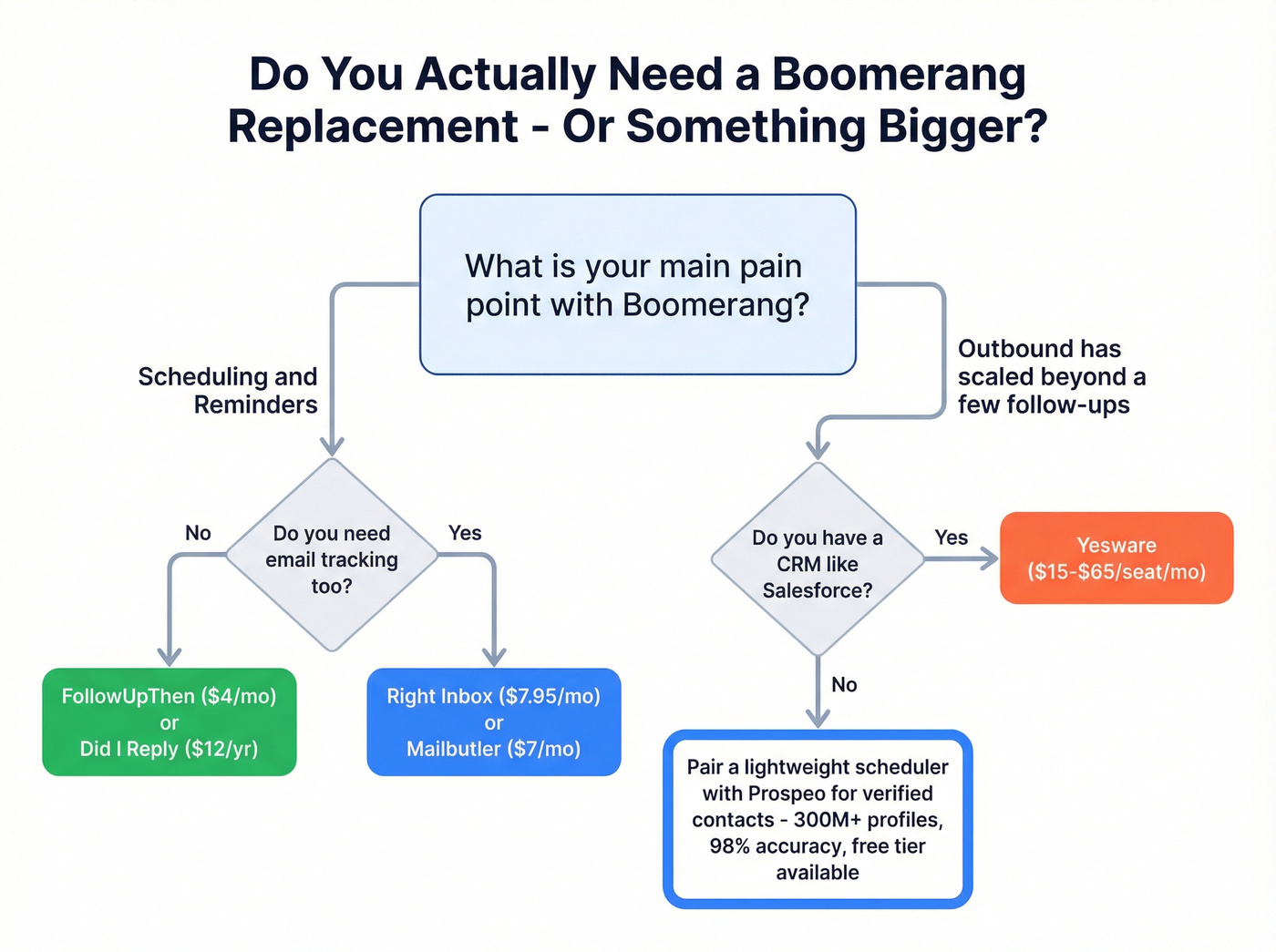
Prospeo gives you access to 300M+ professional profiles with 98% email accuracy. The Chrome extension pulls verified contacts from any website in one click, and the database supports 30+ search filters including buyer intent, technographics, and job changes - all on a 7-day data refresh cycle. The free tier includes 75 email lookups and 100 Chrome extension credits per month. Pair it with any lightweight scheduling tool on this list and you've got a complete outbound stack without the enterprise price tag. If deliverability is the real constraint, use an email deliverability guide to fix the basics, then monitor your email bounce rate as you scale.

Once you've outgrown Boomerang, the real bottleneck isn't scheduling - it's finding verified contact data for the right buyers. Prospeo gives you 300M+ profiles with 30+ filters, at $0.01 per email. No contracts.
Your Gmail extension isn't the problem. Your contact list is.
Pricing Comparison
All prices reflect annual billing where available.
| Tool | Free Plan | Paid From | Best For |
|---|---|---|---|
| Boomerang | 10 credits/mo | $4.98/mo | Scheduling + reminders |
| Right Inbox | 5 emails/mo/feature | $7.95/mo | Direct replacement |
| FollowUpThen | 50 reminders/mo | $4/mo | No-install reminders |
| Did I Reply | 5 reminders + 5 templates | $12/year | Privacy, ultra-cheap |
| Mailbutler | Yes (watermark) | $7/user/mo | Tracking + templates |
| Yesware | Yes (24-hr limit) | $15/seat/mo | Sales + Salesforce |
| Mixmax | Yes (post-trial) | $29/user/mo | Sales engagement |
| Gmelius | 7-day free trial | $19/user/mo | Shared inboxes |
If you're comparing these tools because you're moving from personal productivity to outbound, it helps to map your stack: a lightweight scheduler + a follow up email software layer + a place to store contacts (see contact management software).
FAQ
Is there a free alternative to Boomerang for Gmail?
Did I Reply costs just $12/year - essentially free. FollowUpThen's free plan covers 50 reminders monthly with zero install. Gmail's own Schedule Send handles basic scheduling with no extension at all.
Does Gmail have built-in email scheduling?
Yes. Gmail's Schedule Send supports around 100 scheduled emails at a time with no extension required. It lacks recurring schedules and inline editing of queued messages, so you'll need a third-party tool for those workflows.
What's the best Boomerang alternative for sales teams?
Yesware if you're deep in Salesforce ($15-$65/seat/mo depending on tier). Right Inbox if you want Boomerang's features at half the price. If your real gap is finding contacts worth emailing, Prospeo's free tier covers 75 email lookups per month plus 100 Chrome extension credits - pair it with any scheduler on this list.