

7 Bounce-Back Email Message Examples (With Fixes)
You sent a 5,000-email campaign this morning. Two hours later, dozens of MAILER-DAEMON messages are piling up in your inbox. They're written for machines, not humans, and you can't tell which ones matter.
Here's the thing: most guides about bounce-back emails hand you code snippets and call it a day. We're going to show you the full email you'd actually see in your inbox - seven complete bounce-back email message examples with the exact fix for each.
What a Bounce-Back Email Is
Bounce-back emails are automated failure notices - technically called DSNs (Delivery Status Notifications) or NDRs (Non-Delivery Reports). The sender is usually MAILER-DAEMON or "Mail Delivery Subsystem." They break into three categories:
- Hard bounces = permanent failure. Remove the address immediately.
- Soft bounces = temporary failure. Retry, then suppress after 3-5 attempts.
- Authentication bounces = your authentication setup is failing or missing. Fix SPF/DKIM/DMARC.
If most of your bounces come from invalid addresses, the problem is your data, not your email server.
Anatomy of a Bounce Message
Every email delivery failure notification follows the same structure, even though formatting varies wildly by provider.
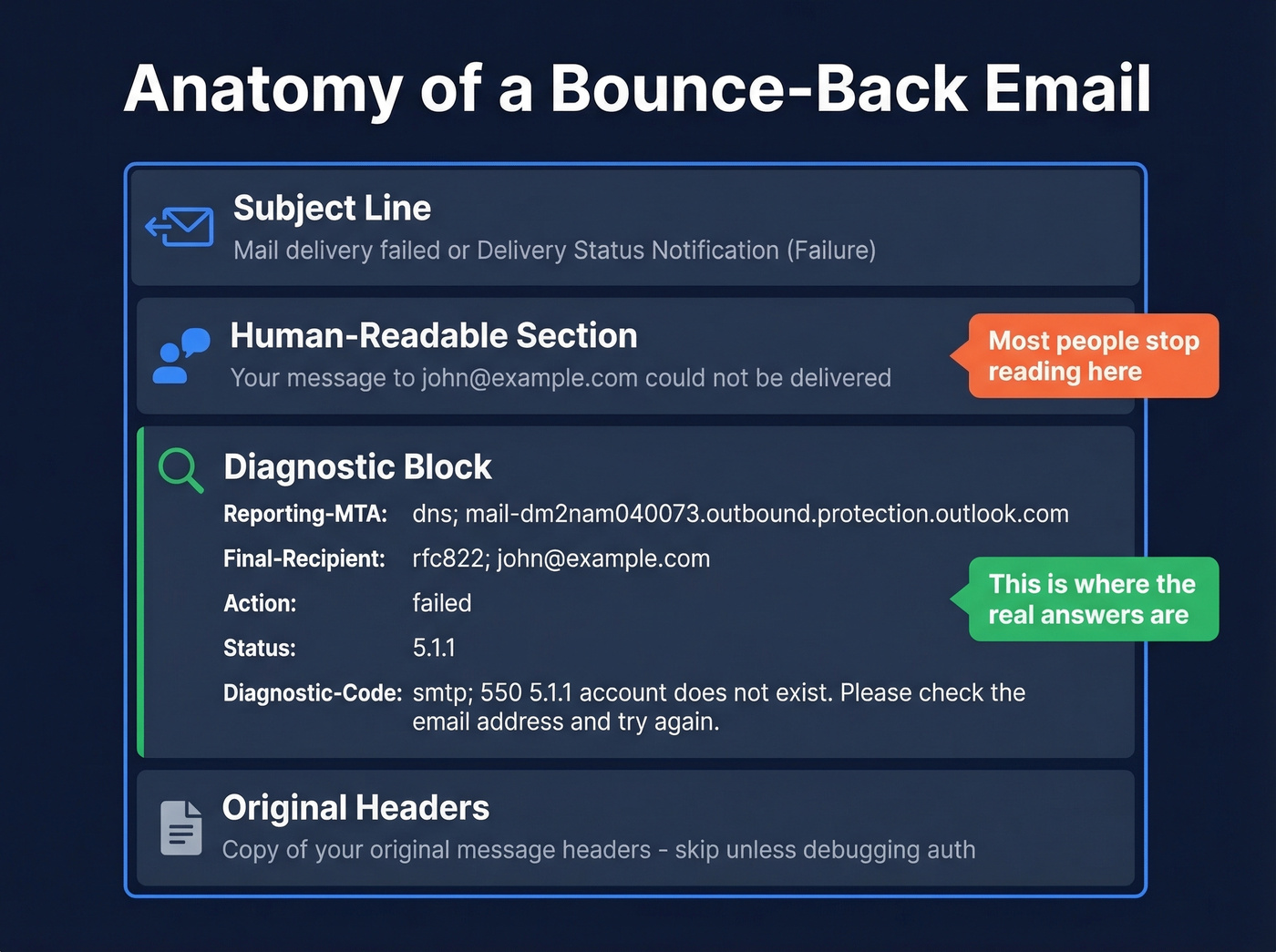
Subject line: Something like "Mail delivery failed" or "Delivery Status Notification (Failure)."
Human-readable section: A plain-English explanation like "Your message to john@example.com couldn't be delivered." Most people read this and stop.
Diagnostic block: The machine-readable section with the actual codes. This is where the useful information lives: Reporting-MTA (the mail server that generated the bounce), Final-Recipient (the address you tried to reach), Action (failed, delayed, or relayed), Status (the enhanced status code like 5.1.1), and Diagnostic-Code (the full SMTP response from the receiving server).
Original headers: A copy of your original message headers, appended at the bottom. Ignore this unless you're debugging authentication.
7 Real Bounce-Back Examples
1. Hard Bounce: Address Doesn't Exist
From: Mail Delivery Subsystem <mailer-daemon@googlemail.com>

Subject: Delivery Status Notification (Failure)

Your message to john.smith@example.com couldn't be delivered.

--- Diagnostic information ---

Reporting-MTA: dns; mail-sor-f41.google.com

Final-Recipient: rfc822; john.smith@example.com

Action: failed

Status: 5.1.1

Diagnostic-Code: smtp; 550 5.1.1 The email account that you tried
  to reach does not exist. Learn more at
  https://support.google.com/mail/answer/6596
What to do: Remove it from your list immediately. The address doesn't exist on that mail server, and resending will hurt your sender reputation. This is the single most common bounce we see - and it's almost always a data quality problem.
2. Hard Bounce: Domain Doesn't Exist
We see this most often when companies merge, rebrand, or shut down and their old domains go offline. Sometimes it's just a typo - "gmial.com" instead of "gmail.com."
From: postmaster@outlook.com

Subject: Undeliverable: Re: Partnership Inquiry

Delivery has failed to these recipients or groups:
  jane@fakecorp.xyz

--- Diagnostic information ---

Reporting-MTA: dns; BL0PR01MB4562.prod.exchangelabs.com

Final-Recipient: rfc822; jane@fakecorp.xyz

Action: failed

Status: 5.1.2

Diagnostic-Code: smtp; 550 5.1.2 Bad destination system address.
  The domain does not exist.
What to do: Remove the address. The entire domain is invalid - not just the mailbox.
3. Soft Bounce: Mailbox Full
From: MAILER-DAEMON@yahoo.com

Subject: Failure Notice

Sorry, we were unable to deliver your message to
  the following address: mark@company.com

--- Diagnostic information ---

Reporting-MTA: dns; mta4.am0.yahoodns.net

Final-Recipient: rfc822; mark@company.com

Action: delayed

Status: [4.2.2](https://www.rfc-editor.org/rfc/rfc3463.html)

Diagnostic-Code: smtp; 452 4.2.2 Mailbox full   -   user is over quota
What to do: Retry 3-5 times over 72 hours. If it still bounces, suppress the address - that's standard best practice. A persistently full mailbox usually means the account is abandoned.
4. Rejected: Message Too Large
Fix first, then resend. Strip large attachments and use a file-sharing link instead.
From: Mail Delivery Subsystem <mailer-daemon@googlemail.com>

Subject: Delivery Status Notification (Failure)

Message rejected: size exceeds limit.

--- Diagnostic information ---

Reporting-MTA: dns; mail-sor-f65.google.com

Final-Recipient: rfc822; ops@smallbiz.com

Action: failed

Status: 5.3.4

Diagnostic-Code: smtp; 552 5.3.4 Message size exceeds fixed maximum
  message size
Even with a 5xx code, this is a straightforward fix - reduce attachment size and resend. The address itself is fine.
5. Block Bounce: IP Blacklisted
This is the scary one. It doesn't affect a single email - it affects every email you send to servers checking that blocklist.
From: MAILER-DAEMON@mail.provider.com

Subject: Returned mail: see transcript for details

--- Diagnostic information ---

Reporting-MTA: dns; mx.provider.com

Final-Recipient: rfc822; buyer@prospect.com

Action: failed

Status: 5.7.1

Diagnostic-Code: smtp; 550 Rejected because 192.168.1.100 is in a
  black list at bl.spamcop.net
What to do: Check your IP against MXToolbox and SpamCop. Request delisting, then investigate the root cause - usually spam complaints or a compromised server. Don't just get delisted and move on. If you don't fix the underlying issue, you'll be back on that list within a week.
6. Authentication Bounce: SPF/DKIM Failure
From: Mail Delivery Subsystem <mailer-daemon@googlemail.com>

Subject: Delivery Status Notification (Failure)

Message rejected. See https://support.google.com/mail/?p=RfcMessageNonCompliant

--- Diagnostic information ---

Reporting-MTA: dns; mail-yw1-f202.google.com

Final-Recipient: rfc822; cfo@enterprise.com

Action: failed

Status: 5.7.26

Diagnostic-Code: smtp; 550 5.7.26 This mail has been blocked because
  the sender is unauthenticated. Gmail requires all senders to
  authenticate with SPF and DKIM.
What to do: Check your DNS records. Set up SPF, DKIM, and DMARC. Gmail and Yahoo require authentication for bulk senders, though best practice is to authenticate regardless of volume. This isn't optional anymore.
7. Policy Bounce: Spam Content Detected
From: postmaster@recipient-server.com

Subject: Mail delivery failed

Your message was blocked by the recipient's mail server.

--- Diagnostic information ---

Reporting-MTA: dns; mx1.recipient-server.com

Final-Recipient: rfc822; lead@target.com

Action: failed

Status: 5.7.1

Diagnostic-Code: smtp; 554 5.7.1 Message blocked due to spam content
  in the message.
Common causes: spam trigger words in the subject line, excessive links, URL shorteners, or image-heavy emails with almost no text. Review your content and send a cleaner version.
Hard vs. Soft Bounce Cheat Sheet
| Hard Bounce | Soft Bounce | |
|---|---|---|
| Duration | Permanent | Temporary |
| SMTP class | 5xx | 4xx |
| Action | Remove immediately | Retry 3-5x over 72 hrs |
| If it persists | Already suppressed | Reclassify as hard bounce |
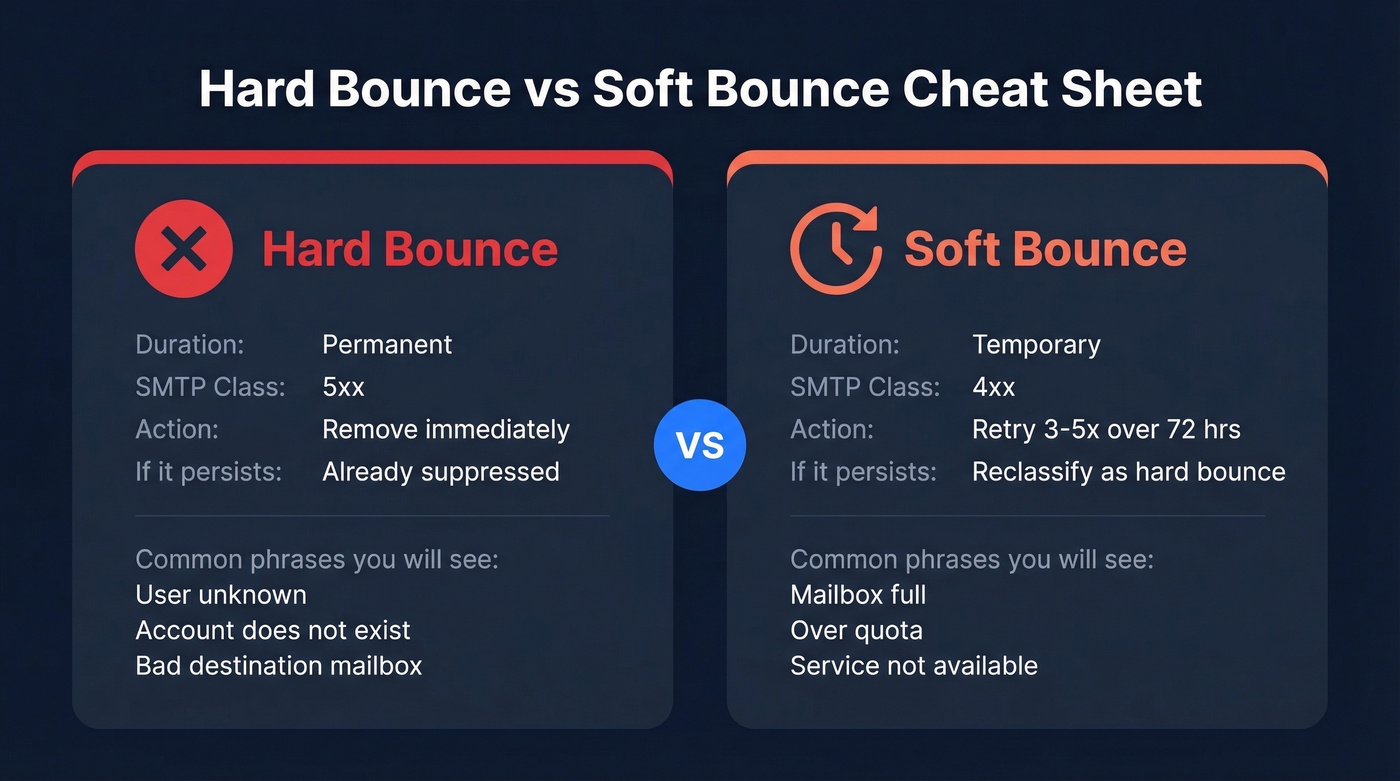
Typical hard bounce phrases: "User unknown," "Account does not exist," "Bad destination mailbox." Typical soft bounce phrases: "Mailbox full," "Over quota," "Service not available."
Many email platforms automatically suppress hard-bounced addresses. Don't override suppression - it's protecting your sender reputation.

That "address doesn't exist" bounce? It's a data problem. Prospeo's 5-step verification with catch-all handling, spam-trap removal, and honeypot filtering delivers 98% email accuracy. Teams switching from other providers drop bounce rates from 35%+ to under 4%.
Fix your bounce rate at the source - start with better data.
SMTP Bounce Code Reference
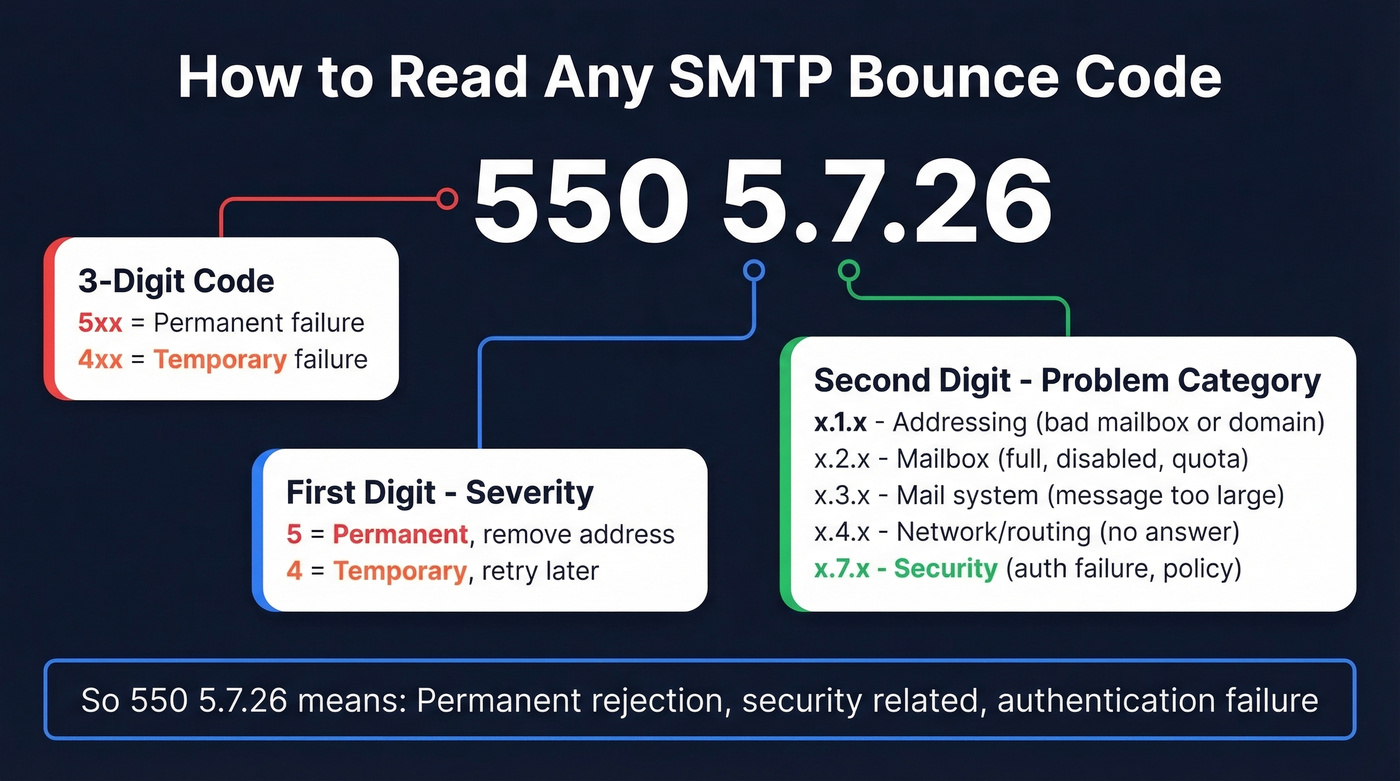
The three-digit code tells you severity. The enhanced code (the x.x.x part) tells you the cause.
| Code | Category | Meaning | Fix |
|---|---|---|---|
| 421 | Temp | Server busy / service not available | Retry later |
| 450 | Temp | Mailbox unavailable | Retry later |
| 452 | Temp | Insufficient storage | Retry in 24-48 hrs |
| 550 | Perm | Mailbox unavailable (often doesn't exist) | Remove address |
| 552 | Perm | Message too large | Reduce attachment size |
| 553 | Perm | Mailbox name not allowed / invalid | Fix address formatting |
| 554 | Perm | Transaction failed (often filter/policy) | Check content/blocklists |
The enhanced status code's second digit tells you the problem category:
| Second digit | Category |
|---|---|
| x.1.x | Addressing (bad mailbox or domain) |
| x.2.x | Mailbox (full, disabled, over quota) |
| x.3.x | Mail system (message too large) |
| x.4.x | Network/routing (no answer from host) |
| x.7.x | Security (auth failure, policy block) |
So when you see 550 5.7.26, you know it's a permanent (5xx) security-related (x.7.x) rejection about authentication. That's the whole system - Mailgun's full reference covers every variant if you want to go deeper.
New Bounce Codes for 2026
Bounce-back emails got more aggressive starting in 2024, and enforcement has only tightened since. Gmail, Yahoo, and Microsoft all now enforce authentication requirements that used to be optional.
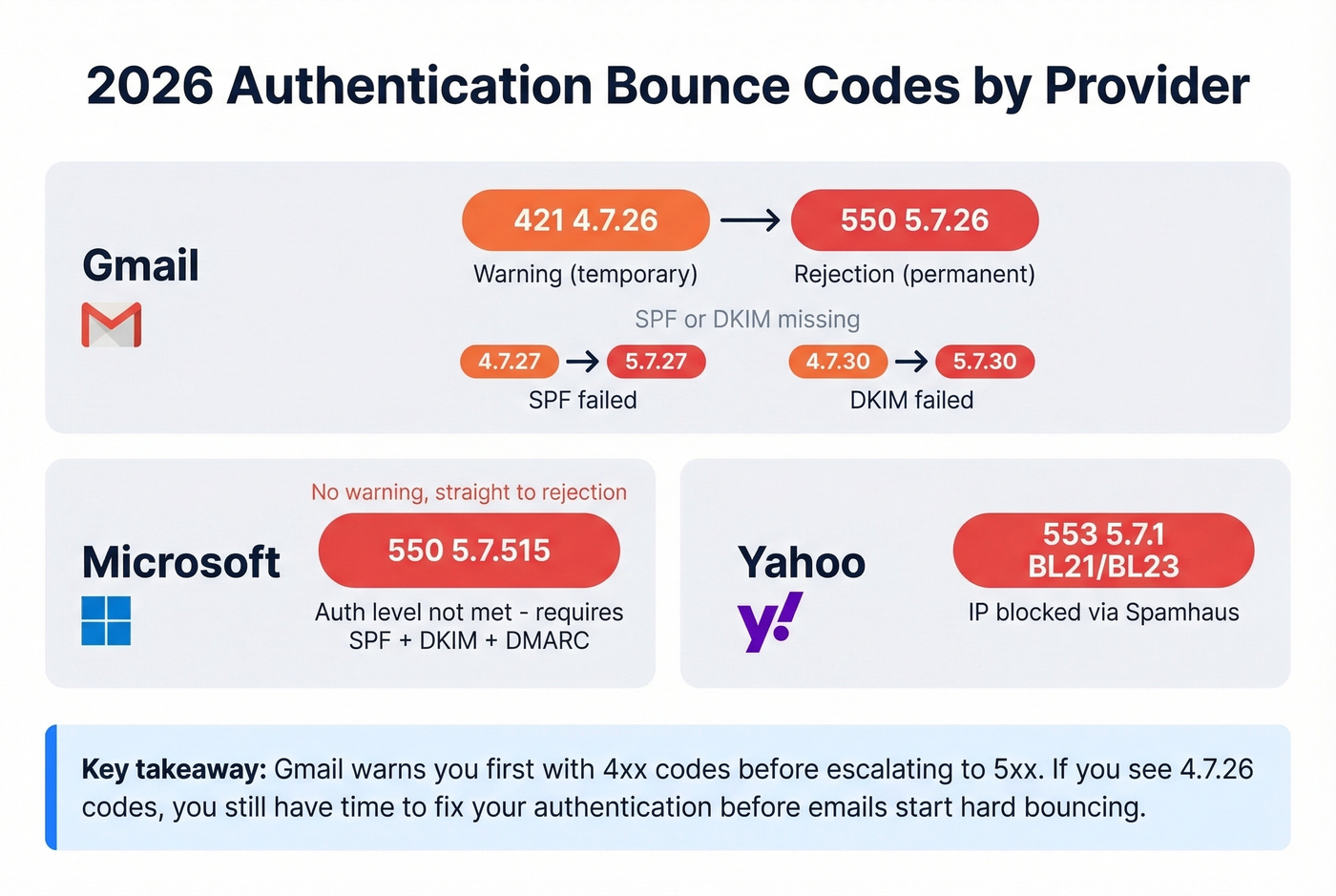
| Provider | Code | Meaning |
|---|---|---|
| Gmail | 421 4.7.26 then 550 5.7.26 | SPF/DKIM missing (warn then reject) |
| Gmail | 421 4.7.27 then 550 5.7.27 | SPF failed |
| Gmail | 421 4.7.30 then 550 5.7.30 | DKIM failed |
| Microsoft | 550 5.7.515 | Auth level not met (SPF+DKIM+DMARC) |
| Yahoo | 553 5.7.1 BL21/BL23 | IP blocked via Spamhaus |
Gmail's approach is notable: they issue a temporary 421 warning first, then escalate to a permanent 550 rejection. If you're seeing 4.7.26 codes, you have a window to act before your emails start hard bouncing.
The 2024 requirements from Gmail and Yahoo boil down to three things: authenticate with SPF/DKIM/DMARC, keep spam complaints under 0.3%, and support one-click unsubscribe for bulk sends.
What's a Good Bounce Rate?
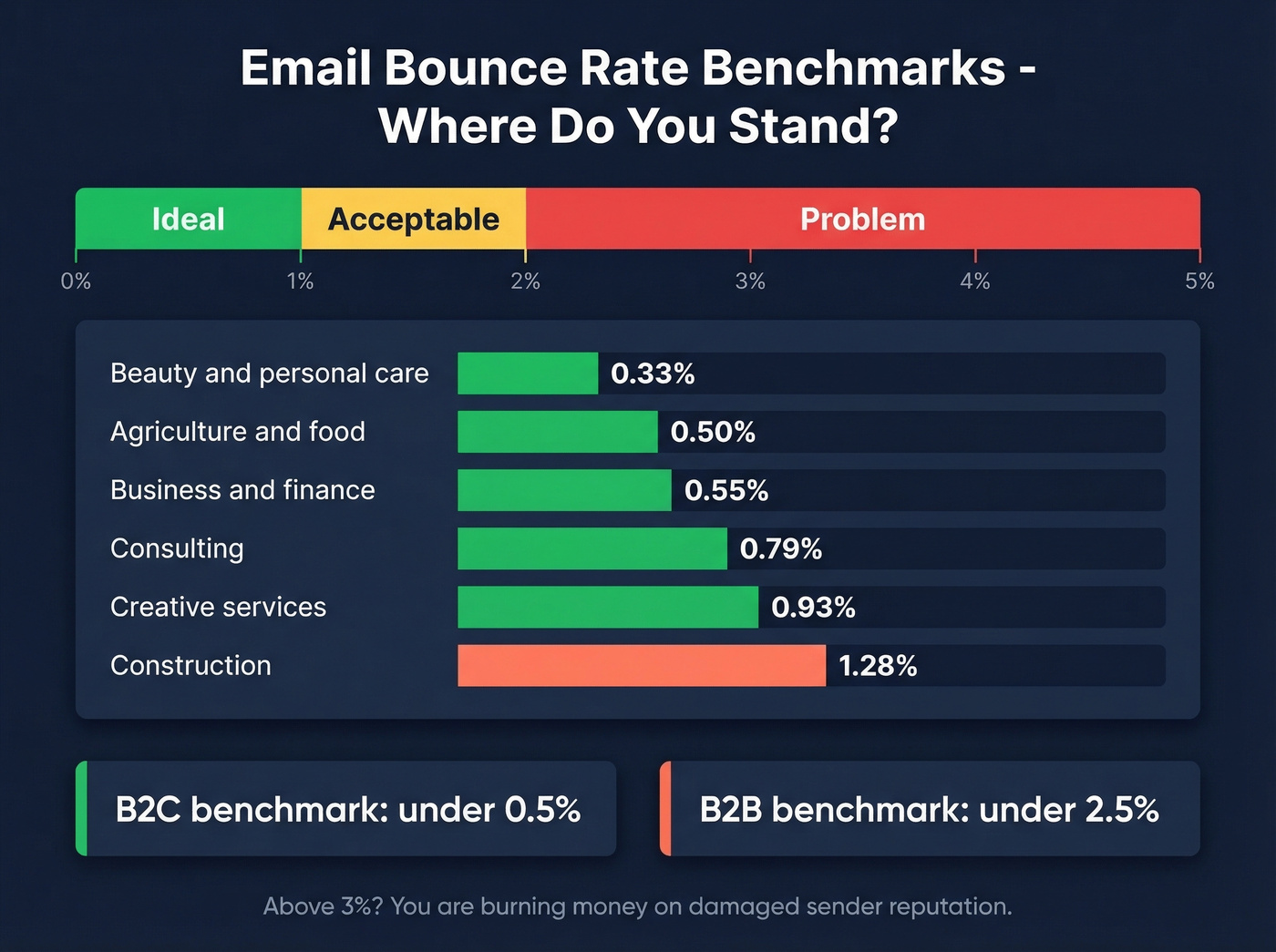
A bounce rate under 2% is good; under 1% is ideal. Anything above 2% signals list hygiene problems that will eventually damage your sender reputation.
| Industry | Avg. Bounce Rate |
|---|---|
| Beauty & personal care | 0.33% |
| Agriculture & food | 0.50% |
| Business & finance | 0.55% |
| Consulting | 0.79% |
| Creative services | 0.93% |
| Construction | 1.28% |
B2C lists typically run under 0.5%. B2B lists are messier - under 2.5% is the practitioner benchmark, per Webbula's analysis. Let's be honest: if your bounce rate is above 3%, you're burning more money on damaged sender reputation than you'd spend just verifying your list upfront.
How to Fix Bounce-Back Emails
Stop watching the bounce-rate percentage. Find out which addresses bounced and why. A 1.5% rate sounds fine until you realize most of those bounces hit the same domain because your SPF record is failing.
Check authentication first. Verify your SPF, DKIM, and DMARC records are published and passing. This fixes most 5.7.x bounces (and is a core part of email deliverability).
Check blocklists. Run your sending IPs through MXToolbox and SpamCop. If you're listed, request removal and investigate the root cause.
Check data quality. This is where most bounces actually start. If you're sending to addresses that don't exist, no amount of authentication will save you. Verify every address before it enters a campaign. In our experience, teams that verify upfront consistently see bounce rates drop from 30%+ to under 5%. Prospeo's email verification catches invalid addresses, spam traps, and catch-all domains at 98% accuracy with a 7-day data refresh that keeps lists clean over time.

For high-volume senders, review your bounce logs weekly. Categorize bounces by type - a spreadsheet with COUNTIF formulas works for smaller lists, SQL for anything over a million rows. The pattern matters more than the percentage. Skip this if you're sending under 500 emails a month; at that volume, just fix bounces as they come in.
You shouldn't need to decode MAILER-DAEMON messages to figure out your list is stale. Prospeo refreshes all 300M+ records every 7 days - not the 6-week industry average - so addresses are valid before you hit send. At $0.01 per email, cleaning up costs less than one bounced campaign.
Send to emails verified this week, not last quarter.
FAQ
What does "550 5.1.1 User unknown" mean?
The recipient's email address doesn't exist on that mail server. It's a permanent hard bounce - remove the address from your list immediately. Resending won't fix it and will actively damage your sender reputation with that provider.
Can a soft bounce become a hard bounce?
Yes. If a mailbox stays full or a temporary server issue persists across 3-5 retry attempts over 72 hours, most email platforms reclassify it as a hard bounce and suppress the address automatically. Don't fight the suppression.
How do I read a bounce-back email message?
Start with the human-readable section at the top - it tells you the recipient address and a plain-English reason. Then check the diagnostic block: the Status code (like 5.1.1) tells you the exact cause. Match those codes to the reference tables above to determine your fix.
How do I prevent bounces before sending?
Verify every email address before your campaign goes out. Prevention beats triage every time, and it's far cheaper than rebuilding a damaged sender reputation after the fact.