

What Is a Bounced Email Address? Causes, Codes & Fixes
Your ESP just flagged your account for a 4.5% bounce rate. You verified the list last week. What happened?
That gap between "verified" and "delivered" is where a bounced email address quietly kills your sender reputation - and it's almost never the platform's fault.
Quick Fix
Most bounces come from stale data, not platform issues. Fix 90% of them by verifying your list before every send, authenticating your domain (SPF + DKIM + DMARC), and suppressing non-engagers after 90 days. If your bounce rate just spiked, jump to the SMTP code table below.
What Is a Bounced Email?
Think of it as a returned package. You addressed it, dropped it off, and the postal service brought it back - wrong address, building demolished, mailbox overflowing. The email left your server, hit the recipient's mail server, and got rejected. You get a Non-Delivery Report (NDR) explaining why.
Over 347 billion emails are sent daily, and the average B2B delivery rate sits around 98.16%. That 2% sounds small until you do the math on a 10,000-contact campaign: 200 emails going nowhere. Stale lists push that number much higher.
Hard Bounce vs. Soft Bounce
The distinction determines what you do next. Getting it wrong compounds the damage.
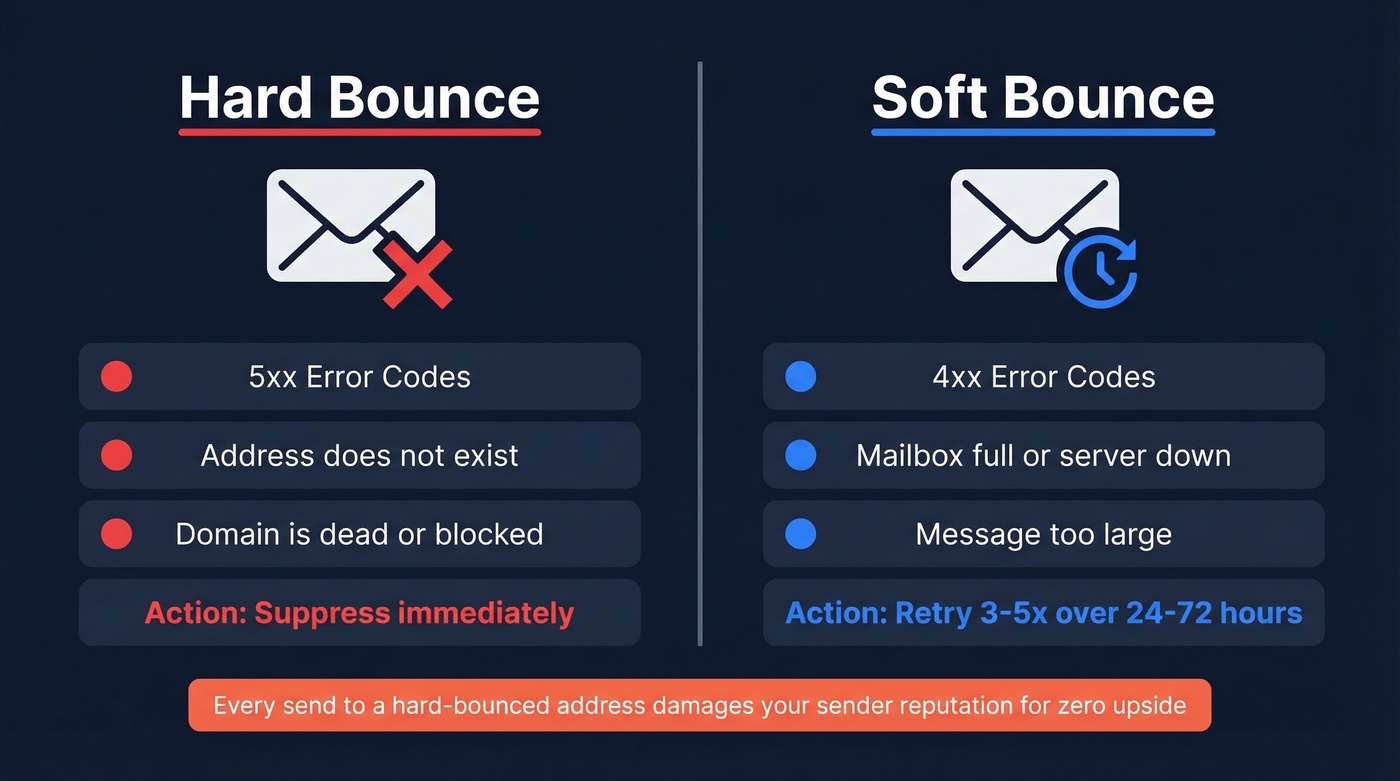
Hard Bounces
A hard bounce is permanent. The address doesn't exist, the domain is dead, or the server has explicitly blocked you. When you see a 5xx error code, stop trying. Suppress immediately. Every send to a hard-bounced address chips away at your sender reputation for zero upside.
Soft Bounces
A soft bounce is temporary - in theory. The mailbox is full, the server is down, or the message is too large. You'll see 4xx codes. Retry 3-5 times over 24-72 hours, then suppress if it still fails.
We've seen this play out firsthand: a small nonprofit running a ~100-person Gmail list on Mailchimp's free plan saw soft bounces spike to 25% overnight. They retried the bounced segment - 7 delivered, 17 still bounced. No list changes, no new contacts. Provider-side throttling can persist across retries, and sometimes waiting is the only fix.
Common Causes
Before you blame your ESP, run through this checklist:
- Invalid or nonexistent address - typos, former employees, made-up emails from form fills
- Full mailbox - recipient hasn't cleaned their inbox in months
- Server down or unreachable - temporary outage on the receiving end
- Message too large - attachments or heavy HTML pushing past server limits
- Authentication failure - missing or misconfigured SPF, DKIM, or DMARC records
- Content or reputation block - spam triggers, or your sending IP/domain is flagged
- DNS misconfiguration - MX records pointing nowhere
If your bounce rate is above 2%, you almost always need list cleaning. Full stop.
How to Read Bounce Codes
The receiving server sends back a code with every rejection. Understanding these codes is the difference between diagnosing the problem in 30 seconds and spending an hour guessing.
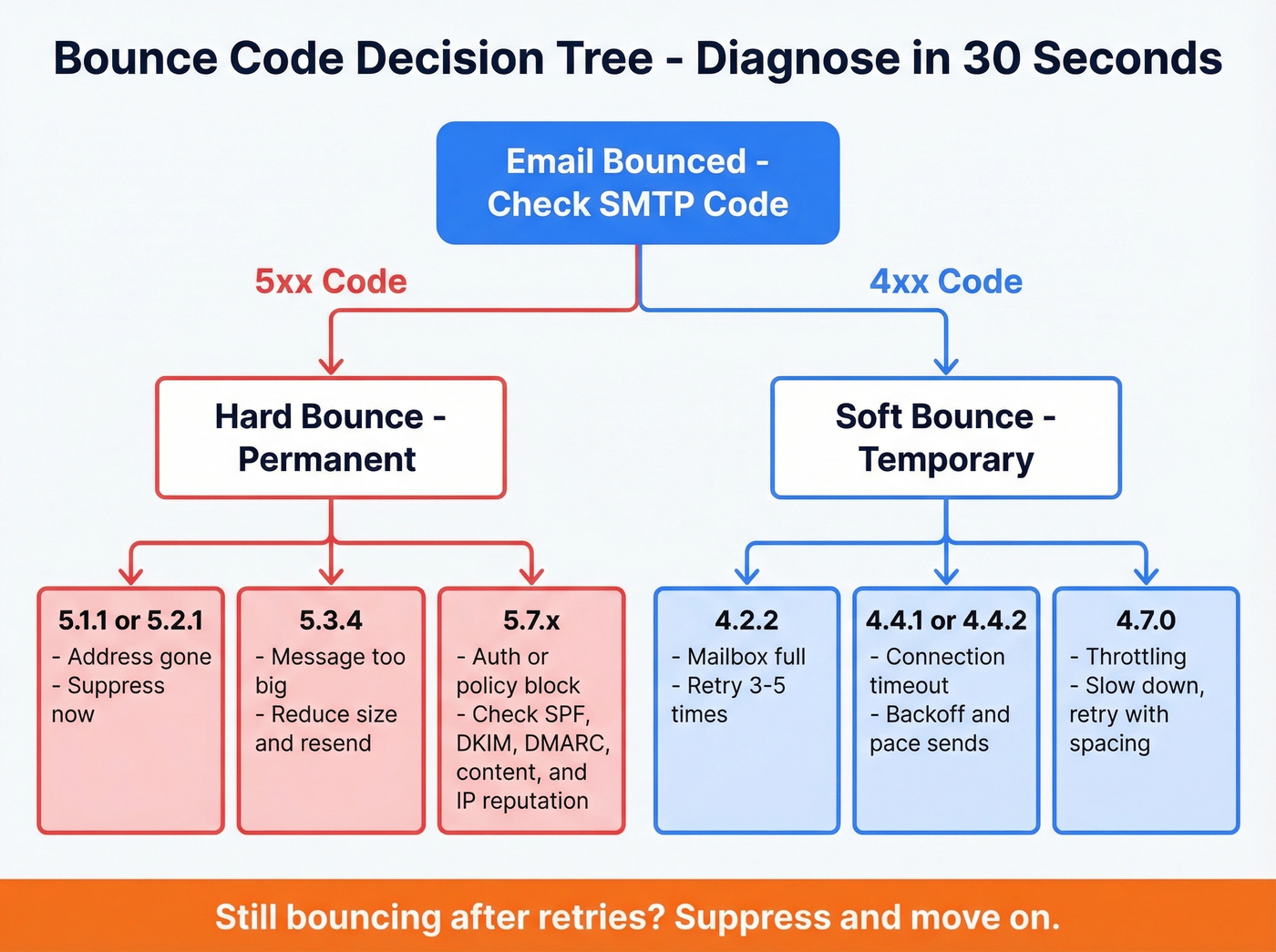
4xx codes are temporary (soft bounce - retry with backoff). 5xx codes are permanent (hard bounce - suppress the address).
| Code | Type | Meaning | Action |
|---|---|---|---|
| 5.1.1 | Hard | Recipient doesn't exist | Suppress immediately |
| 5.2.1 | Hard | Mailbox disabled | Suppress immediately |
| 4.2.2 | Soft | Mailbox full | Retry 3-5x, then suppress |
| 5.3.4 | Hard | Message too large | Reduce size, retest |
| 4.4.1 / 4.4.2 | Soft | Timeout / bad connection | Backoff, pace sends |
| 4.7.0 | Soft | Throttling / greylisting | Slow down, retry with spacing |
| 5.7.1 | Hard | Policy / security refusal | Fix auth, content, or reputation |
| 5.7.26 | Hard | DMARC non-alignment | Fix DMARC alignment |
The 5.7.x family is where things get interesting. A 5.7.1 could mean your content triggered a spam filter, your IP is blocklisted, or your authentication is broken - you won't know which until you read the full error message, not just the code.
And 5.7.26 maps to DMARC alignment failures, which became a hard requirement for bulk senders under the Gmail/Yahoo authentication mandates. With Microsoft enforcing similar rules since mid-2025, these aren't suggestions. They're table stakes.

Most bounces trace back to stale data and catch-all guesswork. Prospeo's 5-step verification handles both - with catch-all domain detection, spam-trap removal, and a 7-day data refresh cycle (not the 6-week industry average). 98% email accuracy, verified before you pay.
Drop your bounce rate under 2% without the guesswork.
What a Bounce Notification Looks Like
NDRs look different depending on the receiving server, but they all contain the same core information.
Gmail (nonexistent address):
"The email account that you tried to reach does not exist. Please try double-checking the recipient's email address for typos or unnecessary spaces."
Content block:
"554 rejected due to spam URL in content"
Blocklist rejection:
"554 5.7.1 - Message blocked due to spam content in message"
When diagnosing bounces at scale, count keyword patterns across your bounce logs and prioritize the biggest clusters. Every NDR should contain the SMTP error code, enhanced status code, error message text, server hostnames/IPs, timestamp, and message ID.
Why Bounces Compound Fast
A single bounce is noise. A pattern is a death spiral.
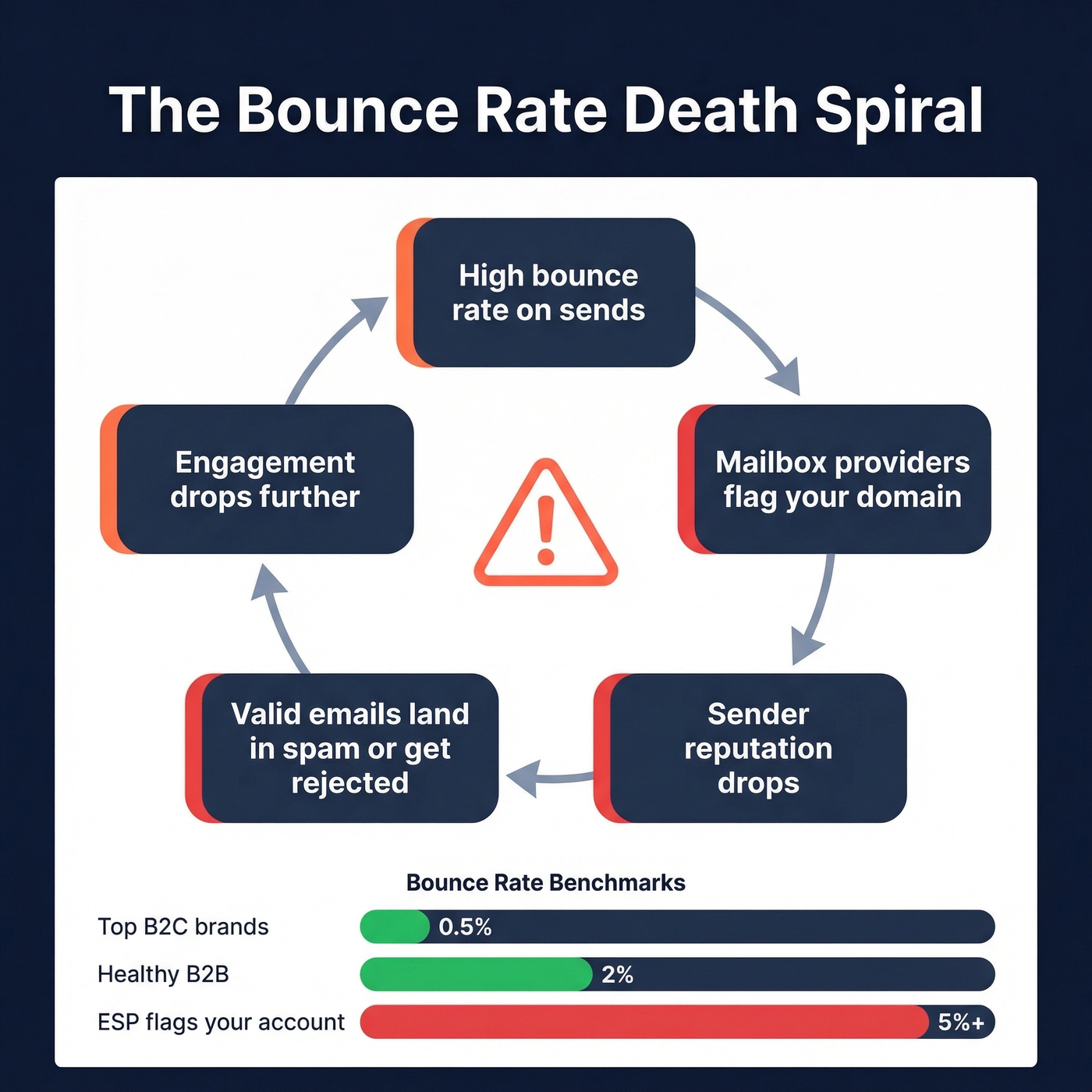
Mailbox providers track your bounce rate over time. High bounces signal you're sending to bad addresses, which signals poor list hygiene, which signals potential spam. Once your sender reputation drops, even valid emails land in spam or get silently rejected. The cycle feeds itself, and clawing back a damaged domain reputation can take weeks of careful warm-up sending.
Top B2C brands keep bounce rates below 0.5%. B2B teams should aim for under 2.5%, though anything under 2% is healthy. Above 5% and most ESPs will flag or suspend your account.
Here's what frustrates us: despite the 2024 Gmail/Yahoo mandates and Microsoft's 2025 enforcement, adoption lags badly. Only about 18% of top domains have valid DMARC, and just 7.6% enforce it. One nuance that trips people up is that enforcement can be selective - if only part of your traffic is non-compliant, providers reject a percentage of that portion rather than blocking everything, creating inconsistent bounce patterns that are maddening to diagnose.
Why Addresses Still Bounce After Verification
You verified the list. The tool said "valid." You're still bouncing. You don't have a bounce problem - you have a data freshness problem.
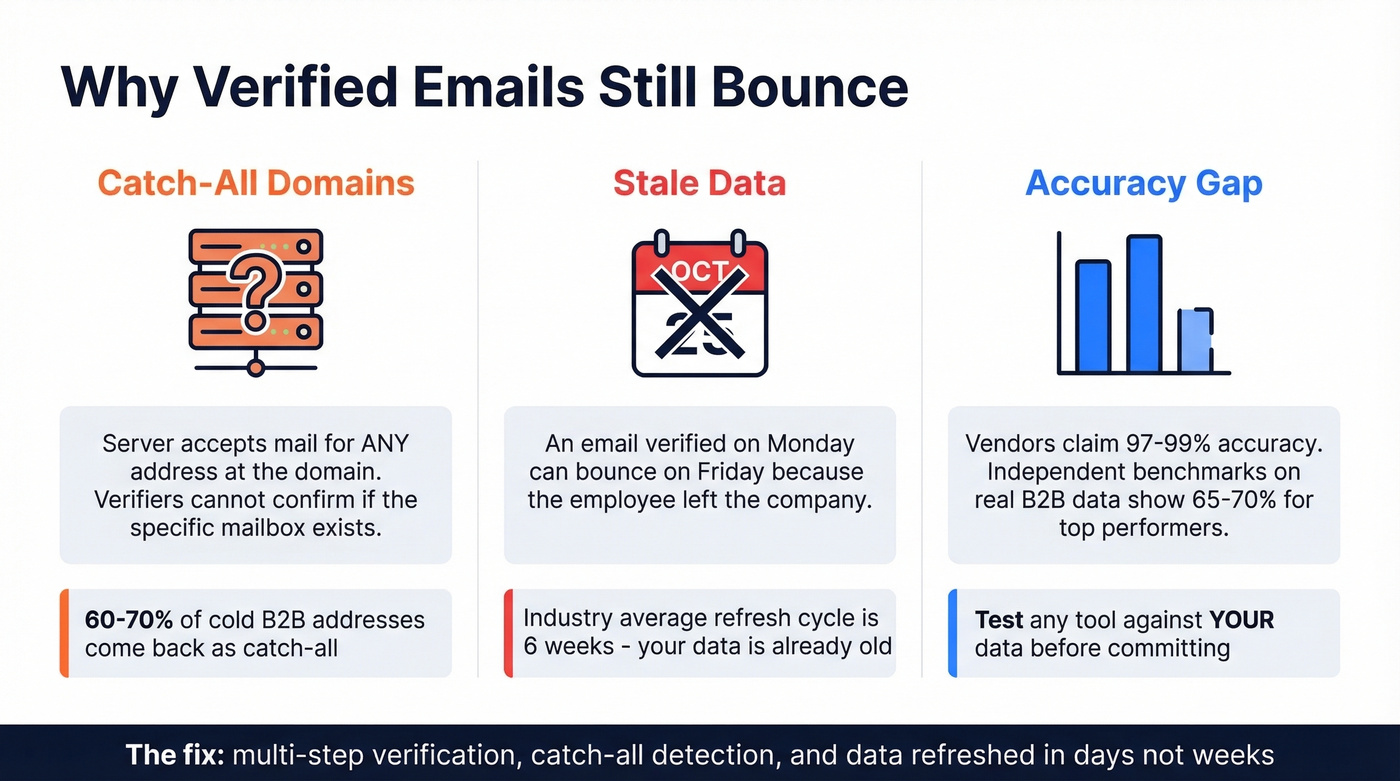
The biggest culprit is catch-all domains. These servers accept mail for any address at the domain, so verification tools can't tell whether the specific mailbox exists. On some cold B2B lists, 60-70% of addresses come back as catch-all. Your verifier marks them "risky," and you're left guessing.
Then there's the timing gap. An email verified on Monday can bounce on Friday because the employee left. The industry average refresh cycle for data providers is about 6 weeks - meaning the data you're verifying against is already stale by the time you send.
Let's be honest: vendor accuracy claims of 97-99% often don't match real-world B2B results. One benchmark testing 15 verifiers against 3,000 real business emails found top performers landing around 65-70% accuracy on actual B2B data. That's a massive gap between marketing copy and reality.
How to Prevent Email Bounces
Prevention beats diagnosis every time. We've seen these practices work across hundreds of email programs, and the ones that skip them always regret it.
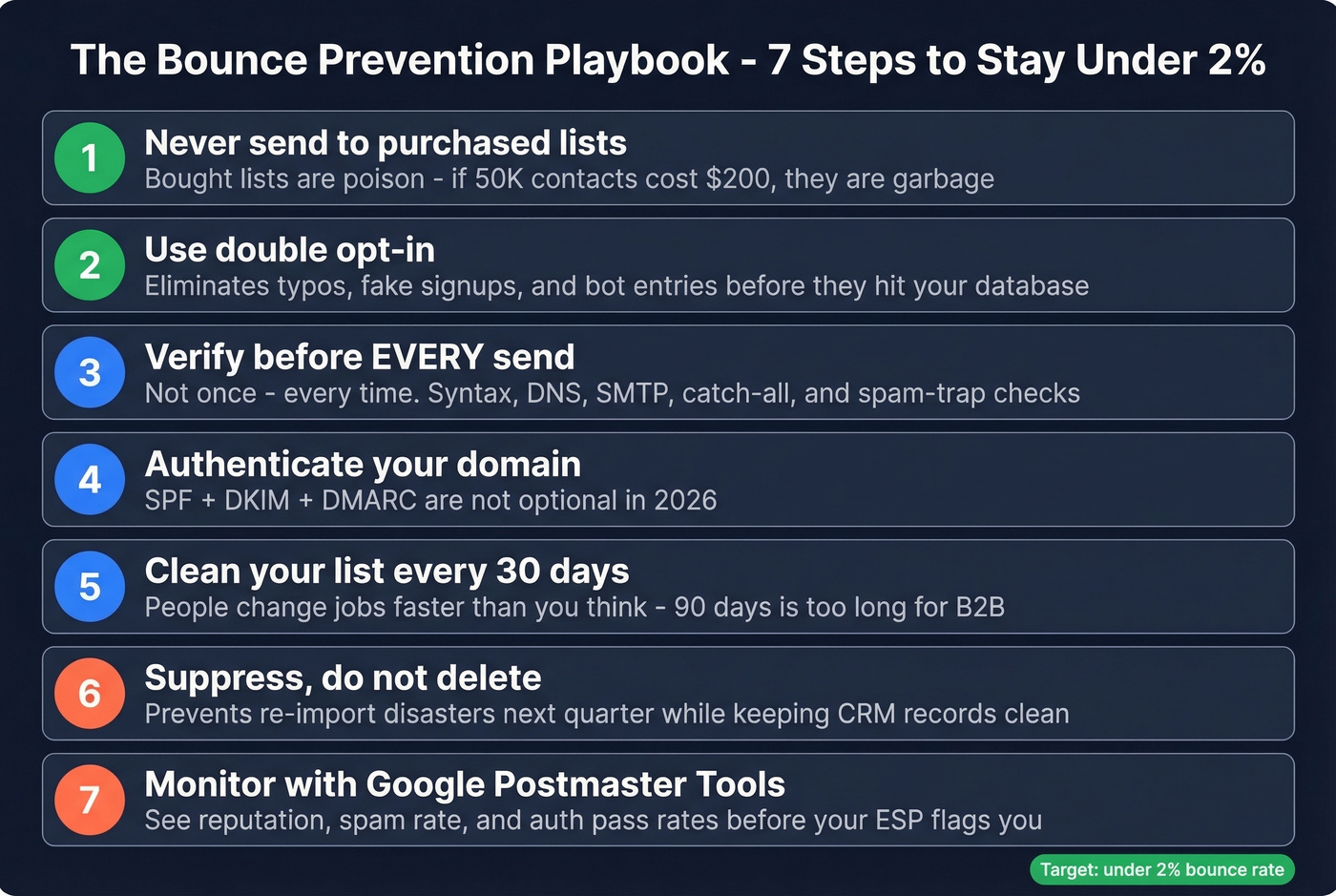
Never send to purchased lists. Bought lists are poison. The consensus on r/SaaS is that inbox placement is "about who you don't send to." If someone's selling you 50,000 "verified" contacts for $200, those contacts are garbage. (If you're unsure, read Is It Illegal to Buy Email Lists?.)
Use double opt-in for marketing lists. It adds friction. It also eliminates typos, fake signups, and bot entries before they hit your database.
Verify before every send. Not once - every time. A multi-step approach covering syntax checks, DNS/MX validation, SMTP pings, catch-all detection, and spam-trap removal catches problems that single-pass tools miss. Snyk, a developer security platform with 50 AEs prospecting weekly, saw bounce rates drop from 35-40% to under 5% after implementing proper pre-send verification, with AE-sourced pipeline up 180%.
Authenticate your domain. SPF, DKIM, and DMARC aren't optional in 2026. The Gmail/Yahoo requirements made this baseline for anyone sending at volume. (If you need a quick check, see How to Verify DKIM Is Working.)
Clean your list every 30-90 days. In our experience, the 30-day cadence works better than 90 - people change jobs faster than you think. Some guides recommend 6-12 months. That's far too long for B2B.
Suppress, don't delete. A suppression list prevents re-sending while preserving the record for CRM hygiene. Deleting contacts means someone re-imports them next quarter and you're right back where you started. (This is easier with solid contact management software.)
Monitor with Google Postmaster Tools. It shows domain reputation, spam rate signals, and authentication pass rates. If something's trending wrong, you'll see it here before your ESP flags you.
Verification Tools That Work
The right tool won't eliminate bounces entirely - catch-all domains and timing gaps make that impossible - but it'll get you under the 2% threshold where ESPs leave you alone. We've run side-by-side tests on most of these, and the differences are real.
| Tool | Stated Accuracy | Price per 1,000 | Free Tier | Best For |
|---|---|---|---|---|
| Prospeo | 98% | ~$10 | 75/month | 5-step verify, 7-day refresh |
| Bouncer | 99.5% | ~$7 | 1,000 credits | Fast one-off cleaning |
| NeverBounce | 99.9% | ~$8 | 1,000 credits | High stated accuracy |
| ZeroBounce | 96-98% | ~$7.50 (2,000 min) | 100/month | Abuse/spam-trap detection |
| BriteVerify | 97% | ~$10 | None | Enterprise integrations |
Bouncer and NeverBounce are solid budget options for one-off list cleaning. ZeroBounce adds abuse detection that's useful for form-fill lists. BriteVerify skews enterprise with deeper ESP integrations but no free tier.
Skip BriteVerify if you're a small team without enterprise needs - you're paying for integrations you won't use.
One more thing: every vendor on this list claims 96%+ accuracy. Independent benchmarks say otherwise. Test any tool against your own data before committing. Run 1,000 addresses through two verifiers and compare. You'll learn more in an hour than from any marketing page. (If you want a broader shortlist, start with email reputation tools and an email deliverability guide.)
You just read why addresses bounce after verification: stale data and catch-all domains. Prospeo refreshes 300M+ profiles every 7 days and runs proprietary catch-all handling so you're not left guessing. Teams using Prospeo cut bounce rates from 35%+ to under 4%.
Get emails that actually land - at $0.01 each.
FAQ
What's a good email bounce rate?
Under 2% is healthy for most B2B senders; top B2C brands target under 0.5%. Above 5% and most ESPs will flag or suspend your account. Monitor bounce rate per campaign, not just as a monthly average.
Can I fix a bounced email address?
No. You can't force delivery to an address the receiving server rejected. You can only prevent future bounces by verifying addresses before each send, authenticating your domain with SPF/DKIM/DMARC, and suppressing contacts that have already bounced.
If an email address doesn't exist, will it bounce back?
Yes. The receiving server returns a 5.1.1 hard bounce immediately when the mailbox doesn't exist. There's no retry window - the NDR will confirm the address is invalid. This is the most common hard bounce reason on cold outbound lists.
Should I delete bounced contacts from my CRM?
Suppress them, don't delete. Suppression prevents re-sending while preserving CRM records for reporting and deduplication. Deletion risks someone re-importing the same bad contacts next quarter.
What free tool can verify emails before sending?
Prospeo offers 75 free email verifications per month with its 5-step process, including catch-all detection and spam-trap removal. ZeroBounce provides 100 free monthly credits, and NeverBounce gives 1,000 one-time credits - useful for a quick list audit.