

Business Email Examples for Every Scenario (With Templates You Can Copy)
You're staring at a blank compose window and the cursor is mocking you. Most "business email example" articles want to sell you a website builder instead of showing you the actual email. This isn't one of those.
375B+ emails get sent every single day, and the average office worker receives 121 of them. Yours needs to stand out - or at least not embarrass you. Whether you're drafting a cold pitch to a VP you've never met or setting up a professional email address that doesn't scream "I made this in 2007," everything you need is here: copy-paste templates, subject line formulas, and the formatting details that separate polished emails from forgettable ones.
Quick Navigation
- Need to write a professional email right now? Jump to the 20+ templates by scenario.
- Need a professional email address? Jump to address format examples.
- Need better subject lines? Jump to subject lines that get opened.
What Makes a Business Email Professional
Every professional email has five components. Nail all five and you're ahead of most inboxes. Miss one and the whole thing feels off.
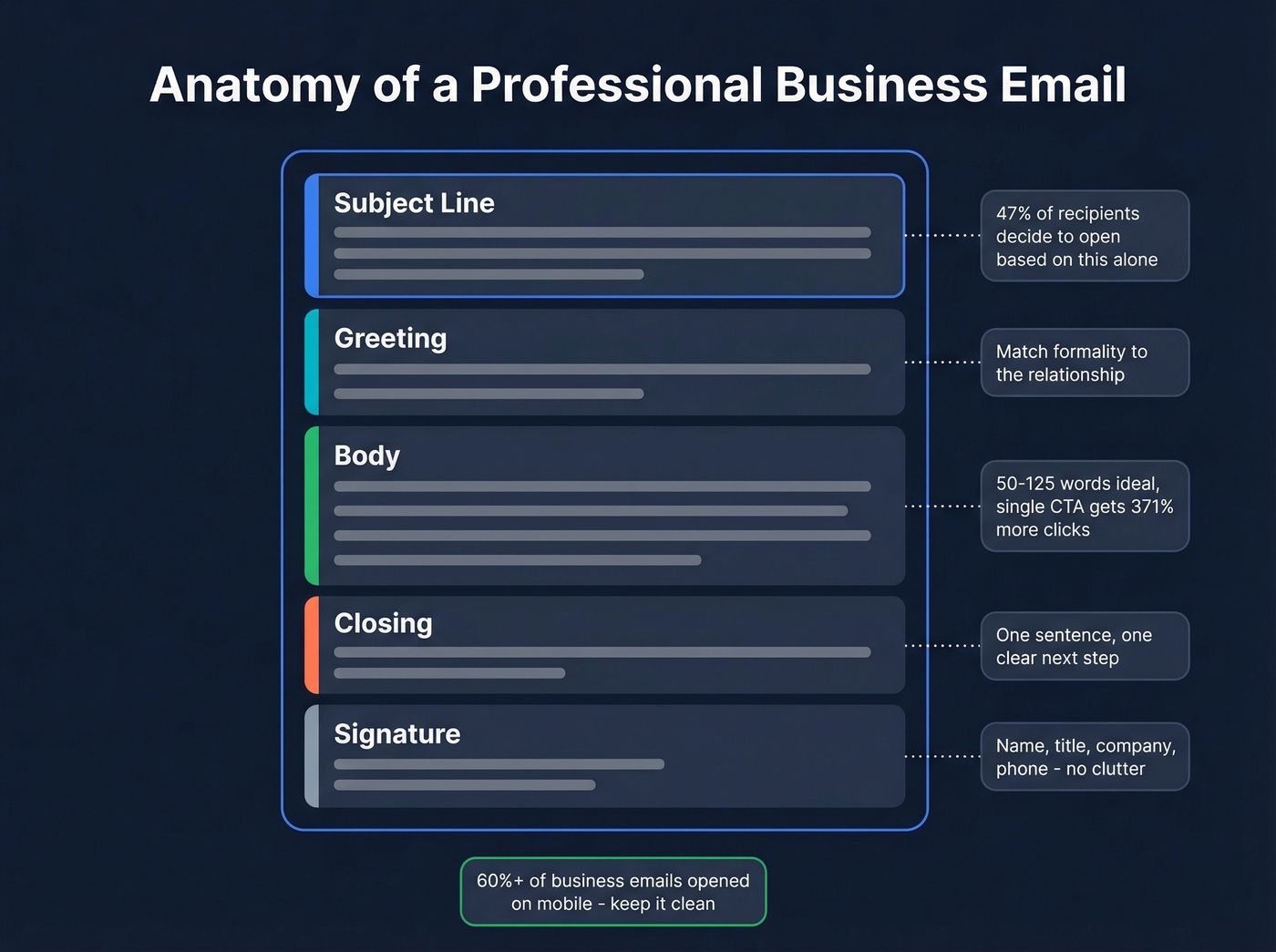
Subject line. This is your headline. 47% of recipients decide whether to open based on the subject line alone, and 69% will mark an email as spam based on nothing but the subject. It's the highest-leverage line you'll write.
Greeting. Match the formality to the relationship. "Dear Ms. Chen" for a first-time client email. "Hi Sarah" for a colleague you Slack with daily. Getting this wrong sets a weird tone for everything that follows. And while we're here: "I hope this email finds you well" needs to die. It's filler. Everyone knows it's filler. Start with something real or skip the pleasantry entirely.
Body. The ideal business email runs 50-125 words. Shorter emails see 5.81% higher click-through rates. Two to three short paragraphs, each making one point. Emails with a single clear CTA get 371% more clicks than emails asking for three different things. If your email needs a scroll bar, it's a document - not an email.
Closing. One sentence that tells the reader exactly what you want them to do next. "Can you confirm by Thursday?" beats "Let me know your thoughts at your earliest convenience."
Signature. Name, title, company, phone number. Keep it clean - no inspirational quotes, no five social media icons, no logo that renders as a broken image on mobile. Over 60% of business emails get opened on mobile, so your signature needs to look good on a small screen.
Professional Email Address Examples
Your email address is your first impression. If you're sending from cooldude2003@hotmail.com, you're losing credibility before anyone reads a word.
Personal Address Formats (Ranked)
From most professional to acceptable:
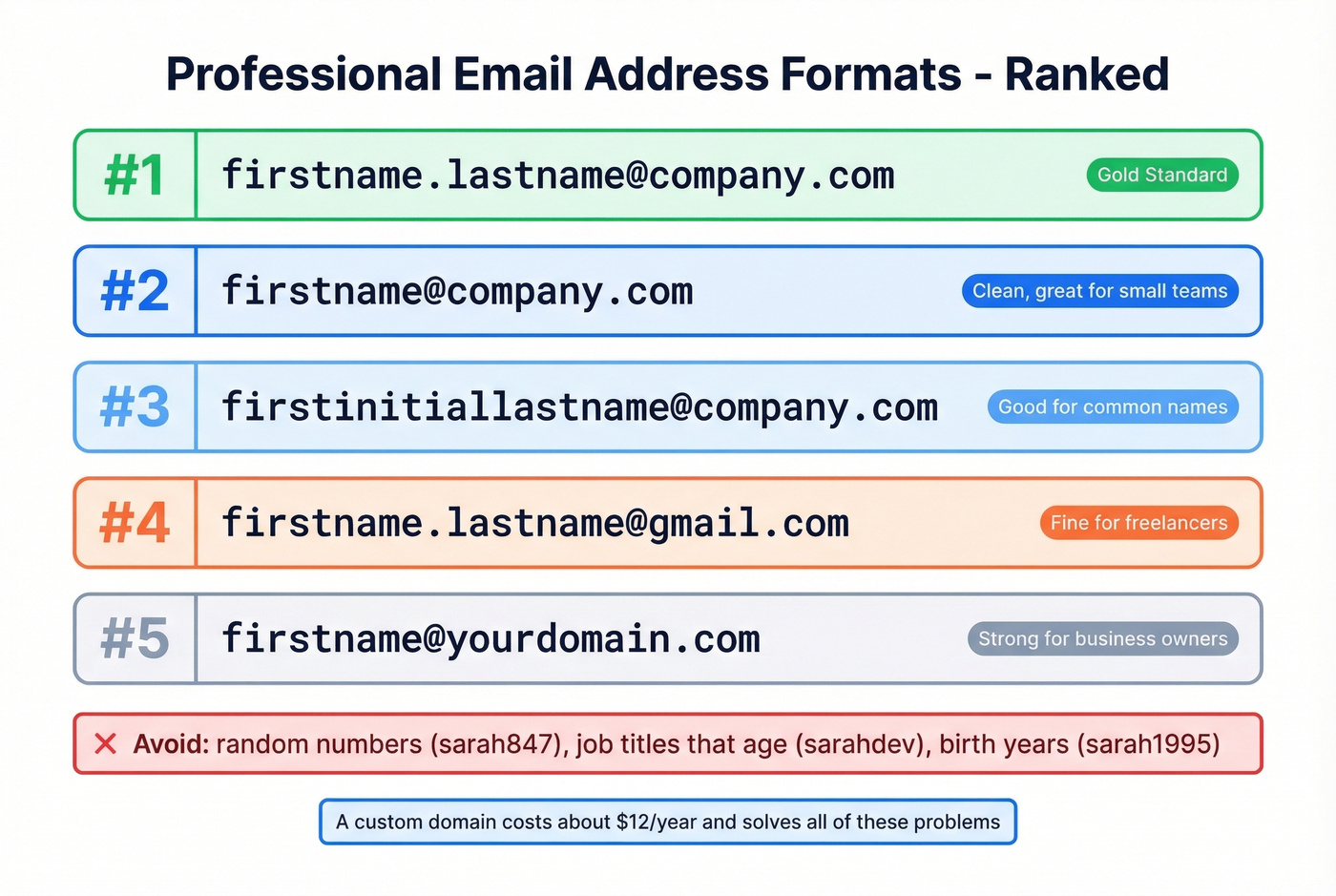
- firstname.lastname@company.com - the gold standard for business
- firstname@company.com - clean, works well for small teams
- firstinitiallastname@company.com - good when names are common
- firstname.lastname@gmail.com - fine for freelancers and job seekers
- firstname@yourdomain.com - strong move if you run your own business
Custom domains beat free providers every time. sarah@chenweb.com looks more credible than sarahchen847@gmail.com, even if the domain costs around $12/year.
When Your Name Is Taken
This is a real problem - 4B+ email users means common names are gone on Gmail. A thread on r/AskProgramming captured this exact frustration: someone replacing an unprofessional childhood email found their name was already taken everywhere.
Your best options:
- Add a middle initial:
sarah.m.chen@gmail.com - Use a middle name:
sarah.marie.chen@gmail.com - Switch providers - ProtonMail or Outlook still have availability
- Buy a personal domain - around $12/year solves the problem permanently
Avoid appending random numbers (sarahchen847), job titles that'll age poorly (sarahchendev), or birth years that give away personal info.
Team and Department Addresses
For shared inboxes and team functions, stick to role-based formats:
| Purpose | Format | Example |
|---|---|---|
| Customer support | support@ | support@acme.com |
| Sales inquiries | sales@ | sales@acme.com |
| Billing | billing@ | billing@acme.com |
| General contact | hello@ or info@ | hello@acme.com |
| Hiring | careers@ or jobs@ | careers@acme.com |
Multi-location businesses can add city identifiers: support.chicago@acme.com or sales-uk@acme.com.
Subject Lines That Get Opened
64% of recipients decide to open or delete based on the subject line. Keep it under 60 characters - and if you want cross-device safety, aim for 41 characters, which Campaign Monitor recommends for mobile visibility. Seven-word subject lines tend to perform best.
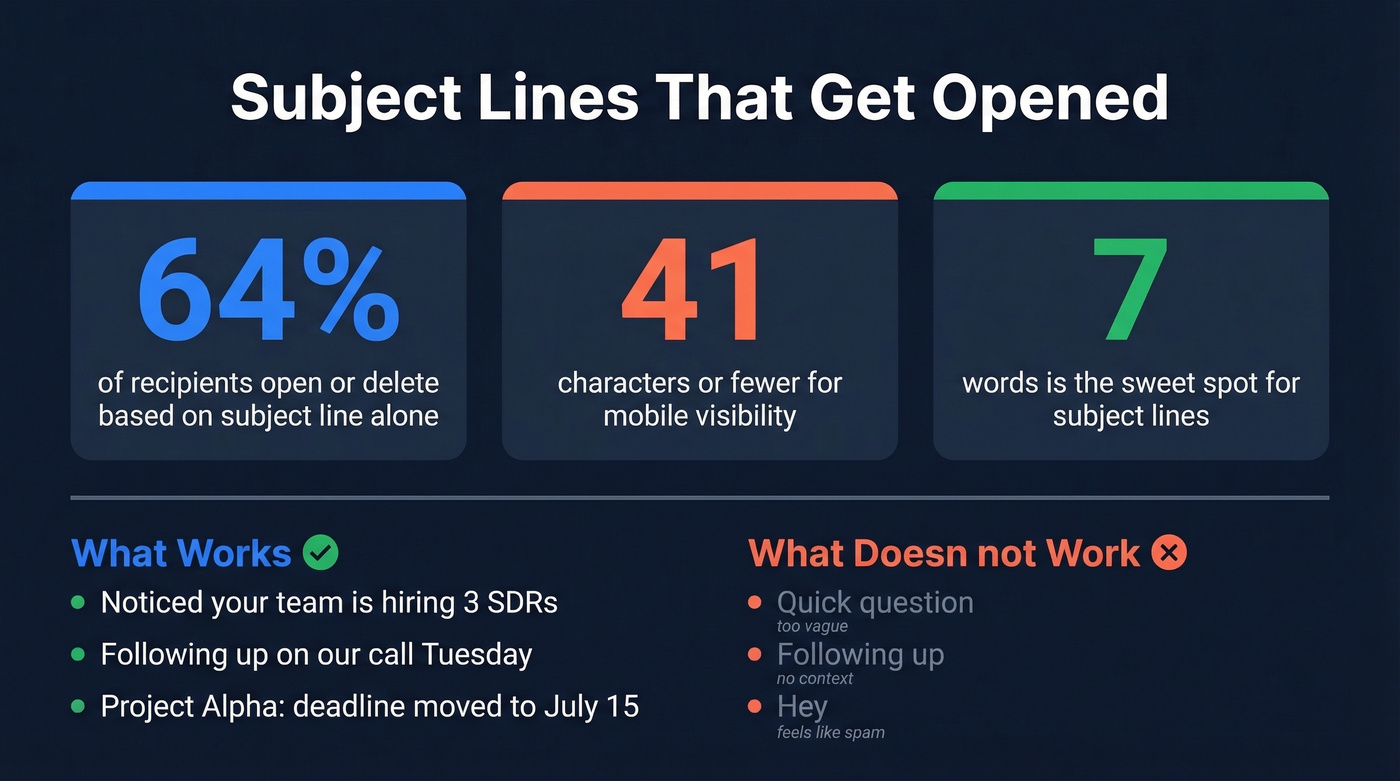
Here's what works, organized by scenario:
Meeting requests: "Quick sync on Q3 roadmap - 15 min?" / "Scheduling: product review before Friday" / "Can we meet Thursday at 2?"
Follow-ups: "Following up on our call Tuesday" / "Next steps from the proposal review" / "Checking in - any questions on pricing?"
Introductions: "Intro: Sarah Chen <> James Park" / "Connecting you with our head of partnerships" / "Quick intro - mutual connection via David"
Cold outreach: "Noticed your team is hiring 3 SDRs" / "Question about [Company]'s outbound strategy" / "Idea for cutting your bounce rate in half"
Thank-yous: "Thanks for the intro, Sarah" / "Appreciated your time today" / "Great meeting you at SaaStr"
Project updates: "Project Alpha: deadline moved to July 15" / "Update: new vendor selected for Q4 launch" / "Design review complete - feedback attached"
Notice the pattern: every subject line is specific. "Quick question" and "Following up" are vague enough to feel like spam. "Following up on our call Tuesday" tells the reader exactly what's inside.

You just spent time crafting the perfect business email. Now imagine it bouncing because the address was wrong. Prospeo's email finder delivers 98% verified accuracy across 300M+ professional profiles - so your polished outreach actually lands in the inbox, not the void.
Stop perfecting emails that never get delivered. Find the right address first.
20+ Business Email Examples by Scenario
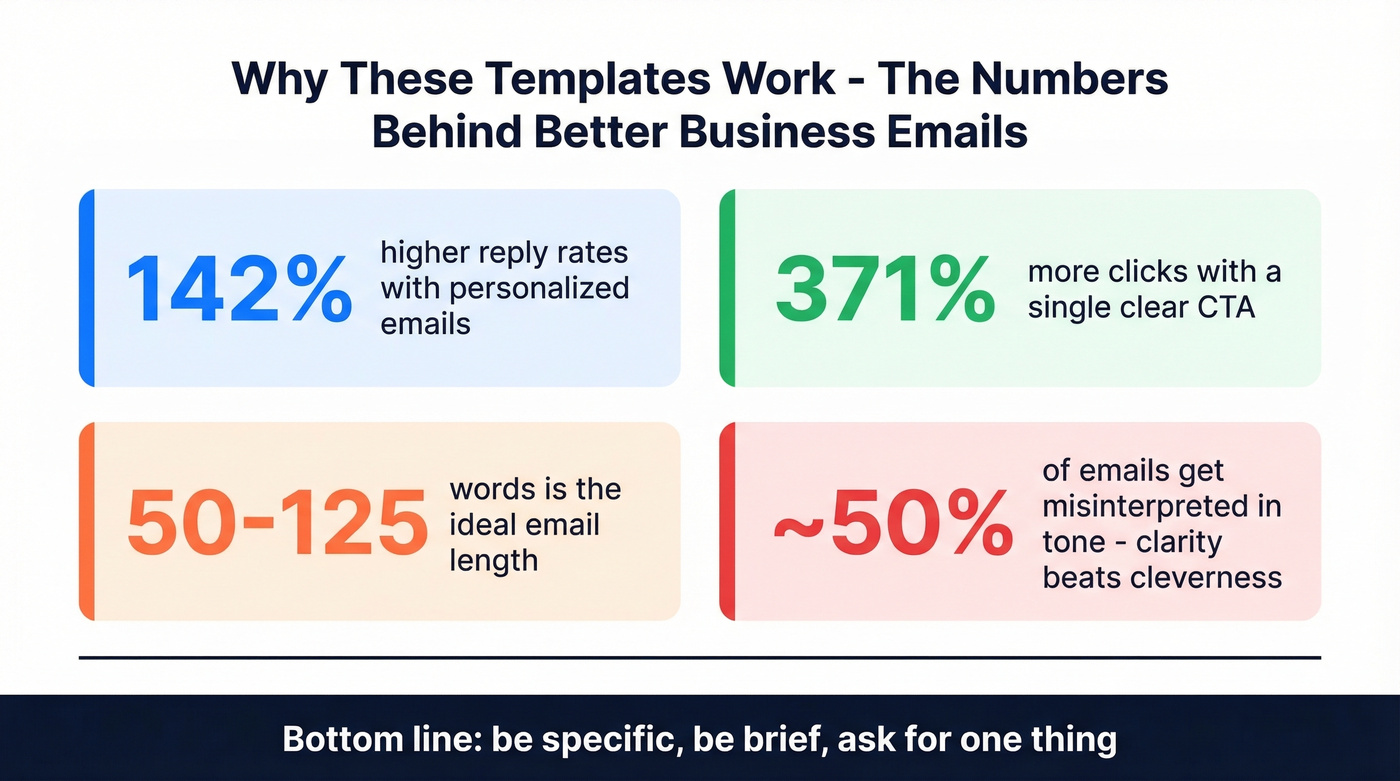
Stop obsessing over the perfect template. The real skill is knowing which component to prioritize for your situation - the subject line for cold outreach, the CTA for internal requests, the tone for client emails. These templates are starting points, not scripts. Personalize them. Emails with personalized elements see up to 142% higher reply rates. And remember: nearly half of all emails get misinterpreted in tone, so clarity always beats cleverness.
Internal Emails
Meeting Request (Formal)
Subject: Request: 30-min alignment on Q3 targets
Hi David,
I'd like to schedule 30 minutes this week to align on Q3 pipeline targets before the board review. Tuesday or Wednesday afternoon works best on my end.
Could you send over a few time slots that work? Happy to book the room.
Best, Sarah
Why this works: Specific ask, clear timeframe, low friction to respond.
Meeting Request (Casual)
Subject: Quick sync this week?
Hey David - can we grab 30 min this week to get on the same page about Q3 targets? I'm open Tues/Wed afternoon. Shoot me a time that works.
Thanks, Sarah
Project Update
Subject: Project Alpha: design phase complete, dev starts Monday
Hi team,
Quick update - the design phase for Project Alpha wrapped yesterday. All mockups are approved and in Figma. Dev kicks off Monday with the onboarding flow as the first sprint.
Two things I need from you:
- Engineering: confirm sprint capacity by Friday EOD
- QA: review the test plan draft I shared yesterday
Let me know if anything's unclear.
Best, Sarah
Why this works: Leads with the news, follows with specific asks, keeps it scannable.
Feedback Request (Formal)
Subject: Your input needed: new onboarding sequence draft
Hi Maria,
I've drafted a new onboarding email sequence for trial users - would love your eyes on it before we ship. The doc is [linked here].
Specifically, I'm looking for feedback on the Day 3 email tone and whether the CTA is clear enough. Could you review by Thursday?
Thanks, Sarah
Feedback Request (Casual)
Subject: Eyes on this before we ship?
Hey Maria - I just wrapped a new onboarding sequence for trial users and could use a gut check. Doc's [linked here].
Mainly wondering if the Day 3 email tone feels right and if the CTA is obvious enough. No rush, but Thursday would be ideal.
Thanks! Sarah
Company Announcement
Subject: Welcoming our new VP of Engineering
Hi everyone,
I'm excited to share that James Park is joining us as VP of Engineering, starting March 3. James comes from Stripe, where he led the payments infrastructure team for four years.
Please join me in welcoming him. He'll be at the all-hands on Thursday - come say hello.
Best, Sarah
Client and External Emails
Introduction Email (Formal)
Subject: Introduction - partnership opportunity with Acme
Dear Ms. Nakamura,
My name is Sarah Chen, and I lead partnerships at Acme. We work with mid-market SaaS companies to streamline their onboarding workflows, and I believe there's a strong fit with what your team is building.
I'd love to schedule a brief call to explore this. Would next Tuesday or Wednesday work for 20 minutes?
Best regards, Sarah Chen
Why this works: States who you are, why you're reaching out, and what you want - all in under 80 words. This is a business email example worth studying because every sentence earns its place.
Introduction Email (Casual)
Subject: Potential fit between our teams
Hey Yuki - I'm Sarah, I run partnerships at Acme. We help mid-market SaaS companies streamline onboarding, and I think there's a natural overlap with what you're building.
Would you be up for a quick 20-min call next week to see if it makes sense?
Cheers, Sarah
Proposal Follow-Up
Subject: Following up on the proposal - any questions?
Hi James,
I wanted to check in on the proposal I sent last Thursday. I know your team is evaluating a few options, so I'm happy to jump on a quick call to walk through the pricing or answer any questions.
Would 15 minutes this week work?
Best, Sarah
Why this works: Acknowledges they're busy, offers a low-commitment next step, and doesn't pressure. The worst follow-up emails demand an answer. The best ones make responding easy.
Thank-You After Meeting (Formal)
Subject: Great meeting you today, James
Hi James,
Thanks for taking the time today - I really enjoyed learning about your team's approach to customer success. As discussed, I'll send over the case study and a revised timeline by Friday.
Looking forward to the next conversation.
Best, Sarah
Thank-You After Meeting (Casual)
Subject: Good chat today
Hey James - really enjoyed the conversation. Your customer success approach is sharp. I'll get that case study and updated timeline over to you by Friday.
Talk soon, Sarah
Complaint Resolution
Subject: Resolving your billing concern - update inside
Dear Mr. Park,
Thank you for bringing the billing discrepancy to our attention. I've reviewed your account and confirmed the overcharge of $240 on your March invoice. A credit has been applied and will reflect within 2 business days.
I apologize for the inconvenience. Please don't hesitate to reach out if you notice anything else.
Best regards, Sarah Chen
Invoice Reminder
Subject: Friendly reminder: Invoice #4821 due March 15
Hi James,
Just a quick reminder that Invoice #4821 ($3,200) is due on March 15. I've reattached it here for convenience.
If payment is already in process, please disregard. Otherwise, let me know if you have any questions about the charges.
Thanks, Sarah
Cold Outreach Emails
It's 9:47 AM on Tuesday. You need to email a VP you've never met to pitch a partnership. You have 15 minutes. Here's what to write - but first, a reality check.
A thread on r/coldemail put it bluntly: prospects are drowning in outreach that follows every "best practice" playbook, and they've learned to ignore all of it. The emails that still break through aren't the ones with the cleverest hook. They're the ones that prove you actually know something about the person you're emailing. Specificity is the only antidote to inbox fatigue.
First Touch (Formal)
Subject: Idea for reducing [Company]'s lead bounce rate
Dear Ms. Nakamura,
I noticed your team recently posted three SDR roles - congratulations on the growth. As you scale outbound, data quality becomes the bottleneck fast.
We help teams like yours cut email bounce rates from 30%+ to under 4%. I'd love to share how in a 15-minute call.
Would Thursday or Friday work?
Best regards, Sarah Chen
Why this works: Opens with something specific about them (not about you), states the value prop in one sentence, asks for a small commitment.
First Touch (Casual)
Subject: Quick question about your outbound stack
Hey James - saw you're scaling the SDR team. Nice.
Curious: are you running into bounce rate issues as you ramp up volume? We've helped a few teams in your space cut bounces from 30%+ to under 4%.
Worth a 15-min chat? No pressure either way.
Cheers, Sarah
Follow-Up (After No Response)
Subject: Re: Quick question about your outbound stack
Hi James,
I know inboxes are brutal - just bumping this in case it got buried. Happy to send over a quick case study instead if a call isn't the right next step.
Either way, no hard feelings.
Best, Sarah
Breakup Email
Subject: Closing the loop
Hi James,
I've reached out a couple of times and haven't heard back - totally understand if the timing isn't right. I'll close this thread out, but if data quality ever becomes a priority, I'm an email away.
Wishing you a great Q3.
Best, Sarah
Why this works: Graceful exit with no guilt trip. It leaves the door open without being needy. We've seen breakup emails actually generate more replies than the initial outreach - people respect the honesty.
Career Emails
Job Application
Subject: Application: Senior Product Manager - Acme Corp
Dear Hiring Manager,
I'm writing to apply for the Senior Product Manager role posted on your careers page. I have six years of experience in B2B SaaS product management, most recently at Stripe, where I led the onboarding product line from 0 to 50K monthly active users.
I've attached my resume and would welcome the opportunity to discuss how my experience aligns with your team's goals.
Best regards, Sarah Chen
Why this works: Leads with the most impressive credential, keeps it under 70 words, and makes the ask clear. Hiring managers skim hundreds of these - brevity is a competitive advantage.
Networking Email
Subject: Loved your talk at SaaStr - quick question
Hi James,
I attended your session on PLG metrics at SaaStr last week and really appreciated your framework for measuring activation. I'm building something similar at my company and would love to pick your brain for 15 minutes.
No worries if you're too busy - I know conference follow-ups pile up fast.
Best, Sarah
Resignation
Subject: Resignation - effective April 15
Dear David,
I'm writing to formally resign from my position as Senior Account Executive, effective April 15. This wasn't an easy decision - I've genuinely valued my time here and the mentorship you've provided.
I'm committed to making the transition as smooth as possible over the next two weeks. Happy to help train my replacement or document my accounts.
Thank you for everything.
Best regards, Sarah
Why this works: Professional, gracious, and forward-looking. It doesn't burn bridges, offers concrete transition help, and keeps emotion in check. This email will live in HR's files - write it like it will.
Recommendation Request
Subject: Would you be willing to write a recommendation?
Hi Maria,
I'm applying for a product leadership role at [Company] and would be grateful if you'd be willing to write a brief recommendation. Our work together on the Q2 launch would be especially relevant - the hiring manager specifically mentioned cross-functional leadership as a priority.
I completely understand if you're too busy. If you're open to it, I can send over a few bullet points to make it easy.
Thanks so much, Sarah
Formal vs. Casual: When to Use Each
The biggest tone mistake isn't being too formal or too casual - it's being inconsistent with the context.
| Go Formal | Go Casual |
|---|---|
| First contact with anyone | Peers you work with daily |
| External clients/partners | Internal team updates |
| Sensitive topics (complaints, bad news) | Established relationships |
| Cross-cultural communication | Startup/flat-org culture |
| Hierarchical organizations | Follow-ups after rapport |
Culture overrides everything else on this list. In Japan and Germany, formality is the default - even in internal emails. In Australia and most US startups, casual is expected and formality can feel stiff or distant. Brazil leans warm and relational; India tends hierarchical.
The safest rule: mirror their tone. If they sign off with "Cheers," you can too. If they open with "Dear Mr. Chen," don't respond with "Hey!" When in doubt, start formal and relax as the relationship develops. You can always dial down formality. Dialing it back up feels awkward.
7 Mistakes That Kill Your Emails
1. Grammar and spelling errors. 97% of people say grammar errors affect their perception of a company or individual. One typo in a client email can undo an entire pitch. Read it aloud before you send.
2. Wall-of-text formatting. Your recipient is scanning 121 emails today. A seven-paragraph email with no line breaks gets skimmed or skipped entirely. Two to three sentences per paragraph. Use bullet points for lists. White space is your friend.
3. Vague subject lines. "Quick question" and "Following up" tell the reader nothing. Be specific: "Question about the Q3 budget timeline" gives them a reason to open.
4. Multiple CTAs. Asking someone to review a doc, schedule a call, AND forward something to their team in the same email guarantees none of it happens. One email, one ask.
5. Unprofessional email address. If you're sending business correspondence from a personal address with numbers or nicknames, fix it today. It takes five minutes.
6. Not verifying recipient addresses. This one's specific to outreach campaigns, and it does the most invisible damage. Sending to dead addresses or spam traps destroys your sender reputation, which tanks deliverability for every future email you send. We've watched teams go from 35% bounce rates to under 4% just by adding a verification step before pressing send. If you're building a process around this, start with an email deliverability baseline and track your email bounce rate over time.
7. Reply-all abuse. Your manager just forwarded your email to the CEO with "see below." Now your hastily written update is being read three levels up. Before you hit reply-all, ask: does everyone on this thread actually need to see my response? Usually the answer is no.
Let's be honest: if your average deal value is under five figures, you don't need a 2,000-word email sequence with seven follow-ups. You need one clear email, sent to a verified address, with a specific ask. Complexity is the enemy of action. If you're doing outbound at scale, a simple cold email sequence and consistent sequence management beat "clever" every time.
Personalizing your business emails drives 142% higher reply rates - but only if you're emailing real, active addresses. Prospeo refreshes every record every 7 days (not the 6-week industry average), so the contacts you write to are current, verified, and reachable. At $0.01 per email, bad data is no longer an excuse.
Great copy deserves a verified inbox. Get emails that don't bounce.
Quick Formatting Checklist
Use this before hitting send on any important business email:
- Font: 10-12pt, standard typeface (Arial, Calibri, or your company default). No Comic Sans. Ever.
- Paragraphs: 2-3 sentences max. Break after each distinct point.
- Attachments: Keep under 10MB. Mention them in the body so they don't get missed.
- CC: Only people who need visibility. BCC for large distribution lists to protect privacy.
- Signature: Name, title, company, one phone number. Skip the inspirational quote.
- Send time: Tuesday and Thursday around 10 AM tend to get the highest open rates. Avoid Monday morning and Friday afternoon. If you're optimizing sends for outreach, the best time to send cold emails depends on your ICP and region.
- Mobile check: Preview on your phone before sending anything client-facing.
- Proofread: Change the font or read aloud - it forces your brain to see errors you'd otherwise skip.
FAQ
How long should a business email be?
Aim for 50-125 words for external emails - that range produces the highest engagement, with shorter messages seeing 5.81% higher CTR. Internal updates can run up to 200 words for project details, but keep paragraphs to 2-3 sentences regardless. If your email exceeds 200 words, it should probably be a document with a one-line email linking to it.
What's the best professional email sign-off?
"Best" is the safe default that works in almost every context. Use "Thanks" when requesting something, "Regards" or "Best regards" for formal client communication, and "Cheers" for casual internal messages with colleagues you know well. Match your sign-off to the tone of your greeting - "Dear Mr. Park" paired with "Cheers" feels dissonant.
Should I use emojis in business emails?
Not in first contact or formal contexts - a smiley face in a cold outreach email to a C-suite executive will hurt your credibility. They're acceptable with colleagues you know well, in casual company cultures, and in internal Slack-to-email crossover communication. When in doubt, leave them out.
How do I make sure outreach emails don't bounce?
Verify every address before sending. Bounced emails damage your sender domain reputation, which tanks deliverability for all future messages. For larger campaigns, batch-verify your entire list before pressing send - our team uses Prospeo's verification for this, which handles catch-all domains and spam traps automatically, but whatever tool you pick, don't skip this step.
How quickly should I respond to a business email?
Within 24-48 hours for external and client emails - same business day is ideal. Internal emails should get a response within the workday unless they're clearly non-urgent. If you can't give a full answer yet, a quick "Got it, I'll have a detailed response by Thursday" buys you time without leaving the sender hanging.