

The Complete Guide to Business Emails in 2026
You just registered your LLC, landed your first client, and you're still sending proposals from yourname@gmail.com. It looks amateur, it hurts deliverability, and it's costing you trust before you even get a meeting. The fix takes less than an hour - and once you're sending business emails from your own domain, the credibility difference is immediate.
The global inbox placement average sits around 84%, which means roughly one in six emails never reaches the inbox. A properly configured professional email with full DNS authentication closes that gap significantly. Let's get yours set up right.
What You Need (Quick Version)
If you're short on time, here's the decision in three lines:
- Best overall: Google Workspace Business Starter at $7/user/month. Highest inbox placement in the benchmark table, everyone knows how to use Gmail, and it just works. True annual cost for one user with a domain: ~$95-$100.
- Best budget: Zoho Mail's free tier handles up to 5 users. If you need IMAP access, Hostinger runs $0.35/mo on promo with a 48-month term, and renews at $1.59/mo (ignore the $0.35 headline - more on that below).
- Best for privacy: Proton Mail. End-to-end encryption, Swiss jurisdiction, solid for regulated industries.
What Is a Business Email?
A business email uses your company's domain - you@yourcompany.com instead of you@gmail.com. The format signals legitimacy to prospects, partners, and email servers alike. If you've ever wondered what counts as a professional email address, the answer is simple: any email tied to a domain you own and control for professional communication.
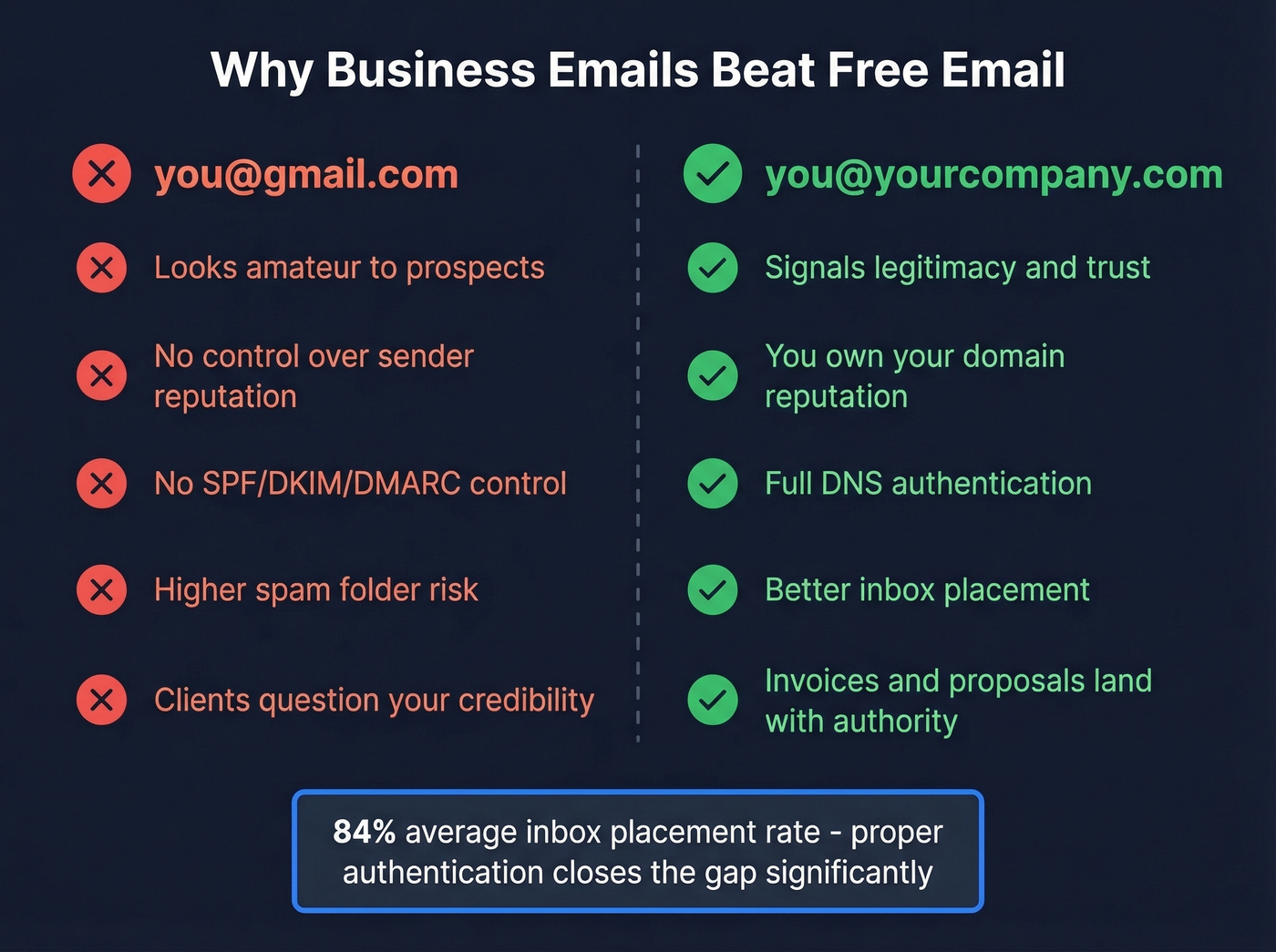
But a custom domain alone isn't enough anymore. Gmail's bulk sender requirements (enforced since February 2024) and Outlook's enforcement (since May 2025) now require SPF, DKIM, and DMARC authentication. Send unauthenticated messages and they'll get bounced or dumped into spam - no warning, no second chance.
This isn't optional. Every setup guide that skips DNS authentication is doing you a disservice. We'll cover the full process later, including the exact DNS records you need.
How Much Does a Business Email Cost?
Let's kill the mystery. Here's what the major providers charge per user, per month, on annual billing:
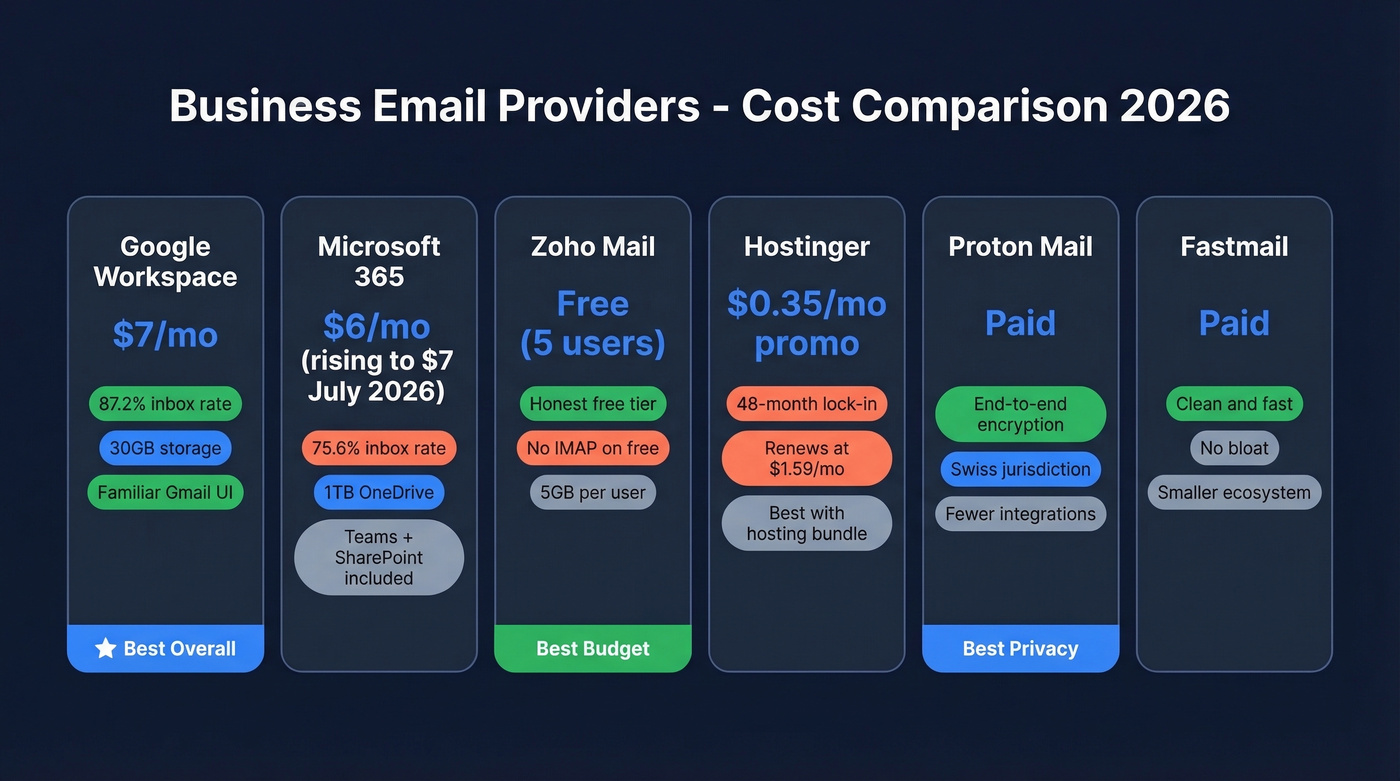
| Provider | Plan | $/User/Mo | Free Tier? | Key Limitation |
|---|---|---|---|---|
| Google Workspace | Business Starter | $7 | 14-day trial | 30GB pooled storage |
| Google Workspace | Business Standard | $14 | No | 2TB pooled storage |
| Google Workspace | Business Plus | $22 | No | 5TB pooled storage |
| Microsoft 365 | Business Basic | $6 | 1-month trial | Price jumps to $7 in July 2026 |
| Zoho Mail | Forever Free | $0 | Yes (5 users) | No IMAP/POP/ActiveSync |
| Hostinger | Business Email Starter | $0.35 promo | No | 48-month term; renews at $1.59/mo |
| Proton Mail | Business plans | Paid | Limited free | No custom domain on free |
| Fastmail | Business plans | Paid | No | Smaller ecosystem |
| GoDaddy | Email plans | Paid | No | Basic features |
| Namecheap | Private Email | Paid | No | Registrar-tier support |
| Titan | Email plans | Paid | Trial | Limited integrations |
| Neo | Email plans | Paid | Trial | Free .co.site domain option |
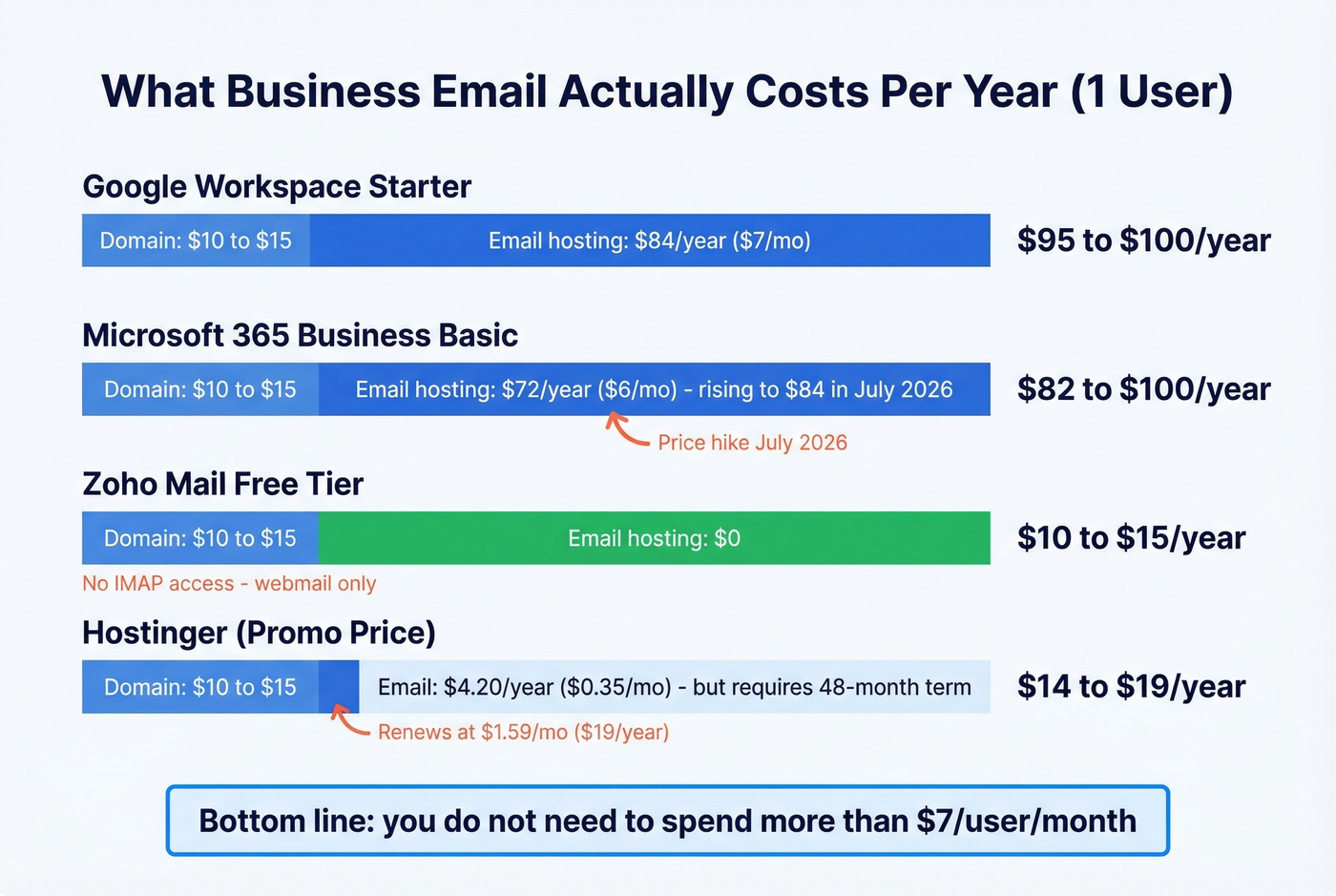
The true annual cost for one user on Google Workspace Business Starter: domain registration ($10-$15) plus $7/month ($84/year on annual billing). That's roughly $95-$100 total. You don't need to spend more than $7/user/month. Period.
The most common question in small business forums isn't which provider to pick - it's whether the $7/month is worth it over free Gmail. It is. The deliverability difference alone pays for itself the first time an invoice actually reaches someone's inbox.
One thing to watch: Microsoft 365 is raising prices effective July 1, 2026. Business Basic jumps from $6 to $7, and Business Standard goes from $12.50 to $14. If you're evaluating Microsoft, factor in the new pricing.
All-in-One Bundles
Providers like Hostinger, Wix, and Squarespace bundle domain registration, website hosting, and email into a single package. If you're building a website anyway, these bundles can save you $20-$40/year compared to buying each service separately. The trade-off is ecosystem lock-in - migrating email away from a bundled provider is more painful than switching standalone services. For most businesses, standalone email hosting with a separate registrar gives you more flexibility.
Can You Get One for Free?
Every page that promises "free business email" is lying to you. A professional address requires a custom domain (that costs money to register), email hosting infrastructure, and storage. You can't get all three for $0.
Zoho Mail's free tier is the closest thing to honest. You get email hosting for up to 5 users with 5GB of storage each - but no IMAP, POP, or ActiveSync access, meaning you're stuck using Zoho's webmail interface. No connecting it to Apple Mail or Outlook on your desktop. Google Workspace offers a 14-day trial. Microsoft 365 gives you one month. These are demos with expiration dates, not free plans. And Hostinger's $0.35/month headline? That requires a 48-month commitment, and the renewal price is $1.59/month. Read the fine print.
Best Business Email Providers
Google Workspace - Best Overall
Use this if: You want the highest inbox placement, the most familiar interface, and zero friction for your team.
Skip this if: You're a solo founder watching every dollar and don't need collaboration tools.
Google Workspace Business Starter at $7/user/month is enough for most businesses. You get a custom domain email running on Gmail's infrastructure, which posts an 87.2% inbox placement rate. Storage is pooled at 30GB per user on Starter, scaling to 2TB on Business Standard ($14) and 5TB on Business Plus ($22). The Gemini AI features are baked in now, handling smart replies and email drafting. If you outgrow Starter, the upgrade path is seamless - same interface, more storage, added security controls. Most teams under 50 people never need to leave the Starter tier.
It's the default for a reason. Not the cheapest, but the one you'll never regret picking.
Microsoft 365 - Best for Microsoft Shops
If your team already lives in Word, Excel, and Teams, Microsoft 365 Business Basic at $6/user/month makes sense. You get Outlook email with a custom domain, 1TB of OneDrive storage per user, and the full Teams/SharePoint stack.
Here's the thing: that's overkill if you just need email. You're paying for Teams, SharePoint, and OneDrive whether you use them or not. And Microsoft's inbox placement rate runs 75.6% - noticeably lower than Gmail's 87.2%. For pure email deliverability, Google wins. The July 2026 price hike pushes Business Basic to $7/month, erasing the cost advantage entirely.
Zoho Mail - Best Budget Option
Zoho's free tier is the only honest free option in this space - and it has real limitations. Five users, 5GB per user, one custom domain, and absolutely no IMAP/POP/ActiveSync access. You're using Zoho's webmail or nothing.
If you know you'll want desktop email clients or broader device support, start on a paid plan instead of forcing a migration later. Zoho's paid tiers run in the ~$1-$4/user/month range and unlock IMAP, more storage, and better attachment limits. For a bootstrapped startup that needs a professional address without the Google Workspace price tag, Zoho Mail Lite is a solid middle ground.
Hostinger - Cheapest Paid Option
That $0.35/month price you see everywhere? It requires a 48-month term. Renewal is $1.59/month. Hostinger also includes its Kodee assistant on higher-tier plans, which is fine for basic tasks. If you're already buying Hostinger hosting for your website, adding email makes sense. Otherwise, the pricing is more bait than bargain.
Proton Mail - Best for Privacy
Proton Mail is built for teams that care about privacy: end-to-end encryption, Swiss jurisdiction, and a product designed around security. Healthcare, legal, finance, or any regulated industry where email privacy isn't optional - Proton is a strong pick. The trade-off is a smaller ecosystem and fewer integrations compared to Google or Microsoft.
Other Providers Worth Knowing
Fastmail is clean, fast, and no-nonsense - great for people who want email without the bloat. GoDaddy and Namecheap are convenient if your domain is already registered there. Titan and Neo are popular add-ons in the domain/hosting ecosystem (Neo also offers a free .co.site domain option). Amazon WorkMail is worth a look if you're deep in AWS. DreamHost is another all-in-one option for teams that want hosting and email under one roof.

Setting up a professional business email is step one. Step two is finding the business emails of the people you actually need to reach. Prospeo's database holds 143M+ verified emails at 98% accuracy - so your outreach lands in inboxes, not spam folders.
Stop guessing email addresses. Start with ones that are already verified.
How to Set Up Business Emails
Six steps. Thirty minutes of active work. We've walked dozens of teams through this process, and it's the same every time.
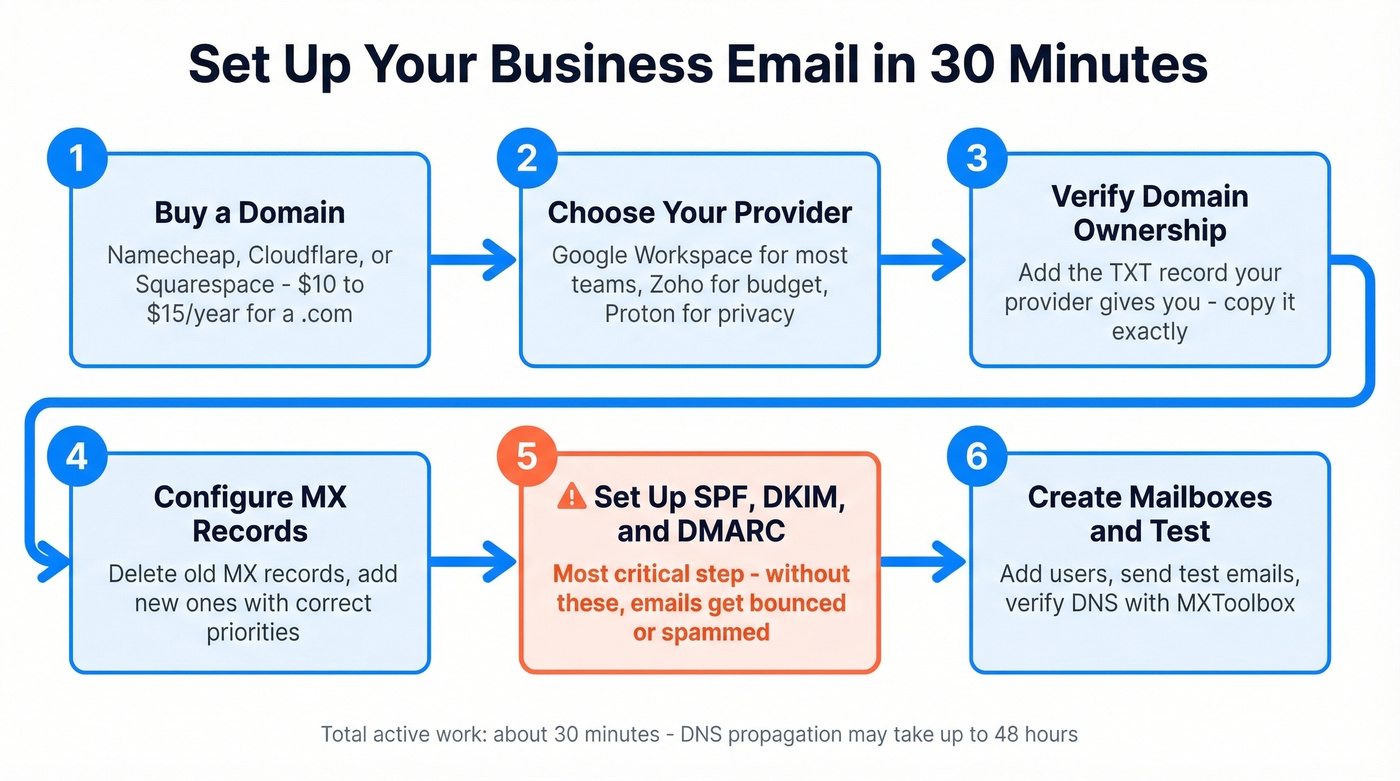
Step 1: Buy a domain. If you don't have one, grab it from Namecheap, Cloudflare, or Squarespace Domains. Expect to pay $10-$15/year for a .com. UK-based founders can use the same registrars - just pick a .co.uk domain if you prefer a local extension.
Step 2: Choose your provider. Google Workspace for most teams. Zoho for budget. Proton for privacy. Pick one and sign up.
Step 3: Verify domain ownership. Your provider will give you a TXT record to add to your domain's DNS settings. This proves you own the domain. Copy it exactly - one wrong character and verification fails.
Step 4: Configure MX records. MX records tell the internet where to deliver your email. Your provider gives you the exact values. Delete any existing MX records from a previous provider, add the new ones, and set priorities as instructed.
Step 5: Set up SPF, DKIM, and DMARC. This is where most guides fail you. These three DNS records authenticate your email and prevent spoofing. Without them, Gmail and Outlook will bounce or spam-folder your messages.
SPF tells receiving servers which IPs are authorized to send email for your domain. Add a single TXT record at your root domain:
- Google Workspace:
v=spf1 include:_spf.google.com ~all - Microsoft 365:
v=spf1 include:spf.protection.outlook.com ~all - GoDaddy:
v=spf1 include:secureserver.net -all
Critical rule: only one SPF record per domain. If you have multiple sending services, combine them into one record. And watch the 10-DNS-lookup limit - exceeding it causes a PermError that breaks everything. Google's SPF setup documentation walks through the exact process if you get stuck.
DKIM adds a cryptographic signature to your emails proving they haven't been tampered with. Your provider generates the key; you publish it as a TXT record at selector._domainkey.yourdomain.com. Use 2048-bit keys when your provider supports them. Microsoft 365 uses two selector CNAMEs instead of TXT records - follow their specific instructions.
DMARC ties SPF and DKIM together with a policy. Start with monitoring mode:
v=DMARC1; p=none; rua=mailto:dmarc@yourdomain.com
This sends you reports without blocking anything. After a few weeks of clean reports, move to p=quarantine, then eventually p=reject. Don't jump straight to reject - you'll block legitimate email from services you forgot to authorize.
Step 6: Create mailboxes and aliases. Set up your primary mailbox (you@company.com) plus aliases for common addresses: info@, sales@, support@. Aliases route to existing mailboxes without costing extra seats on most providers.
DNS propagation takes 24-48 hours. Set everything up the day before you need to send anything important.
Email Structure and Format
Understanding proper structure matters just as much as the technical setup. Every professional message follows the same core components:
- From address: your custom domain email, not a free provider
- Subject line: clear, specific, and under 60 characters so it doesn't get truncated on mobile
- Greeting: professional but not stiff - "Hi [Name]" works in most contexts
- Body: one idea per paragraph, front-load the key information, keep it scannable
- Call to action: a single, clear next step - don't make the reader guess what you want
- Signature: name, title, company, phone number, and optionally a link to your website or calendar
Aim for 50-125 words in outbound messages - long enough to communicate value, short enough to actually get read. For business development specifically, lead with relevance: mention something specific about the recipient's company in the first sentence, state your value proposition in the second, and close with a low-friction ask. Generic templates get deleted. Personalized messages get replies.
Deliverability - What Nobody Tells You
Setting up a professional email address is the easy part. Getting your messages into inboxes consistently? That's where teams stumble. Here's what the data shows:
| Provider | Inbox % | Spam % | Missing % |
|---|---|---|---|
| Gmail | 87.2% | 6.8% | 6.0% |
| Yahoo/AOL | 86.0% | 4.8% | 9.2% |
| Apple Mail | 76.3% | 14.3% | 9.4% |
| Microsoft | 75.6% | 14.6% | 9.8% |
That "missing" column is the scary one - those emails simply vanish. No bounce notification, no spam folder. Gone.
DMARC adoption hit 53.8% in 2024, up from 42.6% the year before. The jump was driven by Gmail and Yahoo requiring DMARC for bulk senders, which produced a 65% reduction in unauthenticated messages across the ecosystem. The fact that half the guides out there skip DNS authentication is irresponsible - Gmail and Outlook bounce unauthenticated emails in 2026. Full stop.
The spam complaint rate threshold is 0.3%. Go above that and your domain reputation takes damage that can take weeks to recover from. This matters especially for new domains, which have zero reputation to fall back on. If you want a deeper breakdown, start with our Email Deliverability Guide and then review the best email reputation tools to monitor issues early.

Before you send a single outbound email from your new domain, run your prospect list through an AI Email Checker or a dedicated verifier. Prospeo catches invalid addresses, spam traps, and honeypots in real time with 98% accuracy across a 5-step verification process - the kind of thing that keeps a fresh domain alive. The free tier covers 75 verifications per month, enough to validate your first outbound campaigns. If you're troubleshooting bounces, use our email bounce rate guide to diagnose what’s happening.
Using Business Emails for Outbound Sales
Look, if your average deal size is under five figures, you probably don't need ZoomInfo-level data infrastructure. But you absolutely need a clean domain and verified contact lists. The domain is the foundation; the data quality is what keeps it standing.
Your new domain is fragile for the first 90 days. It has no sending history, no reputation, and no margin for error. We've seen teams set up beautiful outbound infrastructure - custom domain, proper authentication, warm-up sequences - and then blast 5,000 unverified emails on day 30. Bounce rates spike, spam complaints roll in, and the domain is toast.
Warm-up is essential. Start by sending 10-20 emails per day to engaged contacts who'll actually open and reply, then gradually increase volume over 2-4 weeks. Most email sequencing tools like Instantly or Smartlead have built-in warm-up features. Use them. For safe scaling, follow our email velocity playbook and compare options in our guide to unlimited email warmup tools.
List hygiene is the other half of the equation. The consensus on r/coldemail is pretty consistent: bad data is the number one domain killer, ahead of poor copy and even aggressive sending volume. Verify everything before it goes out. Prospeo pulls verified contact data from 300M+ professional profiles at 98% email accuracy, so you're not guessing at email formats or sending into the void. Start with the free tier to test before you commit. If you’re building lists from scratch, use our email list providers breakdown and the sales prospecting techniques that keep reply rates up.
Outbound agencies scaling campaigns across multiple client domains need this even more. One bad list can flag a client's domain, and that's a relationship-ending mistake.
You just spent time perfecting your DNS authentication and inbox placement. Don't waste that deliverability on bad prospect data. Prospeo verifies every email through a 5-step process with catch-all handling and spam-trap removal - keeping your bounce rate under 4%.
Protect your sender reputation with emails verified every 7 days.
FAQ
What is a business email?
A business email is any address that uses a custom domain you own - like you@yourcompany.com - rather than a free provider like Gmail or Yahoo. It gives you brand credibility, full control over sender reputation, and the ability to authenticate messages with SPF, DKIM, and DMARC.
How much should I budget per year?
For one user, budget ~$95-$100/year: domain registration ($10-$15) plus Google Workspace Business Starter at $84/year. Microsoft 365 Business Basic runs ~$72/year currently but jumps to $84/year starting July 2026. Zoho's free tier costs only the domain registration fee.
Do I really need SPF, DKIM, and DMARC?
Yes - all three are mandatory in 2026. Gmail has required them for bulk senders since February 2024, and Outlook enforced the same rules in May 2025. Without proper authentication, your messages will land in spam or get silently rejected. There's no workaround.
What's the best email format for outreach?
Lead with a specific, relevant observation about the recipient's company in the first sentence, state your value proposition in the second, and close with a low-friction ask. Keep the entire message under 125 words. Generic templates get deleted; personalized, concise messages get replies.
How do I verify contacts before sending?
Run your prospect list through a dedicated verification tool before any campaign. Prospeo's free tier covers 75 email verifications per month with 98% accuracy and catches spam traps, honeypots, and invalid addresses - enough to validate your first outbound campaigns without risking your new domain.