


Cal.com Pricing, Reviews, Pros and Cons in 2026
It shouldn't be this hard to find correct pricing for a scheduling tool. Plenty of review sites still list Cal.com at $15/user/month or $37/user/month, but Cal.com's official pricing page shows $12/user/month and $28/user/month on annual billing. We dug through the official pricing and plan breakdowns, pulled key themes from 149 G2 reviews and 313 Trustpilot reviews, and scoured Reddit's self-hosting threads so you don't have to.
Here's the real story - and who this tool is actually built for.
Quick Verdict
Cal.com is excellent for developer-led teams and technical orgs that want open-source flexibility, API access, and self-hosting. If you don't have a developer on staff, Calendly is easier and you'll be happier.
Pricing on annual billing: Free → $12 → $28 → Custom.
Cal.com Pricing Breakdown
Here's what Cal.com's pricing page shows as of early 2026:
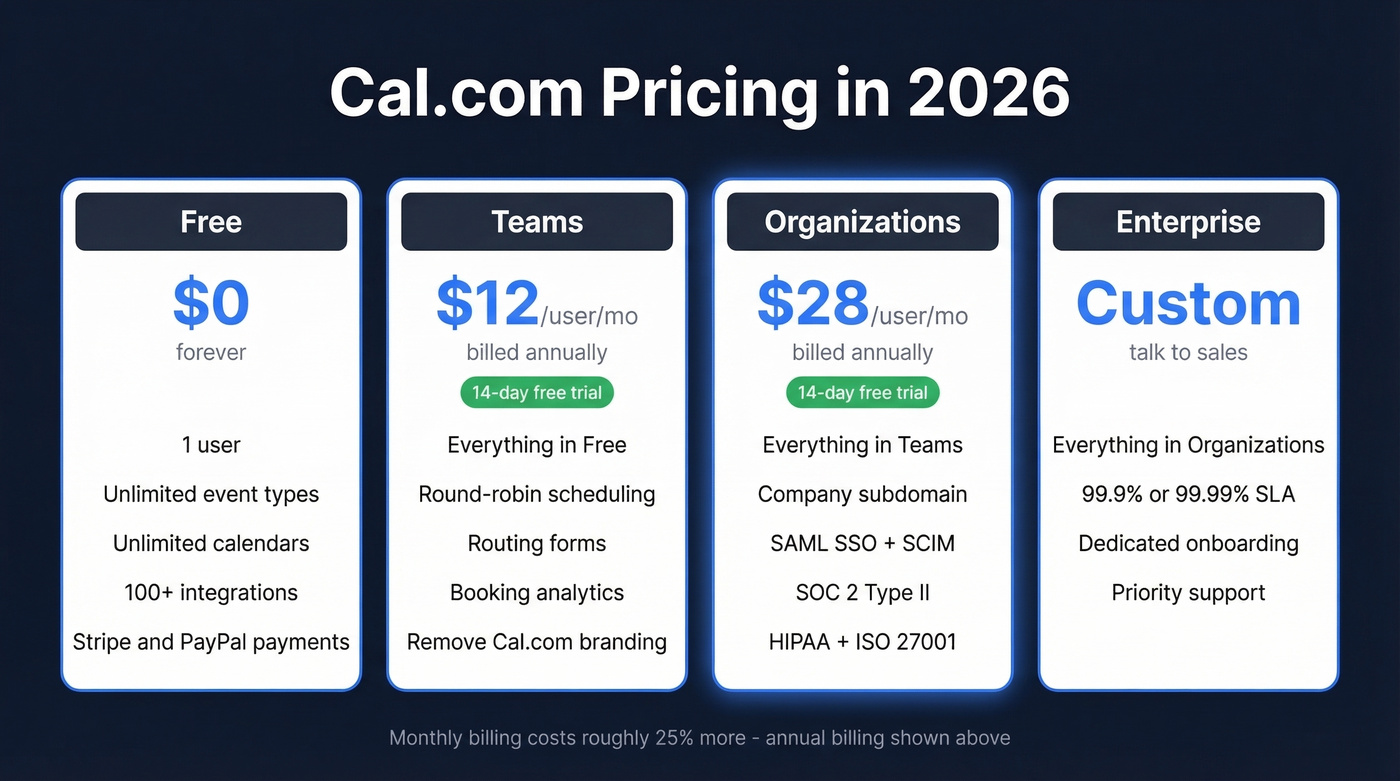
| Plan | Yearly Billing | Est. Monthly Billing | Key Additions |
|---|---|---|---|
| Free | $0 forever | $0 | 1 user, unlimited event types & calendars |
| Teams | $12/user/mo | ~$16/user/mo | Round-robin, routing forms, booking analytics, remove branding |
| Organizations | $28/user/mo | ~$37/user/mo | Company subdomain, SAML SSO + SCIM, SOC 2 Type II / HIPAA / ISO 27001 |
| Enterprise | Custom | Custom | SLA (99.9%, 99.99% option), dedicated onboarding/support |
The monthly estimates come from Cal.com's "Save 25%" messaging on yearly plans.
Both Teams and Organizations include a 14-day free trial - enough time to test team scheduling features like round-robin and routing forms before committing.
What Self-Hosting Actually Costs
Self-hosting Cal.com is "free" the way a puppy is free. You'll need a VPS, backups, monitoring, and someone who knows their way around a Next.js app. Realistically, budget $10-60/month for infrastructure depending on traffic and redundancy needs, and that's before you factor in the maintenance hours of updating dependencies, handling build issues, and managing your own uptime.
If you're weighing the tradeoff, it helps to think in terms of time management and opportunity cost, not just hosting fees.
Key Features Worth Knowing
- 1-click Calendly import - makes switching painless
- Unlimited event types on the free plan (Calendly gives you one)
- Unlimited calendars on the free plan
- Round-robin and collective scheduling for sales teams on Teams+
- Cal.ai - an AI scheduling assistant supporting email-forwarding workflows, with v5.1 adding AI-generated voice for personalized scheduling messages
- Routing forms that assign meetings based on custom variables
- Two-way Salesforce and HubSpot sync included from the Free plan up
- SOC 2 Type II, HIPAA, and ISO 27001 on Organizations and Enterprise
If you're building a full outbound stack around scheduling, your B2B marketing tech stack matters as much as the calendar tool.
Vercel, Supabase, and Mintlify are featured in Cal.com's enterprise customer testimonials - strong social proof for the developer audience this tool targets.
Pros: What Users Love
The free tier is the most generous in scheduling. You get unlimited event types, unlimited calendars, 100+ app integrations, Stripe and PayPal payments, and more - all without paying a cent.
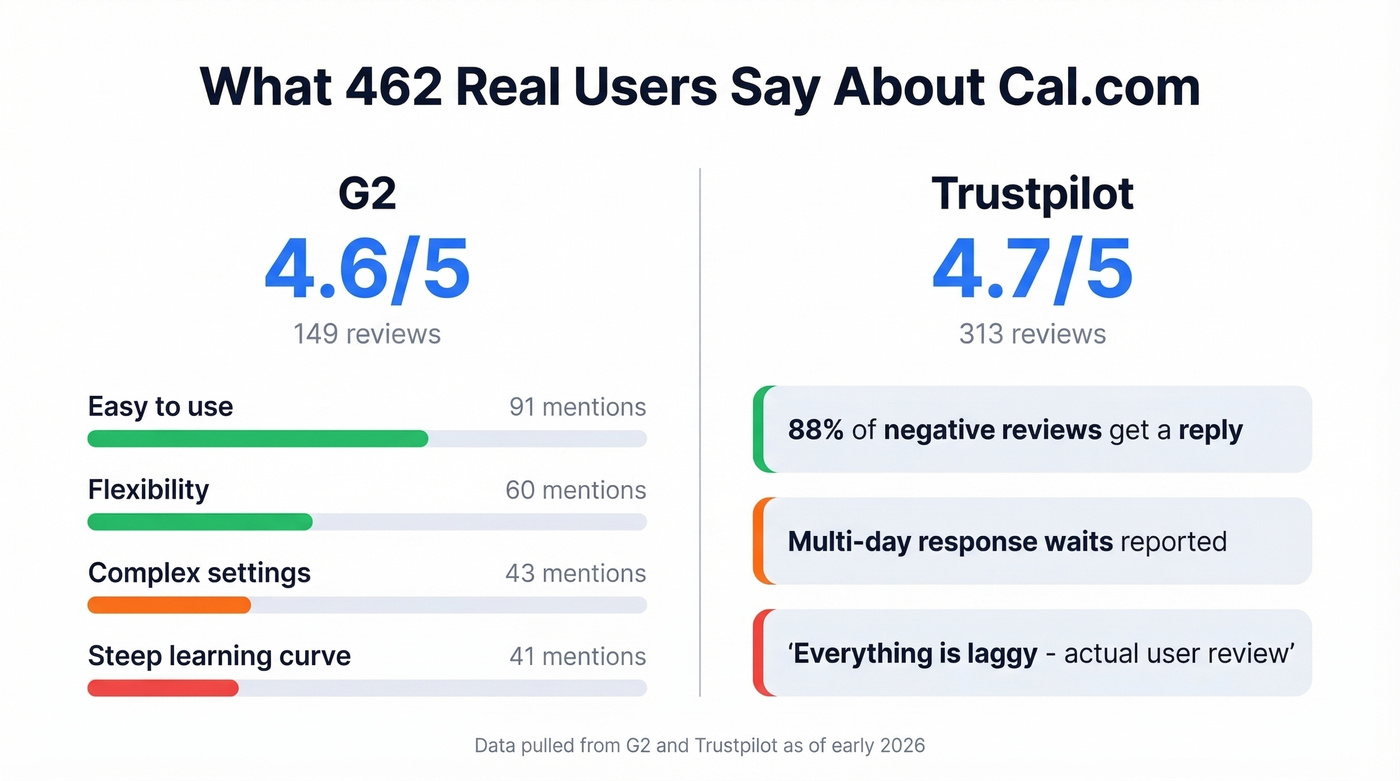
On G2 (4.6/5 from 149 reviews), "easy to use" gets 91 mentions and "flexibility" gets 60. For teams that need enterprise compliance, the Organizations plan covers HIPAA, SOC 2 Type II, and ISO 27001 at $28/user/month on annual billing - cheaper than most enterprise scheduling tools. The open-source codebase and full API access give developer teams a level of control that Calendly simply can't match.
If you're trying to turn booked meetings into revenue, tightening your sales process is usually the bigger lever than switching schedulers.

Cal.com handles the booking. But who's filling those slots? Prospeo gives you 300M+ professional profiles with 98% verified email accuracy and 125M+ direct dials - refreshed every 7 days, not every 6 weeks. At $0.01/email, it costs less than the time you spent comparing scheduling plans.
Stop optimizing your calendar for meetings that never get booked.
Cons: Where It Falls Short
Here's the thing: 43 reviewers on G2 flag "complex settings" and 41 mention a "steep learning curve." That's nearly a third of all reviews. The UX is developer-first, and non-technical users feel it.

Support is a coin flip. Trustpilot shows 4.7/5 from 313 reviews, and Cal.com replies to 88% of negative reviews, typically within a week. But dig into the negatives and you'll find template responses, multi-day response waits, and one reviewer flatly stating "everything is laggy." Experiences vary a lot.
Self-Hosting: The Real Story
Reddit's self-hosting threads paint a consistent picture. Changing your IP address or FQDN after initial setup can be painful - one thread describes needing to restore from a backup just to change the IP, rather than making a simple config change. Users also run into build and deploy friction, including errors when trying to deploy on free cloud providers.
Another thread from an education business owner argues the self-hosted version felt too limited for a small org, specifically citing missing user management and sign-up functionality. That makes $12/user/month feel steep when the "free" alternative doesn't actually work the way they need.
We've seen teams burn a full day on self-hosted deployment only to realize the managed Teams plan would've been cheaper than the engineering time they spent. Unless you have a strong philosophical reason to self-host, it often doesn't pencil out for small teams.
This is also where having clean CRM data and solid data enrichment can save you from compounding operational mess.
Who Cal.com Is (and Isn't) For
Use Cal.com if:
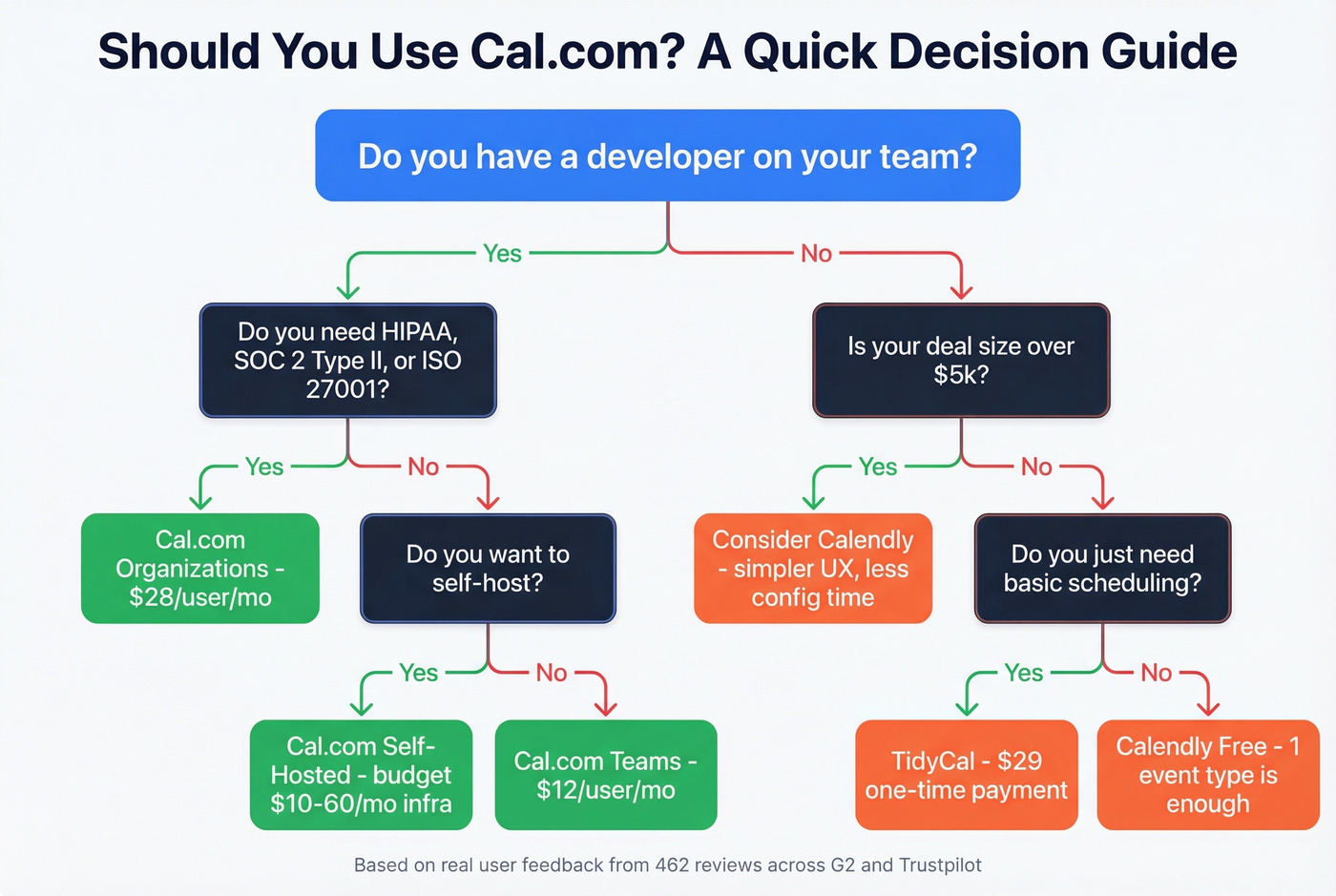
- You have developers who can customize workflows and manage self-hosting
- You need API-heavy scheduling integrations
- Enterprise compliance (HIPAA, SOC 2 Type II) is non-negotiable
- You want open-source control over your scheduling infrastructure
If you're selling into regulated industries, pairing scheduling with a tighter enterprise sales motion matters more than most teams expect.
Skip Cal.com if:
- You're a non-technical solopreneur who wants plug-and-play simplicity - use Calendly
- Your small team needs multi-user scheduling without dev resources - consider TidyCal ($29 one-time)
- You expect self-hosting to be truly zero-effort
Let's be honest: Cal.com is technically the better product. But "better" doesn't mean "right for you." If your deals are under $5k and you don't have a developer on the team, you'll spend more time configuring Cal.com than you'll ever save with its flexibility. Calendly exists for a reason.
Cal.com vs. Calendly at a Glance
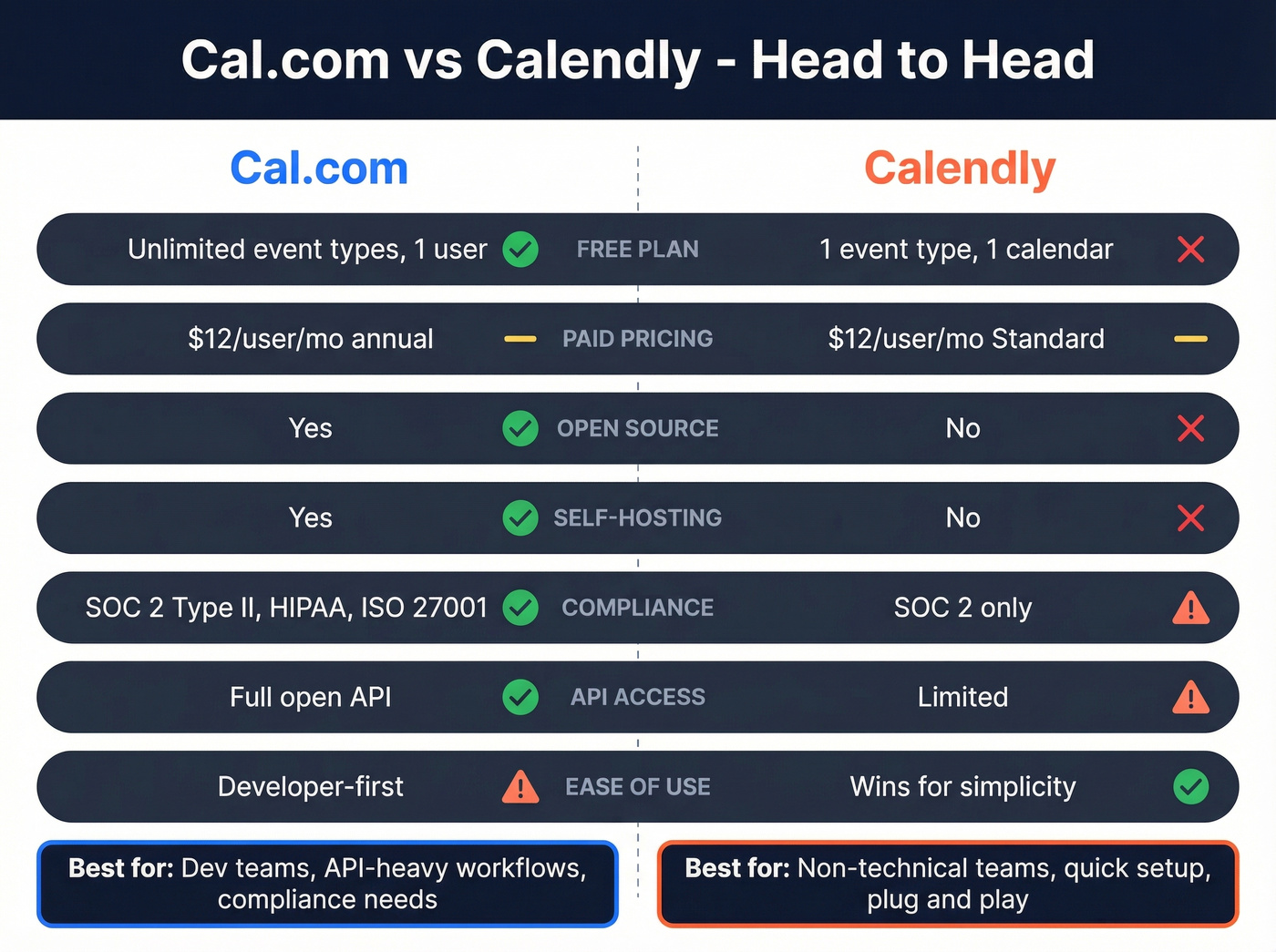
| Feature | Cal.com | Calendly |
|---|---|---|
| Free plan | Unlimited event types, 1 user | 1 event type, 1 calendar |
| Paid pricing | $12/user/mo (annual) | $12/user/mo (Standard) |
| Open source | Yes | No |
| Self-hosting | Yes | No |
| Enterprise compliance | SOC 2 Type II, HIPAA, ISO 27001 | SOC 2 |
| API access | Full, open API | Limited |
| Ease of use | Developer-first | Wins for simplicity |
If you're trying to increase booked meetings, the bigger win is usually better targeting from a B2B contact database and cleaner segmentation.
Final Verdict
Cal.com is the best scheduling tool for technical teams who want control. The free plan is unbeatable, the API is wide open, and the enterprise compliance story holds up. But if your team isn't comfortable with Next.js and self-hosting nuances, you'll get more value from Calendly's simpler UX.
Scheduling is step two, though. Step one is finding the right people to put on your calendar. Prospeo handles that - 300M+ professional profiles with 98% email accuracy and data refreshed every 7 days, not every 6 weeks. The free tier gets you started without a sales call or contract.
Once you have the right contacts, your follow-up matters: use proven sales email templates and a tight follow up email sequence to convert bookings into pipeline.
You just picked a scheduling tool with round-robin, routing forms, and CRM sync. Now feed it real pipeline. Prospeo's 30+ search filters - buyer intent, technographics, job changes, funding - let you target exactly who should land on your calendar. 143M+ verified emails, 83% enrichment match rate, zero contracts.
Fill every round-robin slot with verified decision-makers.