

Sales Email Templates: Data-Backed Scripts, Frameworks, and the Infrastructure That Makes Them Work
A RevOps lead we work with sent 200 cold emails last month. Forty-seven bounced. The rest landed in a mix of primary inboxes and spam folders, generating exactly three replies - two of which were "please remove me." That's not a template problem. That's an infrastructure problem wearing a template disguise.
In Belkins' large-scale analysis of Jan-Dec 2024 sends, cold email reply rates dropped 15% year-over-year - from 6.8% to 5.8% across a dataset of 16.5 million emails. Even the best sales email templates can't overcome bad data and broken deliverability. The data, the domains, the sending stack - that's what actually moves the needle.
Before You Scroll to the Templates
Here's the cheat sheet:
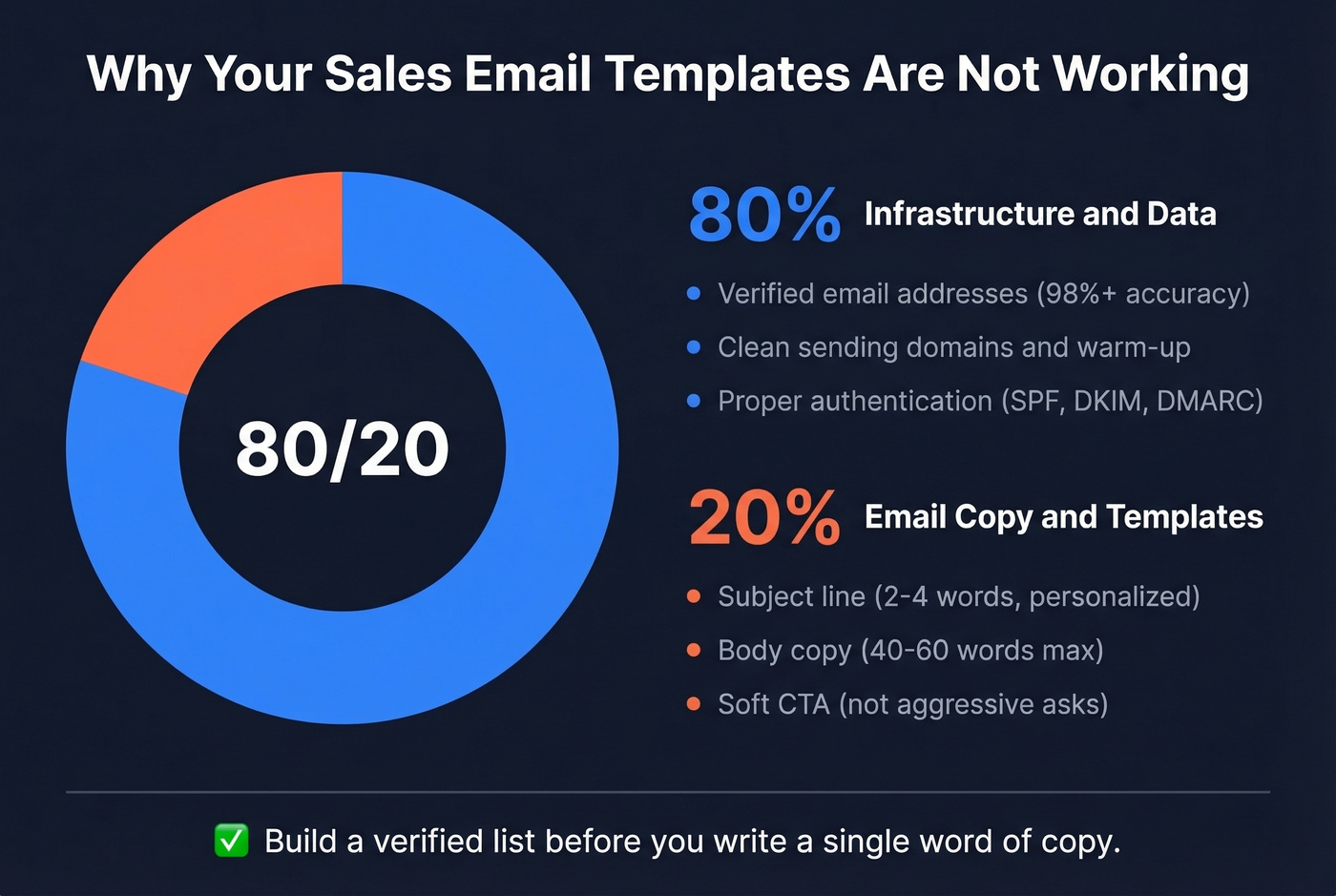
- Keep it short. 40-60 words. Every extra sentence is a reason to delete. Use a proven framework like PAS or AIDA and end with a soft CTA - "Worth a conversation?"
- Subject lines: 2-4 words, personalized. That combination hits 46% open rates. Anything that sounds like marketing drags opens below 36%. If you want more options, pull from these subject lines and test them in batches.
- Templates are 20% of the equation. Verified data and clean sending infrastructure is the other 80%. Build a verified list before you write a single word of copy.
2026 Cold Email Benchmarks
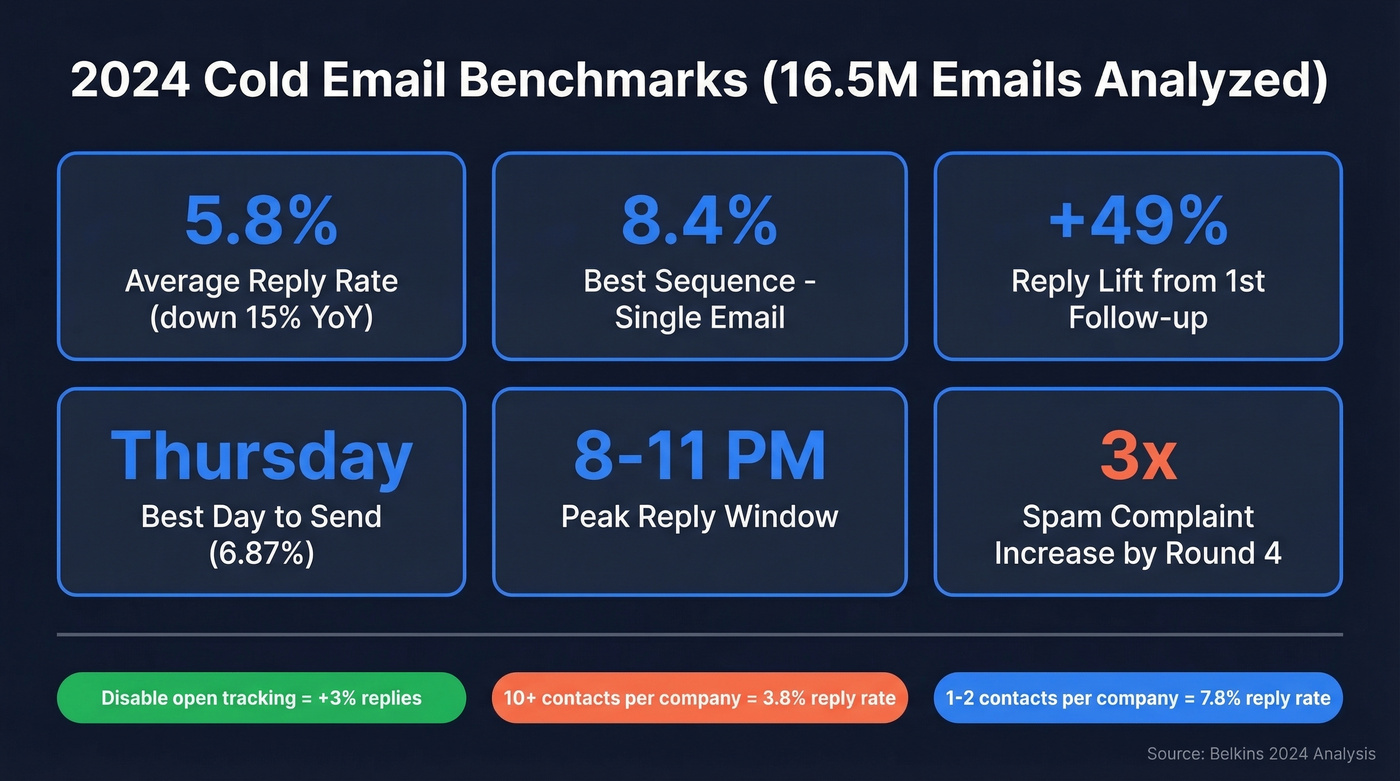
The best dataset we've found comes from Belkins' analysis of 16.5 million cold emails sent across 93 business domains in 2024. Here's what the numbers say:
| Metric | 2023 | 2024 | Change |
|---|---|---|---|
| Avg reply rate | 6.8% | 5.8% | -15% |
| Best sequence (2024) | - | 1-email (8.4%) | Simpler wins |
| 1st follow-up lift | - | +49% replies | Still worth it |
| Spam complaint rate by round | - | 0.5% (round 1) to 1.6% (round 4) | 3x worse |
| Best day | - | Thursday (6.87%) | Monday worst |
| Peak reply window | - | 8-11 PM | Evenings win |
A few things jump out. Single-email sequences posted the highest reply rate at 8.4%, which sounds counterintuitive until you realize that adding a third email can drop reply rates by up to 20%. The first follow-up is gold - it lifts replies 49%. But by follow-up #4, response rates crater 55% and spam complaints triple.
Targeting breadth matters too. Emailing 1-2 contacts per company yields a 7.8% reply rate. Blast 10+ contacts at the same company and you're down to 3.8%.
Here's a free deliverability win: turning off open-tracking pixels improved response rates by 3%. That pixel is costing you replies. And open rates themselves are becoming unreliable as a metric - Belkins stopped tracking opens mid-2024 because the data was too noisy. Reply rate is the only metric worth optimizing against now.
Subject Lines That Work
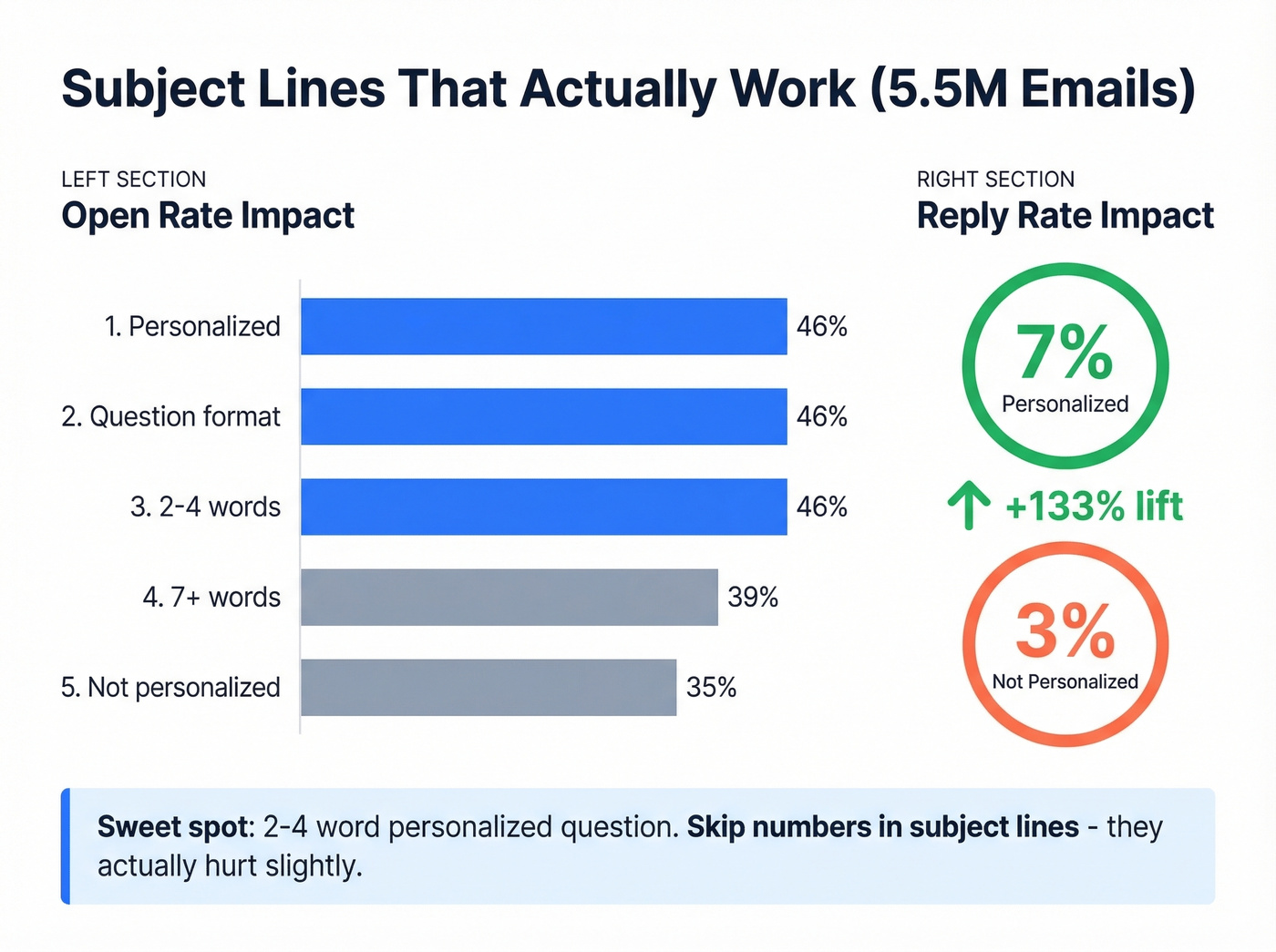
A parallel study of 5.5 million emails focused specifically on subject lines:
| Factor | Open Rate | Reply Rate |
|---|---|---|
| Personalized | 46% | 7% |
| Not personalized | 35% | 3% |
| Question format | 46% | - |
| 2-4 words | 46% | - |
| 7+ words | 39% | - |
| With numbers | 27% | - |
| Without numbers | 28% | - |
Personalized subject lines deliver a 31% lift in opens and a 133% lift in replies. Questions match that 46% open rate. The sweet spot is brutally short: 2-4 words. Once you cross seven words, opens slide. Numbers in subject lines actually hurt slightly.
The consensus on r/coldemail aligns with this - "Quick question" pulled 39% opens in one practitioner's test, while "Partnership opportunity" landed below 19%. Marketing hype is the kiss of death for B2B outreach.
A/B test relentlessly. Run two subject lines per campaign - one question, one statement - and let the data pick the winner. Do the same with your CTA: "Worth a quick chat?" vs. "Can I send a 3-min breakdown?" Small differences compound across thousands of sends.

47 bounces out of 200 sends means 24% of your outreach never had a chance - no template can fix that. Prospeo's 5-step email verification delivers 98% accuracy, so your carefully crafted cold emails actually reach real inboxes.
Build a verified list before you write a single word of copy.
Proven Frameworks Behind Every Template
Templates without frameworks are just mad libs. Here are the four that work, and when to reach for each one.
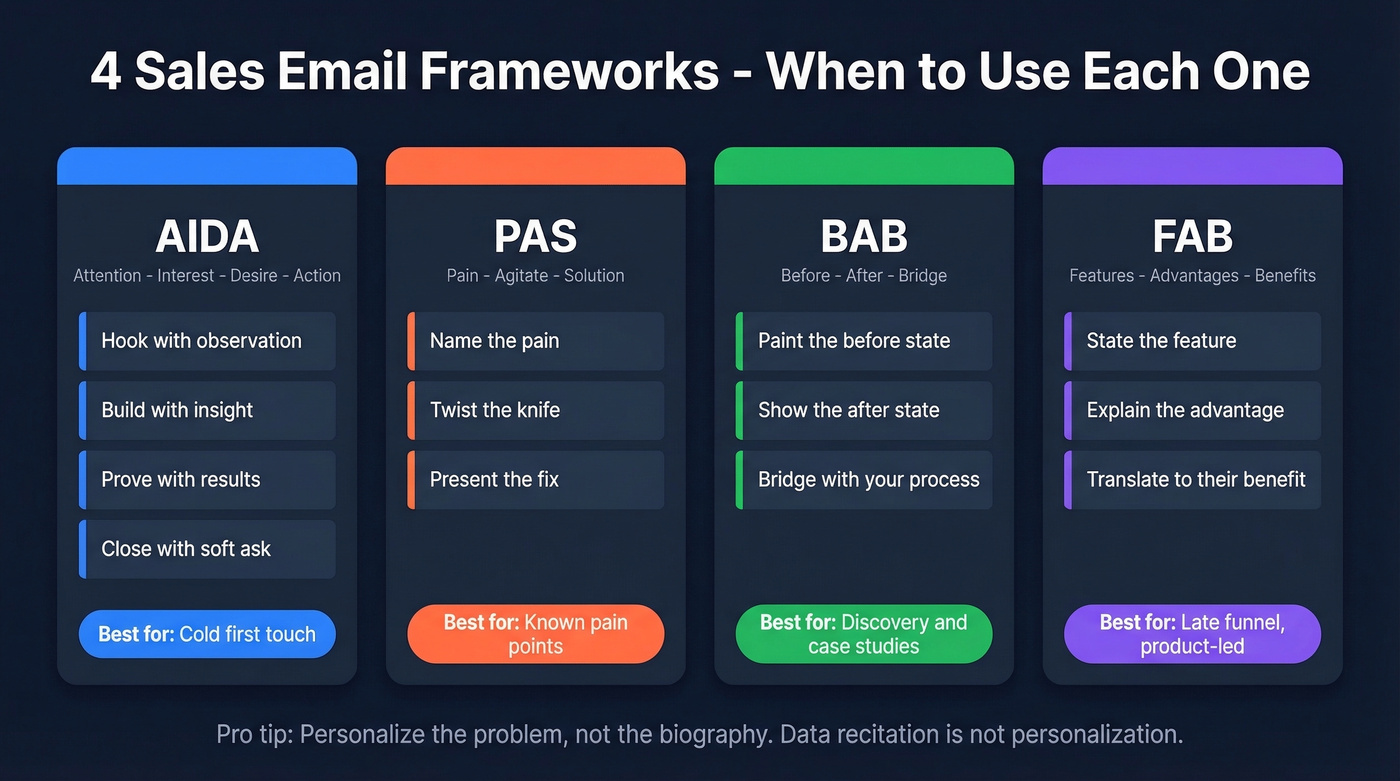
AIDA (Attention - Interest - Desire - Action)) is your cold outreach workhorse. Imagine a VP of Sales who's never heard of you. You need to earn every second of attention. Hook them with a relevant observation, build interest with a specific insight, create desire with a proof point, and close with a soft ask. Most of the templates in this guide use AIDA because most outbound email is first-touch, and AIDA is built for that moment where you have zero relationship equity and maybe three seconds of attention before the delete key wins.
When the prospect already knows they have a problem, PAS (Pain - Agitate - Solution) is a killer option. Name the pain, twist the knife slightly, then present your solution as the obvious fix.
BAB (Before - After - Bridge) shines in discovery and case-study emails - paint the "before" state, show the "after," then bridge with how you get them there. FAB (Features - Advantages - Benefits) is for product-led emails later in the funnel, when the prospect needs specifics to justify a decision internally.
One critical rule from GMass's AIDA guidance: the best personalization identifies the prospect's specific problem, not their biography. Listing someone's alma mater and recent podcast appearance isn't personalization - it's data recitation. AI personalization tools fail here constantly, producing what amounts to "cyberstalking" openers that don't connect to any real business problem. If you're using AI to draft outreach, start with a clear personalized outreach rubric.
21 Proven Templates by Stage
Cold Outreach (First Touch)
Every template follows the 40-60 word rule. Each is tagged with its framework, plus when to use it and why it works - so you can adapt rather than blindly copy-paste.
Template 1 - The Trigger-Based Open (AIDA)
Subject: Quick question
Hi {{first_name}}, saw {{company}} is hiring 3 new AEs - usually means pipeline needs to grow faster than the team can. We helped [similar company] add $200K/mo in qualified pipeline within 60 days. Worth a quick look?
When to use: You've spotted a hiring signal, funding round, or product launch - any public trigger that implies a need. Why it works: The trigger proves you did your homework, and the peer proof creates instant credibility. This is the highest-converting cold template format we've tested. (If you want a system for finding those signals, use a sales triggers workflow.)
Template 2 - The Value-First Offer (PAS)
Subject: {{company}} landing pages
Hi {{first_name}}, I audited your top 3 landing pages and found a few conversion gaps. Happy to send a 3-min Loom with fixes - no strings. Want me to send it over?
When to use: You can deliver something genuinely useful before asking for anything. Why it works: Leading with free value flips the dynamic - you're giving, not asking. Reply rates on value-first emails consistently beat standard pitches by 2-3x in practitioner tests on r/coldemail.
Template 3 - The Peer Proof (AIDA)
Subject: How {{peer_company}} did it
Hi {{first_name}}, {{peer_company}} was dealing with the same {{specific problem}} last quarter. They cut {{metric}} by 40% in 6 weeks. I can show you exactly what they changed. Interested?
When to use: You have a relevant case study in the prospect's industry. Why it works: Peer proof is the strongest persuasion lever in B2B. Naming a company they recognize makes the result feel achievable.
Template 4 - The Direct Ask (PAS)
Subject: {{pain_point}}?
Hi {{first_name}}, most {{job_title}}s at {{industry}} companies tell us {{pain_point}} is eating 5+ hours/week. We built a fix that takes 15 minutes to set up. Worth a conversation?
When to use: The pain point is well-known in the industry and doesn't need explanation. Why it works: Directness respects the reader's time. The specificity of "5+ hours/week" makes the pain tangible.
Follow-Up Sequences
The first follow-up lifts replies by 49%. That's the single most important email in your sequence. But by follow-up #4, response drops 55% and spam complaints hit 1.6%. Two to three follow-ups is the sweet spot. (If you want more variations, use these sales follow-up templates.)
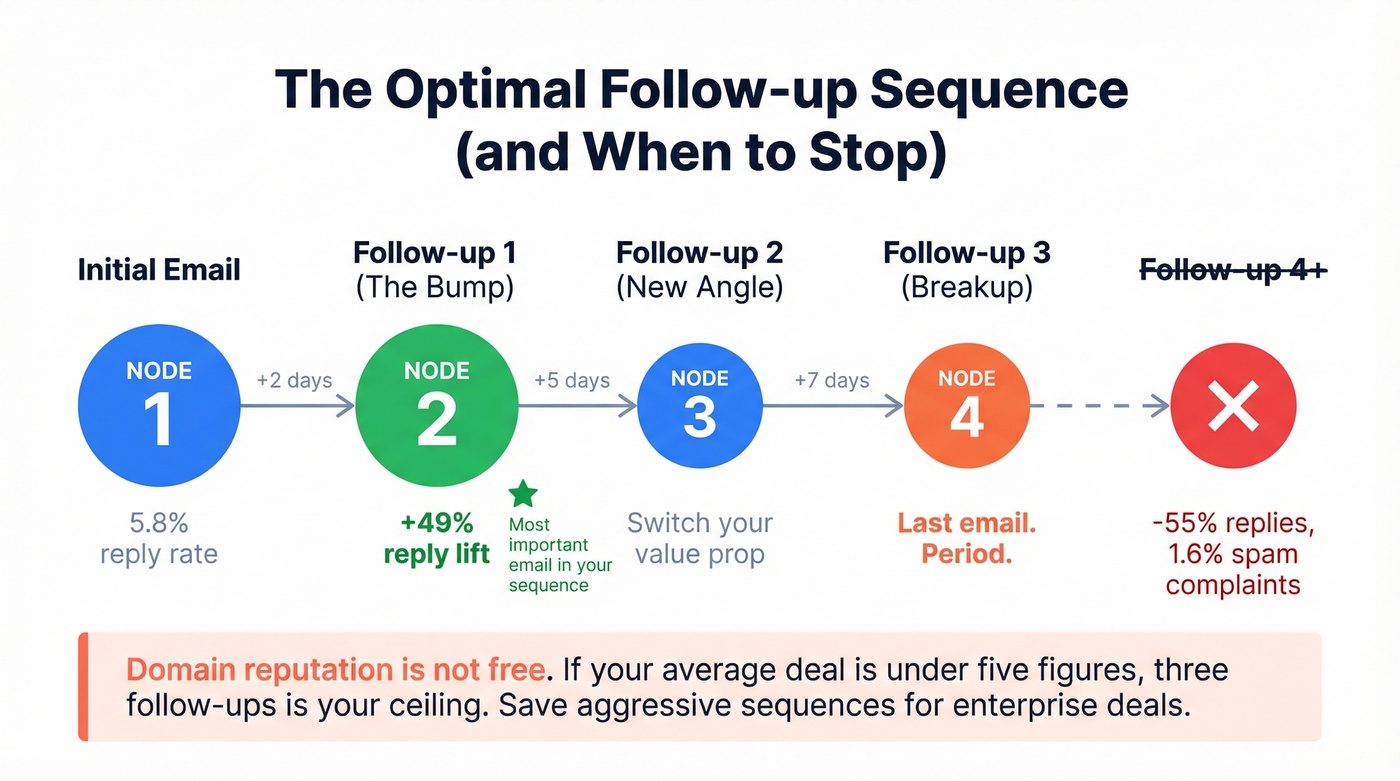
Here's the thing: most teams send too many follow-ups because their sequences are automated and it costs nothing to add another step. But domain reputation isn't free. If your average deal size sits below five figures, three follow-ups is your ceiling. Save the aggressive sequences for enterprise deals where one meeting justifies the risk.
Follow-Up #1 - The Bump (2 days later)
Subject: Re: {{original subject}}
Hi {{first_name}}, wanted to make sure this didn't get buried. The offer to {{specific value}} still stands. Would next week work for a quick look?
When to use: Always. Non-negotiable. Why it works: Short, low-pressure, and references the original value prop without repeating it.
Follow-Up #2 - New Angle (5 days later)
Subject: Different thought
Hi {{first_name}}, instead of {{original offer}}, here's something that might be more useful: {{new resource, insight, or case study}}. Let me know if it's relevant.
When to use: The original angle didn't land and you have a second value prop. Why it works: Switching the angle signals you're not just blindly following a cadence - you're actually thinking about their situation.
Follow-Up #3 - The Breakup Tease (7 days later)
Subject: Should I close this out?
Hi {{first_name}}, I don't want to clog your inbox. If the timing's off, no worries - I'll check back in Q{{next quarter}}. But if {{pain_point}} is still on your radar, I've got 10 minutes this week.
When to use: Final follow-up. Period. Why it works: The "closing the file" framing triggers loss aversion without being pushy. It also gives the prospect a graceful out, which paradoxically increases replies.
Discovery and Qualification
Once someone replies, switch to BAB. Paint their current state, show the transformation, then bridge with your process.
Template - The Problem Mirror (BAB)
Hi {{first_name}}, thanks for the reply. Most {{job_title}}s we talk to are spending {{X hours/dollars}} on {{problem}} and still not hitting {{goal}}. After working with us, teams like {{peer}} cut that by {{metric}} and redirected the time to {{higher-value activity}}. Can I walk you through how in 20 minutes?
When to use: First reply to a cold thread - the prospect is curious but not committed. Why it works: Mirroring their pain back to them builds trust. The before/after contrast makes the transformation concrete.
Template - The Case Study Tease (BAB)
Hi {{first_name}}, {{peer_company}} was in a similar spot - {{before state}}. Six months later: {{after state}}. The bridge was {{your solution, one sentence}}. Want the full breakdown?
Skip this template if you don't have a real, named case study. Vague "companies like yours" language kills credibility faster than no social proof at all.
Closing-Stage Templates
At this stage, FAB earns its keep. The prospect knows the problem and your solution - now they need specifics to justify the decision internally.
Template - The ROI Frame (FAB)
Hi {{first_name}}, based on our conversation: {{feature}} gives you {{advantage}}, which means {{benefit in dollars or hours}}. At {{price point}}, that's a {{X}}x return in the first {{timeframe}}. I've attached the proposal - happy to walk through it Thursday.
When to use: Post-demo, when the prospect needs to build an internal business case. Why it works: Translating features into dollar impact gives your champion the language they need to sell upward.
Template - The Internal Champion (FAB)
Hi {{first_name}}, I put together a one-pager your team can share with {{decision maker title}}. It covers the key ROI metrics in their language. Want me to send it over?
When to use: Multi-stakeholder deals where your contact isn't the final decision-maker. Why it works: You're arming your champion with ammunition. In our experience, this template has the highest close-rate correlation of any in our library.
Breakup and Re-Engagement
Template - The Clean Exit
Hi {{first_name}}, I'll take the hint - timing clearly isn't right. I'll remove you from my sequence. If {{pain_point}} comes back on the radar, here's my calendar link: {{link}}. No hard feelings either way.
Graceful exits preserve the relationship. We've seen prospects book calls from breakup emails 3-6 months later.
Template - The Renewal Nudge (60 days before renewal)
Hi {{first_name}}, your renewal is coming up on {{date}}. Based on your usage, I'd recommend {{specific plan adjustment}}. Let's find 15 minutes to make sure you're set up for next year.
Proactive outreach with a specific recommendation signals you're paying attention - not just collecting invoices.
The Outreach template library has dozens of additional variations if you need more starting points, but the pattern is always the same: context trigger, specific value, soft CTA.
Infrastructure That Makes Templates Land
Let's be honest - most reply rate problems aren't copy problems. A practitioner on r/Entrepreneur shared their journey from a 3% reply rate to 6%, and the templates barely changed. Everything underneath changed.
They went from 3 domains to 7, capping each at 26 emails/day. Bounce rate dropped from 11% to under 2% after they stopped buying lists and started verifying every address. Email length went from 141 words to under 56. They sent only Tuesday through Thursday, 8-11 AM in the recipient's timezone - and opens jumped 16%. Total stack cost: roughly $420/month generating 16 qualified leads.
That bounce rate improvement - 11% to under 2% - is the single biggest lever in the whole story. It's also the easiest to fix. Prospeo runs every email through a 5-step verification process including catch-all handling, spam-trap removal, and honeypot filtering, delivering 98% email accuracy at roughly $0.01 per email. That's cheaper than the domain reputation damage from one bad batch.
Beyond list quality, here's the infrastructure checklist that matters in 2026:
- SPF, DKIM, and DMARC authentication. Non-negotiable. Bulk-sender rules enforced since May 2025 require all three. (If you need a deeper walkthrough, start with an email deliverability checklist.)
- Spam complaints under 0.3%. Cross that threshold and your domain takes weeks to recover. Use an email spam checker before scaling volume.
- Bounces under 2%. Anything above 5% risks permanent reputation damage. Track it like a KPI with an email bounce rate playbook.
- One-click unsubscribe per RFC 8058 - required, not optional.
- Domain warmup. Start new domains at 5-10 emails/day, ramp over 4-6 weeks. Keep warmup running between campaigns. (More on safe sending limits in email velocity.)
- Custom tracking domain via CNAME to isolate your sending reputation. If you’re not sure what that means, here’s a guide to a tracking domain.
Compliance isn't optional either. CAN-SPAM penalties run up to $53,088 per email. CASL fines hit $10M for businesses. GDPR can cost EUR 10M. These aren't theoretical - they're enforced.
Your Cold Email Stack
You need three layers: verified data, a sending tool, and a CRM. That's it.
| Layer | Tool | Price | Best For |
|---|---|---|---|
| Data + Verification | Prospeo | Free tier; ~$0.01/email | Verified emails, mobiles |
| Sending | Instantly | ~$30-97/mo | Multi-domain rotation, warmup |
| Sending | Smartlead | ~$39-94/mo | Agency-scale multi-client |
| CRM | HubSpot (free) / Salesforce | Free-$75+/user/mo | Pipeline tracking |
| Enterprise sending | Outreach / Salesloft | ~$100+/user/mo | Full sequence management |
Build a verified list before you write a single word of copy. Apollo (~$49-99/mo per user) is a solid alternative data source if you need a built-in sequencer, but verify the emails separately - we've run bake-offs where Apollo's native verification missed addresses that bounced on first send.
For sending, Instantly and Smartlead both handle multi-domain rotation and warmup well. For teams running enterprise outbound with branching logic, Outreach and Salesloft justify their premium. If you’re evaluating platforms, start with an SDR tools shortlist.
Trigger-based templates only work when you can find the right contacts fast. Prospeo's 30+ filters - including hiring signals, funding rounds, and buyer intent across 15,000 topics - surface the prospects your templates were built for.
Stop sending perfect emails to the wrong people.
FAQ
How many follow-ups should I send?
Two to three. The first follow-up lifts replies by 49%, making it the highest-leverage email in your sequence. By follow-up #4, response rates drop 55% and spam complaints climb to 1.6%. More isn't better - it's riskier.
What's the best day and time to send?
Thursday posts the highest reply rate at 6.87%, while Monday is the worst at 5.29%. The peak reply window is 8-11 PM, with mornings (7-11 AM) also performing well. Always send in the recipient's timezone.
How long should a cold email be?
Forty to sixty words for first-touch outreach. Six to eight sentences hits the sweet spot in Belkins' dataset - 42.67% open rate and 6.9% reply rate. One practitioner cut length from 141 words to under 56 and doubled their reply rate.
Do personalized subject lines actually work?
Personalized subject lines hit 46% open rates versus 35% without, and reply rates jump from 3% to 7%. Keep them to 2-4 words, use a question format, and skip hype terms. The data from 5.5 million emails is unambiguous.
What's the cheapest way to verify emails before sending?
Prospeo's free tier includes 75 email verifications per month with 98% accuracy - enough to test a small campaign. For larger sends, credits cost roughly $0.01 per email. Apollo and Hunter also offer free tiers, but verify accuracy independently; we've seen 10-15% bounce-rate gaps between providers.