

How to Check an Email Address for Blacklist - And What to Actually Do About It
Your open rates were fine last Tuesday. By Thursday, they'd cratered to single digits. The sales team's panicking, the VP of Marketing is asking questions, and you're staring at bounce logs at 10pm trying to figure out what happened.
With global inbox placement hovering around 84%, roughly one in six emails never reach the inbox. A blacklisting makes that number dramatically worse.
Here's the thing - when you check an email address for blacklist issues, you quickly discover that email addresses don't actually get blacklisted. Your domain or sending IP does. That distinction matters, and most guides skip right past it. One cold email sender on r/coldemail noticed deliverability dipping, ran a blacklist check, found an older sending domain listed, followed removal steps, cleaned their list, and things improved within days. But before you can diagnose anything, you need to understand what actually gets listed.
The Short Version
Email addresses don't land on blacklists - your sending domain or IP does. Run a free blacklist check on MxToolbox or MultiRBL using your domain or sending IP, fix the root cause if you're listed on Spamhaus and Barracuda, and verify every email before you hit send to prevent it from happening again.
What Actually Gets Blacklisted
Most people assume their address - like john@company.com - is sitting on some list somewhere. It's not. Traditional blacklists (DNSBLs and RBLs) don't track individual email addresses. You'll see these called blocklists or denylists in newer documentation; same concept, updated terminology. They track two things: IP addresses and domains.
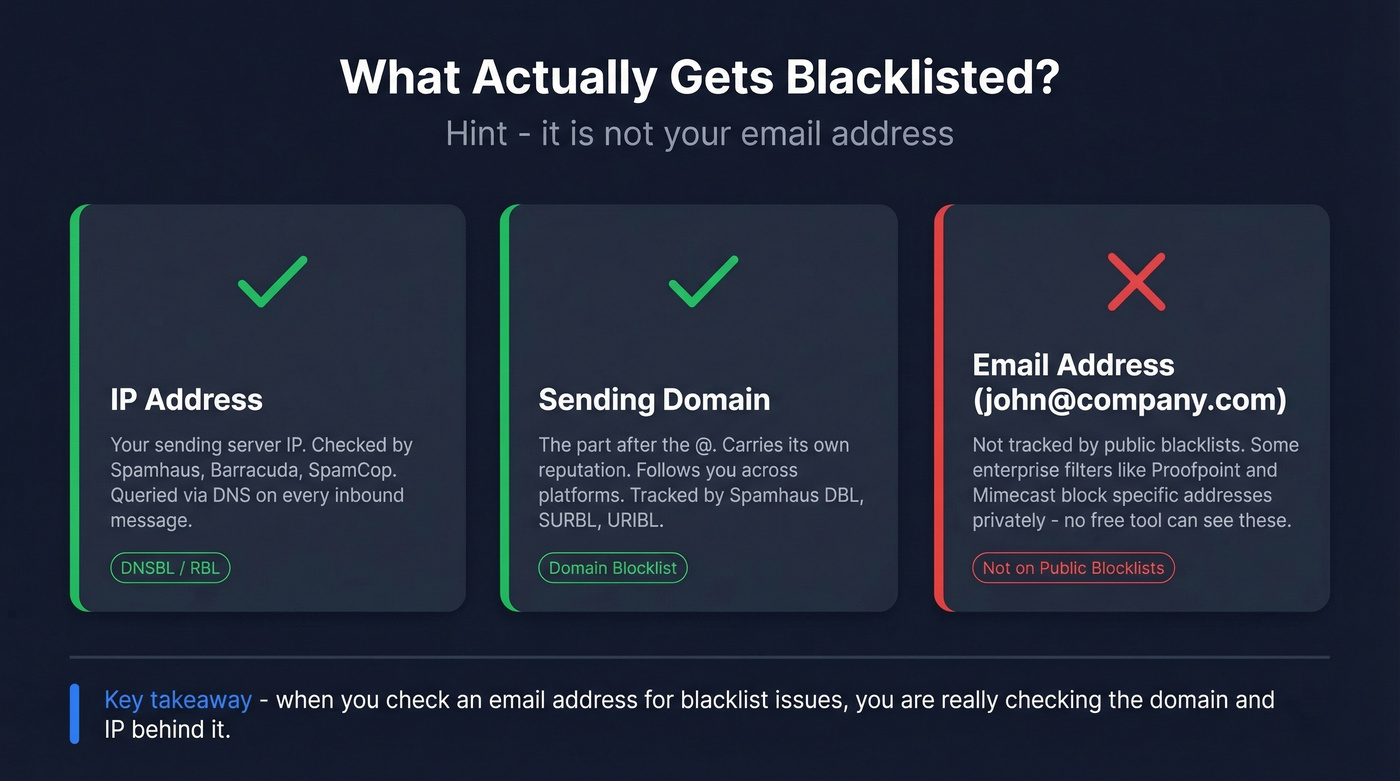
IP blocklists monitor sending infrastructure. When a receiving mail server gets your message, it queries the sender's IP against databases like Spamhaus and Barracuda. If the IP matches, the message gets rejected, delayed, or routed to spam - almost instantly via DNS lookups.
Domain blocklists track identity. Your sending domain (the part after the @) carries its own reputation, and that reputation travels with you across infrastructure changes. Move from one sending platform to another with a torched domain, and you'll drag the bad reputation right along.
Now here's where it gets confusing: some enterprise security filters like Proofpoint and Mimecast maintain internal lists of specific sender addresses. These function as private block lists that no free checker tool can see. So when you run a scan and everything comes back clean, it doesn't guarantee you're in the clear.
How to Check for Blacklist Issues (Step by Step)
The actual check takes two minutes. Running a blacklist lookup is read-only - it doesn't ping your server or affect your reputation in any way.
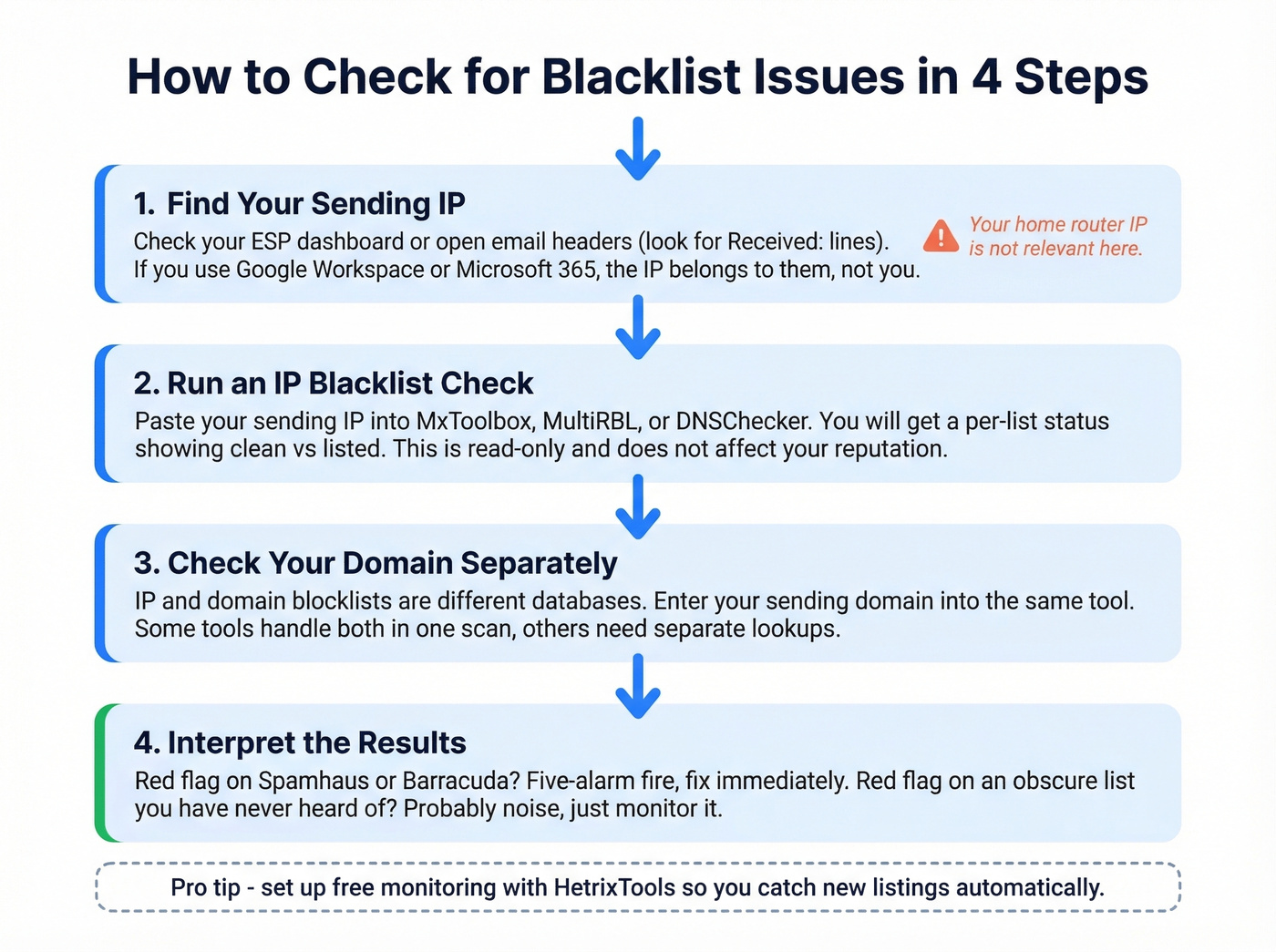
Step 1: Find your sending IP. Log into your ESP or email sending platform and look for sending infrastructure details. You can also open a sent email's full headers - the "Received:" lines will show the originating IP. If you're using Google Workspace or Microsoft 365, the sending IP belongs to Google or Microsoft, not you. Your home router's IP is irrelevant here.
Step 2: Enter your IP into a checker. Go to MxToolbox, MultiRBL, or DNSChecker's blacklist tool and paste the IP. You'll get a per-list status result - clean vs. listed.

Step 3: Check your domain separately. IP and domain blocklists are different databases. Enter your sending domain into the same tool. Some tools handle both in one scan; others require separate lookups.
Step 4: Read the results carefully. A red flag on Spamhaus is a five-alarm fire. A red flag on some list you've never heard of? Probably noise. Let's break down which is which.
Best Blacklist Checker Tools
Most of these tools give you the same basic result. Pick one and move on - the real skill is interpreting what you find.
| Tool | Blacklists Checked | Input Types | Monitoring | Free Tier | Best For | Approx. Pricing |
|---|---|---|---|---|---|---|
| MxToolbox | 100+ | IP | Paid | Yes (one-off) | Industry default | Free one-off; paid ~$10-$100+/mo |
| MultiRBL | Dozens+ | IP (primary) | No | Yes | Deepest raw scan | Free |
| DNSChecker | 50+ | IP, domain, email | No | Yes | Quick spot check | Free |
| ZeroBounce | 200+ | IP, domain | Yes | Yes | Broad single scan | Free tier; paid ~$15-$50+/mo |
| HetrixTools | 100+ | IP, domain | Yes | Yes | Free monitoring alerts | Generous free plan; paid from ~$10/mo |
| EmailListVerify | 100+ | IP, domain | No | Yes | Budget verification | Free checker; paid from ~$4/1,000 emails |
DNSChecker accepts an email input, then resolves the domain/MX to an IP for the blacklist check - it's not a true "email-address blacklist" lookup.
MxToolbox is the industry default. It's what sysadmins reach for first, and it's what most deliverability consultants reference when they need a quick scan. The free tier handles one-off lookups fine; continuous monitoring requires a paid plan.
HetrixTools is the best free monitoring option we've found. You get automated alerts when a new listing appears, which matters more than most people realize. Catching a Spamhaus listing shortly after it happens versus days later is the difference between a minor hiccup and a week of tanked deliverability.
ZeroBounce runs a broad scan - 200+ blacklists in one check, plus it tells you if your IP is whitelisted anywhere. Good for a thorough one-time audit.
MultiRBL deserves a specific caveat. It shows nuanced statuses like "brownlisted," "neutralized," and "yellowlisted." Neutral entries are informational only and don't mean your mail is being blocked. MultiRBL explicitly warns against sending removal requests to them - they aggregate data, they don't run the blacklists.

Most blacklist issues start with sending to invalid addresses. Prospeo's 5-step verification - including catch-all handling, spam-trap removal, and honeypot filtering - delivers 98% email accuracy so your bounce rate stays under the thresholds that trigger listings.
Stop diagnosing blacklists. Start preventing them at the source.
How to Interpret Your Results
Which Blacklists Actually Matter
Not all blacklists carry the same weight. Spamhaus, Barracuda, and SpamCop are among the most widely referenced blocklists across mail systems. Fix these first - everything else is secondary.
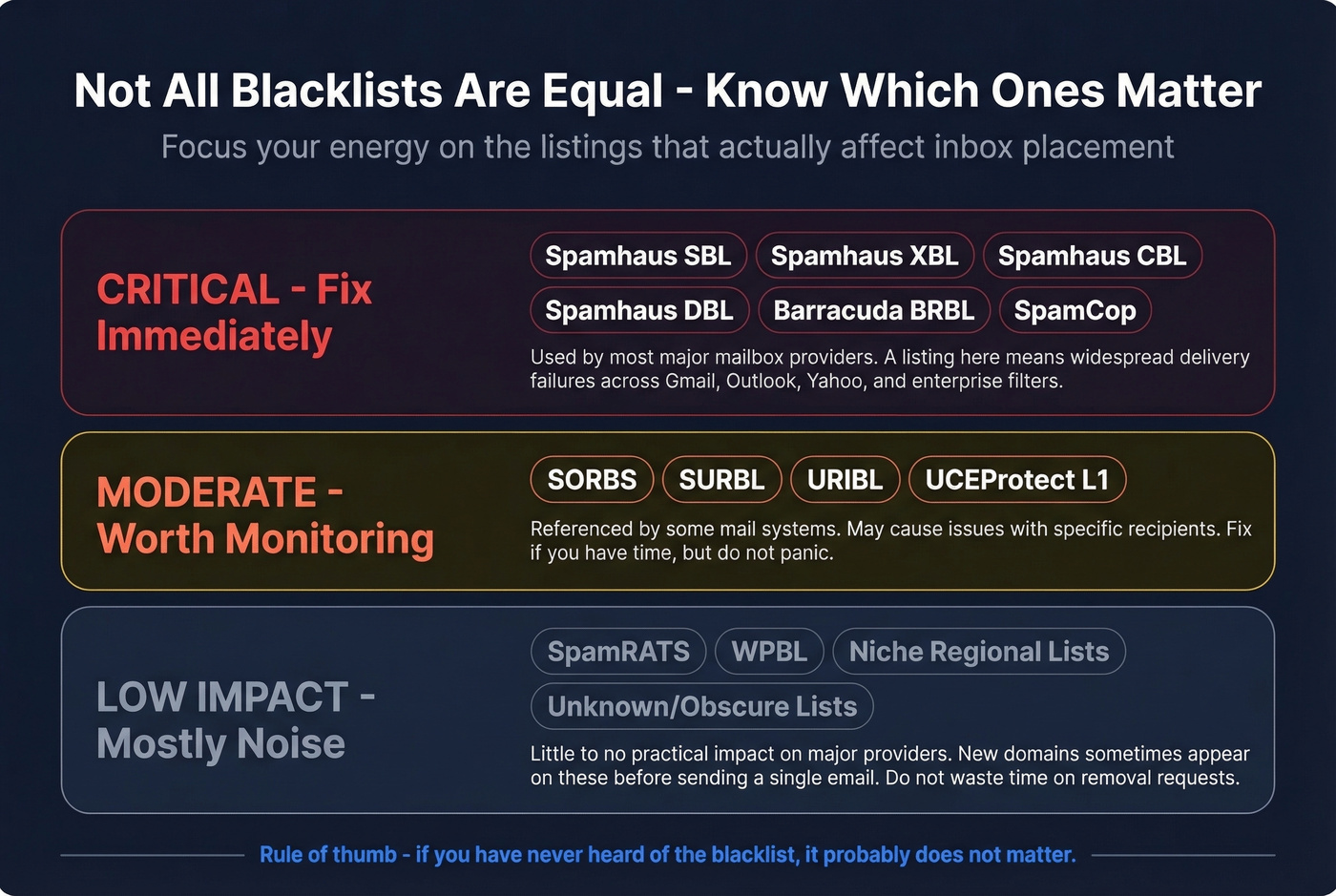
Spamhaus alone maintains several sub-lists, and knowing which one flagged you determines your next move:
- SBL targets confirmed spam sources.
- XBL flags compromised infrastructure like malware or botnet activity.
- CBL catches IPs showing characteristics of open proxies and spam bots.
- DBL tracks domains rather than IPs - your reputation follows your domain across infrastructure changes.
- PBL lists IP ranges that shouldn't be sending email directly, like residential broadband blocks.
Obscure lists like SpamRATS, WPBL, and niche regional databases often have little practical impact on major mailbox providers. We've seen brand-new domains show up on obscure blacklists within hours of registration - before a single email was ever sent. Don't panic over these. The confusion they cause does more damage in wasted time than the listings themselves.
If you're listed on Spamhaus or Barracuda, drop everything and fix it. If you're only listed on lists you've never heard of, monitor the situation but don't lose sleep.
Clean Results Don't Guarantee Delivery
A sysadmin on r/sysadmin ran every blacklist scanner available after a WordPress compromise - none showed any issues. The fix? Removing a website link from the email signature. The block was URL/domain reputation or security filtering, not a DNSBL listing at all.
This happens more than people realize. Enterprise security filters maintain their own internal reputation databases. Google Safe Browsing can flag links in your emails without any public blacklist involvement. Public checkers can't query these private systems. If your scans come back clean but emails still aren't landing, the problem is content-based filtering, link reputation, or a recipient-side block. Sometimes you need to contact the recipient's IT team directly.
How to Get Delisted
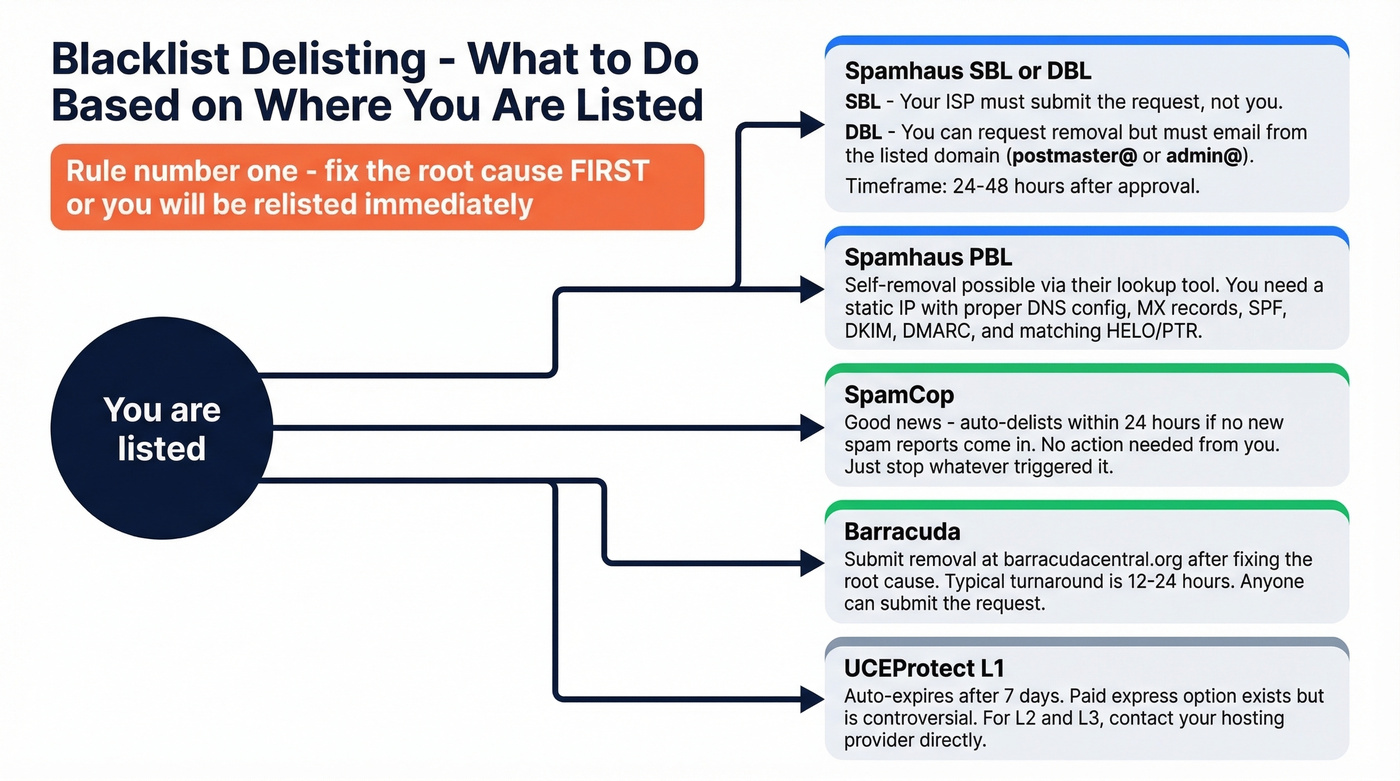
Once you've identified a listing that matters, here's how removal works for each major blacklist:
| Blacklist | Delisting URL | Timeframe | Who Requests | Notes |
|---|---|---|---|---|
| Spamhaus SBL | spamhaus.org/lookup | 24-48h after approval | ISP/network owner | End-users can't request directly |
| Spamhaus DBL | spamhaus.org/lookup | 24-48h after approval | Domain owner | Request must come from listed domain's email |
| Spamhaus PBL | spamhaus.org/lookup | Self-removal | Server operator | Static IP + proper DNS required |
| SpamCop | spamcop.net/bl.shtml | Auto-delists 24h | N/A (automatic) | Stops if no new reports |
| Barracuda | barracudacentral.org/lookups | 12-24h | Anyone | Submit after root cause is fixed |
| SORBS | au.sorbs.net | Varies | Anyone | Some lists auto-expire |
| UCEProtect L1 | - | 7 days auto | Automatic | Paid "express" option exists |
| SURBL | surbl.org | Varies | Anyone | Submit removal request |
The critical rule across every blacklist: fix the root cause first, or you'll be relisted immediately. Spamhaus is especially strict about this.
Spamhaus Delisting Deep Dive
Spamhaus is the most impactful blacklist and the most complex to navigate.
SBL: Your ISP or network owner must submit the request. Spamhaus doesn't accept removal requests from end-users. If you're on shared hosting, this means contacting your provider and hoping they care enough to act quickly.
DBL: Domain owners can request removal, but the request email must come from an address on the listed domain - not a Gmail or Yahoo address. You'll need a working postmaster@ or admin@ address on the domain itself.
PBL: Self-removal is possible for a single static IP via the lookup tool, but only if you're running a legitimate mail server with proper DNS configuration.
A self-hosted mail operator on Reddit shared a practical checklist for successful Spamhaus delisting: use postmaster@yourdomain for the request, ensure your MX record points to the sending IP, have SPF/DKIM/DMARC configured, and make sure your HELO matches your PTR record. In their experience, delisting held for about three months depending on the IP neighborhood.
UCEProtect offers a paid "express delisting" option. It's controversial - many in the email community view it as borderline extortion. The free path is to wait 7 days for L1 auto-expiry. For L2 and L3 listings, contact your hosting provider directly.
Shared and Recycled IP Problems
Look, getting a blacklisted IP from your hosting provider and being told "that's just how it works" is infuriating. But it happens constantly.
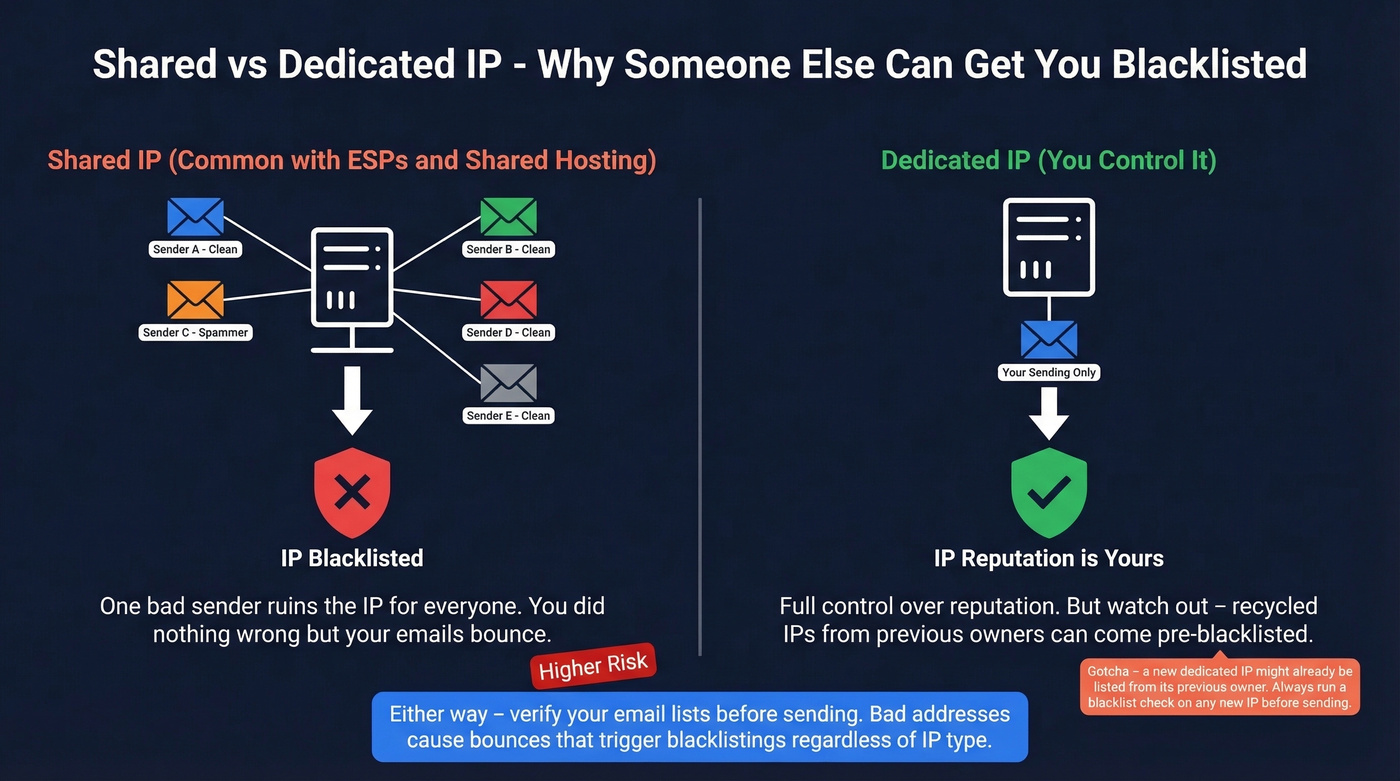
One webhosting user bought a dedicated IP specifically to escape shared-IP blacklisting - and the new IP was immediately flagged by Proofpoint, blocking mail for a week. Another reported OVH assigned a blacklisted IP and support refused to change it, suggesting they buy an entirely new server instead. With IPv4 addresses in short supply, IPs get recycled constantly, and you inherit whatever reputation the previous tenant left behind.
Run a blocklist scan on any new IP before you start sending. If you're stuck with a dirty IP, your options are: request a different IP from your provider, escalate to a supervisor who actually has authority to swap IPs, switch providers entirely, or use a dedicated email sending service like Postmark, Mailgun, or SendGrid that manages IP reputation as part of the service.
How to Prevent Blacklisting
Prevention beats delisting every time. Here's our hot take: most blacklisting isn't a deliverability problem - it's a data quality problem. Teams blame ESPs, blame mailbox providers, blame the blacklist operators. Nine times out of ten, the root cause is sending to garbage data.
Configure SPF, DKIM, and DMARC. Without all three, major mailbox providers treat your messages with suspicion regardless of blacklist status. (If you want a deeper technical walkthrough, see our email deliverability guide.)
Keep bounce rate under 2%. Above this threshold, blacklist risk spikes. High bounce patterns are a common spam signal. (Benchmarks and fixes: bounce rate.)
Keep spam complaint rate under 0.1%. That's the widely used tolerance benchmark. Exceed it consistently and you're asking for trouble.
Use double opt-in for marketing lists. This reduces spam-trap signups and filters out typos and fake addresses.
Verify outbound email data before sending. This is where bad B2B data causes blacklisting. Sending to invalid, outdated, or spam-trap addresses triggers bounces, which triggers listings. Prospeo's 5-step verification process with catch-all handling, spam-trap removal, and honeypot filtering delivers 98% email accuracy on a 7-day data refresh cycle. Stack Optimize built to $1M ARR using Prospeo's data and maintained 94%+ deliverability with bounce rates under 3% and zero domain flags across all clients. (Related: spam trap removal and how to check if an email exists.)
One bad purchased list can torch a domain's reputation overnight. We've seen teams go from clean sender reputation to Spamhaus-listed in a single campaign because they skipped verification on a bought list.
Never buy or scrape email lists. Purchased lists are the #1 source of spam traps. Period. (If you're unsure where the line is, see: Is It Illegal to Buy Email Lists?.)
Warm up new sending domains and IPs gradually. Don't blast 10,000 emails on day one. Ramp volume over a few weeks so mailbox providers can build a positive reputation profile. (More on safe sending speed: email velocity.)
Monitor continuously, don't just check once. HetrixTools offers monitoring alerts on its free plan. MxToolbox's paid plans do the same. A one-off scan tells you where you stand today - monitoring tells you the moment something changes.
Stack Optimize built a $1M agency on Prospeo data - 94%+ deliverability, under 3% bounce rate, zero domain flags across every client. When your contact data is verified on a 7-day refresh cycle, blacklists become someone else's problem.
Clean data at $0.01 per email beats delisting requests every week.
One-Off Checks vs. Continuous Monitoring
Running a one-off scan right now tells you whether you have a problem today. It doesn't tell you about the listing that'll appear tomorrow afternoon when a spam trap you didn't know about triggers a Barracuda flag.
One-off checks are diagnostic - use them when deliverability dips or before a major campaign. Continuous monitoring is preventive - it catches new listings before they tank your inbox placement for days. HetrixTools is the best free option here. MxToolbox requires a paid plan but offers more granular alerting.
And remember: "blacklisted" extends beyond email DNSBLs. Google Safe Browsing can flag your domain's URLs, security reputation databases can block your links, and enterprise filters maintain private lists that no public tool can see. Skip the one-off-only approach if you're sending at any real volume. (For a broader toolkit, see: email reputation tools.)
FAQ
Can an individual email address be blacklisted?
Not on traditional DNSBLs - those track domains and IPs exclusively. Some enterprise security filters maintain internal lists of specific sender addresses, but no public checker tool can query those private databases.
How do I check if my email is blacklisted?
Enter your sending domain or IP into MxToolbox or MultiRBL - they query 50-100+ blacklists in seconds. If you only know the email address, extract the domain (everything after @) and check that. DNSChecker and ZeroBounce also accept full email inputs and resolve them automatically.
How long does delisting take?
SpamCop auto-delists in 24 hours if no new spam is reported. Spamhaus and Barracuda typically process removals within 12-48 hours after you fix the root cause. UCEProtect L1 auto-expires after 7 days without requiring any action.
Can I prevent blacklisting when sending cold outreach?
Yes - verify every address before sending to keep bounce rates under 2%. Warm up new domains gradually and authenticate with SPF, DKIM, and DMARC from day one.
Is my home IP the same as my sending IP?
No. Your email is sent from your provider's or ESP's servers, not your home router. Your home IP doesn't affect deliverability unless you're running a mail server from home - which almost nobody should be doing.