

How to Check Domain Reputation Online (2026 Guide)
Your warmup tool says "85% health." Your sequences are landing in spam. Something doesn't add up - and it probably doesn't, because one in six legitimate emails never reaches the inbox. On r/coldemail, users regularly report warmup tools showing 80-90% health while their actual inbox placement tells a completely different story. The gap between what your tools report and what actually happens at the mailbox level is where domain reputation lives.
Before you can fix anything, you need to check domain reputation online with tools you can actually trust.
What You Need (Quick Version)
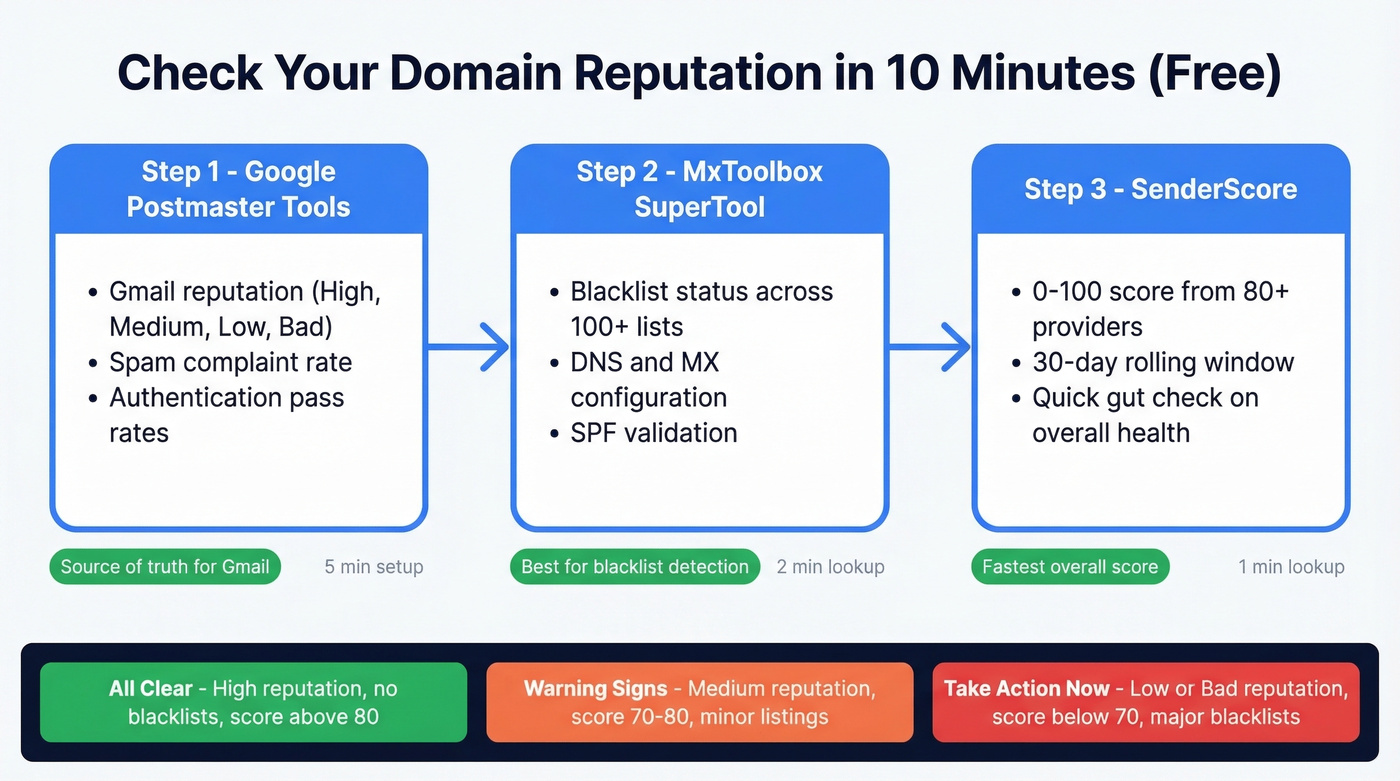
We've tested dozens of reputation tools. Three free ones cover the majority of what matters:
- Google Postmaster Tools - the source of truth for Gmail reputation
- MxToolbox - blacklist checks across 100+ lists plus DNS diagnostics
- SenderScore - a quick 0-100 score based on 30 days of sending data
Ten minutes to set up, zero dollars. If your reputation is tanked because of bounces and bad data, the fix starts upstream with verified contact data - but first, you need to know where you stand.
What Domain Reputation Actually Is
There's no single "domain reputation score." Every receiving mail server - Gmail, Microsoft, Yahoo - runs its own scoring process. Your Gmail reputation can be High while Microsoft is throttling you into Junk. That's normal, and it's why you need multiple tools.
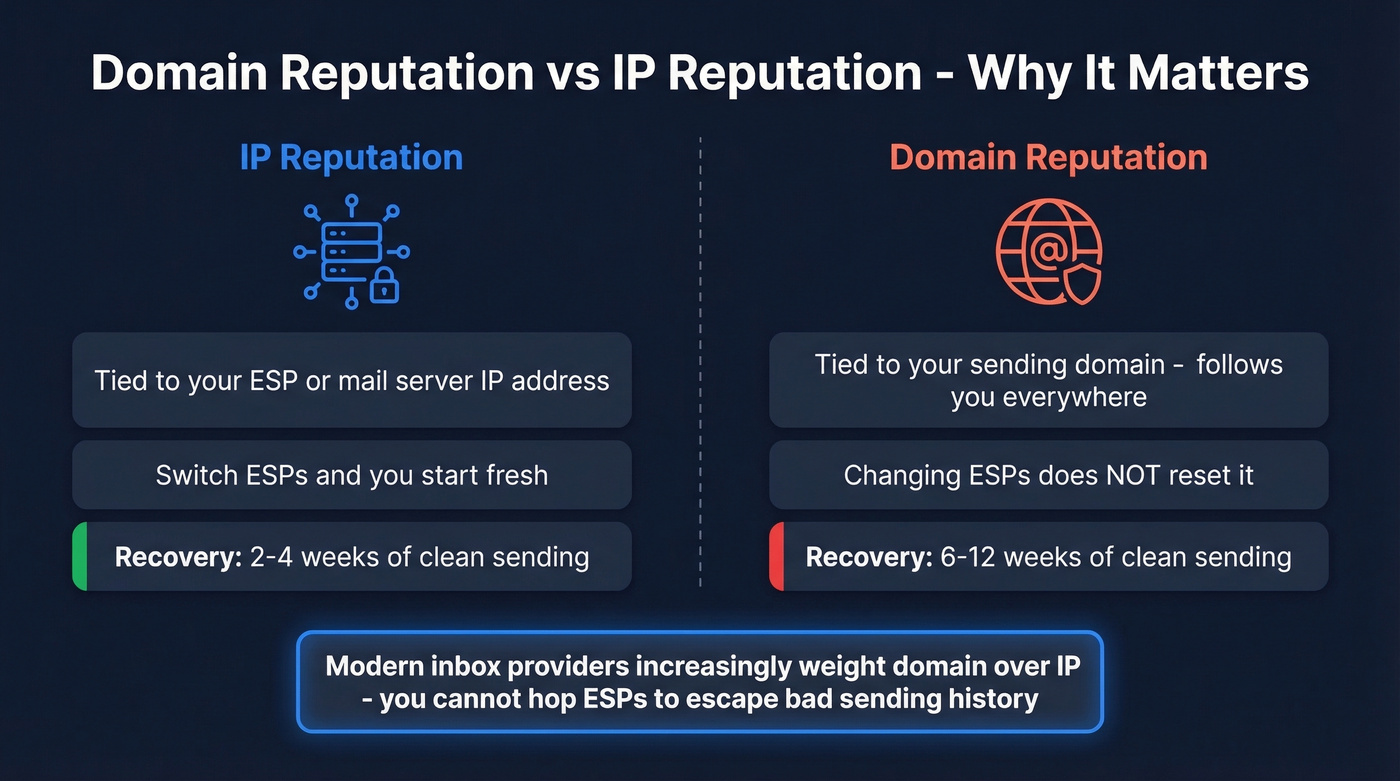
Your domain reputation gets evaluated everywhere it appears: From address, Return-Path, DKIM signing domain, even links in the email body. It's also distinct from security reputation. Security tools like VirusTotal check whether your domain is associated with malware or phishing. Email sending reputation is about bounce rates, spam complaints, engagement, and authentication - related but measured by completely different systems.
Here's a distinction worth internalizing: IP reputation and domain reputation recover on different timelines. Switch ESPs and you're building reputation on a new sending IP, which you can rebuild in 2-4 weeks of clean sending. Domain reputation follows you everywhere and takes 6-12 weeks to recover. Modern inbox providers increasingly weight domain over IP, so you can't just hop ESPs to escape a bad sending history.
Best Free Domain Reputation Tools
| Tool | What It Checks | Price | Best For |
|---|---|---|---|
| Google Postmaster Tools | Gmail reputation, spam rate, auth | Free | Gmail source of truth |
| MxToolbox | 100+ blacklists, DNS, MX | Free (1/day); $129/mo paid | Blacklist + DNS diagnostics |
| SenderScore | 0-100 sender score, 30-day rolling | Free | Quick overall score |
| Cisco Talos | Good/neutral/poor + spam level | Free | IP + domain lookup |
| BarracudaCentral | Barracuda blacklist status | Free | Barracuda-specific check |
| Spamhaus | Blocklists: SBL, XBL, PBL, DBL | Free | Most impactful blacklist |
| EasyDMARC | DMARC, SPF, DKIM, BIMI lookups | Free | Authentication-focused checks |
| VirusTotal | Multi-vendor security reputation | Free (web) | Security/malware reputation |
For deeper analysis beyond free tools, MailTester ($27/mo) and SendForensics ($39/mo) offer more granular diagnostics.
Google Postmaster Tools
This is the one that matters most if your audience uses Gmail or Google Workspace. It shows four reputation categories: High, Medium, Low, and Bad. The metric to watch is spam complaint rate - keep it below 0.1% for healthy delivery. Anything above 0.3% consistently and Gmail starts blocking.
One quirk worth knowing: you'll sometimes see a "100% spam rate" on days with zero sends. That's a delayed-complaint artifact, not a real crisis. Focus on the 30-day trend, not individual spikes.
MxToolbox
The Swiss Army knife. Its SuperTool runs 37 different lookups from a single search - blacklist status across 100+ lists, DNS records, MX configuration, SPF validation. The free tier limits you to one Domain Health Check every 24 hours, which is enough for a weekly check. If you're managing multiple sending domains, the $129/month plan adds monitoring for up to 5 domains. In our experience, MxToolbox catches blacklist issues faster than any other free tool.
SenderScore
Below 70? You've got deliverability problems. The score pulls data from 80+ email and security providers on a rolling 30-day window, so check weekly for trend shifts rather than obsessing over daily fluctuations. It's the quickest gut-check available.
Cisco Talos
See "neutral"? Don't panic. That often just means low sending volume or limited data, not an actual problem. Only "poor" requires immediate action.
Spamhaus
Skip this if you're only sending a few hundred emails a week - you're unlikely to show up here. But for anyone doing volume outbound, Spamhaus scores domains across five dimensions: human interaction, identity, infrastructure, malware presence, and SMTP practices. Getting listed here can tank your deliverability overnight.

Most domain reputation damage traces back to one root cause: sending to unverified emails. Prospeo's 5-step verification and 7-day data refresh cycle keep bounce rates under 4% - the threshold that keeps your domain out of blacklists and your emails in inboxes.
Fix your reputation at the source - start with 98% accurate emails.
How to Read Bounce Messages
Bounce codes tell you which system is blocking you, which matters because each requires a different remediation path:
| Bounce Code | Likely Blocker |
|---|---|
| 550 5.7.1 ...Client host blocked | Spamhaus |
| 550 SC-001 | Barracuda |
| 550 5.7.606 ...banned sending IP | Microsoft |
When you see these in your ESP's bounce logs, don't just retry. The code tells you exactly where to go for delisting.
If you want a deeper breakdown of bounce categories and what they mean, start with bounce codes and work backward to list quality.
2026 Compliance Changes
The inbox is getting harder. Since May 2025, Microsoft requires a DMARC record (at least p=none) for anyone sending 5,000+ emails per day - non-compliant mail gets filtered to Junk and will eventually be rejected outright. Gmail tightened enforcement further in late 2025, with failures in key sender requirements triggering temporary rate limits and permanent rejections.
If you're unsure whether your setup is aligned, review DMARC alignment and compare against a working SPF record.
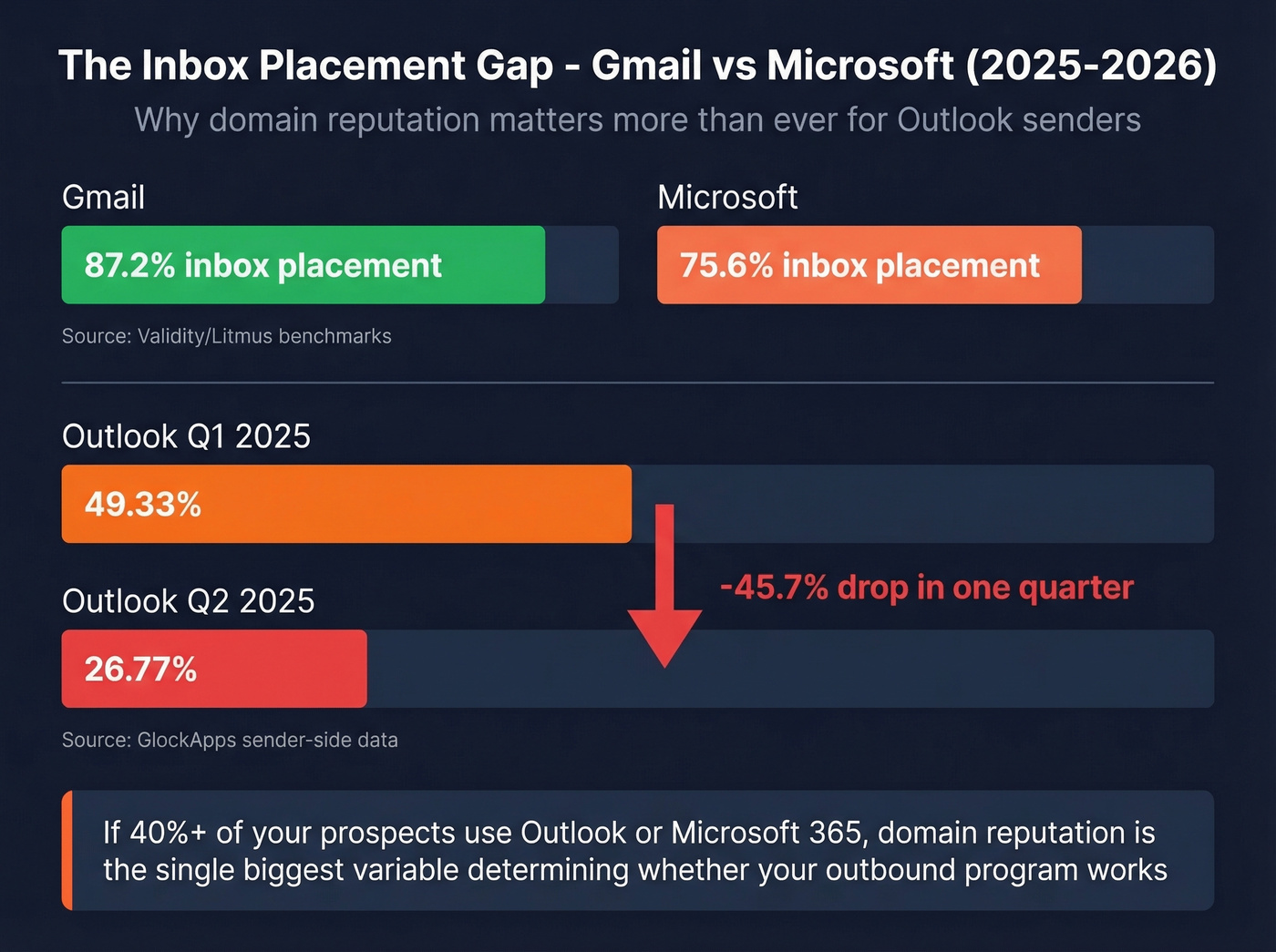
The numbers tell the story. Validity/Litmus benchmarks show Gmail at 87.2% inbox placement vs. Microsoft at 75.6% - and GlockApps' sender-side data paints an even grimmer picture for Outlook, with inbox placement dropping from 49.33% to 26.77% in a single quarter.
Let's be honest: if more than 40% of your prospect list uses Outlook or Microsoft 365, domain reputation isn't "nice to have." It's the single biggest variable determining whether your outbound program works at all. Most teams obsess over copy and sequencing while ignoring the infrastructure that actually gets messages delivered. If you need the full system view, use our email deliverability guide alongside these checks.
How to Fix Bad Reputation
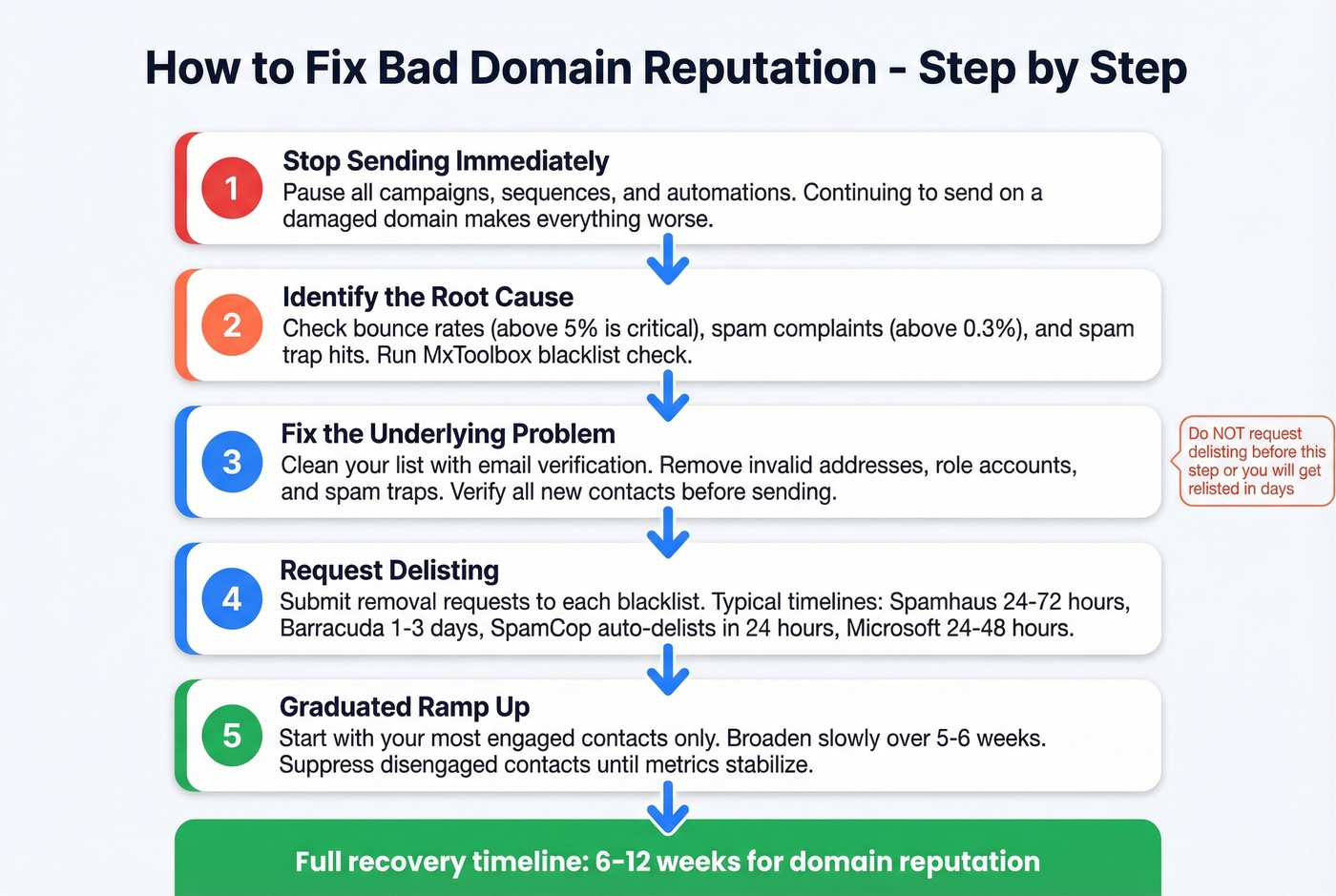
If you're blacklisted, the sequence is: stop sending, identify the cause, fix the root cause, request removal, ramp slowly. Don't request delisting before fixing the underlying problem - you'll just get relisted within days.
Delisting timelines vary:
| Blacklist | Typical Delisting Time |
|---|---|
| Spamhaus | 24-72 hours |
| Barracuda | 1-3 business days |
| SpamCop | Auto-delists in 24 hours |
| Microsoft | 24-48 hours |
| SURBL/URIBL | 2-7 days |
If Spamhaus is the issue, follow a dedicated Spamhaus blacklist removal process rather than guessing.
If your reputation is low but you're not blacklisted, use a graduated ramp. Start with your most engaged contacts - say, the 10,000 who opened in the last 10 days from a 150,000-person list. Broaden gradually over five to six weeks. Suppress disengaged contacts and pause risky automations until metrics stabilize. Also keep an eye on email velocity so you don't ramp too fast.

The Data Quality Root Cause
We've seen this pattern dozens of times: a team comes to us after getting blacklisted, and when we trace the problem back, it almost always starts with bad contact data. High bounce rates and spam trap hits are what get domains blacklisted in the first place. If your bounce rate is above 5%, the problem isn't reputation - it's your contact list.
Prospeo's 5-step email verification catches spam traps and honeypots that basic validators miss, and the 7-day data refresh cycle keeps bounce rates under 3%. If you're rebuilding your list, use a name to email workflow and validate before you send. Stack Optimize built to $1M ARR running client campaigns on Prospeo-verified data - 94%+ deliverability, under 3% bounce, zero domain flags across all clients.
You just spent 10 minutes checking your domain reputation. Now fix what's breaking it. Teams using Prospeo cut bounce rates from 35%+ to under 4% because every email is verified before it leaves your outbox. At $0.01 per email, clean data costs less than one blacklist delisting cycle.
Stop diagnosing deliverability problems. Eliminate the cause.
FAQ
How often should I run a reputation lookup?
Weekly if you're actively sending campaigns. Daily during warmup or after a deliverability incident. Google Postmaster Tools updates daily; SenderScore uses a 30-day rolling window, so weekly checks catch trend shifts before they become crises.
Can I check any domain's reputation for free?
Yes. MxToolbox, Cisco Talos, VirusTotal, and Spamhaus let anyone look up any domain without authentication. Google Postmaster Tools is the exception - you must verify domain ownership via DNS to access Gmail-specific reputation data.
What's the fastest way to get a domain reputation score?
SenderScore gives you a 0-100 score in seconds - just enter your sending domain or IP. For a more complete picture, pair it with Google Postmaster Tools for Gmail data and MxToolbox for blacklist status. Together, these three tools cover the full spectrum of what matters when you check domain reputation online.
Does email verification prevent reputation damage?
Directly, yes. High bounce rates and spam trap hits are the top causes of blacklisting. Verifying emails before sending keeps bounce rates low and your domain off blocklists. Prevention is always cheaper than remediation - a delisting request takes days, while verifying a list takes minutes.