

How to Check Email Address Authenticity (Two Ways)
You pasted an email into a free checker, got "valid" back - then it bounced on the first send. Or maybe you got an email from your "CEO" asking for a wire transfer, and something felt off. These are two completely different problems, and most guides only cover one.
What You Need (Quick Version)
- Checking if a sender is legit? Inspect the From address, check email headers for SPF/DKIM/DMARC, and search the domain via WHOIS.
- No tool hits 100%. Catch-all domains and greylisting guarantee edge cases. Most verification tools flag these as "risky" or "unknown" so you can decide what to do with them.
How Email Verification Works
Every verification tool runs roughly the same four-step process under the hood. The differences come down to how well each handles the edge cases.
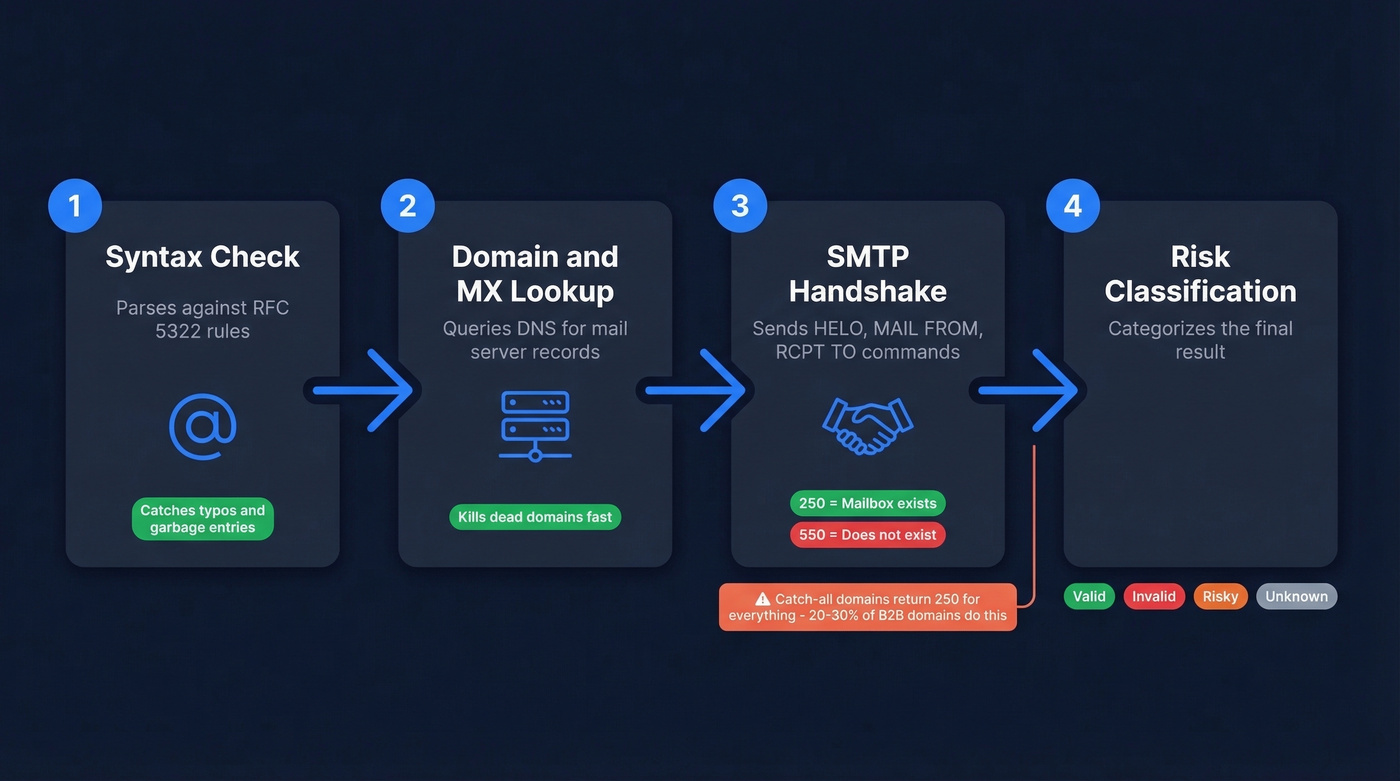
Step 1: Syntax check. The tool parses the address against RFC 5322 formatting rules. Does it have an @ symbol? Is the local part valid? This catches typos and garbage entries, but it doesn't prove anything exists on the other end.
Step 2: Domain and MX lookup. The tool queries DNS for MX records - the servers responsible for receiving mail at that domain. No MX record means the address can't receive email. Quick kill for dead domains.
Step 3: SMTP handshake. Here's where the real verification happens. The tool opens a connection to the recipient's mail server and sends partial SMTP commands - HELO, MAIL FROM, RCPT TO - without actually delivering a message. A 250 response code means the server accepted the recipient. A 550 means the mailbox doesn't exist.
Step 4: Risk classification. The tool categorizes the result as valid, invalid, risky, or unknown. This is where catch-all domains cause problems.
Here's the thing: 20-30% of B2B domains use catch-all configurations. These servers accept mail for any address - even ones that don't exist - so the SMTP handshake always returns a 250. About 23% of unverified catch-all emails hard bounce when you actually send. Greylisting), where servers temporarily reject the first connection attempt, piles false negatives on top of that.
In our testing, catch-all domains were the single biggest source of false positives across every tool we evaluated. No tool can promise 100% accuracy. Anyone who claims otherwise is selling you something.

Catch-all domains fool every tool on this list. Prospeo's 5-step verification includes catch-all handling, spam-trap removal, and honeypot filtering - built on proprietary infrastructure, not third-party providers. 98% accuracy on 143M+ emails, refreshed every 7 days.
Skip the false positives. Verify authenticity before you hit send.
Spotting Fake Senders
This is the security side of email authenticity - figuring out whether a message actually came from who it claims to be. Phishing accounts for over 80% of cyberattacks, costing businesses $50B annually.
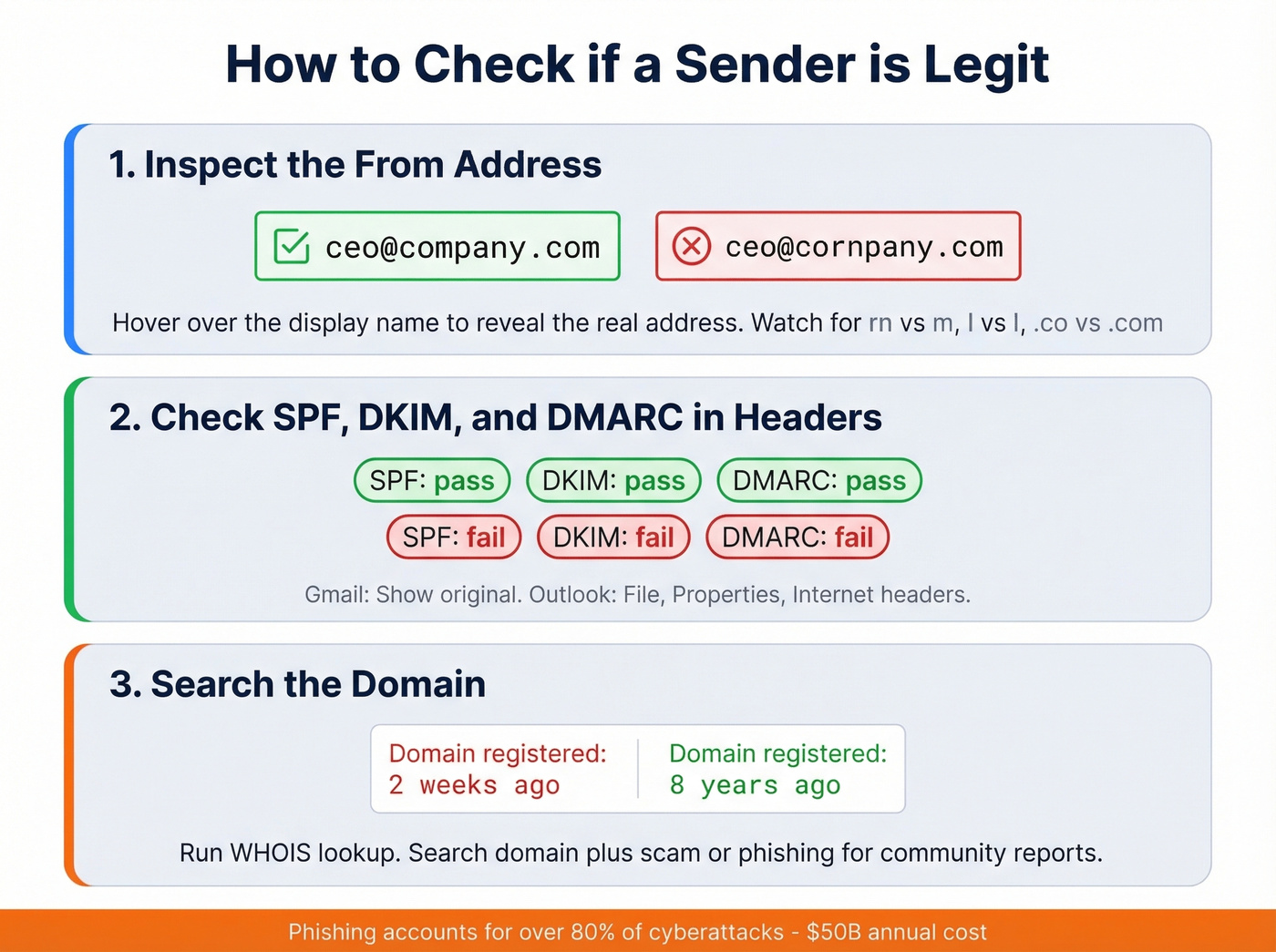
Inspect the From address. Hover over the sender's display name to reveal the actual email address. Compare it against known emails from that person. Watch for character substitution tricks - "rn" rendered as "m," "l" swapped for "1," ".co" instead of ".com." The classic CEO wire-transfer scam relies on you not hovering.
Check headers for SPF/DKIM/DMARC. In Gmail, click "Show original." In Outlook, go to File, then Properties, and look at Internet headers. You're looking for Received-SPF: pass, dkim=pass, and dmarc=pass in the Authentication-Results line. A fail on any of these is a red flag. MXToolbox's Header Analyzer can parse this automatically if you don't want to read raw headers.
Search the domain. Run the sender's domain through WHOIS or ICANN lookup. A domain registered two weeks ago claiming to be your bank's fraud department? Obvious tell. Search the domain plus "scam" or "phishing" for community reports.
Best Tools for Email Validation
We've run enough verification bake-offs to know that accuracy claims are the most inflated numbers in this space. Still, benchmark tests across 10,000+ contacts give us a reasonable comparison.
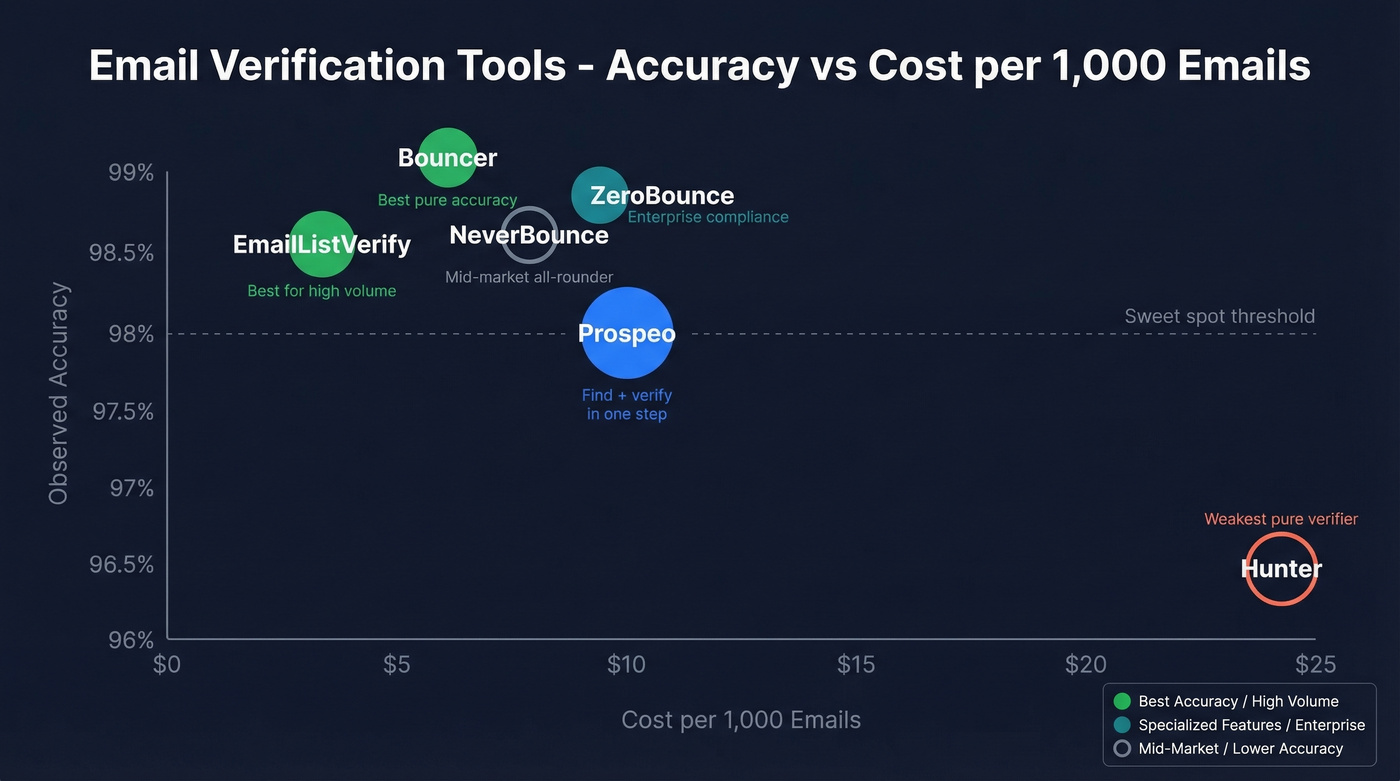
Let's be honest - on r/coldemail, a common complaint is that verification tools charge too much for what's essentially the same four-step process. That's fair. But the gap between 96% and 99% accuracy can be the difference between staying under bounce-rate thresholds and torching your sender reputation (and your sender reputation).
| Tool | Observed Accuracy | Cost/1K | Cost/10K | Free Tier | Best For |
|---|---|---|---|---|---|
| Prospeo | 98% | ~$10 | ~$100 | 75 emails/mo + 100 extension credits/mo | Find + verify in one step |
| Bouncer | 98.9% | $7 | $45 | Free trial: 1,000 credits | Pure verification accuracy |
| EmailListVerify | 98.5% | $4 | $24 | Free single checker | High-volume budget cleans |
| ZeroBounce | 98.8% | $8-$10 (2K min) | $64 | 100 credits | Enterprise compliance |
| NeverBounce | 98.6% | $8 | $50 | Free trial: 1,000 credits | Mid-market all-rounder |
| Hunter | 96.4% | ~$24.50 | $149 | 100 verifications/month | Email finder with basic verify |

If pure verification is all you need and you already have your list, Bouncer is hard to beat. It leads on raw observed accuracy at 98.9%, prices reasonably at $7/1K, and Capterra reviewers give it a 4.9 across 233 reviews.
For teams running 50K+ list cleans monthly, EmailListVerify at $4/1K is the obvious pick. At $24 for 10K verifications, it's the cheapest option that still clears 98% observed accuracy.
Prospeo plays a different game entirely. Instead of verifying a list you already built somewhere else, it finds and verifies emails in one step - pulling from 143M+ verified emails on a 7-day refresh cycle versus the 6-week industry average. Its proprietary 5-step verification process includes catch-all handling, spam-trap removal, and honeypot filtering (see spam-trap removal), which eliminates the "find, export, upload, verify, download" workflow. At ~$0.01 per email, the economics work for sales prospecting teams who need both discovery and verification.
ZeroBounce comes in at 98.8% observed accuracy and is built for teams that care about compliance and process. Its pay-as-you-go pricing starts at a 2,000-email minimum purchase, which can be awkward for small batches. NeverBounce is the solid mid-market option - $8/1K with a generous 1,000-credit free trial and no minimum.
Skip Hunter if you only need verification. Its 96.4% observed accuracy makes it the weakest pure verifier here, and you're paying nearly $25/1K because the email finder is bundled in. Fine if you use both features, expensive if you don't (if you're comparing options, see Hunter alternatives).
Our take: Most teams don't need the most accurate verifier - they need the one that fits their workflow. If you're already building lists manually and just need to clean them, Bouncer or EmailListVerify will save you money. If you're spending hours finding emails before you even get to verification, collapsing those steps into one is worth more than a 0.9% accuracy edge.
For context, the industry benchmark is to keep total bounces below 2%, with top performers targeting under 1% (more on email bounce rate).
Maintain Email Authenticity Over Time
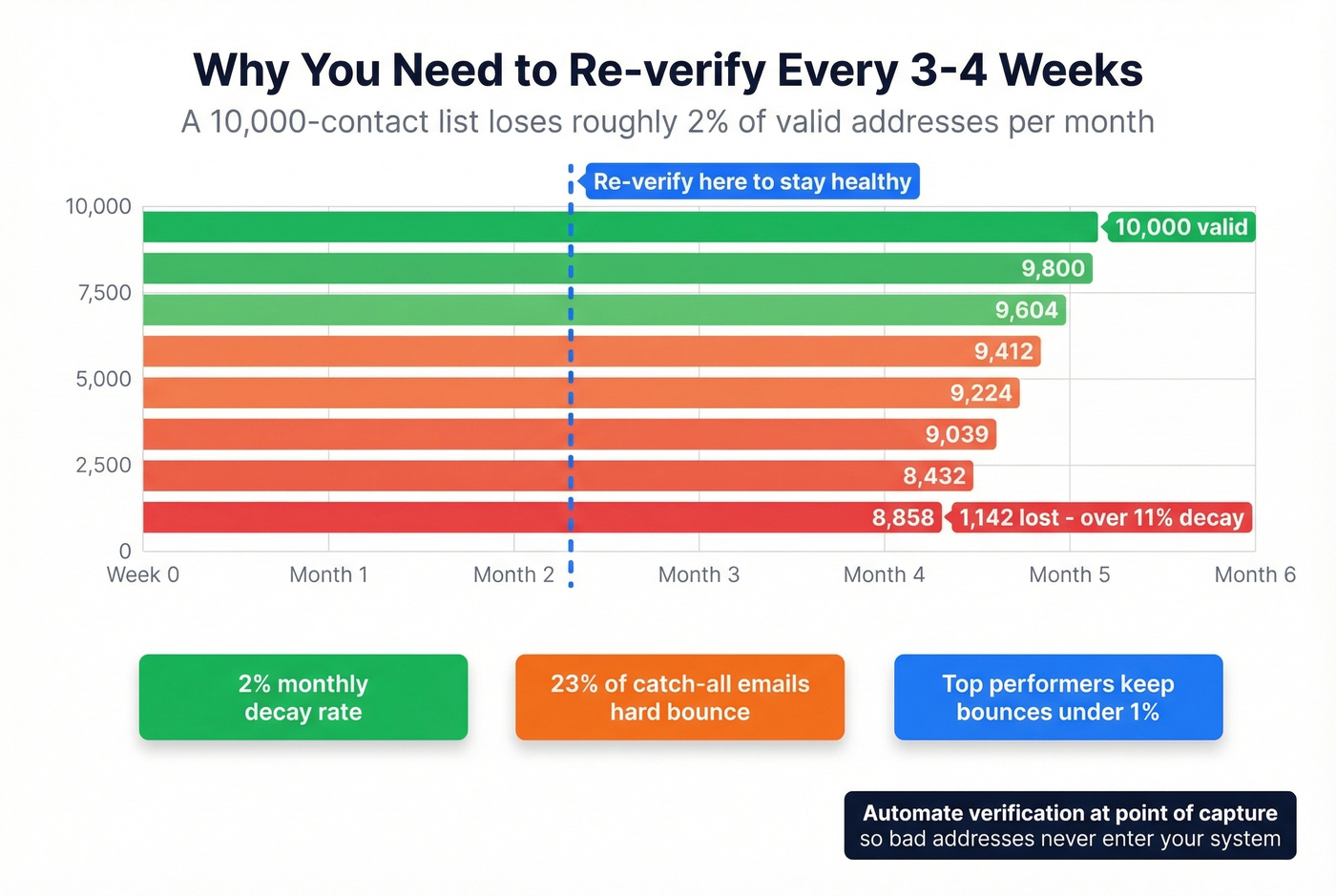
Re-verify every 3-4 weeks. After four weeks, roughly 2% of a verified list goes invalid due to job changes, deactivated accounts, and domain shifts. That decay compounds fast - a 10,000-contact list loses ~200 valid addresses per month if you don't maintain it.
Segment catch-all results instead of blasting them. Test in small batches and monitor bounce rates before scaling sends.
Automate verification at point of capture by wiring it into your forms, CRM workflows, or API integrations so bad addresses never enter your system in the first place. And don't treat verification as a deliverability fix-all. It reduces bounces, but content quality, sending reputation, and warm-up matter just as much (see email deliverability and email warmup). If you're verifying because you don't trust the source, the real fix is switching to pre-verified data upstream rather than cleaning up downstream (compare email list providers and data enrichment services).
You just read about the find-export-upload-verify-download workflow. Prospeo kills it. Find and verify emails in one step from 300M+ profiles at ~$0.01 each - no separate verification tool needed. 75 free emails per month, no contract.
Collapse two tools into one and cut your bounce rate under 4%.
FAQ
Can I check a single email address for free?
Yes. Mailmeteor, Hunter, and Verifalia all offer free single-email checks. Prospeo's free tier covers 75 email lookups per month with full verification - enough for light prospecting without paying anything.
Why did a "valid" email still bounce?
Most likely a catch-all domain. These servers accept all incoming mail at the SMTP level, even for nonexistent mailboxes. About 23% of unverified catch-all emails hard bounce on actual sends. The best tools flag catch-alls as "risky" so you can decide whether to send.
How often should I re-verify my email list?
Every 3-4 weeks. After four weeks, roughly 2% of a verified list goes invalid from job changes and deactivated accounts. Re-verify before every major campaign, and automate the process if your volume justifies it.
What's the difference between email verification and email authentication?
Verification confirms a mailbox exists and can receive messages - it's a deliverability check. Authentication via SPF, DKIM, and DMARC confirms the sender's identity is legitimate and the message wasn't spoofed. You need both: verification before sending outbound, authentication checks when receiving inbound.