

How to Check Email Address Blacklist Status - And What to Do About It
Your outbound numbers were fine last Tuesday. By Thursday, reply rates cratered and bounces tripled. Something changed - and there's a good chance your IP or domain landed on a blacklist.
The numbers paint the picture: 60% of emails reach a visible mailbox, 36% hit spam, and 4% get blocked outright. When email marketing generates $36 for every $1 spent, a blacklisting doesn't just hurt deliverability - it bleeds revenue.
The pattern we see constantly mirrors what practitioners describe on r/coldemail: deliverability dips, someone finally runs a blacklist check, finds an old domain listed, delists it, cleans the list, and things recover. The fix isn't complicated. But knowing which listings matter and how to prevent recurrence is where most guides fall short.
Quick Blacklist Check Steps
If you're in a hurry:
- Run a check using MxToolbox or Spamhaus Lookup. Enter your sending IP and domain.
- Prioritize Spamhaus listings. If you're on Spamhaus, act immediately. Everything else can wait.
- Fix the root cause before requesting delisting. Submitting a removal request while still sending to a dirty list gets you re-listed within days.
- Verify your list to prevent recurrence. Run contacts through an AI Email Checker before your next campaign - spam traps and dead addresses are what got you here.
What Blacklist Checks Actually Reveal
Here's a common misconception: DNSBLs (DNS-based blocklists) don't list individual email addresses. They list IPs and domains. When someone says "my email is blacklisted," what they really mean is their sending IP or domain has been flagged. A flagged address is almost always a symptom of sender reputation issues, not an address-level block.
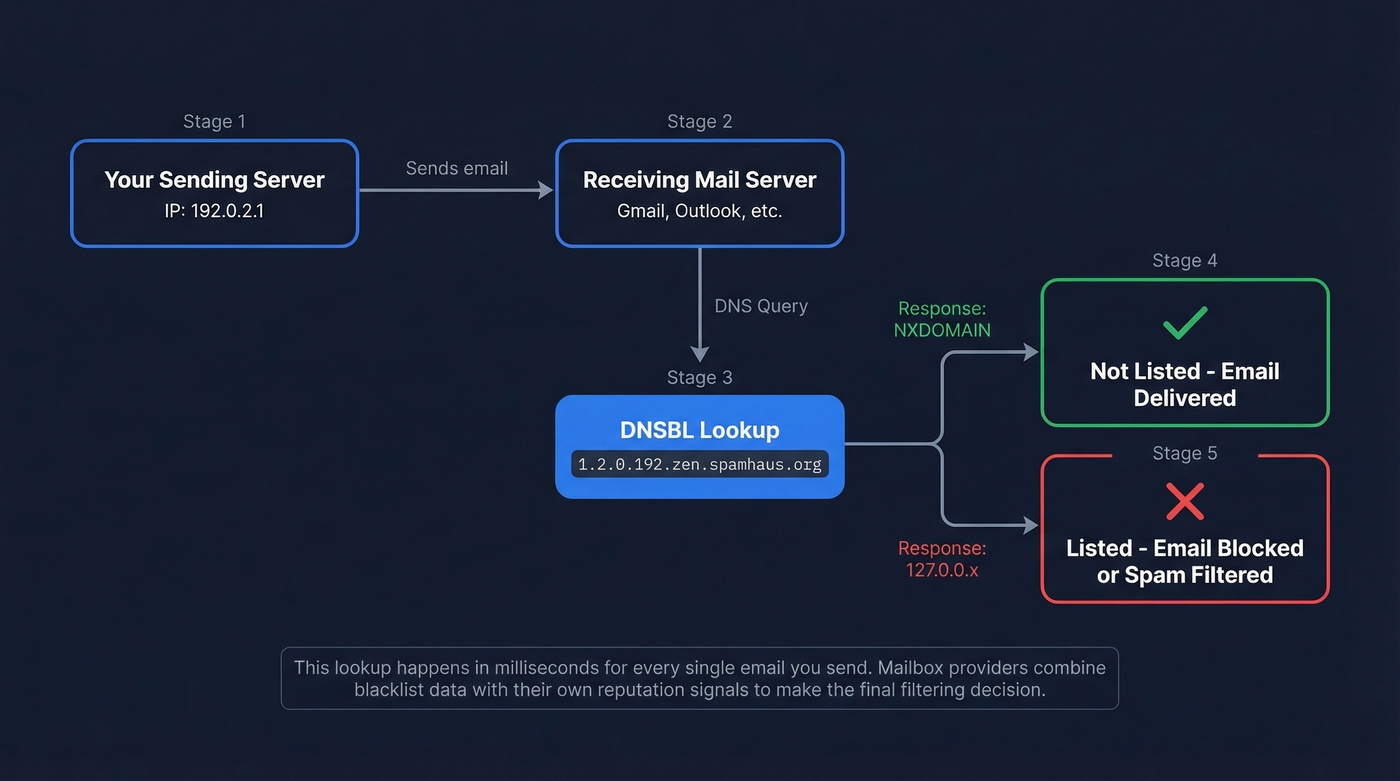
Change your ESP to escape an IP listing, and your domain blacklist follows you anyway. IP blocklists track your sending server infrastructure. Domain blocklists track the domains in your From address, links, and content. Domain reputation travels with you no matter where you send from.
The lookup mechanics are straightforward. A receiving mail server takes your sending IP, reverses it, and appends the blocklist's zone - something like 1.2.0.192.zen.spamhaus.org. If the response comes back as 127.0.0.x, you're listed. NXDOMAIN means you're clean. This happens in milliseconds during every email delivery.
One critical framing from Mailgun's blocklist guide: blocklists don't actually block messages. Mailbox providers do. They use blocklist data alongside their own internal reputation signals to make filtering decisions. A listing is a data point, not a death sentence - but on the right list, it's a very loud data point.
Which Blacklists Actually Matter
Not all blacklists are created equal. Anyone can create a blocklist - including, as Mailgun notes, "lesser-known companies and sometimes fraudsters." The question isn't whether you're listed somewhere. It's whether you're listed somewhere that matters.
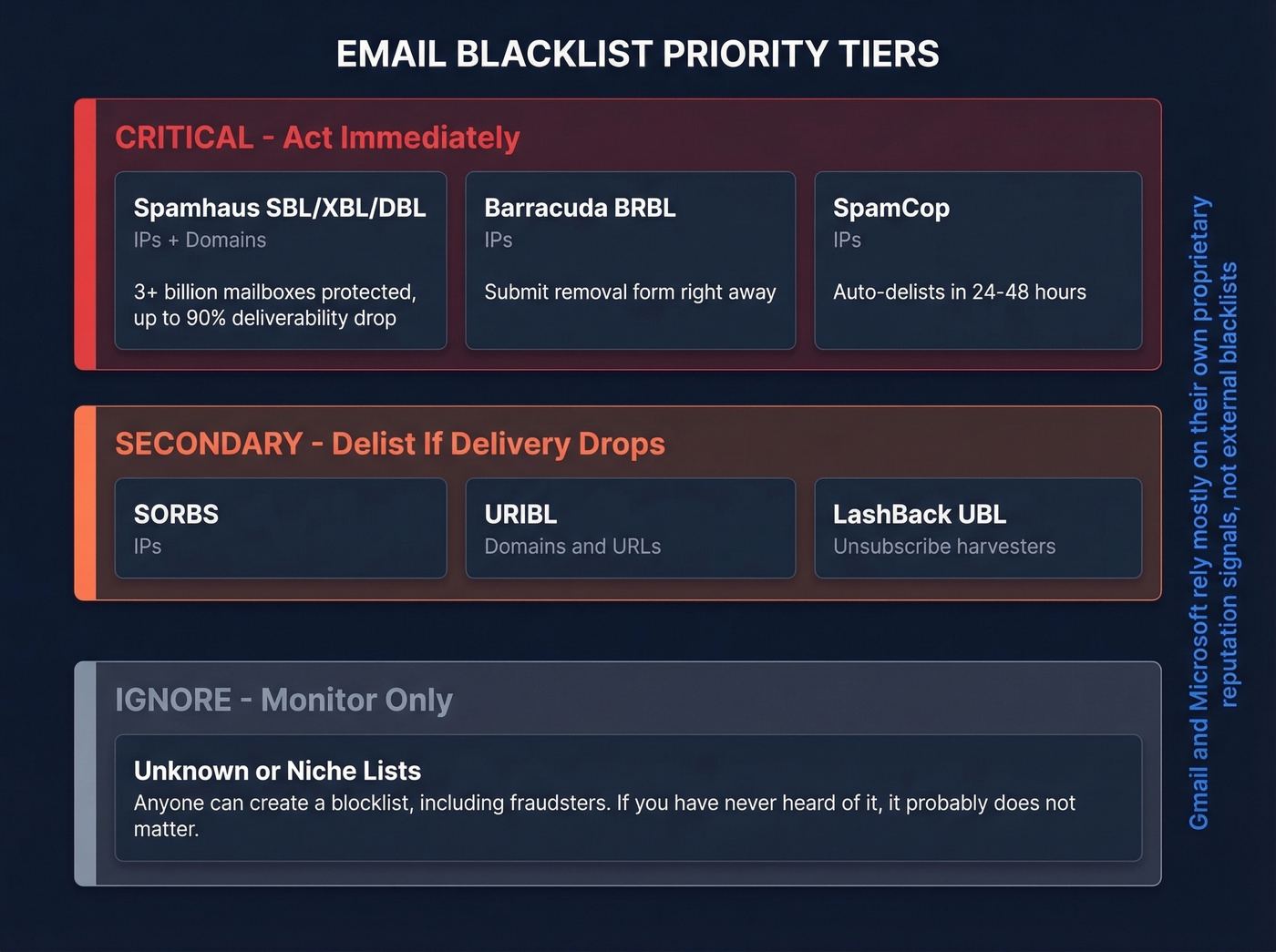
Spamhaus protects 3+ billion mailboxes and is widely used across major email ecosystems. A Spamhaus listing can reduce deliverability by up to 90% within hours.
| Tier | Blacklist | What It Tracks | Action If Listed |
|---|---|---|---|
| Critical | Spamhaus (SBL/XBL/DBL) | IPs + domains | Delist immediately |
| Critical | Barracuda BRBL | IPs | Delist immediately |
| Critical | SpamCop | IPs | Wait 24-48h (auto-delists) |
| Secondary | SORBS | IPs | Delist if delivery drops |
| Secondary | URIBL | Domains/URLs | Delist if delivery drops |
| Secondary | LashBack UBL | Unsubscribe harvesters | Delist if delivery drops |
| Ignore | Unknown/niche lists | Varies | Monitor only |
A thread on r/email captures the confusion well: a user reported that a brand-new domain got flagged on an obscure list within hours of setup, with zero impact on Gmail delivery. Gmail and Microsoft rely heavily on proprietary reputation and engagement signals. Smaller providers lean on external blacklists more.
Let's be honest: if you're listed on some random blocklist you've never heard of, ignore it. Spend that energy on email reputation tools instead. If you're listed on Spamhaus, stop what you're doing and fix it now.
Best Free Tools for a Blacklist Check
Most blacklist checkers are functionally identical - they query the same DNSBLs via the same DNS lookup mechanism. Pick one and run the check. Don't spend an afternoon comparing tools that return the same results.
| Tool | Lists Checked | Accepts | Monitoring | Pricing |
|---|---|---|---|---|
| MxToolbox | 100+ | IP, domain | Yes (paid) | Free checks; monitoring ~$100+/mo |
| Spamhaus Lookup | Spamhaus only | IP, domain | No | Free |
| ZeroBounce | 300+ | IP, domain, email | Yes | Free checker; paid monitoring ~$10-30/mo |
| DNS Checker | 100+ | IP, domain, email | No | Completely free |
| Mailmeteor | 100+ | IP, domain, email | No | Free, no sign-up |
| CleanTalk | 50+ | IP, email | No | Free manual lookup; paid API available |

MxToolbox is the default for a reason - it's been around forever, checks 100+ lists, and offers paid monitoring that alerts you when a new listing appears. If you only check one tool, make it MxToolbox. For the list that matters most, go directly to Spamhaus Lookup. ZeroBounce checks the broadest range at 300+ lists if you want maximum coverage.

Most blacklistings trace back to one thing: sending to unverified contacts. Prospeo's 5-step verification process - with catch-all handling, spam-trap removal, and honeypot filtering - eliminates the dead addresses and traps that trigger listings. 98% email accuracy means your domain stays clean.
Stop fixing blacklist damage. Start preventing it at the source.
How to Interpret Your Results
Listed on Spamhaus? Act now. Listed on some obscure list you can't even Google? Monitor only.
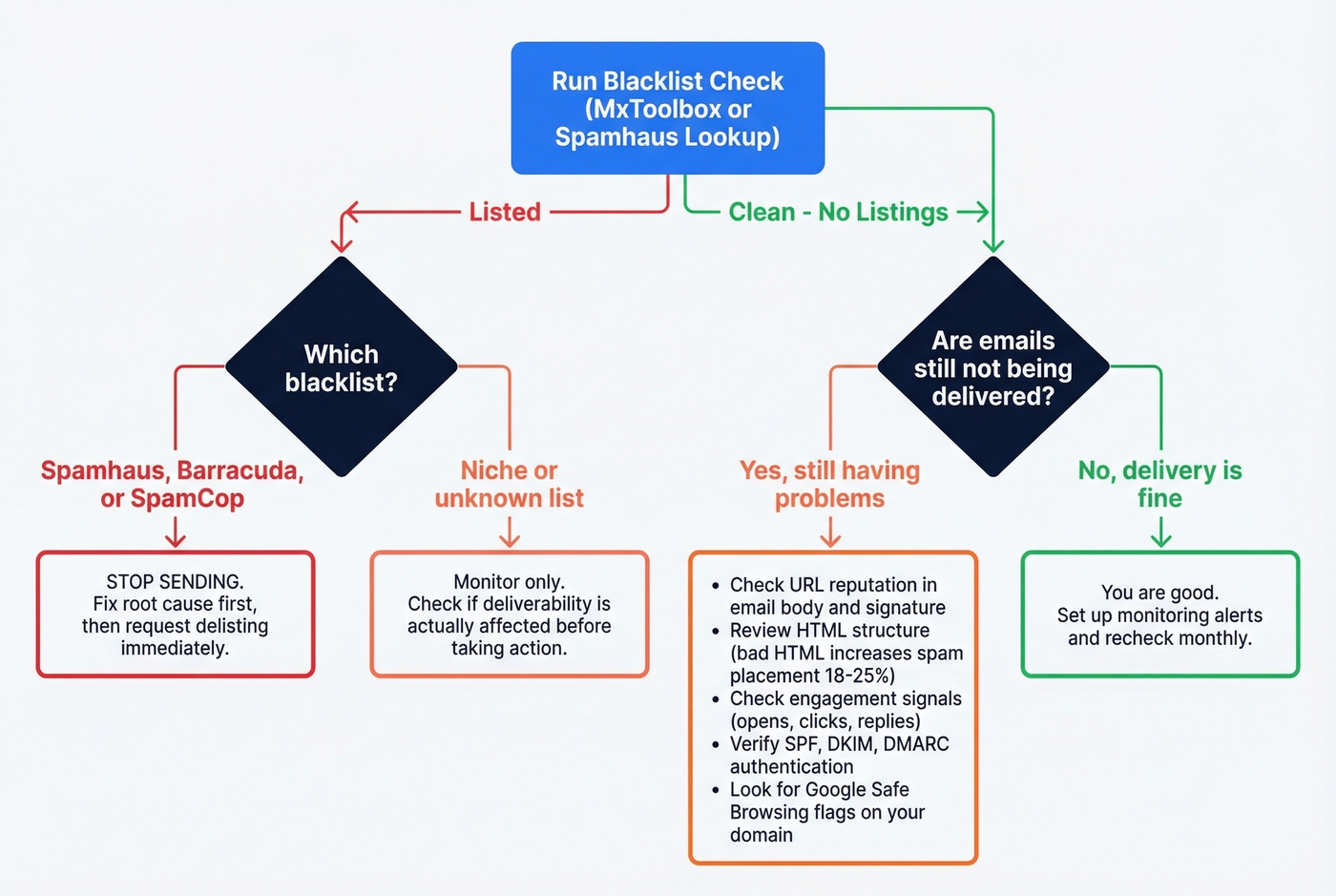
That's the decision tree. But there's a nuance most guides skip: blacklist status doesn't always correlate with deliverability problems. Gmail and Microsoft rely heavily on proprietary reputation scores and engagement signals - opens, clicks, replies, complaints. A Spamhaus listing will hurt you everywhere. A listing on a niche blocklist won't move the needle at all.
The trickier scenario is the reverse: your blacklist checks come back clean, but recipients still aren't getting your emails. A sysadmin on Reddit described exactly this - after a WordPress compromise, all blacklist scanners showed no issues, yet emails were being blocked. The fix? Removing the website URL from the email signature. The block was tied to Google Safe Browsing flagging the domain as malicious, not a traditional DNSBL listing.
If your checks are clean but delivery is still broken, look at these angles:
- URL reputation in your email body or signature
- Poor HTML structure, which alone increases spam placement by 18-25%
- Low engagement signals
- Authentication failures
Bounce codes help too. A 421 temporary deferral typically means the server is throttling you, while a 550 permanent rejection means you're actively blocked. That distinction helps you separate a reputation dip from a hard block. If you need a deeper breakdown, use this bounce code guide.
How to Get Delisted
Before you submit a single removal request, fix the root cause. We can't stress this enough - delisting without addressing the underlying problem gets you re-listed within days, sometimes hours.
- Identify the root cause - spam traps, bounces, compromised account, open relay
- Fix it - clean your list, patch the vulnerability, update authentication
- Identify which blacklist flagged you - run MxToolbox or Spamhaus Lookup
- Follow the per-blacklist delisting process
- Re-check after the expected timeframe and set up monitoring
| Blacklist | Process | Timeline |
|---|---|---|
| SpamCop | Auto-delists if no new reports | 24-48h |
| Barracuda BRBL | Submit form with IP, email, phone, reason | ~12-24h first offense |
| Spamhaus SBL | Submit removal with identity + corrective measures | 24-72h manual review |
| Spamhaus XBL/CBL | Automatic after fixing infection/proxy | Hours to 24h |
| SORBS | Lookup, then follow delisting link (may require account) | Hours to several days |
| UCEProtect L1 | Wait 7 days (free) or pay "express" - don't | 7 days |
In our experience, the "reason for removal" field on Barracuda's form is what separates a 12-hour delist from a 72-hour wait. A specific explanation - "removed 12,000 unverified contacts, implemented double opt-in, patched open relay on port 25" - gets faster treatment than "please remove me."
Barracuda listings typically surface as bounce codes like 450 4.7.1 Try Later; see barracudacentral.org/rbl/removal-request. The BRBL is IP-based, not domain-based. Submit once and wait. Multiple requests get ignored.
Don't pay to be delisted. If a blacklist asks for payment, ignore it. UCEProtect's paid "express" removal is the one controversial exception - waiting the 7 days is the better move.
Why You Got Blacklisted
The blacklist is a symptom. The real problem is the data or infrastructure that got you there. These are the most common triggers, roughly in order of frequency:
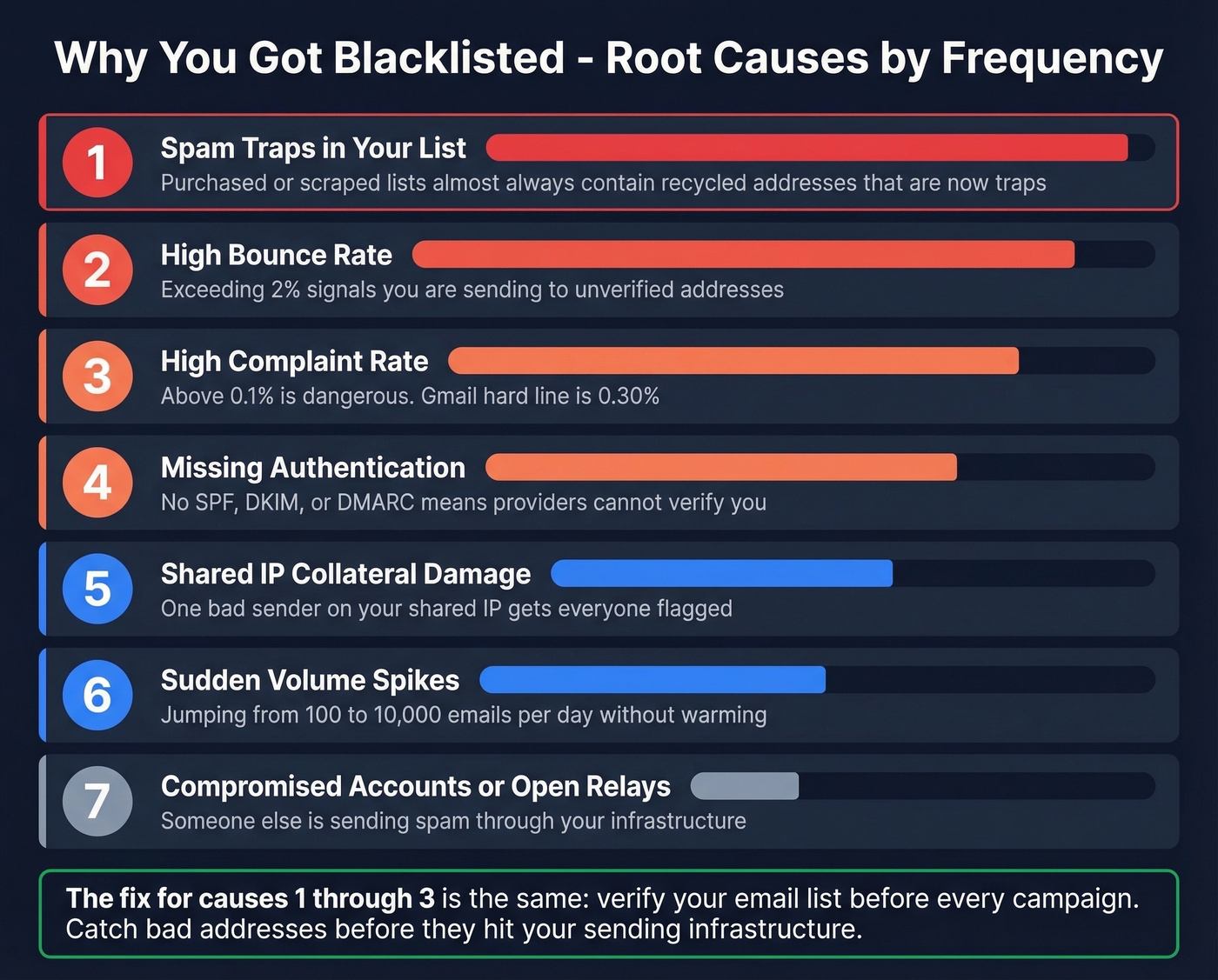
- Spam traps in your list - purchased or scraped lists almost always contain recycled addresses that are now traps (see spam trap removal)
- High bounce rate - exceeding 2% signals you're sending to unverified addresses
- High complaint rate - above 0.1% is dangerous; Gmail's hard line is 0.30%
- Missing authentication - no SPF, DKIM, or DMARC means mailbox providers can't verify you're legitimate
- Shared IP collateral damage - one bad sender on your shared IP gets everyone flagged
- Sudden volume spikes - jumping from 100 emails/day to 10,000 without warming looks like a compromised account
- Compromised accounts or open relays - someone else is sending spam through your infrastructure
You can test for open relays with a quick telnet SMTP session against your mail server. If it accepts a RCPT TO for an external domain without authentication, you've found your problem.
If your bounce rate is above 2%, your list is the problem. Run it through a verification tool before your next campaign - spam traps and dead addresses are what got you here, and catching them before they hit your sending infrastructure is the entire game.
How to Prevent Future Blacklisting
Getting delisted is the easy part. Staying off blacklists requires ongoing discipline across three areas.
Email Authentication
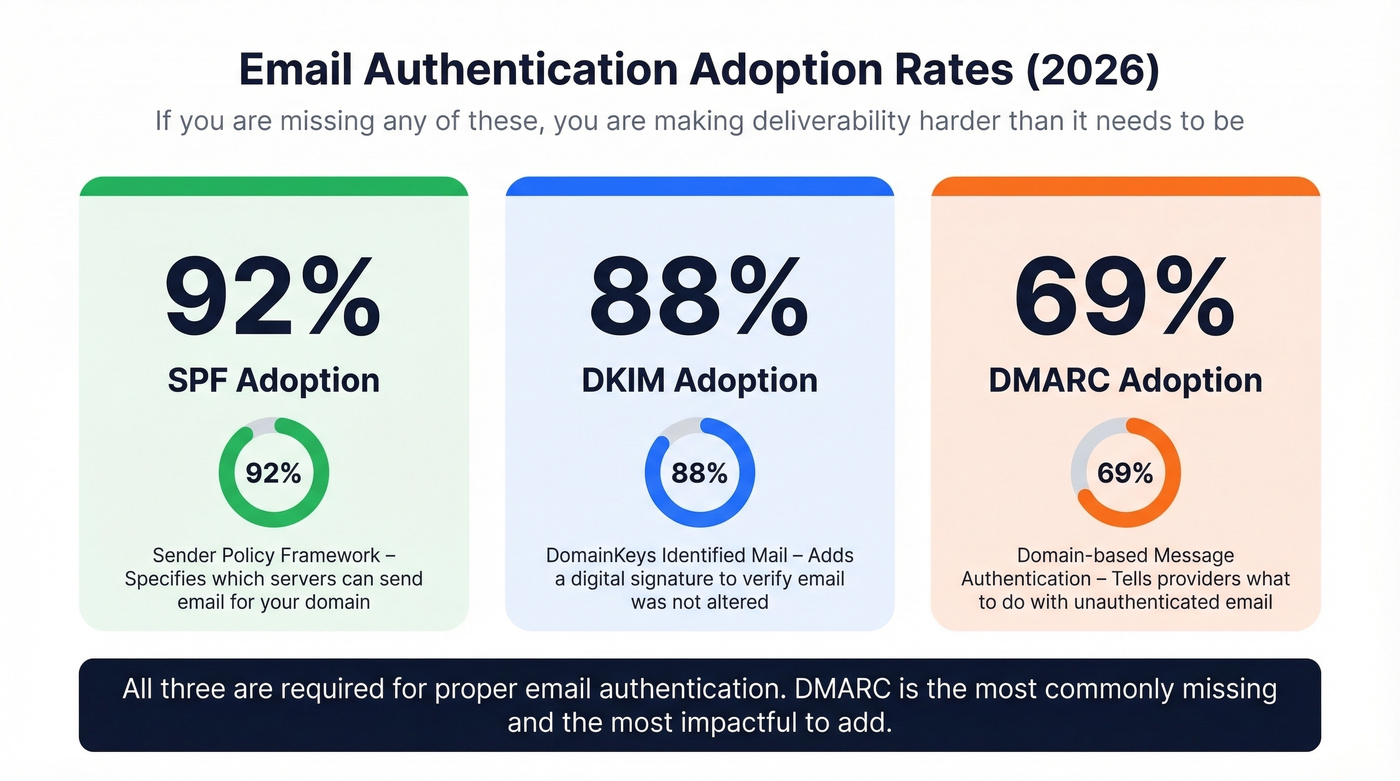
SPF adoption sits at 92%, DKIM at 88%, and DMARC at 69% in recent testing. If you're missing any of these, you're making it easy for blocklist operators to distrust you. All three should be configured and passing - free generators from MxToolbox and EasyDMARC make setup straightforward. If you want to go deeper, start with SPF record examples and DMARC alignment.
The quick win most teams miss: the List-Unsubscribe header. Only 14% of senders include it. Adding it reduces complaint rates because recipients can opt out without hitting "Report Spam." That's a five-minute configuration change that directly protects your reputation.
List Hygiene and Volume Management
Most blacklistings trace back to dirty data. Prospeo's 5-step verification catches spam traps, honeypots, and catch-all domains before they hit your sending infrastructure, with every record refreshing on a 7-day cycle. Teams like Snyk went from 35-40% bounce rates to under 5% after switching to verified data - that's the difference between blacklist risk and clean delivery.

IP warming isn't optional either. New IP or domain? Start with low volume and scale gradually over 2-4 weeks. Jumping straight to high volume is one of the fastest ways to trigger automated blacklisting. (If you're sending cold outbound, this email velocity guide helps.)
Reputation Monitoring
Google Postmaster Tools V2 now emphasizes a Compliance Status dashboard - pass or fail. The spam rate thresholds remain the same: 0.10% recommended ceiling, 0.30% policy violation. Cross the 0.30% line and you've got a 7-day window to fix things before mitigation support disappears. Check Postmaster Tools weekly at minimum.
Cleaning your list after a blacklisting is damage control. Building with verified data from day one is prevention. Prospeo refreshes 300M+ profiles every 7 days - not every 6 weeks - so you never send to contacts that have gone stale and turned into bounce traps.
Fresh data every 7 days. Bounce rates under 4%. Zero domain flags.
FAQ
Can a single email address be blacklisted?
DNSBLs list IPs and domains, not individual addresses. If your emails are being blocked, the issue is your sending IP or domain reputation - not the specific "From" address. Run both your IP and sending domain through MxToolbox to find the actual listing.
How often should I check my blacklist status?
Weekly if you send high-volume outbound; immediately after any deliverability dip. MxToolbox offers automated monitoring that alerts you to new listings, which beats manual checks for teams sending 1,000+ emails per day.
Does Gmail use external blacklists?
Gmail relies primarily on internal reputation and engagement signals but references Spamhaus data. No public "Gmail blacklist" exists. Monitor your reputation through Google Postmaster Tools V2, which shows Compliance Status and spam rate trends.
How long does delisting take?
SpamCop auto-delists in 24-48 hours. Barracuda processes requests in 12-24 hours for first offenses. Spamhaus SBL takes 24-72 hours with manual review. Always fix the root cause before requesting removal - otherwise you'll be re-listed within days.
What's the best way to prevent blacklisting?
Verify every contact before sending. Combine verification with SPF/DKIM/DMARC authentication and keep bounce rates under 2% - that covers 90%+ of blacklisting causes. The authentication piece is table stakes; the list quality piece is where most teams fall down.