

How to Check an Email Address Online - And Which Tools Actually Work
You're an SDR, it's Monday morning, and your first Outreach sequence just came back with a 19% bounce rate. Your domain reputation is tanking. Half the "verified" contacts your enrichment tool handed you don't even exist. That's what happens when you don't know how to check an email address online properly - or when you trust the wrong tool to do it.
Every verification vendor plasters "99% accuracy" on their homepage. Benchmarks that score "unknown" results as wrong show the real number is closer to 68-70%. Let's cut through the marketing.
What You Need (Quick Version)
ZeroBounce - best standalone bulk verifier. 100 free verifications/month, 45 integrations, SOC 2 Type 2 certified.
EmailListVerify - cheapest for large lists at $24/10K emails. No frills, gets the job done.
How Email Verification Works
Email verification runs a 4-step pipeline that checks whether an address is real without ever sending a message. Understanding this pipeline helps you evaluate why tools disagree on the same email - and why some results come back "unknown."
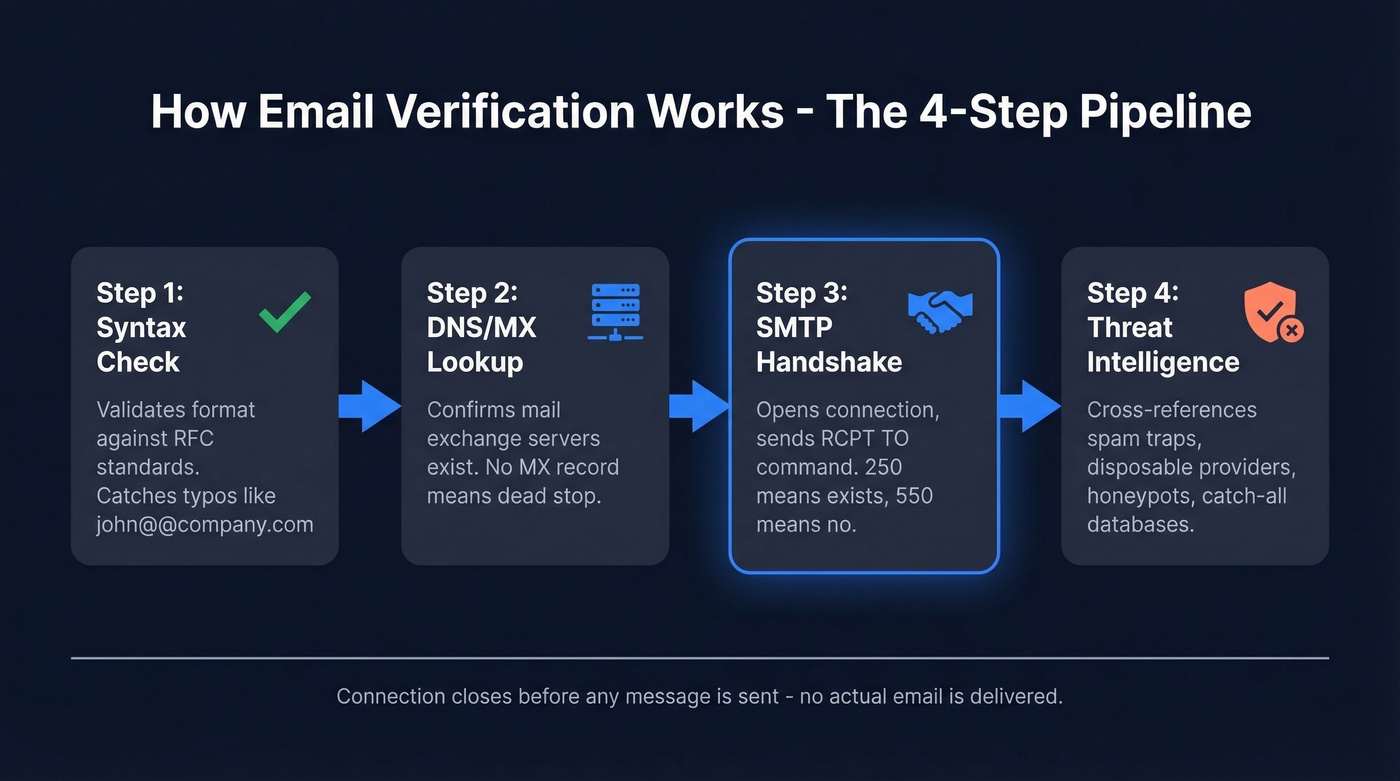
Step 1: Syntax check. The tool validates the email format against RFC standards. Catches typos like "john@@company.com" or missing TLDs. Every tool nails this.
Step 2: DNS/MX lookup. The tool queries the domain's DNS records to confirm mail exchange servers exist. No MX record means the domain can't receive email. Dead stop.
Step 3: SMTP handshake. Here's where the real work happens. The tool opens a connection to the mail server, gets a 220 response, issues a HELO command, then sends a RCPT TO with the target address. A 250 response typically means the mailbox exists; 550 typically means it doesn't. Temporary codes like 450 or 451 mean "try later," which is why some results come back inconclusive. The connection closes before any message body is sent.
Step 4: Threat intelligence. The tool cross-references the address against known spam traps, disposable email providers, honeypots, and catch-all domain databases. This layer separates basic verifiers from serious ones.
Don't try running SMTP handshakes yourself from a normal server. Mail providers detect bulk RCPT TO queries as a Directory Harvest Attack and will blacklist your IP. Verification tools exist because they rotate IPs, manage rate limits, and handle connection pooling so you don't torch your infrastructure.
The Catch-All Problem
Roughly 30-40% of B2B email addresses sit on catch-all domains. A catch-all domain accepts mail for any address - real or fake - so the SMTP handshake always returns "valid." Standard verification can't tell a real inbox from a black hole.
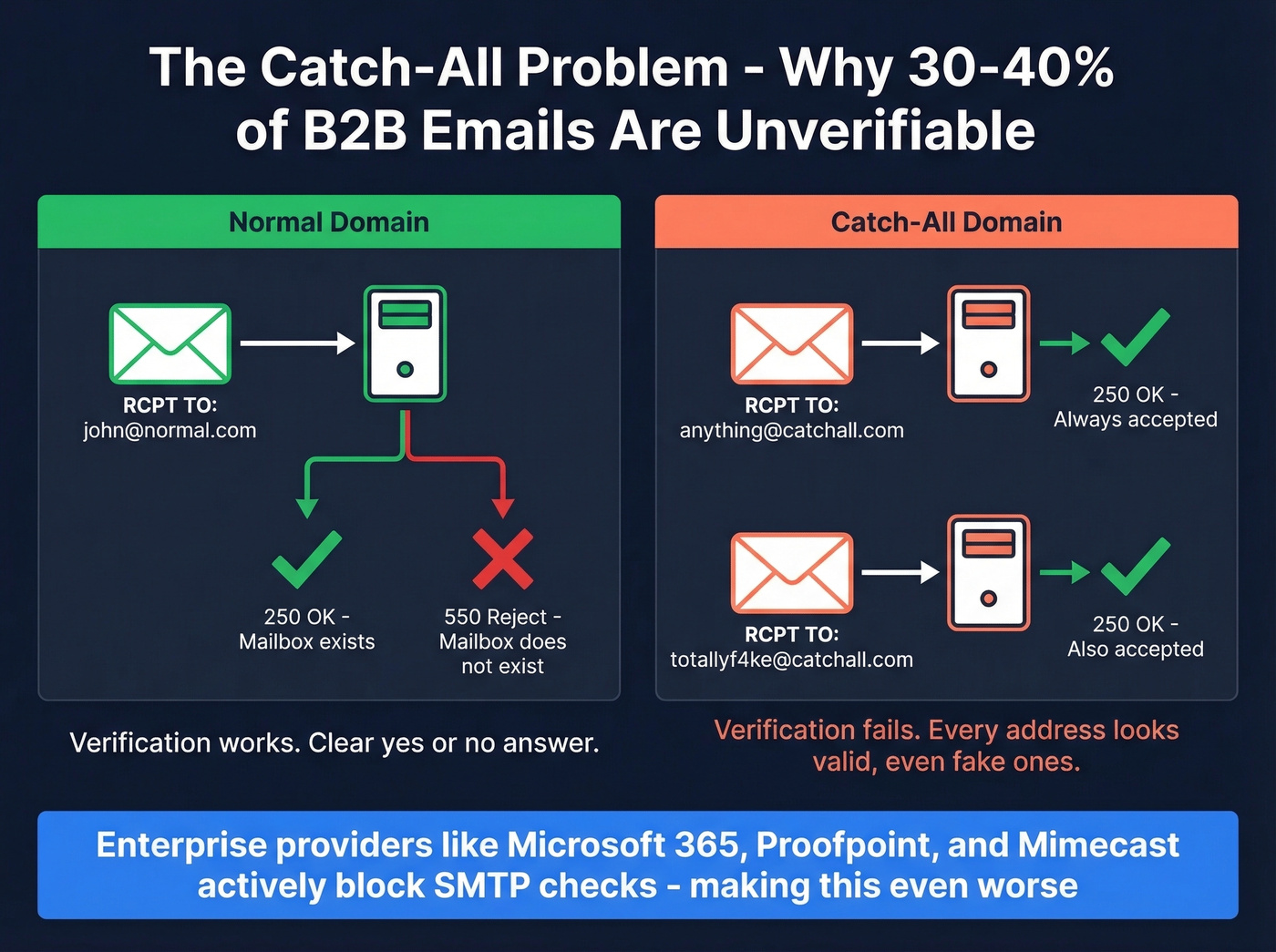
This is the #1 unsolved problem in verification for most teams. Enterprise security layers like Proofpoint, Mimecast, and Microsoft Defender actively block SMTP verification attempts, producing "unknown" results even when the inbox is perfectly active. A huge chunk of your list ends up in limbo.
Most tools punt on this. They return "accept-all" or "unknown" and leave you to decide whether to send. That's not verification - that's a coin flip. Prospeo's 5-step verification includes dedicated catch-all domain handling, spam-trap removal, and honeypot filtering, which is a key reason it reports 98% email accuracy even on lists heavy with catch-all domains.
If your list skews toward mid-market and enterprise companies, catch-all handling isn't a nice-to-have. It's the difference between a 2% bounce rate and a 12% one.

Most verifiers choke on catch-all domains and return "unknown." Prospeo's 5-step verification - with dedicated catch-all handling, spam-trap removal, and honeypot filtering - hits 98% accuracy on real-world lists. Data refreshes every 7 days, not 6 weeks.
Check any email address online with data you can actually trust.
The Truth About Accuracy Claims
Every email verification tool claims 99%+ accuracy. It's the industry's favorite lie.
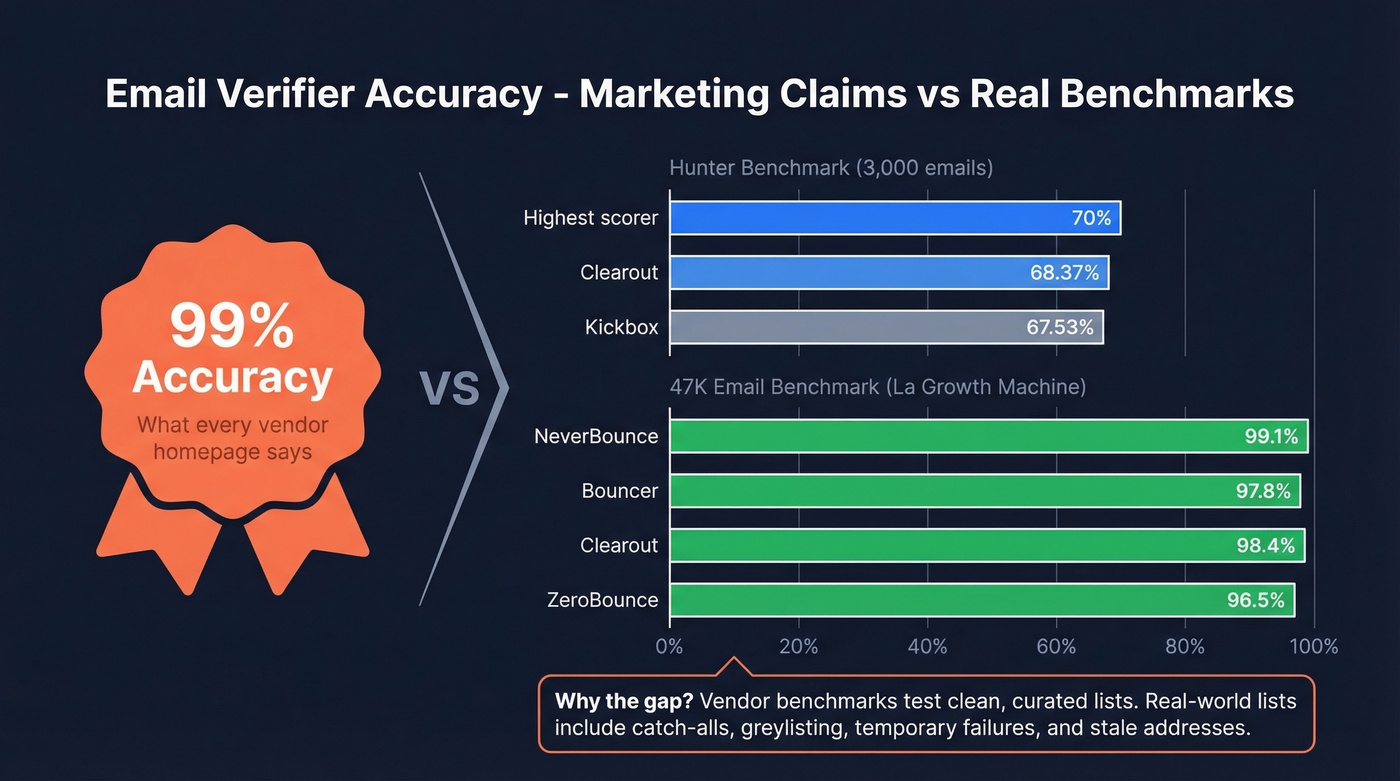
Hunter ran a benchmark of 15 email verifiers using 3,000 real business emails, standardized through Clay. The highest overall accuracy was 70%. Not 99%. Not 95%. Seventy percent. Clearout came in second at 68.37%, and Kickbox third at 67.53%.
Dropcontact ran a separate benchmark with 20,000 contacts and actually sent emails to measure hard bounces - not just SMTP simulation. They also checked for wrong-domain matches, where a finder returns a valid email at the wrong company. Their "real enrichment rate" was dramatically lower than raw finder rates.
Why the gap? Vendor benchmarks test on clean, curated lists. Real-world lists include catch-all domains, greylisting servers, temporary failures, and stale addresses. The "99% accuracy" number comes from testing syntax checks and obvious invalids - the easy stuff.
We've seen this pattern repeatedly: a team buys a verifier based on the homepage accuracy claim, runs their actual prospect list through it, and still bounces 5-8%. The tool wasn't lying - it was measuring something different than what you need.
Best Tools to Verify Email Addresses Online
Prospeo
Use this if: You need email finding and verification in one platform with genuinely fresh data. Prospeo's 5-step verification covers syntax, MX, SMTP, catch-all handling, spam-trap removal, and honeypot filtering - all on a 7-day refresh cycle. The industry average is around 6 weeks, and email lists decay roughly 2% every four weeks. With 143M+ verified emails and 98% accuracy, you're working with data that's accurate when you send, not just when you first checked.
75 free emails/month, roughly $0.01 per email on paid plans. Self-serve, no contracts, no sales calls required. Integrates natively with Salesforce, HubSpot, Clay, Lemlist, Instantly, and Zapier.
Skip this if: You just need a one-time free check on a single address and don't care about finding emails or ongoing verification.
ZeroBounce
ZeroBounce is the compliance-first option. SOC 2 Type 2 certified with 100 free monthly verifications and 45 integrations, it's built for teams connecting verification to a complex martech stack. They report 500K+ customers, and benchmarks from La Growth Machine's 90-day test of 47,000 emails put real-world accuracy at 96.5%.

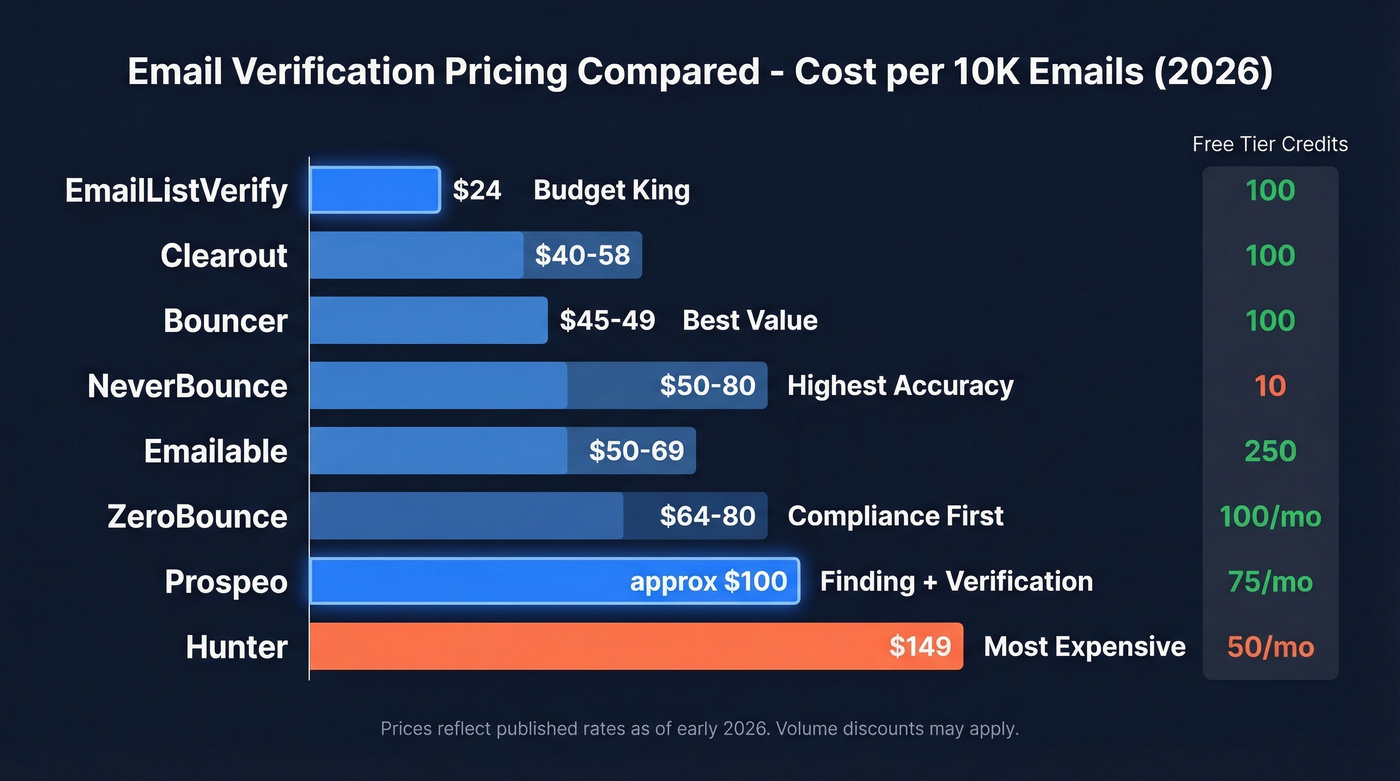
At $64-80/10K, ZeroBounce sits at the premium end of standalone verifiers. If compliance matters and you need a deep integration ecosystem, it's worth the premium.
Watch out for: The price. At about 3x the cost of EmailListVerify for the same basic function, you're paying for the ecosystem, not the verification itself.
Bouncer
In that same 47K-email benchmark, Bouncer hit 97.8% accuracy - the second-best result - at just $45-49/10K. Processing speed runs 180K emails/hour, fast enough for most batch operations. You get 100 free credits to test.
Bouncer is lean by design: 16 integrations, no email finding, no enrichment. It does one thing and does it well. Here's the thing - if your average deal size is modest and you just need clean lists before hitting send, Bouncer is the best value in this entire roundup. You don't need a platform. You need a verifier that doesn't lie to you about catch-alls.
Hunter
Hunter's brand recognition is massive - 6M+ users - and they published the benchmark data we've been referencing. Their email verifier checks syntax, domain, server response, and cross-references their own B2B database, including accept-all verification for several major providers.
But Hunter charges $149 per 10K verifications. That's over 6x more expensive than EmailListVerify. The 50 free monthly verifications are useful for spot-checking an address, but the paid tiers are built for teams already using Hunter's finder.
NeverBounce
NeverBounce scored highest in the 47K-email benchmark at 99.1% accuracy, with a 94% catch-all detection rate. They also offer a 3% bounce refund guarantee - if your verified list bounces above 3%, you get credits back.
The downside: only 10 free credits. That's barely enough to test. Pricing runs $50-80/10K depending on volume. Good accuracy, stingy free tier.
Clearout
Clearout placed second in Hunter's benchmark at 68.37% overall accuracy and hit 98.4% in the 47K-email test. At $40-58/10K with 38 integrations, it's a solid mid-range option. The 100 free credits let you run a meaningful test before committing. Not flashy, but consistently performs well across multiple benchmarks.
EmailListVerify
The budget king. $24/10K makes EmailListVerify the cheapest option by a wide margin - about half the cost of the next cheapest alternatives. You get 100 free verifications to start, and their free single-email checker allows 3 checks. If you're cleaning a massive list and accuracy within a few percentage points doesn't matter, this is the obvious pick.
Emailable
Emailable stands out for its generous 250 free credits and blazing 2M emails/hour processing speed. At $50-69/10K it's mid-range on price, with 97.2% accuracy in independent testing. A solid choice if you want a quick, free test on a decent-sized list before committing. Check their best practices guide for setup tips.
Pricing Comparison
| Tool | Free Tier | Per 10K | Per Email | Best For |
|---|---|---|---|---|
| Prospeo | 75/mo | ~$100 | ~$0.01 | Finding + verifying |
| EmailListVerify | 100 | $24 | $0.0024 | Budget bulk cleaning |
| Clearout | 100 | $40-58 | $0.004-0.006 | Mid-range all-rounder |
| Bouncer | 100 | $45-49 | $0.0045-0.005 | Accuracy on a budget |
| NeverBounce | 10 | $50-80 | $0.005-0.008 | Highest raw accuracy |
| Emailable | 250 | $50-69 | $0.005-0.007 | Largest free test |
| ZeroBounce | 100/mo | $64-80 | $0.006-0.008 | Compliance + integrations |
| Hunter | 50/mo | $149 | $0.015 | Existing Hunter users |
When to Verify (And How Often)
Verification isn't a one-time event - it's hygiene. You should check email addresses before every send, not after bounces start rolling in. By the time you see bounce notifications, the damage to your sender reputation is already done.
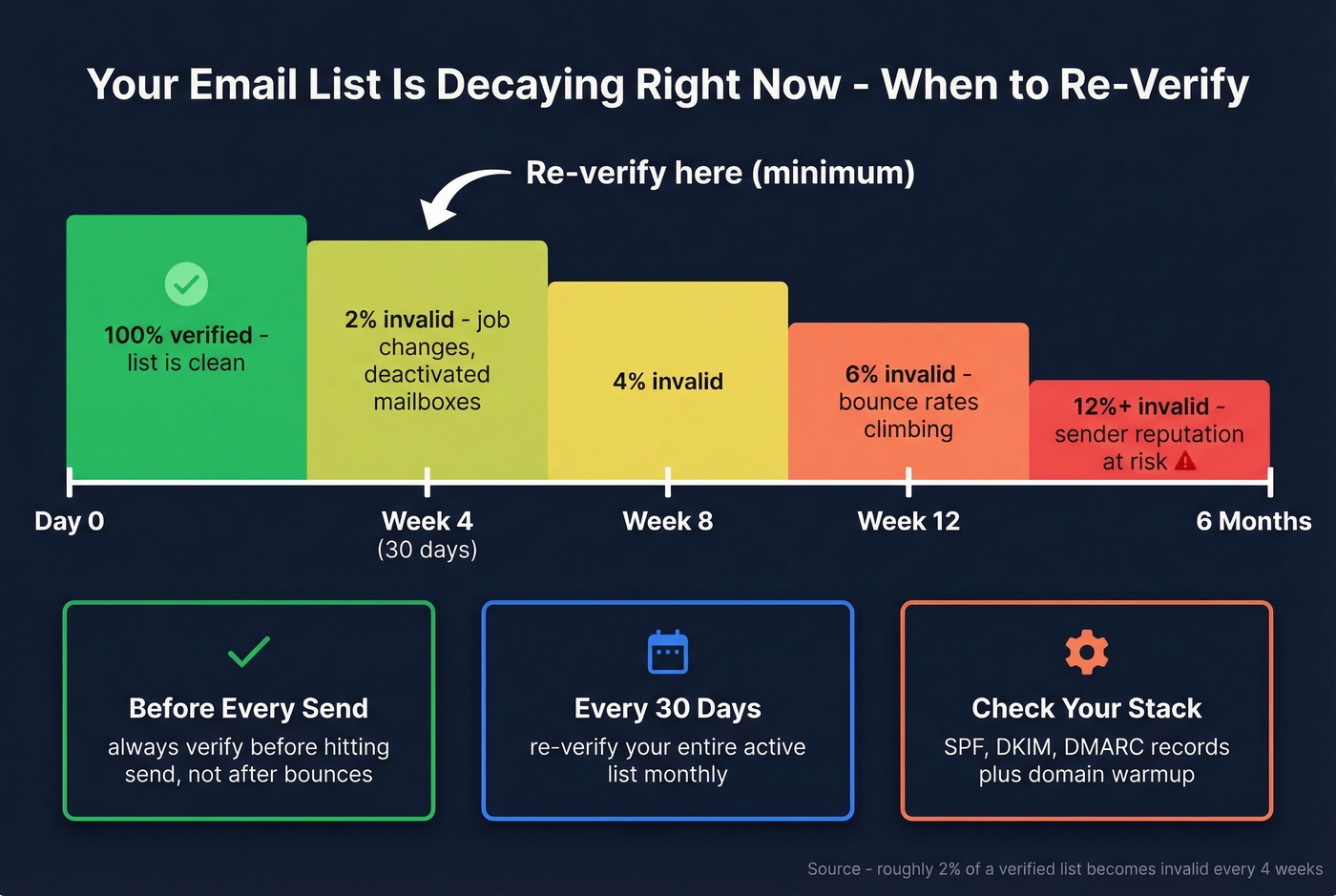
Re-verify at minimum every 30 days. After four weeks, roughly 2% of a verified list becomes invalid due to job changes, deactivated mailboxes, and expired domains. Teams running high-volume outbound should verify more frequently.
Beyond verification itself, make sure your SPF, DKIM, and DMARC records are configured correctly (see DMARC and DKIM) and that you're warming up new sending domains (use an unlimited email warmup tool if needed). Verification fixes the data layer, but deliverability depends on the full stack.
A few rules we follow in our own outbound:
- Treat "accept-all" as a separate category. Don't lump accept-all results with confirmed valid addresses. Make a deliberate decision about whether to send to them.
- Target less than 2% total bounces. Hard bounces should stay under 1%. Anything above 5% signals a serious list hygiene failure (more on email bounce rate).
Bounce Rate Benchmarks
Mailchimp's analysis of billions of emails shows an average hard bounce rate of 0.21% and soft bounce rate of 0.70% across all industries.
| Industry | Avg Bounce Rate |
|---|---|
| Software & Web App | 0.93% |
| Architecture | 1.04% |
| Consulting | 0.76% |
| Ecommerce | 0.29% |
If you're running cold outbound and seeing bounce rates above 5-10%, your list is the problem - not your ESP, not your copy, not your sending schedule. Fix the data first. Everything else is downstream (start with an email deliverability guide and then improve sender reputation).
Independent benchmarks show most verifiers top out at 70% accuracy on real B2B lists. Prospeo's proprietary infrastructure verifies 143M+ emails at 98% accuracy for ~$0.01 each - no contracts, no sales calls. 75 free emails/month to prove it.
Stop paying for "verified" emails that bounce at 8%.
FAQ
Can I check an email address online for free?
Yes - most verification tools offer free tiers. Emailable gives 250 free credits, ZeroBounce offers 100/month, and Prospeo provides 75 free verified emails per month with catch-all handling included. These free tiers let you validate addresses before committing to paid plans.
How do email verifiers work without sending an email?
They connect to the recipient's mail server via SMTP, issue a RCPT TO command with the target address, and read the server's response code - 250 typically means the mailbox exists, 550 means it doesn't. The connection closes before any message body is sent, so no email is ever delivered.
What does "catch-all" mean in verification?
A catch-all domain accepts mail for any address at that domain, so the server always returns "valid" - even for nonexistent mailboxes. Standard SMTP verification can't distinguish real from fake on these domains, which is why 30-40% of B2B addresses end up marked "unknown" or "accept-all."
How accurate are email verification tools really?
Vendor claims of 99% are marketing. A benchmark of 15 tools showed the highest overall accuracy was 70% when "unknown" results count against the score. Real-world accuracy depends heavily on your list composition - especially the percentage of catch-all and enterprise domains. Running your list through multiple verifiers and comparing results increases confidence.
How often should I re-verify my email list?
Re-verify at minimum every 30 days. After four weeks, roughly 2% of a verified list becomes invalid due to job changes, deactivated mailboxes, and expired domains. Teams running high-volume outbound should verify more frequently - or use a platform with an automatic 7-day refresh cycle so the data stays current without manual re-runs.