

How to Check Email Authenticity in 2026 (Full Guide)
3.4 billion phishing emails land in inboxes every single day. Nearly half of all global email traffic - 47.27% - is spam. Whether you're investigating a suspicious message or confirming an address exists before you hit send, knowing how to check email authenticity is a non-negotiable skill. Both problems are real, and they require completely different approaches.
What You Need (Quick Version)
Got a suspicious email? Open it in Gmail or Outlook, view the original headers, and check whether SPF and DKIM show PASS with the correct domain alignment. Takes 60 seconds, costs nothing.
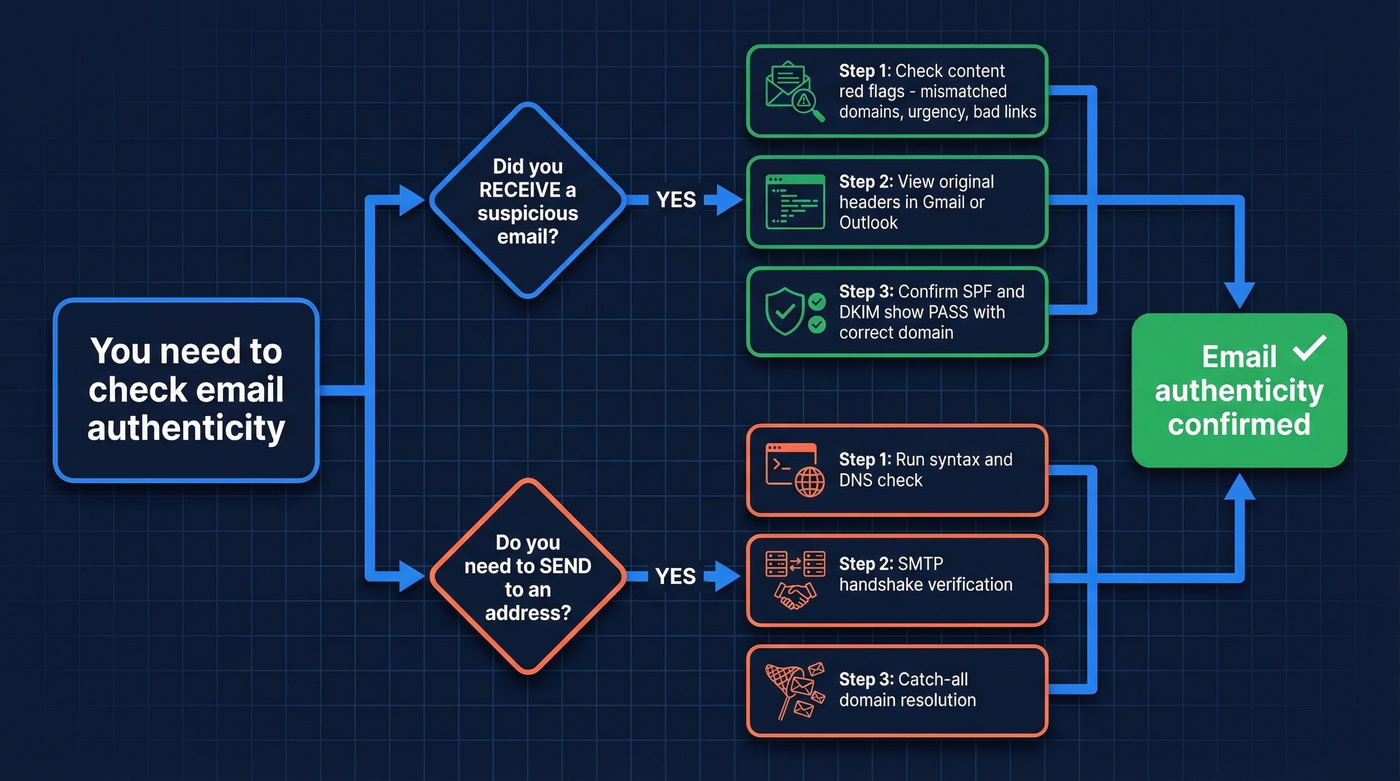
Want to understand authentication protocols? Jump to the SPF/DKIM/DMARC section below for a plain-English breakdown with DNS record examples (and DMARC alignment basics).
Need to verify email addresses before sending? Use a verification tool with catch-all resolution to keep bounces under 2% and protect your sender reputation (see email bounce rate benchmarks).
Why Verifying Emails Is Harder Than Ever
Phishing used to be easy to spot - broken English, a Nigerian prince, a sketchy attachment. Those days are gone. AI-generated phishing messages now mimic brand voice, formatting, and even personalization with alarming accuracy. Lookalike domains like saneb0x.com or spot1fy.com slip past casual inspection, and homograph attacks swap characters that look identical at a glance.
The financial stakes are staggering. Impersonation scams caused $12.5 billion in losses in 2024. Gmail, Yahoo, and Microsoft responded by tightening enforcement - since 2025, all senders must use some form of email authentication, and bulk senders need SPF, DKIM, and DMARC in place. That's progress, but it doesn't stop a well-crafted phishing email from landing in your inbox if the attacker has set up their own authenticated domain.
Spot a Phishing Email Without Any Tools
Before you touch a single header, run through these content-level signals. We've reviewed hundreds of phishing samples across client inboxes, and most fail at least two or three of these checks:
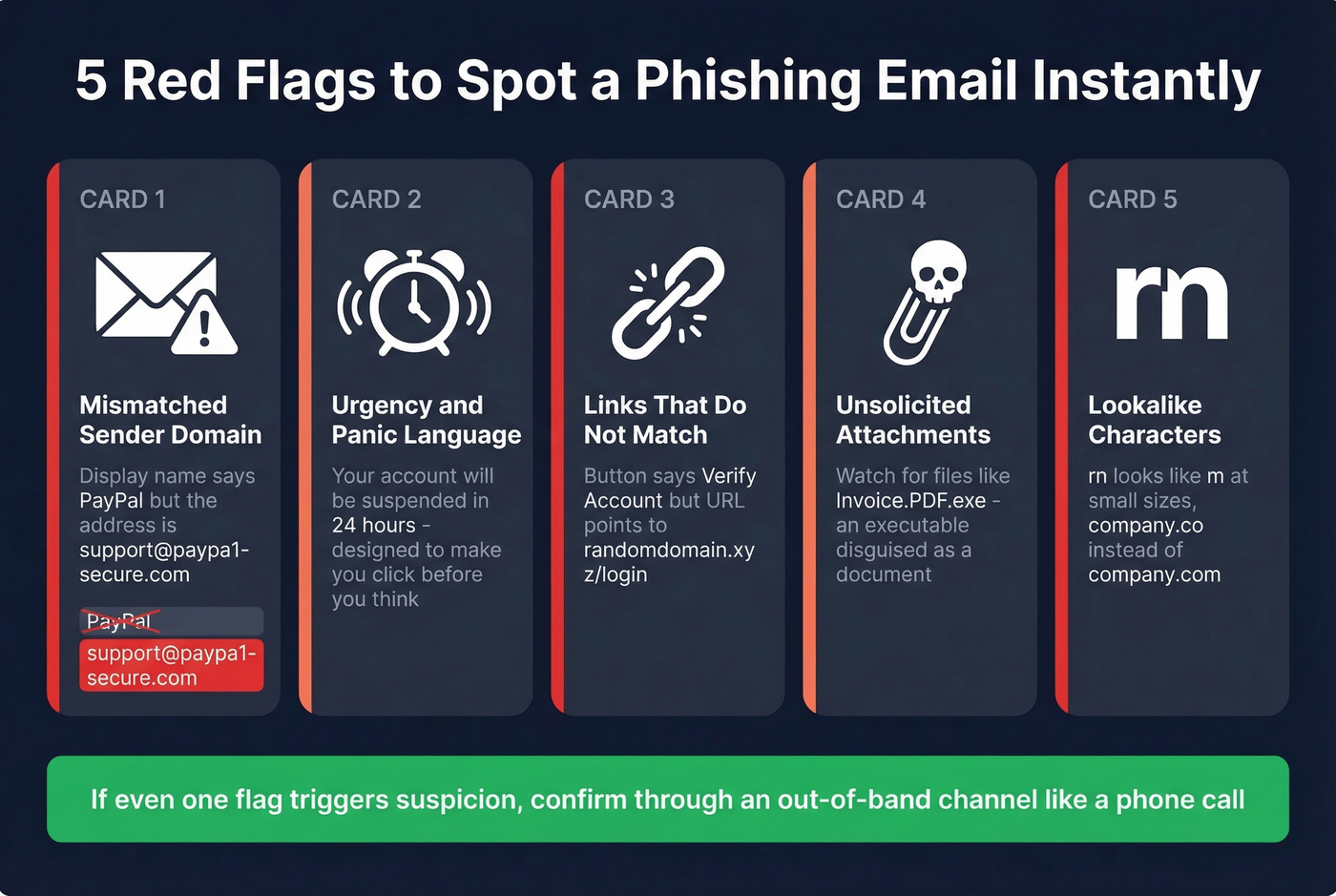
- Mismatched sender domain. The display name says "PayPal" but the actual address is
support@paypa1-secure.com. Always look at the full address, not just the name. - Urgency and panic language. "Your account will be suspended in 24 hours" is designed to make you click before you think.
- Links that don't match. Hover over any link before clicking. If the button says "Verify Account" but the URL points to
randomdomain.xyz/login, that's your answer. - Unsolicited attachments. Especially files like
Invoice...PDF.exe- an executable masquerading as a document. - Lookalike characters. The classic:
rnlooks likemat small font sizes.company.coinstead ofcompany.com. These are deliberate.
If an email triggers even mild suspicion, confirm through an out-of-band channel - call the sender using a number you already have, not one from the email itself.
How to Verify an Email in Gmail, Outlook & Apple Mail
The fastest way to confirm whether an email is genuinely from who it claims is to check the authentication results in the message headers. Every major email client gives you access, though some make it far easier than others. If you're trying to confirm whether an address exists before you email it, use a dedicated workflow like check if an email exists.
Gmail
Open the email on desktop. Click the three dots in the top-right corner, then select Show original. You'll see a summary showing SPF, DKIM, and DMARC results right at the top - no scrolling through raw text required. If SPF or DKIM shows PASS and the domain aligns with the sender's organization, you can be confident the message really came from that domain. It doesn't guarantee the organization wasn't compromised, but it rules out simple spoofing.
In our testing, Gmail's Show original view is by far the fastest way to check whether an email is authentic - about 30 seconds, zero technical background needed. The consensus on r/phishing backs this up.
Outlook
In the Outlook desktop app, open the message, go to File > Properties, and look at the Internet Headers box at the bottom. Search for the Authentication-Results line. You're looking for spf=pass and dkim=pass with the correct domain. It's less user-friendly than Gmail's summary view, but the information is all there.
Apple Mail / iPhone
Here's the thing: Apple Mail on iPhone isn't a convenient place to view full raw headers. Your best workaround is to forward the suspicious email to a Gmail account and use the "Show original" method there, or paste the headers into a header analyzer like MXToolbox. Reddit threads on r/phishing regularly ask for simpler iPhone instructions, and honestly, forwarding to Gmail is the best answer until Apple improves this.

Checking email authenticity after a message lands is smart. But verifying addresses before you send is what protects your domain. Prospeo's 5-step verification catches spam traps, honeypots, and catch-all domains - delivering 98% email accuracy across 143M+ verified addresses.
Keep bounces under 2% and your sender reputation intact.
How to Read Email Headers
Once you've pulled up the raw headers, read the Received fields from bottom to top - that traces the message's path from origin to your inbox.
| Header Field | What It Tells You |
|---|---|
| SPF = pass | Sending server is authorized |
| SPF = fail | Server not in domain's SPF record |
| DKIM = pass | Message wasn't altered in transit |
| DKIM = none | Sender may not use DKIM, or you're reading an intermediate hop |
| DMARC = pass | SPF/DKIM align with the From domain |
| DMARC = fail | Likely spoofed or misconfigured |
| Return-Path ≠ From | Possible spoofing red flag |
One important nuance: if you see dkim=none in the headers, don't panic. A Microsoft moderator on the official support forums explains that intermediate hops - internal gateways, spam filters - can generate their own [Authentication-Results](https://datatracker.ietf.org/doc/html/rfc8601) lines showing dkim=none even when DKIM passed at the final destination. Always check the last Authentication-Results entry. That's the one that matters.
For most teams, SPF + DKIM pass with domain alignment is sufficient to trust the domain origin of a message. You don't need to become a DMARC expert - just check those two results and confirm the domain matches. If you're troubleshooting setup, follow a dedicated checklist like how to verify DKIM is working.
SPF, DKIM, DMARC & BIMI Explained
These four protocols form the backbone of email authentication. They're all implemented as DNS TXT records, and mailbox providers use them to decide whether a message reaches your inbox or gets flagged as spam.
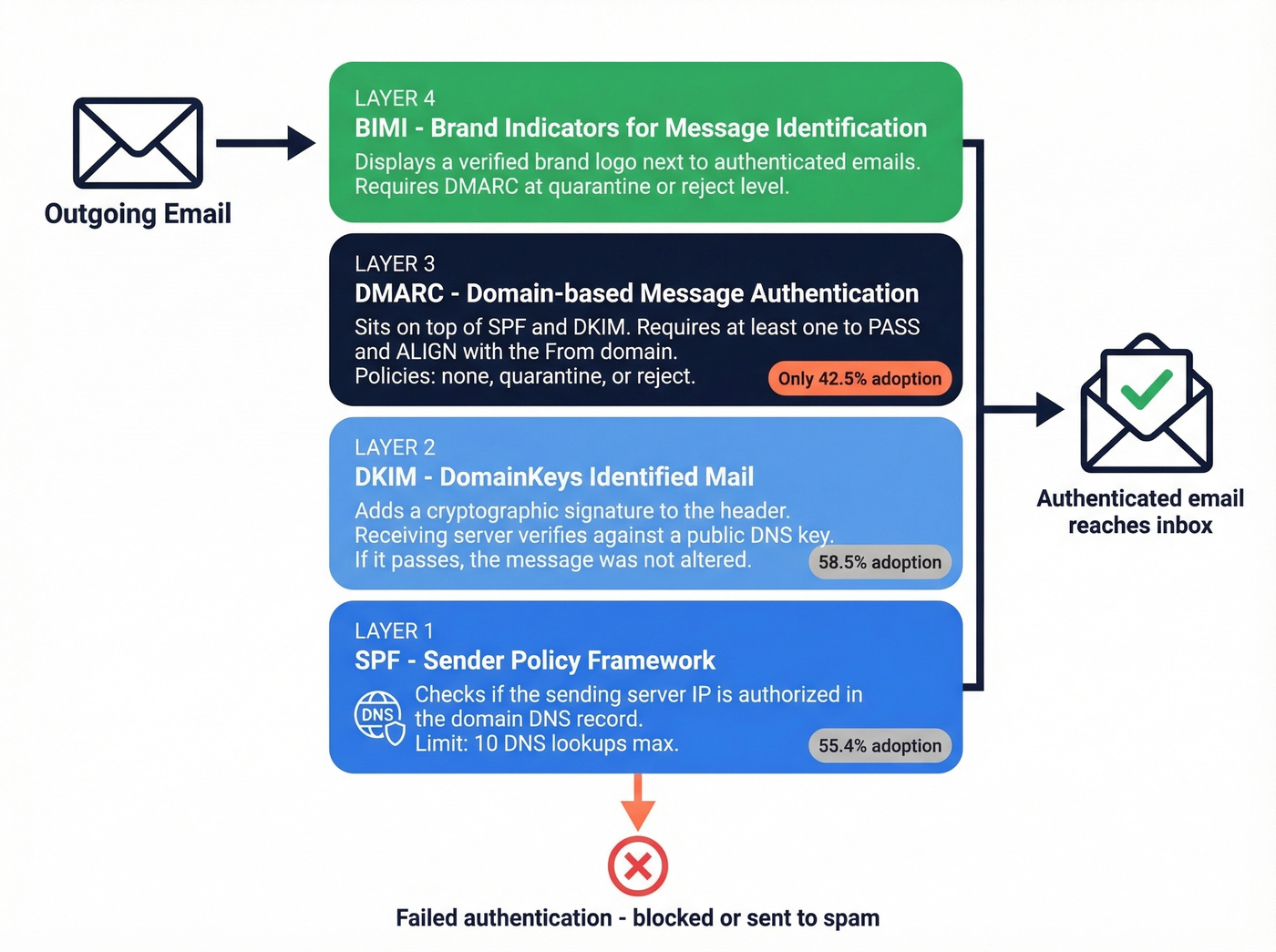
SPF publishes a list of servers authorized to send email for a domain. A typical record looks like this: v=spf1 include:_spf.google.com ~all. When a message arrives, the receiving server checks whether the sending IP matches. One practical constraint: SPF has a 10 DNS lookup limit, which matters if you use multiple sending tools (more SPF record examples here).
DKIM adds a cryptographic signature to the email header. The receiving server verifies it against a public key published in DNS. If the signature checks out, the message wasn't altered in transit. Simple as that.
DMARC sits on top of SPF and DKIM. It checks that at least one passes and aligns with the From domain, then tells the receiving server what to do on failure - policies range from none (monitor only) to quarantine (send to spam) to reject (block entirely). A typical record: v=DMARC1; p=reject; rua=mailto:dmarc-reports@yourdomain.com.
BIMI displays a verified brand logo next to authenticated emails. It requires DMARC enforcement at quarantine or reject level.
Adoption is still patchy. Per a Mailgun survey, only 55.4% of senders use SPF, 58.5% use DKIM, and just 42.5% use DMARC. Only 18.2% of the top 10 million domains have a valid DMARC record, and a mere 7.6% enforce quarantine or reject. Authentication isn't optional anymore after the 2025 enforcement changes, but the ecosystem still has a long way to go.
Free Tools for Authentication Checks
You don't need to read raw headers manually. These tools parse everything for you:
- MXToolbox Header Analyzer - paste raw headers, get a visual breakdown of every hop plus SPF/DKIM/DMARC results.
- Google Admin Toolbox (Messageheader) - Google's own header parser. Clean interface, fast results.
- dmarcian - excellent for domain-level DMARC analysis and ongoing monitoring, especially if you manage authentication for your own sending domain.
- Google Postmaster Tools - more useful for senders monitoring domain reputation over time than for one-off checks, but worth setting up if you send at volume.
The workflow is simple: copy the raw headers from your email client, paste them into any of these tools, and read the results.
Verifying Email Addresses Before You Send
Everything above covers message authenticity - determining whether an email you received is legitimate. But there's a second meaning that matters just as much for sales and marketing teams: verifying that an email address actually exists and can receive mail before you send to it.
These are different problems with different tools.
Verification works through a multi-step process: syntax check, DNS/MX record lookup, SMTP handshake with the receiving server, and catch-all detection. The whole thing takes milliseconds per address. The industry rule of thumb is to keep total bounces under 2% and hard bounces under 1%. One bad list can torch your domain reputation, and recovering takes weeks (here’s how to improve sender reputation). Catch-all handling is the key differentiator between tools that actually prevent bounces and tools that just flag "catch-all" and leave you guessing - roughly 28% of B2B domains are catch-all, so this isn't a niche concern. If you're sending at scale, pair verification with an email deliverability guide so you don't fix one problem and create another.
Best Email Verification Tools Compared
| Tool | Accuracy | Catch-All Handling | Free Tier | Price per 1K | Best For |
|---|---|---|---|---|---|
| Prospeo | 98% | Resolved | 75/mo | ~$10 | Accuracy + catch-all |
| ZeroBounce | ~97.8% | Weak (~12%) | 100/mo | ~$7.50 | Deliverability extras |
| NeverBounce | ~96.9% | Weak (~8%) | 1,000 credits | ~$8 | Bulk speed |
| Hunter | ~95% | Basic | 100/mo | Starts ~$49/mo | Finding + verifying |
| Bouncer | ~96% | Basic | 1,000 credits | ~$7 | Budget bulk |
| Emailable | ~96% | Basic | 250 credits | ~$8-10 | Clean API |
| Verifalia | ~95% | Basic | Free tier | From ~$9/mo | Conservative flagging |
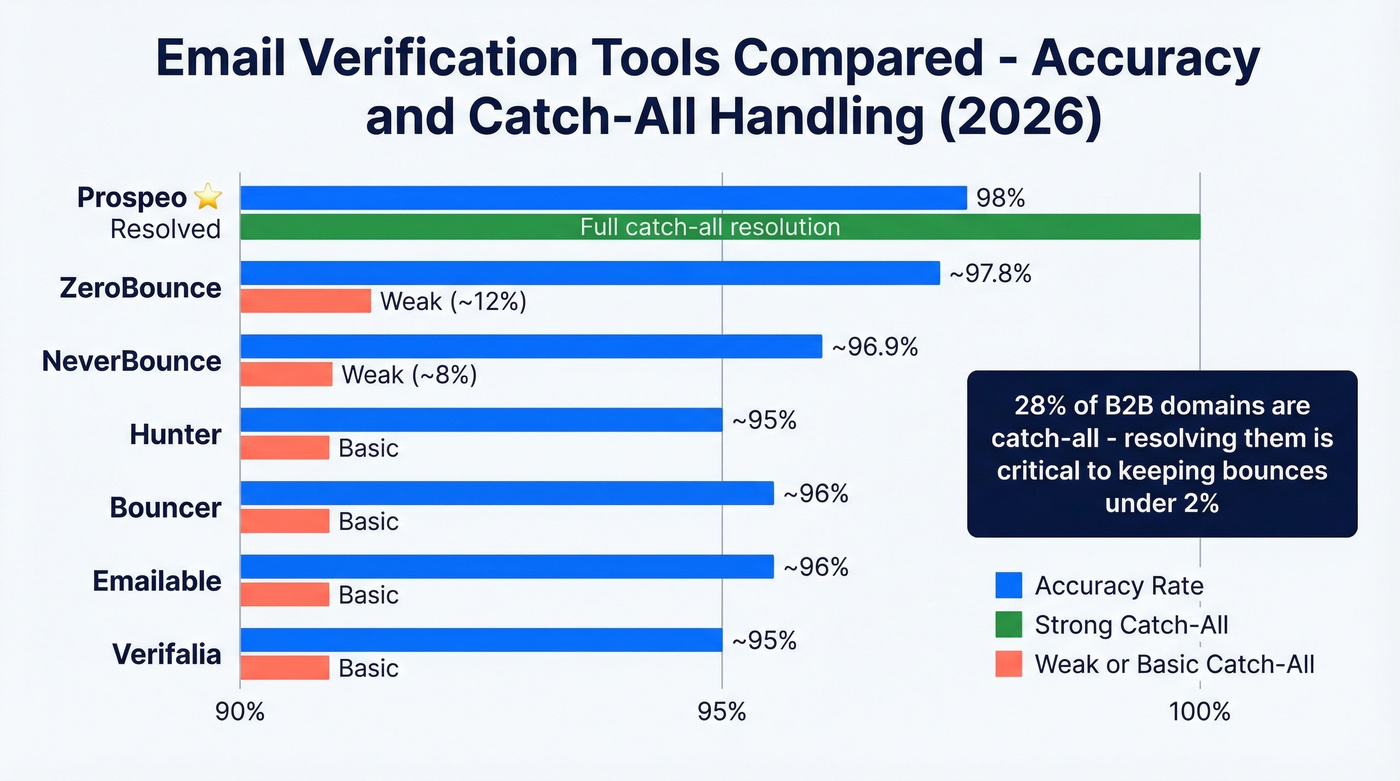
Winners: Best accuracy - Prospeo. Best free tier for volume - NeverBounce. Best value per email - Bouncer. On r/software, users rank Instantly.ai, NeverBounce, and MillionVerifier highly for bulk work, though catch-all handling remains the most common complaint across tools.
Prospeo
Prospeo runs verification on proprietary infrastructure - it doesn't farm out to third-party providers, which is how it maintains 98% accuracy. The 5-step process covers syntax validation, DNS/MX checks, SMTP verification, catch-all resolution, and spam-trap/honeypot removal. That catch-all resolution piece is critical: most tools just label catch-all addresses and leave you guessing, while Prospeo actually resolves them. The 7-day data refresh cycle means you're verifying against current records, not stale data.

The free tier gives you 75 email verifications per month - enough to test accuracy before committing. Paid plans run about $0.01 per email with no contracts. One agency, Stack Optimize, built from $0 to $1M ARR while maintaining client deliverability above 94% and bounce rates under 3% with zero domain flags across all clients.
ZeroBounce
Where ZeroBounce stands out isn't raw verification - it's the deliverability toolkit wrapped around it. Inbox placement testing, email scoring, and blacklist monitoring make it a strong pick for teams who care about the full delivery pipeline, not just address validity. The 100 free monthly verifications let you test, and pricing starts at $15 per 2,000 emails. The gap: catch-all resolution hovers around 12% in benchmark testing. If your prospect list is heavy on enterprise domains, that's a real problem.
NeverBounce
Speed is the story here. NeverBounce processes large lists faster than almost any competitor, and the API integrates cleanly with most sending platforms. At ~96.9% accuracy and about $8 per 1,000 emails, it's reliable for high-volume campaigns where you need a quick pass over a massive list. The 1,000 free credits are one of the most generous starting offers in this space. Skip NeverBounce if precision on catch-all domains matters to you - resolution sits around 8%, which means enterprise-heavy lists will still have gaps.
Hunter, Bouncer, Emailable, Verifalia
Hunter offers 100 free verifications per month and doubles as an email finder. Paid plans start around ~$49/mo. Solid for light-volume prospecting teams who want finding and verification in one place. If you're comparing options, see Hunter alternatives.
Bouncer gives you 1,000 free credits and charges ~$7 per 1,000 - one of the cheapest options. Straightforward verification without extras. If you need more picks, check Bouncer alternatives.
Emailable starts with 250 free credits and runs ~$8-10 per 1,000. Clean API, good documentation, no surprises.
Verifalia has a free tier and paid plans from around ~$9/mo. It's the most conservative verifier - tends to flag borderline addresses as undeliverable, which means fewer bounces but more false negatives. If you'd rather miss a valid address than hit a bad one, Verifalia's your tool.
For teams verifying under 500 emails per month, a free tier makes paid tools pointless. Start there and upgrade only when volume demands it.
Bad email data doesn't just waste outreach - it triggers spam filters and destroys the domain reputation you're working so hard to protect. Prospeo refreshes every record on a 7-day cycle and removes invalid addresses before they ever reach your list. At $0.01 per email, authentic data costs less than a single bounce.
Stop guessing which addresses are real. Verify them at scale.
FAQ
Can I check email authenticity on my phone?
Yes, but native options are limited. Forward the suspicious email to a Gmail account and use "Show original" on desktop, or paste the raw headers into MXToolbox from your phone's browser. Android Gmail shows basic SPF/DKIM results inline; iOS Mail doesn't.
What's the difference between verification and authentication?
Authentication (SPF/DKIM/DMARC) proves a message came from the claimed domain. Verification confirms an address exists and can receive mail. Authentication protects recipients from spoofing; verification protects senders from bounces and reputation damage.
Is SPF PASS enough to trust an email?
No - SPF alone can still pass on forwarded or misconfigured messages. Check DKIM too. Both passing with correct domain alignment gives strong confidence. DMARC alignment, where SPF or DKIM matches the From header domain, is the gold standard for confirming sender legitimacy.
What's a good free tool for address validation?
Prospeo offers 75 free verifications per month with full catch-all resolution - the best accuracy at no cost for small lists. NeverBounce gives 1,000 free credits for bulk work but lacks catch-all handling. Hunter provides 100 free checks and doubles as an email finder.
What does "dkim=none" mean in headers?
It typically means the sender doesn't publish a DKIM record, or you're reading an intermediate relay's authentication line. Always check the last Authentication-Results entry in the headers - that reflects the final destination server's determination, not a mid-route gateway.