

How to Check Email Validity Online (and Why Most Tools Get It Wrong)
You sent 2,000 cold emails last quarter and 460 bounced. Your domain reputation tanked, your sequences got throttled, and your ops team spent a week cleaning up the mess. The fix isn't better copy or warmer subject lines - it's verifying emails before they ever hit a sequence.
Most online verification tools are just paste-and-click boxes with zero explanation of what's happening behind the scenes. We're going to break down how verification actually works under the hood, why the accuracy numbers vendors throw around are nonsense, and which tools are worth your money right now in 2026.
Quick picks:
- Single free check, no signup: Hunter's free email verifier handles one-offs instantly.
- Budget bulk cleaning: MillionVerifier runs $0.30 per 1,000 emails, though it only resolves about 5% of catch-all emails.
How Email Verification Works
Every verification tool runs roughly the same sequence. The differences come down to how they handle edge cases.
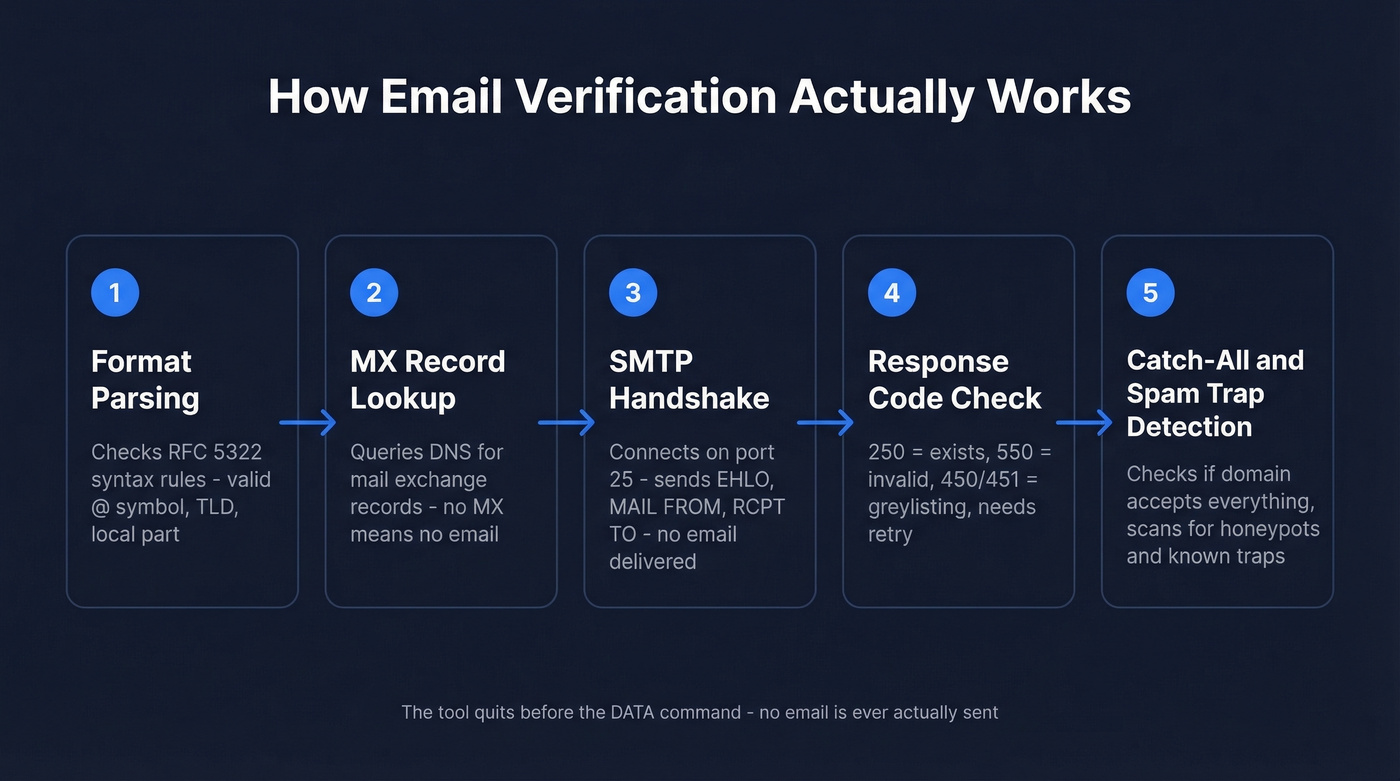
Step 1: Format parsing. The tool checks whether the address follows RFC 5322 syntax rules. Does it have an @ symbol? Is the local part valid? This catches typos like "john@@company.com" or missing TLDs.
Step 2: MX record lookup. The tool queries DNS for the domain's mail exchange records. No MX record means the domain can't receive email. A common mistake is checking A/AAAA records instead, which produces false positives.
Step 3: SMTP handshake. The tool connects to the mail server on port 25 and initiates a simulated conversation: EHLO, MAIL FROM, RCPT TO. No email is actually sent - the tool is asking the server, "Would you accept a message for this mailbox?"
Step 4: Response code interpretation. A 250 means "yes, that mailbox exists (or at least the server will accept it)." A 550 means "no." Temporary codes like 450 or 451 mean the server is greylisting) or rate-limiting, and the tool needs to retry with exponential backoff. This is where cheap tools cut corners.
Step 5: Catch-all and spam-trap detection. Better tools add a final layer: checking whether the domain accepts everything, scanning for known spam traps, and filtering honeypot addresses. This step separates serious verification from checkbox verification.
The whole process takes a few seconds per address. No email is ever delivered - the tool quits the SMTP conversation before the DATA command.
What Verification Results Mean
Verification tools return one of four categories. What you do with each matters more than the verification itself.
| Result | What It Means | Action |
|---|---|---|
| Valid | Server confirmed the mailbox exists | Send normally |
| Invalid | Server returned 550 - mailbox doesn't exist | Delete immediately |
| Unknown/Risky | Server didn't give a clear answer | Quarantine, re-test in 48 hours |
| Catch-all | Domain accepts all addresses | Micro-batch test (details below) |
The mistake most teams make is treating "valid" and "catch-all" the same way. Around 23% of unverified catch-all emails hard bounce when actually sent. That's enough to wreck your sender reputation in a single campaign.
The Catch-All Problem
Here's the thing: 20-30% of B2B domains use catch-all configurations. The mail server returns a 250 response code for any address - john.smith@company.com, asdfghjkl@company.com, doesn't matter. Your verification tool can't tell the difference between a real mailbox and a black hole.
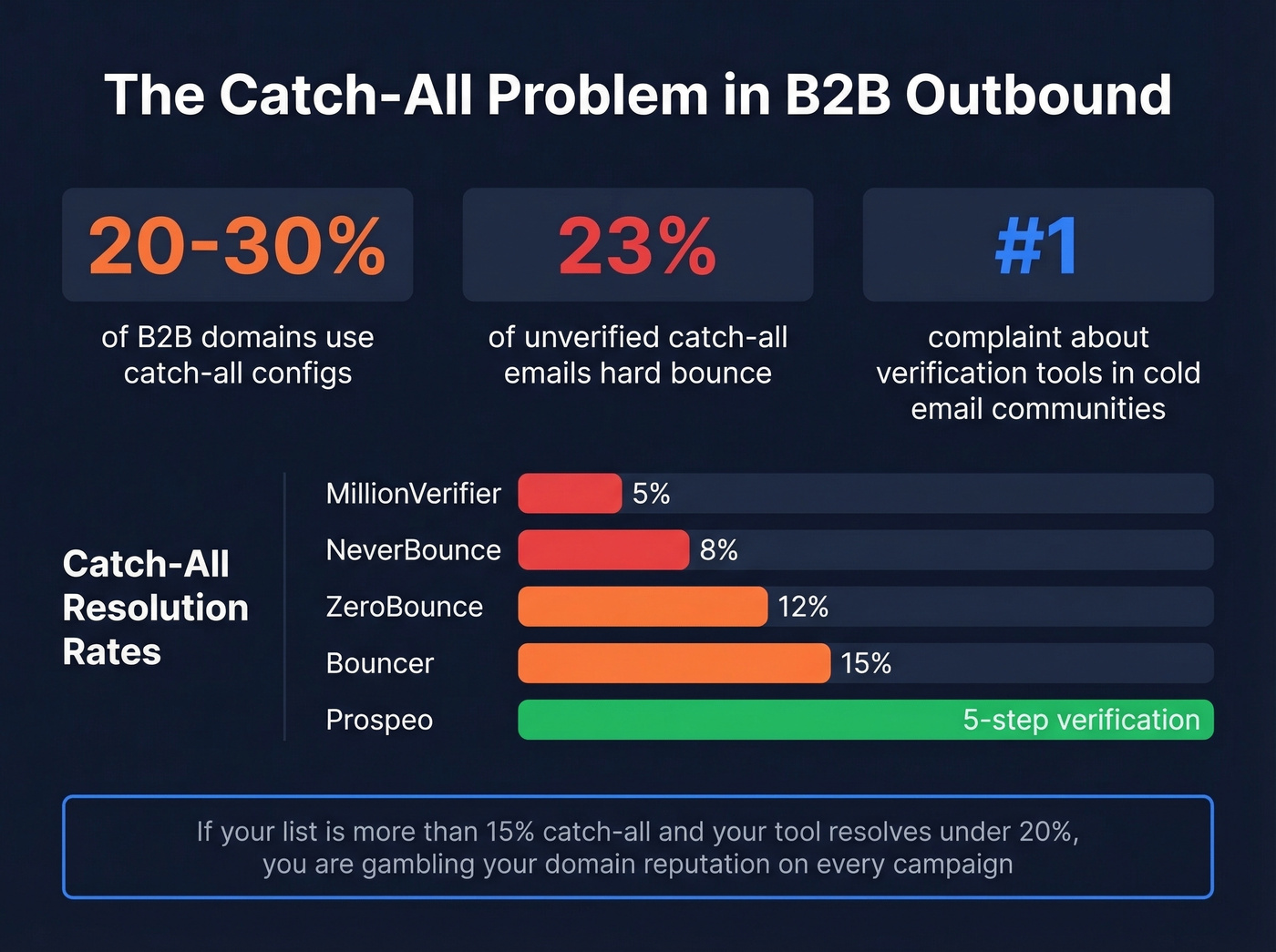
This is the single biggest source of "verified" emails that still bounce. In cold email communities on Reddit, catch-all handling is consistently the #1 complaint about verification tools - more than pricing, speed, or UI. And it disproportionately affects B2B outbound because enterprise IT teams love catch-all configs for security monitoring.
If your outbound list is more than 15% catch-all addresses and your verification tool resolves fewer than 20% of them, you're gambling with your domain reputation on every campaign. Most teams would get better results sending fewer, verified emails than blasting a larger unresolved list.
The playbook for handling catch-alls:
- Segment them. Never mix catch-all addresses into your main send list.
- Micro-batch test. Send 50-100 catch-all addresses per batch. Monitor bounce signals before scaling.
- Cap catch-all share. Keep catch-all addresses under 10-15% of any single sequence.
- Prioritize patterns. firstname.lastname formats are more likely to be real mailboxes than generic addresses.
- Suppress on bounce. If a catch-all address bounces, suppress it immediately. Don't retry.
We've seen teams ignore this and send 500+ catch-all addresses in a single campaign. The bounce rate hit 18% and their domain got throttled for two weeks.

Most verification tools resolve under 15% of catch-all emails. Prospeo's 5-step verification handles catch-all domains, spam traps, and honeypots - delivering 98% email accuracy so your bounce rate stays under 4%, not the 23% you'd get sending unresolved catch-alls.
Stop gambling your domain reputation on tools that shrug at catch-alls.
Why "99% Accuracy" Is Marketing
Every verification tool claims 95-99% accuracy. These numbers are meaningless without knowing how they count unknowns and catch-alls.
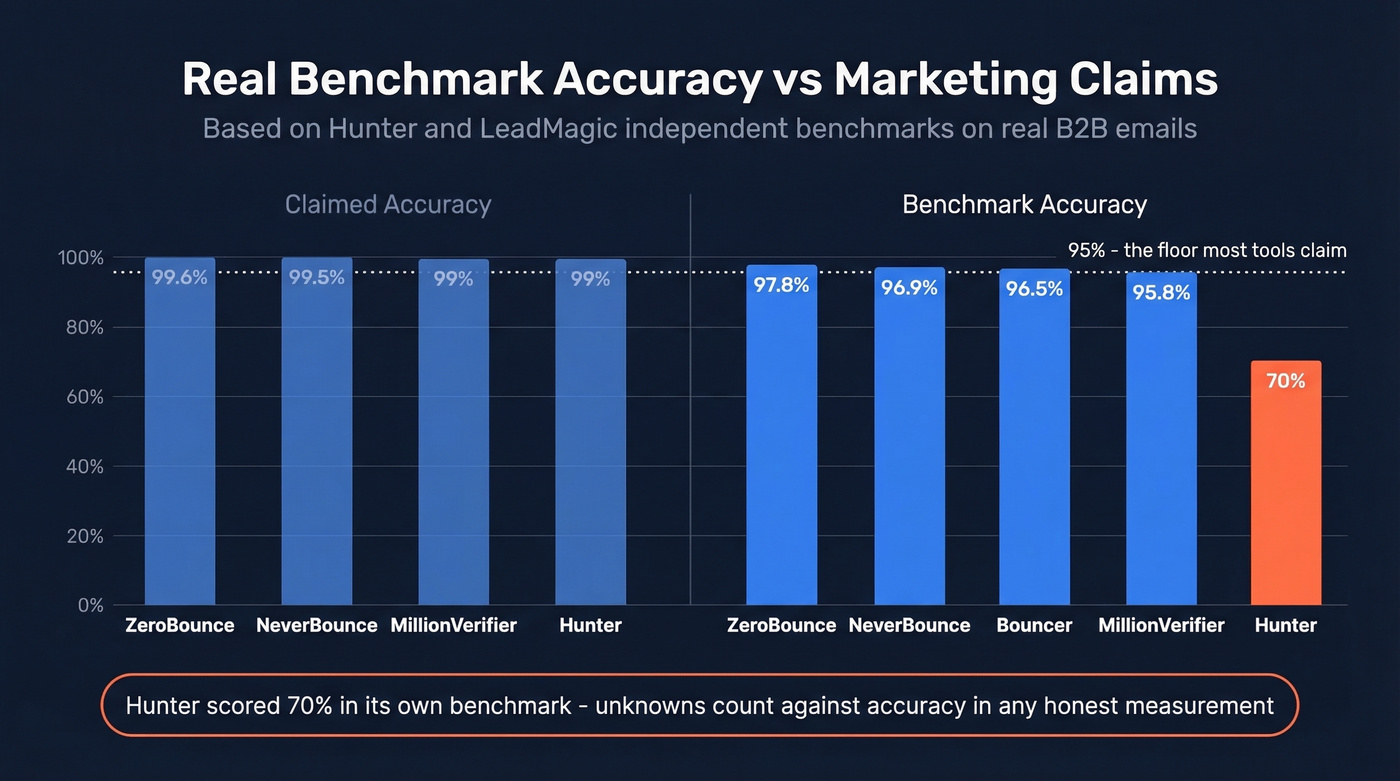
A Hunter benchmark tested 15 verifiers on ~3,000 real business emails. Hunter itself scored highest at 70% accuracy. Not 99%. Not 95%. Seventy percent. The reason is simple: unknowns count against accuracy in any honest measurement. When a tool returns "unknown" for 30% of addresses, that's not accuracy - that's a shrug.
The catch-all resolution gap is even more revealing. A LeadMagic benchmark on 10,000 B2B emails found catch-all resolution rates ranging from 5% (MillionVerifier) to 94% (LeadMagic's own tool). NeverBounce resolved 8%. ZeroBounce resolved 12%. Bouncer hit 15%.
Let's be honest: a tool that marks everything as "valid" would score 90% accuracy on a clean list. That doesn't mean it's good - it means the test was easy. When evaluating tools, ask about catch-all resolution rates. That's where the real differences show up.
Best Tools to Verify Email Addresses Online
| Tool | Accuracy | Catch-All Handling | Cost/1,000 | Best For |
|---|---|---|---|---|
| Prospeo | 98% | Yes (5-step) | ~$10* | B2B - finds + verifies |
| Hunter | ~70% (benchmark) | Yes (major providers) | ~$49/mo plans | Quick free checks |
| ZeroBounce | 99.6% (claimed) | Limited (12%) | ~$8 | Enterprise workflows |
| NeverBounce | 96.9% (benchmark) | Limited (8%) | ~$8 | Mid-volume bulk |
| MillionVerifier | 95.8% (benchmark) | Weak (5%) | ~$0.30 | Budget bulk |
| Bouncer | 96.5% (benchmark) | Moderate (15%) | ~$7 | Affordable mid-range |
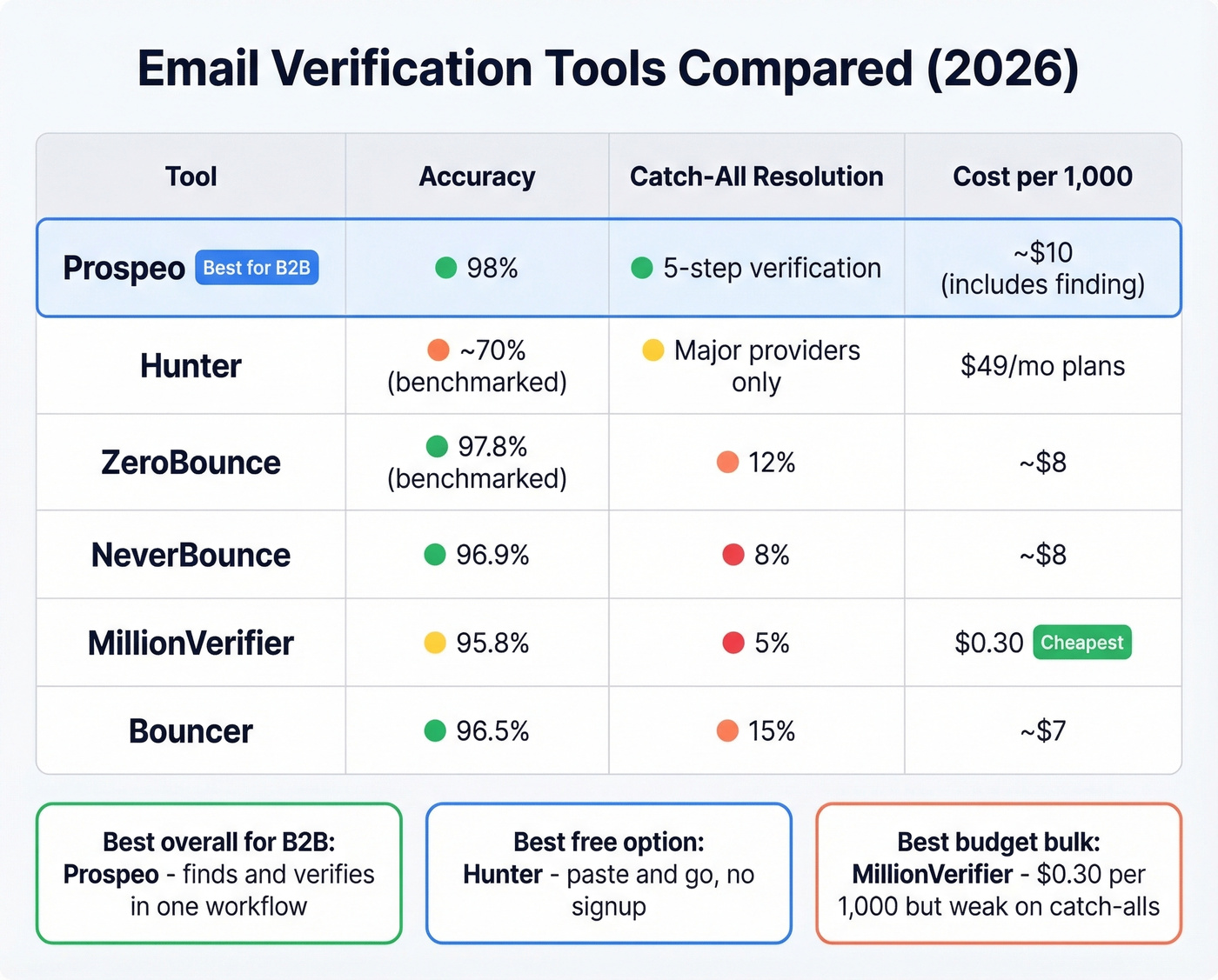
\Includes email finding - not just verification. Comparing Prospeo's cost against pure verifiers is apples to oranges.*
Prospeo
Use this if you're running B2B outbound and want email finding and verification in a single workflow. Unlike standalone verifiers, Prospeo finds emails from its 143M+ verified database and runs 5-step verification - including catch-all handling, spam-trap removal, and honeypot filtering - before you ever see the result. You start with clean data instead of cleaning dirty data after the fact.

Because the platform runs its own email infrastructure rather than relying on third-party providers, verification quality doesn't degrade when a data vendor changes their API. The 7-day data refresh cycle keeps records current - the industry average is six weeks, which is an eternity in B2B where 41% average professional turnover means contacts go stale fast.
Free tier gives you 75 emails plus 100 Chrome extension credits per month. Paid plans run about $0.01 per email with no annual contracts. For teams already paying for a separate finder and a separate verifier, consolidating usually saves money and eliminates the data handoff where errors creep in.
Hunter
Hunter's free email verifier is the fastest way to confirm an address - no signup, no credit card, paste and go. The tool checks syntax, domain info, server response, and looks up the email in Hunter's B2B database. They've also built proprietary accept-all verification for several major email providers, which helps with catch-all domains at the big providers. Paid plans start around $49/mo. Ratings sit at 4.4 on G2 and 4.6 on Capterra, and the platform serves 6+ million users.
ZeroBounce
Skip this if you don't need compliance paperwork. ZeroBounce is the compliance-first option, serving 500,000+ customers, with 100 free monthly verifications when you sign up with a business domain. They claim 99.6% accuracy, though the LeadMagic benchmark put them at 97.8% with only 12% catch-all resolution. Pay-as-you-go runs about $0.008/email. If your team needs audit trails and formal processes, ZeroBounce checks those boxes. For pure catch-all handling, it's middling.
NeverBounce vs. MillionVerifier
These two compete for budget-conscious teams, but they serve different use cases.
NeverBounce scored 96.9% accuracy in the LeadMagic benchmark with 8% catch-all resolution. Pricing starts at ~$0.008/email pay-as-you-go with volume discounts at 10,000+ emails, and they offer 1,000 free trial credits. For cleaning a list of 5,000-50,000 addresses without catch-all complexity, it's dependable.
MillionVerifier is the budget king at $0.0003 per email - that's $0.30 per thousand, an order of magnitude cheaper than everything else. The tradeoff is real: 95.8% accuracy and only 5% catch-all resolution. If your list is mostly consumer emails or domains you know aren't catch-all, the price-to-performance ratio is excellent. For B2B lists heavy on corporate domains? You get what you pay for.
NeverBounce wins if your list has any meaningful catch-all percentage. MillionVerifier wins if you're cleaning a massive consumer list and every dollar counts.
Bouncer
Bouncer sits in the affordable middle ground: ~$7 per 1,000 emails, 1,000 free trial credits, and 15% catch-all resolution - better than NeverBounce or MillionVerifier on that metric. Worth testing if you need a step up from budget tools without enterprise pricing.
When Free Tools Are Enough
Checking 1-5 emails before a manual outreach? Hunter's free verifier handles this fine with no signup. ZeroBounce's 100 monthly credits also work well if you're willing to create an account. Either way, you get results in seconds.
Cleaning a one-time list of 500-5,000 addresses? Grab NeverBounce's trial credits or pay MillionVerifier's $0.30/1,000 rate. For a single cleanup, bulk tools are cheap enough to be disposable.
Running ongoing outbound campaigns? This is where free tools break down. You need verification built into your prospecting workflow so every email is verified before it enters a sequence - finding and verifying in one step rather than cleaning bad data after the fact. If you're building a full outbound stack, compare options across SDR tools and outbound lead generation tools.
Why pay for verification that only tells you half the story? Prospeo finds and verifies B2B emails in one workflow - 300M+ profiles, 7-day data refresh, and proprietary infrastructure that doesn't rely on third-party email providers. At ~$0.01 per email, it costs 90% less than ZoomInfo.
Find, verify, and send - without switching between three different tools.
Verification Best Practices
Verify before every major campaign - not just new lists. Re-verify existing contacts before any high-volume send.
Re-verify every 30-60 days. With 41% average professional turnover annually, corporate lists decay fast. A list verified in January can have 20% dead addresses by summer. One team we know bought a 30,000-contact list and hit a 35% bounce rate on the first send - their domain was throttled for weeks. Never buy email lists without verifying them first. (If you're sourcing data, start with vetted email list providers and run lead enrichment after verification.)
Monitor bounce rate against the 2% threshold. Anything above 2% signals list quality issues; below 1% is where you want to be. For context, average bounce rates range from 0.33% in beauty/personal care to 1.28% in construction, so even "normal" varies by industry. If you're troubleshooting, use an email bounce rate guide and pair it with email reputation tools.
Remove duplicates before verifying. You're paying per email - don't waste credits on the same address twice. And always segment catch-alls into separate micro-batch sends rather than mixing them into primary sequences. For deeper deliverability work, follow an email deliverability guide and keep an eye on email velocity.
FAQ
How do I check email validity online without sending a message?
Verification tools simulate an SMTP handshake using the RCPT TO command without delivering anything. The server's response code - 250 for exists, 550 for doesn't - reveals whether the mailbox is active. No email touches the recipient's inbox. Most tools complete this in under five seconds per address.
Can I verify an email address for free?
Hunter's free verifier lets you check one address at a time with no account required, and ZeroBounce offers 100 free monthly checks with a business email signup. Prospeo's free tier includes 75 email credits per month with full 5-step verification - the strongest option if you need ongoing free checks with catch-all handling.
Why did a "verified" email still bounce?
Most likely a catch-all domain. The server accepted all addresses during verification, but the specific mailbox didn't exist. Catch-all domains affect 20-30% of B2B lists, which is why catch-all resolution matters more than headline accuracy numbers.
How often should I re-verify my email list?
Every 30-60 days for active senders. With 41% annual professional turnover, corporate addresses go stale quickly - especially after Q1 job-change season. Teams sending over 5,000 emails monthly should verify weekly.
What's a catch-all domain?
A domain configured to accept email sent to any address, even nonexistent ones. The server returns 250 for everything, so basic SMTP verification can't distinguish real from fake mailboxes. Catch-all resolution rates vary from 5% to 94% across tools, making it the most important metric when choosing a verifier for B2B lists.