

How to Set Up a Cold Email Domain the Right Way
A RevOps lead we know burned his company's primary domain reputation in three weeks. The SDR team sent 400 emails a day from the main domain, and within days the CEO's board updates were landing in spam. Rebuilding took months.
Setting up a dedicated cold email domain takes an afternoon. It's the single cheapest insurance policy in your outbound stack.
Here's the thing: a 0.1% complaint rate is all it takes to trigger reputation damage with Google and Microsoft. One complaint per thousand emails. That's why you never send cold outreach from your primary domain - and why we wrote this guide.
What You Need (Quick Version)
- 2-3 dedicated cold outreach domains (not your primary)
- 2-3 Google Workspace mailboxes per domain (~$6/user/month)
- SPF, DKIM, and DMARC configured on every domain
- 4-week warmup ramp before you scale sending
- Verified email list - bounces kill new domains fast
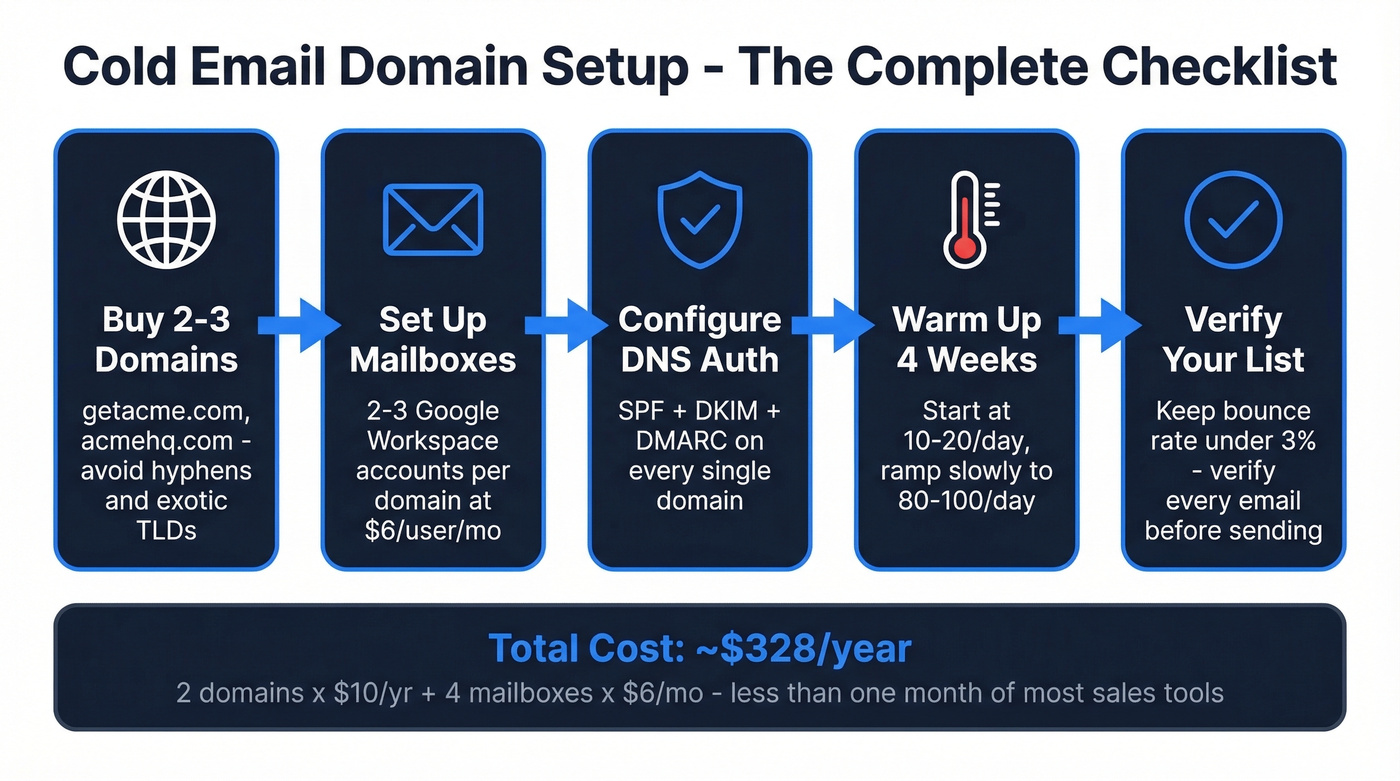
Total infrastructure cost: 2 domains x ~$10/yr + 4 mailboxes x $6/mo = ~$328/year. Less than one month of most sales tools.
Choose Your Domain Name
Keep it short and recognizable. If your company is acme.com, go with getacme.com, acmehq.com, or tryacme.com. Stick to .com, .io, or .co.
Skip numbers and hyphens. acme-outreach-123.com screams phishing. Skip cheap or exotic TLDs too - Spamhaus reputation statistics show .name domains spiked +185% in spam-related domains. Avoid .xyz, .biz, .site, and anything that feels like a burner.
Your outreach domain should look like a legitimate variation of your brand, something a prospect wouldn't think twice about seeing in their inbox. Set up a simple landing page or redirect to your main site on the new domain. A domain with zero web presence looks suspicious to both recipients and inbox providers.
Buy Your Domain
Before you pay, run any domain through MXToolbox. Previous owners may have left it on blacklists, and buying a pre-flagged domain is the most expensive $10 mistake you can make.
| Registrar | First Year | Renewal | Notes |
|---|---|---|---|
| Cloudflare | $9.77 | $9.77 | At-cost, no markup |
| Namecheap | $10.28 | $15.88 | DNS-friendly, flexible |
| Porkbun | $10.37 | $10.37 | Free WHOIS privacy |
| GoDaddy | $0.01 intro | High | Avoid - renewal trap |
Cloudflare is the best steady-state price in this list. Namecheap is a common pick on r/coldemail for DNS management and bulk domain handling. Don't fall for GoDaddy's penny intro pricing - renewals are brutal.
Pick Your Email Provider
| Feature | Google Workspace | Microsoft 365 |
|---|---|---|
| Inbox placement | ~94% | ~95% |
| Technical daily limit | 2,000 | 10,000 |
| Safe daily limit | 100-150 | 100-150 |
| Price | ~$6/user/mo | ~$6/user/mo |
Deliverability is close enough to be a coin flip. Google Workspace is the default for most cold outreach setups because the tool ecosystem - Instantly, Smartlead, Lemlist - integrates more smoothly with it. Microsoft 365 gives you more granular control via Exchange Online Protection, but most teams don't need that.
The safe sending limit is 100-150/day regardless of provider. The technical ceiling doesn't matter because you should never get close to it.

Your cold email domain is only as strong as the data you send through it. Prospeo's 5-step email verification - with spam-trap removal and honeypot filtering - delivers 98% accuracy so your freshly warmed domains stay clean. At $0.01 per verified email, it's cheaper than replacing a burned domain.
Stop warming domains just to kill them with unverified lists.
Set Up DNS Authentication
This is where most people skip steps or misconfigure something subtle. We've audited dozens of setups for clients, and DNS errors are the number one reason warm domains suddenly tank.
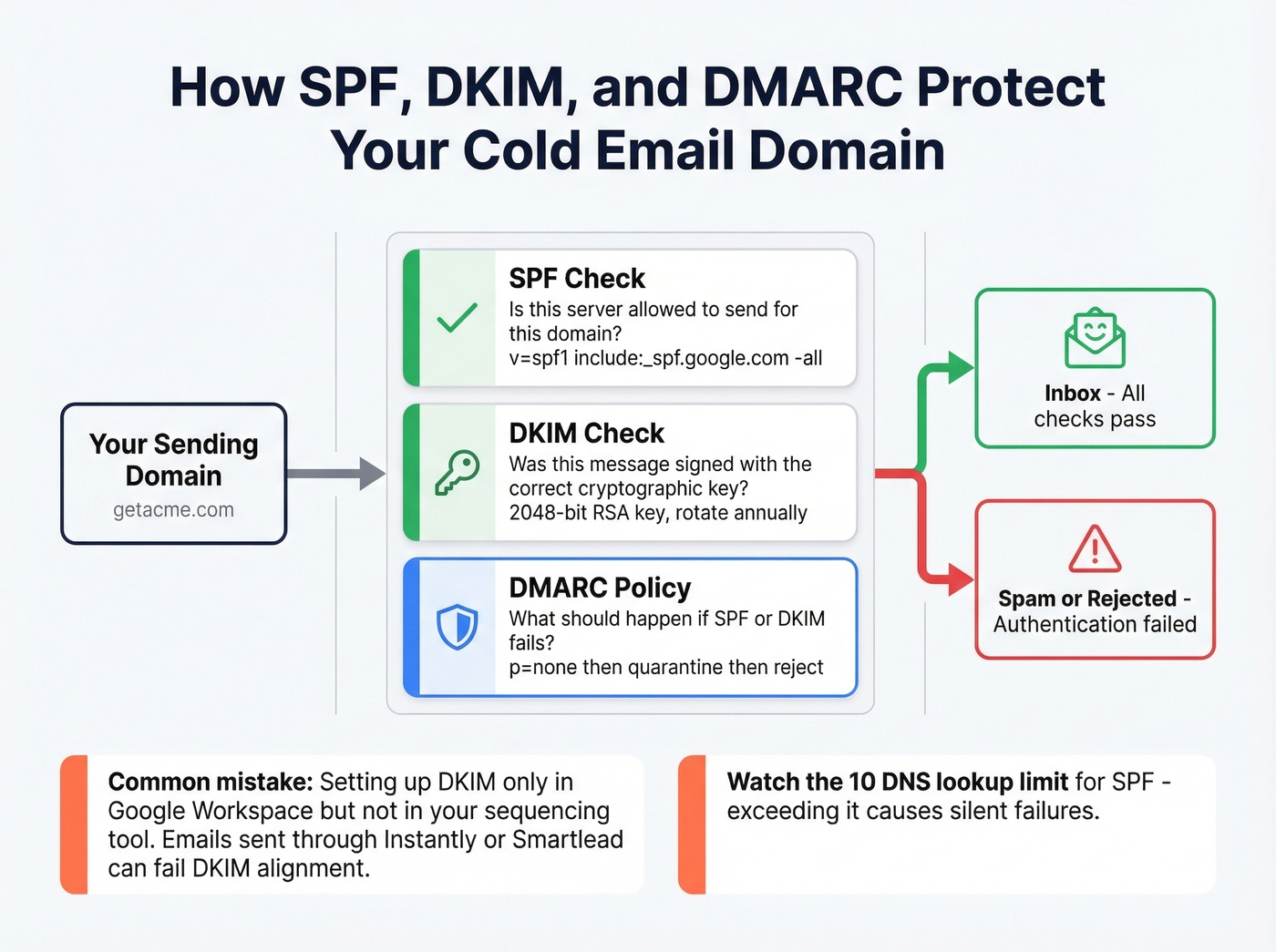
SPF Record
Add this as a TXT record on your domain:
v=spf1 include:_spf.google.com -all
Use -all (hard fail), not ~all. You can only have one SPF record per domain - if you're using multiple sending services, merge the includes into a single record. Watch the 10 DNS lookup limit; exceeding it causes SPF to fail silently.
Verify with: dig +short TXT yourdomain.com | grep spf
DKIM Record
Google Workspace generates this in the admin console:
selector._domainkey.yourdomain.com TXT "v=DKIM1; k=rsa; p=YOUR_PUBLIC_KEY"
Use 2048-bit keys and rotate them annually. If your cold email tool signs mail separately, it needs its own DKIM setup too. Only setting up Google's DKIM means emails sent through your sequencer can fail DKIM alignment - a mistake we see constantly. If you want a quick sanity check, follow a verify DKIM workflow before you scale.
DMARC Record
Start with monitoring, then tighten:
v=DMARC1; p=none; rua=mailto:dmarc@yourdomain.com; pct=100; aspf=r; adkim=r
The aspf=r and adkim=r tags set relaxed alignment, which is often necessary for dedicated outreach domain setups where different tools touch the message flow. If you want the deeper technical nuance, see DMARC alignment.
DMARC rollout timeline:
- Weeks 1-4:
p=none(monitor only) - Weeks 5-8:
p=quarantine - Week 9+:
p=reject
Don't jump straight to p=reject. You'll block legitimate mail and have no visibility into what's failing.
Warm Up Before You Send
Age your domain 7-14 days after purchasing before starting warmup. Inbox providers treat brand-new domains with zero history as suspicious - there's no shortcut here.
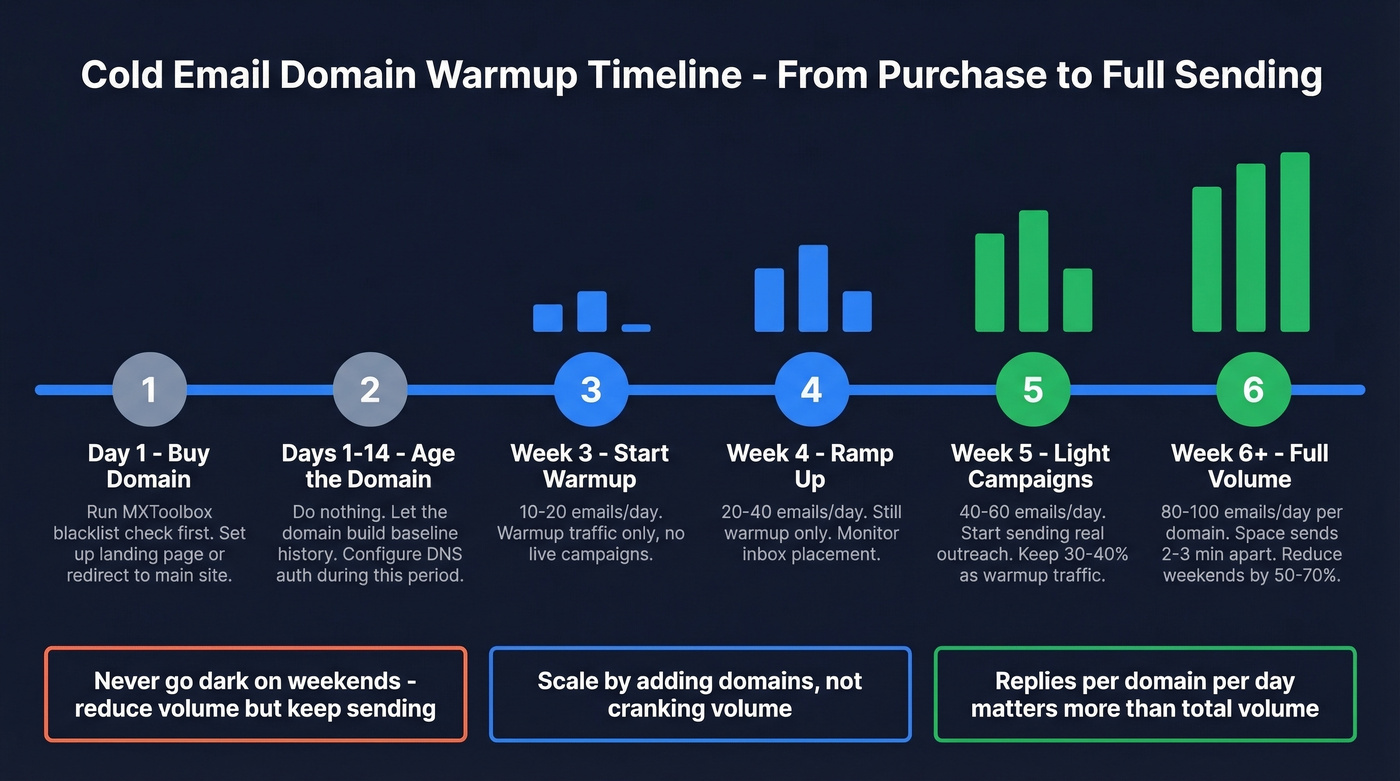
| Week | Daily Volume | Notes |
|---|---|---|
| 1 | 10-20 | Warmup only |
| 2 | 20-40 | Warmup only |
| 3 | 40-60 | Can start light sends |
| 4 | 60-80 | Gradual live campaigns |
In our experience, four weeks is the minimum for a safe ramp. The consensus on r/coldemail backs this up - "one month minimum" for new workspaces comes up in nearly every warmup thread.
Once you're sending live campaigns, maintain 30-40% of daily volume as warmup traffic. Space sends 2-3 minutes apart. Reduce weekend volume by 50-70% but don't stop entirely - going dark for two days looks unnatural to inbox providers. Tools like Instantly, Warmbox, and Warmy handle scheduling automatically. If you want to go deeper on pacing, see email velocity.
Domain reputation affects every mailbox on that domain. If one inbox gets flagged, the whole sending domain suffers. The scaling formula: 2-3 domains, 2-3 mailboxes per domain, ~100 emails per domain per day. That gives you 200-300 daily sends. Scale by adding domains, not by cranking volume on existing ones.
Let's be honest about something most guides won't say: most teams obsess over sending volume when they should obsess over reply rates. The teams consistently booking meetings from cold email are sending 150 emails a day with sharp targeting and clean data, not 1,000 emails a day into an unverified list. Volume is a vanity metric. Replies per domain per day is the number that matters. If you need a system for improving targeting, start with sales prospecting techniques.
Protect Reputation with Clean Data
You just spent four weeks warming up your domain. Don't burn it on day one with an unverified list.
Bounces are one of the fastest ways to destroy a new domain's reputation. High bounce rates tell inbox providers you're spraying bad or purchased lists - which is exactly what spammers do. I've watched a client lose a perfectly warmed domain in 48 hours because they imported a two-year-old CSV without verifying it first. (Benchmarks and fixes: email bounce rate.)

Prospeo's 5-step verification removes invalid addresses, spam traps, and honeypots before you send. The 98% email accuracy keeps bounce rates under 3% consistently, and it integrates natively with Instantly, Smartlead, and Lemlist so verified contacts flow directly into your sequencing tools. Stack Optimize built from $0 to $1M ARR running client campaigns through Prospeo - 94%+ deliverability, bounce under 3%, zero domain flags across all clients. If you're comparing tools, see our roundup of email verification options.
Skip verification if you enjoy re-buying domains every month.
You're running 2-3 domains, 100 sends each, spacing emails 2 minutes apart. That infrastructure deserves data that won't waste it. Prospeo refreshes every record on a 7-day cycle - no stale emails, no surprise bounces. It integrates natively with Instantly, Smartlead, and Lemlist so your verified contacts flow straight into your sending stack.
Keep bounce rates under 3% across every domain you run.
Monitor and Maintain Your Domains
Set a weekly routine. This takes 15 minutes and saves you from nasty surprises.
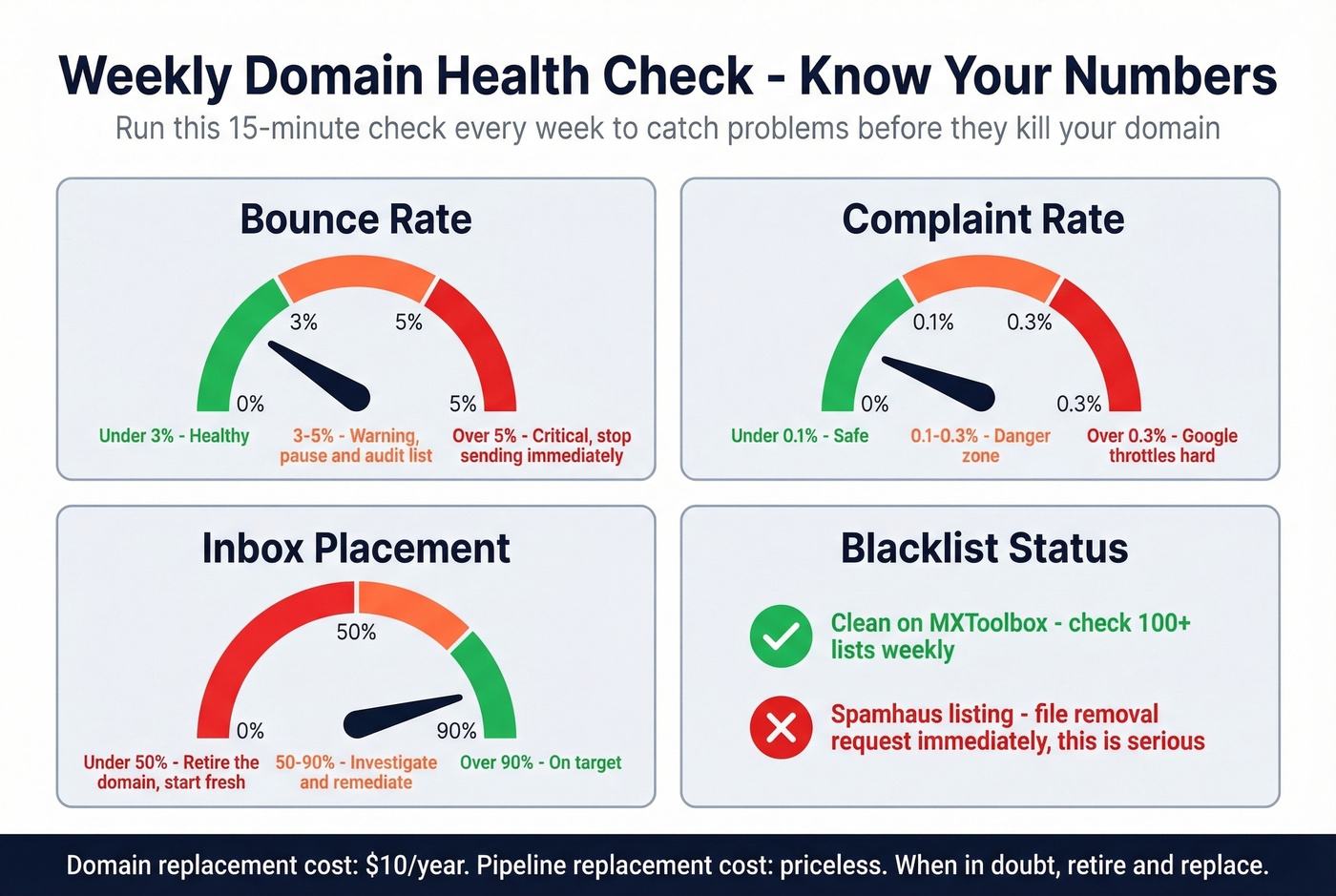
Blacklist check - Run your domains through MXToolbox (checks 100+ blacklists). Most minor listings expire on their own. Spamhaus listings are serious; file a formal removal request through their Blocklist Removal Center immediately. If you need the step-by-step, use our Spamhaus blacklist removal guide.
Bounce rate - Keep it under 3%. If it spikes, pause campaigns and audit your list before sending another email.
Complaint rate - Stay under 0.1%. Above 0.3% and Google starts throttling hard.
Inbox placement - Target 90%+. GlockApps or MailReach can track this over time. For more monitoring options, see email reputation tools.
When to retire a cold email domain: if deliverability stays below 50% after remediation - reduced volume, re-warmup, list cleaning - replace it. Domains cost $10/year. Your pipeline costs a lot more.
FAQ
How many domains do I need?
Start with 2-3 domains, 2-3 mailboxes each, sending 100-150 emails per domain per day. That gives you 200-450 daily sends with healthy reputation distribution. Scale by adding domains, not increasing volume per domain.
Can I use a subdomain instead?
Separate root domains are safer. Subdomains still share some reputation signals with the parent domain, and a dedicated outreach domain costs under $10/year - the isolation is worth it.
How long before I can send from a new domain?
Minimum 5-6 weeks total. Age the domain 7-14 days, then warm up for 4 weeks. Rushing this is the most common reason new sending domains get flagged immediately.
What if my domain gets blacklisted?
Check MXToolbox to identify which lists flagged you. Most minor listings expire within days. For Spamhaus, file a removal request through their Blocklist Removal Center. If deliverability stays below 50% after remediation, retire the domain and start fresh - a new one costs $10.
Does list quality really affect domain reputation?
Directly and immediately. High bounce rates signal spam to inbox providers, and a single bad send can undo weeks of warmup. Run every list through verification before sending to protect the reputation you spent weeks building.