

How to Build, Choose, and Maintain a Contact Management Database in 2026
Your marketing coordinator just exported the team's master contact list. It's a 6,000-row Google Sheet with three different date formats, 400 duplicates, and a column labeled "Notes (DO NOT DELETE)" that nobody can explain. In one UK study, 32% of SMEs still manage customer data in spreadsheets - and the pattern holds globally. If you're one of them, that spreadsheet is quietly rotting, costing you deals you'll never know about.
The fix isn't a $15,000-$40,000/year CRM. Most teams need something simpler: a clean, searchable contact management database with good tagging, shared access, and data that doesn't decay the moment you look away. Here's what that actually looks like, which tools fit which teams, and how to keep the whole thing from falling apart six months after setup.
Quick Picks by Use Case
- Simplest setup: Less Annoying CRM - $15/user/month, flat pricing, no upsells
- Best free tier: HubSpot (2 users, 1,000 contacts) or Bitrix24 (unlimited users)
- Google Workspace teams: Copper - starts at $9/seat/month
- Spreadsheet lovers who want structure: Airtable - free up to 1,000 records
What Is a Contact Management Database?
A contact management database is a searchable system that stores contact records alongside interaction history and lets your team tag, filter, and share those records in one place. Salesforce defines it as the layer between "scattered inboxes and calendars" and a full CRM.
That means tagging by role, industry, or interest. Search and filtering. Shared access with permissions. Interaction logging so you know who talked to whom and when. A 15-person think tank team on Reddit described this exact need - shared access, tagging by interest area, and Outlook integration - but found most CRMs packed with features they'd never touch. One user even described wanting daily prompts to reach out to a random subset of contacts, using the database as a relationship-maintenance engine.
What it doesn't include: pipeline forecasting, marketing automation, or deal-stage tracking. Those are CRM territory. Most teams don't need them.
Contact Database vs. Full CRM
Every alternatives list blurs this line. Here's the actual difference:
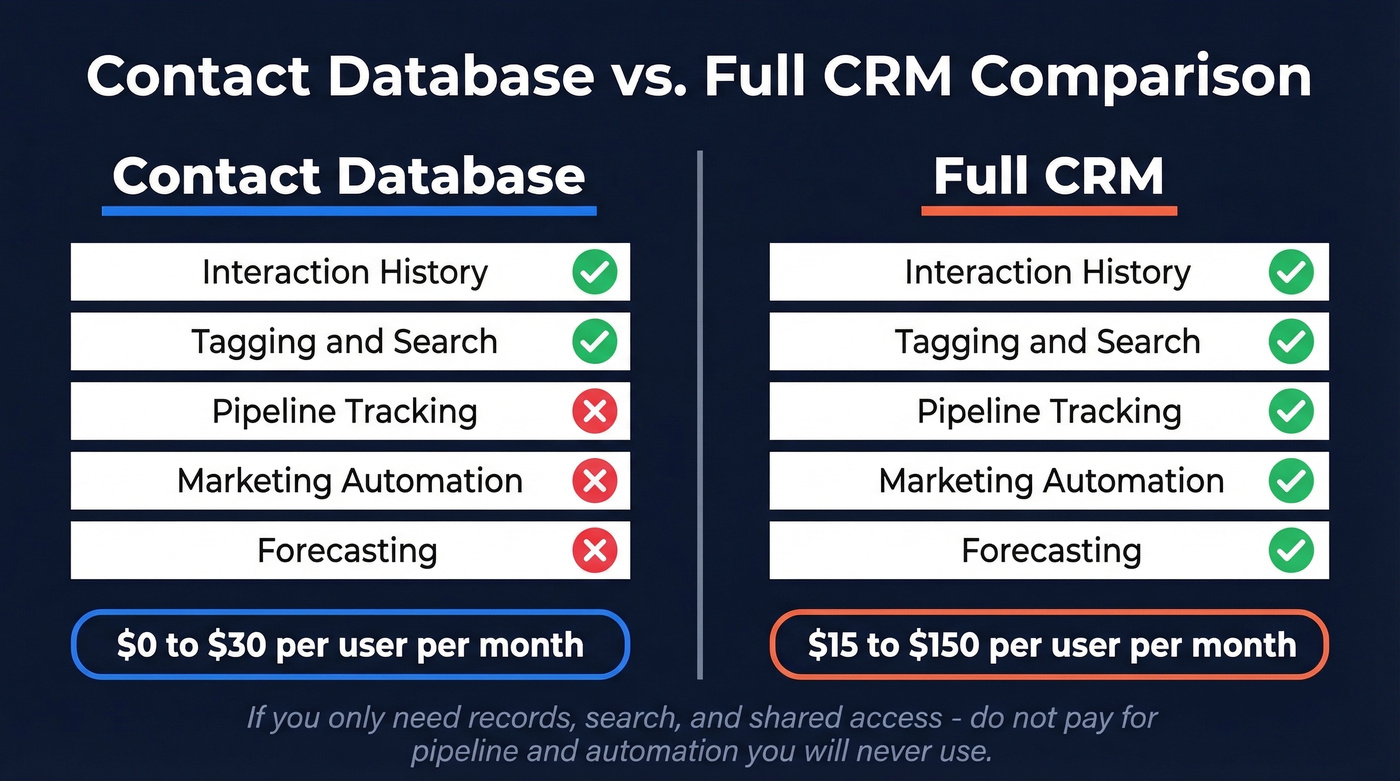
| Feature | Contact Database | Full CRM |
|---|---|---|
| Interaction history | ✓ | ✓ |
| Tagging & search | ✓ | ✓ |
| Pipeline tracking | ✗ | ✓ |
| Marketing automation | ✗ | ✓ |
| Forecasting | ✗ | ✓ |
| Typical price | $0-30/user/mo | $15-150/user/mo |
The folk.app team puts it well: "A database stores records; a CRM adds context, workflows, and collaboration to drive action." If you only need the first part, don't pay for the second. And before committing to any tool, check export options - can you get your data out as a clean CSV if you switch? Data portability matters more than most feature checklists suggest.
When Spreadsheets Stop Working
A two-person business on Reddit described managing 10,000+ contacts in a spreadsheet as "unmanageable and confusing." That's the inflection point most teams hit somewhere between 1,000 and 10,000 contacts.
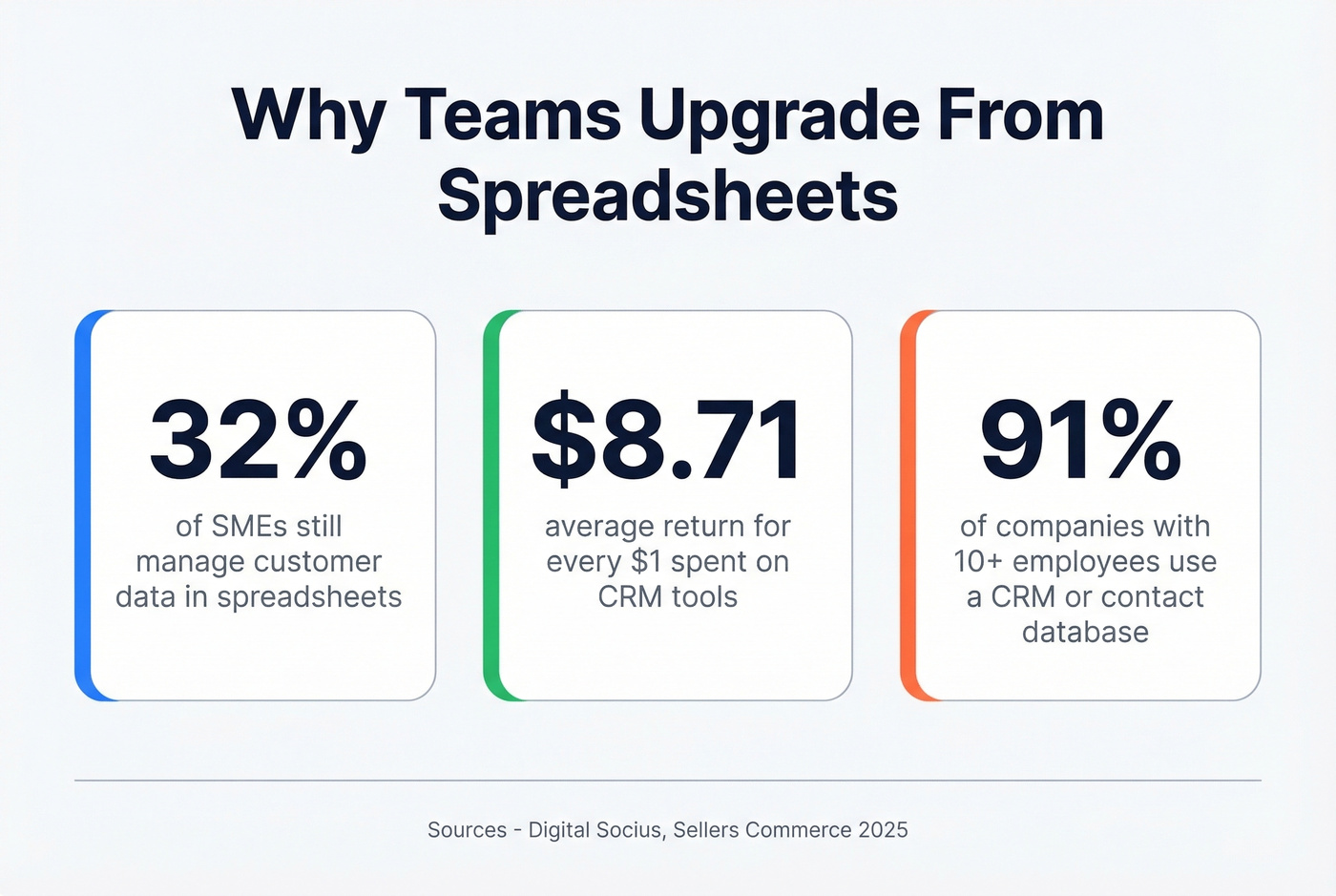
The upgrade triggers are predictable. Missed follow-ups because nobody remembered to check the sheet. Duplicate records multiplying faster than you can merge them. No interaction history showing who emailed whom last week. Multiple team members editing the same file with conflicting formats. There's also a security angle - a lost laptop with your master spreadsheet means your entire contact list is exposed, while cloud tools offer role-based permissions and encryption.
91% of companies with 10+ employees already use some form of CRM or contact database. Companies using CRM tools see an average return of $8.71 for every dollar spent. Hard to justify sticking with a free spreadsheet when the ROI gap is that wide.

Duplicate records and decayed emails are why contact databases rot. Prospeo refreshes data every 7 days - not every 6 weeks - and delivers 98% email accuracy across 300M+ profiles. At $0.01 per email, cleaning up that 6,000-row spreadsheet costs less than lunch.
Stop building your contact database on data that's already stale.
Best Contact Database Software in 2026
You don't need 15 options. Answer two questions: Do I need a full CRM or just a database? Does my team use Google or Microsoft? Those two answers eliminate 80% of the field.
Many tools now include AI-powered enrichment or lead scoring. For a contact database - as opposed to a full CRM - you rarely need those features. Focus on clean data, good search, and shared access.
| Tool | Starting Price | Free Plan? | Contact Limit | Best For |
|---|---|---|---|---|
| Less Annoying CRM | $15/user/mo | 30-day trial | ~50,000 | Simplicity |
| HubSpot CRM | $15/user/mo (Starter) | Yes (2 users) | 1,000 (free) | Free tier + scale |
| Copper CRM | $9/seat/mo (annual) | Free trial | 1,000-unlimited | Google Workspace |
| Prospeo | ~$0.01/email | Yes (75 emails/mo) | N/A (enrichment) | Data accuracy |
| Bigin by Zoho | $7/user/mo (annual) | Yes (1 user) | Varies | Budget teams |
| Bitrix24 | $49/mo for 5 users | Yes (unlimited) | Unlimited | Large teams, budget |
| Freshsales | $9/user/mo (annual) | Yes (3 users) | Varies | Sales-focused SMBs |
| Nimble | ~$25/user/mo (annual) | Free trial | Varies | Social enrichment |
Less Annoying CRM
Use this if you want zero complexity. $15/user/month, flat - no tiers, no upsells, no "talk to sales" gates. The practical contact limit is around 50,000, which covers most SMBs comfortably. They offer free phone and email support even to non-customers, which tells you something about the company.
Skip this if you need marketing automation, advanced reporting, or integrations beyond the basics. It's intentionally simple - that's the product, not a limitation.
HubSpot CRM
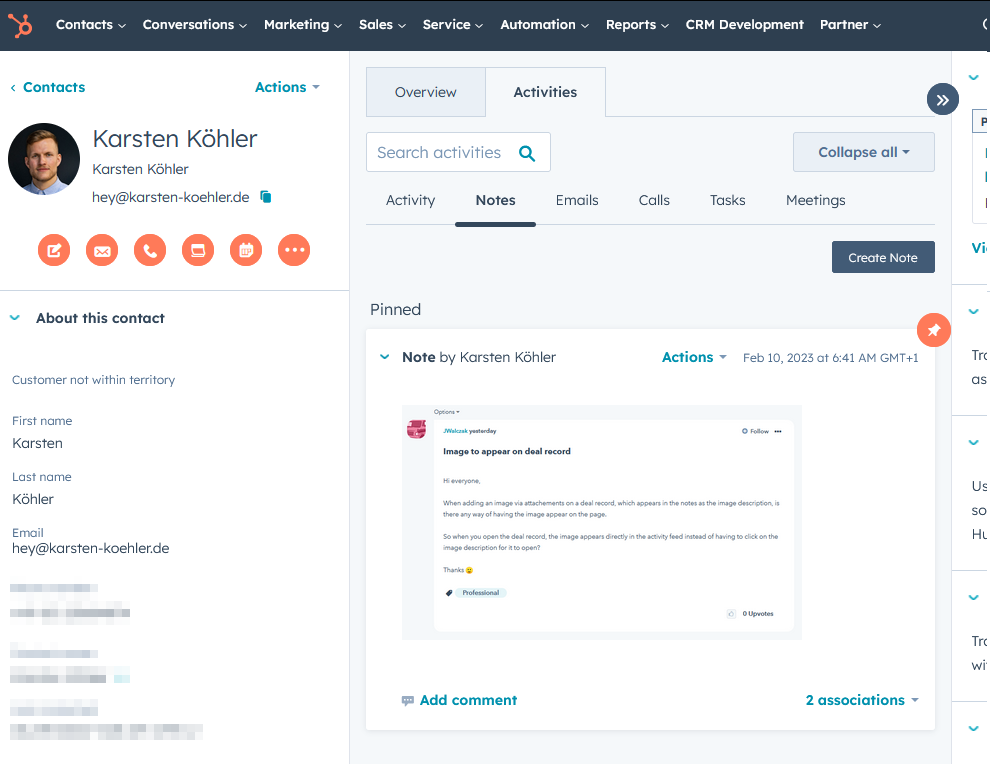
The free tier is generous: 2 users, up to 1,000 contacts, and 2,000 marketing emails per month, with a clear upgrade path as you grow. The ecosystem is massive, covering marketing, sales, and service under one roof.
Here's the thing, though. HubSpot can automatically add contacts you email - spam senders, newsletter services, automated replies. Within a week you can have 300 records you didn't ask for. Budget time for cleanup if you go this route.
Copper CRM
If your team lives in Google Workspace, stop looking. Copper is the obvious choice - deep integration with Gmail, Calendar, Drive, and Looker Studio. Pricing starts at $9/seat/month on the annual Starter plan with 1,000 contacts, scaling to $99/seat/month for Business with unlimited contacts.
On Microsoft 365? Skip Copper entirely. It's built for Google, and forcing it into Outlook is a frustrating exercise that we've seen waste weeks of setup time for zero payoff.
Prospeo
Prospeo isn't a CRM - it's the tool that makes any contact database's data reliable. With 98% email accuracy across 300M+ professional profiles, 143M+ verified emails, and 125M+ verified mobile numbers, it sits upstream of your database and ensures what goes in is actually accurate. Every record includes 50+ data points, and the entire dataset refreshes on a 7-day cycle while the industry average sits at 6 weeks. The free tier gives you 75 email verifications plus 100 Chrome extension credits per month, and paid plans run about $0.01 per email with no contracts.
Bigin by Zoho
Lightweight CRM starting at $7/user/month with a free plan for one user. Think of it as Zoho CRM's little sibling - enough pipeline and contact management for small teams without the full Zoho complexity.
Bitrix24
Unlimited free users and unlimited contacts - hard to beat on paper. The tradeoff is a steep learning curve and an interface that tries to do everything from CRM to project management to video calls. Paid sales automation starts at $49/month for 5 users.
Freshsales
Free for up to 3 users with built-in phone and email. Paid plans start at $9/user/month on an annual contract. If your team's primary workflow is outbound calling and email sequences, Freshsales fits better than a generic contact database.
Nimble
At around $25/user/month on an annual plan, Nimble enriches contacts with social profile data automatically. It's a solid pick for teams on Microsoft 365 who want enrichment without manual research.
Let's be honest about one more option: Salesforce offers a Free Suite for 2 users, with Gmail and Google Calendar integration and up to 100 email sends/month. But the lack of automation and custom objects makes it impractical for most teams. Don't get lured by the brand name - a $7/month Bigin plan will outperform free Salesforce for any team under 20 people.
Setting Up Your Database
Most guides tell you what to buy. Nobody tells you what to do after you buy it. These five steps separate a useful database from an expensive address book:
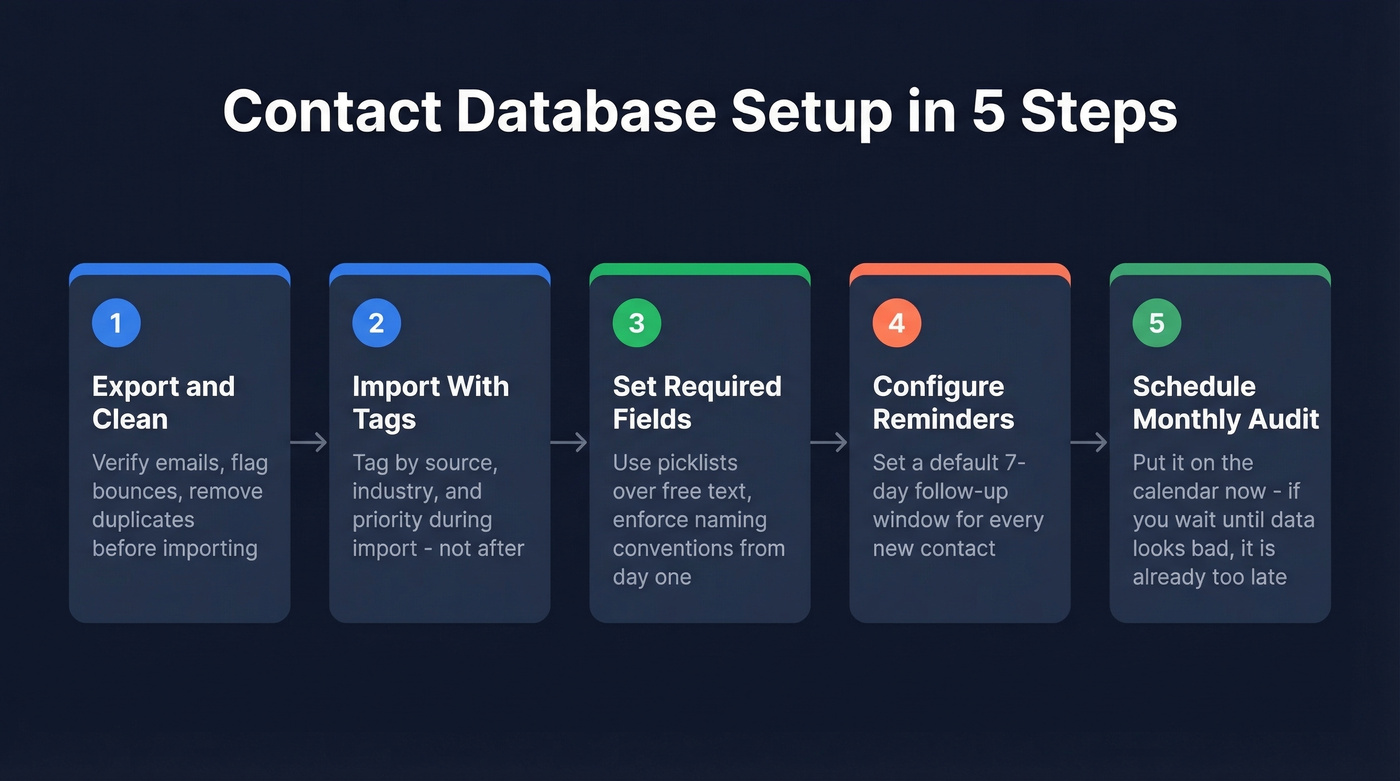
1. Export and clean your existing contacts. Don't import your messy spreadsheet as-is. Run it through a verification tool first to flag bounces, duplicates, and outdated records. If you need to view contact data in Excel one last time to audit what you have, do it before the import - not after. If you're comparing vendors, start with our roundup of data enrichment services.
2. Import with tags and segments. Tag contacts by source, industry, deal stage, or priority during import - not after. Retroactive tagging never happens. We've seen teams promise to "tag everything next week" and then never touch it again.
3. Set required fields and naming conventions. Use picklists over free text. Enforce "Company Name" not "company," "comp," or "Company name." Fifteen minutes of setup saves months of cleanup.
4. Configure follow-up reminders. The whole point of moving off spreadsheets is automated nudges. Set a default follow-up window for new contacts - 7 days is a good starting point. If you need copy you can paste into your workflow, use these sales follow-up templates.
5. Schedule your first monthly audit. Put it on the calendar now. If you wait until the data looks bad, it's already too late.
How to Keep Your Data Clean
The tool matters less than the data inside it. I've watched teams spend $15,000/year on a CRM and still miss deals because their contact records were 18 months stale. A $15/month tool with clean, verified contacts will outperform that every time.
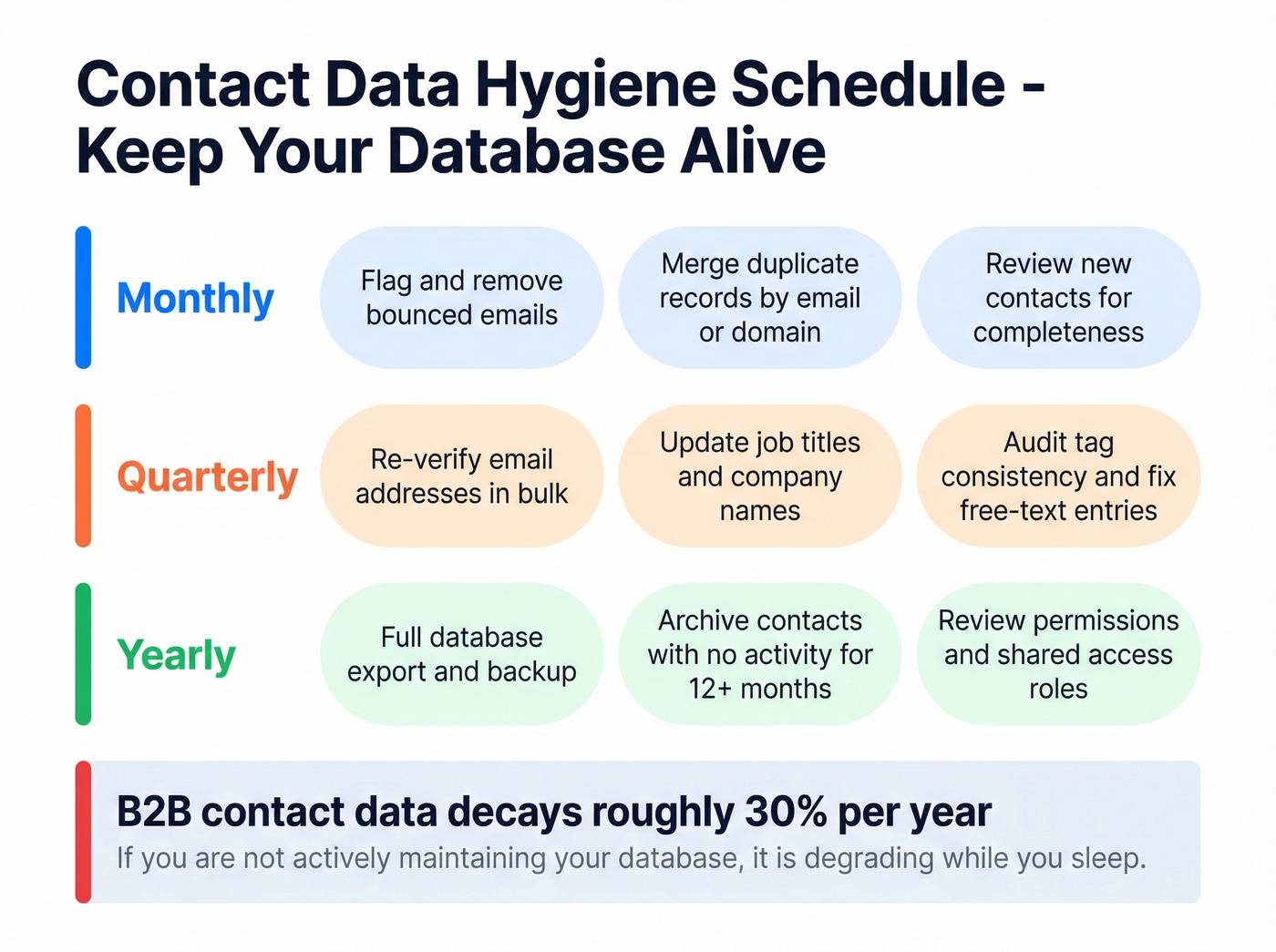
Industry benchmarks put B2B contact data decay at roughly 30% per year. People change jobs, companies get acquired, email domains rotate. If you aren't actively maintaining your database, it's degrading while you sleep.

Monthly: Flag bounced emails and remove them. Merge duplicate records by matching on email or company domain. Review records untouched in 6+ months and archive or re-verify. If deliverability is part of your workflow, keep an eye on email bounce rate.
Quarterly: Verify email accuracy across your full database. Standardize fields and check completeness. Assign a database owner - even part-time. Link data hygiene directly to revenue: dirty data means missed deals. For deeper ops hygiene, see our email deliverability guide.
Mistakes That Kill Your Database
We've seen the same five mistakes sink contact databases across teams of every size.
Importing messy data on day one. Your old spreadsheet has unqualified leads and contacts from 2019 who've changed jobs twice. Import only verified contacts. Tag as you go.
Trying to do everything at once. Start with three habits: add notes after every call, set follow-up reminders, track one pipeline. Add complexity later. If you're building a repeatable outbound motion, borrow from these sales prospecting techniques.
Leaving the tool in default mode. Rename stages, hide unused fields, tailor your dashboard. Fifteen minutes of customization saves hours of confusion.
Low team adoption. If half your team still tracks contacts in their inbox, your database is incomplete by definition. Show small wins early and assign a "CRM champion" who keeps the team accountable. Even a dedicated contact management app on mobile can boost adoption by letting reps log interactions on the go. If you're still deciding between tools, compare more options in our guide to the best contact management software.
Ignoring data hygiene after setup. Data hygiene isn't a one-time cleanup. It's an ongoing practice - schedule it or watch your database rot.
A contact management database without verified data is just a prettier spreadsheet. Prospeo's 5-step verification catches spam traps, honeypots, and catch-all domains before they tank your deliverability. 83% of leads come back enriched with 50+ data points - job title, phone, company size, and more.
Fill every record in your database with data you can actually trust.
FAQ
Is a spreadsheet a contact management database?
Technically yes, practically no. Spreadsheets store contact data but lack interaction history, duplicate detection, shared access controls, and automated reminders. They work for under ~500 contacts. Beyond that, even a free tool like HubSpot or Bitrix24 will outperform a spreadsheet for organizing and acting on contact data.
What's the best free contact database tool?
HubSpot (2 users, 1,000 contacts) and Bitrix24 (unlimited users, unlimited contacts) offer the most generous free tiers. For data verification before importing, Prospeo's free plan includes 75 email verifications per month - enough to clean a small list before it enters your system.
How often should I clean my database?
Monthly spot checks for bounces and duplicates, plus quarterly deep audits to verify accuracy, archive inactive records, and standardize fields. B2B contact data decays at roughly 30% per year, so quarterly verification is the minimum to keep records reliable.
Do I need a CRM or just a contact database?
If you only need to store, tag, search, and share contacts with interaction notes - a contact database is enough. If you need pipeline tracking, deal forecasting, or marketing automation, you need a CRM. Most teams under 20 people start with a database and graduate to a CRM when their sales process demands it.
Can I use Microsoft Access for contact management?
Yes - Access is a viable option for teams already on Microsoft 365 who want more structure than Excel without paying for a SaaS tool. It gives you relational tables, forms, and queries. The downsides are limited multi-user collaboration, no cloud sync by default, and a steeper learning curve than most modern contact management apps. For teams larger than five people or those needing mobile access, a dedicated cloud tool is usually the better choice.