

The Best CRM for Account Management in 2026
It's QBR season. You open the account record for your biggest customer and discover the VP who signed the deal left six months ago. The org chart hasn't been touched since close. The primary email bounces. You spend three hours on manual research before the call even starts.
That's not a CRM problem - it's a symptom of CRMs built for closing deals, not managing relationships. Picking the right CRM for account management is one of the highest-leverage decisions a post-sale team can make, yet most tools still optimize for new logos. The global CRM market hit $73.4B in 2024 and is projected to reach $163B by 2030, and the overwhelming majority of that investment goes toward acquisition. Account managers get the leftovers. As one practitioner on r/CRM put it, "most CRMs seem designed for tracking deals/prospects/new business" - not for organizing existing clients. In verticals like managed services, teams outgrow their CRM the moment they need to track meetings, contracts, and files alongside contacts - not just deals.
Meanwhile, 82% of B2B decision-makers say sales reps come unprepared to engage - and that number is worse for account managers working with stale data. With retention economics mattering more than ever in uncertain markets, getting account management right isn't optional.
Here's what actually works, plus the data layer most teams forget entirely.
Our Picks (TL;DR)
| Use Case | Pick | Starting Price |
|---|---|---|
| Best all-around CRM | HubSpot | Free |
| Best built-in KAM | Pipeliner CRM | $65/user/mo |
| Best dedicated KAM platform | DemandFarm | ~$20-70/user/mo |
| Best budget option | Zoho CRM | $14/user/mo |
HubSpot wins on breadth and free entry. Pipeliner is the most underrated option for native key account management features. DemandFarm is the enterprise play for teams managing 50+ strategic accounts. Zoho gets the job done at a price that won't trigger a procurement review.
Hot take: Most teams don't need a dedicated KAM platform. A solid CRM paired with a data enrichment layer that keeps contacts fresh will outperform an expensive KAM tool filled with stale records. The bottleneck is almost never the software - it's the data inside it.
CRM vs. KAM Platform - Which Do You Need?
Before you pick a tool, answer a more fundamental question. A standard CRM and a dedicated Key Account Management platform solve different problems. Here's a quick diagnostic, adapted from Kapta's KAM framework:
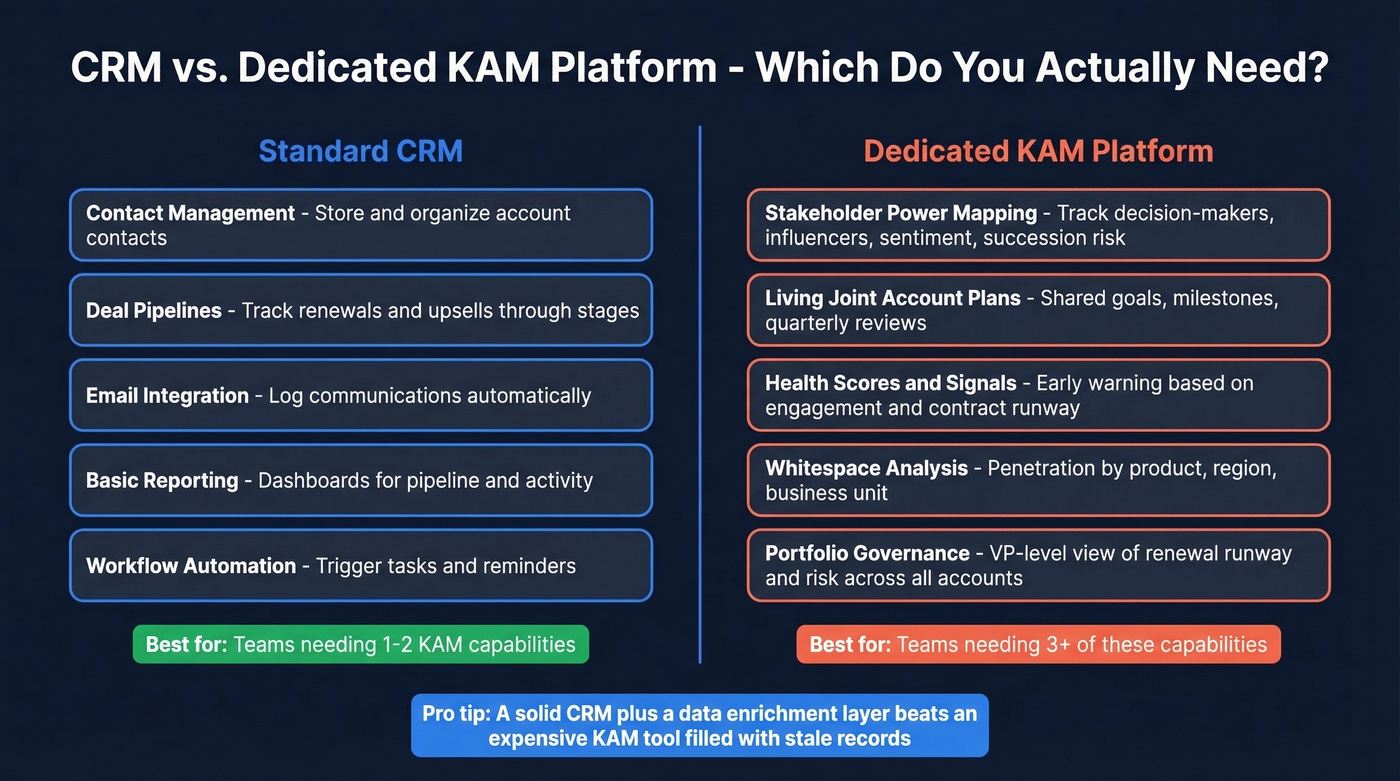
- People & power mapping - Do you need to track decision-makers, influencers, sentiment, and succession risk across accounts?
- Living joint plans - Do your accounts require shared goals, milestones, and proofs of progress reviewed quarterly?
- Signals & telemetry - Do you need early-warning health scores based on engagement patterns, meeting quality, and contract runway?
- Whitespace analytics - Are you tracking penetration by product, region, or business unit to find expansion opportunities?
- Portfolio governance - Does your VP need a single view of renewal runway, risk concentration, and plan progress across all accounts?
If you need three or more of these, a standard CRM won't cut it. You're looking at a dedicated KAM platform like DemandFarm or Kapta, or a CRM with native KAM features like Pipeliner. For teams that only need one or two, a good CRM plus an enrichment layer will get you there.
We've seen VPs of Customer Success spend a full day every quarter building a spreadsheet to get portfolio-level visibility that a KAM platform would surface in seconds. That's the real cost of using the wrong tool category.
5 KPIs Every Account Manager Should Track
No matter which tool you pick, these are the numbers that matter:
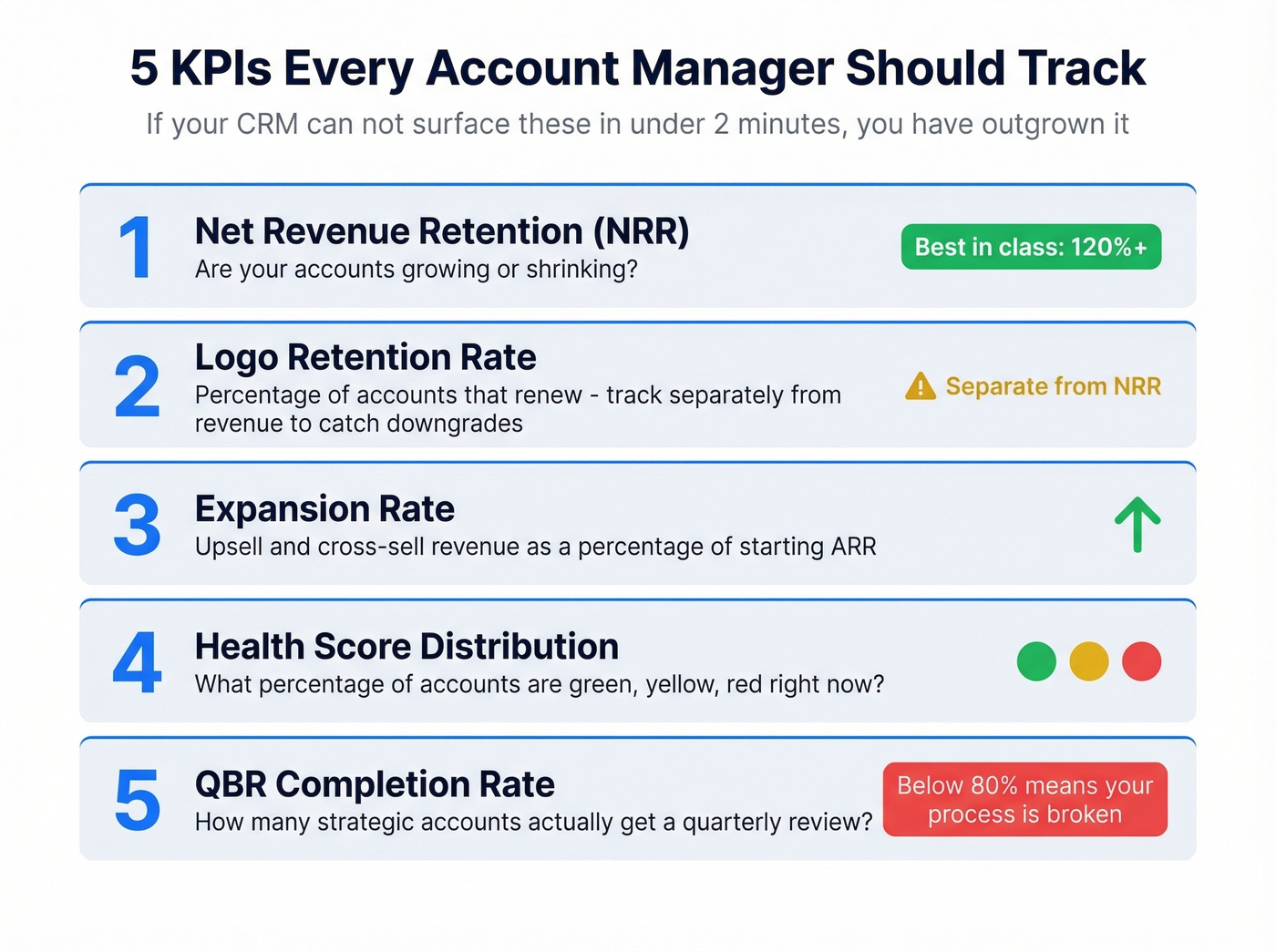
- Net Revenue Retention (NRR) - Are your accounts growing or shrinking? Best-in-class B2B teams hit 120%+.
- Logo Retention Rate - What percentage of accounts renew? Track this separately from revenue retention to catch downgrades early. (If you need a clean definition and benchmarks, start with renewal rate.)
- Expansion Rate - Revenue from upsells and cross-sells as a percentage of starting ARR. This is where whitespace analysis pays off. (Related: cross-selling vs up-selling.)
- Health Score Distribution - What percentage of accounts are green, yellow, red? If you can't answer this instantly, your CRM isn't set up for AM. (If you're formalizing scoring, use a lead scoring style rubric and adapt it to accounts.)
- QBR Completion Rate - How many strategic accounts actually get a quarterly review? Below 80% means your process is broken, not your tool. (See also: QBR questions to ask.)
If your CRM can't surface these five numbers in under two minutes, you've outgrown it for account management.
Best Account Management CRMs Compared
HubSpot CRM - Best All-Around
Use it if you want a CRM that's free to start, scales cleanly, and has one of the deepest integration ecosystems in the market. HubSpot's free tier supports 2 users and 1,000 contacts - enough for a small AM team to get moving without a budget conversation. Paid tiers run $15/seat/mo (Starter), $50/seat/mo (Professional), and $75/seat/mo (Enterprise). For account management, the shared inbox, customizable deal pipelines (repurpose them for renewals), and reporting dashboards do most of the heavy lifting. The 2,000+ integrations mean you can bolt on whatever's missing.
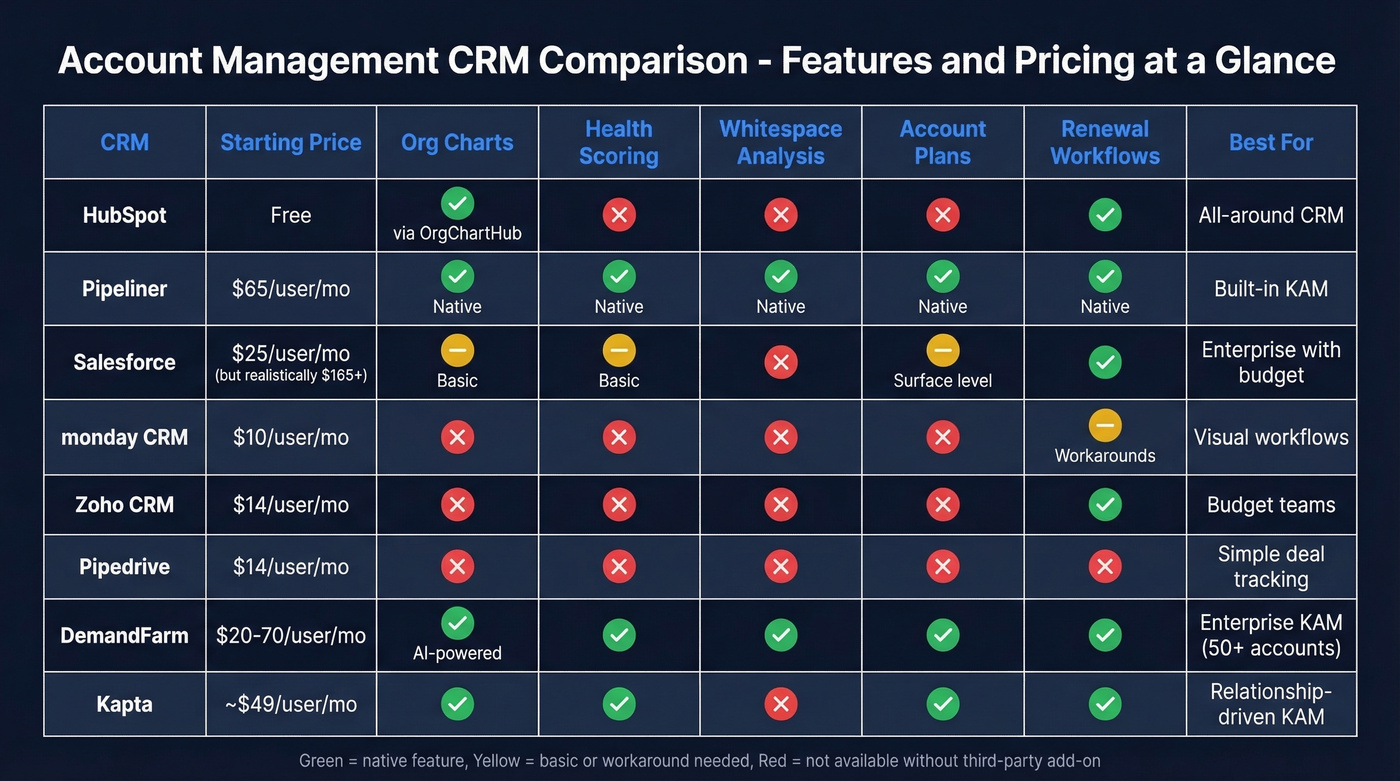
Skip it if you need native stakeholder mapping or account health scoring out of the box. HubSpot doesn't have either without add-ons. OrgChartHub fills the org chart gap with drag-and-drop relationship maps and engagement heatmaps, but that's another tool to manage. Pair HubSpot with Prospeo's CRM enrichment to keep contact records fresh automatically - 50+ data points per contact pushed directly into HubSpot on a 7-day refresh cycle.
Pipeliner CRM - Best Built-In KAM
Nobody talks about Pipeliner, and that's a mistake. Pipeliner's pricing page lists everything: account hierarchy, relationship mapping, visual org charts, whitespace analysis, account matrix views, health scoring, and account plans - all native, across every tier. Starter runs $65/user/mo (annual), Business $85, Enterprise $115, Unlimited $150, with a 3-user minimum.
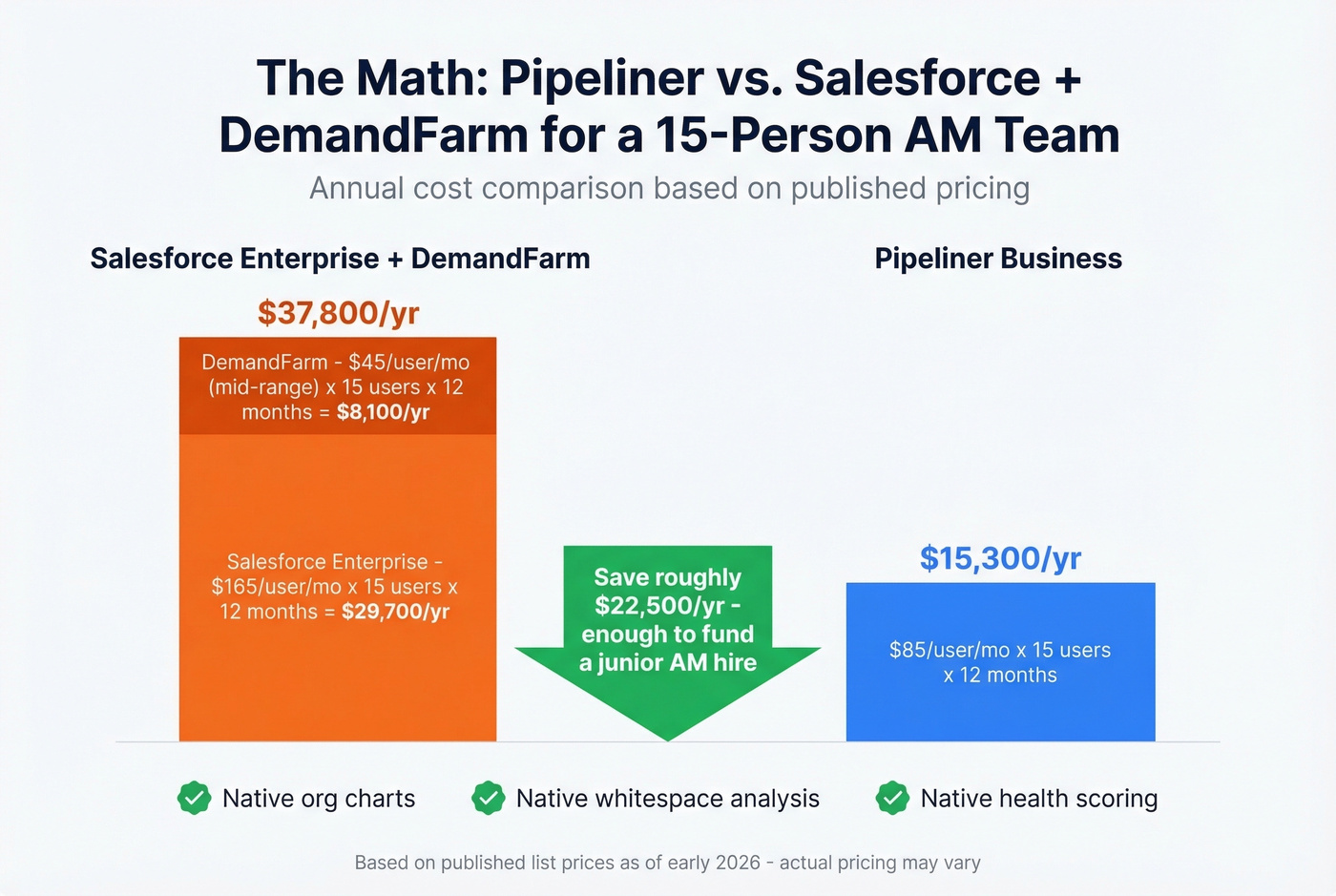
No other mid-market CRM ships this much KAM functionality without requiring a third-party add-on. If you're evaluating Salesforce plus DemandFarm and the combined cost makes your CFO twitch, Pipeliner delivers 80% of that functionality at a third of the price. We ran a side-by-side comparison for a 15-person AM team last year, and the annual savings came out to roughly $40K - enough to fund a junior AM hire instead.
Skip it if you care deeply about UI polish. Pipeliner's interface feels a generation behind HubSpot or monday. It's functional, not beautiful. For teams that prioritize substance over aesthetics, that's a fine tradeoff.

Salesforce - Best for Enterprise
Salesforce can do almost anything for account management - with enough customization, admin hours, and budget. It starts at $25/user/mo, but enterprise deployments with the features you'd actually need for AM often run $165-$330/user/mo. The native Account Plans feature exists, but it's surface-level. Most serious AM teams layer DemandFarm or Kapta on top for relationship mapping and whitespace analysis.
Here's the thing: if you already have Salesforce and a dedicated admin, build on what you have. If you're starting fresh, the implementation cost and complexity rarely justify it for account management alone. (If you're sanity-checking costs, see our breakdown of Salesforce pricing.)
monday CRM - Best Visual Workflows
monday CRM starts at $10/user/mo and brings no-code flexibility, automations, and dashboards that make account health visible at a glance. It's genuinely good for teams that think visually and want to customize everything. The tradeoff: monday's DNA is project management, not CRM. Post-sale workflows like renewal tracking and stakeholder mapping require creative workarounds rather than native features.
Zoho CRM - Best Budget Option
Zoho starts at $14/user/mo and delivers a surprisingly broad feature set: email integration, pipeline management, workflow automation, and basic analytics. For teams that need account management software but don't have HubSpot or Salesforce budget, Zoho is the obvious pick. It won't wow you with KAM-specific features, but it covers the fundamentals.
Pipedrive - Best for Simple Tracking
Pipedrive starts at $14/user/mo and offers one of the cleanest visual pipelines in the market. Setup takes hours, not weeks. The limitation is real, though: Pipedrive was designed for deal flow, and post-sale features like account health scoring, renewal workflows, and stakeholder mapping are either absent or require third-party apps. Use it for tracking accounts through a simple lifecycle - don't expect it to replace a KAM platform.
DemandFarm - Best Dedicated KAM
DemandFarm is the enterprise-grade KAM platform for teams managing large strategic account portfolios. It's CRM-agnostic, integrating with Salesforce (native) plus HubSpot, Dynamics, Zoho, and Pipedrive. The feature set runs deep: AI-powered org charts, whitespace analysis, dynamic account plans, and portfolio governance views. G2 lists pricing at $20-$70/user/mo with a 10-user minimum, and the product carries a 4.4/5 rating across 45 reviews.
One word of caution: DemandFarm lists AI features like 1-click account plan summaries and account health insights, with some marked "coming soon." Ask for a live demo with your actual data to confirm what's shipped versus what's still on the roadmap.
DemandFarm is excellent if you manage 50+ strategic accounts and have budget for a dedicated tool. It's overkill for everyone else.
Kapta - Best for Relationship-Driven KAM
Kapta focuses on the human side of account management: account health scoring, living joint plans, and structured renewal cadences at T-120, T-90, and T-60 days. Pricing runs ~$1,000/mo (KAM Basics) to $5,000/mo (Enterprise), with a per-user equivalent around $49/mo. It integrates with Salesforce, HubSpot, Zoho, and Slack. The pricing is steep for small teams, but for relationship-driven AM organizations, the structured methodology is worth it.
Honorable Mentions
- Freshsales - If your AM team wants built-in phone and email without juggling integrations, Freshsales at $15/user/mo is the simplest path. Solid for teams under 10.
- Nimble - $24.90/user/mo. Social-enriched contact management that's surprisingly good for keeping tabs on stakeholder activity across channels. (If you're comparing, see HubSpot vs Nimble.)
- folk - $20/mo. Lightweight, collaborative CRM built for teams of 20-50. Great for early-stage AM teams that don't need enterprise features yet.
- OrgChartHub - HubSpot-native org chart add-on with drag-and-drop relationship maps and engagement heatmaps. The missing piece if you're running HubSpot for AM.
- Prophet CRM - Embeds directly into Outlook. Worth a look for teams that refuse to leave their inbox.

You just read about the VP who left six months ago while your CRM stayed frozen. Prospeo's enrichment pushes 50+ data points per contact directly into HubSpot and Salesforce on a 7-day refresh cycle - 6x faster than the industry average. 83% of enriched leads come back with verified contact data at $0.01 per email.
Stop prepping for QBRs with stale records. Start with live data.
Pricing Comparison
DemandFarm and Kapta won't publish pricing on their own sites - that tells you they're selling to procurement teams, not account managers. Here's what we've gathered:
| Tool | Starting Price | Per-User Cost | Free Tier? | Best For |
|---|---|---|---|---|
| HubSpot | Free | $15-$75/seat/mo | Yes | All-around AM |
| Pipeliner | $65/user/mo | $65-$150/user/mo | No | Native KAM features |
| Salesforce | $25/user/mo | $25-$330/user/mo | No | Enterprise AM |
| monday CRM | $10/user/mo | $10+/user/mo | No | Visual workflows |
| Zoho | $14/user/mo | $14+/user/mo | No | Budget teams |
| Pipedrive | $14/user/mo | $14+/user/mo | No | Simple tracking |
| DemandFarm | ~$20/user/mo | $20-$70/user/mo | No | Enterprise KAM |
| Kapta | ~$49/user/mo | ~$1K-$5K/mo flat | No | Relationship KAM |
| Freshsales | $15/user/mo | $15+/user/mo | No | Small teams |
| Nimble | $24.90/user/mo | $24.90/user/mo | No | Social enrichment |
| folk | $20/mo | $20+/mo | No | Lightweight AM |
The Data Problem Nobody Talks About
Let's be honest: no CRM will save you if your contact data is stale. And contact data decays fast - stakeholders change roles, champions get promoted or leave, emails bounce, phone numbers go dead. By the time QBR season hits, you're starting every conversation with "wait, who's our new champion?"
This is what a data enrichment layer solves. Prospeo refreshes contact records on a 7-day cycle, not the six-week lag you'd get from most enrichment providers. Native HubSpot and Salesforce integrations push fresh data directly into your CRM without manual intervention. A 92% API match rate means you're not just getting an email - you're getting the full picture of who's in the account, what they do, and how to reach them.
Stop looking for the perfect account management tool. It doesn't exist. What exists is a CRM that's good enough plus a data layer that keeps it accurate. That combination beats any single tool, every time.

The best CRM for account management is the one with accurate data. Prospeo keeps org charts current with 300M+ profiles, 98% email accuracy, and 125M+ verified mobile numbers - so your account managers always know who to call, even after reorgs.
Fix the data layer most account teams forget entirely.
How to Build Your Stack
Budget stack (~$500/mo):
- HubSpot CRM (free tier) for pipeline and account tracking
- Prospeo for contact enrichment and data freshness
- Shared Google Doc or Notion for account plans
- OrgChartHub (free tier) for basic org charts
In our experience, this budget stack handles 80% of what most AM teams need. A 5-person team gets accurate data and structured workflows without a major software commitment.
Premium stack (~$2,000+/mo):
- Pipeliner CRM or Salesforce for native KAM features and pipeline management
- DemandFarm or Kapta for stakeholder mapping, whitespace analysis, and portfolio governance
- A data enrichment layer keeping every contact record fresh across the stack
One caveat on "AI-powered account management": every CRM vendor claims it in 2026. Most of it is a GPT wrapper on your meeting notes. Ask for a live demo with your actual data before you sign anything - we've been burned by this more than once.
FAQ
What's the difference between a CRM and a KAM platform?
A CRM tracks deals and contacts across your pipeline, while a KAM platform manages ongoing strategic relationships - stakeholder mapping, health scoring, whitespace analysis, and renewal workflows. Most teams start with a CRM and add a KAM layer when they hit 30+ strategic accounts requiring structured account plans.
Can I use a free CRM for account management?
HubSpot's free tier handles basic account tracking for small teams with up to 2 users and 1,000 contacts. You'll outgrow it once you need health scoring or stakeholder mapping, but it's a solid starting point paired with an enrichment tool that keeps contacts current.
How do I keep account data fresh in my CRM?
Use a data enrichment tool that integrates natively with your CRM and refreshes records automatically. Weekly enrichment that catches stakeholder changes - pushing updated emails, titles, and phone numbers directly into your system - prevents the "who's our champion now?" scramble before every QBR.
When should I invest in a dedicated KAM platform?
Invest when you manage 30+ strategic accounts and need relationship mapping, whitespace analysis, and portfolio-level visibility that a standard CRM can't provide. Below that threshold, a well-configured CRM with a reliable enrichment layer handles most account management workflows at a fraction of the cost.
What's the biggest mistake teams make when choosing account management software?
Picking a CRM optimized for closing new deals and expecting it to handle post-sale relationships. Account management is non-linear and relationship-driven - deal-stage pipelines don't map to renewal cadences, stakeholder changes, or expansion opportunities. Match the tool to the workflow, not the other way around.