

CRM Platform Meaning: Definition, Features, and What Nobody Tells You
Every major CRM vendor defines "CRM platform" in a way that conveniently sounds like their own product. Salesforce's definition sounds like Salesforce. Microsoft's sounds like Dynamics 365. HubSpot's sounds like HubSpot.
Here's a definition that isn't trying to sell you anything.
TL;DR: Platform vs Software vs Spreadsheet
A CRM platform is CRM software plus extensibility - APIs, app marketplaces, custom objects, and multi-department modules. If you just need organized contacts and follow-ups, CRM software is enough. If you need a single source of truth across sales, marketing, and support with integrations and automation, you need a platform. And whichever you pick, the data inside it matters more than the features around it.
What Is a CRM Platform, Really?
CRM stands for Customer Relationship Management - the practice of tracking every interaction between your company and the people who buy from you (or might).
A CRM platform takes that concept and builds infrastructure around it. It's not just a database of contacts with a pipeline view. It's a foundation layer with APIs, an app marketplace, workflow automation, custom data objects, and governance controls that other tools and teams plug into.
The distinction matters because the average organization uses close to 900 different applications, but only 29% of those are integrated. A CRM platform exists to solve that fragmentation. It becomes the central nervous system where sales, marketing, support, and operations share a single customer record instead of maintaining four separate versions of the truth. The CRM market was valued at $101.41B in 2024 and is on track to reach $262.74B by 2032 - growth driven not by better contact databases, but by platforms expanding into AI, automation, and cross-department orchestration.
Platform vs Software vs System
These three terms get used interchangeably, and that's a problem. They mean different things, and the differences affect what you buy and how much you spend.
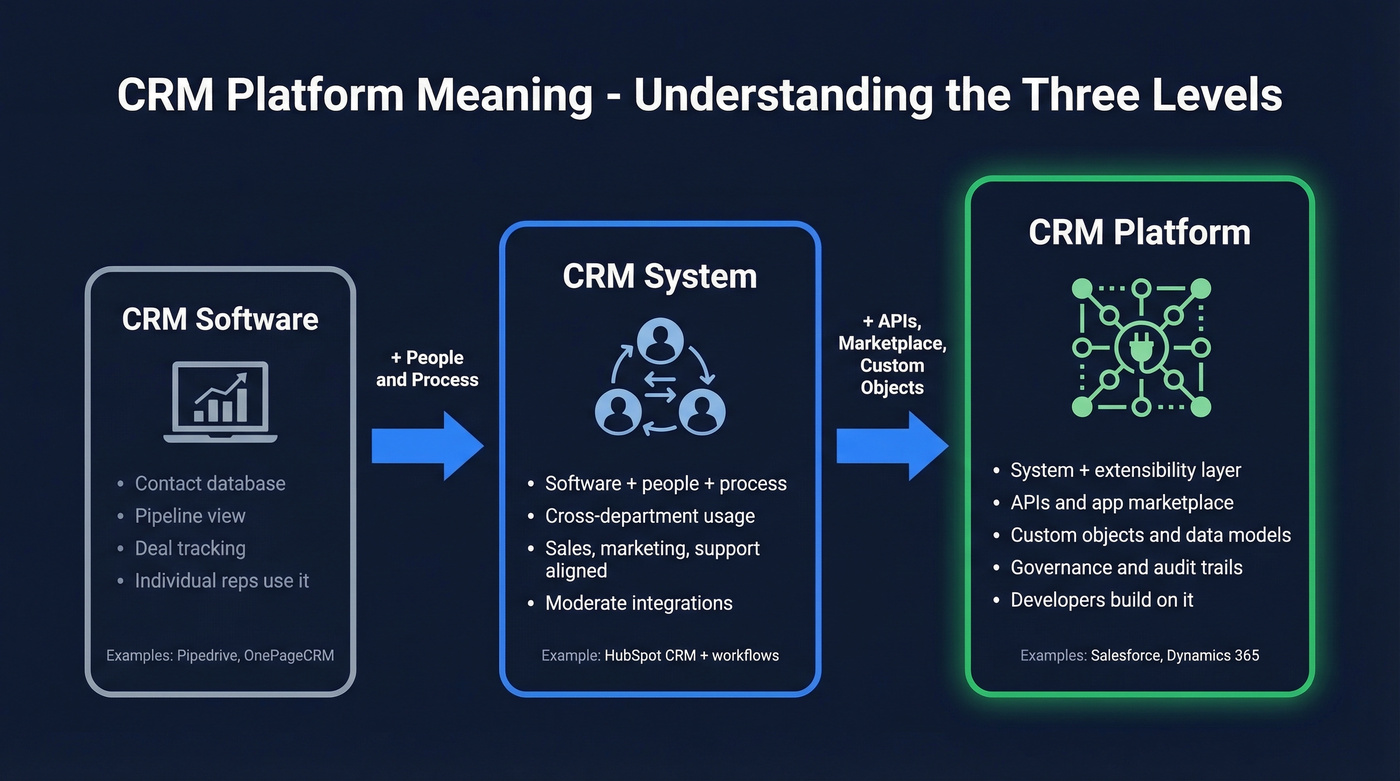
CRM software is the application itself - what your reps log into to search contacts, update deals, and check their pipeline.
CRM system includes the software plus the people, processes, workflows, and strategies wrapped around it. A system spans departments: sales uses it for pipeline, marketing for segmentation, support for ticket history.
CRM platform adds extensibility on top. A platform has APIs that let developers build on it, a marketplace of third-party apps, custom object modeling for data unique to your business, and governance controls for multi-team access. It's a system designed to be extended, not just configured.
| Software | System | Platform | |
|---|---|---|---|
| Scope | The application | App + people + process | System + extensibility layer |
| Who uses it | Individual reps | Cross-department | Cross-department + developers |
| Extensibility | Limited | Moderate | APIs, marketplace, custom objects |
| Examples | Pipedrive, OnePageCRM | HubSpot CRM + workflows | Salesforce, Dynamics 365 |
As one user in r/CRM put it, they wanted "basically a little more than Google Sheets" - and found most CRMs were either too simple or absurdly complex. That's the software-vs-platform gap in a nutshell. If you're that person, you need software. A mid-market VP of Sales who needs role-based permissions and integrations across 12 tools? They need a platform.
Core Features of a CRM Platform
Not every feature matters equally. Let's separate the essentials from the nice-to-haves.
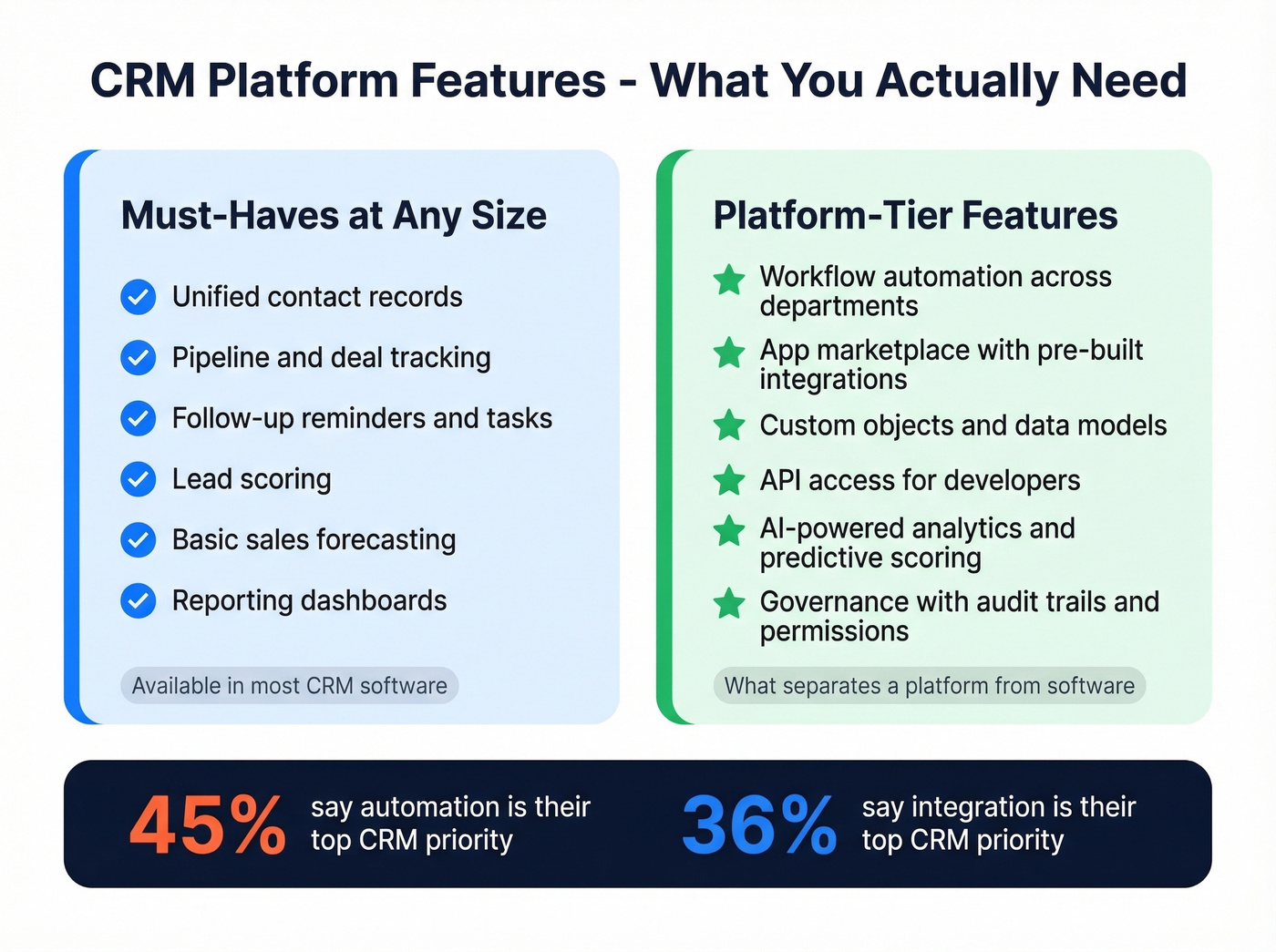
Must-haves at any size: contact management with unified records, pipeline and deal tracking, follow-up reminders and task management, lead scoring, basic sales forecasting, segmentation by industry or stage or custom fields, and reporting dashboards that show pipeline health and rep activity.
Platform-tier features - the ones that separate a platform from basic software - include workflow automation across departments, an app marketplace with pre-built integrations, custom objects and data models, API access for developers, AI-powered analytics and predictive scoring, and governance with audit trails and role-based permissions.
45% of companies say automation is their top CRM priority, followed by integration at 36%. Those two capabilities are exactly what distinguish a platform from a standalone tool.

You just read that only 29% of apps are integrated and 45% of companies prioritize automation. But automation and integrations are worthless if your CRM is full of bad data. Prospeo enriches your CRM with 50+ data points per contact at a 92% match rate - with native Salesforce and HubSpot integrations.
Stop automating workflows built on stale, unverified contact records.
Types of CRM Platforms
Four main types exist: operational, analytical, collaborative, and strategic. Most modern platforms blend two or three, but understanding the taxonomy helps you evaluate what you're actually buying.
Operational
Focuses on automating sales, marketing, and service workflows. Salesforce Sales Cloud is the canonical example. This is what most people mean when they say "CRM."
Analytical
Emphasizes reporting, data mining, and customer behavior analysis. Zoho Analytics and tools built on top of data warehouses fit here. The goal is insight, not workflow.
Collaborative
Breaks down silos between departments. Dynamics 365 does this well - sales, service, and marketing share a unified customer record. If your biggest pain is teams working from different versions of the same contact, this is your category.
Strategic
The long-game version: using customer data to shape product decisions, retention strategies, and lifetime value optimization. It's less a product category and more a maturity stage that any platform can reach.
How to Choose by Company Size
Company size is one of the most reliable proxies for CRM complexity. Your IT capacity, budget, admin overhead, and learning curve all scale with headcount.
SMB (Under 50 Employees)
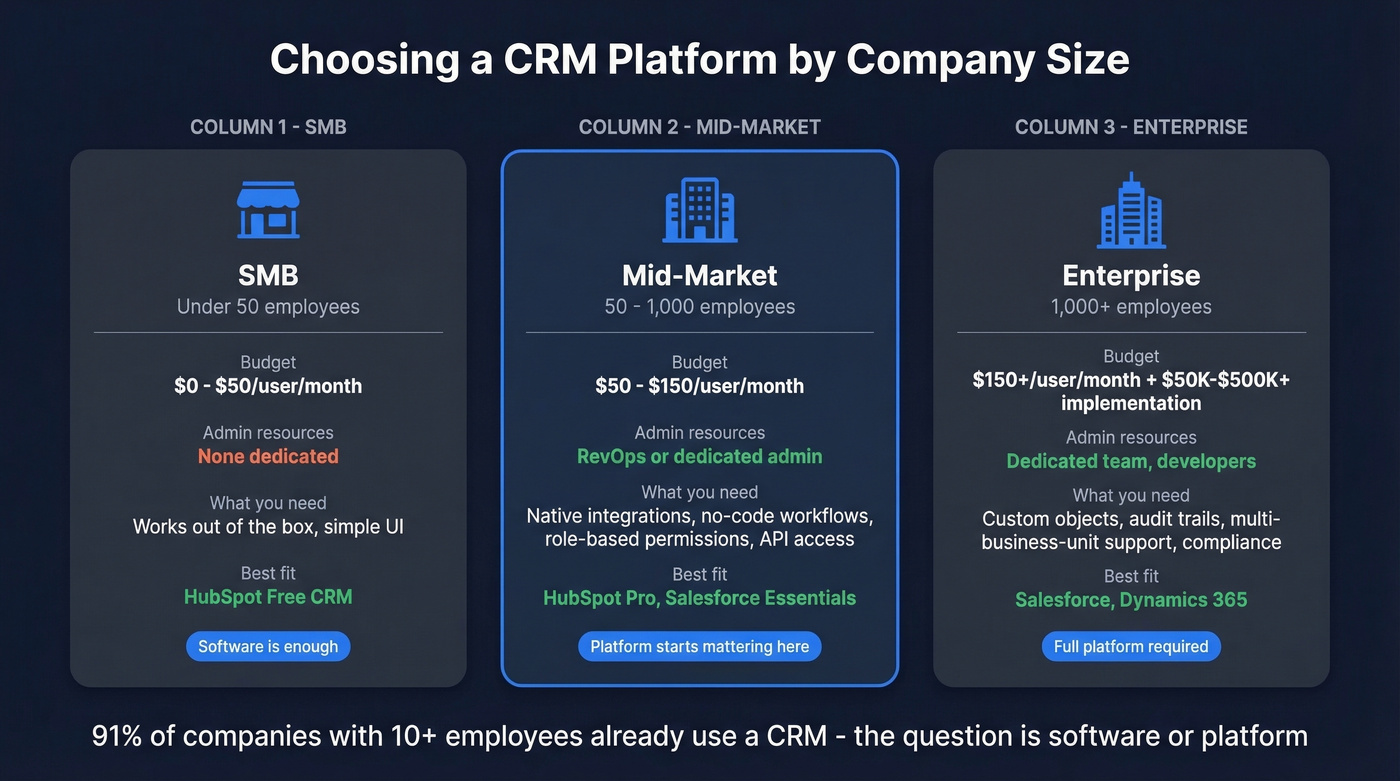
Budget: $0-50/user/month. You don't have a dedicated admin, so the CRM needs to work out of the box. HubSpot Free CRM is a solid starting point. Skip platforms that assume you have developers or a RevOps team - you'll pay for complexity you can't use.
The Reddit sentiment here is consistent: small teams feel overwhelmed by options and fear paying for features they'll never touch. That instinct is correct. Start simple.
Mid-Market (50-1,000 Employees)
This is where "software" stops being enough and "platform" starts mattering. Budget: $50-150/user/month. Your checklist should include native integrations with your marketing automation, support desk, and billing system, plus no-code workflow builders, role-based permissions, and a clear API for custom connections. If the CRM can't integrate with your existing stack, it creates silos instead of solving them.
Enterprise (1,000+ Employees)
You need this tier if you're managing multiple business units with different sales processes, you need audit trails for compliance, and your data model requires custom objects that don't exist in standard CRMs. Budget: $150+/user/month, plus $50K-$500K+ in implementation costs. Salesforce and Dynamics 365 are common choices because they're built for this complexity. Implementations often span quarters, sometimes longer.
91% of companies with 10+ employees already use a CRM. The question isn't whether you need one - it's whether you need software or a platform.
Popular CRM Platforms Compared
| Platform | Best For | Starting Price | Free Tier |
|---|---|---|---|
| HubSpot | SMBs scaling up | ~$15/user/mo | Yes (unlimited users) |
| Zoho CRM | Budget-conscious teams wanting breadth | ~$14/user/mo | Yes |
| Salesforce | Mid-market to enterprise | ~$25/user/mo | No |
| Dynamics 365 | Microsoft-stack orgs | ~$65/user/mo | No |
| Pipedrive | Sales-first teams | ~$14/user/mo | No |
| Freshsales | Small teams wanting AI on a budget | ~$9/user/mo | No |
Here's the thing: HubSpot's free tier - unlimited users, up to 1M contacts - is the obvious starting point for teams that don't know what they need yet. Salesforce paid plans start around $25/user/month, but most real deployments land at $75-150/user/mo once you add the modules you actually need. If your average deal size is under $10K and your team is under 50 people, you almost certainly don't need Salesforce-level infrastructure.
Pipedrive is the best pure sales pipeline tool if you don't need marketing or service modules. Dynamics 365 only makes sense if your org already lives in Microsoft 365.
The Data Quality Problem Nobody Mentions
Every CRM comparison focuses on features, pricing, and UI. Almost none address what actually determines whether your CRM works: the data inside it.
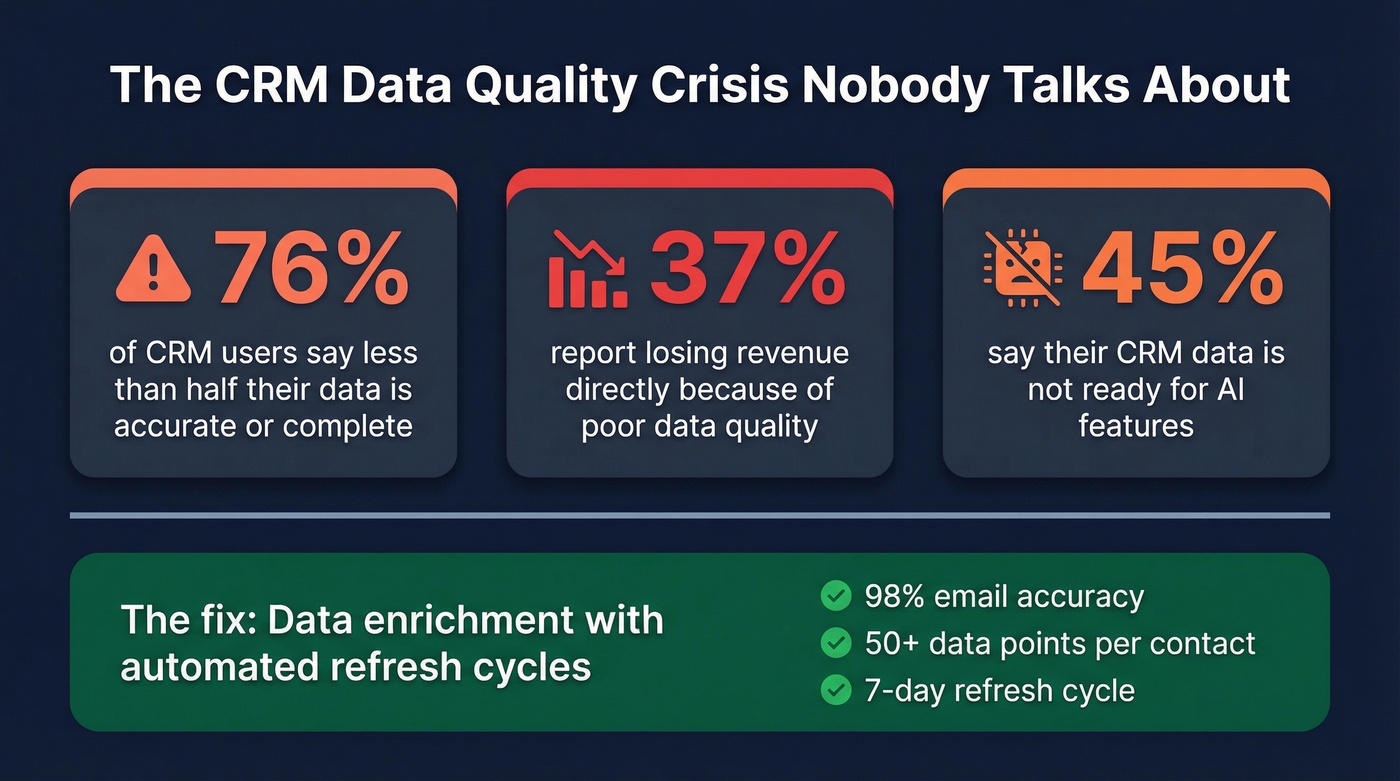
76% of CRM users say less than half their data is accurate or complete. 37% report losing revenue directly because of poor data quality. And 45% say their CRM data isn't ready for AI - which means all those predictive scoring and automation features are running on garbage inputs.
We've seen this pattern dozens of times. A team buys a CRM, imports their contacts, and six months later 40% of emails bounce and half the phone numbers are disconnected. The platform didn't fail. The data did.

This is where data enrichment becomes essential. Prospeo enriches CRM records across 300M+ professional profiles with 98% email accuracy, 50+ data points per contact, and a 7-day refresh cycle - the industry average is six weeks. It integrates natively with Salesforce and HubSpot, so enrichment happens inside your existing workflow rather than as a separate step your team forgets about.
Your CRM platform is only as good as the data feeding it. Features don't matter if your reps are calling disconnected numbers.
A CRM platform is your single source of truth - but 83% of CRM data decays within a year. Prospeo refreshes every record on a 7-day cycle, delivers 98% email accuracy, and costs roughly $0.01 per verified email. No contracts, no sales calls.
Your platform is the foundation. Prospeo is the data that makes it work.
Why CRM Implementations Fail
70% of CRM implementations fail. The causes are remarkably consistent.
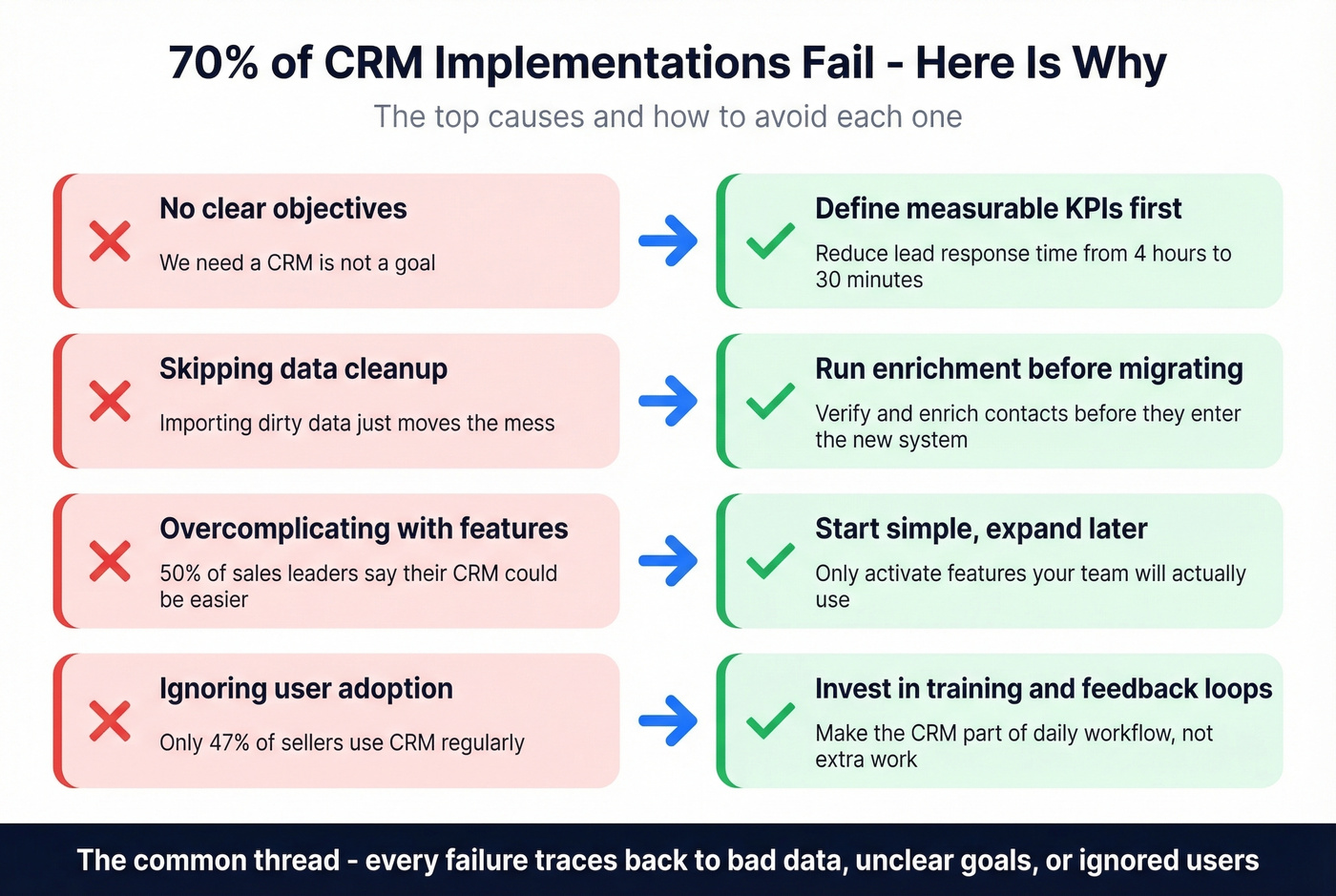
No clear objectives. "We need a CRM" isn't a goal. "Reduce lead response time from 4 hours to 30 minutes" is. Define measurable KPIs before you evaluate a single vendor.
Skipping data cleanup. Importing dirty data into a new CRM just moves the mess to a new address. Before migrating, run your existing contacts through an enrichment tool to see how much of your data is actually usable. You'll probably be surprised - and not in a good way.
Overcomplicating with unnecessary features. 50% of sales leaders say their CRM could be easier to use. Only 47% of sellers use CRM software regularly. If your reps won't use it, the features don't exist.
Ignoring training. A phased rollout with proper training can show productivity gains within 30-60 days. Dumping the full platform on 200 reps on day one guarantees adoption collapse. A simple 30-60-90 day plan helps keep adoption on track.
No executive buy-in. If leadership doesn't use the CRM, nobody else will either. CRM adoption is a top-down cultural decision, not a software rollout.
Most CRM failures aren't technology problems. They're people problems wearing a technology mask.
FAQ
What is a CRM platform?
A CRM platform is a customer relationship management system with an extensibility layer - APIs, an app marketplace, custom objects, and multi-department modules - so other tools and teams can plug into it. Every platform is CRM software, but not every piece of CRM software qualifies as a platform.
Is a CRM platform the same as CRM software?
No. CRM software is the application your reps log into daily. A CRM platform adds extensibility on top: APIs, a third-party app marketplace, custom data objects, and governance controls for multi-team access. Pipedrive is software; Salesforce is a platform.
How much does a CRM platform cost?
Free tiers exist from HubSpot and Zoho. SMB plans run $0-50/user/month. Mid-market deployments typically cost $50-150/user/month. Enterprise deals start at $150+/user/month plus implementation costs ranging from $50K to $500K+.
Do small businesses need a CRM platform?
Most don't - CRM software with contact management, pipeline tracking, and follow-up reminders is enough until you need integrations and automation across multiple departments. Start with HubSpot Free or Pipedrive, then upgrade to a platform when you outgrow it.
How do I keep CRM data accurate over time?
Use enrichment tools that verify and refresh contact data automatically on a weekly cycle. Pair automated enrichment with deduplication rules in your CRM and you'll avoid the slow data rot that kills most implementations.