

How to Build a CRM Strategy That Actually Works
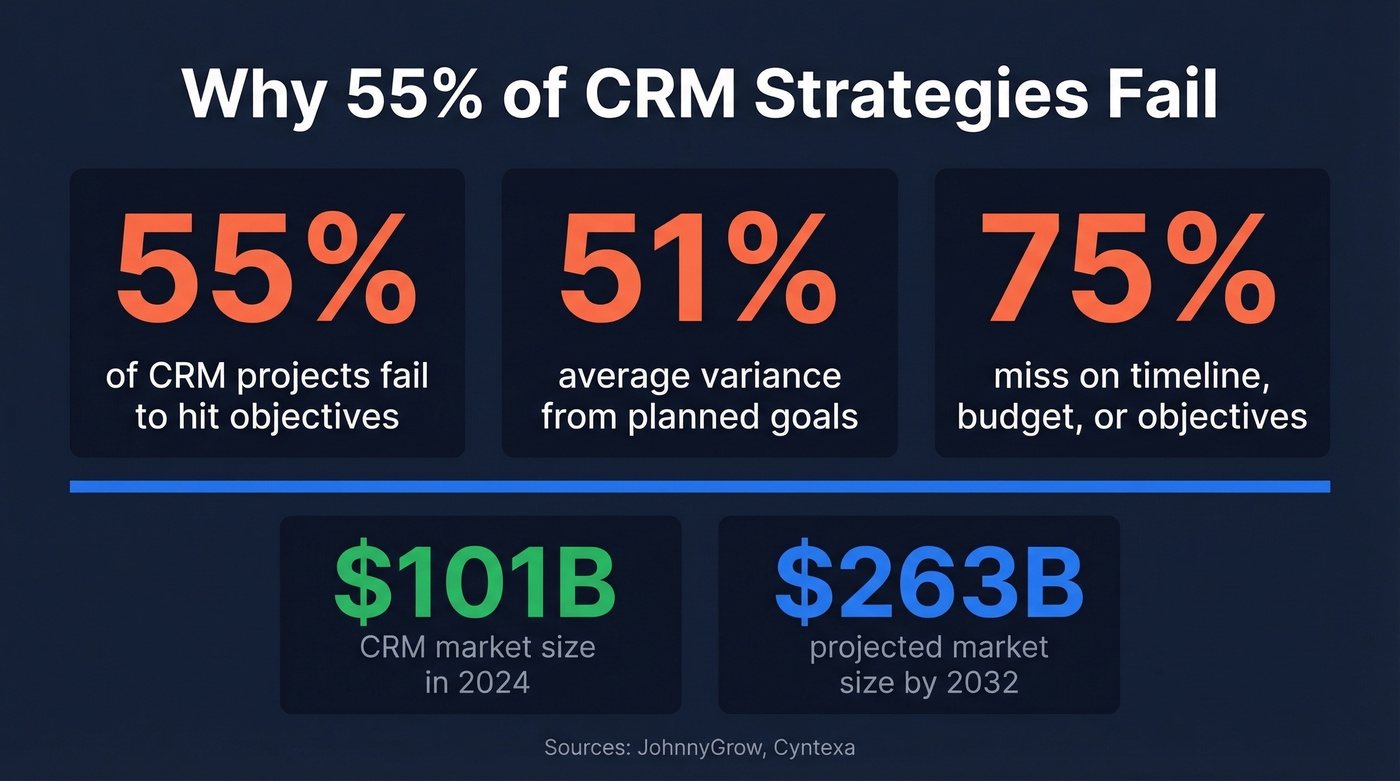
More than half of CRM implementations fail - and the root cause is almost always a missing or broken strategy. 55% don't achieve their planned objectives, and among those that miss, the average objective variance is 51%. Teams aren't just falling short. They're delivering roughly half of what they promised.
The vendor-authored guides won't tell you this because they're selling you the software, not the strategy. Let's fix that.
The Short Version
- Your CRM strategy is a data strategy first. If most of your records are inaccurate, no workflow or AI feature will save you.
- Design for adoption by reducing friction - zero-touch data capture beats mandates and training workshops that fade in two weeks.
- Refresh your data quarterly (minimum), audit your strategy every 4-6 months, and phase AI adoption only after your data foundation is clean.
That's the skeleton. Everything below puts muscle on it.
What Is a CRM Strategy?
A CRM strategy isn't a software purchase. It's the plan governing how your organization manages customer relationships, captures and maintains data, and aligns sales, marketing, and service around revenue growth. The software is just the delivery mechanism. If you've ever asked "what is a CRM strategy" and gotten a vague answer about picking the right tool, you were talking to a vendor, not a strategist.
The CRM market hit $101B in 2024 and is projected to reach $263B by 2032. Companies are spending aggressively on CRM tools - but spending on tools without a strategy is how you end up in the 55% failure bucket.
How to Build a CRM Strategy: 8 Steps
Step 1 - Define Goals That Survive Reality
The single most common CRM mistake is implementing before identifying goals. Teams get excited about features, skip planning, and end up with a system that does everything except what the business actually needs.
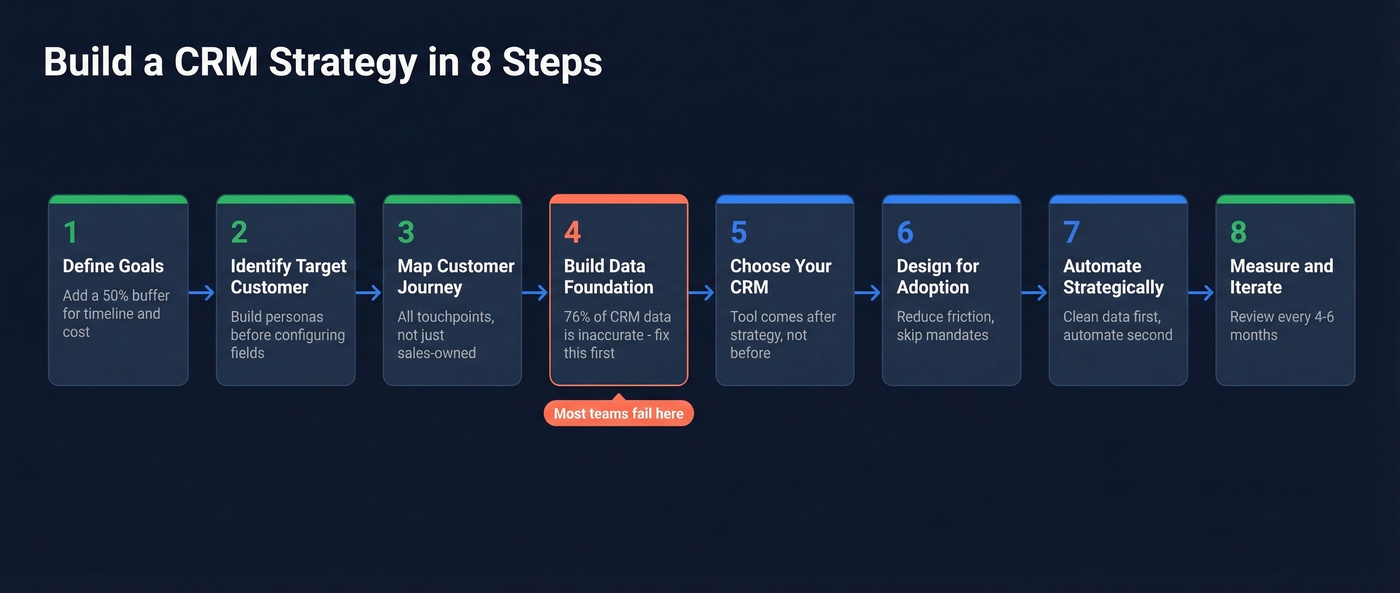
Only 25% of CRM projects hit their objectives, timeline, and budget. Among those that exceed their timeline, 7 in 10 blow past it by 30% or more. One in five double their original timeline.
Use the SMART framework, but add a buffer. For each goal, ask: "What happens when this takes 50% longer and costs 30% more than planned?" If the goal still makes sense with that cushion, it's worth pursuing. If it only works in the best-case scenario, redefine it.
Step 2 - Identify Your Target Customer
Your CRM should be structured around who you're selling to, not around your org chart. Build buyer personas before configuring a single field.
B2B and B2C strategies diverge sharply here. B2B deals involve multiple stakeholders, longer cycles, and firmographic data like company size, tech stack, and funding stage. B2C focuses on individual behavior, purchase frequency, and demographic segmentation. The data types, KPIs, and lifecycle stages are fundamentally different - your CRM fields need to reflect that.
Only 32% of companies have a single unified view of customer information, even though 90% believe it would be valuable. Start by defining what a complete customer record looks like for your business, then build toward that standard.
Step 3 - Map the Customer Journey
Customer journeys aren't linear funnels anymore. A prospect might read a blog post, attend a webinar three months later, get cold-emailed by an SDR, and then circle back through an inbound demo request. Your CRM needs to capture all of it.
Map every touchpoint from awareness through advocacy - not just the sales-owned ones. Marketing touches, support interactions, product usage signals, and renewal conversations all belong in the same system. Don't forget communication channels: which segments prefer email vs. phone vs. live chat vs. social? Your CRM should track channel preference so reps aren't cold-calling someone who only responds to email.
This is where cross-department alignment becomes critical. Sales, marketing, and CS need shared definitions for lifecycle stages, or you'll end up with three different versions of "qualified lead" living in the same CRM.
Step 4 - Build Your Data Foundation
Here's the thing: none of the previous steps matter if your data is garbage. And most CRM data is garbage.
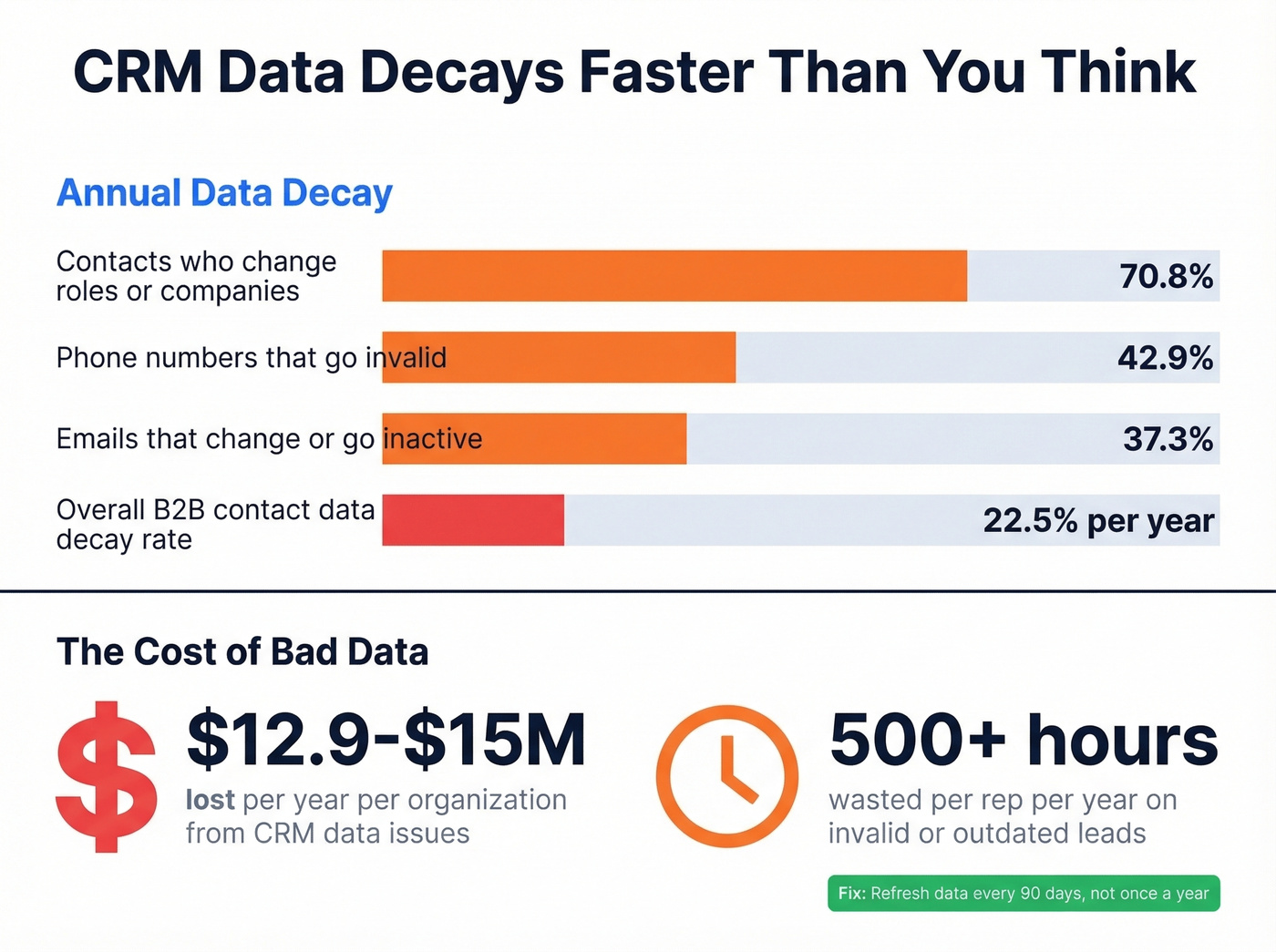
76% of CRM users say [less than half of their data is accurate or complete](https://www.validity.com/resource-center/the-state-of-crm-data-management-in-2025/). B2B contact data decays at 22.5% per year - some studies put the figure as high as 70.3%. Within 12 months, 70.8% of business contacts change roles, companies, or responsibilities. 42.9% of phone numbers go invalid. 37.3% of emails change or go inactive. And only 28% of companies actively enrich their CRM with third-party sources.
The downstream cost is brutal. Reps waste 27.3% of their time - over 500 hours per year - pursuing invalid or outdated leads. The average organization loses $12.9-$15M per year to CRM data issues. The fix isn't a one-time cleanup. Contact data should be considered fresh for no longer than 90 days. Treating data hygiene as a recurring process, not a one-off project, is what separates the 45% that succeed from the 55% that don't.
This is where tools like Prospeo fit into the stack. With native Salesforce and HubSpot integrations, it enriches and re-verifies existing CRM records - 83% of leads come back with contact data, returning 50+ data points per enrichment. The 7-day refresh cycle means records don't sit stale for the 6-week industry average, and email accuracy runs 98% with catch-all handling, spam-trap removal, and honeypot filtering built in.

Step 5 - Choose and Configure Your CRM
With goals, personas, journey maps, and a data strategy in place, now you pick the tool. Not before.
The custom-vs-off-the-shelf decision comes first. Custom CRMs offer total flexibility but carry higher upfront costs and longer timelines. Off-the-shelf platforms like HubSpot, Salesforce, and Pipedrive get you running faster with lower initial investment but come with ongoing licensing fees and configuration constraints.
For SMBs with 1-50 users, HubSpot's free CRM or a lightweight platform like Pipedrive gets you moving in weeks. Budget $5K-$50K for setup, light customization, and initial data migration over 4-8 weeks.
Mid-market teams of 50-500 users typically land on Salesforce or Dynamics 365, with implementations running $50K-$200K over 3-6 months. Enterprise rollouts with ERP integrations, compliance requirements, and multi-region deployments can hit $200K-$500K+ and stretch 6-12 months or longer.
Before signing anything, build an integration checklist. Every tool your CRM needs to talk to - marketing automation, enrichment, sequencing, billing, support - should be mapped and tested during evaluation, not discovered post-launch.
Step 6 - Design for Adoption, Not Mandates
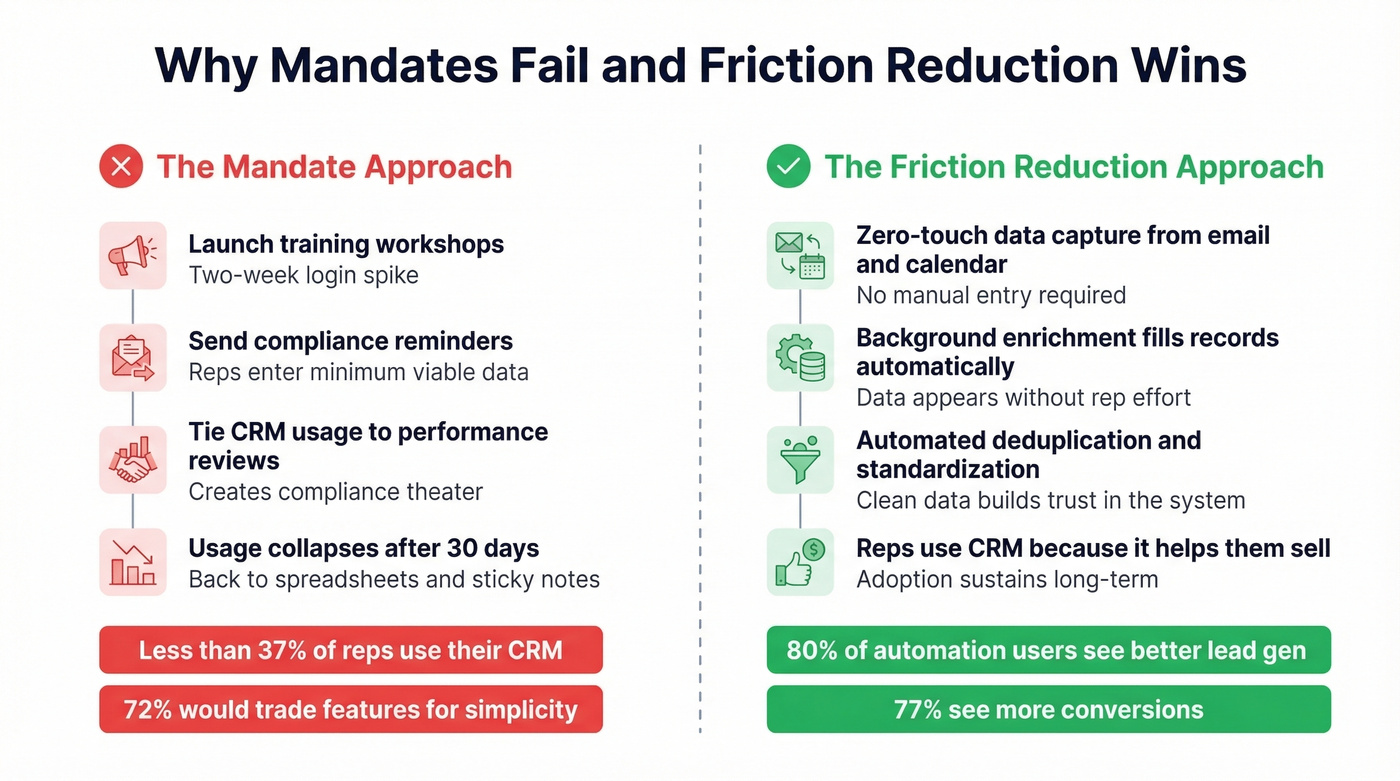
Less than 37% of sales reps actually use their company's CRM. 43% use fewer than half of the available features. And 72% would trade functionality for ease of use.
Let that sink in. Nearly three-quarters of your reps would rather have a simpler tool than a more powerful one.
Training workshops, mandates, and incentives don't work because they don't address the root problem. Training creates a short-term login bump, then usage reverts because manual data entry is low-value work that competes with selling time. We've tested both approaches on our own team - mandates produce compliance theater, friction reduction produces real adoption.
The consensus on r/salesforce is blunt: reps spend an hour a day manually entering data because the system can't trust its own data enough to trigger automation. The modern alternative is zero-touch data capture - background enrichment from email and calendar activity, automated deduplication, and standardized fields that don't require rep intervention.
Step 7 - Automate Strategically
Automation is the payoff for getting steps 1-6 right. 80% of automation users report improved lead generation, and 77% see more conversions. Those numbers are real - but only when automation runs on clean data.
Start with three targets:
- Reporting: Auto-generated activity and revenue reports
- Communications: Follow-up reminders and drip sequences (use proven sales follow-up templates to standardize messaging)
- Channel integrations: Syncing data between your CRM, enrichment tools, and outbound platforms (see how to connect outreach tool to CRM)
Automating on dirty data doesn't save time - it scales mistakes. If your lead routing triggers on job titles that are misspelled or outdated, you're sending the wrong leads to the wrong reps faster. Clean first, automate second.
Step 8 - Measure and Iterate
Only 20% of small business owners use CRM analytics or reporting weekly. The rest are flying blind with a tool that has a dashboard they never open.
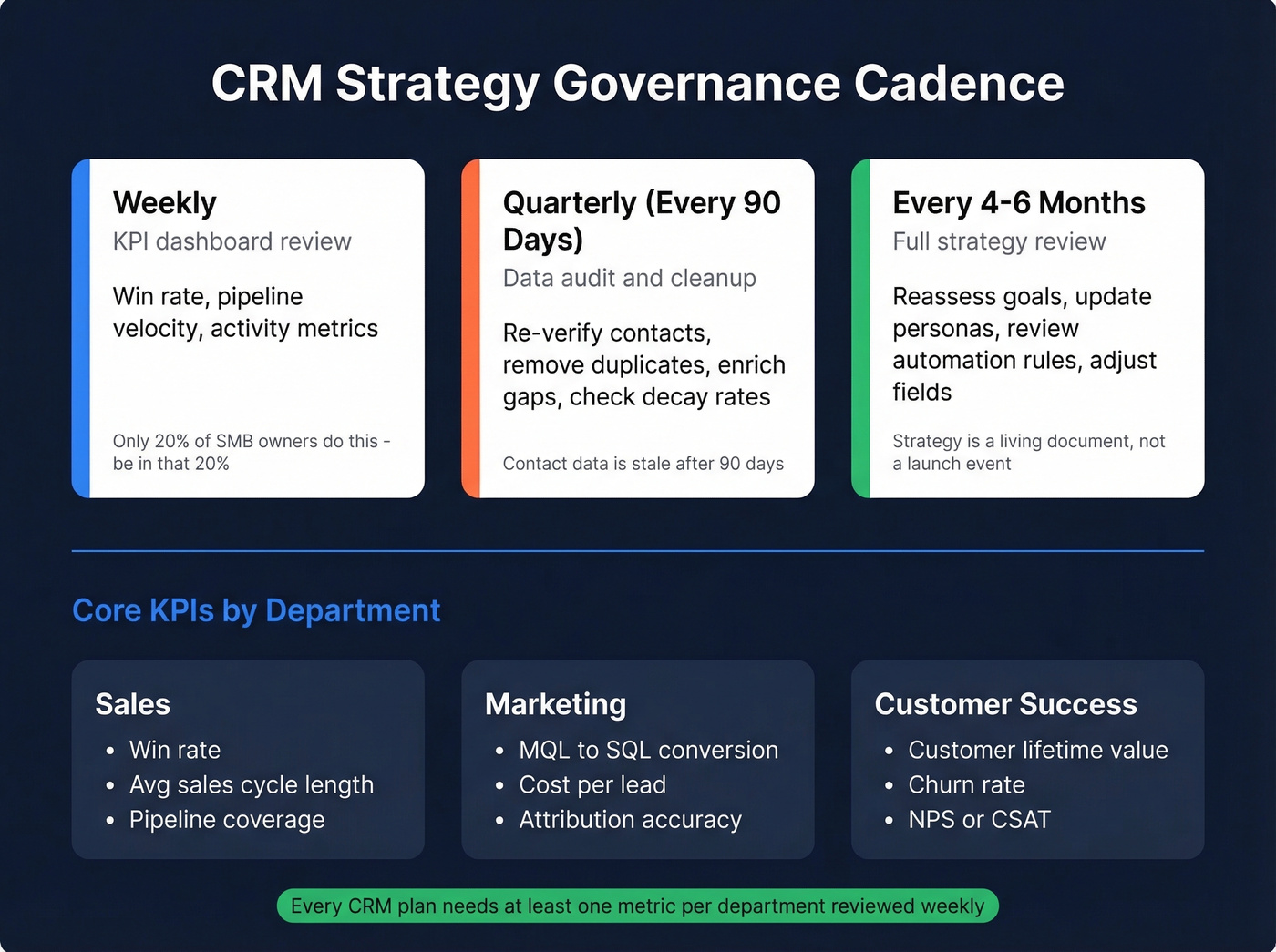
Track these KPIs at minimum: win rate, average sales cycle length, customer lifetime value, churn rate, and data accuracy percentage. Every CRM plan needs at least one metric per department - sales, marketing, CS - reviewed weekly.
Set a strategy review cadence of every 4-6 months. Data audits should happen quarterly, aligned with the 90-day freshness window. In our experience, the teams that succeed treat their CRM strategy as a quarterly discipline, not a launch event. The strategy is a living document, not a project plan you archive after go-live.

Your CRM strategy is only as good as your data. With 76% of CRM users reporting inaccurate records and reps wasting 500+ hours per year on bad leads, enrichment isn't optional - it's the foundation. Prospeo's native Salesforce and HubSpot integrations enrich your CRM with 98% accurate emails, 50+ data points per contact, and an 83% match rate - refreshed every 7 days, not the 6-week industry average.
Stop building workflows on top of decaying data.
Mistakes That Kill CRM ROI
No goals before implementation. Teams buy the CRM first, then figure out what they want it to do. Without defined objectives, you can't measure success, and you'll configure the system around assumptions that don't match reality.
The data dumpster. Without scheduled cleanups, your CRM accumulates duplicates, incomplete records, and outdated contacts until it becomes unusable. Data decays at 22.5% per year with no cleanup schedule, and 44% of organizations report revenue losses exceeding 10% tied directly to CRM data quality.
The training trap. Workshops create a two-week spike in logins, then usage collapses. Training addresses awareness, not friction. If the CRM requires 15 minutes of manual entry per meeting, no amount of training changes the math.
Feature bloat. 43% of CRM users engage with fewer than half the features they're paying for. More modules don't mean more value - they mean more complexity, more configuration debt, and more things that break when you upgrade.
No governance cadence. This is the most insidious mistake because it's invisible. Everything works fine at launch. Six months later, data has decayed, new hires haven't been trained on conventions, and the fields that mattered at launch are now ignored. Without quarterly audits and semi-annual strategy reviews, entropy wins every time.
No scalability plan. Teams configure the CRM for today's headcount and data volume, then hit a wall at 2x growth. If your CRM can't handle double your current user count and record volume without a re-architecture, you're building on a foundation with an expiration date.
Best Practices by Company Size
One-size-fits-all CRM advice is how SMBs end up with enterprise-grade complexity they can't maintain, and how enterprises end up with tools that can't scale past 100 users.
| Dimension | SMB (1-50 users) | Mid-Market (50-500) | Enterprise (500+) |
|---|---|---|---|
| Budget | $5K-$50K | $50K-$200K | $200K-$500K+ |
| Timeline | 4-8 weeks | 3-6 months | 6-12+ months |
| Key pitfall | Overly complex CRM | Integration gaps | Scope creep |
| CRM fit | HubSpot Free, Pipedrive | Salesforce, Dynamics 365 | Salesforce Enterprise, SAP |
| Training | Self-guided + onboarding | Workshops + champions | Change management program |
| Integration complexity | Low (3-5 tools) | Medium (10-20 tools) | High (ERP, MA, compliance) |
The SMB trap is deploying a CRM that requires a dedicated admin when you don't have one. Half-finished rollouts and frustrated reps who revert to spreadsheets are the predictable result. Pick a tool that matches your team's actual capacity, not your ambitions.
The enterprise trap is the opposite - over-customization and scope creep. Different departments define "customer" differently, data silos conflict, and the implementation stretches from 6 months to 18. Align definitions and data governance before configuring workflows, or you'll build an expensive system that nobody trusts.
Skip Salesforce-level complexity if your deal sizes are sub-$10K. A well-configured HubSpot instance with clean data will outperform a bloated Salesforce org with dirty data every single time. The CRM doesn't close deals - accurate data and disciplined process do.
AI in Your CRM Strategy (2026)
45% of CRM users say their data isn't ready for AI. They're right. AI amplifies whatever it's fed - clean data produces useful predictions, dirty data produces confident nonsense.
Phase your AI adoption in four stages:
Phase 1 - Automated enrichment. Start here. Use enrichment tools to fill gaps, deduplicate records, and standardize fields. This is the prerequisite for everything else. Before turning on AI lead scoring, make sure your data foundation is solid - a 92% match rate on enrichment means you're working from a real picture of your pipeline, not a partial one.
Phase 2 - AI-generated sequences. Once your data is clean, use AI to draft outbound sequences and cold email icebreakers. Teams report ~25% lifts in response rates from AI-generated sequences and 20% improvements in open rates from personalized icebreakers.
Phase 3 - Predictive lead scoring. With clean data and behavioral signals flowing in, AI scoring can redirect ~40% of rep effort toward high-value opportunities. This only works if your historical data is accurate enough to train on. (If you need a practical setup, see our guide to lead scoring.)
Phase 4 - AI analytics and governance. Natural language querying, anomaly detection, and forecasting. This is the endgame, but it requires months of clean data accumulation to produce reliable outputs. Equally important: establish who reviews AI-generated scores, how to audit recommendations that seem off, and when human override is required. AI without governance is just automated guessing with a confidence score attached.
One-Page CRM Strategy Template
The simplest framework that works: three focus areas, each with two objectives, two projects, and two KPIs. Fit it on one page. If your strategy can't be summarized this tightly, it's too complex to execute.
| Focus Area | Objective | Project | KPI |
|---|---|---|---|
| Data Quality | 90%+ record accuracy | Quarterly enrichment + cleanup | % records verified |
| Data Quality | Reduce duplicates by 80% | Automated dedup + merge rules | Duplicate rate |
| Sales Efficiency | Cut sales cycle by 15% | Automate lead scoring + routing | Avg. cycle length, win rate |
| Sales Efficiency | Increase pipeline velocity 25% | Automated follow-up sequences | Pipeline velocity, response rate |
| Customer Retention | Increase CLV by 20% | Lifecycle sequences + health scoring | Churn rate, CLV, NPS |
| Customer Retention | Cut resolution time by 30% | Ticket routing + knowledge base | Avg. resolution time, CSAT |
This template is adapted from Cascade's CRM strategy template. Focus areas define where you'll invest, objectives define what success looks like, projects define how you'll get there, and KPIs tell you if it's working.
Start with data quality as Focus Area #1. Everything else - sales efficiency, retention, AI adoption - depends on it.
The article says contact data should be considered fresh for no longer than 90 days. Prospeo refreshes every 7 days - automatically catching job changes, new emails, and invalid numbers before they cost you pipeline. At $0.01 per email with 92% API match rates, it's the cheapest insurance policy your CRM strategy will ever have.
Keep your CRM alive for less than a penny per record.
FAQ
What is a CRM strategy vs a CRM system?
A CRM strategy is the plan for managing customer relationships and aligning teams around revenue goals; a CRM system is the software that executes it. Strategy should dictate tool choice - not the reverse. Buying Salesforce doesn't give you a strategy any more than buying a gym membership gives you abs.
How often should you audit your CRM data?
Quarterly, at minimum. B2B contact data decays at 22.5% per year, so 90 days is the longest you should go between cleanups. Align data audits with strategy reviews every 4-6 months.
What's the biggest reason CRM strategies fail?
Poor data quality. 76% of CRM users say less than half their data is accurate. When the foundation is unreliable, automation scales mistakes, AI produces garbage predictions, and reps stop trusting the system entirely.
How can I keep CRM data accurate without manual entry?
Use automated enrichment tools that sync directly with your CRM. Prospeo, for example, integrates natively with Salesforce and HubSpot, re-verifying records on a 7-day refresh cycle and returning 50+ data points per contact - no rep intervention required. Pair that with automated deduplication rules and standardized picklist fields.
How much does a CRM implementation cost?
SMB implementations run $5K-$50K over 4-8 weeks. Mid-market projects land at $50K-$200K over 3-6 months. Enterprise rollouts hit $200K-$500K+ over 6-12 months. Budget a 30-50% buffer - two-thirds of CRM projects exceed their original budget.