

Custom Tracking Domain: Setup Guide for 2026
You've set up SPF, DKIM, and DMARC. You've warmed your domains for three weeks. You're sending clean copy to a targeted list. And you're still stuck at 35% inbox rates.
The culprit isn't your content or your authentication - it's the default tracking domain your email platform assigned you, quietly inheriting the spam reputation of every other sender on that server.
A custom tracking domain is one of the cheapest, fastest fixes in the deliverability stack, and it's the one most teams skip. Here's exactly what it is, why it matters more than ever in 2026, and how to set one up in under 10 minutes of hands-on work.
The Short Version
- A custom tracking domain isolates your sender reputation from every other user on your email platform. Set one up before your first campaign.
- Setup is quick: create a subdomain, create a CNAME record, wait for propagation (often 24-72 hours), then activate in your platform.
- Open tracking is increasingly unreliable thanks to Apple MPP and enterprise security gateways. Prioritize clicks and replies.
- A CTD protects you from other senders. Verified data protects you from yourself - keep bounce rates under 2%.
- If you send plain-text emails with no tracking enabled, you don't need one. The moment you enable open or click tracking, you do.
What Is a Custom Tracking Domain?
Every time your cold email platform tracks an open or a click, it inserts itself into the email. Opens are tracked via a tiny 1x1 invisible pixel - an image hosted on a domain that fires an HTTP request when loaded. Clicks are tracked by rewriting every link in your email to route through a tracking domain first, then redirecting to the actual URL.
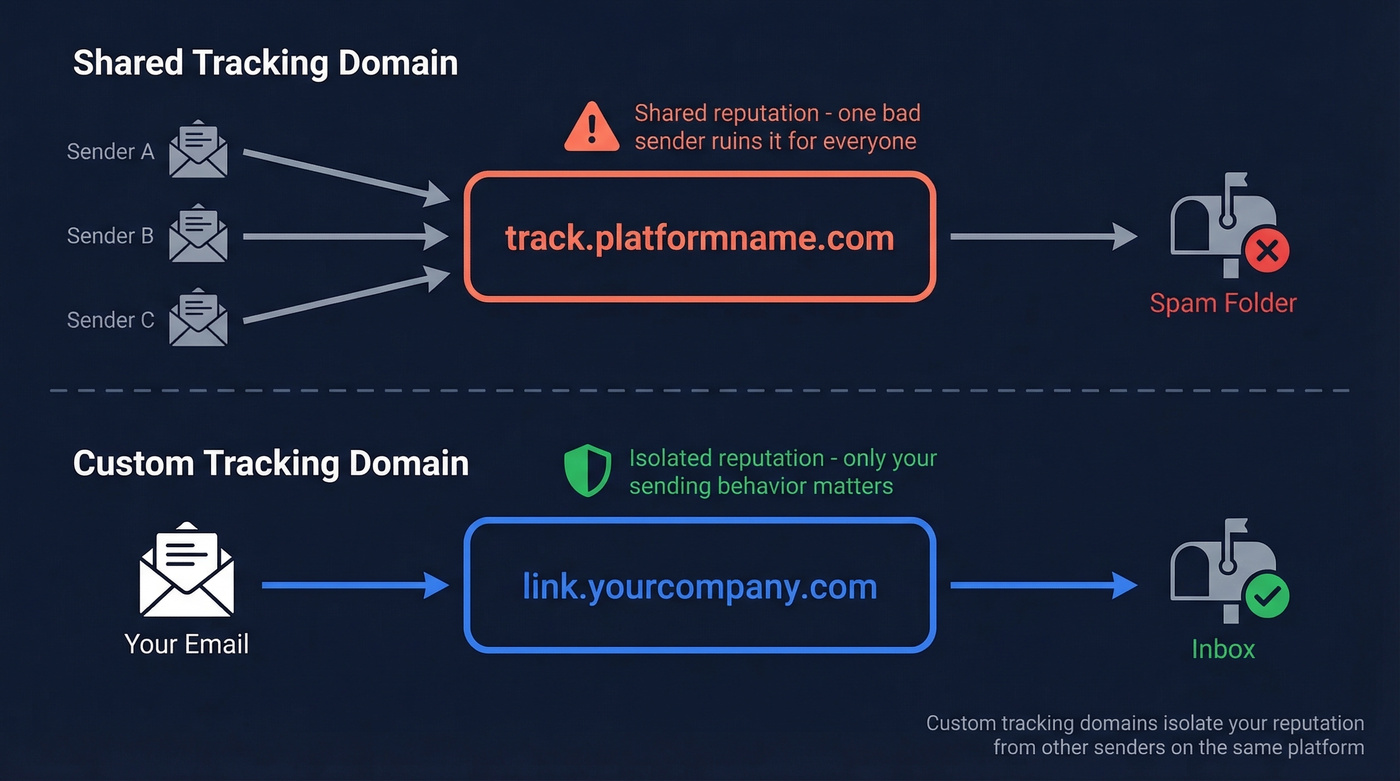
By default, most platforms use a shared tracking domain. That means your emails, and the emails of thousands of other senders, all route through the same default domain. When a recipient hovers over a link in your email, they don't see your domain - they see something like track.platformname.com. Spam filters see it too.
A custom tracking domain replaces that shared domain with your own branded subdomain - something like link.yourcompany.com. The tracking mechanism is identical, but now your reputation is isolated. If another sender on the platform gets blacklisted, their mess doesn't splash onto your emails. And when recipients hover over links, they see your domain, not a generic tracking URL that screams "mass email."
Shared domains pool risk. Custom domains isolate it.
Why It Matters in 2026
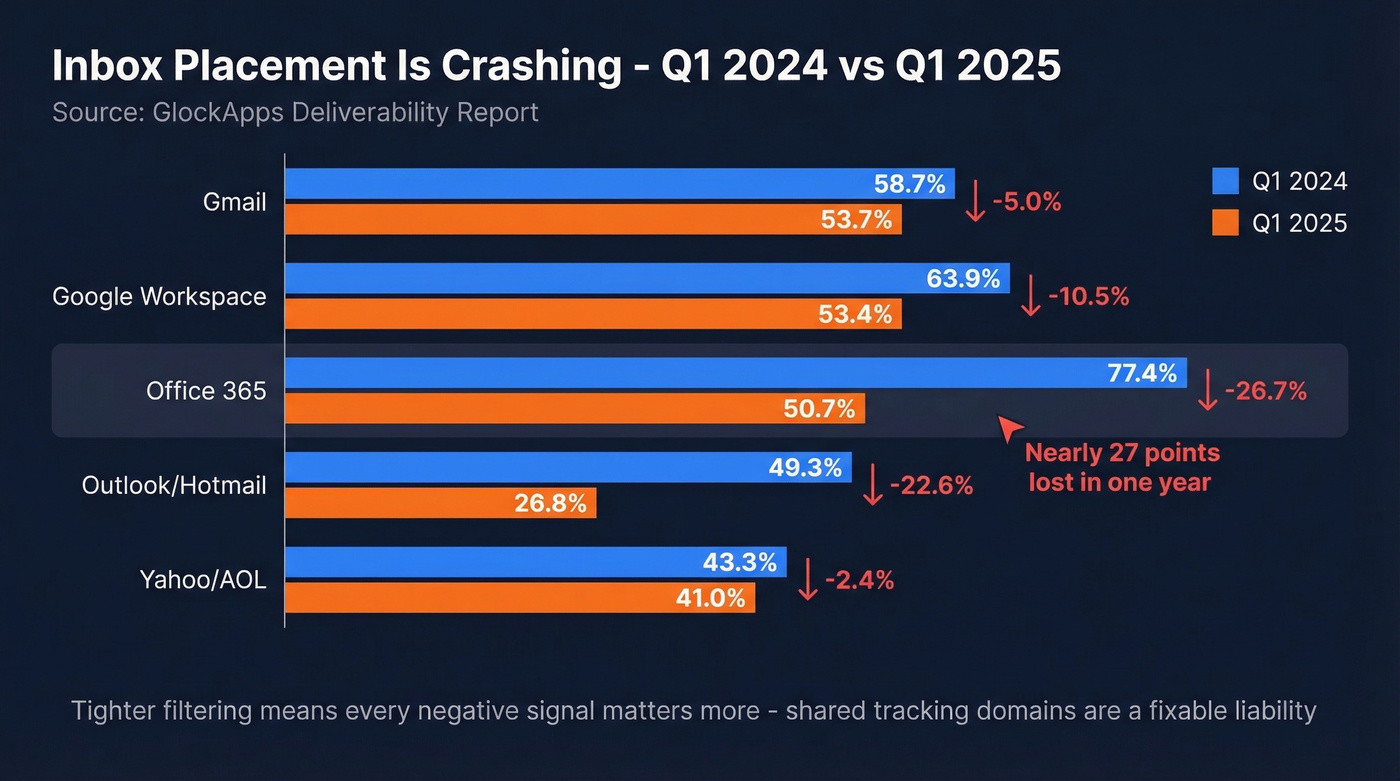
Inbox placement is getting harder across the board. GlockApps' Q1 2025 data shows significant drops compared to Q1 2024:
| Inbox Provider | Q1 2024 | Q1 2025 | Change |
|---|---|---|---|
| Gmail | 58.7% | 53.7% | -5.0% |
| Google Workspace | 63.9% | 53.4% | -10.5% |
| Office 365 | 77.4% | 50.7% | -26.7% |
| Outlook/Hotmail | 49.3% | 26.8% | -22.6% |
| Yahoo/AOL | 43.3% | 41.0% | -2.4% |
Office 365 dropping nearly 27 percentage points in a single year is staggering. ESP-level drops were even steeper - Mailgun fell 27.75%, Mailchimp 19.63%, and Amazon SES 14.60%. Microsoft's May 2025 DMARC enforcement deadline, requiring bulk senders (5,000+/day) to publish DMARC with at least p=none and pass alignment, tightened the screws further. Gmail started displaying "This message may be suspicious" warning banners on flagged emails in late 2024, and those banners haven't gone away.
Here's the thing: the tighter inbox providers get, the more a single negative signal tips you from inbox to junk. A shared tracking domain is a liability you can eliminate in minutes. If the shared domain gets flagged on Spamhaus or SURBL because another sender on your platform was careless, your emails bounce or land in spam - even if your list, copy, and authentication are perfect.
Most teams obsess over subject lines and sending schedules while ignoring the shared tracking domain that's silently tanking their reputation. Fix the infrastructure first. Copy tweaks don't matter if you never reach the inbox.
How to Set One Up
Step-by-Step Setup
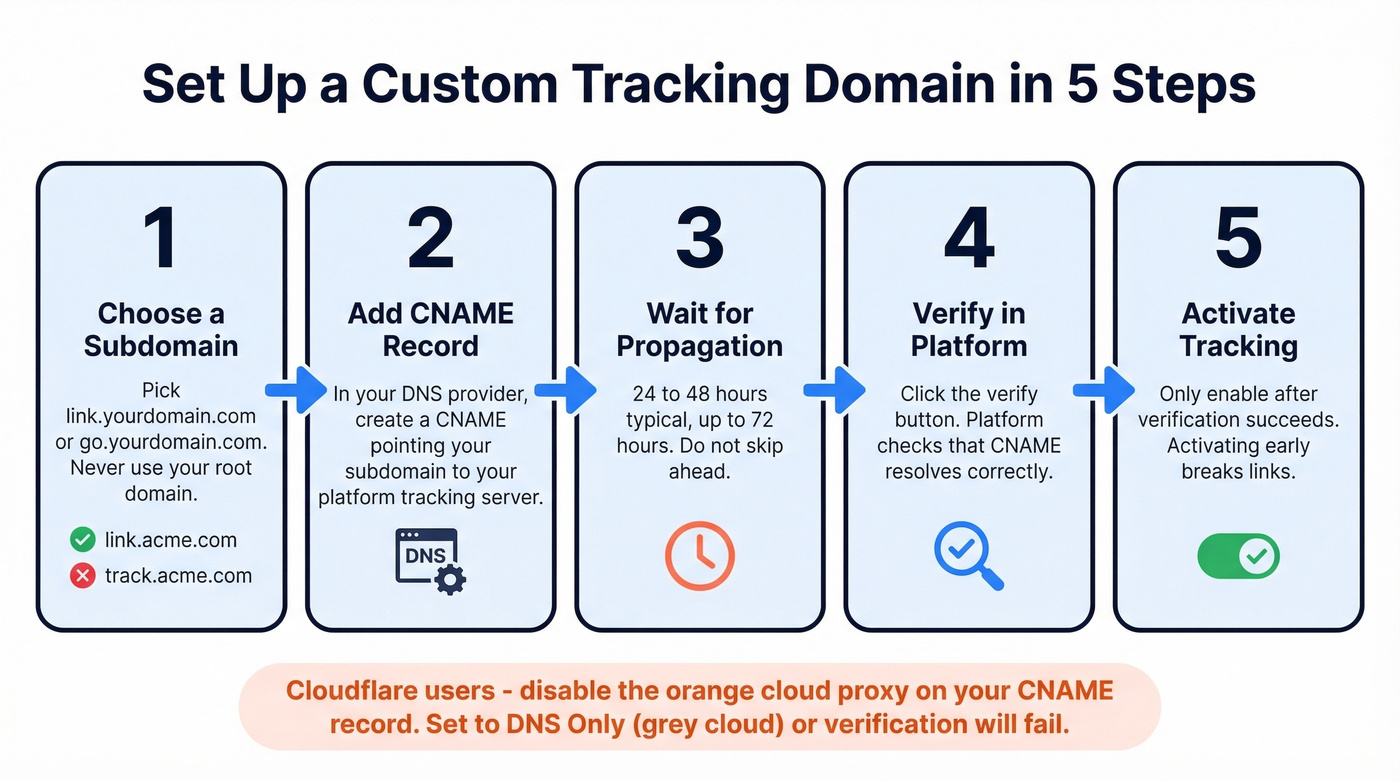
- Choose a subdomain. Pick something like
link.yourdomain.comorgo.yourdomain.com. Don't use your root domain. - Add a CNAME record. Log into your DNS provider and create a CNAME record pointing your subdomain to your email platform's tracking server.
- Wait for propagation. DNS changes typically take 24-48 hours, sometimes up to 72. Don't rush this.
- Verify in your platform. Most platforms have a "verify" button that checks the CNAME is resolving correctly.
- Activate tracking. Only flip this on after verification succeeds. Activating before propagation completes breaks tracking links and pixels entirely - you'll send emails with dead links that damage both deliverability and credibility.
Platform CNAME Reference
| Platform | CNAME Host | CNAME Target | Pricing |
|---|---|---|---|
| GMass | link |
x.gmtrack.net |
From ~$25/mo |
| Instantly | inst |
prox.itrackly.com |
From ~$30/mo |
| Lemlist | custom |
Per Lemlist docs | From ~$39/mo |
| Apollo | track |
Per Apollo docs | Free tier available |
| Smartlead | sl |
Per Smartlead docs | From ~$39/mo |
| Elastic Email | tracking |
api.elasticemail.com |
From ~$29/mo |
Check your platform's documentation for the exact CNAME target - these can change. The pattern is always the same: subdomain pointing to the platform's tracking server.
DNS Provider Tips
Cloudflare trips up more people than any other provider. Disable the orange cloud (proxy) on your CNAME record - Cloudflare's proxy intercepts traffic and breaks tracking verification. Set it to "DNS only" (grey cloud). We've seen this single mistake waste days of troubleshooting.
Route 53 (AWS) works well but requires you to set the record type explicitly. Don't accidentally create an A record when you need a CNAME.
HSTS TLDs: If your tracking subdomain uses an HSTS TLD (.app, .dev), confirm your platform serves tracking links over HTTPS.
CAA records: If your domain has CAA records, make sure letsencrypt.org is listed as an authorized CA - otherwise SSL provisioning fails silently. Many platforms auto-provision SSL certificates via Let's Encrypt once the CNAME resolves, so you shouldn't need to handle HTTPS configuration manually unless CAA blocks it.

A custom tracking domain isolates your reputation - but it can't save you from bad data. Prospeo's 98% email accuracy and 5-step verification keep bounce rates under 2%, so your new tracking domain stays clean from day one.
Don't protect your domain reputation and then wreck it with unverified emails.
Subdomain Naming
Do:
- Use neutral, brand-aligned subdomains:
link.yourdomain.com,go.yourdomain.com,e.yourdomain.com - Keep one tracking subdomain per sending domain
- Match the subdomain to the domain you're actually sending from
Don't:
- Use
track.yourdomain.comorpixel.yourdomain.com- spam filters flag obvious tracking terminology - Reuse the same tracking subdomain across multiple sending domains
- Use your root domain as the tracking domain
The goal is a subdomain that looks natural if a recipient hovers over a link. link.acme.com reads like a normal branded URL. track.acme.com reads like surveillance.
When Tracking Doesn't Work
Apple Mail Privacy Protection
Apple's Mail Privacy Protection has been live since September 2021, and it's only gotten more aggressive. MPP pre-fetches tracking pixels via Apple's servers, generating "machine opens" that inflate open rates by 40-50%. That 65% open rate you're celebrating? A huge chunk of those are Apple's servers, not humans.
Apple's Link Tracking Protection can also strip tracking parameters like UTMs in Mail and Safari, breaking attribution. iOS 18 introduced AI-generated previews and new inbox categories that further change how recipients interact with messages.
Open rates on Apple Mail are fiction. Prioritize click tracking and reply rates as your real engagement signals.
Enterprise Security Gateways
Not all inbox providers treat tracking the same way. Google, Yahoo, and Amazon mailboxes are generally tracking-pixel friendly - open tracking isn't a significant deliverability factor in a vacuum. Outlook desktop often strips images by default, making opens unreliable but not typically harmful to your sender reputation.
The real problem is enterprise. If you're prospecting into accounts protected by Proofpoint or Mimecast, open tracking is dead on arrival. These security gateways strip tracking, and opens often never register. One practitioner on r/coldemail put it bluntly - they've never once registered an open from a domain with these filters active. Not once.
Worse, enabling tracking against these domains can actively hurt deliverability. The contrarian move is to stop tracking opens against enterprise prospects altogether. Segment your lists by company size and security posture. For Fortune 500 targets, measure success by replies and meetings booked, not pixel fires.
Where It Fits in Your Stack
A custom tracking domain is one piece of a larger system. Here's the full deliverability stack you need in 2026:
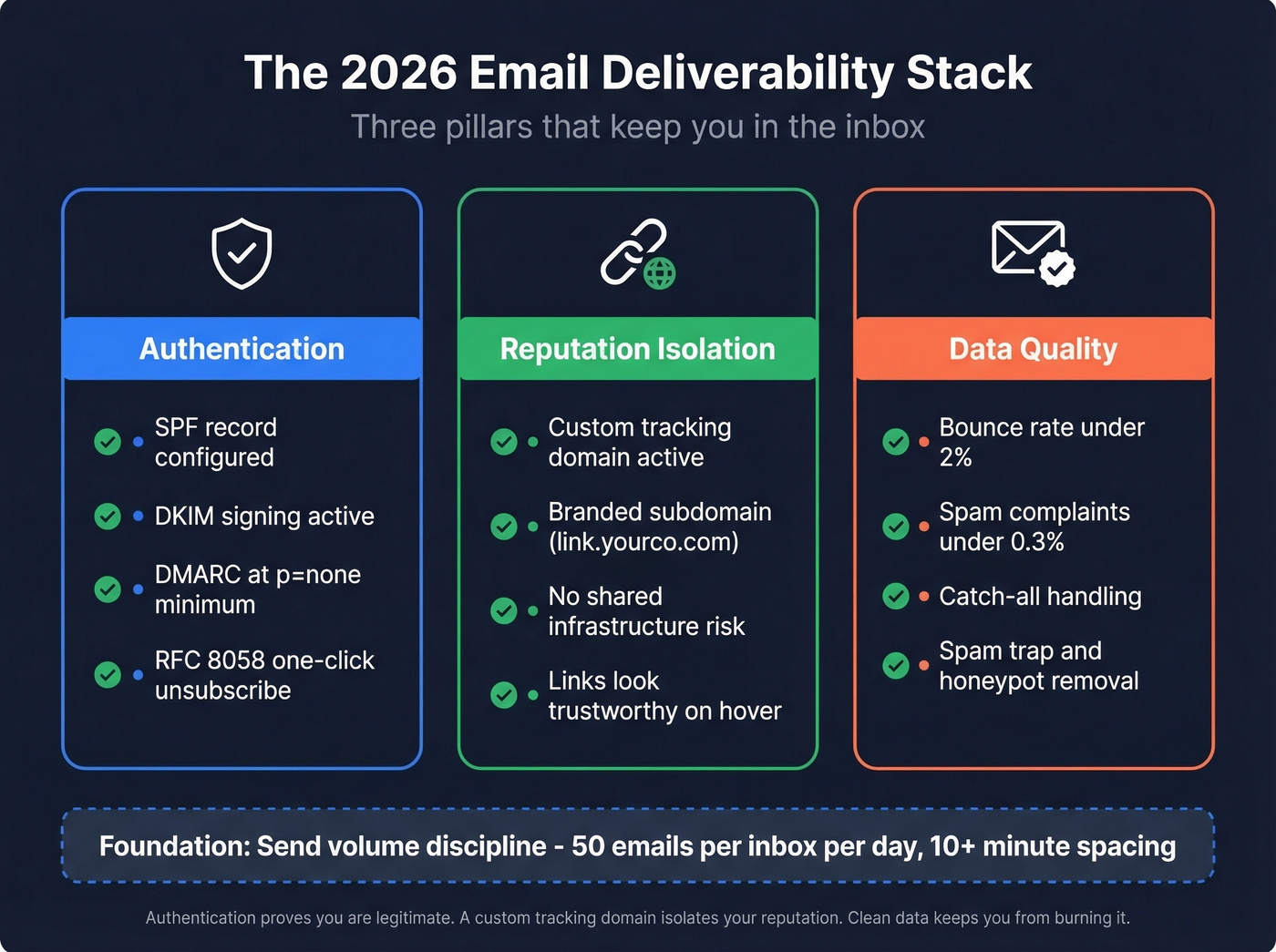
- SPF, DKIM, DMARC with at least
p=none- non-negotiable since Microsoft's May 2025 enforcement - RFC 8058 one-click unsubscribe - required by Google, Yahoo, and Microsoft for bulk senders
- Custom tracking domain - reputation isolation from shared infrastructure
- Spam complaints under 0.3% - the threshold Google and Yahoo enforce
- Bounce rate under 2% - above this, you're actively damaging your domain
- Send volume discipline - cap at 50 sends per inbox per day with 10+ minute spacing (see Email Velocity)
- List hygiene and data quality - the foundation everything else sits on (see Email Deliverability Guide)
The CTD protects your reputation from other senders. Verified data protects it from yourself. Prospeo's 5-step verification - catch-all handling, spam-trap removal, honeypot filtering - delivers 98% email accuracy and keeps bounce rates under 2% from day one.

Think of it as three pillars: authentication proves you're legitimate, a branded tracking subdomain isolates your reputation, and clean data ensures you're not burning that reputation by emailing invalid addresses (see Email Bounce Rate).
Compliance and Privacy
Tracking pixels process personal data. When that 1x1 image fires, it captures a timestamp, IP-based location, device type, OS, and email client. Each pixel URL is uniquely assigned to an individual recipient - making it personal data under GDPR (see Email Tracking Pixels).
France's CNIL launched a public consultation in June 2025 on a draft recommendation specifically targeting email open tracking, signaling that regulators are paying close attention. Identifying who individually opens or clicks requires explicit consent under the proposed framework. CCPA applies to businesses with annual gross revenues above $25M, adding another layer for US-based senders targeting California residents.
The broader trend is clear: using your own domain aligns better with first-party tracking approaches than relying on a shared third-party platform domain. A CTD doesn't exempt you from consent requirements, but it aligns with the privacy-centric direction regulators are pushing. Disclose tracking in your privacy policy, ensure a lawful basis for EU recipients, and give recipients a clear way to opt out.
Troubleshooting
Is Your Tracking Domain the Problem?
Here's the fastest diagnostic we've found. Send the same email via native Gmail - no platform, no tracking. If it lands in the inbox, send it again through your platform with tracking enabled. If the second email hits spam, your tracking domain is the variable.
This native-send test works regardless of which platform you use. If tracking is confirmed as the issue, either set up a custom tracking domain (if you haven't) or check whether your existing CTD has been blacklisted. Use GlockApps or a similar placement testing tool to verify inbox delivery before and after setting up your CTD. Also verify there aren't any CAA record conflicts in your DNS blocking SSL certificate provisioning (see How to Improve Sender Reputation).
Bounce Rate Too High?
If your bounce rate is above 2%, the issue isn't your tracking domain - it's your list. Under 2% is safe, 2-5% is a warning zone, and above 5% is critical. At that level, inbox providers actively throttle or block your sending domain.
A CTD can't save you from a 6% bounce rate. In our experience, pairing it with real-time email verification catches invalid addresses, spam traps, and catch-all domains before they damage your sender score (see Spam Trap Removal). Upload a CSV, get results in minutes, send only to verified contacts.
You just spent 10 minutes fixing your tracking infrastructure. Now fix the data feeding it. Prospeo delivers 143M+ verified emails refreshed every 7 days - not the stale lists that spike bounces and burn the domains you just configured.
Start sending to verified contacts at $0.01 per email.
FAQ
Do I need a custom tracking domain for plain-text emails?
No. If you send plain text with no tracking enabled, no tracking domain is inserted into your emails. You only need one when open or click tracking is active - that's when the shared domain becomes a liability.
What happens if I keep using the default shared tracking domain?
Your emails share reputation with every other sender on your platform. If any of them get flagged for spam, the shared domain's reputation drops - and your inbox placement drops with it, even if your own sending practices are clean.
How long does DNS propagation take?
Typically 24-48 hours, sometimes up to 72. Don't activate tracking in your platform until propagation completes. Activating too early breaks tracking links, meaning recipients click dead URLs that hurt both deliverability and credibility.
Can I use multiple tracking subdomains?
Yes. Map one tracking subdomain per sending domain. If you're an agency running campaigns across multiple client domains, set up separate subdomains for each. Sharing a single one across different sending domains defeats the purpose of reputation isolation.
Does setting up a CTD guarantee inbox placement?
No. It isolates your reputation from other senders, removing one risk factor. Deliverability depends on your full stack - authentication, content quality, list hygiene, sending volume, and complaint rates. Let's be honest: there's no single silver bullet. But a CTD paired with verified data and proper authentication gets you most of the way there.