

DMARC Settings: Complete Setup Guide for 2026
Your CEO's name just showed up in a phishing email - sent from your own domain. The board wants answers. IT is scrambling. And the fix? A single DNS TXT record you should've published six months ago.
Getting your DMARC settings right isn't optional anymore. Since February 2024, Gmail and Yahoo require bulk senders exceeding 5,000 emails per day to implement SPF, DKIM, and DMARC, with spam complaints ideally under 0.1% and a hard ceiling of 0.3%. Miss those thresholds and your mail starts getting rejected.
Roughly one in six emails never reaches the inbox globally. Proper email authentication won't fix everything, but it's the foundation - without it, you're building deliverability on sand. Even domains that send zero email should publish a DMARC record. An unprotected domain is an open invitation for spoofers.
What You Need First
Before you touch DNS, confirm three things are in place:
- SPF record published for your domain
- DKIM signing enabled on every service that sends as your domain (quick check: verify DKIM is working)
- DNS access (or a colleague who has it)
Then copy, paste, and publish your minimum viable DMARC record:
v=DMARC1; p=none; rua=mailto:dmarc@yourdomain.com
That's it. You're in monitoring mode. Aggregate reports start arriving within 24 hours, showing who's sending email as your domain and whether they're passing authentication.
Fewer than five sending services? You can go from zero to p=reject in under a month. Running 20+ vendors and legacy systems? Budget 6-8 weeks.
How DMARC Actually Works
DMARC - formally specified in RFC 7489 - doesn't authenticate email by itself. It sits on top of SPF and DKIM and adds two things: a policy telling receivers what to do with failing mail, and reporting that tells you what's happening.
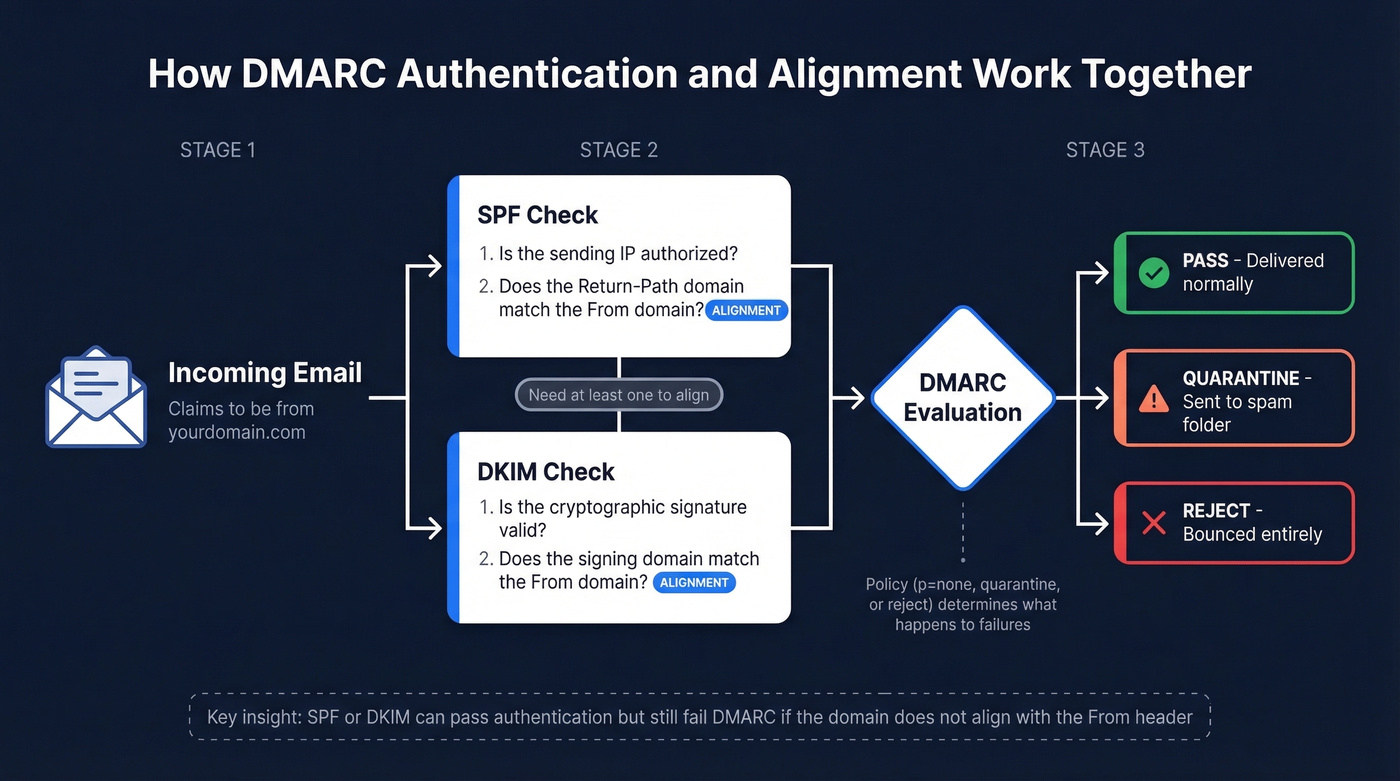
When a receiving server gets an email claiming to be from yourdomain.com, it checks SPF (does the sending IP have permission?) and DKIM (is the cryptographic signature valid?). But authentication alone isn't enough. DMARC requires alignment: the domain in the visible "From" header must match the domain that passed SPF or DKIM.
Here's the thing - this distinction between authentication and alignment is where most confusion lives. Your SPF record might pass fine, but if the Return-Path domain doesn't align with your From domain, DMARC still fails. Same with DKIM: the signature must be on a domain that aligns with your From address. Every service sending as your domain needs either SPF alignment or DKIM alignment (or both) to pass.
Relaxed alignment, the default, allows subdomains to match - mail.yourdomain.com aligns with yourdomain.com. Strict alignment requires an exact match. Start relaxed unless you have a specific security reason not to.
Complete Tag Reference
DMARC defines 11 tags. Only two are mandatory: v and p. The rest give you control over reporting, alignment strictness, and rollout pacing.
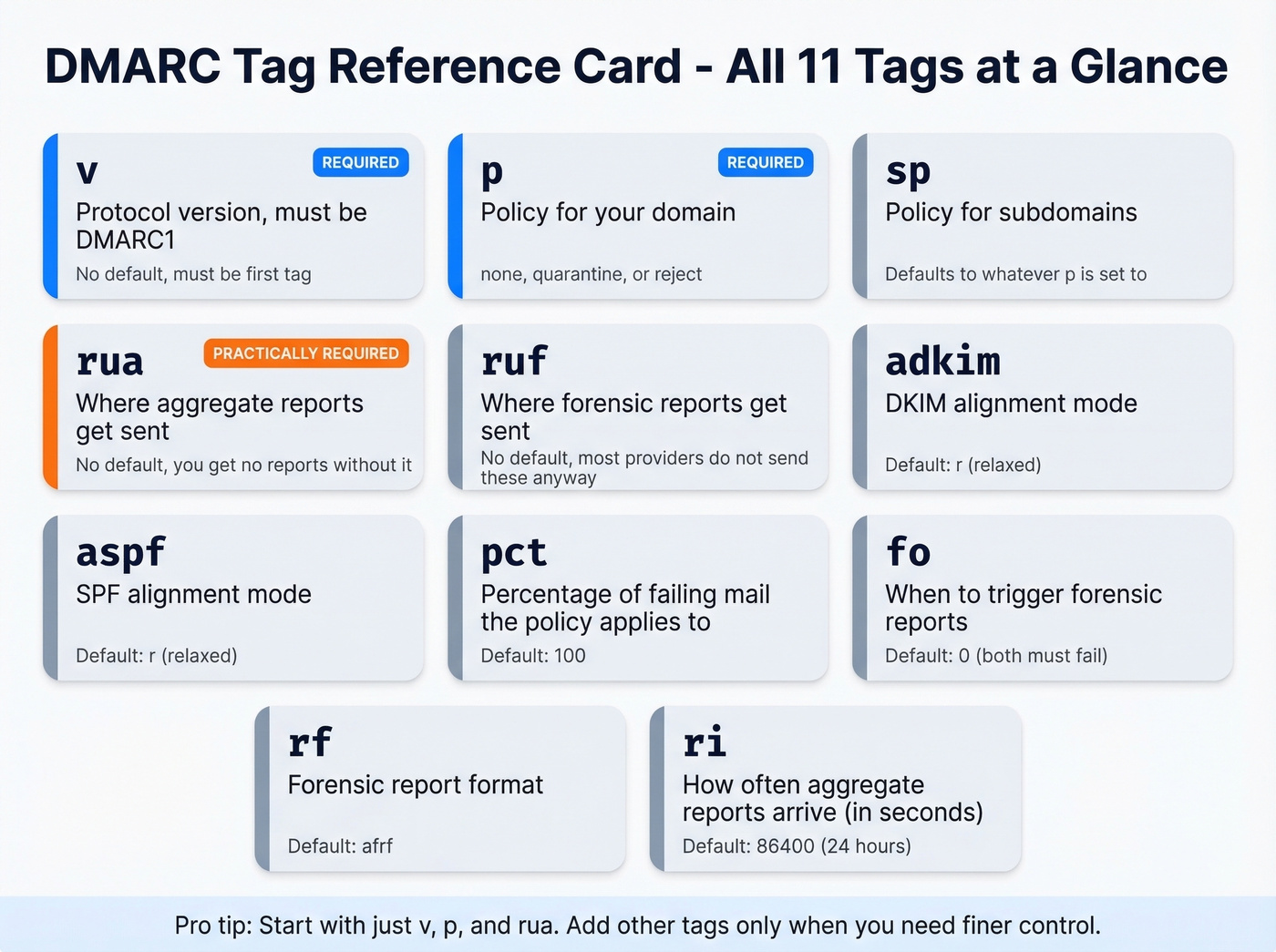
| Tag | Required? | Valid Values | Default | What It Does |
|---|---|---|---|---|
| v | Yes | DMARC1 | - | Protocol version. Must be first. |
| p | Yes | none / quarantine / reject | - | Policy for your domain. |
| sp | No | none / quarantine / reject | Same as p | Policy for subdomains. |
| rua | No* | mailto:address | None | Aggregate report destination. |
| ruf | No | mailto:address | None | Forensic report destination. |
| adkim | No | r (relaxed) / s (strict) | r | DKIM alignment mode. |
| aspf | No | r (relaxed) / s (strict) | r | SPF alignment mode. |
| pct | No | 0-100 | 100 | % of failing mail policy applies to. |
| fo | No | 0 / 1 / d / s | 0 | Forensic report trigger conditions. |
| rf | No | afrf | afrf | Forensic report format. |
| ri | No | Seconds (integer) | 86400 | Aggregate report interval. |
*rua is technically optional but practically mandatory. Without it, you're publishing a policy with zero visibility. Flying blind.
A note on fo: the default (0) only triggers forensic reports when both SPF and DKIM alignment fail. Setting fo=1 triggers on either failure, giving you more signal. That said, forensic reports are effectively dead - Gmail and Outlook don't send them. Don't lose sleep over fo configuration.
Copy-Paste Records for Common Scenarios
Starter / Monitoring Only
v=DMARC1; p=none; rua=mailto:dmarc@yourdomain.com
You're just getting started and need to see who's sending as your domain before enforcing anything.
Cautious Enforcement
v=DMARC1; p=quarantine; pct=10; rua=mailto:dmarc@yourdomain.com
You've reviewed reports and most legitimate mail passes. You want to test enforcement on a small percentage first.
Full Enforcement
v=DMARC1; p=reject; rua=mailto:dmarc@yourdomain.com
All legitimate senders are aligned. Receivers reject anything that fails. Bonus: BIMI requires p=quarantine or p=reject to display your logo in supporting inboxes.
Multi-Vendor with Subdomain Policy
v=DMARC1; p=reject; sp=quarantine; adkim=s; rua=mailto:dmarc@yourdomain.com
Root domain is locked down but subdomains still have vendors being onboarded. Strict DKIM alignment adds protection against subdomain spoofing.
Non-Sending / Parked Domain
v=DMARC1; p=reject; sp=reject; rua=mailto:dmarc@yourdomain.com
This domain should never send email. Skip straight to reject - there's no legitimate mail to break.

You're locking down DMARC so your domain stays clean. Don't undo that work with bad data. Prospeo's 5-step email verification delivers 98% accuracy - bounce rates under 4% across 15,000+ companies.
Protect your domain reputation on both sides of the equation.
From None to Reject: The Rollout Plan
Every DMARC guide tells you to "go slow." That advice is designed for enterprises running 50+ sending services across multiple business units. If you have 3-5 senders, you can reach p=reject in under a month.
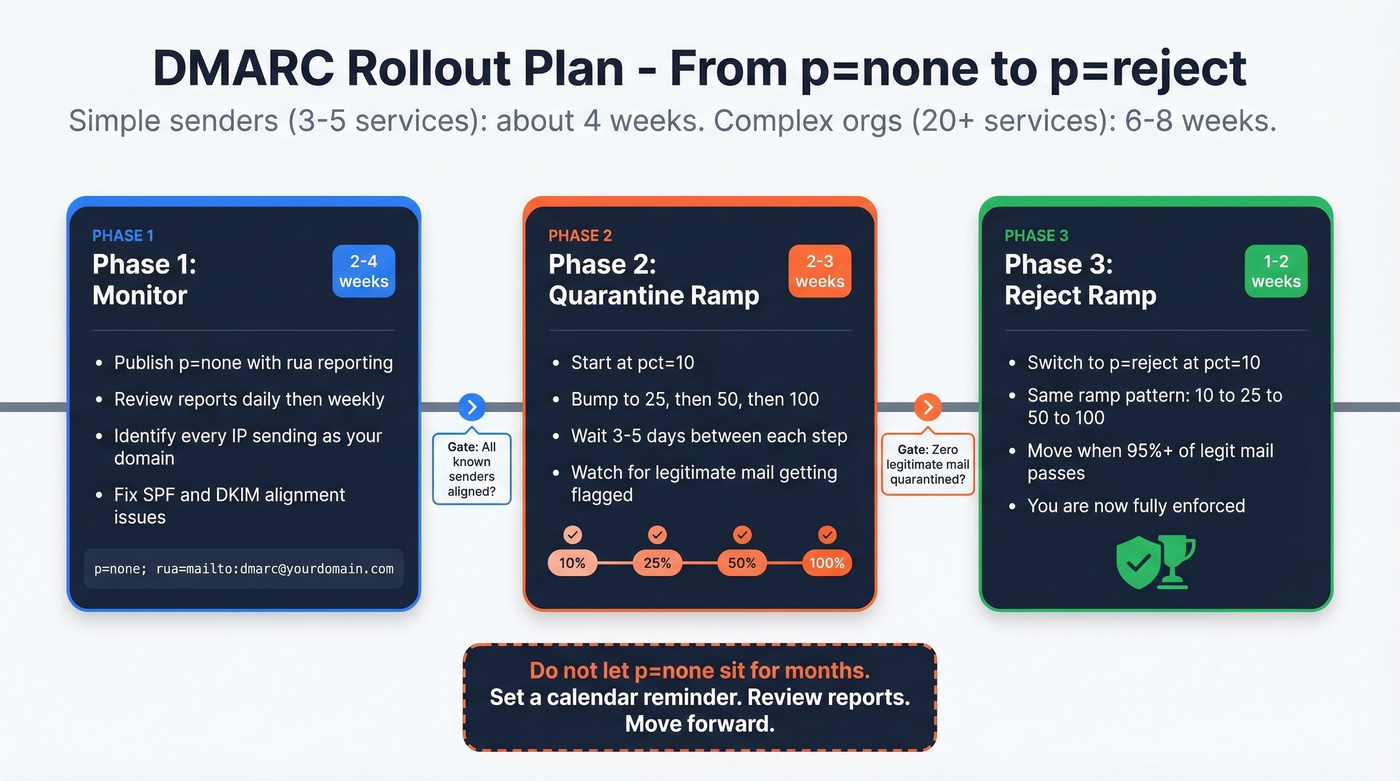
Phase 1: Monitor (2-4 weeks). Publish p=none with rua reporting. Review aggregate reports daily for the first week, then weekly. Identify every IP sending as your domain and cross-reference against your known senders - marketing automation, transactional email, CRM, support desk. Fix any SPF or DKIM alignment issues you find. This monitoring phase is where you catch misconfigurations before they cause delivery failures.
Phase 2: Quarantine ramp (2-3 weeks). Move to p=quarantine; pct=10. Watch your reports. If legitimate mail isn't getting flagged, bump to 25%, then 50%, then 100%. Each step can be 3-5 days if reports look clean.
Phase 3: Reject ramp (1-2 weeks). Switch to p=reject; pct=10. Same pattern: 10% to 25% to 50% to 100%. Move when 95%+ of legitimate mail passes alignment consistently.
Don't advance until you've seen at least one full reporting cycle - 24 hours minimum, ideally a week - with clean results at each percentage level.
One caveat: pct isn't always honored by all receivers. Some apply the full policy regardless. That's fine; it just means you reach enforcement faster than planned.
Let's be honest: p=none isn't a DMARC policy. It's a confession that you haven't done the work yet. Don't let it sit there for months while you "monitor." Set a calendar reminder. Review the reports. Move forward.
Reading Aggregate Reports
Every guide says "monitor your reports" without showing you what one actually looks like. Here's a trimmed aggregate report - we'll walk through the key fields below.
<!-- unknown MDX component: feedback -->
Reports arrive daily from major receivers - Google, Microsoft, Yahoo, and others. Three things to look for:
- Unrecognized source IPs. An IP you don't recognize sending 500+ messages as your domain is either a forgotten vendor or someone spoofing you.
- SPF/DKIM failures from known senders. A legitimate service isn't properly aligned. Fix it before you enforce.
- Disposition on legitimate mail. If you're at
p=quarantineand seedisposition: quarantineon real mail, solve the alignment problem before moving to reject.
Raw XML is painful at scale. Tools like dmarcian or EasyDMARC parse these into dashboards. For record validation, MxToolbox works. For raw lookups, dig TXT _dmarc.yourdomain.com is all you need.
Skip configuring ruf= and wondering why nothing arrives. Gmail and Outlook don't send them due to privacy concerns. Aggregate reports are where the actionable data lives.
Handling Third-Party Senders
This is the #1 reason organizations stay stuck at p=none for months. Mailchimp sends marketing emails, SendGrid handles transactional messages, Salesforce fires notifications, HubSpot runs sequences - each one needs to pass DMARC alignment independently.
The core pattern for third-party DKIM delegation is a CNAME record:
selector._domainkey.yourdomain.com CNAME selector._domainkey.provider.com
This lets the provider sign emails with a key that aligns with your domain. Every major ESP supports this, but setup instructions vary wildly. In our experience, vendor support teams often give wrong or outdated guidance - we've seen vendors recommend obsolete standards like SenderID that have zero impact on DMARC. Always verify alignment yourself by sending a test email and inspecting the headers.
SPF has a hard 10 DNS lookup limit. If you're including five or six vendors in a single SPF record, you're close to that ceiling. The workaround: dedicated subdomains per sender (marketing.yourdomain.com for Mailchimp, transactional.yourdomain.com for SendGrid). Each subdomain gets its own SPF record, sidestepping the limit entirely. If you're on Microsoft 365, check their documentation for specific DMARC behaviors with *.onmicrosoft.com domains.
The dmarc.io directory catalogs 1,000+ sending sources with vendor-specific alignment capabilities. Check there before guessing at CNAME selectors.
Common Mistakes to Avoid
We've seen every one of these in production:
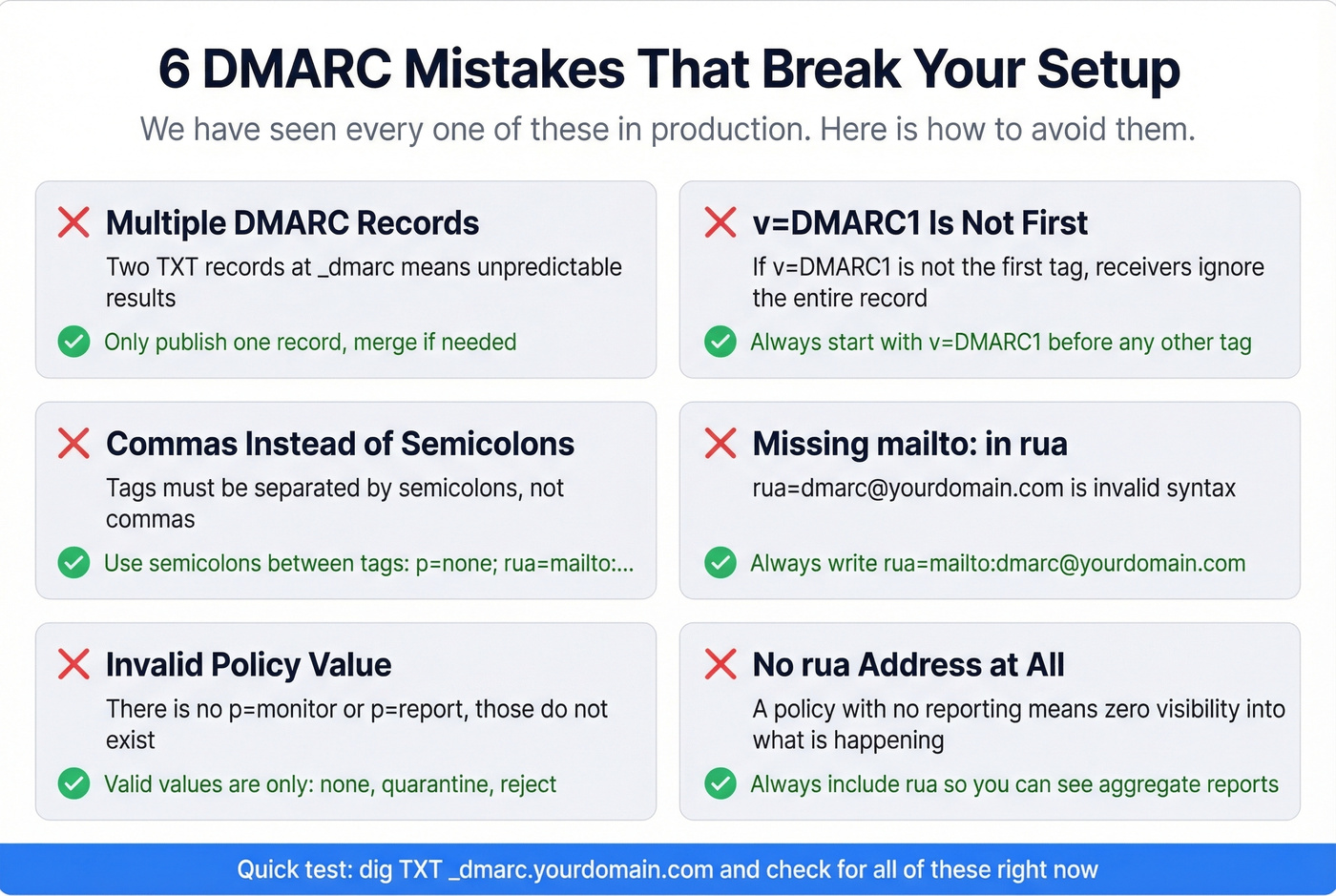
Multiple DMARC records. Only one TXT record at _dmarc.yourdomain.com. Two means unpredictable results. Merge them.
v=DMARC1 isn't the first tag. If it isn't first, receivers ignore the record entirely.
Commas instead of semicolons. Tags are separated by semicolons. Commas are only valid within multi-address rua/ruf values.
Missing mailto: in rua/ruf. The URI scheme is required. rua=dmarc@yourdomain.com is invalid - it must be rua=mailto:dmarc@yourdomain.com.
Invalid policy value. There's no p=monitor or p=report. Valid values: none, quarantine, reject. Nothing else.
No rua address. A policy with no reporting is the DMARC equivalent of closing your eyes while driving.
Leaving p=none for months. The consensus on r/dns is that teams publish p=none, forget about it, and never enforce. Set a deadline. Stick to it.
Multiple SPF records. Like DMARC, one SPF record per domain. Two cause unpredictable failures that cascade into DMARC alignment failure.
Don't Undo Your Work with Bad Data
Domain reputation protection doesn't end at authentication. You configure DMARC settings to stop spoofing, but bounces from bad contact data damage sender reputation just as fast. Prospeo runs a 5-step verification process with 98% accuracy before you hit send, keeping bounce rates under control so your newly protected domain stays clean. Pair enforcement with verified data and you've covered both sides of deliverability (more: email deliverability, email bounce rate, and improve sender reputation).
DMARC at p=reject means you take deliverability seriously. Prospeo does too - 143M+ emails verified on a 7-day refresh cycle, so you never send to dead addresses that spike spam complaints past that 0.3% ceiling.
Start with 75 free verified emails and zero bounce anxiety.
FAQ
Do I need DMARC if I don't send bulk email?
Yes. DMARC prevents spoofing of your domain regardless of volume. Gmail and Yahoo mandate it for senders exceeding 5,000 emails per day, but every domain benefits from at least p=none with reporting. Even if you send 50 emails daily, someone else could send 5,000 pretending to be you. Non-sending domains should publish v=DMARC1; p=reject immediately.
What's the difference between relaxed and strict alignment?
Relaxed alignment allows subdomains to pass - mail.yourdomain.com aligns with yourdomain.com. Strict requires an exact domain match. The default is relaxed for both adkim and aspf, and that's the right starting point for most organizations. Switch to strict only when you need subdomain isolation for security reasons.
How do I send DMARC reports to a third-party service?
The third-party domain must publish a TXT record at yourdomain.com._report._dmarc.theirservice.com authorizing report delivery. Without this record, receiving mail servers won't forward your aggregate reports. Providers like dmarcian and EasyDMARC walk you through this during onboarding - don't skip the step.
How do I protect my domain reputation after DMARC enforcement?
DMARC stops spoofing, but high bounce rates from outdated contact data still erode sender reputation. Pair enforcement with a verification tool that catches bad addresses before they hit your sending queue. Stack Optimize, for example, maintains 94%+ deliverability and under 3% bounce rates across all client domains by combining authentication with verified data.