

Domain Reputation in Google Postmaster Tools (2026)
You logged into Google Postmaster Tools last week, and your domain reputation grade was just gone. No High, no Medium, no Low - just a blank space where your most trusted deliverability diagnostic used to live. You're not alone. r/Emailmarketing threads have been lighting up with the same confusion since the v1 retirement, and we've fielded dozens of questions from teams who built entire alerting workflows around a metric that no longer exists.
Here's what actually happened, what replaced it, and how to protect your sending reputation now.
The Short Version
- Domain reputation grades are gone. Google retired them from Postmaster Tools on September 30, 2025. IP reputation is gone too. They aren't coming back.
- Monitor Compliance Status instead. Postmaster Tools v2 focuses on pass/fail compliance checks, spam rate, authentication, delivery errors, encryption, and feedback loop data - not a reputation grade.
- Fill the gap with free tools. MxToolbox + Sender Score + Talos Intelligence give you the closest proxy to the reputation signal you lost.
What Domain Reputation Used to Show You
For years, Google Postmaster Tools displayed a simple four-tier domain reputation rating: High, Medium, Low, or Bad. It was the go-to way to check your Gmail sending reputation at a glance.
The rating reflected how Gmail's filters perceived your mail based on spam complaints, engagement signals, authentication health, bounce rates, and sending patterns. Alongside it sat an IP reputation dashboard using the same tiers. Together, they gave email operators a clear, instant read on email deliverability health - and that simplicity is exactly what made losing them so disorienting.
What Changed - The v1 Retirement
Google retired Postmaster Tools v1 on September 30, 2025. Anyone trying to access the old interface now gets redirected to v2.
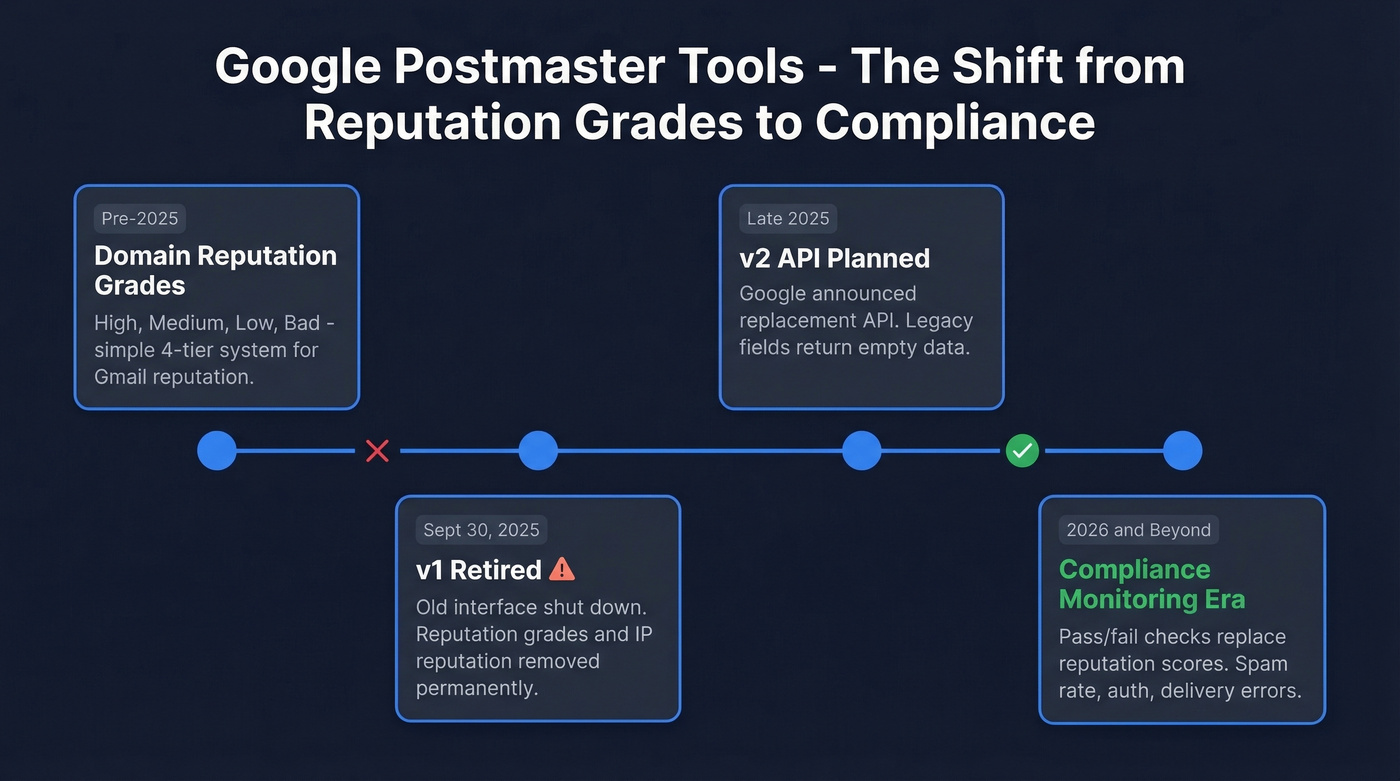
Why did Google kill it? The leading theory: reputation visibility gave spammers a feedback loop to optimize against Gmail's filters. Combine that with Apple Mail Privacy Protection degrading open-rate data and AI-generated spam making engagement signals noisier, and Google had good reason to stop publishing a score that bad actors could game.
Since the retirement, the v1 API returns either empty values or v2-consistent data - legacy reputation fields are effectively dead. If you built dashboards or alerting scripts around the old schema, they're broken. Google planned a v2 API by the end of 2025; if it hasn't launched yet, don't build workflows around the old reputation fields regardless.
One thing that caught teams off guard: metric calculations changed during the transition. Spam rate calculations and other signals don't match their historical definitions, so any thresholds you'd set need recalibrating against v2 baselines.

Your domain reputation depends on data quality. Every bounce and spam trap hit drags you closer to Gmail's 0.3% ceiling. Prospeo's 5-step verification - with catch-all handling, spam-trap removal, and honeypot filtering - delivers 98% email accuracy so your outbound never triggers the signals that kill deliverability.
Stop guessing why Gmail is throttling you. Fix the data.
What Replaced It - Postmaster Tools v2
V2 gives you compliance monitoring, not reputation grading. Think of it as a checklist, not a thermometer. You'll know if you pass or fail Gmail's requirements, but you won't get the High/Medium/Low signal that told you how well you were doing.
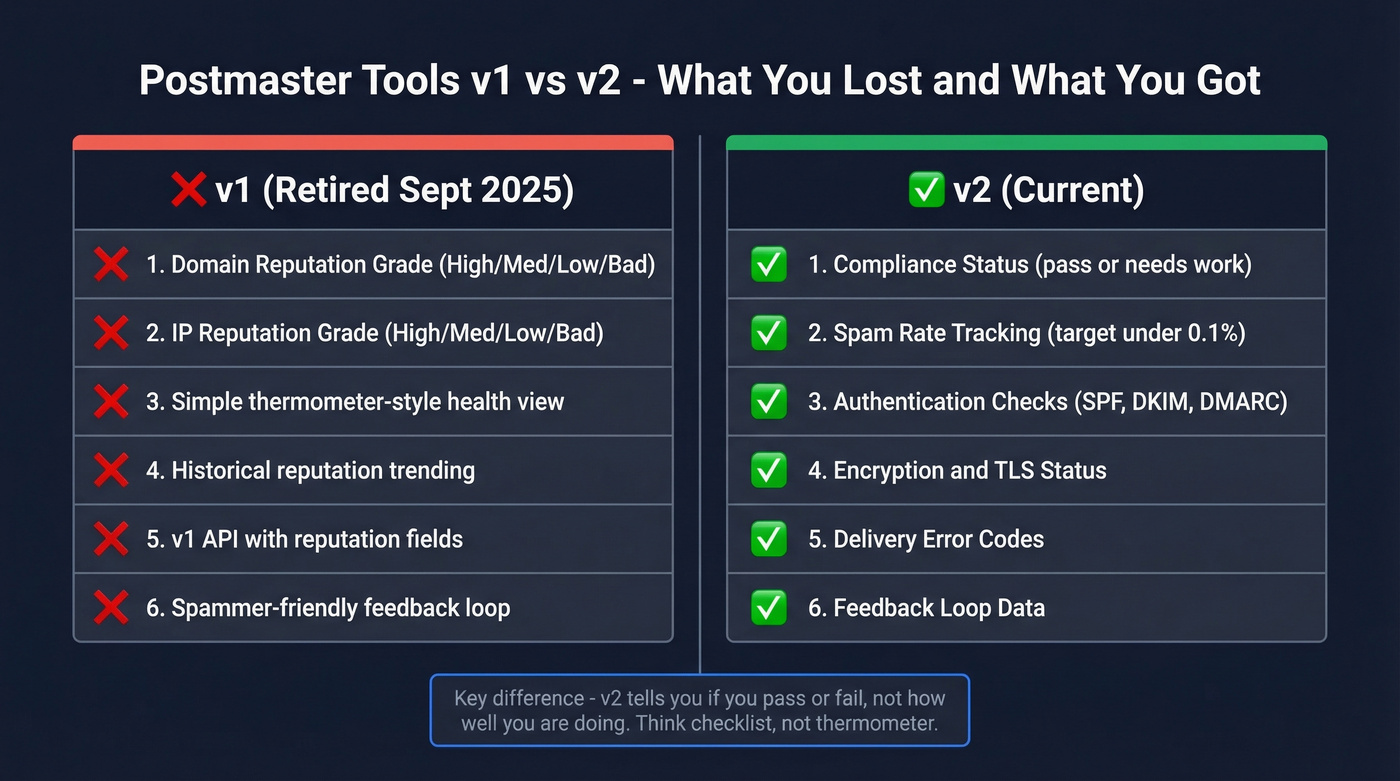
What v2 covers:
- Compliance Status (pass vs. needs work across Gmail's bulk sender requirements)
- Spam rate tracking
- Authentication checks (SPF/DKIM/DMARC)
- Encryption/TLS status
- Delivery errors
- Feedback loop data
The Compliance Status dashboard uses rolling averages over multiple days, so improvements won't show instantly. Expect a few days of lag.
One quirk worth knowing: the compliance dashboard operates at the parent domain level. Selecting a subdomain still shows the parent domain's compliance status, which trips up teams running multiple subdomains for different mail streams. We've seen this cause real confusion when a team's marketing subdomain looks clean but their outbound subdomain is dragging down the parent.
Volume thresholds matter too. The compliance dashboard only shows data for domains that've sent 5,000+ messages to Gmail in a single day since January 2024. For the other dashboards - spam rate, authentication, delivery errors - you typically need 100+ emails per day to unique Gmail recipients before data appears reliably, and a few hundred per day is more consistent.
How to Check Gmail Domain Reputation Without the Grade
The reputation signal didn't disappear from the internet. It disappeared from Google's tool. Here's what fills the gap.
| Tool | Price | What It Monitors |
|---|---|---|
| Postmaster Tools v2 | Free | Gmail compliance, spam rate, auth, delivery errors |
| MxToolbox | Free / $129-$399/mo | Blacklists, DNS, SMTP |
| Sender Score (Validity) | Free | IP reputation (0-100) |
| Cisco Talos Intelligence | Free | Domain/IP classification |
| Spamhaus Lookup | Free | Major blocklist status |
| Barracuda Reputation | Free | Barracuda filter status |
| Microsoft SNDS | Free | Outlook/Hotmail reputation |
| Yahoo Sender Hub | Free | Yahoo/AOL reputation |
| GlockApps | From ~$85/mo | Inbox placement testing |
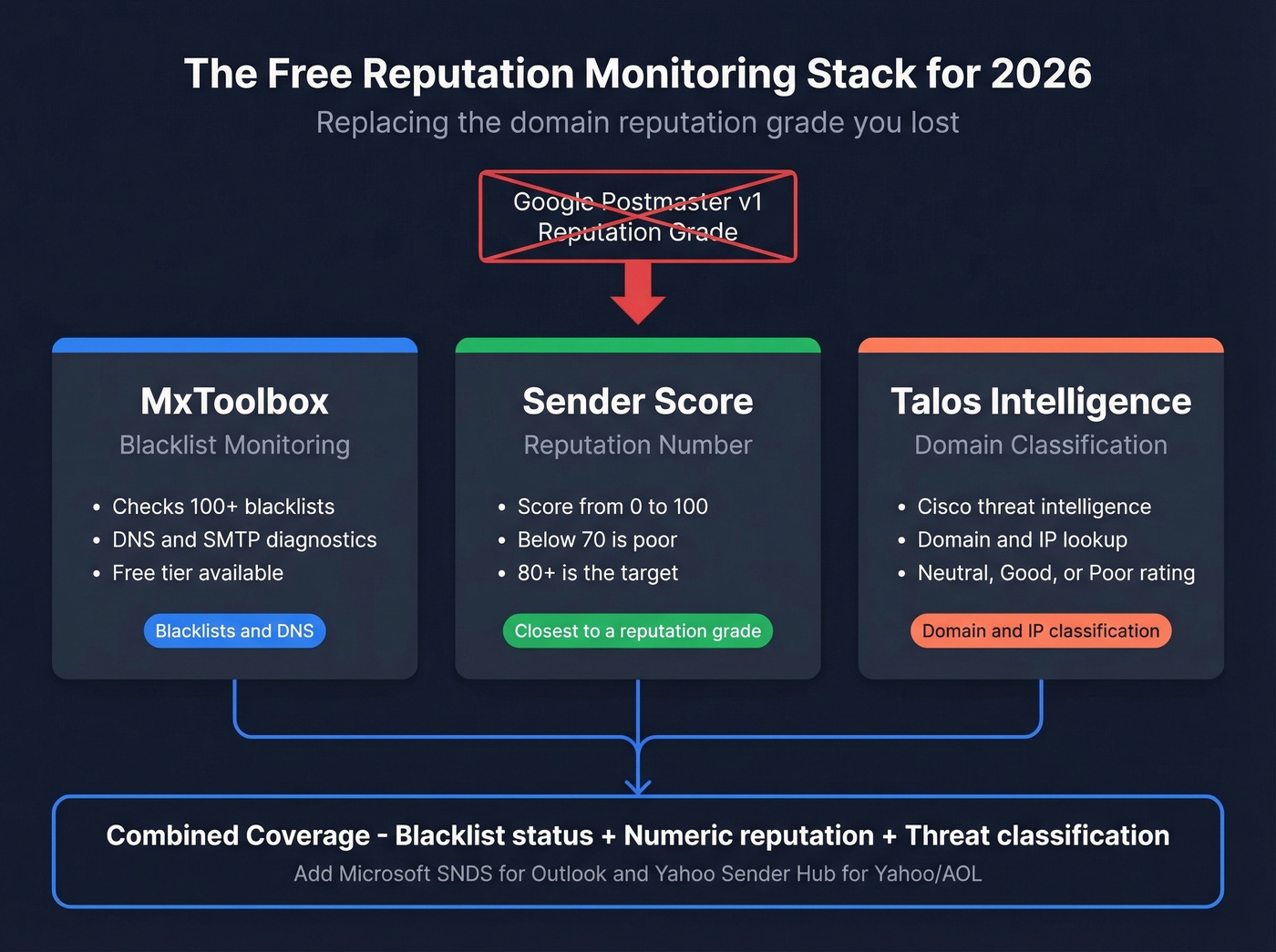
The free stack we recommend: MxToolbox + Sender Score + Talos Intelligence. Together, they cover the practical basics you used the old reputation dashboard for - blacklist monitoring, a numeric reputation proxy, and domain/IP classification.
Sender Score runs on a 0-100 scale. Below 70 is poor, 70-80 is decent, 80+ is where you want to be. It isn't Gmail-specific, but it's the closest thing to a single reputation number you'll find for free. For mailbox-provider-specific views, Microsoft SNDS covers Outlook/Hotmail and Yahoo Sender Hub handles Yahoo/AOL.
How to Improve Your Sending Reputation
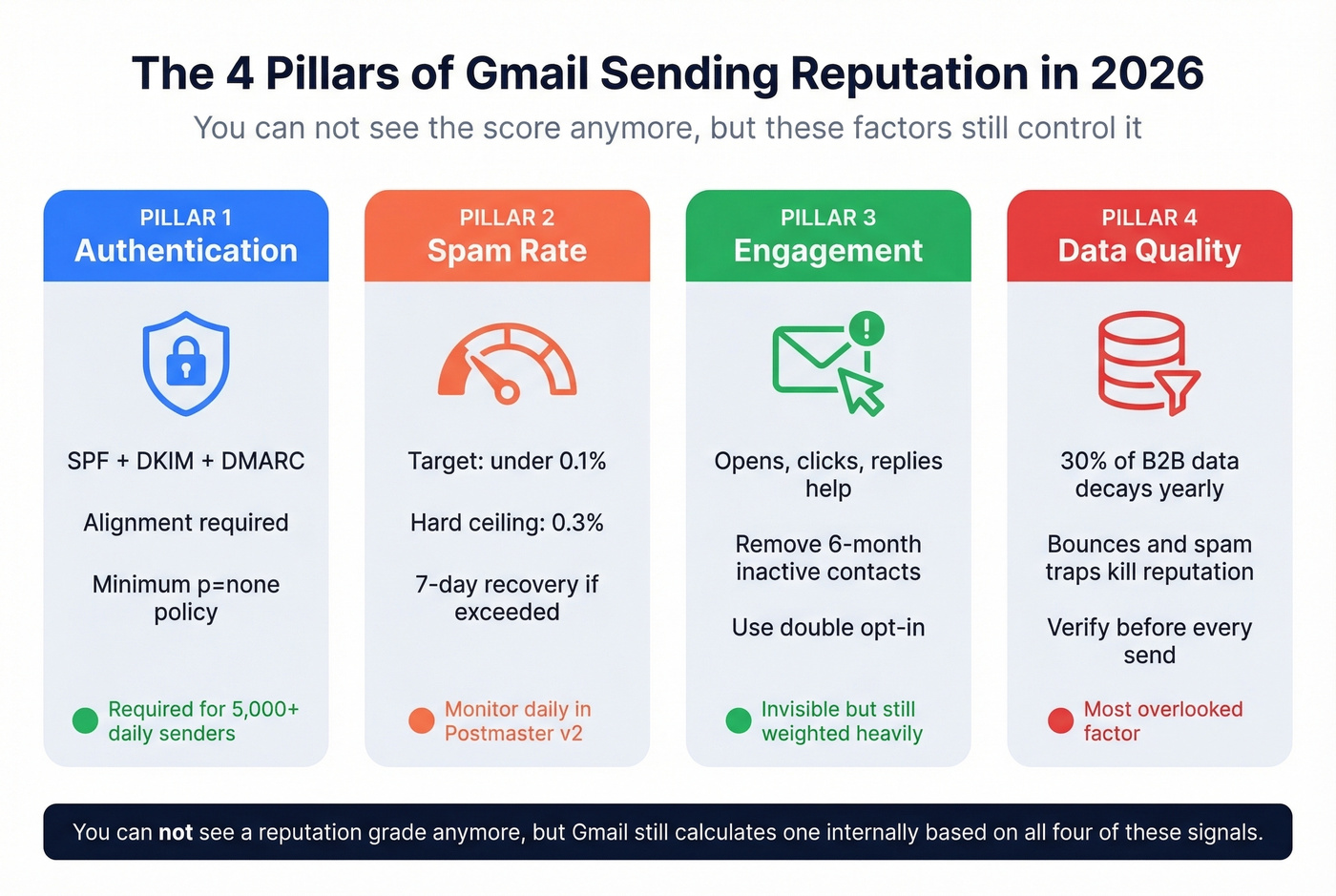
Gmail doesn't show you a reputation grade anymore, but the factors that drive reputation haven't changed.
Authentication Is Non-Negotiable
SPF, DKIM, and DMARC with alignment - at minimum p=none - are required for bulk senders. If you're sending 5,000+ emails per day to Gmail, you're classified as a bulk sender permanently. Non-compliant emails face temporary rate limiting (4.7.x errors) or permanent rejection (5.7.x errors). If you’re unsure about alignment, start with DMARC alignment and sanity-check your DNS against a few SPF record examples.
Keep Spam Rate Below 0.1%
Gmail's hard ceiling is 0.3%. Hit that and you lose access to Gmail Postmaster mitigation support until you stay below 0.3% for seven consecutive days. The recommended target is under 0.1%. One-click unsubscribe (RFC 8058) is required too - process opt-outs within 48 hours.
Engagement Still Matters
Positive engagement - opens, clicks, replies, users rescuing your mail from spam - still helps your reputation even though you can't see the score anymore. Conversely, dead contacts actively damage you through low engagement signals. If someone hasn't opened or clicked in six months, stop emailing them. Double opt-in on the front end prevents the problem from compounding. (If you’re benchmarking, compare against a standard email open rate and track your click rate formula in email marketing consistently.)
Fix the Upstream Problem: Bad Data
Here's the thing most teams get wrong: they obsess over authentication and unsubscribe compliance (which matter), but ignore the fact that roughly 30% of B2B contact data decays every year. Bounces from invalid emails, spam traps, and honeypots are one of the fastest ways to tank your sending reputation - and no amount of DMARC configuration fixes a dirty list. If you’re seeing issues, start by diagnosing your email bounce rate and follow a real spam trap removal process.
We've watched this play out dozens of times. A team's authentication is perfect, their unsubscribe flow is compliant, their content is clean - and they're still landing in spam because 15% of their list is dead addresses and recycled spam traps. Meritt went from a 35% bounce rate to under 4% after switching to Prospeo's 5-step verification, which catches spam traps and honeypots that simpler validation tools miss. With a 7-day data refresh cycle versus the 6-week industry average, the data stays clean long after the initial verification.

Teams using bad provider data see 35%+ bounce rates - exactly the kind of signal that destroyed domain reputation scores and now triggers Gmail's 5.7.x rejections. Prospeo refreshes all 300M+ records every 7 days, not every 6 weeks. That's how Snyk cut bounce rates from 35-40% to under 5% across 50 AEs.
Replace stale contacts before they wreck your sender reputation.
FAQ
Why is my Google Postmaster Tools dashboard blank?
You likely aren't hitting the volume threshold: roughly 100+ emails per day to personal Gmail accounts (gmail.com/googlemail.com), with a few hundred daily for consistent data. Also confirm your SPF or DKIM is properly configured so Gmail can associate traffic with your domain, and verify your DNS ownership record is still in place - Google re-checks monthly and revokes access if it fails. Data updates once daily, typically around 12 PM Pacific.
Does the Postmaster API still return domain reputation data?
No. Since the v1 retirement on September 30, 2025, legacy reputation fields return empty or v2-consistent data. Google's planned v2 API replaces the old endpoints entirely. Don't build alerting or dashboards around the old reputation fields - use Sender Score, Talos Intelligence, or MxToolbox as external proxies instead.
How do I keep contact data clean enough to protect reputation?
Verify emails before every send - not just once. Remove catch-all domains that can't be validated and flag spam traps before they enter your sequences. Re-verify lists regularly since B2B data decays roughly 30% annually. Let's be honest: if you're only validating at import and never again, you're sending to a list that's rotting in real time.
What's a good spam rate to maintain in Postmaster Tools v2?
Stay below 0.1% - that's Gmail's recommended threshold for healthy senders. The hard ceiling is 0.3%; exceed it and Gmail restricts mitigation support until you hold below 0.3% for seven consecutive days. Monitor the spam rate dashboard in v2 daily, especially after list imports or campaign launches. If you see a spike, pause sending immediately and investigate before the rolling average catches up.