

Email Extractor for Chrome: 7 Extensions Worth Downloading in 2026
A RevOps lead we know installed a "popular" email extractor from the Chrome Web Store - looked legit, lots of installs, solid ratings. Within a week, it raised serious security questions: permissions that could read email, background processes running with no tabs open, and the ability to load remote code after installation.
Here's the thing. Before you download an email extractor for Chrome, accuracy across tools ranges from 51% to 95%, and the gap between "popular" and "safe" is wider than most people realize.
Our Picks (TL;DR)
- Prospeo - Best for verified emails and direct dials. 98% email accuracy from a 300M+ profile database. Free tier: 75 emails + 100 extension credits/month.
- Hunter - Best for quick domain-level lookups. 6M+ users, confidence scoring. Free: 50 credits/month.
- Email Extractor Lite - Best free option for grabbing visible addresses off a page. No account, no verification, no cost.
Scrapers vs. Database Tools
Page scrapers use regex to grab every string that looks like an email address from the HTML you're viewing. They're fast and free - and they'll hand you outdated addresses, role-based inboxes, and honeypot traps without blinking. Some scraper extensions add features like JavaScript/Ajax delay handling and batch URL processing, but the output still isn't verified.
If you're comparing options, see our breakdown of free email scrapers and when they make sense.
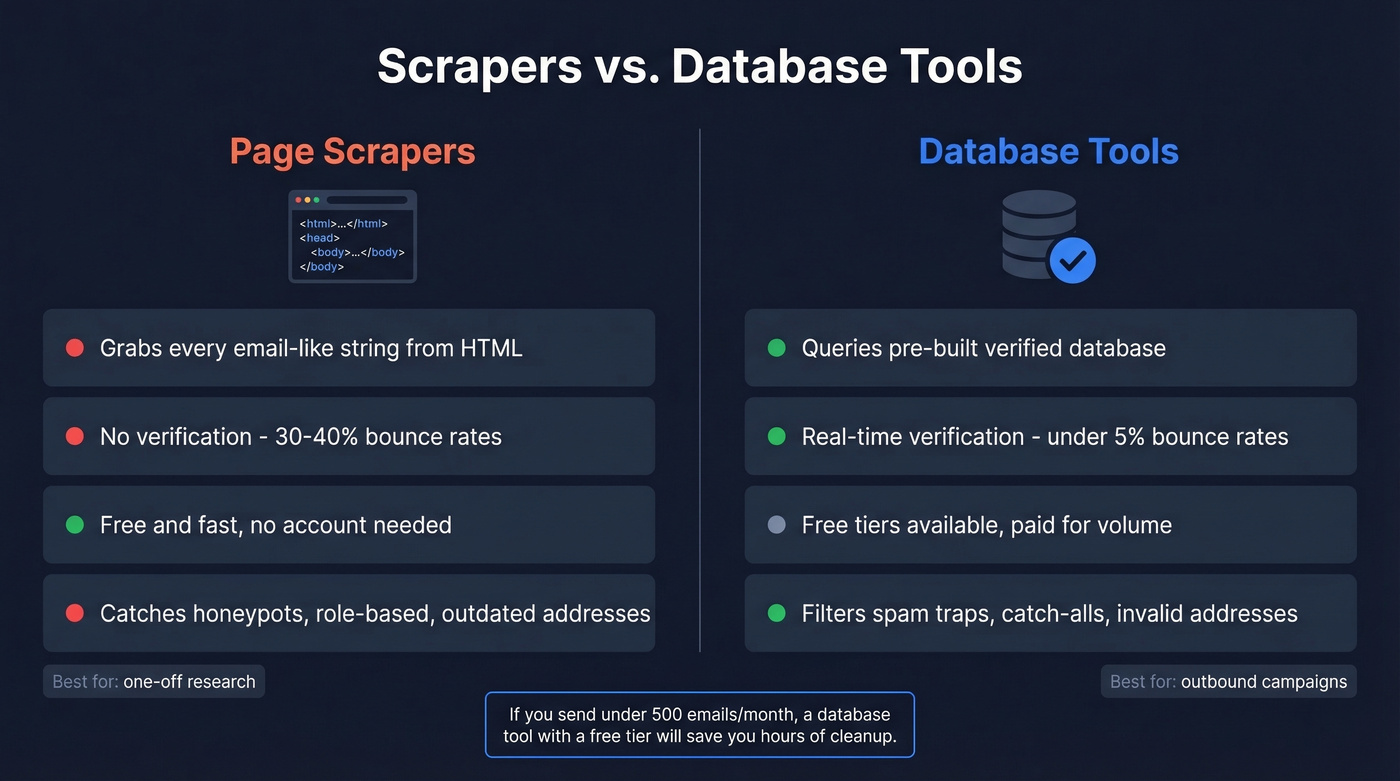
Database tools work differently. When you visit a company page or professional profile, the extension queries a pre-built, verified database instead of scraping the page. Hunter explicitly states it doesn't scrape pages - it queries its own crawler database.
Scrapers give you volume. Database tools give you deliverability. If your outbound volume is under 500 emails/month, you almost certainly don't need a scraper - a database tool with a free tier will save you hours of cleanup and protect your sender reputation.
Check Extension Permissions First
Before you install anything, open the extension's permissions panel. These flags mean walk away:
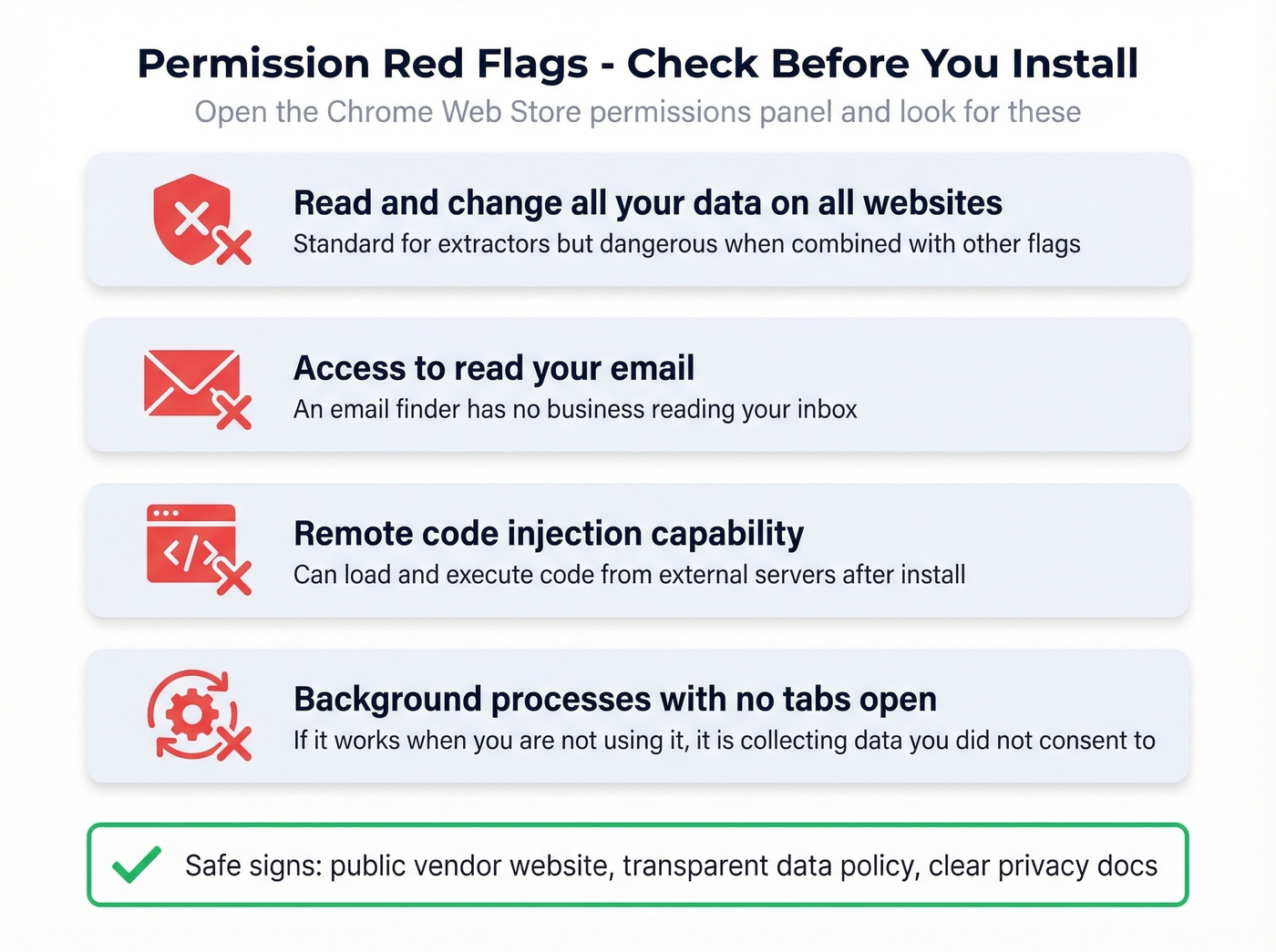
- "Read and change all your data on all websites" - standard for extractors, but dangerous combined with the next flags.
- Access to read your email - an email finder has no business reading your inbox. A Reddit r/cybersecurity thread flagged one popular extension for exactly this.
- Remote code injection capability - the extension can load and execute code from an external server after installation.
- Background processes running with no tabs open - if it's working when you're not using it, it's collecting data you didn't consent to.
Stick to extensions from vendors with public websites and transparent data policies.

Most Chrome email extractors scrape raw HTML and leave you with 30-40% bounce rates. Prospeo's extension queries a 300M+ verified database refreshed every 7 days - not scraped regex patterns. 98% email accuracy, spam-trap removal, and catch-all handling built in. 75 free emails + 100 extension credits every month, no credit card required.
Download the extension 40,000+ users trust for emails that actually land.
7 Best Chrome Email Extractor Extensions
Prospeo
Use this if you need emails that actually land in inboxes. The extension pulls from 300M+ professional profiles with 143M+ verified emails, catching spam traps, honeypots, and catch-all domains before you ever hit "export." Data refreshes every seven days - not the six-week industry average - so you're not emailing someone who changed jobs last month.
Skip this if you just want to scrape visible addresses off a webpage for free with zero verification.
The free tier gives you 75 emails plus 100 Chrome extension credits per month. Paid plans start at roughly $39/month, working out to about $0.01 per verified email - the cheapest unit cost on this list. We've run side-by-side tests against several competitors, and the bounce rate difference is stark: under 4% with Prospeo versus 30%+ with unverified scrapers.
If you want to go deeper on list quality, pair extraction with an email deliverability checklist.
Hunter
With 6M+ users and 12K+ reviews (4.6 on Capterra, 4.4 on G2), Hunter is the most widely adopted option here. It queries its own crawler database rather than scraping the page you're on, and its confidence scoring system uses SMTP verification, source quality, and pattern matching to rate each result.
The gap: Hunter is email-only. No phone numbers, no direct dials.
Free plan includes 50 credits/month. Starter runs $49/month ($34/month billed annually) for 2,000 credits. Verification costs 0.5 credits per email, putting the effective cost at ~$0.025 per email.
If you're evaluating similar tools, compare against these Hunter alternatives.

Skrapp
Skrapp's Fair Credit Policy only charges you for Valid or Catch-all results - you don't burn credits on invalid addresses, and duplicate searches aren't re-charged either. Users consistently praise the straightforward workflow. Free plan gives you 100 credits/month with rollover. Professional plan starts at $30/month for 1,000 credits, roughly $0.03 per email. Coverage outside North America and Western Europe can be spotty.
For a full cost breakdown, see Skrapp pricing.
GetProspect
Clean UI, solid for building targeted lists with company and role filters. Free plan offers 50 lookups/month. Starter at $49/month for 1,000 credits. At ~$0.049 per email, it's pricier per credit than Skrapp, and the verification methodology is less transparent. Fine for small teams who value the filtering interface over raw cost efficiency.
If you're building lists at scale, consider adding data enrichment services after extraction.
Kaspr
Kaspr's Starter plan charges $49/month for just 60 email credits - that's $0.82 per email, which is hard to justify. The Business plan at $79/month for 2,400 credits brings it down to ~$0.03, but you're locked into a higher commitment to get reasonable unit economics. We've seen teams sign up for Starter, realize the math doesn't work, and upgrade within a week.
Waalaxy
Waalaxy is a multi-channel outreach tool that happens to include email finding. Free plan gives you 25 emails. Business at $80/month for 500 emails works out to $0.16 each - expensive if email extraction is your primary need. Only worth considering if you're already running Waalaxy for sequences and want everything in one place.
If you're sending at volume, follow a safe email velocity ramp to avoid deliverability issues.
Email Extractor Lite
Completely free, no account required, optional donation. It's a pure regex page scraper with built-in deduplication and browser storage - your extracted data stays in your browser. Great for quickly pulling visible addresses off directories, contact pages, or event sites.
But there's zero verification. Expect 30-40% bounce rates if you send unverified scraped lists raw. For one-off research? Perfect. For outbound campaigns? You'll need a verification step.
If you need more options in this category, see our list of email scraper Chrome extension picks.
At $0.01 per verified email, Prospeo costs 60-80x less than Kaspr's Starter plan and delivers higher accuracy than every tool on this list. You also get direct dials from 125M+ verified mobiles - something Hunter, Skrapp, and Email Extractor Lite can't offer at all.
Get verified emails and phone numbers from one Chrome extension for free.
Pricing Comparison
| Tool | Free Tier | Paid Plan | ~Cost/Email | Verification |
|---|---|---|---|---|
| Prospeo | 75 emails + 100 ext | ~$39/mo | $0.01 | Yes (5-step) |
| Hunter | 50 credits | $49/mo (2,000 cr) | $0.025 | Yes |
| Skrapp | 100 (rollover) | $30/mo (1,000 cr) | $0.03 | Yes (fair credit) |
| GetProspect | 50/mo | $49/mo (1,000 cr) | $0.049 | Yes |
| Kaspr | 5 emails/mo | $49/mo (60 cr) | $0.82 | Yes |
| Waalaxy | 25 emails | $80/mo (500 cr) | $0.16 | Partial |
| Extractor Lite | Unlimited | $0 | $0 | No |
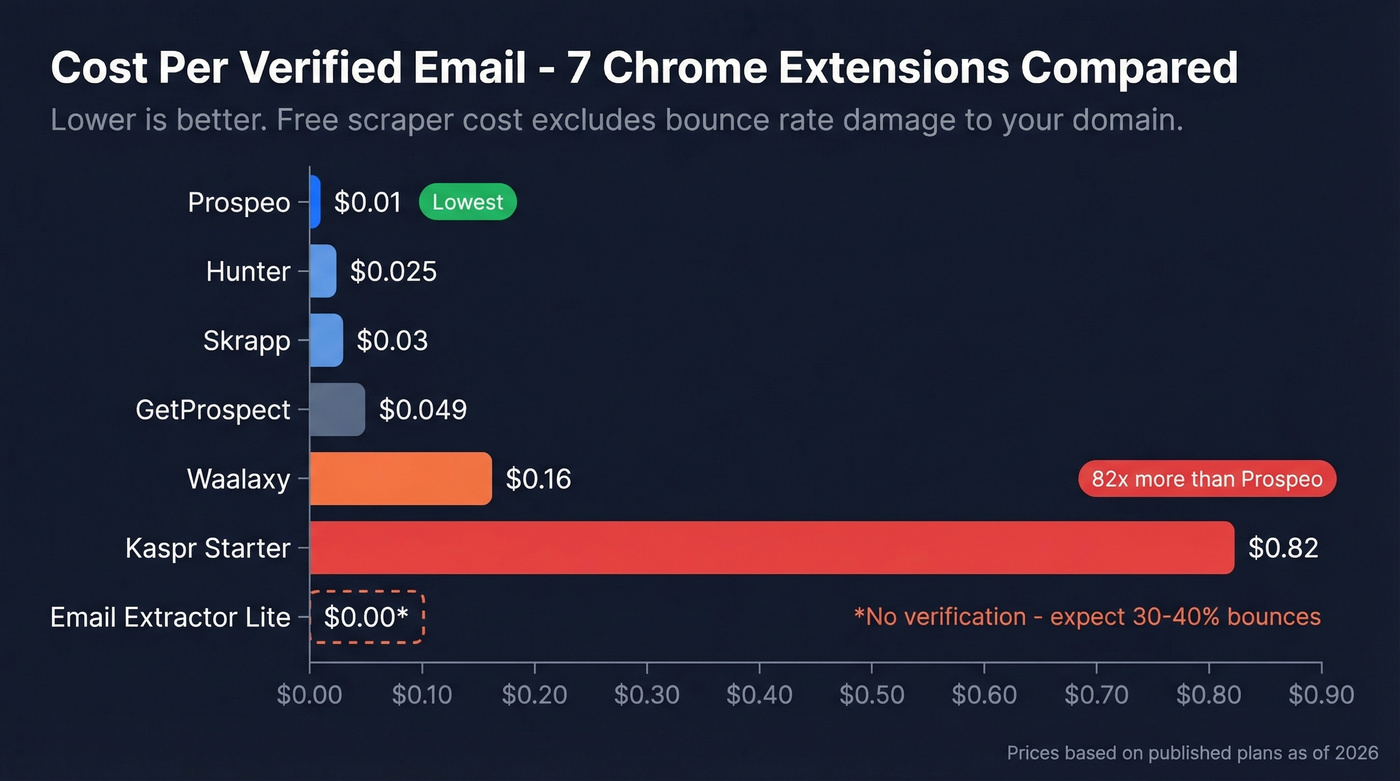
Cost per email only matters if the emails are real. A free scraper that bounces 35% of its output costs you more in domain reputation damage than a $0.01 verified email ever will.
Extract, Verify, Send
The workflow that actually protects your sender reputation:
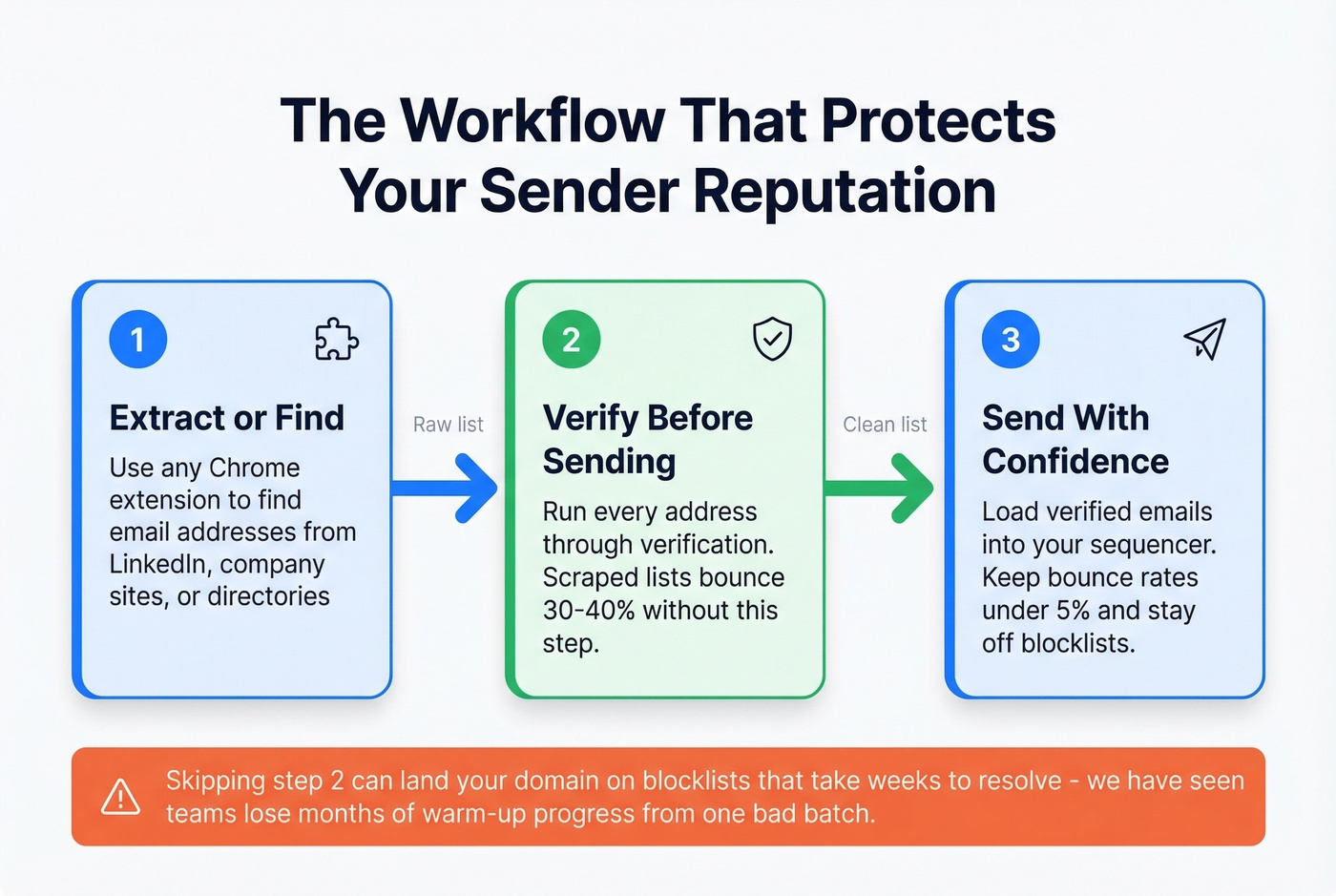
- Extract or find emails using any tool on this list.
- Verify before sending. Tools without real-time verification produce 30-40% bounce rates. For scrapers, run the output through a dedicated verification service before loading it into your sequencer.
- Send with a clean list. Keep bounce rates low. In our experience, one bad campaign can land your domain on blocklists that take weeks to resolve - we've watched teams lose months of warm-up progress from a single unverified batch.
For bounce benchmarks and fixes, see our guide to email bounce rate.
Legal Basics
The 2022 Ninth Circuit ruling in hiQ v. LinkedIn reaffirmed that scraping publicly accessible information doesn't violate the Computer Fraud and Abuse Act. But GDPR and CAN-SPAM govern how you use that data - you need legitimate interest to contact someone and must honor opt-out requests immediately. Document your legitimate interest basis, include an unsubscribe mechanism in every outreach email, and don't buy pre-scraped lists from vendors who can't explain their data sourcing.
FAQ
Are email extractor Chrome extensions safe?
Audit permissions before installing. Avoid any extension that requests access to read your emails, injects remote code, or runs background processes when you're not using it. Stick to tools from vendors with public websites and transparent data policies - Prospeo, Hunter, and Skrapp all publish clear privacy documentation.
Is it legal to extract emails from websites?
Scraping publicly accessible data isn't a CFAA violation per the 2022 hiQ v. LinkedIn ruling. GDPR and CAN-SPAM regulate how you use extracted data - you still need legitimate interest for outreach and must honor opt-out requests immediately.
What should I check before I download an email extractor for Chrome?
Open the permissions panel in the Chrome Web Store listing. Red flags include email-reading access, remote code injection, and background processes. Then check whether the tool scrapes pages or queries a verified database - that difference determines your bounce rate. Cross-reference user count and recent reviews before committing.
Why do extracted emails bounce so often?
Page-scraping extensions grab every string that resembles an email address, including outdated, role-based, and honeypot addresses. Without real-time verification, bounce rates of 30-40% are common. Database tools that run verification before returning results keep bounces under 5%.