

Download Email Verifier: Desktop Tools, Cloud Options, and What Works in 2026
You exported 10,000 leads, ran them through a desktop email verifier on your laptop, and got back 4,000 "unknown" results. Not invalid - unknown. The tool couldn't tell you whether those addresses were real or dead, so now you're guessing. That's the reality when you download email verifier software in 2026: these tools promise cheap, private verification, but most users lack the server infrastructure to make them work.
We've tested the desktop tools still worth considering, and we'll explain why they choke on unknowns - and when to skip the download entirely.
Quick Picks
Three paths, depending on your setup:
- Best desktop verifier (with server infrastructure): GlockApps Email Verifier - $99 one-time, built-in bounce handler, free demo available. You'll want a Windows VPS/server with proper PTR + forward-confirmed reverse DNS (FCrDNS) for usable results.
- Best desktop verifier for Mac: Maxprog eMail Verifier - one of the few native Mac desktop options in this category, EUR44.95-EUR59.95, rated 3.3/5.
If you don't already have a server or VPS with a clean IP, that third option saves you hours of frustration.
Desktop vs. Cloud Verification Software
The appeal of desktop verifiers is straightforward: your email lists never leave your computer, and you pay once instead of per-credit. For teams handling sensitive data under strict compliance rules, that privacy advantage is real.
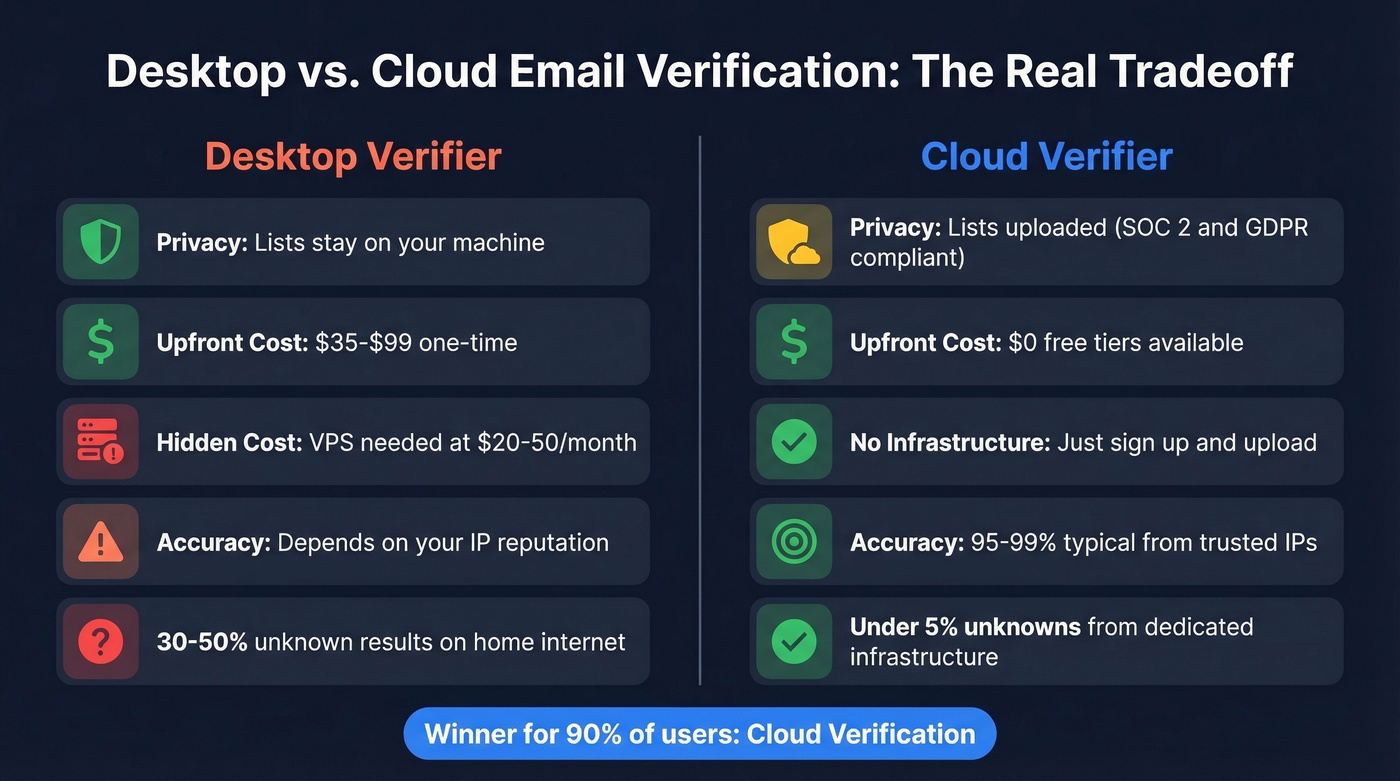
Here's the tradeoff most people don't anticipate. Desktop SMTP verification depends heavily on your IP reputation. When your verifier connects to Gmail or Outlook's mail servers, those servers decide whether to cooperate based on who's asking. A laptop on home internet has a dynamic IP with zero sender reputation - the mail server either refuses the connection or returns a vague "try again later," which your tool logs as "unknown."

GlockApps themselves recommend installing their verifier on a Windows server/VPS with proper PTR and forward-confirmed reverse DNS. Good advice, but your "$99 one-time" tool now also needs server infrastructure. Expect to pay $20-$50/month for a basic Windows VPS if you don't already have one.
Cloud verifiers handle SMTP queries from infrastructure with established sender reputation - dedicated IPs that major providers already trust. That's why cloud tools consistently return fewer unknowns.
| Factor | Desktop | Cloud | Winner |
|---|---|---|---|
| Privacy | Lists stay local | Lists uploaded (SOC 2 / GDPR) | Desktop |
| Upfront cost | $35-$99 one-time | ~$0 (free tiers) | Desktop |
| Ongoing cost | VPS: $20-50/mo | ~$150 per 100k emails | Cloud (no infrastructure) |
| Accuracy | IP-dependent | 95-99% typical | Cloud |
| Setup | Install + configure DNS | Sign up + upload | Cloud |
Here's the thing: desktop email verifiers are a relic. The privacy argument made sense a decade ago. In 2026, downloading a random .exe from a third-party portal is the actual security risk - ASTGD's own site warns that cracked products include viruses and malware. Reputable cloud verifiers operate under SOC 2 and GDPR compliance with data processing agreements. For 90% of users, desktop verification is solving a problem that no longer exists.
Why Desktop Verifiers Return "Unknown"
SMTP verification works by connecting to the recipient's mail server and asking "does this mailbox exist?" The server responds with a code: 250 means valid, 550 means invalid, and 421 or 450 means "come back later." That last category is where unknowns pile up.
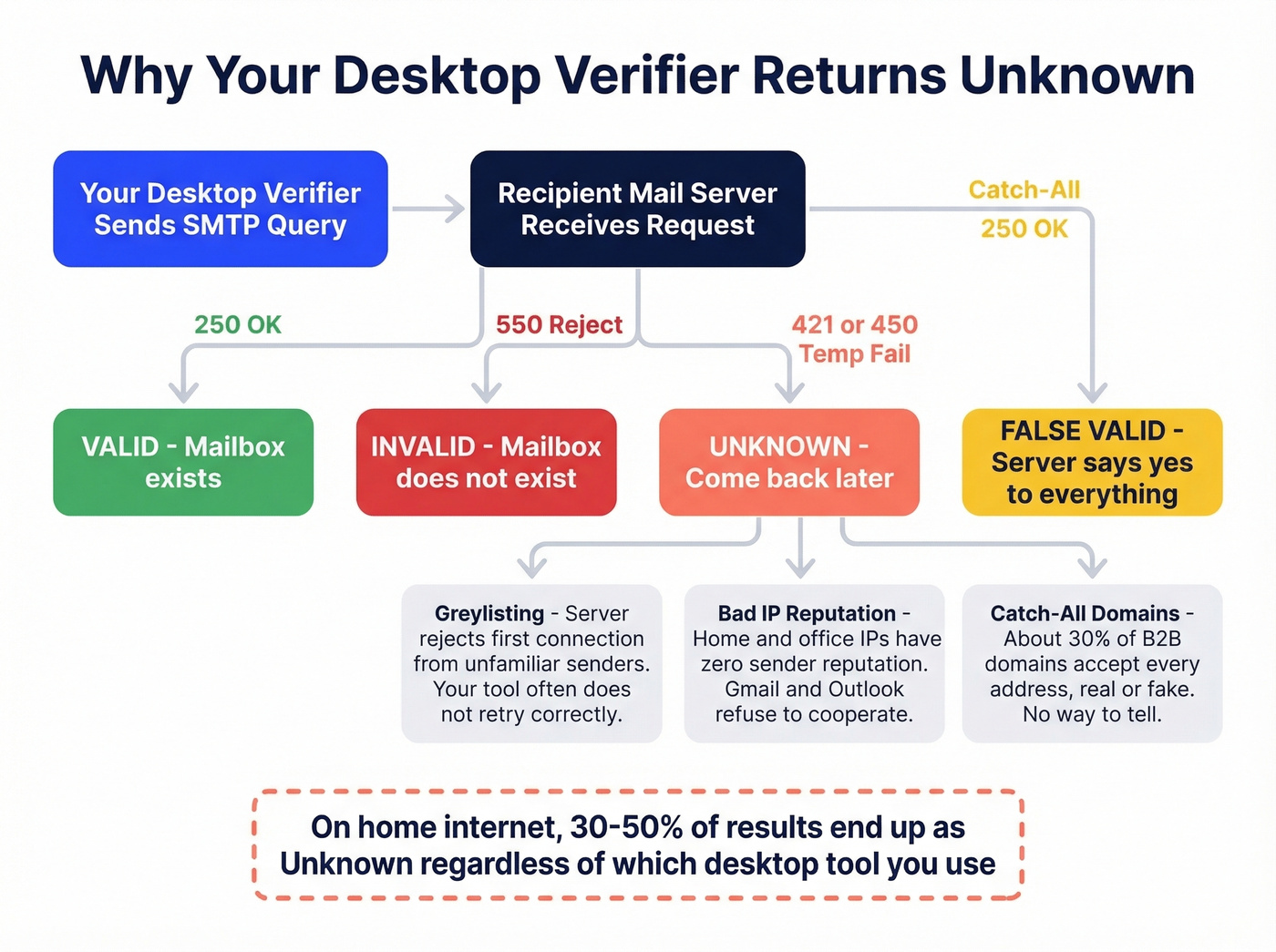
Greylisting is the biggest culprit. Mail servers intentionally reject the first connection from unfamiliar senders with a 450 temporary failure. Legitimate mail servers retry; spammers don't. Your desktop verifier often doesn't retry with the right timing, so greylisted addresses get logged as unknown.
Then there are catch-all domains - roughly 30% of B2B domains return a 250 OK for every address, real or fake. Your verifier can't distinguish john.smith@company.com from gibberish@company.com because the server accepts everything.
The final blow: Yahoo, AOL, Hotmail/Live, and Outlook are especially uncooperative when you run SMTP verification from a local dynamic IP with no reputation. If your list is heavy on these providers and you're running verification from your office network, you're running an expensive syntax checker. The software is only as good as the IP it runs on.
Neither desktop nor cloud tools can solve spam traps, either. These look like normal addresses and pass every verification check. That's why verifying purchased or harvested lists is a losing game regardless of your tool.
A bounce rate above 5% triggers spam filtering. Proper verification keeps it under 2%. If you want the benchmarks and fixes, see our guide to bounce rate.

Desktop verifiers choke on greylisting and catch-all domains because they lack server infrastructure. Prospeo's 5-step verification handles both - including catch-all detection and spam-trap removal - from infrastructure major providers already trust. 98% accuracy, $0.01 per email, zero VPS configuration.
Stop paying $99 plus a VPS bill to get 30-50% unknowns.
Best Email Verifier Software to Download
GlockApps Email Verifier
GlockApps is the most full-featured desktop verifier still actively maintained. At $99 one-time with a free demo, it includes a built-in bounce handler that processes bounced messages via POP3/IMAP - genuinely useful if you're running your own mail infrastructure.
The catch: Windows-only, and it performs best on a VPS/server with proper PTR and FCrDNS configuration. For users stuck on dynamic IPs, it supports third-party API verification through Swift Email Verifier, though that adds cost. Unknown results from greylisting are common, and the tool recommends retrying those addresses after a delay.
We've seen teams waste weeks configuring VPS infrastructure for GlockApps only to get results comparable to a $0.01/email cloud tool. If you already have the server setup, it's a solid buy. If you don't, the total cost of ownership makes cloud verification cheaper fast.
Atomic Email Verifier
Capterra reviewers call it "great bang for your buck," and at $69 one-time with a 4.6/5 rating across 17 reviews, they're not wrong. It handles syntax, domain, and SMTP checks without fuss.
The flip side: it slows down significantly on large lists, and a few reviewers flag bugs that affect accuracy. No Mac version - a recurring complaint across nearly every desktop verifier in this category. Best for small-to-medium Windows lists under 50k. Beyond that, you'll feel the performance ceiling.
If you're building outbound lists, pair verification with better sales prospecting techniques so you’re not cleaning low-intent data.
Maxprog eMail Verifier
If you're on Mac and insist on a local tool, Maxprog is one of the few true native desktop options people actually use. It runs on macOS and Windows, can determine 70-80% of dead-email addresses, and verifies at 10+ emails per second with multithreading. Version 3.8.7 is actively maintained.
The 3.3/5 rating across 118 reviews is the lowest here. At EUR44.95-EUR59.95, it's affordable, but in our testing desktop verifiers on home internet returned 30-50% unknowns regardless of the tool. Maxprog is no exception.
ASTGD Valid Email Verifier
$50 lifetime license sounds appealing until you notice the $10/month VIP server URL renewal required for verification to work. That's $170/year ongoing - more expensive than most cloud verifiers. Windows 8/10/11 and Server editions supported. The vendor suggests loading 30-60k addresses at a time, up to 100k.
Skip this one. The recurring cost defeats the purpose of a desktop tool.
Email Unlimited Email Verifier
Free to download with a trial license, claiming 50,000 addresses/hour. The hard requirement: SMTP port 25 access, which means a dedicated server or VPS. Lists stay local. Useless without server infrastructure. If you're specifically looking for a free email verification software download, this is the closest option - but "free" comes with serious infrastructure strings attached.
If you’re sending at scale, also watch your email velocity so verification gains don’t get wiped out by throttling.
Open-Source Option (GitHub)
A free, open-source email validation API with zero data storage. Batch validation up to 100 emails, with syntax, domain/MX checks, and disposable detection. Best for developers comfortable self-hosting. Everyone else should look elsewhere.
Desktop Verifiers at a Glance
| Tool | Price | OS | Rating | Key Limitation |
|---|---|---|---|---|
| GlockApps | $99 one-time | Windows | - | Needs server/VPS + PTR/FCrDNS |
| Atomic | $69 one-time | Windows | 4.6/5 | Slow on large lists |
| Maxprog | EUR44.95-EUR59.95 | Mac + Windows | 3.3/5 | Desktop SMTP still IP-dependent |
| ASTGD | $50 + $10/mo | Windows | - | Recurring "server URL renewal" cost |
| Email Unlimited | Free trial | Windows | - | Requires port 25 |
| Open-source | Free | Any (self-host) | - | Developer-only |
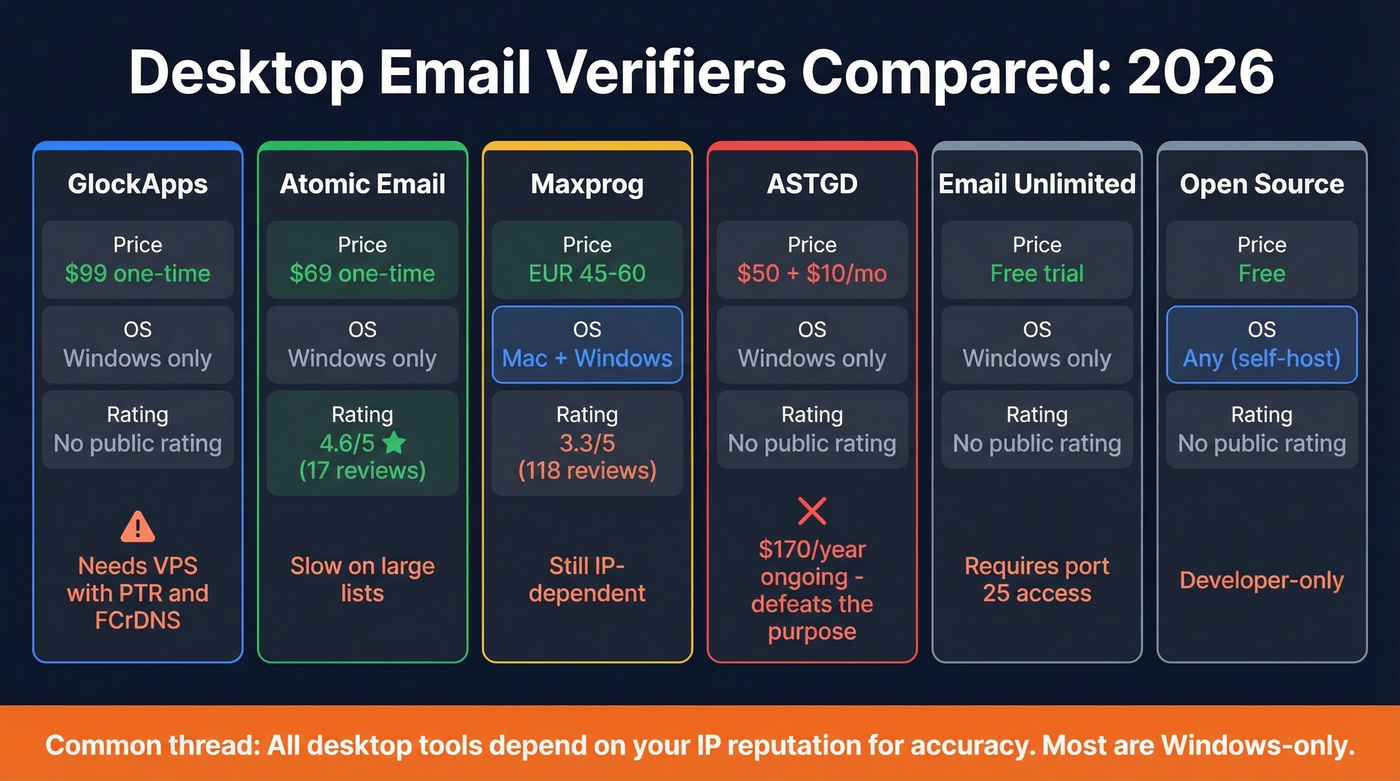
Most are Windows-only. All depend on your IP reputation for accuracy. Desktop tools also tend to have low review volume compared to mainstream cloud platforms.
When to Skip the Download Entirely
Look, you probably shouldn't download an email verifier at all.
Prospeo
Prospeo runs a 5-step verification process with catch-all handling, spam-trap removal, and honeypot filtering on proprietary email infrastructure. It doesn't rely on third-party verification providers, which means consistent accuracy regardless of what's happening with upstream APIs.
If you’re comparing cloud tools, start with our roundup of Bouncer alternatives for email verification.
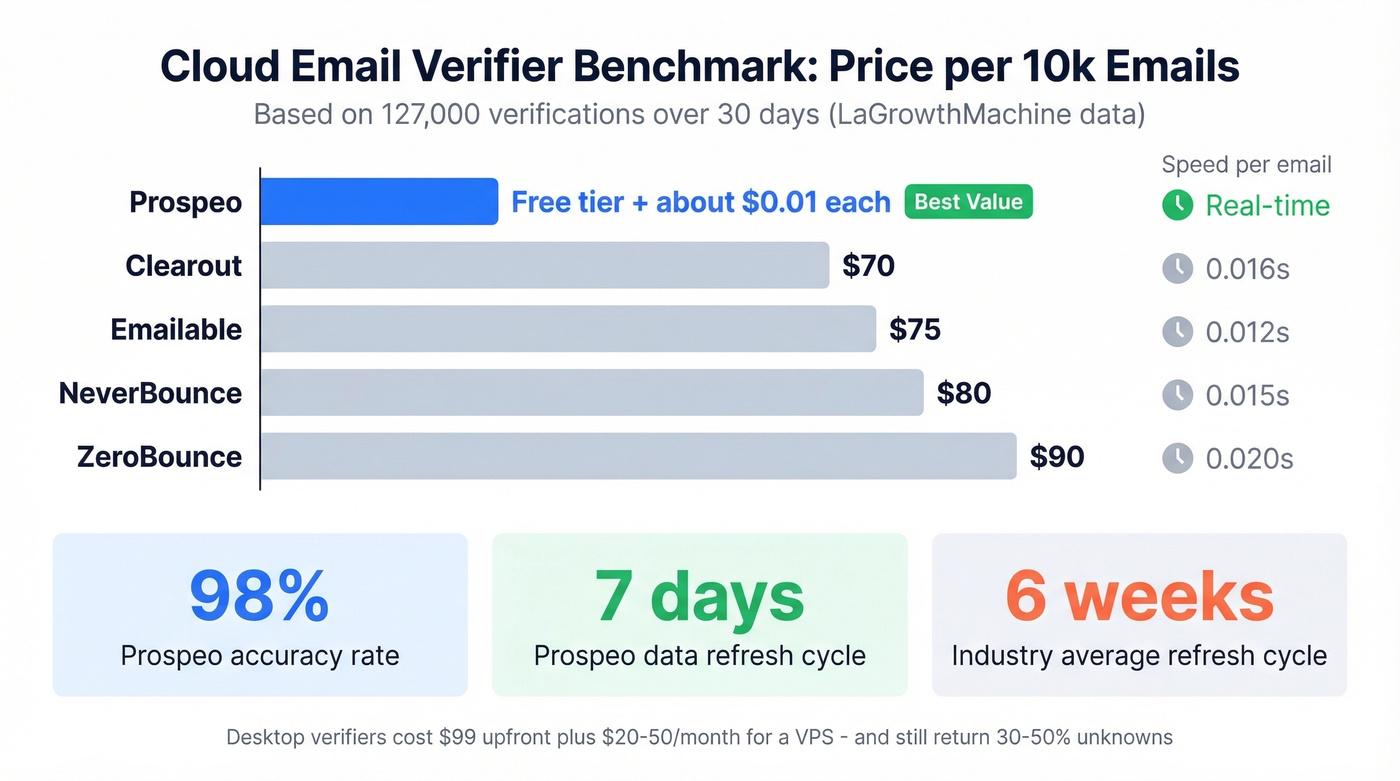
The 98% email accuracy rate comes from dedicated infrastructure with established sender reputation - exactly what desktop tools lack on a home network. All records refresh on a 7-day cycle, compared to the 6-week industry average, so you're not verifying against stale data. Upload a CSV, paste addresses, or verify in real time through the API. Results come back in clear categories instead of walls of "unknown."
If you’re troubleshooting deliverability end-to-end, use our email deliverability guide alongside verification.
The free tier gives you 75 email verifications per month - no software, no port 25 requirements, no VPS. Paid plans run about $0.01/email. For anyone who searched for a free email verifier download, this free tier delivers better results without the installation headaches.
A LaGrowthMachine benchmark testing 127,000 verifications across 30 days provides useful context for cloud pricing and speed:
| Tool | Price per 10k | Speed/Email | Best for |
|---|---|---|---|
| Prospeo | Free tier + ~$0.01/ea | Real-time | Free tier, proprietary infrastructure |
| Clearout | $70 | 0.016s | High-volume bulk |
| Emailable | $75 | 0.012s | Speed-focused teams |
| NeverBounce | $80 | 0.015s | CRM integrations |
| ZeroBounce | $90 | 0.020s | Deliverability scoring |
If you’re also sourcing addresses (not just cleaning them), see our picks for email search tools.
A desktop verifier on a home IP is an expensive syntax checker. Prospeo verifies 143M+ emails on a 7-day refresh cycle using proprietary infrastructure - no third-party email providers, no DNS configuration, no unknown pileups. Bounce rates under 2%, not 5%+.
Get 75 free email verifications right now - no download, no setup.
Download Safety Tips
If you do go the desktop route, protect yourself:
- Download from official vendor sites only. Third-party portals are higher-risk for bundled installers and unwanted extras. ASTGD explicitly warns that cracked products include viruses and malware.
- Verify file hashes and digital signatures before running any installer. Legitimate vendors sign their executables.
- Scan every installer with antivirus - even from official sources.
- Avoid "free full version" sites entirely. If a $99 tool is offered free on a random domain, it's a trojan. The consensus on r/sysadmin and r/netsec is consistent: if it sounds too good to be true, your machine is about to have a very bad day.
If you’re trying to improve inbox placement after cleaning lists, focus on sender reputation next.
FAQ
Can I verify emails on a Mac?
Maxprog eMail Verifier is a native Mac desktop option, rated 3.3/5 across 118 reviews. For better accuracy without platform restrictions, cloud verifiers work on any OS through a browser - no download or configuration needed.
Why do desktop verifiers show so many "unknown" results?
Your IP has no sender reputation. Gmail, Yahoo, and Outlook reject or throttle SMTP queries from unrecognized IPs, returning temporary failure codes. Greylisting and catch-all domains compound the problem - roughly 30% of B2B domains accept all addresses regardless.
Are free downloadable email verifiers safe?
Only download from official vendor sites - third-party portals bundle unwanted extras and potential malware. The open-source GitHub option is transparent and auditable but requires technical setup. Cloud verifiers with GDPR compliance eliminate the download risk entirely.
What's the catch with "one-time payment" desktop verifiers?
Some charge recurring fees disguised as "server URL renewals" - ASTGD's $10/month adds up to $120/year on top of the $50 license. Others require a VPS at $20-50/month for usable accuracy. Always calculate total cost of ownership before committing.
How many emails can I verify for free?
Email Unlimited offers a free trial download requiring port 25 access. The GitHub open-source tool handles batches of 100. Prospeo's free tier includes 75 verifications per month at 98% accuracy with no software to install and no infrastructure to manage.