

Email Bounce Codes: What Every Code Means and What to Do About It
It's Monday morning. Your outbound sequence fired over the weekend, and now you're staring at a bounce report full of cryptic codes - 550 5.7.26, 421 4.7.28, 553 5.7.1 [BL21]. Half your team thinks these are all "bad emails." They're not.
Stop memorizing codes and start understanding the structure behind them. Once you see the pattern, every bounce becomes a diagnosis, not a mystery. This is your complete reference - from basic structure to provider-specific tables to prevention.
The Quick Version
Three rules cover 90% of bounce handling:
- 4xx = temporary failure. Retry. 5xx = permanent failure. Suppress the address or fix the root cause if it's an auth/policy block.
- X.1.X = address problem. X.7.X = policy or authentication problem. The middle digit tells you where the issue lives.
- Most bounces are preventable. Verify emails before sending and authenticate your domain properly - that dramatically reduces both 5.1.1 and 5.7.X rejections.
That's the cheat sheet. The rest of this guide is the "why" and the provider-specific details.
How SMTP Codes Work
Every bounce response follows a structure defined in RFC 3463: class.subject.detail. The class is the severity - 2 means success, 4 means temporary failure, 5 means permanent failure. The subject tells you the category, and the detail narrows it down.
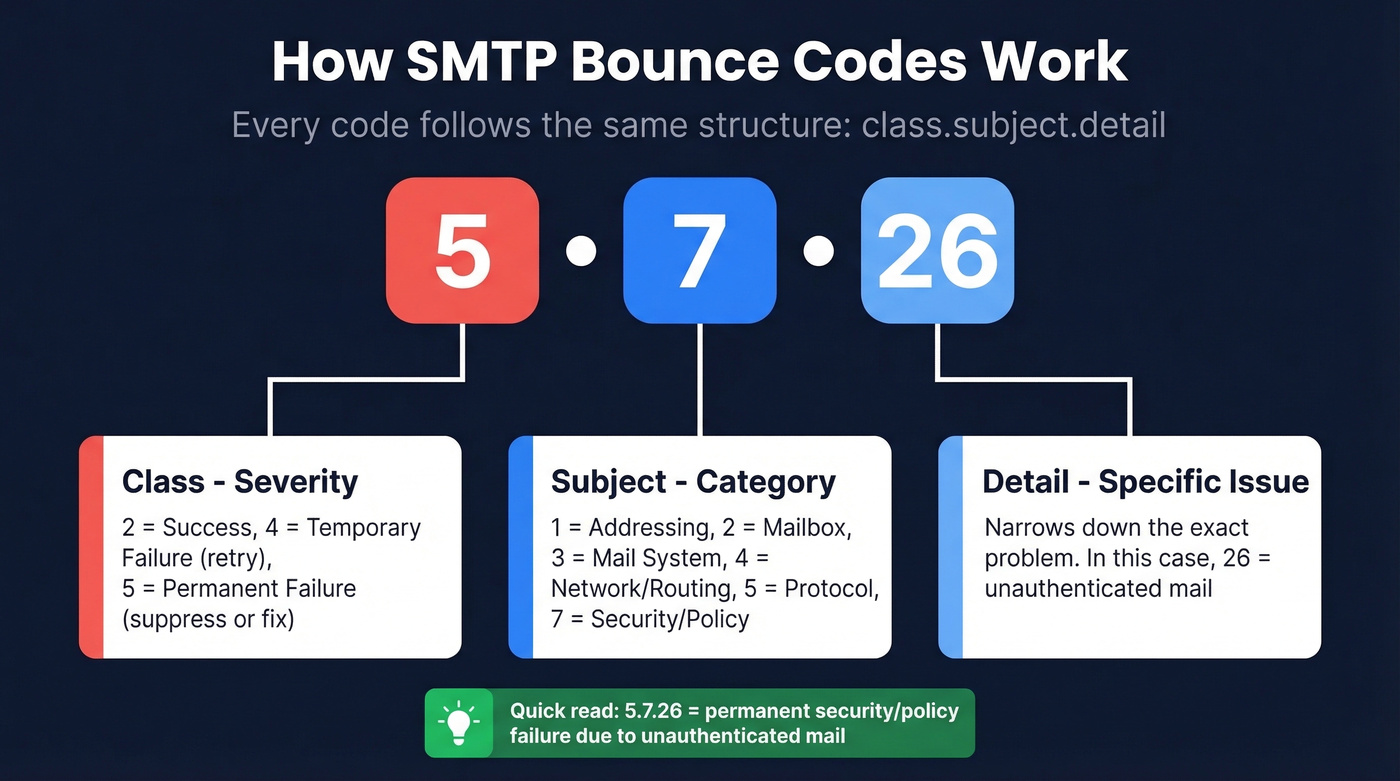
The subject categories matter more than most people realize:
- 1 = addressing (bad mailbox or domain)
- 2 = mailbox (full, disabled)
- 3 = mail system (storage, capabilities)
- 4 = network/routing
- 5 = protocol (invalid commands)
- 7 = security/policy (authentication, reputation, content filtering)
So when you see 5.7.26, you immediately know it's a permanent security/policy failure - before you even look up the specific code.
The original RFC didn't cover every scenario, which is why the IANA registry (RFC 5248) tracks enhanced status codes that have emerged since. One more distinction worth knowing: bounces can be synchronous (rejected during the SMTP conversation) or asynchronous (accepted initially, then returned as a DSN/NDR later). Asynchronous bounces are harder to parse because the error details live inside a non-delivery report email, not in a direct server response.
Common Bounce Codes Reference
Knowing 5.1.1 means "bad destination mailbox" is useless if you don't know whether to suppress, retry, or check your DNS records. The "What to Do" column is the whole point.
Traditional 3-Digit Codes
| Code | Meaning | Type | What to Do |
|---|---|---|---|
| 421 | Service not available | Soft | Retry in 30-60 min |
| 450 | Mailbox unavailable | Soft | Retry; check later |
| 451 | Local processing error | Soft | Retry; server-side |
| 452 | Insufficient storage | Soft | Retry in 24 hrs |
| 550 | Mailbox unavailable (often user not found) | Hard | Suppress immediately |
| 551 | User not local | Hard | Update address |
| 552 | Storage exceeded / quota issue | Soft | Retry; if persistent, suppress |
| 553 | Mailbox name invalid | Hard | Suppress; fix format |
| 554 | Transaction failed / policy rejection | Hard | Check provider text, content, auth, reputation |
Enhanced Status Codes
These enhanced codes - standardized in the IANA registry - give you far more diagnostic detail than the basic 3-digit SMTP responses.
| Code | Meaning | Type | What to Do |
|---|---|---|---|
| 4.1.1 | Addressing issue (mailbox unavailable) | Soft | Retry 3x, then suppress |
| 4.2.2 | Mailbox full | Soft | Retry over 72 hrs |
| 4.4.1 | No answer from host | Soft | Retry; routing issue |
| 4.7.1 | Delivery not authorized (often auth or reputation) | Soft | Check SPF/DKIM/DMARC + reputation; retry |
| 5.0.0 | Undefined error | Hard | Investigate manually |
| 5.1.1 | Bad destination mailbox | Hard | Suppress immediately |
| 5.1.2 | Bad destination domain | Hard | Suppress; domain gone |
| 5.2.1 | Mailbox disabled | Hard | Suppress immediately |
| 5.2.2 | Mailbox full (persistent) | Hard | Suppress; likely dead |
| 5.3.4 | Message too large | Hard | Reduce size; resend |
| 5.5.1 | Invalid command | Hard | Check SMTP config |
| 5.7.1 | Delivery not authorized / policy | Hard | Check auth + reputation |
| 5.7.23 | DMARC policy failure (common at Gmail) | Hard | Fix DMARC alignment |
| 5.7.26 | Unauthenticated mail | Hard | Fix SPF/DKIM/DMARC |

Every 5.1.1 "bad mailbox" bounce is a lead you paid to reach and never will. Prospeo's 5-step verification with catch-all handling, spam-trap removal, and honeypot filtering delivers 98% email accuracy - turning bounce reports from Monday morning nightmares into non-events.
Fix your bounce rate at the source, not the SMTP log.
Gmail, Microsoft, and Yahoo Codes
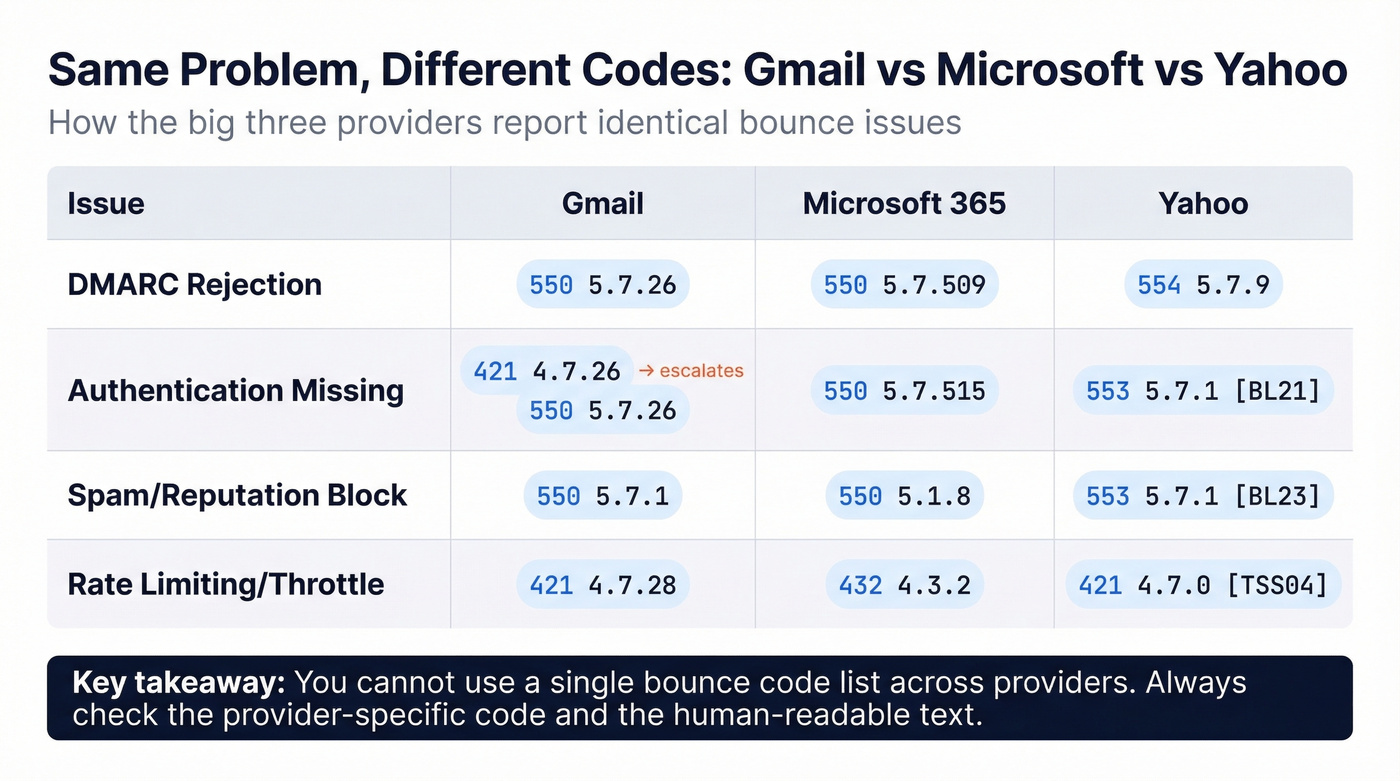
Here's the thing that makes bounce handling genuinely frustrating: Gmail surfaces DMARC failures as 550 5.7.26, Microsoft uses 550 5.7.509, and Yahoo goes with 553 5.7.1 plus a bracket code. Same problem, different codes. You need provider-specific tables.
Gmail
Gmail uses a warning-to-rejection escalation pattern. You'll often see a 421 (temporary) first, and if you don't fix the issue, it escalates to a 550 (permanent). Since late 2025, Gmail actively converts warnings to permanent rejections for persistent non-compliance.
| Code | Meaning | Type | Fix |
|---|---|---|---|
| 421 4.7.26 | Unauthenticated (warning) | Temp | Add SPF + DKIM now |
| 550 5.7.26 | Unauthenticated (enforced) | Perm | Fix SPF/DKIM/DMARC |
| 550 5.7.27 | SPF failure (enforced) | Perm | Fix SPF record |
| 550 5.7.1 | Spam/low reputation | Perm | Warm domain; clean list |
| 550 5.7.23 | DMARC policy failure (p=quarantine or p=reject) | Perm | Align DMARC properly |
| 421 4.7.28 | High spam rate / unusual sending rate | Temp | Reduce volume; clean list |
| 550 5.7.28 | Spam rate (enforced) | Perm | Major list hygiene needed |
| 550 5.7.30 | DKIM failure (enforced) | Perm | Fix DKIM signing |
Microsoft 365
Microsoft leans heavily on authentication enforcement and throttling. If a sender gets restricted, go to Defender > Email & Collaboration > Review > Restricted Entities to unblock. Admins can also use Remove-BlockedSenderAddress in PowerShell.
| Code | Meaning | Type | Fix |
|---|---|---|---|
| 550 5.7.515 | Required authentication level not met (bulk) | Perm | Add SPF + DKIM + DMARC |
| 432 4.3.2 | Mailbox throttled | Temp | Wait; reduce send rate |
| 4.4.8 | MTA-STS validation fail | Temp | Fix MTA-STS policy |
| 550 5.1.8 | Restricted sender | Perm | Unblock in Defender |
| 550 5.7.509 | DMARC reject enforced | Perm | Fix DMARC alignment |
| 4.4.7 | Message expired in queue | Temp | Resend; check recipient |
Yahoo
Yahoo requires SPF or DKIM for all senders and demands both plus a DMARC policy for bulk senders. They'll also bounce you for RFC compliance failures - duplicate headers, bad MIME types, unresolvable From domains.
| Code | Meaning | Type | Fix |
|---|---|---|---|
| 421 4.7.0 [TSS04] | Temporary deferral | Temp | Reduce volume; retry |
| 553 5.7.1 [BL21/BL23] | Spamhaus blocklisted | Perm | Delist at Spamhaus |
| 553 5.7.2 [TSS11] | Permanent deferral | Perm | Major reputation issue |
| 554 5.7.9 | Policy rejection | Perm | Check content + auth |
Mistakes That Kill Your List
Bounce codes are messy in production. Automated systems misclassify them constantly, and the consequences compound fast.
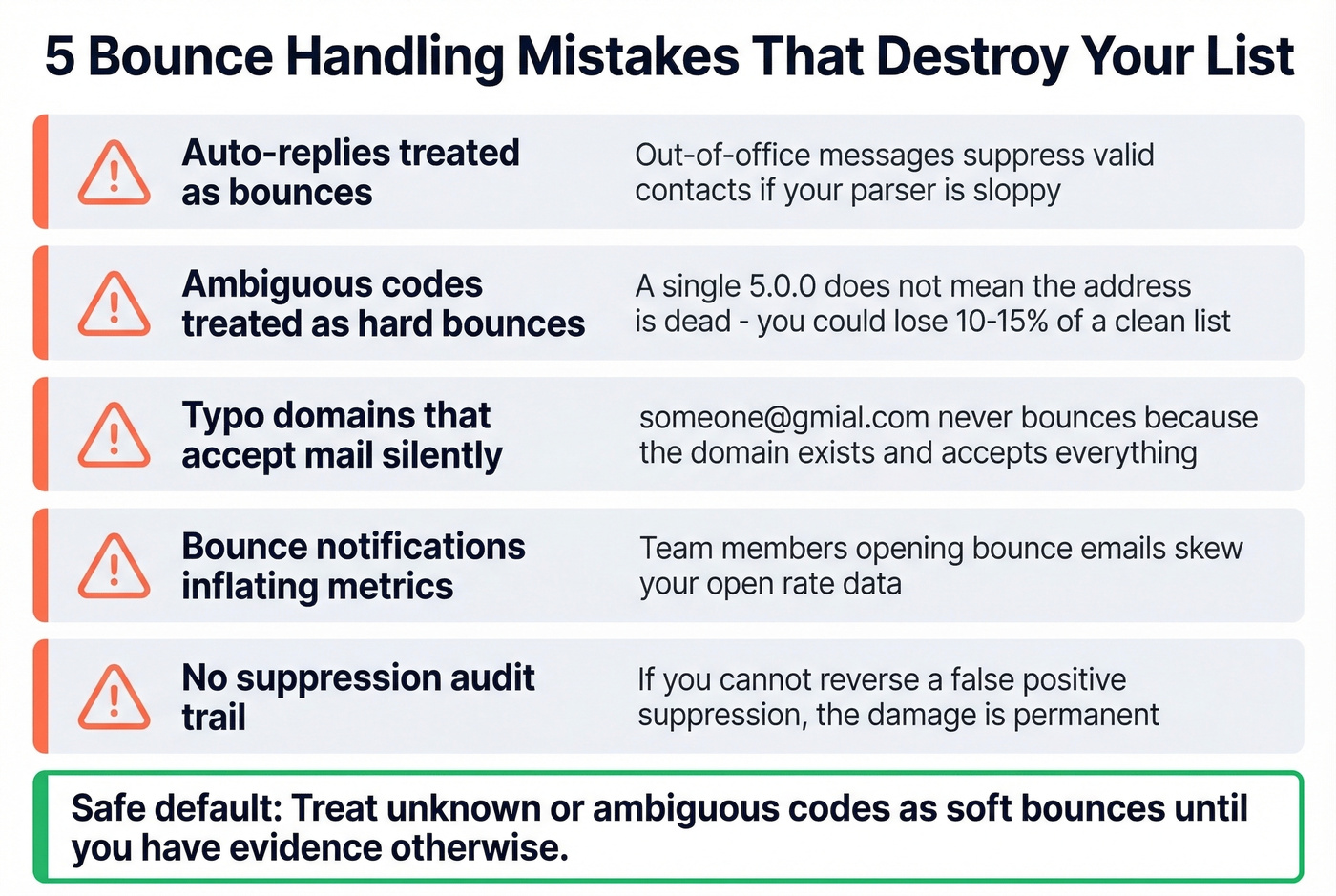
Auto-replies mistaken for bounces. Out-of-office messages and vacation responders can trigger bounce processing if your system doesn't parse them correctly. That's a valid contact you just suppressed for no reason.
Ambiguous codes treated as hard bounces. A generic 5.0.0 or a vague provider response doesn't always mean the address is dead. Suppressing on a single ambiguous code loses real contacts - we've seen teams accidentally nuke 10-15% of a clean list this way.
Typo domains that accept mail silently. If someone@gmial.com doesn't bounce, it's because that domain exists and accepts everything. You've got a silent deliverability problem, not a clean send. Pre-send verification catches these; bounce codes never will. If you need a quick preflight, see how to check if an email will bounce.
Bounce notifications inflating your metrics. If anyone on your team opens bounce notification emails, those opens get counted in your campaign analytics. Dumb gotcha, but it skews open-rate data for teams that don't filter them out.
No suppression audit trail. If you can't review and reverse suppressions, every false positive is permanent damage to your list. The safe default: treat unknown or ambiguous codes as soft bounces until you have evidence otherwise.
Bounce Handling Framework
Hard bounce (5xx)? If it's an invalid mailbox or domain, suppress immediately. If it's a policy/auth block like a DMARC reject, suppress for now and fix the root cause before retrying. (If you’re troubleshooting alignment specifically, use this DMARC alignment guide.)
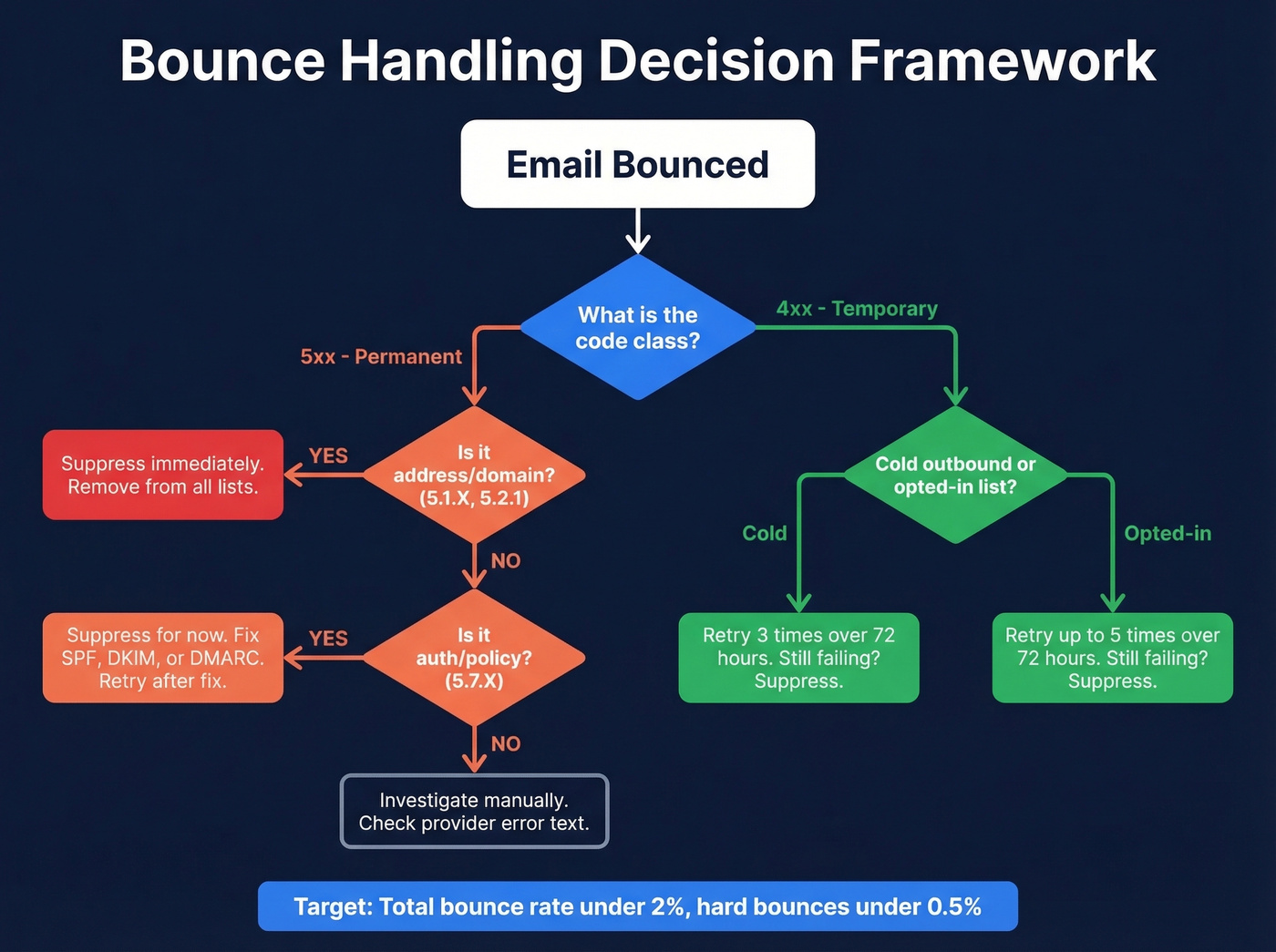
Soft bounce (4xx)? For cold outbound, retry 3 times over 72 hours. For opted-in marketing lists, you can stretch to 5 retries. The 3-vs-5 debate comes up constantly on r/email - cold lists deserve tighter thresholds because you have less relationship equity. After your retry limit, suppress.
Your target benchmarks: total bounce rate under 2%, ideally under 1%. Hard bounces specifically should stay below 0.5%. For context, business and finance averages run around 0.55%, while construction sits higher at 1.28%. If you're consistently above 2%, your list hygiene needs work before you worry about individual codes (see email bounce rate benchmarks and fixes).
Let's be honest: most teams spend hours debugging delivery errors when the real fix takes five minutes - verify the list before you send it. In our experience, teams that verify before sending spend almost zero time in bounce reports afterward.
How to Prevent Bounces
The best bounce code is one you never see. Prevention beats diagnosis every time.
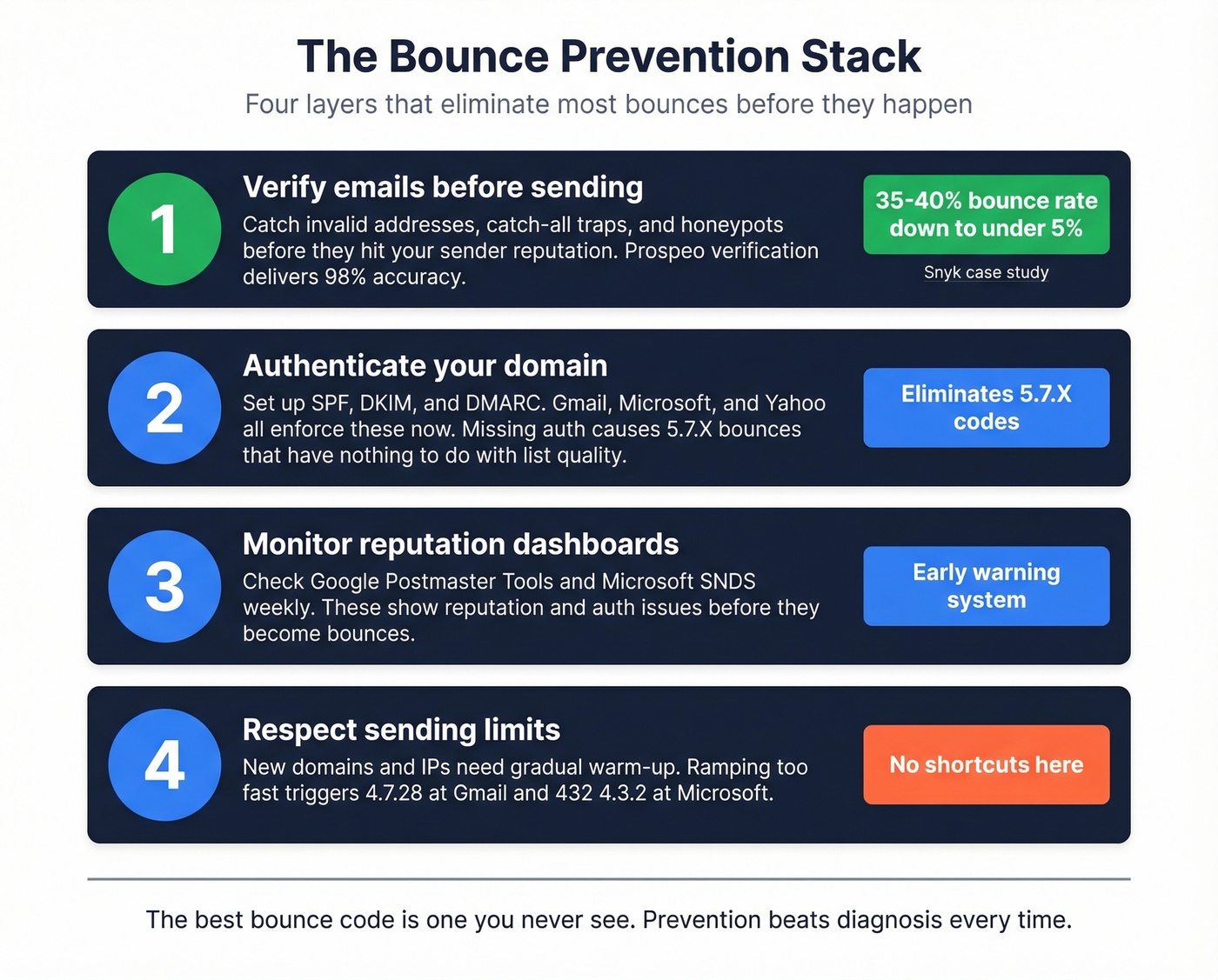
Verify emails before sending. This is the single biggest lever for reducing 5.1.1 bounces at scale. Prospeo's 5-step verification handles catch-all domains, spam traps, and honeypots, catching invalid addresses before they touch your sender reputation. Snyk's 50-person AE team dropped from a 35-40% bounce rate to under 5% after switching their verification workflow, and Stack Optimize maintains under 3% across all their agency clients. If you’re comparing tools, start with AI Email Checker options and workflows.
Authenticate your domain properly. SPF, DKIM, and DMARC aren't optional anymore - Gmail, Microsoft, and Yahoo all enforce them. If you haven't set up all three, you're generating 5.7.X bounces that have nothing to do with your list quality. For SPF syntax and examples, use these SPF references, and confirm signing with verify DKIM.
Monitor with Google Postmaster Tools and Microsoft SNDS. These show you reputation and authentication issues before they escalate to bounces. Check them weekly at minimum. For a broader stack, see email reputation tools.
Respect sending limits. Ramping too fast triggers 4.7.28 at Gmail and 432 4.3.2 at Microsoft. New domains and IPs need gradual warm-up - there's no shortcut here. Skip this advice if you're only sending transactional email to confirmed recipients; it's primarily relevant for outbound and marketing sends. If you want concrete guardrails, follow email velocity best practices.
Suppressing bad addresses after a 550 5.7.26 is damage control, not a strategy. Prospeo verifies 143M+ emails on a 7-day refresh cycle so stale and dead addresses never hit your sequences. Teams using Prospeo cut bounce rates from 35%+ to under 4%.
Send to real inboxes. Pay roughly $0.01 per verified email.
FAQ
Can a soft bounce become a hard bounce?
Yes. A temporarily full mailbox (4.2.2) that stays full for weeks is effectively permanent. After 3-5 consecutive soft bounces to the same address across separate sends, suppress it. Most ESPs auto-convert after 3 consecutive failures.
Do bounce codes differ across providers?
Significantly. A DMARC failure surfaces as 5.7.26 at Gmail, 5.7.509 at Microsoft, and 5.7.1 at Yahoo. Always check the provider-specific tables above rather than relying on generic code lookups.
What's the fastest way to reduce bounce rates?
Verify every email address before it enters your sequence. Pair that with proper SPF, DKIM, and DMARC authentication to cover policy bounces too. Those two steps alone eliminate the vast majority of both hard and soft bounces.
What's the difference between a bounce code and a non-delivery report?
An SMTP bounce code is the status code returned during or after the mail transaction. A non-delivery report (NDR) is the actual email your mail server generates and sends back to you when delivery fails - it contains the bounce code plus a human-readable explanation. The code is the machine-readable part; the NDR is the full notification wrapper.