

The Best Email Deliverability Tools in 2026: What You Actually Need
You're staring at your campaign dashboard: 47% open rate on Gmail, 8% on Outlook. Half your pipeline works at Microsoft shops. Your sequences aren't broken - your deliverability is. And the 17-tool listicles ranking every email deliverability tool on the internet aren't helping you fix it.
You don't need 17 tools. You need three. One for testing, one for warmup, and one for data quality. Here's which ones are worth your money and which ones are noise.
Our Picks (TL;DR)
| Use Case | Tool | Why | Starting Price |
|---|---|---|---|
| Inbox placement testing | GlockApps | Reliable seed-list testing, 50+ blacklist checks | $59/mo |
| Email warmup | MailReach | Transparent pricing, bundled spam tests, multi-ESP | $19.50/mailbox/mo |
| Preventing problems upstream | Prospeo | 98% email accuracy, spam-trap removal before you send | Free tier |
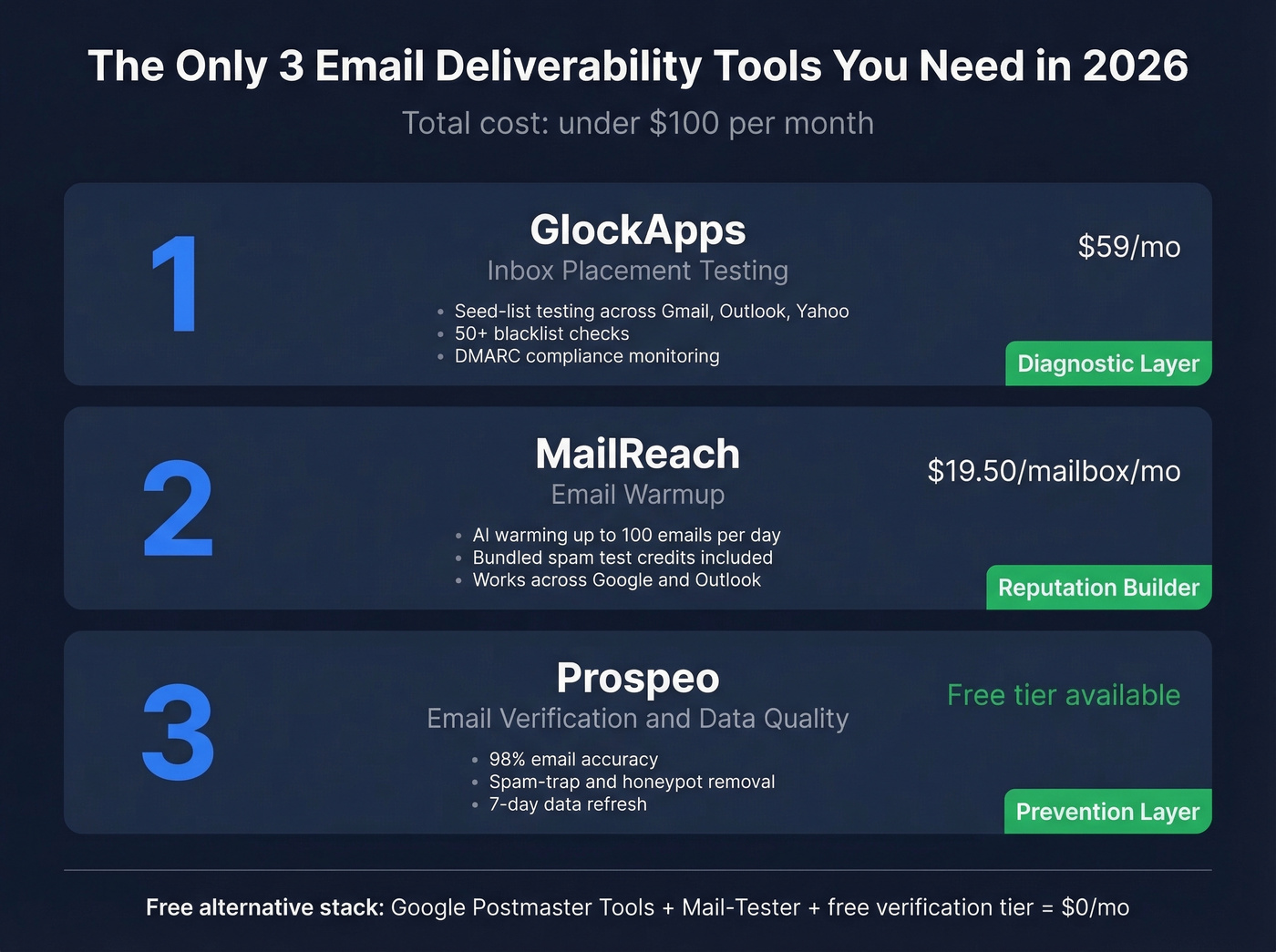
Best free stack: Google Postmaster Tools + Mail-Tester + a free verification tier (75 verified emails/month). That's $0/month and covers the basics for anyone just getting started.
Why Deliverability Got Harder in 2026
The rules changed. They're not going back.
In February 2024, Google and Yahoo started requiring an active DMARC policy for anyone sending 5,000+ daily emails. By 2026, that requirement is strictly enforced - non-compliant messages can be rejected at the SMTP level. No spam folder. No "promotions" tab. Just a bounce.
Microsoft followed in early 2025 with similar requirements. If you're sending outbound without SPF, DKIM, and DMARC properly configured and aligned, you're dead on arrival at every major mailbox provider.
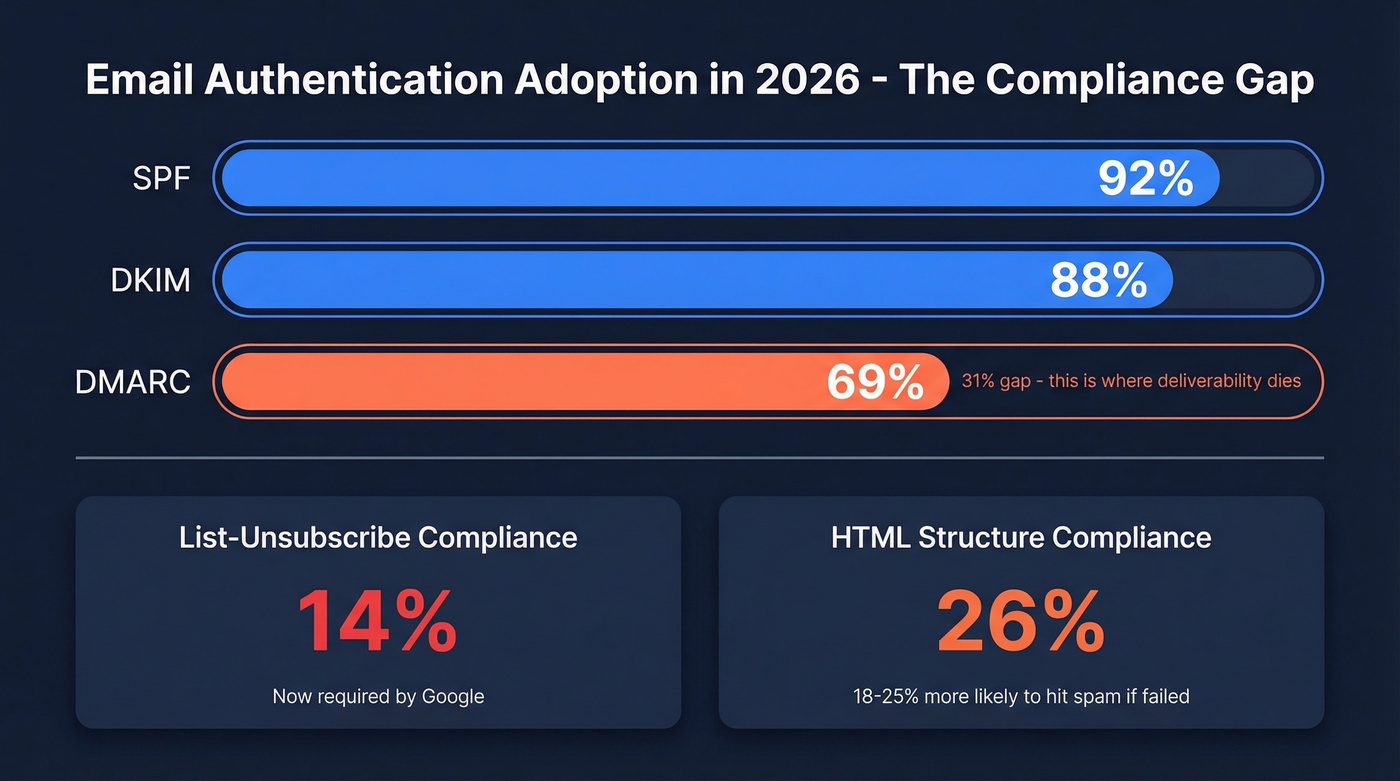
The adoption numbers tell the story. According to Unspam's 2025 dataset covering millions of email tests, SPF adoption sits at 92%, DKIM at 88%, but DMARC is only at 69%. That 31% gap is where deliverability goes to die. It gets worse below the authentication layer: List-Unsubscribe compliance - now required by Google - sits at just 14%, HTML structure compliance is at 26%, and emails that fail those checks are 18-25% more likely to land in spam.
The 2026 compliance checklist every sender needs:
- SPF, DKIM, and DMARC configured with alignment
- One-click List-Unsubscribe header
- Clean HTML structure (no broken tags, proper encoding)
- Bounce rate under 3% (see bounce rate benchmarks and fixes)
- Spam complaint rate under 0.1%
Miss any of these, and no tool will save you.
What Good Deliverability Looks Like
Before you buy anything, you need benchmarks. Otherwise you're optimizing blind.
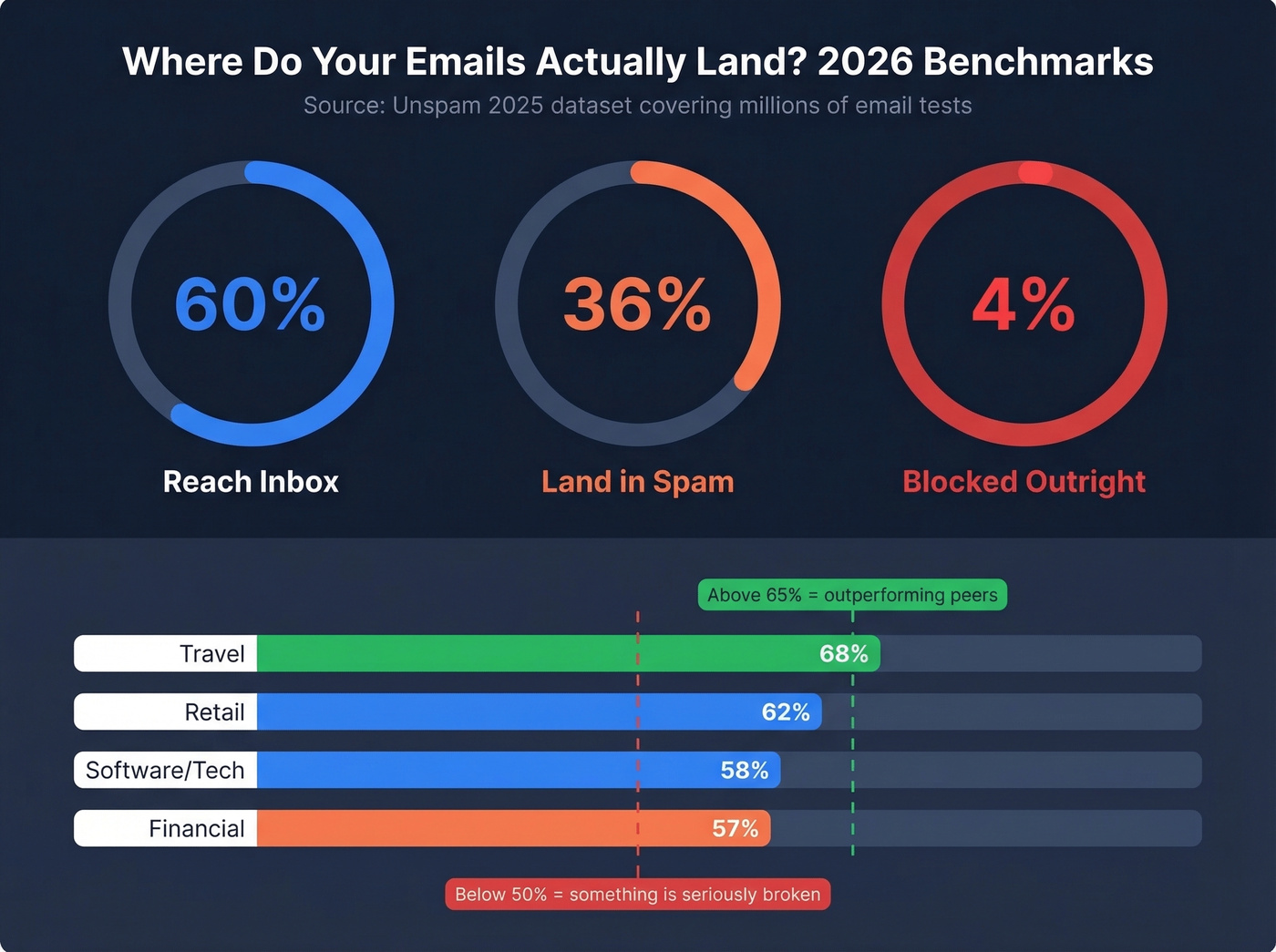
The Unspam 2025 dataset found that only 60% of emails reach a visible inbox location. 36% land in spam. 4% are blocked outright. Even with full SPF/DKIM/DMARC authentication, spam placement can exceed 30%.
Those are averages. Industry matters:
| Industry | Inbox Placement Rate |
|---|---|
| Travel | 68% |
| Retail | 62% |
| Software/Tech | 58% |
| Financial | 57% |
If you're in SaaS and hitting above 65% inbox placement, you're outperforming your peers. Below 50%? Something is seriously broken - and it's probably your data, not your sending infrastructure.
Five Types of Deliverability Tools
The market is confusing because vendors blur categories. Here's what you're actually shopping for.
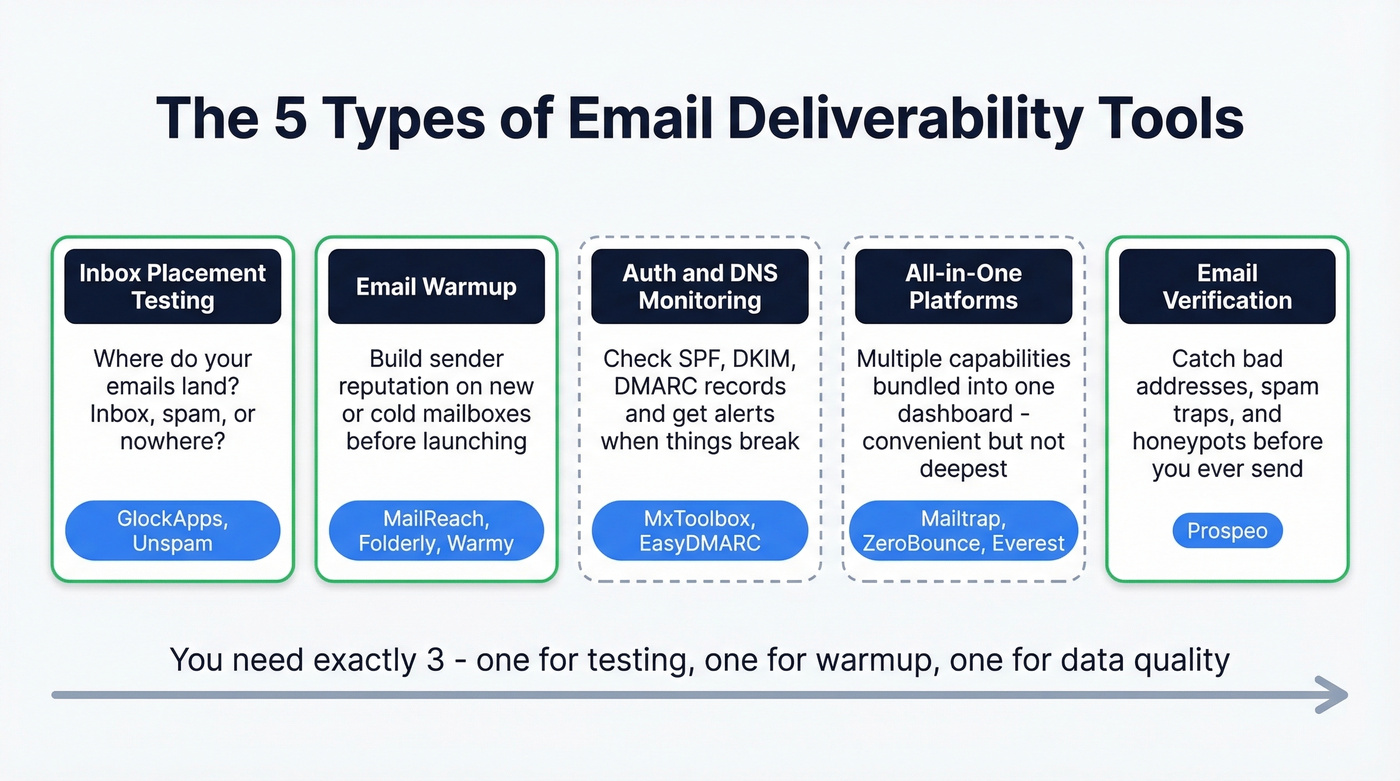
Inbox placement testing tools like GlockApps and Unspam send test emails to seed mailboxes and tell you where they land - inbox, spam, or nowhere. This is your diagnostic layer.
Email warmup tools like MailReach, Warmy, and Folderly simulate real engagement on new or cold mailboxes, building sender reputation before you launch campaigns.
Authentication and DNS monitoring tools like MxToolbox and EasyDMARC check your SPF, DKIM, and DMARC records and alert you when something breaks.
All-in-one platforms like Mailtrap, ZeroBounce, and Validity Everest bundle multiple capabilities into a single dashboard. Convenient, but you pay for breadth over depth.
Email verification and data quality tools catch the upstream problem: bad email addresses, spam traps, and honeypots that torch your sender reputation before any testing tool can intervene. (If you're dealing with traps already, start with spam trap removal.)
One thing we've noticed: many cold email platforms - Instantly, Smartlead, Lemlist - now include built-in warmup and basic deliverability features. If you're already using one, check whether their built-in warmup is sufficient before paying for a separate tool. For most teams doing serious volume, the dedicated tools below still outperform the bundled versions.
You don't need one from every category. You need exactly three - one for testing, one for warmup, and one for data quality. Everything else is optional.
Best Inbox Placement Testing Tools
GlockApps
If you're only going to buy one deliverability tool, make it GlockApps. It's the default inbox placement tester for a reason: it works, the pricing is straightforward, and it covers the fundamentals without overcomplicating things.
GlockApps sends your email to a seed list of roughly 100 mailboxes across Gmail, Outlook, Yahoo, and other providers, then reports where each one landed. It checks against 50+ blacklists, monitors your DMARC compliance, and gives you a clear pass/fail on authentication. (If you need the bigger picture, see our full email deliverability guide.)
The free plan gives you 2 spam tests per month and 10,000 DMARC checks - enough to spot-check before a big campaign. Paid plans run from $59/mo (Essential) to $129/mo (Enterprise), scaling by test volume and sending accounts.
A ~100-mailbox seed list gives you directional data, not statistical certainty. Don't panic if one test shows 40% spam placement - run three tests and look at the trend. We've seen teams make drastic changes based on a single GlockApps test, which is like changing your entire sales strategy because of one lost deal. In our testing, GlockApps consistently delivered the most granular provider-level breakdowns of any tool in this category.
Unspam.email
Budget alternative. Plans include Free ($0/mo), Basic ($9/mo), Business ($19/mo), and Agency (from $29/mo). If you're running lean, it's a solid way to do quick pre-send checks without committing to a bigger stack. Among free testing options, Unspam's free tier is one of the most capable available.
Best Email Warmup Tools
MailReach
MailReach is the best warmup tool for the money, and it's not particularly close. At $19.50 per mailbox per month, it includes something most warmup tools charge extra for: at least 20 spam test credits bundled into every plan.
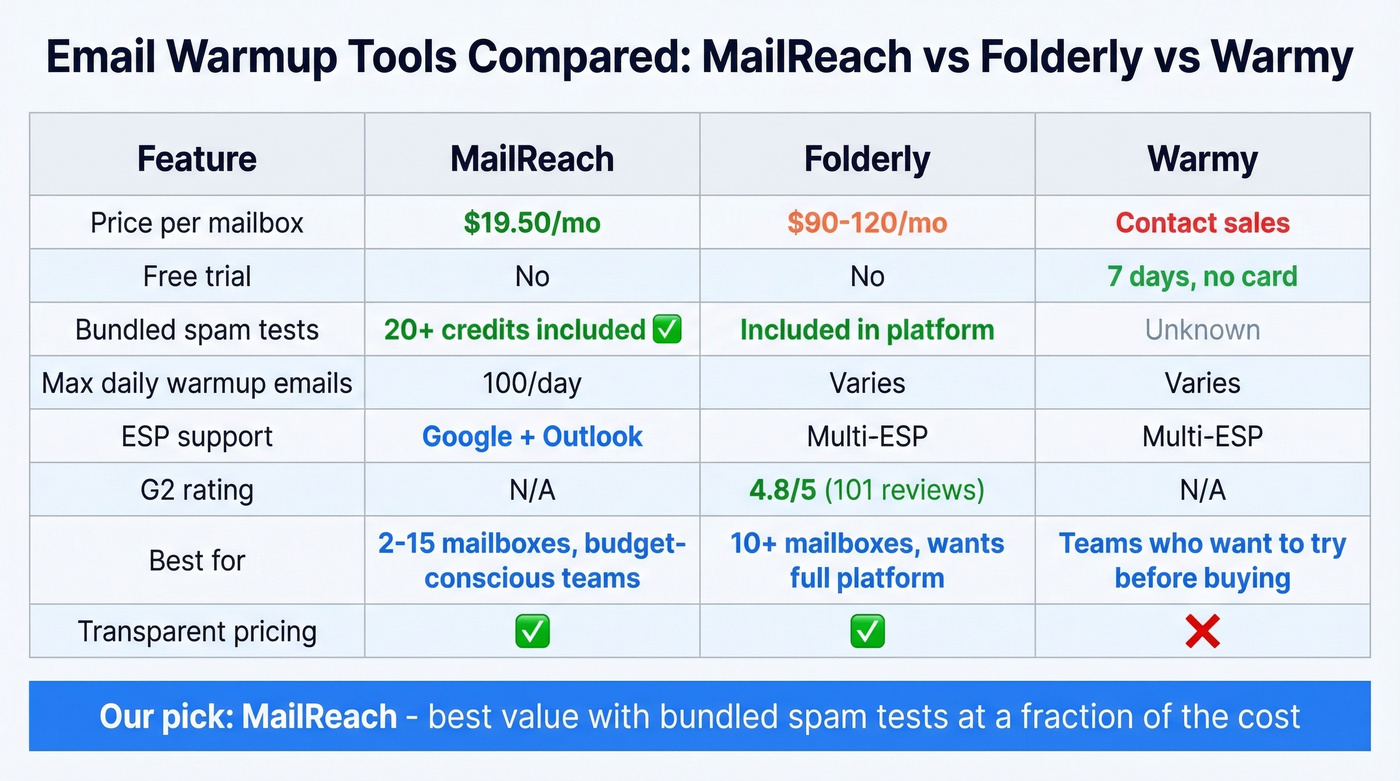
The AI warming algorithm works across both Google and Outlook, ramping up to 100 emails per day per mailbox. The reputation tracking dashboard shows your sender score trending over time, and it runs blacklist, SPF, DKIM, and DMARC health checks as part of the platform. You don't need to configure anything beyond connecting your mailbox. (If you're unsure about safe ramping, use an email velocity framework.)
Here's what makes it a standout: the bundled spam tests turn this into a two-in-one tool at a one-tool price. Instead of paying for MailReach plus a separate GlockApps subscription, smaller teams can use MailReach's included tests for basic inbox placement monitoring and only add GlockApps when they need deeper diagnostics. For teams running 5-15 outbound mailboxes, MailReach is the obvious starting point.
Folderly
Use this if: You're managing 10+ mailboxes and want warmup, monitoring, and deliverability analytics in a single dashboard.
Skip this if: You're budget-conscious or only warming up 2-3 mailboxes.
Folderly carries a 4.8/5 on G2 across 101 reviews, with users consistently praising ease of use and responsive support. Pricing runs $120/mailbox for 1-9 mailboxes, dropping to $90/mailbox at 10+. That's a premium over MailReach, but you're getting a broader platform rather than a pure warmup tool.
Warmy
Warmy claims 35,000+ happy businesses and 650,000+ domains warmed. They offer a 7-day free trial with no credit card required, which is genuinely useful for kicking the tires. The problem? Pricing isn't published - the page says "volume based pricing" and pushes you to contact sales. Expect around $49-189/mailbox/month based on comparable tools.
Let's be honest: in 2026, if a deliverability vendor won't tell you what it costs, they're optimizing for their sales team, not your budget.

Every spam trap and honeypot in your list is a deliverability time bomb. Prospeo's 5-step verification with spam-trap removal and honeypot filtering catches them before they torch your sender reputation. 98% email accuracy. 7-day data refresh. Start free with 75 verified emails/month.
Fix deliverability at the source - not after the damage is done.
All-in-One Platforms
Mailtrap
Built for dev teams first, sales teams second. Mailtrap combines an email testing sandbox with a sending API and deliverability monitoring, making it ideal if your engineering team manages email infrastructure directly. Free tier covers 1,000 emails per month and 100 test emails per month. Paid plans start at $15/mo (Basic) and $85/mo (Business). Not the right pick for a pure sales team, but excellent if your bottleneck is testing email templates in staging environments.
ZeroBounce
ZeroBounce straddles email validation and deliverability monitoring. Validation starts at around $18/mo for 2,000 credits. The Deliverability Toolkit adds inbox placement testing and blacklist monitoring at $49/mo (Starter) or $99/mo (Team). The appeal is consolidation - one vendor for both verification and deliverability testing. The tradeoff is that neither capability is best-in-class compared to dedicated tools.
Validity Everest
Validity Everest is an enterprise-grade platform built from Return Path, 250ok, and BriteVerify as part of Validity's email success suite. 4.2/5 on G2 with 189 reviews. Average implementation time: 2 months. List prices can exceed $100,000/year for bundled packages, though negotiated deals typically land at $35,000-65,000/year.
Overkill for anyone not sending millions of emails monthly.
Authentication & DNS Monitoring
MxToolbox
Free diagnostic tools for SPF, DKIM, DMARC, and blacklist checks. The paid Delivery Center ($129/mo) and Plus ($399/mo) tiers add monitoring and alerts. Powerful but the UI is genuinely confusing - best used as a free spot-check tool rather than a daily dashboard.
EasyDMARC
EasyDMARC offers a free inbox placement test that shows whether your email lands in Inbox, Spam, or Promotions across major providers, with a daily test limit and no credit card required. For ongoing DMARC monitoring and reporting, expect pricing around $20-50/month depending on domains and volume. (If you're troubleshooting alignment issues, see DMARC alignment.)
SendForensics
Niche content analysis and deliverability scoring. Plans start at $49/mo. Useful if your specific bottleneck is email content triggering spam filters, but most teams have bigger problems to solve first.
Email Verification & Data Quality
Every tool above diagnoses deliverability issues after they happen. Verification prevents them.
The logic is simple: if 5% of your list bounces, you've torched your sender reputation before GlockApps or MailReach can do anything about it. Spam traps and honeypots are invisible - you can't spot them by eyeballing a CSV. (If you're building lists, start with how to generate an email list and then verify.)
Stack Optimize built to $1M ARR using Prospeo data, maintaining 94%+ client deliverability with bounce rates under 3% and zero domain flags across all clients. That's what clean data does for your sending infrastructure.
Prospeo integrates natively with Smartlead, Instantly, and Lemlist - the cold outreach tools most readers are already using. Free tier gives you 75 verified emails per month. Pair it with GlockApps for testing and MailReach for warmup, and you've got a complete deliverability stack for under $100/month.
Free Tools Worth Using
Google Postmaster Tools is essential for anyone sending to Gmail at scale. It shows your domain reputation, spam rate, and authentication status - straight from Google. Microsoft SNDS does the same for Outlook, which matters because Outlook filtering is a different beast entirely. Mail-Tester gives you an instant spam score check on any email - paste in a test address, send your email, get a score. Yahoo Sender Hub rounds out the free stack for Yahoo/AOL recipients.
Together, these free tools cover every major mailbox provider at zero cost. Start here. If they show problems, fix them before paying for anything else.
Tools We Evaluated But Excluded
We looked at Postmark (an ESP, not a standalone deliverability tool), Mailgun Optimize (solid features but a real risk of usage-based validation overages if you don't set alerts and caps), InboxAlly (from $149/mo with limited differentiation over MailReach), and TrulyInbox (from $29/mo but too new for a confident recommendation). None earned a spot over the tools above.
Pricing Comparison
Every tool, every starting price, every free tier - in one place.
| Tool | Category | Starting Price | Free Tier? | Best For |
|---|---|---|---|---|
| GlockApps | Inbox testing | $59/mo | Yes (2 tests/mo) | Inbox placement diagnostics |
| Unspam.email | Inbox testing | $9/mo | Yes | Budget inbox checks |
| MailReach | Warmup | $19.50/mailbox/mo | No | Warmup + spam testing |
| Folderly | Warmup + monitoring | $90-120/mailbox | No | Multi-mailbox teams |
| Warmy | Warmup | ~$49-189/mailbox/mo | 7-day trial | Warmup (opaque pricing) |
| Mailtrap | Testing + sending | $15/mo | Yes (1K emails/mo) | Dev teams |
| ZeroBounce | Validation + deliverability | $18/mo (validation) | Yes | Consolidated validation |
| Validity Everest | Enterprise platform | ~$35K-65K/yr | No | High-volume senders |
| MxToolbox | DNS monitoring | $129/mo | Yes (free checks) | SPF/DKIM/DMARC checks |
| EasyDMARC | Inbox placement + DMARC | ~$20-50/mo | Yes (free test) | DMARC + placement visibility |
| SendForensics | Content analysis | $49/mo | No | Content optimization |
| Google Postmaster | Reputation monitoring | Free | Yes | Gmail deliverability |
| Mail-Tester | Spam scoring | Free | Yes | Quick spam checks |
| Microsoft SNDS | Reputation monitoring | Free | Yes | Outlook diagnostics |
| Prospeo | Email verification | ~$0.01/email | Yes (75/mo) | Data quality + spam-trap removal |
Billing horror story worth knowing: One user on r/Emailmarketing reported receiving a $30,000+ invoice from Mailgun/Sinch after their contract ended, triggered by unexplained validation spikes - 10 million validations on Christmas Day 2024, another 6 million in early 2025. Always set usage alerts and hard caps on any tool with usage-based billing. Always.
Your Data Is the Tool Nobody Talks About
Here's the thing most deliverability guides won't tell you: if your deal sizes are in the SMB range and you're sending cold email, your data quality matters more than every other deliverability tool combined. You can warm up mailboxes for months and run GlockApps tests daily, but if 5% of your list bounces, none of it matters. The damage is done before you can diagnose it.
Spam traps and honeypots are the silent killers. They look like normal email addresses. They don't bounce. They just quietly flag your domain as a spammer. You can't spot them by scanning a spreadsheet - you need automated detection. (If you're already flagged, start with Spamhaus blacklist removal.)

The proof points are dramatic. Meritt went from a 35% bounce rate to under 4% after switching to verified data. Snyk dropped from 35-40% to under 5% across 50 AEs. GreyScout cut bounces from 38% to under 4%. In every case, the deliverability improvement was a downstream effect of fixing the data upstream.
Remember that 60% inbox placement average from the benchmarks above? Bad data is a major reason the other 40% fails. Verification tools that catch spam traps, honeypots, and catch-all domains before they touch your sending infrastructure are the highest-leverage investment you can make. The most important email deliverability tool isn't the one that tests your inbox placement - it's the one that makes sure your list is clean before you send.
You just read that bounce rates need to stay under 3%. Teams using Prospeo's verified emails consistently hit under 4% bounce - some under 3%. That's because every email passes proprietary catch-all handling, spam-trap removal, and triple verification before it reaches your sequences.
Stop paying for warmup tools to fix what bad data broke.
Build Your Deliverability Stack
You don't need to spend thousands. Here's how to build a stack at every budget level.
Budget stack ($0/month): Google Postmaster Tools for Gmail reputation monitoring, Mail-Tester for spam score checks, and a verification tool's free tier for basic list cleaning. This covers the fundamentals and costs nothing. Start here, and only upgrade when you hit limits.
Standard stack (~$80-100/month): GlockApps Essential ($59/mo) for inbox placement testing, MailReach ($19.50/mailbox/mo) for warmup, and a dedicated verification tool for data quality. This is the sweet spot for teams running 5-20 outbound mailboxes - you get diagnostics, warmup, and clean data without enterprise overhead.
Enterprise stack ($3,000+/month): Validity Everest for monitoring, Folderly for multi-mailbox warmup, and ZeroBounce for validation at scale. Only justified if you're sending millions of emails monthly and need consolidated reporting for a large team.
The Outlook problem: If you're getting crushed on Outlook placement - and many teams are - adding Microsoft SNDS to your stack and warming up Outlook-specific mailboxes separately is non-negotiable. We've seen senders with Sender Score ratings of 82-97 still unable to crack Outlook's inbox. Gmail and Outlook use fundamentally different filtering algorithms, and what works for one doesn't automatically work for the other.
The three-tool framework - test, warm, verify - covers 90% of deliverability problems. Everything else is optimization at the margins.
FAQ
What's a good inbox placement rate?
Based on 2026 benchmark data, 60% of emails reach the inbox, 36% hit spam, and 4% are blocked. Industry rates range from 68% (Travel) to 57% (Financial). Above 70% is strong; below 50% signals a serious problem needing immediate attention.
Do I need a warmup tool?
Yes, if you're using a new domain or mailbox for outbound. Tools like MailReach simulate real engagement over 2-4 weeks, building sender reputation before you launch campaigns. Skip warmup only if your domain has established sending history with consistent volume and low complaint rates.
Why do emails land in spam on Outlook but not Gmail?
Microsoft uses different filtering algorithms than Google, weighing sender reputation and engagement history differently. Many senders report strong Gmail placement but persistent Outlook spam issues - even with sender scores above 80. Use Microsoft SNDS to diagnose, and warm up Outlook-specific mailboxes separately.
Can email verification improve deliverability?
Directly. Sending to invalid addresses, spam traps, and honeypots damages sender reputation faster than almost anything else. Verification catches these before you send, keeping bounce rates under 3-4%.
How much should I spend on deliverability tools?
A solid three-tool stack - inbox testing, warmup, and verification - costs $80-100/month total. Free options exist for every category. Enterprise platforms like Validity Everest run $35,000-65,000/year, justified only for teams sending millions of emails monthly with large reporting needs.