

Email Domain Spam Score: How to Check & Fix It (2026)
You sent a campaign, 40% landed in spam, and now you're hunting for a number to fix. That single number doesn't exist. Every mailbox provider - Gmail, Outlook, Yahoo - calculates your domain's spam score independently, using different signals, on different scales. The same domain shows wildly different results depending on which tool you check.
Here's the thing: most people treat "domain spam score" like a credit score - one number, one scale, one fix. It's not. But you can still diagnose and repair the damage. Let's break it down.
The Quick Version
There's no universal score. Check three free tools: Google Postmaster Tools for your Gmail spam rate, Sender Score for a 0-100 benchmark, and MxToolbox for blacklist status and DNS checks. MxToolbox's free tier limits you to one Email Health Check per 24 hours, but that's enough for spot checks.
If your reputation's damaged, fix authentication first, clean your list, then warm back up over 2-4 weeks.
What "Domain Spam Score" Actually Means
"Domain spam score" is convenient shorthand for something much messier. Gmail, Outlook, and Yahoo each evaluate your domain across dozens of signals - complaints, engagement, authentication, sending patterns - and make independent filtering decisions. There's no shared database, no master score.
When you run your domain through a email spam score checker, you're getting one tool's approximation based on whatever subset of signals it measures. One checks content against SpamAssassin-style rules. Another checks blacklists. A third looks at DNS authentication. They're measuring different dimensions of the same problem, which is why they disagree.
Reddit threads on r/emaildeliverability are full of confusion for exactly this reason - someone sees "1%" on Google Postmaster Tools and "Poor" on Talos Intelligence. Trust none of them individually. Check multiple.
What Affects Your Score
SPF/DKIM/DMARC authentication is table stakes. Missing or misconfigured auth is the fastest way to get filtered. Full stop.
Spam complaint rate matters more than most people realize. Gmail and Yahoo require bulk senders to stay below 0.3%, but staying under 0.1% is the real safety margin. Hit 0.3% and you're in what deliverability folks call "reputation death."
Beyond authentication and complaints, several other factors stack up:
- Bounce rate - sending to invalid addresses tells providers you don't maintain your lists (see bounce rate benchmarks and fixes)
- Engagement signals - opens, replies, and clicks tell Gmail your mail is wanted
- Blacklist status - landing on Spamhaus or similar lists tanks deliverability fast
- Domain age and sending consistency - new domains with sudden volume spikes get flagged
- Domain suffix - less common TLDs like .xyz carry higher spam risk than .com or .io
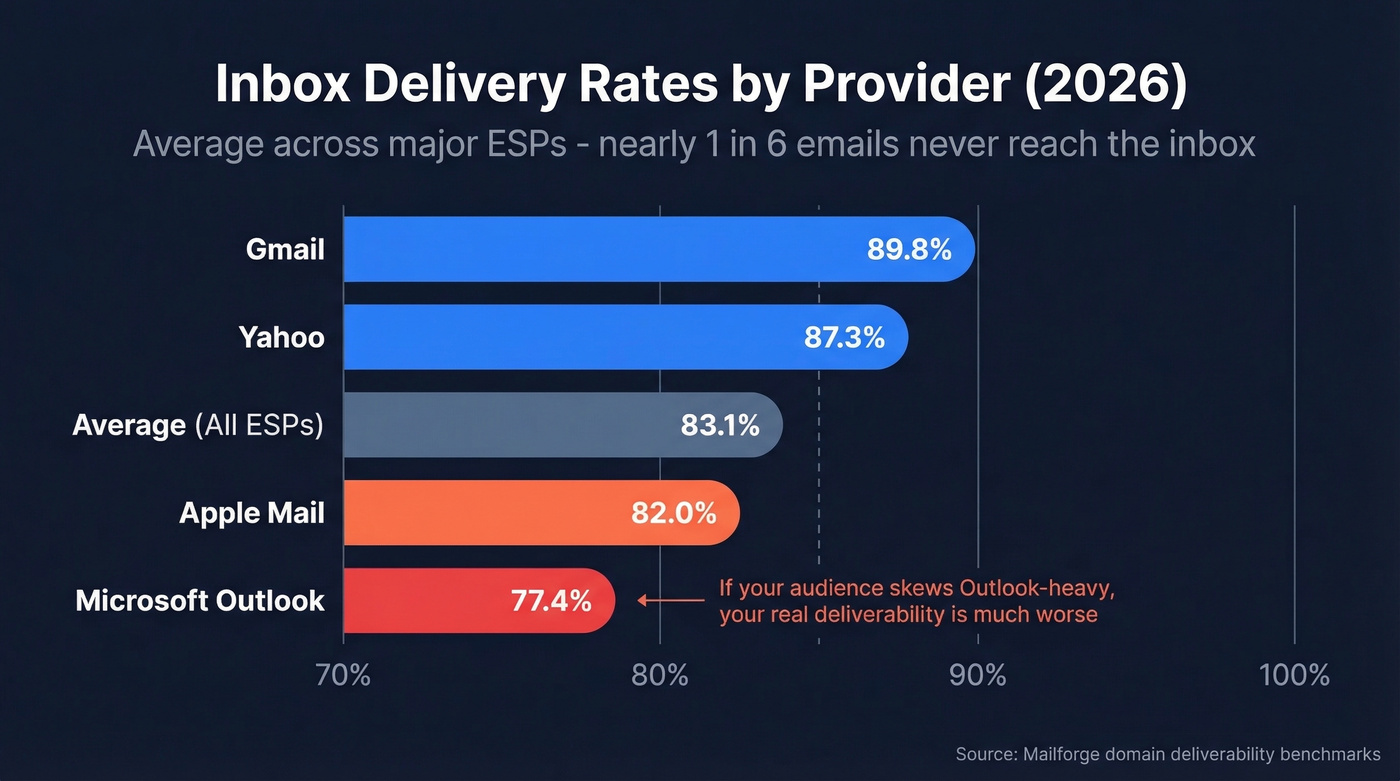
The average deliverability rate across major ESPs is just 83.1% - nearly 1 in 6 emails never reach the inbox. And that average hides brutal provider-level differences: Gmail delivers 89.8% to inbox, Yahoo 87.3%, Apple 82%, but Microsoft sits at just 77.4%. If your audience skews Outlook-heavy, your effective deliverability is significantly worse than the headline number suggests.

Bounce rates above 4% destroy domain reputation faster than any authentication gap. Prospeo's 5-step verification - with spam-trap removal, honeypot filtering, and catch-all handling - delivers 98% email accuracy on a 7-day refresh cycle. That's how teams like Stack Optimize maintain sub-3% bounce rates across every client.
Stop fixing DNS records when the real problem is your data.
Domain vs. IP Reputation
Modern providers weight domain reputation more heavily than IP reputation. This matters because domain reputation is portable - it follows you if you switch ESPs. You can't outrun a bad sending history by changing providers.
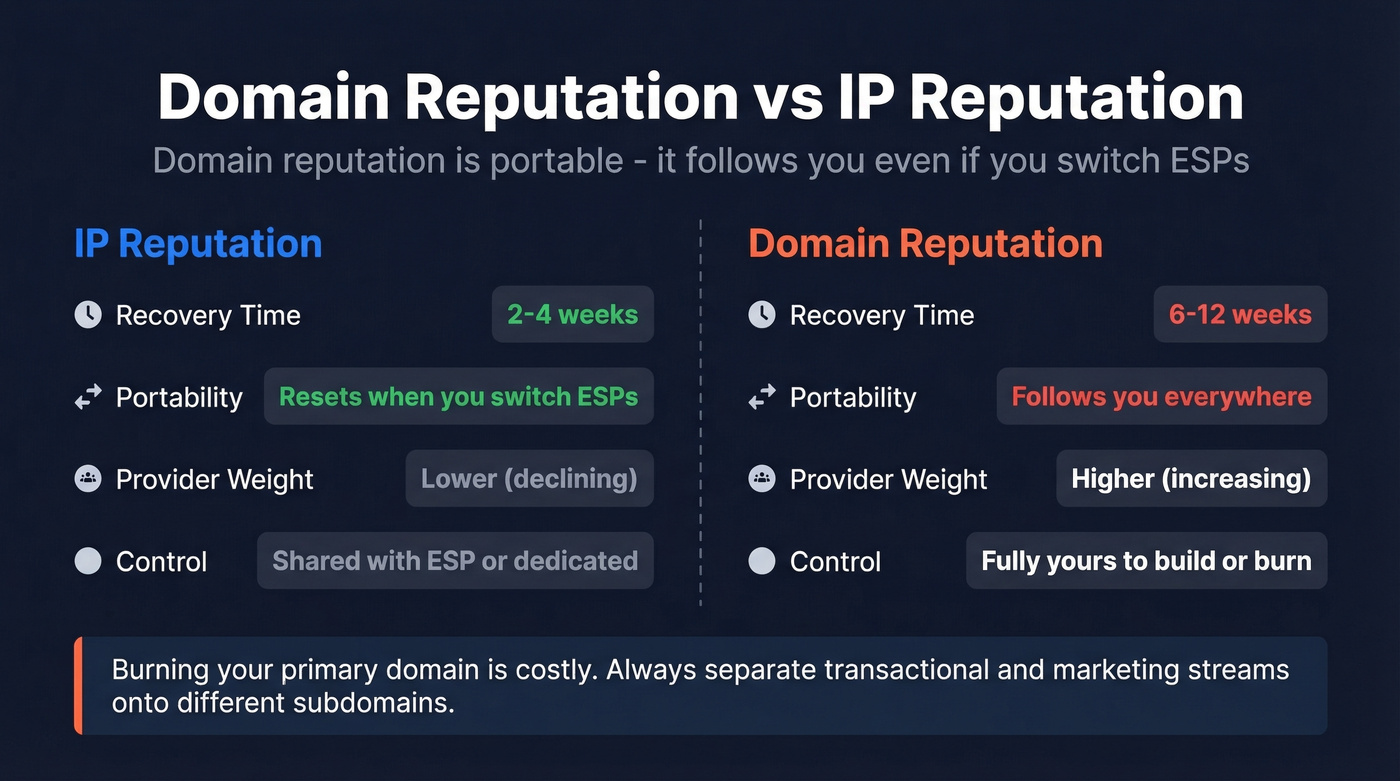
Recovery timelines are brutal. IP reputation rebuilds in roughly 2-4 weeks, but domain reputation takes 6-12 weeks of clean sending. In our experience, cold outreach domains often need closer to 8 weeks. That's why burning your primary domain is so costly - separate transactional and marketing streams onto different subdomains at minimum.
If you're doing outbound, also watch your email velocity so you don't spike volume and trigger filtering.
How to Check Your Domain Reputation
Most "spam score checkers" only test email content against SpamAssassin-style rules. That's not reputation. For the real picture, you need tools that measure infrastructure, reputation, and provider-specific signals.
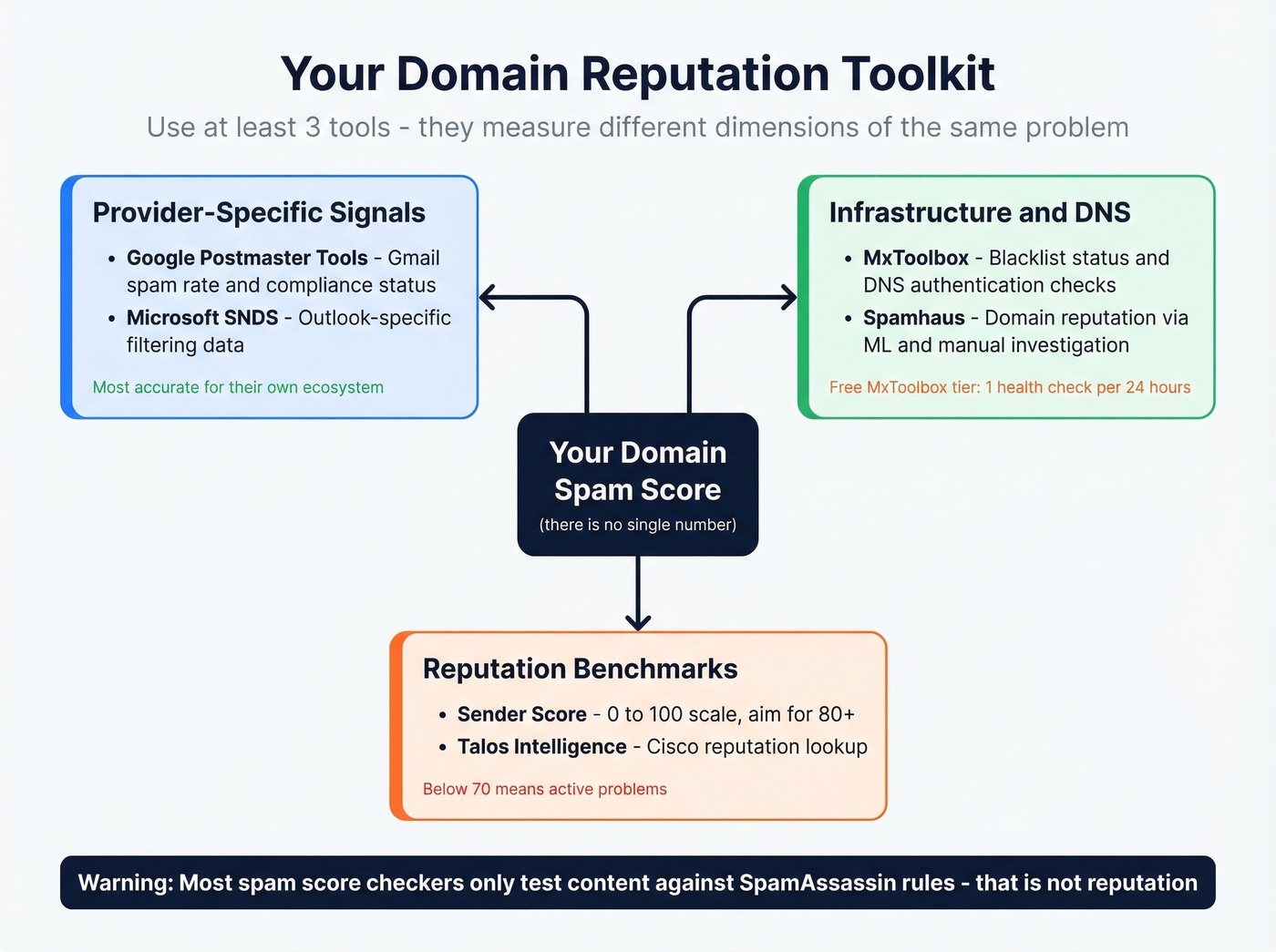
| Tool | What It Tells You |
|---|---|
| Google Postmaster Tools | Gmail spam rate + compliance |
| Sender Score | 0-100 reputation benchmark |
| MxToolbox | Blacklist + DNS checks |
| Spamhaus | Domain reputation via ML, heuristics, and manual investigation |
| Microsoft SNDS | Outlook-specific data |
| Talos Intelligence | Cisco's reputation lookup |
All have free options. Use at least three. On Sender Score, 80+ is solid; below 70 means active problems. For a broader toolkit, see our roundup of email reputation tools.
Google Postmaster Tools went through a major overhaul in late 2025. The v2 interface replaced the old "Domain Reputation" and "IP Reputation" dashboards with a Compliance Status (pass/fail) and a Spam Rate dashboard. Google requires below 0.3%, but aim for under 0.1%. One caveat worth knowing: GPT's spam rate only reflects manual "Report spam" clicks, not automatic spam-folder placement. You can show a low spam rate while most of your mail quietly gets filtered.
How to Improve Your Score
Fix Authentication First
Work through these in order:
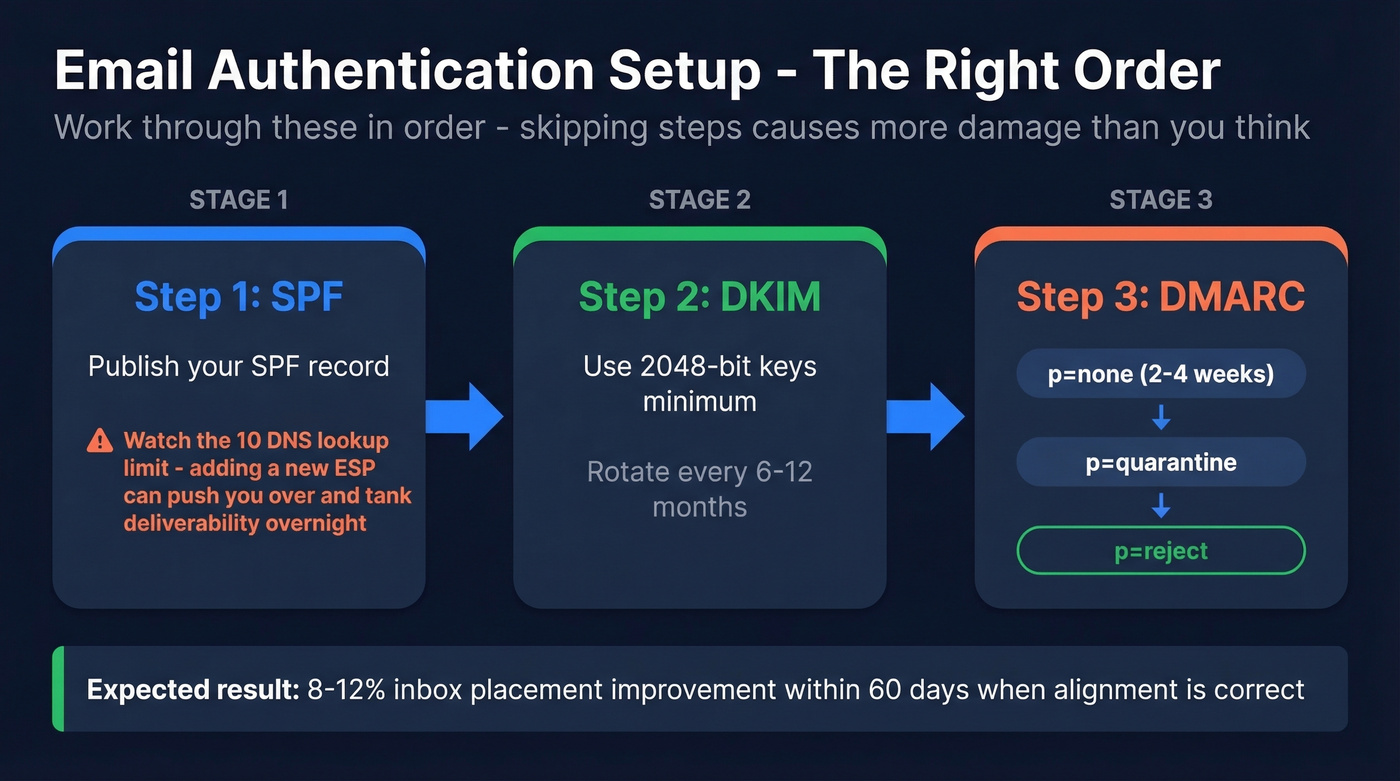
- SPF - publish your record, but watch the 10 DNS-lookup limit. We've seen teams add a new ESP and unknowingly push past 10 lookups, tanking deliverability overnight. (Use these SPF record examples to sanity-check syntax.)
- DKIM - use 2048-bit keys minimum. Rotate every 6-12 months. If you're unsure, follow a quick checklist to verify DKIM is working.
- DMARC - don't jump straight to enforcement. Start at
p=nonefor 2-4 weeks, move top=quarantine, thenp=reject. This progression often yields an 8-12% inbox placement improvement within 60 days when alignment is set up correctly. (More detail: DMARC alignment.)
Then Fix Your Data
Authentication gets you to the door. Data quality gets you through it.
Double opt-in for marketing lists. Remove bounces and invalid addresses every send cycle - not quarterly, every cycle. Never use purchased lists. The connection is direct: bad data leads to bounces, bounces lead to reputation damage, and reputation damage leads to the spam folder.

Here's what clean data looks like in practice: Stack Optimize built their agency to $1M ARR while maintaining 94%+ client deliverability, bounce rates under 3%, and zero domain flags across all clients. They do it by verifying every address before sending with Prospeo, whose 98% accuracy and 7-day refresh cycle catches invalid addresses - including spam traps and honeypots - before they cause damage.
If your bounce rate is above 4%, your reputation problem isn't technical. It's a data problem. Fix the list before you touch a single DNS record.
Warm Up Properly
For warm-up, start with 5-10 recipients per day for the first 3-5 days, prioritizing contacts who'll actually reply. Replies are the strongest positive signal you can generate. Scale gradually over 2-4 weeks. Skip this if you're only sending transactional emails to existing customers - warm-up applies to cold outreach and new marketing domains. If you need options, compare unlimited email warmup tools.
Every invalid email you send is a reputation hit that takes weeks to recover from. Prospeo verifies 143M+ emails through proprietary infrastructure - no third-party providers - and refreshes every 7 days so you're never sending to addresses that went stale last month. At $0.01 per email, clean data costs less than one spam-folder disaster.
Fix your domain reputation at the source: the list itself.
What to Do If You're Blacklisted
Stop sending immediately. Don't request removal first - identify and fix the root cause, or you'll get relisted. We've watched teams get relisted within 48 hours because they skipped this step.
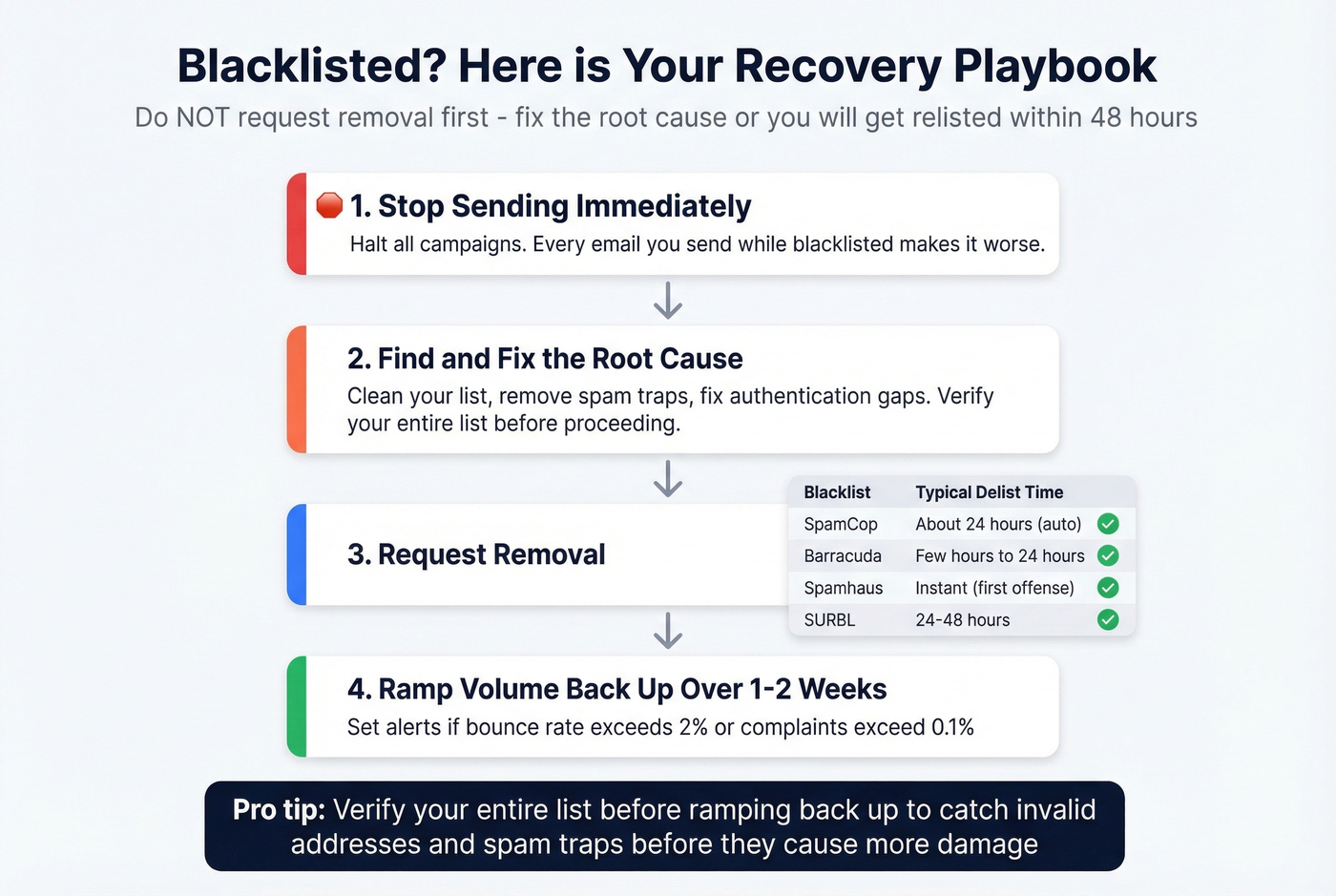
Once you've fixed the underlying issue, request removal:
| Blacklist | Typical Delist Time |
|---|---|
| SpamCop | ~24hr auto-delist |
| Barracuda | Few hours to 24hr |
| Spamhaus | Instant (first offense) |
| SURBL | 24-48hr |
After delisting, ramp volume back up over 1-2 weeks. Set alerts if bounce rate exceeds 2% or complaints exceed 0.1%. Before ramping, verify your entire list to catch invalid addresses and spam traps before they do more damage. If you need a step-by-step, follow our Spamhaus blacklist removal guide.
FAQ
What's a good email domain spam score?
No universal number exists. On Sender Score, aim for 80+. On Google Postmaster Tools, keep your spam rate below 0.1%. On blacklist checkers, the goal is zero listings. Check all three for a complete picture.
Can I fix a domain with bad history?
Yes, but expect 6-12 weeks of clean sending. Set up SPF/DKIM/DMARC, send only to verified addresses, and warm up gradually. If the domain has severe history - multiple Spamhaus listings, for instance - starting fresh on a new subdomain is often faster than rehabilitation.
How does bad email data hurt domain reputation?
Invalid addresses generate bounces. High bounce rates signal poor list hygiene, which directly tanks reputation. Verifying your list before every campaign - catching spam traps, honeypots, and dead addresses - breaks this cycle before it starts.