

Email Extractor from Website: Full Guide for 2026
An SDR hands you a spreadsheet with 500 "leads" scraped from company websites last weekend. Half are generic inboxes like info@ and careers@, a quarter bounce on the first send, and buried in there are three spam traps that torch your sender reputation before lunch.
Sound familiar? Independent testing by Dropcontact across 20,000 real contacts found that even the best email-finding tools produce 0.9%-3.6% hard bounce rates - and that benchmark is for name+company enrichment, not raw website scraping. "Found an email" doesn't mean "deliverable email."
The extraction part is easy. Getting usable emails is the actual problem.
What You Need (Quick Version)
- Quick one-off extraction - Mailmeteor (free, no signup)
- Bulk extraction at scale - Apify or Outscraper
- Non-negotiable: always verify before sending
If you're scraping fewer than 50 URLs, a free web tool works fine. Thousands of URLs need an API. And if you want to skip scraping entirely and get verified contact data by company or job title, a sales prospecting database saves you the whole extraction-then-verification dance.
Extractor vs. Finder - Know the Difference
These terms get used interchangeably, but they're fundamentally different tools that solve different problems.
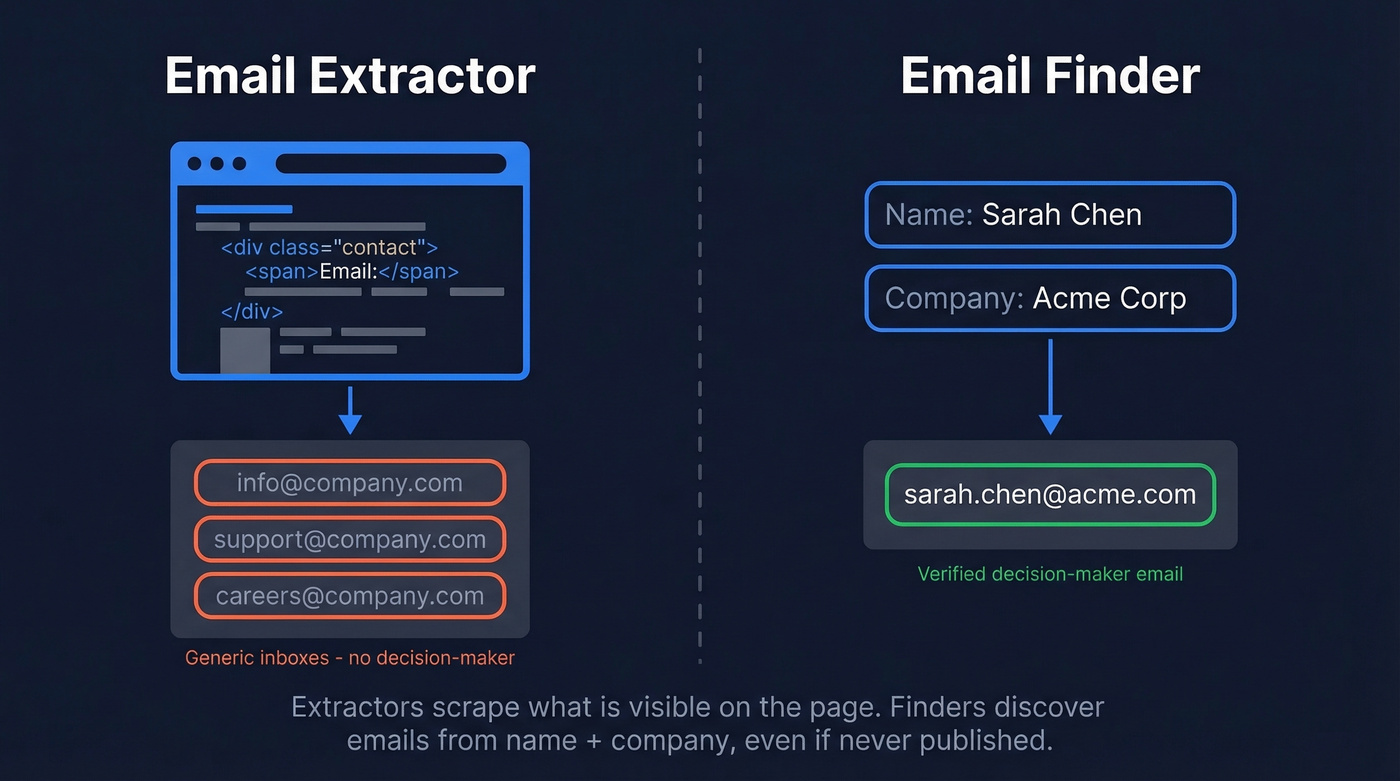
An extractor scrapes emails already publicly displayed on web pages - it crawls HTML, follows internal links, and pulls anything matching an email pattern. A finder discovers someone's email from their name and company, even if it's never been published anywhere.
We worked with a sales team that had 2,000 target companies. An extractor gave them hello@company.com and support@company.com - whatever sat on the contact page. A finder gave them sarah.chen@company.com, the actual decision-maker. For outbound sales, the finder is almost always what you want. The extractor is a fallback for when you don't have names, or you're doing broad local business prospecting where any email will do.
Three Ways to Extract Emails from Websites
Chrome Extensions
Best for quick lookups on individual pages. You land on a company's team page, click the extension, and it pulls every email visible in the DOM. Lemlist offers a free extraction tool that handles quick URL/text parsing. The limitation is obvious - it's manual, one page at a time, and it doesn't scale past a handful of lookups.
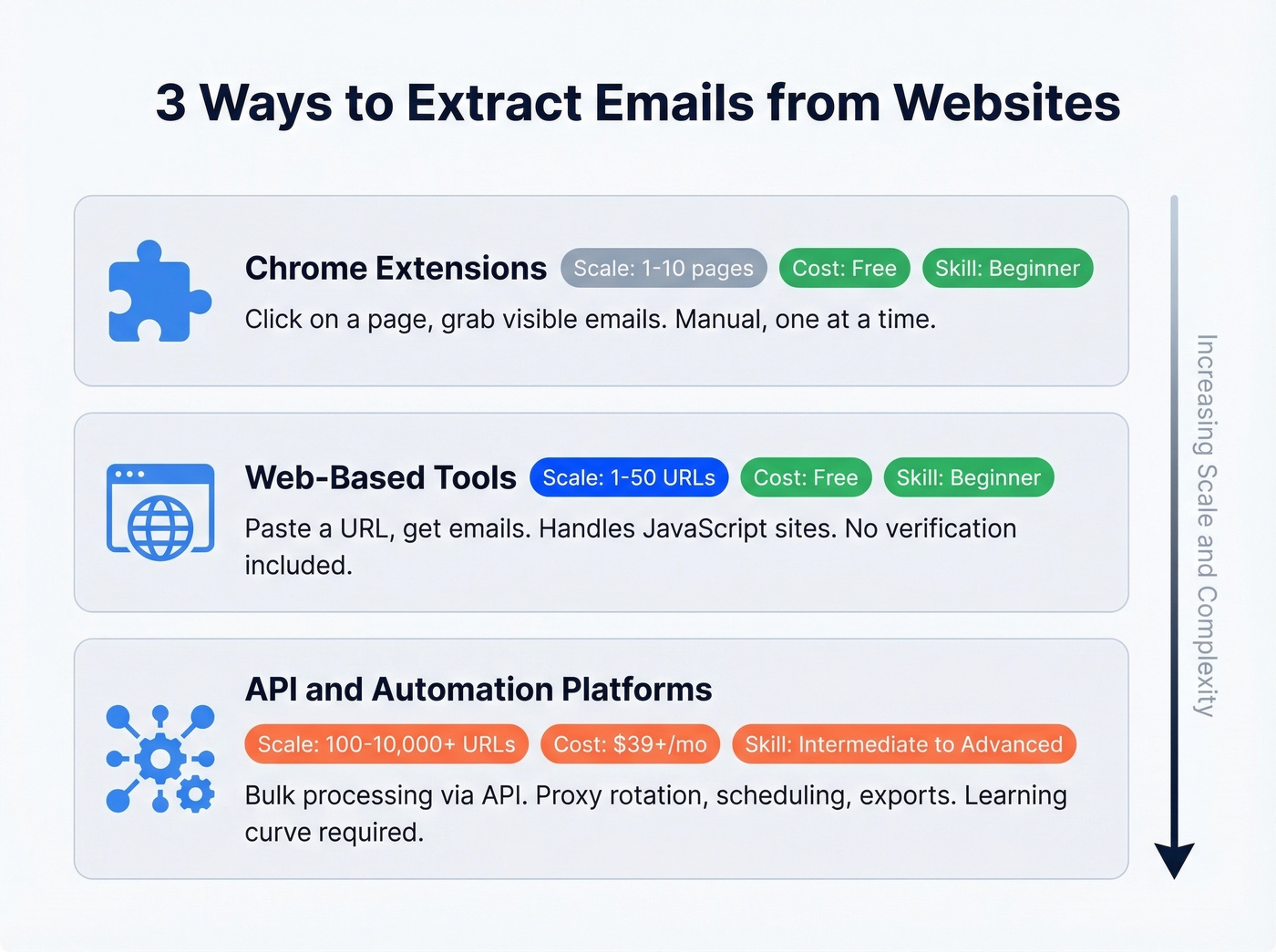
Web-Based Online Tools
Tools like Mailmeteor let you paste a URL and pull addresses instantly. They crawl the page's HTML, grab mailto links, and follow internal links to find more addresses. Mailmeteor handles JavaScript-heavy websites too, so dynamic sites aren't a dead end.
These tools don't verify deliverability, though. You'll get addresses without knowing which ones actually work.
API & Automation Platforms
When you've got hundreds or thousands of URLs to process, you need platforms like Apify, PhantomBuster, or Outscraper. Don't lump them into one pricing model - they're structured very differently:
- Outscraper is pay-per-result (https://outscraper.com/faq/)
- Apify is credit-based (you pay for compute/usage)
- PhantomBuster is subscription-based (execution time / workspace plans)
Here's the thing: if your average deal size is under five figures, you probably don't need to build a scraping pipeline at all. A B2B data platform or a finder like Hunter.io gets you named contacts faster than any extract-then-verify workflow, and your domain stays clean.
If you’re building a repeatable outbound motion, it’s worth mapping this into a broader lead generation workflow so extraction doesn’t become the bottleneck.

Website extractors give you whatever's on the page - generic inboxes, dead addresses, spam traps. Prospeo gives you 143M+ verified emails at 98% accuracy, refreshed every 7 days, with catch-all handling and honeypot filtering built in. Skip the extract-then-verify pipeline entirely.
Get verified emails for $0.01 each - no scraping required.
Best Email Extraction Tools Compared
| Tool | Type | Free Tier | Paid From | Best For |
|---|---|---|---|---|
| Prospeo | B2B data platform | 75 emails/mo | ~$0.01/email | Verified emails without scraping |
| Hunter.io | Email finder | Free plan available | ~$49/mo | Name + company lookups |
| Apify | Dev scraping platform | $5 credits/mo | $39/mo | Bulk extraction via API |
| Mailmeteor | Web extractor | Free (no signup) | - | Quick one-off URL pulls |
| PhantomBuster | No-code automation | 14-day trial | $69/mo | Multi-step workflows |
| Outscraper | Pay-per-result | 500 businesses/mo | $3/1,000 | Local business scraping |
| Clearout | Verification + finder | 100 credits | $14/mo | Verification-first |
| Skrapp | Email finder | 100 credits/mo | $39/mo | Email finding by name |
| Lemlist | Outreach + extractor | Free extractor | $59/mo (outreach) | Built-in extraction |
Prospeo - Verified Emails, No Scraping Required
Use this if you need verified, deliverable emails for outbound campaigns and don't want to babysit a scraping pipeline.
Prospeo's verified database runs on a 7-day refresh cycle - the industry average is six weeks. In our testing, that freshness gap makes a real difference on bounce rates. The 5-step verification process handles catch-all domains, removes spam traps, and filters honeypots before you ever export a contact, delivering 98% email accuracy. Meritt, one of Prospeo's customers, went from a 35% bounce rate to under 4% after switching - and tripled their pipeline from $100K to $300K per week.

The Chrome extension (40,000+ users) lets you pull verified emails from any web page in one click. Search filters cover buyer intent, technographics, job changes, headcount growth, and funding, so you're finding the right people at the right time. Free tier gives you 75 emails/month. Paid plans run about $0.01/email with no contracts.
Skip this if you specifically need to scrape visible emails from web pages. That's an extractor job, not a database job.
Hunter.io - The Established Email Finder
Enter a company domain, get every email pattern and address they've indexed. Built-in verification catches obvious invalids before you send. Paid plans start around $49/month. Hunter isn't built for bulk website scraping - if you need to process hundreds of URLs, you'll want an API platform instead. Hunter's strength is precision, not volume.
If you’re comparing options, see our breakdown of Hunter alternatives.

Apify - Developer-First Bulk Extraction
Paid plans start at $39/month with $5 in free monthly credits, making Apify one of the most cost-effective ways to extract emails from URL lists programmatically. Their Google Maps scraper runs $4 per 1,000 places, and the platform handles scheduling, proxy rotation, and exports to JSON/Excel/CSV.

The tradeoff is a real learning curve. You're configuring scrapers, not clicking a button. One practical constraint: many Google Maps-style scrapers hit a ~120 results/search limitation, so large datasets need careful job structuring. Non-technical teams should look elsewhere.
Mailmeteor - Free, Zero-Signup Extractor
Completely free, no account required. Paste a URL, get every email on the page. Mailmeteor renders JavaScript and crawls internal links, so a single company URL can surface emails from multiple pages - the fastest option for anyone who just needs to grab addresses from a website without installing software. It doesn't verify deliverability, so run everything through a verification tool before sending.
If you want more options in this category, compare the best free email scrapers.
PhantomBuster, Outscraper, and the Rest
PhantomBuster ($69-$439/month, 14-day trial) is a workflow automation platform that happens to extract data. It's strongest for multi-step automations - scrape a list, enrich it, push to a CRM. For pure email extraction, it's overkill.
Outscraper is purpose-built for local business lead gen. The first 500 businesses/month are free, then $3 per 1,000 results. Feed it Google Maps queries and it returns emails and phones. Queries of ~400 results take 20-25 minutes. If you're building lists of plumbers, dentists, or restaurants, this is the tool.
Clearout is verification-first - 100 free credits, $14/month for 3,000. Use it to clean scraped lists. Skrapp offers 100 free credits/month and $39/month for 1,000 email-finding searches. Lemlist bundles a free extractor with its outreach platform ($59/month), which is handy if you're already running sequences there.
Meritt switched from scraping workflows to Prospeo and dropped their bounce rate from 35% to under 4% - tripling pipeline to $300K/week. With 30+ filters for intent, technographics, and job changes, you find decision-makers directly instead of harvesting info@ addresses from contact pages.
Find the decision-maker's email, not the company's generic inbox.
Why You Must Verify Every Extracted Email
Extraction gives you addresses. Verification tells you which ones work.
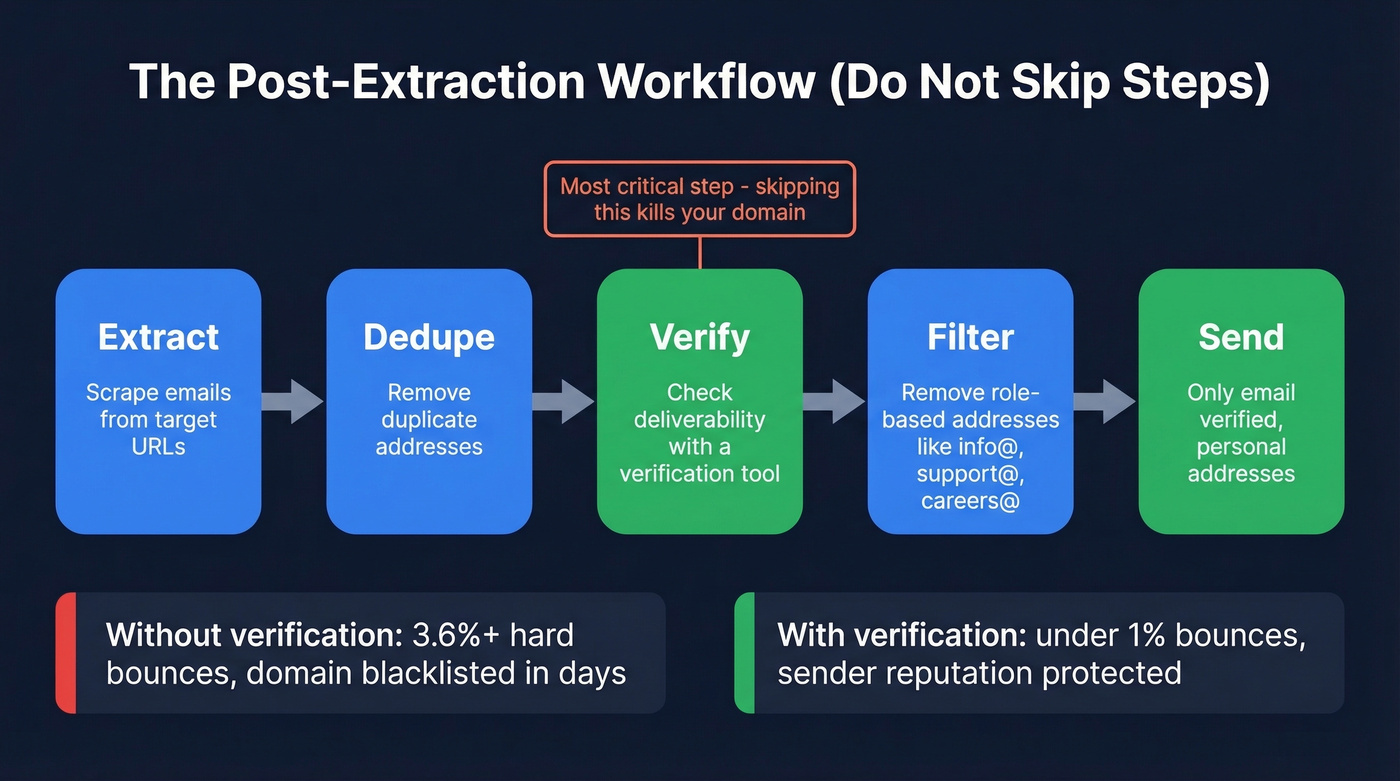
That Dropcontact benchmark tested 15 tools across 20,000 real contacts, sending a real email to every address found. Even the best tools produced hard bounce rates between 0.9% and 3.6%. Website-scraped emails are even riskier in practice because you're collecting role-based addresses, outdated contacts, and the occasional spam trap.
The post-extraction workflow should be: extract, dedupe, verify, filter out role-based addresses, then send. We've seen teams skip verification and lose their sending domain within a week. Don't be that team.
To go deeper on deliverability mechanics, see our email deliverability guide and the benchmarks in email bounce rate.
Is Extracting Emails from Websites Legal?
Extracting isn't inherently illegal, but what you do with the emails can be.
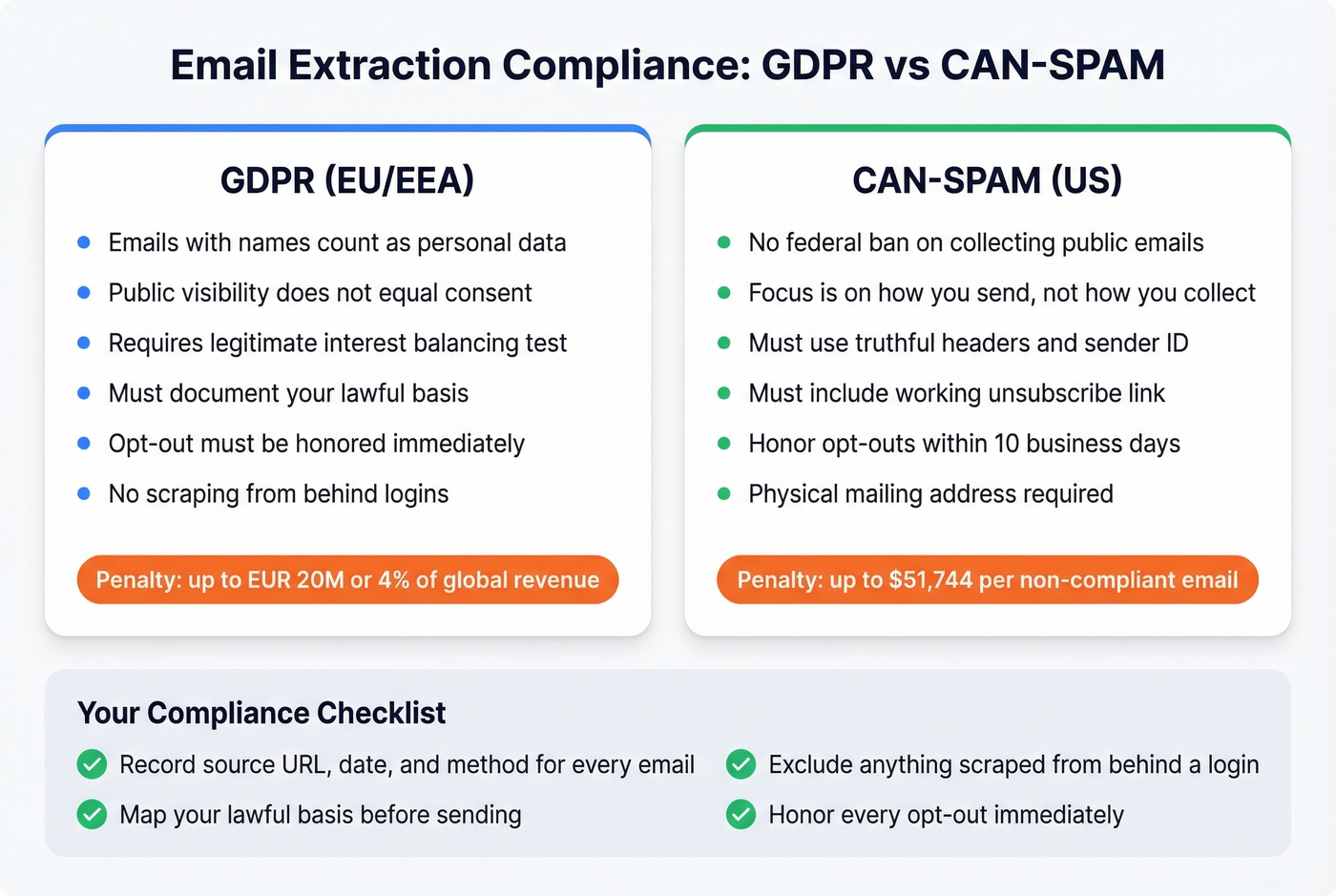
Under GDPR, an email containing a person's name is personal data. Public visibility doesn't grant permission to compile it into a marketing list. You can use legitimate interest as a legal basis for B2B outreach, but that requires a balancing test, documentation, and a clear opt-out. Penalties reach EUR 20M or 4% of global annual revenue.
Under CAN-SPAM in the US, there's no federal ban on collection from public pages - the focus is on how you send: truthful headers, sender identification, working unsubscribe, and honoring opt-outs within 10 days. For a deeper compliance walkthrough, LetsExtract's legal guide covers jurisdiction-specific nuances.
Your compliance checklist: record the source of every email (URL, date, method), map your lawful basis before sending, exclude anything scraped from behind a login, and honor every opt-out immediately.
Seven Mistakes That Get Your Domain Blacklisted
- Sending without verifying. Even "fresh" scraped emails include dead addresses and spam traps. One bad send can tank your sender score.
- No deduplication. Case variants and formatting differences create duplicate outreach, annoying recipients and triggering spam filters.
- Keeping role-based addresses. Sending cold outreach to
careers@orinfo@produces complaints, not conversations. - Ignoring robots.txt and rate limits. Aggressive scraping gets your IP blocked and can create legal exposure.
- Treating scraped data as evergreen. People change jobs, companies change domains. Re-verify every list before reusing it.
- Using scraped lists in ESPs that ban them. Many ESPs explicitly prohibit purchased or scraped lists in their ToS. Violations mean account suspension.
- No opt-out mechanism. Every cold email needs a working unsubscribe - it's required under CAN-SPAM and a best practice for GDPR-aligned outreach.
If you’re sending at scale, follow the safeguards in our guide on the best way to send bulk email without getting blacklisted.
FAQ
What's the difference between an email extractor and an email finder?
An extractor scrapes visible emails from web pages - whatever's published in the HTML. A finder discovers someone's email from their name and company, even if it's never appeared online. Extractors return generic addresses like info@; finders return specific people's verified work emails.
Can I extract email addresses from a website for free?
Yes. Mailmeteor lets you paste a URL and pull addresses at no cost with no signup. Prospeo's free tier gives you 75 verified emails per month if you'd rather skip scraping entirely. Free extraction tools don't verify deliverability, so always run a separate verification step before sending.
How many emails can I extract in bulk?
Free web tools handle one URL at a time. For bulk extraction across hundreds or thousands of URLs, use Apify (from $39/month) or Outscraper ($3/1,000 results). B2B data platforms let you search and export thousands of verified contacts using filters instead of URLs - no scraping infrastructure required.
Is there a way to pull emails without installing software?
Browser-based tools like Mailmeteor work entirely in your browser - no downloads, no extensions. Paste a URL, and the tool crawls the page to surface every address it finds. For verified results at scale, cloud-based platforms like Prospeo and Hunter.io also run without any local installation.