

Best Email Follow-Up Apps in 2026 (Honest Picks)
A RevOps Manager lead we work with ran a 10,000-email sequence last quarter. Open rates looked great. Reply rates? Under 2%. The problem wasn't the copy or the cadence - 31% of the list bounced before the follow-ups ever had a chance to land. The email follow-up app worked fine. The data didn't.
That's the real reason most follow-ups fail. A Belkins study of 16.5M cold emails found that peak reply rates hit 8.4% on the first email and decline from there. Every follow-up you send to a bad address doesn't just waste a touch - it actively damages your sender reputation, dragging down deliverability for the emails that could have connected.
The right follow-up tool matters. But the data underneath it matters more.
Our Picks (TL;DR)
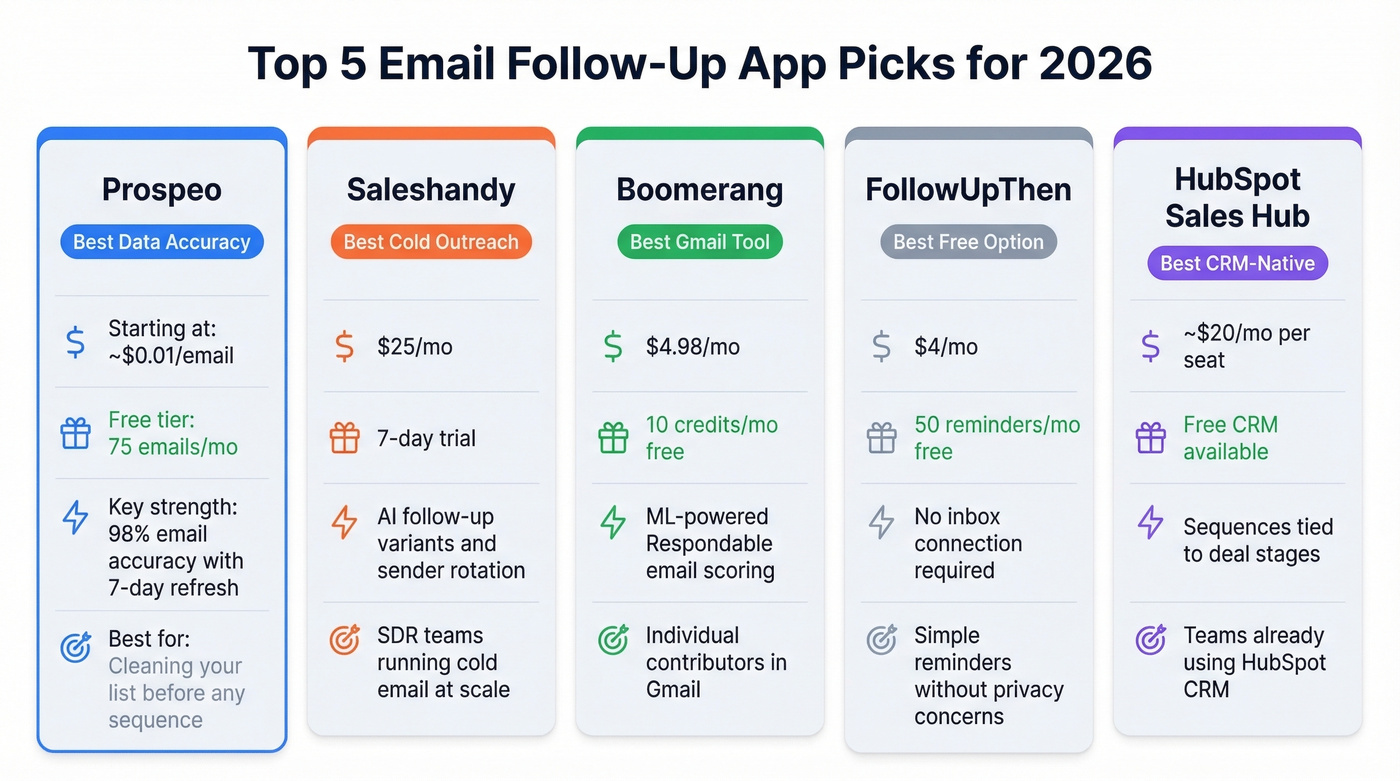
- Best for verified data + follow-up accuracy: Prospeo - 98% email accuracy, 7-day data refresh, catches bad addresses before they torch your domain
- Best for cold outreach sequences: Saleshandy - multi-step sequences with AI follow-up variants, starting at $25/mo
- Best for Gmail power users: Boomerang - free plan, ML-powered Respondable scoring, dead simple
- Best free option: FollowUpThen - 50 active reminders/mo, no inbox connection required
- Best if you're already in a CRM: HubSpot Sales Hub - sequences baked into the CRM you're already paying for
What Type of Follow-Up Tool Do You Need?
Not all follow-up software solves the same problem. Before you trial anything, figure out which category you actually need.
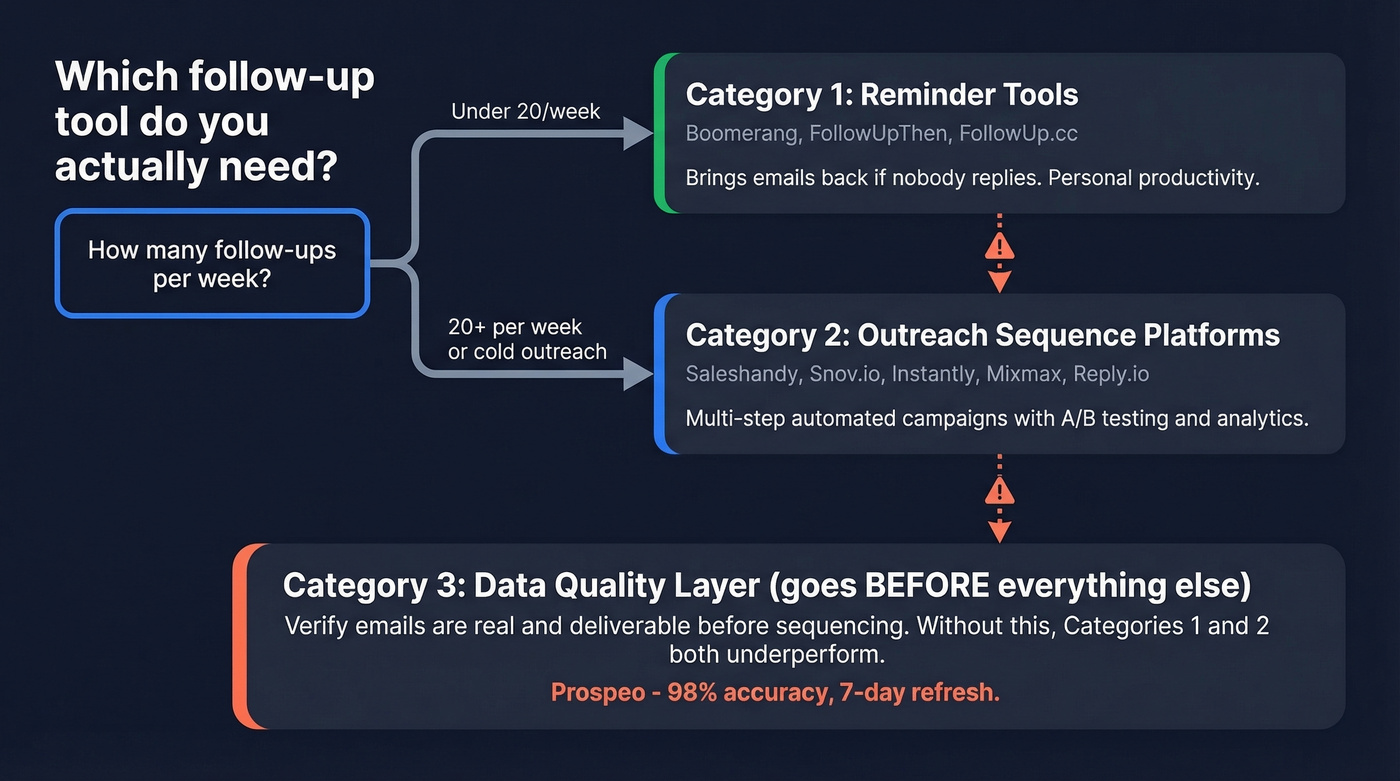
Category 1: Reminder and nudge tools. Boomerang, FollowUpThen, FollowUp.cc. These bring emails back to your inbox if nobody replies. They're personal productivity tools - great for account managers, founders doing 10-20 follow-ups a week, or anyone who just needs a "don't forget" system. They don't send automated sequences.
Category 2: Outreach sequence platforms. Saleshandy, Snov.io, Instantly, Mixmax, Reply.io. These automate multi-step email campaigns with conditional logic, A/B testing, and unified inboxes. Built for SDR teams running cold outreach at scale.
Category 3: The data quality layer. This sits before your follow-up tool, verifying that the emails you're about to sequence are real, deliverable, and won't trigger spam traps. Without clean data, categories 1 and 2 both underperform.
Fewer than 20 follow-ups a week? Category 1. Cold outreach at scale? Category 2. Either way, verify your list first with an AI Email Checker.
Best Email Follow-Up Apps Reviewed
Saleshandy - Cold Outreach Sequences
Saleshandy is the strongest all-in-one platform for teams whose primary motion is cold email. Multi-step sequences with AI-generated follow-up variants, a unified inbox that aggregates replies across all connected accounts, and built-in sender rotation to spread volume across mailboxes.
We've tested the sequence builder against several competitors, and the workflow from first touch through follow-up cadence is genuinely smooth - especially once you connect multiple sending accounts and let the rotation logic handle distribution. The Starter plan at $25/mo covers most solo SDRs. Pro at $74/mo unlocks AI variants and advanced analytics, which is where the jump becomes worth it for teams. Scale runs $149/mo, and there's a 7-day free trial across all tiers.
Best fit: Cold outbound is your primary channel and you need sequences, not just reminders.
Walk away if: You just want to be reminded to reply to warm leads. Saleshandy is overkill - you'd be paying for automation you won't use.

Boomerang - Gmail Power Users
Boomerang does one thing exceptionally well: it makes Gmail smarter about timing. Schedule sends, get nudged when someone doesn't reply, and use the Respondable machine-learning feature to score your email before you hit send.
The free plan gives you 10 message credits/month. Paid tiers run $4.98/mo (Personal), $14.98/mo (Pro - the most popular tier, which adds Recurring Messages and full Respondable access), and $49.98/mo (Premium) on annual billing. New accounts get a 30-day Pro trial. One important catch: the Personal plan is restricted to @gmail.com addresses. Google Workspace users need Pro or higher.
Best fit: You're an individual contributor working out of Gmail who needs send-later and follow-up reminders without learning a new platform.
Skip this if: You need multi-step automated sequences or Outlook support. Boomerang is a personal productivity tool, not a sales engagement platform.
Snov.io - Prospecting + Outreach Combined
Snov.io combines an email finder with drip campaigns, so you can build a list and sequence it without switching platforms. Starter runs $29.25/mo for 1,000 credits and 5,000 recipients. Pro at $74.25/mo bumps you to 5,000 credits and 25,000 recipients.
A July 2025 update kept prices the same while increasing recipient limits on Pro plans - which is why third-party pricing you see in older posts sometimes looks inconsistent.
Best fit: You want prospecting and outreach in one tool. Skip this if: You already have a separate lead source and just need a sequencer. The credit-plus-recipient metering adds complexity you don't need if you're only using half the platform.
Instantly - Scale Outreach Fast
Instantly's real selling point is scaling across multiple sending accounts on higher tiers. Growth starts at $30/mo, Hypergrowth at $77.60/mo. The infrastructure is built for volume.
Best fit: You're managing multiple sending accounts and need to scale without hitting limits. Skip this if: You're a solo sender. The multi-account infrastructure is wasted on a single mailbox.
FollowUpThen - Simplest Reminder Tool
Sometimes you don't need automation. You just need to not forget.
FollowUpThen has been doing exactly this for 12 years, with 30 million follow-ups sent. The free plan covers 50 active reminders per month. Base is $4/mo on annual billing (or $5/mo monthly), with modular "skills" like response detection, SMS alerts, and calendar sync available as $2-$20/mo add-ons. No inbox connection required - a genuine privacy advantage.
Best fit: Dead-simple follow-up reminders without connecting your inbox to another service. Skip this if: You need automated sequences. This is a reminder tool, not a campaign platform.
Mixmax - Gmail Teams With CRM Sync
Let's correct something you'll see on other listicles: Mixmax doesn't cost $24/mo anymore. The current Suite pricing is $89/mo/user on annual billing. If you don't need the full suite, Inbox Copilot and Meeting Copilot start at $29/mo/user, and Engagement Copilot starts at $49/mo/user.
SOC 2 Type II certified, GDPR and HIPAA compliant - which matters if your security team has opinions about where email data lives.
Best fit: Your team lives in Gmail and wants sequences, scheduling, and CRM sync in one extension. Skip this if: You don't need CRM sync. At $89/mo/user for the Suite, it's expensive if you're only using basic sequencing.
HubSpot Sales Hub
If you're already paying for HubSpot CRM, adding sequences through Sales Hub is the path of least resistance. Starter runs around $20/mo/seat, Professional around $90-$100/mo/seat. Sequences, templates, and follow-up tasks all live inside the CRM you already know.
The downside: it's not built for high-volume cold outreach the way Saleshandy or Instantly are. It's best for teams following up with inbound leads and existing pipeline. For follow-up management tied directly to deal stages, though, a CRM-native approach is hard to beat.
If you're comparing CRM options, see these examples of a CRM before you commit.
FollowUp.cc
Gmail-focused follow-up reminders with auto-cancel when someone replies. Starter at $18/mo on annual billing ($23/mo monthly), Salesforce Edition at $40/mo. Lightweight and functional, but the pricing feels steep compared to FollowUpThen's $4/mo for similar core functionality.
GMass
Gmail mail merge with built-in follow-up sequences. Free trial covers 50 emails/day, Standard at $25/mo, Professional at $55/mo. The external SMTP routing option is useful if you're hitting Gmail's daily sending limits. Good for newsletter-style follow-ups, less polished for sales sequences.
Reply.io
Multichannel sequences spanning email, calls, and social touches. Email Volume plan from $49/mo, Multichannel at $89/user/mo. Worth a look if your follow-up strategy extends beyond email - but for email-only workflows, you're paying for channels you won't use.

That 31% bounce rate from the intro? It happens when follow-up apps run on stale data. Prospeo refreshes every 7 days - not 6 weeks - and delivers 98% email accuracy through 5-step verification with spam-trap and honeypot removal. Clean data in, replies out.
Fix the data layer before your next sequence goes live.
Pricing at a Glance
| Tool | Free Tier | Starting Price | Best For |
|---|---|---|---|
| Prospeo | 75 emails/mo | ~$0.01/email | List verification |
| Saleshandy | 7-day trial | $25/mo | Cold sequences |
| Boomerang | 10 credits/mo | $4.98/mo | Gmail reminders |
| Snov.io | Trial available | $29.25/mo | Find + sequence |
| Instantly | Trial available | $30/mo | Multi-account scale |
| FollowUpThen | 50 active reminders/mo | $4/mo | Simple reminders |
| Mixmax | Free tier (basic) | $29/mo (Copilot) | Gmail + CRM sync |
| HubSpot Sales Hub | Free CRM | ~$20/mo/seat | CRM-native sequences |
| FollowUp.cc | None | $18/mo (annual) | Gmail reminders |
| GMass | 50 emails/day | $25/mo | Gmail mail merge |
| Reply.io | None | $49/mo | Multichannel |
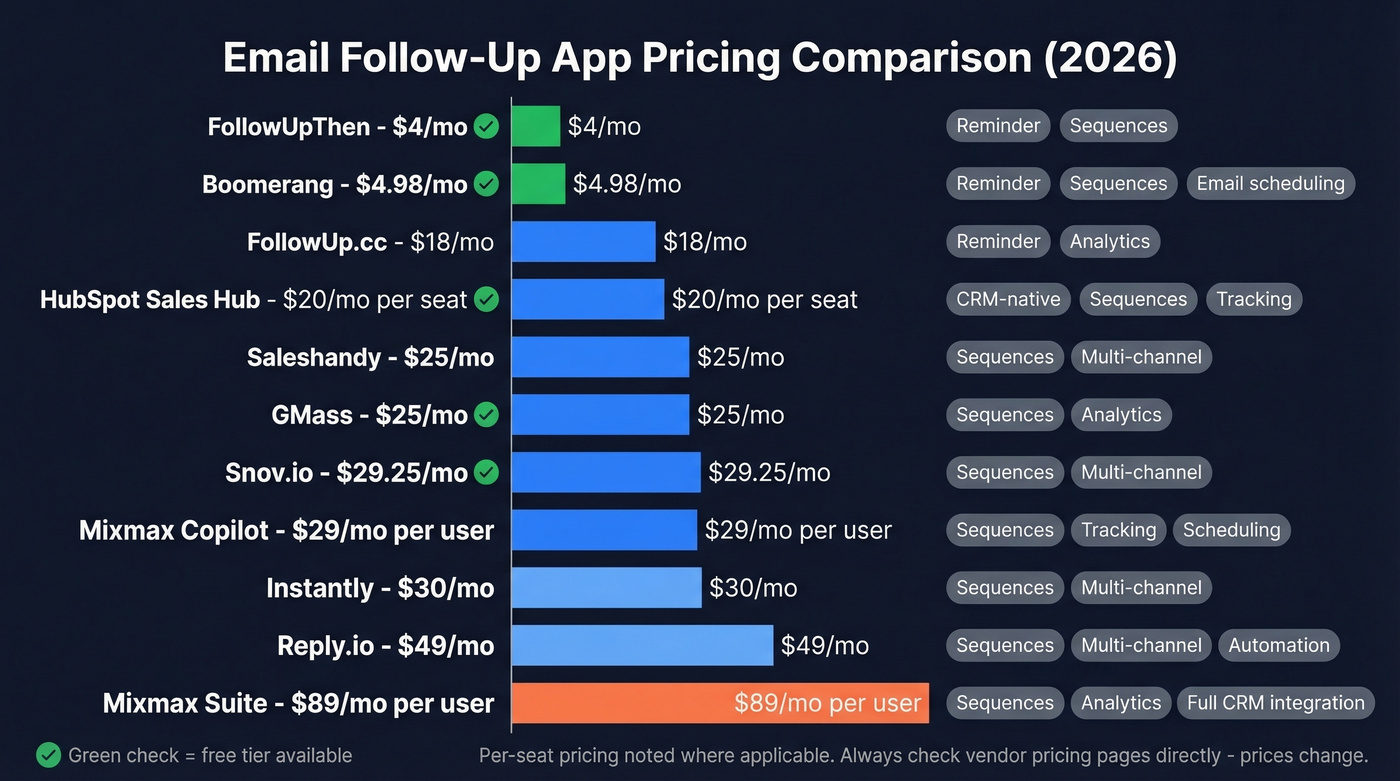
Mixmax Suite is $89/mo/user - not the $24/mo you'll see on outdated comparison sites. Always check their pricing page directly.
Follow-Up Mistakes That Get You Flagged
Based on GMass's breakdown of common follow-up failures, here are the five that actually land you in spam:
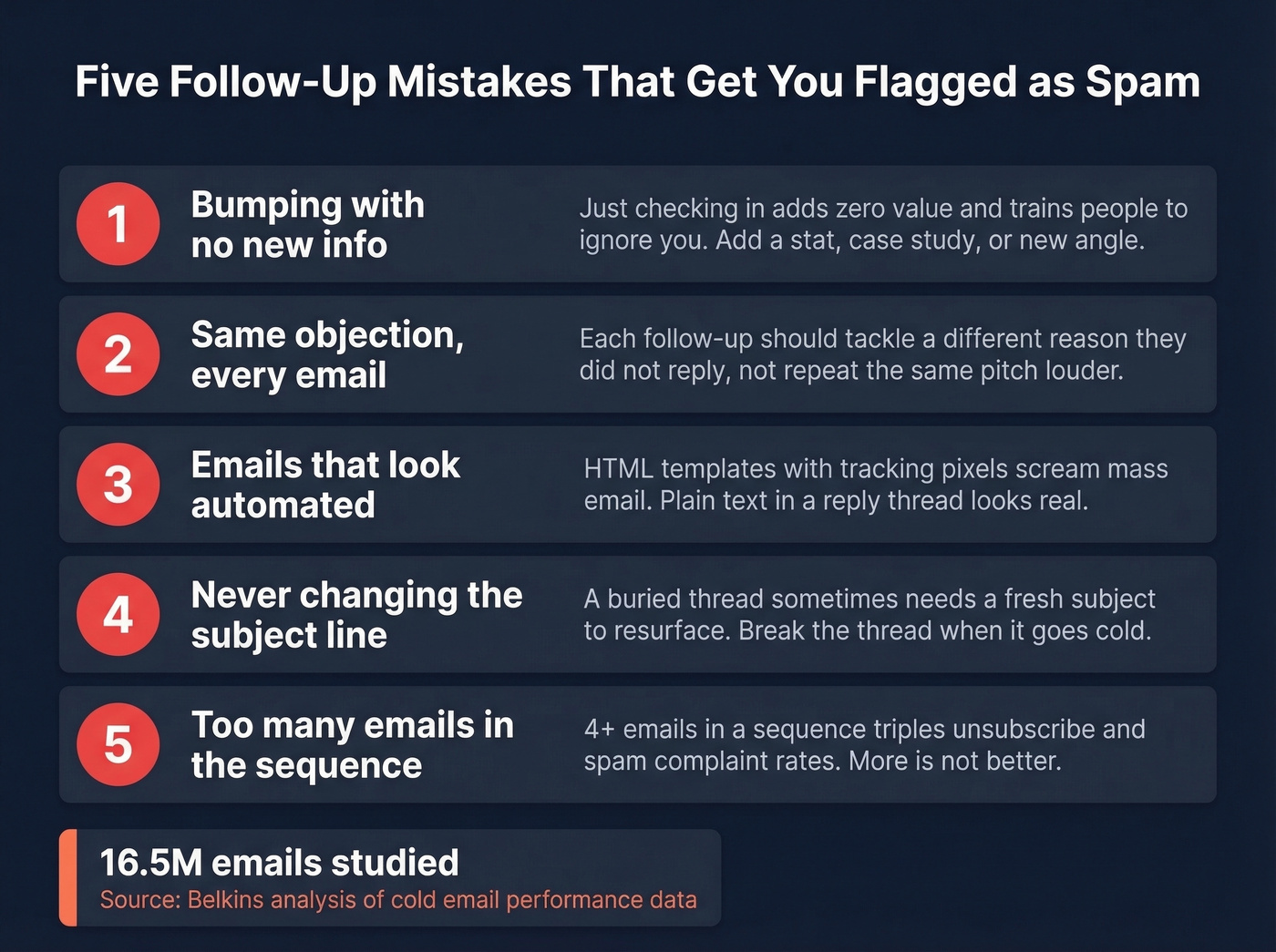
Bumping with no new information. "Just checking in" adds zero value and trains recipients to ignore you. Every follow-up needs a new angle - a stat, a case study, a question they haven't considered.
Not addressing different objections. Your first email might lose on timing. Your second might lose on trust. Each follow-up should tackle a different reason someone didn't reply, not repeat the same pitch louder.
Follow-ups that don't look real. HTML templates with tracking pixels and formatted signatures scream "automated." Plain text, short paragraphs, sent as a reply thread - that's what real follow-ups look like. (If you want the technical why, see Email Tracking Pixels.)
Never changing the subject line. Sometimes a buried thread needs a fresh subject to resurface. Don't be afraid to break the thread when the conversation has gone cold. If you need ideas, pull from these email subject line examples.
Wrong frequency. The 16.5M-email dataset is clear: 4+ emails in a sequence triples unsubscribe and spam complaint rates. More isn't better. It's worse.
No follow-up automation can compensate for these mistakes. Even the most sophisticated sequencing tool will underperform if the fundamentals are broken.

How Many Follow-Ups Should You Send?
Most guides say 5-7. The data says 2-3 max.
That same 16.5M-email analysis found reply rates peak at the first email (8.4%) and decline with every subsequent touch. Small businesses showed a slight bump on the second follow-up - from 8% back to 8.4% - but enterprises punish persistence. After four emails, you're not just getting ignored. You're getting flagged.
Here's the thing: there's a company-size nuance that most people miss. Smaller companies are more forgiving of a second or third touch. Enterprise prospects, who get hammered with outbound daily, have a much shorter fuse. If you're running the same five-email cadence against a Fortune 500 list and a list of 20-person startups, you're doing it wrong.
A common debate on r/sales is where the line falls between helpful follow-up and robotic drip sequence. In our experience, if your average deal size is under five figures, you probably don't need more than two follow-ups. The math doesn't support burning sender reputation on lower-value deals that need five touches to close.
One more thing worth knowing: the team behind that 16.5M-email study stopped tracking open rates entirely because tracking pixels were hurting deliverability. If an agency running that kind of volume decided opens aren't worth measuring, that should tell you something about where to focus. Reply rate is the only metric that matters. Everything else is vanity. For a deeper playbook, see our email deliverability guide.
Every follow-up sent to a dead address chips away at your sender reputation. Prospeo catches bad emails at $0.01 each before they ever hit your sequencer - whether you use Saleshandy, Instantly, or anything else. 143M+ verified emails, native integrations with the tools you already run.
Stop burning domain reputation on emails that will never land.
FAQ
Do follow-up apps work with Outlook?
Sequence platforms like Saleshandy, Instantly, and Snov.io support both Google and Microsoft inboxes. Boomerang, GMass, and Mixmax are Gmail-first. If your team runs Outlook, confirm compatibility before committing - this is the most common gotcha we see.
How do I stop follow-up emails from going to spam?
Verify your list before sending - invalid addresses damage domain reputation faster than anything else. Keep sequences to 2-3 emails max. Write plain-text replies, not HTML templates. Add new value in every message. And stop tracking opens with pixels if deliverability matters more than vanity metrics.
What's the difference between follow-up software and a CRM?
Follow-up software automates and schedules email touches - reminders, sequences, and cadence management. A CRM like HubSpot or Salesforce manages the entire customer relationship including deals, contacts, and reporting. Many teams use both: the CRM as the system of record and a dedicated follow-up app to handle actual sending and timing.