

Email IP Reputation: How to Check, Fix & Protect It in 2026
Your bounce rate just spiked to 8%. You imported a list, sent a campaign, and now your ESP is flagging your account. Your Sender Score dropped from 92 to 71 overnight. Spamhaus has you listed. This is what an IP reputation crisis looks like - and it's fixable if you move fast.
The Quick Version
Check your IP reputation right now with Google Postmaster Tools for Gmail, Microsoft SNDS for Outlook, and MxToolbox for blacklists - all free. If you're blacklisted, stop sending immediately, fix the root cause, request delisting, and ramp back slowly over one to two weeks. Prevent future damage by verifying every email address before you send. Bounce rates above 2% and spam complaints above 0.1% will tank your reputation fast.
Why 1 in 6 Emails Never Reach the Inbox
Roughly 84% of emails globally reach the inbox. That means one in six messages vanishes - filtered to spam, silently dropped, or bounced. Your sending IP's standing is one of the first things mailbox providers evaluate when deciding what happens to your message.
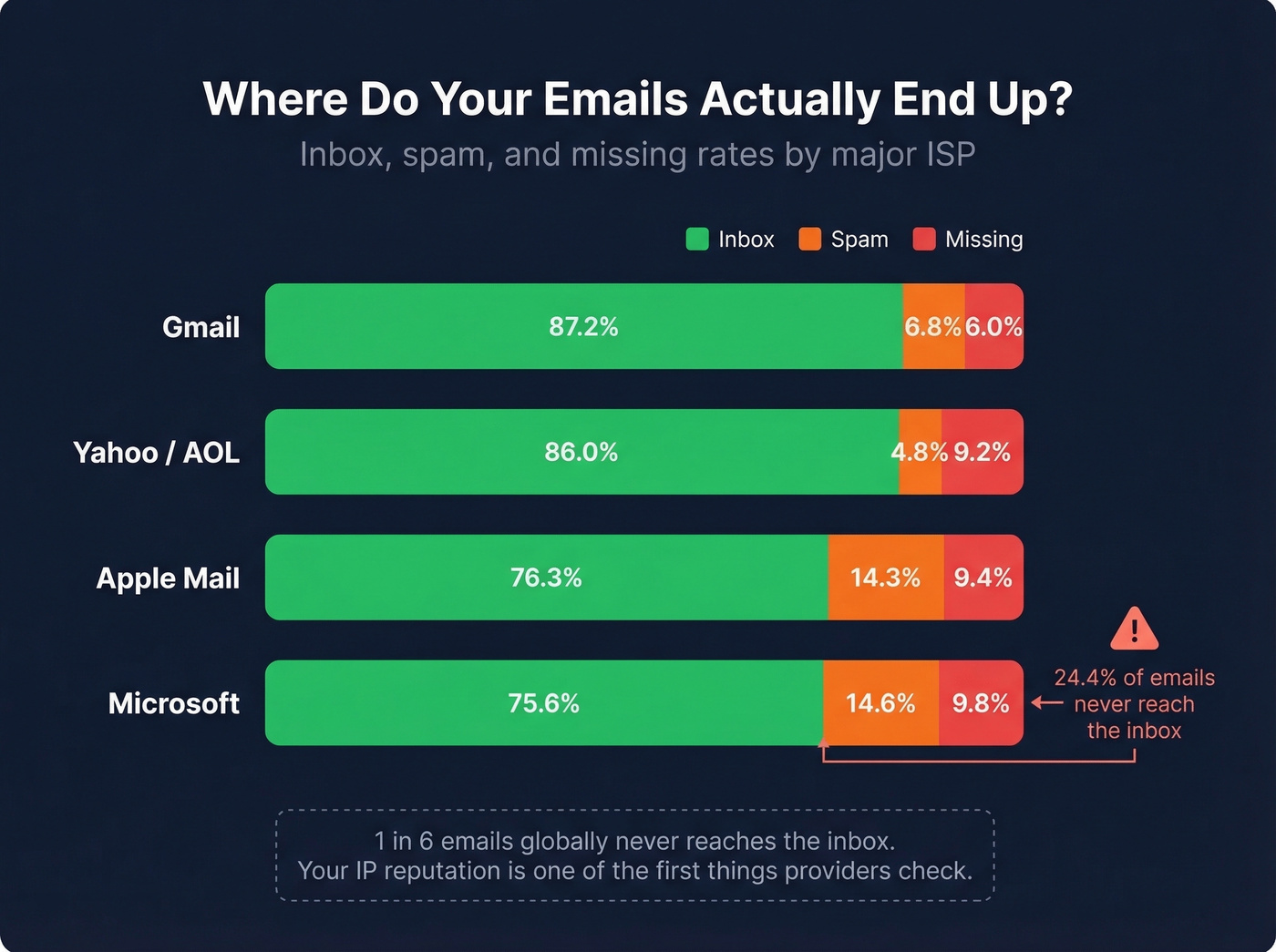
| ISP | Inbox Rate | Spam Rate | Missing |
|---|---|---|---|
| Gmail | 87.2% | 6.8% | 6.0% |
| Microsoft | 75.6% | 14.6% | 9.8% |
| Yahoo/AOL | 86.0% | 4.8% | 9.2% |
| Apple Mail | 76.3% | 14.3% | 9.4% |
Microsoft has the lowest inbox placement rate in this set. About 24% of emails sent to Microsoft addresses either land in spam or disappear entirely.
What Is Email IP Reputation?
Email IP reputation is a trust score that mailbox providers assign to the IP address your emails originate from. Think of it as a credit score for your sending infrastructure - it determines whether your messages reach the inbox, get filtered to spam, or get rejected outright. Marketing campaigns, transactional receipts, internal notifications: they all contribute to the same reputation on that IP.
Many reputation systems use a 0-100 scale. Above 80 is healthy. Below 70 means you've got a deliverability problem. But there's no single, universal score. You can show "Good" on Sender Score, "Poor" on Cisco Talos, and be actively blocked by Outlook - all at the same time. Each provider calculates reputation independently using different signals and different thresholds.
That's why checking one tool and calling it a day is a mistake.
IP Reputation vs. Domain Reputation
These two concepts are related but distinct, and confusing them leads to misdiagnosis. Your IP reputation is tied to the server sending your mail. Your domain reputation is tied to the domain in your From address and authentication records.
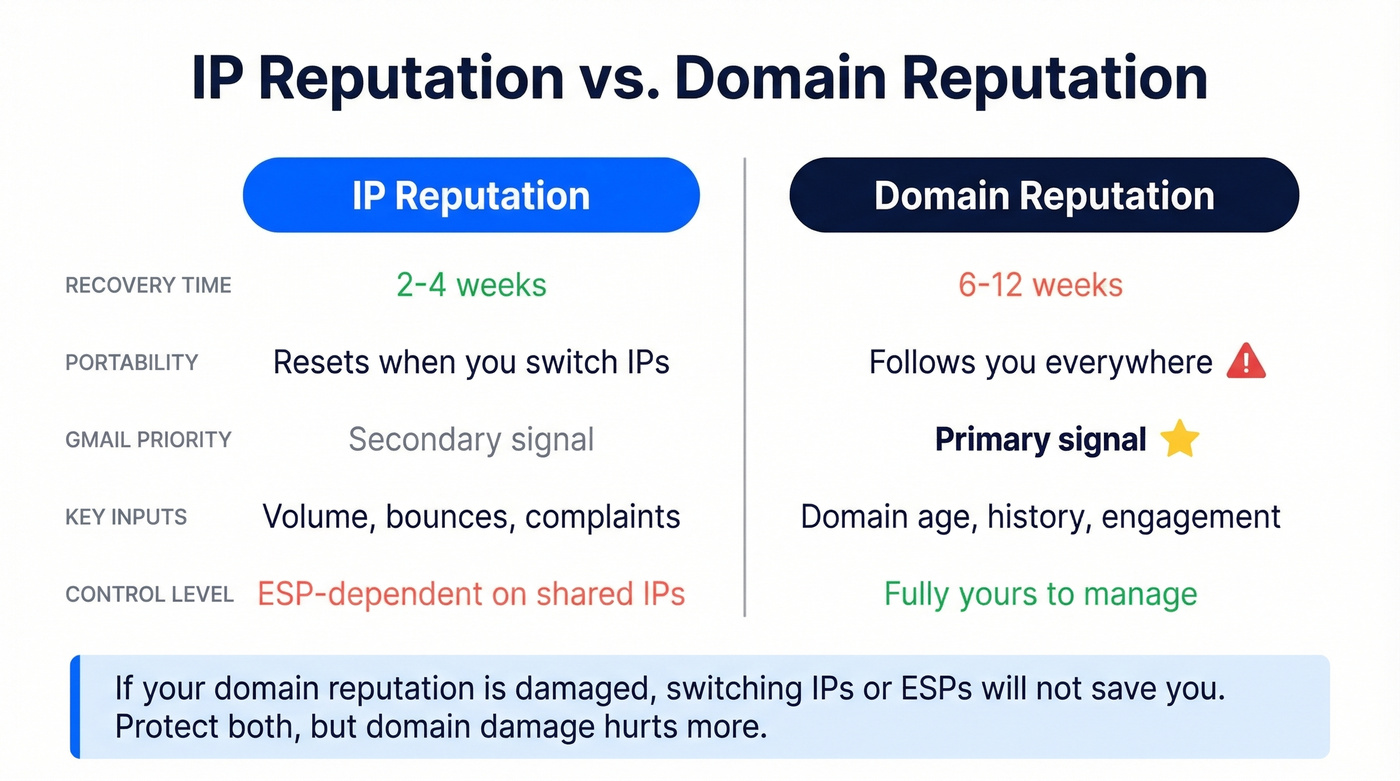
| Factor | IP Reputation | Domain Reputation |
|---|---|---|
| Recovery time | 2-4 weeks | 6-12 weeks |
| Portability | Resets if you switch IPs | Follows you everywhere |
| Gmail weighting | Secondary signal | Primary signal |
| Key inputs | Volume, bounces, complaints | Domain age, history, engagement |
| Control level | ESP-dependent on shared IPs | Fully yours |
Gmail weighs domain reputation more heavily than IP reputation. The logic is straightforward: domains are persistent identifiers, while IPs can change with servers and providers. If you switch ESPs, your IP reputation resets but your domain reputation follows you.
Here's the thing: if your domain reputation is damaged, switching to a new IP or a new ESP won't save you. Domain reputation takes 6-12 weeks to rebuild - roughly three times longer than IP reputation. Protect both, but know that domain damage is the one that really hurts.
What Determines Your Sending IP's Score
Mailbox providers evaluate a handful of signals. These are the ones that actually move the needle:
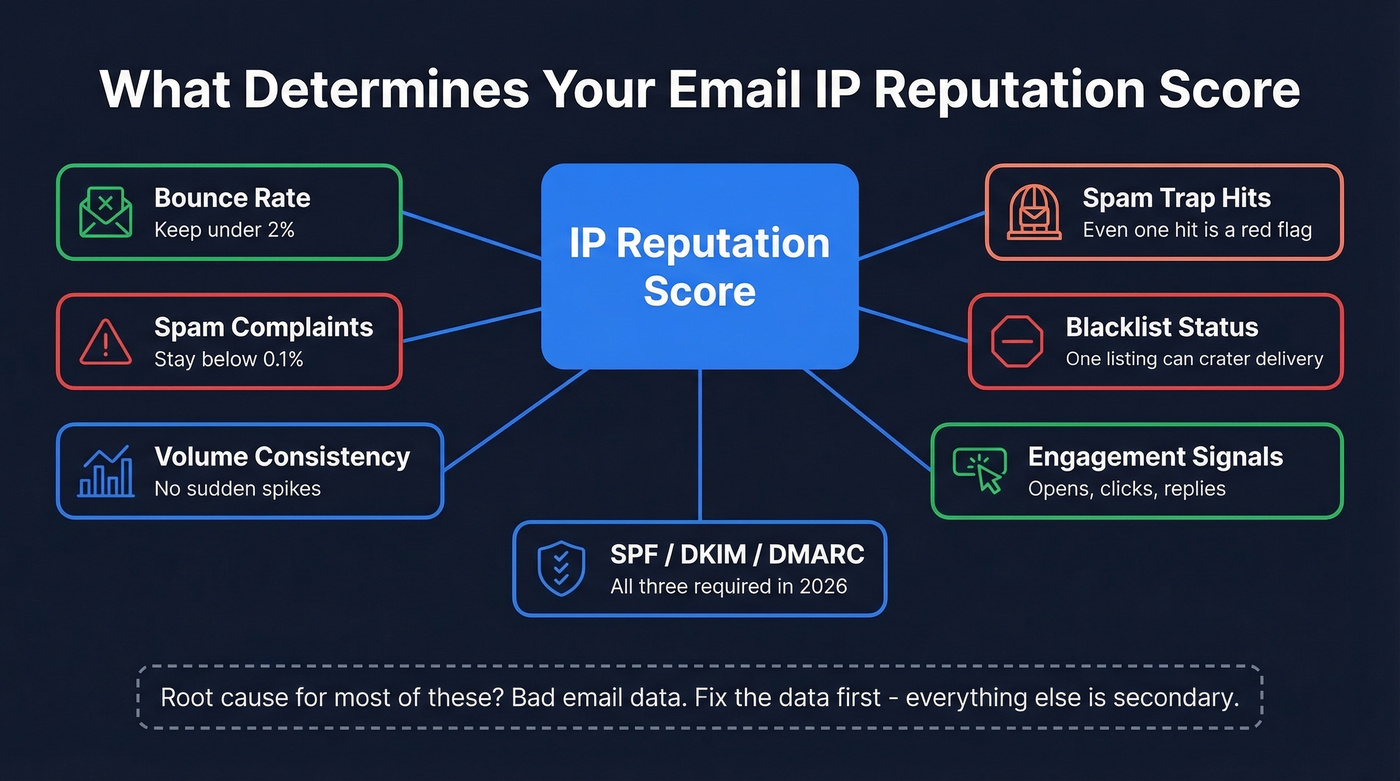
- Bounce rate - Keep it under 2%. Anything higher signals you're sending to bad addresses, and it's almost always a data quality problem. (If you need benchmarks and fixes, see our guide to bounce rate.)
- Spam complaint rate - The critical threshold is 0.1%. Exceed 0.3% consistently on Gmail and you'll face blocks.
- Volume consistency - Sudden spikes trigger filters. ISPs want predictable sending patterns.
- SPF/DKIM/DMARC authentication - Table stakes in 2026. Without all three, you're starting from a deficit.
- Engagement signals - Gmail especially tracks opens, clicks, and replies. Low engagement drags reputation down over time. (Related: what counts as a good email open rate in 2026.)
- Blacklist status - A single Spamhaus listing can crater your deliverability overnight.
- Spam trap hits - Even one hit on a pristine trap tells ISPs your list hygiene is broken. (If you suspect traps, use this spam trap removal playbook.)
Most of these factors trace back to one root cause: the quality of the addresses you're sending to. We've seen teams obsess over authentication and warm-up schedules while ignoring the fact that 15% of their list is invalid. Fix the data first - everything else is secondary.
Let's be honest: the email deliverability industry overcomplicates this. If your bounce rate is under 2% and your complaint rate is under 0.1%, you'll maintain healthy sender standing with minimal effort. The teams that struggle are almost always the ones sending to unverified lists.
How to Find Your Sending IP
Before you can check your reputation, you need to know which IP you're sending from. Open any sent email, view the full headers, and look for the SPF result line:
Authentication-Results: spf=pass (sender IP is 104.245.209.210)
That IP is your sending IP. If you're on a shared IP pool - which most ESPs use - check multiple messages from the past week. ESPs rotate customers between pools, so your sending IP today might differ from Monday's. Grab three or four recent messages and compare.

You just read that bounce rates above 2% crater your IP reputation. The fix isn't another warm-up tool - it's cleaner data. Prospeo's 5-step email verification delivers 98% accuracy, and every record refreshes every 7 days. Teams using Prospeo cut bounce rates from 35%+ to under 4%.
Stop diagnosing deliverability problems you can prevent with verified data.
How to Check Your IP Reputation
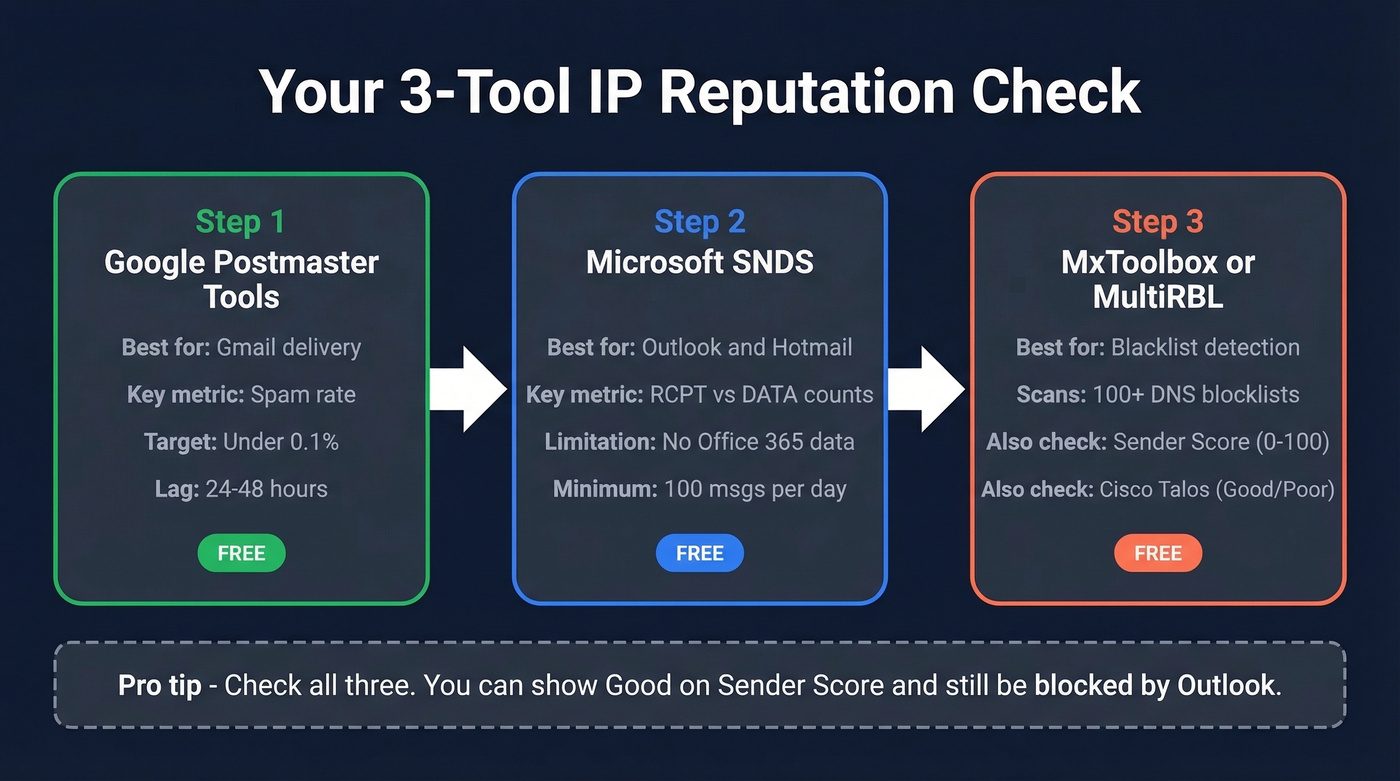
You don't need ten monitoring tools. You need three: Google Postmaster Tools for Gmail, Microsoft SNDS for Outlook, and one multi-RBL checker for blacklists.
Google Postmaster Tools
Postmaster Tools V1 retired on September 30, 2025. V2 provides daily updates with a 24-48 hour lag, so you're never looking at real-time data. You'll need to send roughly 100+ daily messages to unique Gmail recipients before the dashboard populates.
The spam rate metric is the one to watch. Keep it below 0.1% for healthy delivery. Exceed 0.3% consistently and Gmail will start blocking your messages.
One quirk worth knowing: you might see a "100% spam rate" on days you didn't send anything. That's a reporting artifact - delayed spam complaints from previous sends register on zero-send days, creating a division-by-zero anomaly. Don't panic. Focus on your 30-day trend, not single-day spikes.
Microsoft SNDS
SNDS (Smart Network Data Services) is Microsoft's free tool for monitoring how your IP performs when sending to Outlook and Hotmail recipients. Setup requires a Microsoft account, your sending IPv4, and access to the WHOIS-listed email for that IP. SNDS won't display traffic or spam data for IPs that sent fewer than 100 messages on a given day.
One important limitation: SNDS doesn't include mail sent to Office 365 or Exchange Online enterprise accounts. For B2B senders, that's a significant blind spot.
A useful diagnostic trick: compare RCPT counts versus DATA counts in the dashboard. If RCPT shows 1,000 but DATA shows 950, that means 50 messages were rejected before delivery - a sign of reputation-based filtering.
Starting November 2025, Microsoft tightened SNDS security. Authentication is now required for network access approval, complaint sample downloads have been discontinued, and automated report links expire after 30 days. JMRP reports now use standardized ARF format. If you had JMRP feeds not linked to an SNDS account, they've been removed - recreate them from the SNDS interface.
Sender Score, Talos, and Blacklists
Sender Score gives you a 0-100 rating. Scores in the 90s are excellent. Below 80, start investigating with your ESP. Cisco Talos uses a simpler grading system - unknown, poor, neutral, or good - and it's worth checking because some corporate firewalls reference Talos directly.
For blacklist checks, MxToolbox scans your IP against 100+ DNS-based blacklists, and MultiRBL checks many blocklists at once. Two interpretation warnings: blue or neutral entries on MultiRBL don't mean you're blocked (they're informational), and never send removal requests to MultiRBL itself. It's a checker, not a list operator. For direct blocklist lookups, go straight to Spamhaus.
Shared vs. Dedicated IP
Dedicated IPs are overrated for most senders.
Use a shared IP if your volume fluctuates week to week or you're just getting started. Shared IPs come pre-warmed, the ESP monitors for bad actors, and you skip the warm-up grind entirely.
Use a dedicated IP if you send high volume consistently, you need complete isolation from other senders' behavior, or you're running business-critical transactional email alongside marketing. A dedicated IP starts with zero reputation - you'll need to warm it up over weeks and maintain consistent volume. If a dedicated IP goes dormant for 30+ days, plan to warm it up again.
Skip the dedicated IP if you're sending fewer than 50,000 emails per month. The math just doesn't work at lower volumes. (If you're planning volume increases, also watch your email velocity.)
Warming Up a New or Damaged IP
IP warming means gradually increasing your daily send volume so ISPs learn to trust your sending patterns. In our experience, the schedule below is conservative but reliable - rushing it triggers spam filters every time.
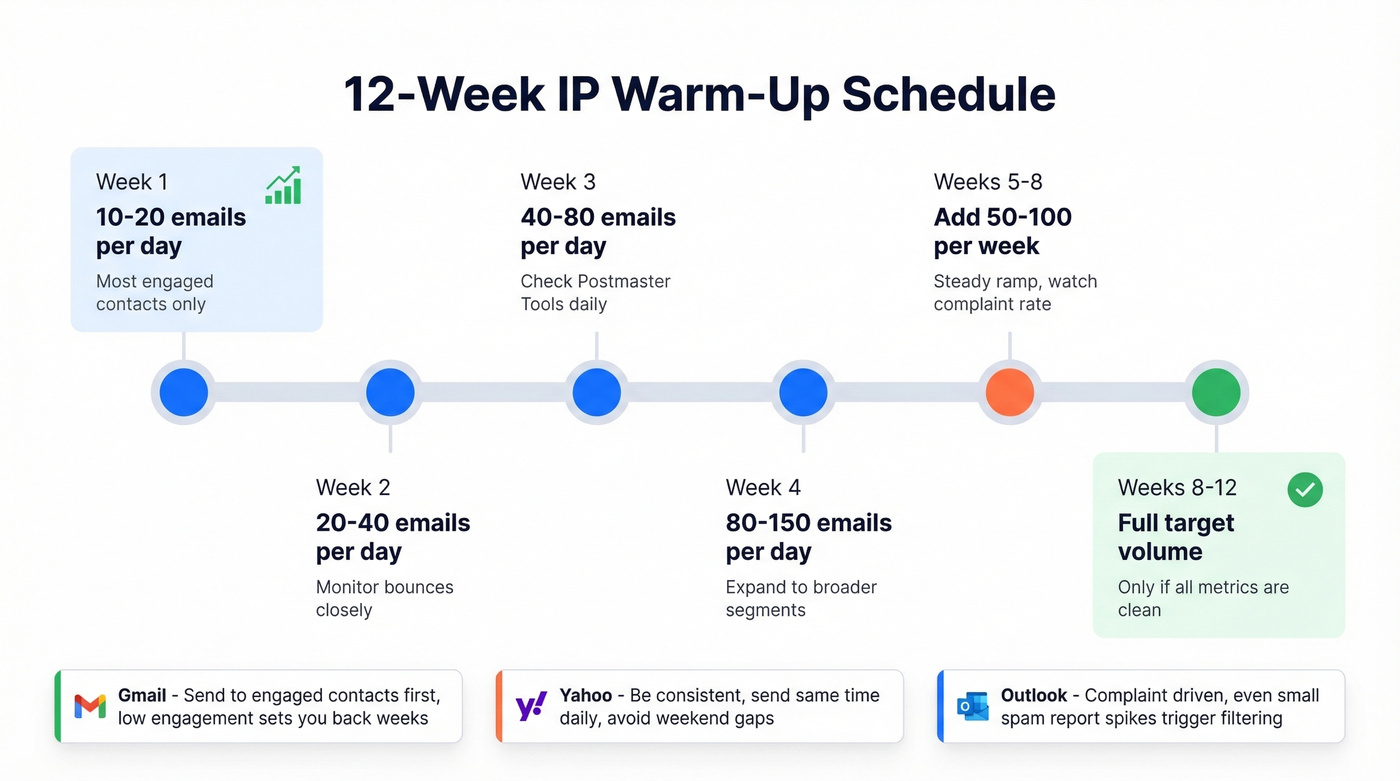
| Week | Daily Volume | Notes |
|---|---|---|
| 1 | 10-20 | Most engaged contacts only |
| 2 | 20-40 | Monitor bounces closely |
| 3 | 40-80 | Check Postmaster Tools daily |
| 4 | 80-150 | Expand to broader segments |
| 5-8 | +50-100/week | Steady ramp, watch complaints |
| 8-12 | Target volume | Full sending if metrics are clean |
Expect the full warm-up to take 8-12 weeks. A few ISP-specific notes worth remembering:
Gmail is highly sensitive to engagement. During warm-up, send only to contacts who've opened or clicked recently. Low engagement during the ramp will set you back weeks.
Yahoo throttles irregular patterns aggressively. Consistency matters more than volume - send at roughly the same time each day and avoid weekend gaps.
Outlook is complaint-driven. Even a small spike in "Report Spam" clicks can trigger filtering. The upside: "Not Spam" user actions actively help your reputation recover.
Warm-up tools that simulate engagement exist, but manual warm-up with real engagement is the safer path. The consensus on r/emaildeliverability tends to agree - synthetic engagement is a short-term hack that creates long-term risk. (If you're evaluating tools anyway, start with these unlimited email warmup tools.)
Fixing a Damaged IP Reputation
Emergency SOP
When you discover your IP is blacklisted or your reputation has tanked, follow this sequence:
- Stop all sending from the affected IP immediately.
- Diagnose the cause. Check bounce logs, complaint reports, and blacklist status. The culprit is usually bad list data, spam trap hits, a compromised account, or a sudden volume spike.
- Fix the root cause. Clean your list, remove complainers, reset compromised credentials, or fix authentication gaps.
- Request delisting from any blacklists.
- Ramp back slowly over 1-2 weeks, starting with your most engaged segment. Watch bounce rates daily - red flag above 2% - and complaint rates - red flag above 0.1%.
Delisting Playbook
| Blacklist | Process | Timeline |
|---|---|---|
| Spamhaus SBL | Manual form + explanation | 24-48h |
| Spamhaus XBL | Tied to CBL, auto after fix | Hours-24h |
| Barracuda BRBL | Lookup, request removal, verify email | 12-24h |
| SpamCop | Auto-expire | 24-48h |
| UCEProtect L1 | Free after 7 days | 7 days |
| UCEProtect L2/L3 | Requires host action | Varies |
Prioritize Spamhaus and Barracuda first - they're referenced by the widest range of filters and gateways. (If you need step-by-step, see our Spamhaus blacklist removal guide.)
When Authentication Isn't Enough
This one is frustrating. Microsoft can block your IP based on internal signals that don't appear on any public blocklist - and your only recourse is a manual support form.
You'll see this error: 451 4.7.650 The mail server [IP] has been temporarily rate limited due to IP reputation.
Your SPF, DKIM, and DMARC are all passing. Every public blocklist shows clean. But Microsoft is throttling you anyway based on internal reputation data that's invisible to you.
Your only option is to submit a remediation request through olcsupport.office.com. There's no automated unban. You wait.
How IP Reputation Affects Deliverability
The connection is direct: a low score means fewer messages reach the inbox. ISPs use your sending IP's reputation as one of the first gatekeeping checks - often before they even evaluate your content or subject line. If your IP has poor standing, messages get throttled, deferred, or rejected at the SMTP level, meaning recipients never see them at all.
This is why monitoring across multiple providers matters. A clean reputation with Gmail doesn't guarantee clean delivery to Outlook, and vice versa. Each mailbox provider maintains its own scoring model, so checking across tools is the only way to catch problems before they cascade into full-blown blocks. (For a broader monitoring stack, see our roundup of email reputation tools.)
Protecting Your Reputation Long-Term
Most IP reputation problems are data quality problems in disguise. You can nail authentication, warm up perfectly, and monitor daily - but if you're sending to bad addresses, none of it matters. We recommend running through this checklist weekly:
Verify every list before sending. Not after the first bounce spike. Before. Prospeo's email verification catches spam traps and honeypots through a 5-step process with 98% accuracy at roughly $0.01 per email - the cheapest insurance your sending reputation can buy. (If you're comparing vendors, start with these Bouncer alternatives.)
Monitor weekly. Check Google Postmaster Tools and SNDS every Monday. It takes five minutes.
Enroll in feedback loops. ISP feedback loops are automated reports that tell you exactly which recipients marked you as spam. Most major ISPs offer them free - sign up, and remove every complainer immediately.
Segment by engagement. Send to your most active contacts first. Suppress anyone who hasn't opened in 90 days from cold campaigns. (If you're building outbound sequences, use a proven B2B cold email sequence structure.)
Run real-time verification on form submissions and imports. Catch bad addresses at the point of entry, not after they've bounced.
Real results from teams that prioritized verification: Meritt cut their bounce rate from 35% to under 4%, and Stack Optimize maintains 94%+ deliverability with bounce rates under 3% and zero domain flags across all clients.
Spam traps, invalid addresses, catch-all domains - these are the root causes behind every IP reputation crisis in this article. Prospeo's proprietary verification catches all three with spam-trap removal, honeypot filtering, and catch-all handling built in. At $0.01 per email, protecting your sender reputation costs less than one blocked campaign.
Fix the data first. Everything else is secondary.
FAQ
How long does it take to recover IP reputation?
IP reputation typically recovers in 2-4 weeks of clean sending, while domain reputation takes 6-12 weeks. Start with your most engaged contacts and ramp volume gradually - rushing the ramp is the most common reason recovery stalls.
Can a shared IP's bad reputation affect my emails?
Yes - other senders' behavior directly impacts your deliverability on a shared IP. Reputable ESPs monitor and remove bad actors quickly, but if you're consistently affected and send 50,000+ messages monthly, a dedicated IP gives you full control.
Why does Postmaster Tools show 100% spam rate when I didn't send?
Delayed spam complaints from previous sends register on zero-send days, creating a division-by-zero anomaly. The number is meaningless in isolation - focus on your 30-day trend instead.
What's the difference between a blocklist and an internal ISP blacklist?
Public blocklists like Spamhaus have defined delisting processes with 24-48 hour turnarounds. Internal ISP blacklists - especially Microsoft's - are invisible to external tools, and your only recourse is a manual remediation request through olcsupport.office.com.
How does email verification prevent reputation damage?
Bad addresses cause bounces and spam trap hits - the two fastest ways to destroy your sending reputation. Verifying emails before sending keeps bounce rates under 2% and eliminates the most common cause of blacklisting.