

Email List Scrubbing: The Practical Process (and Tools) for 2026
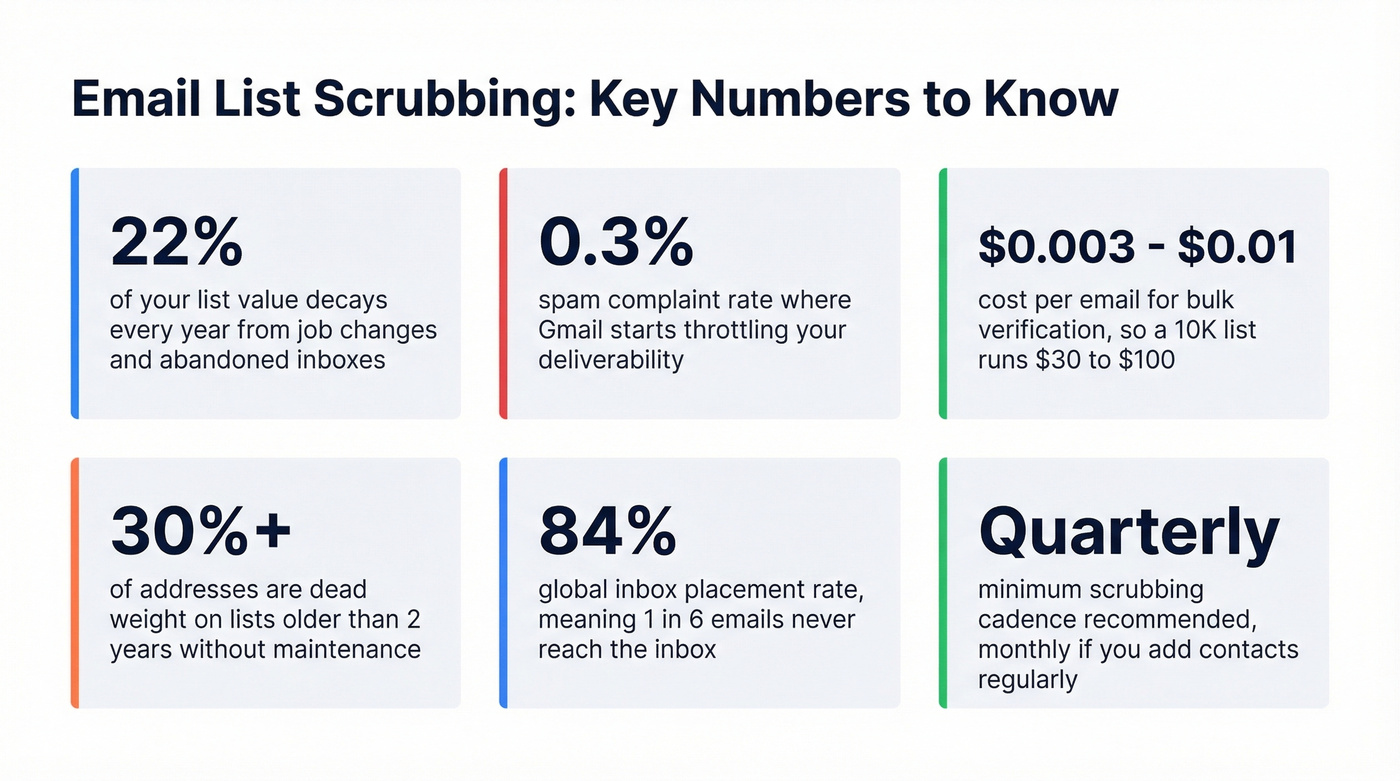
Your email list loses roughly 22% of its value every year. That's not a scare tactic - it's what happens when people change jobs, abandon inboxes, and let domains lapse. Email list scrubbing is how you stop the bleeding before dead addresses wreck your sender reputation and ISPs start routing campaigns to spam. Nearly 40% of senders rarely or never conduct list hygiene, which is wild considering how straightforward the process actually is.
Here's the thing: we've watched teams spend weeks optimizing subject lines and A/B testing send times while ignoring a list that's 25% dead weight. Fix the list first. Everything else gets easier.
Scrub Triggers and Workflow at a Glance
Act if any of these are true:
- Bounce rate above 2% on your last campaign
- Spam complaint rate approaching 0.3%
- You haven't verified your list in 6+ months
- You just imported contacts from a new source
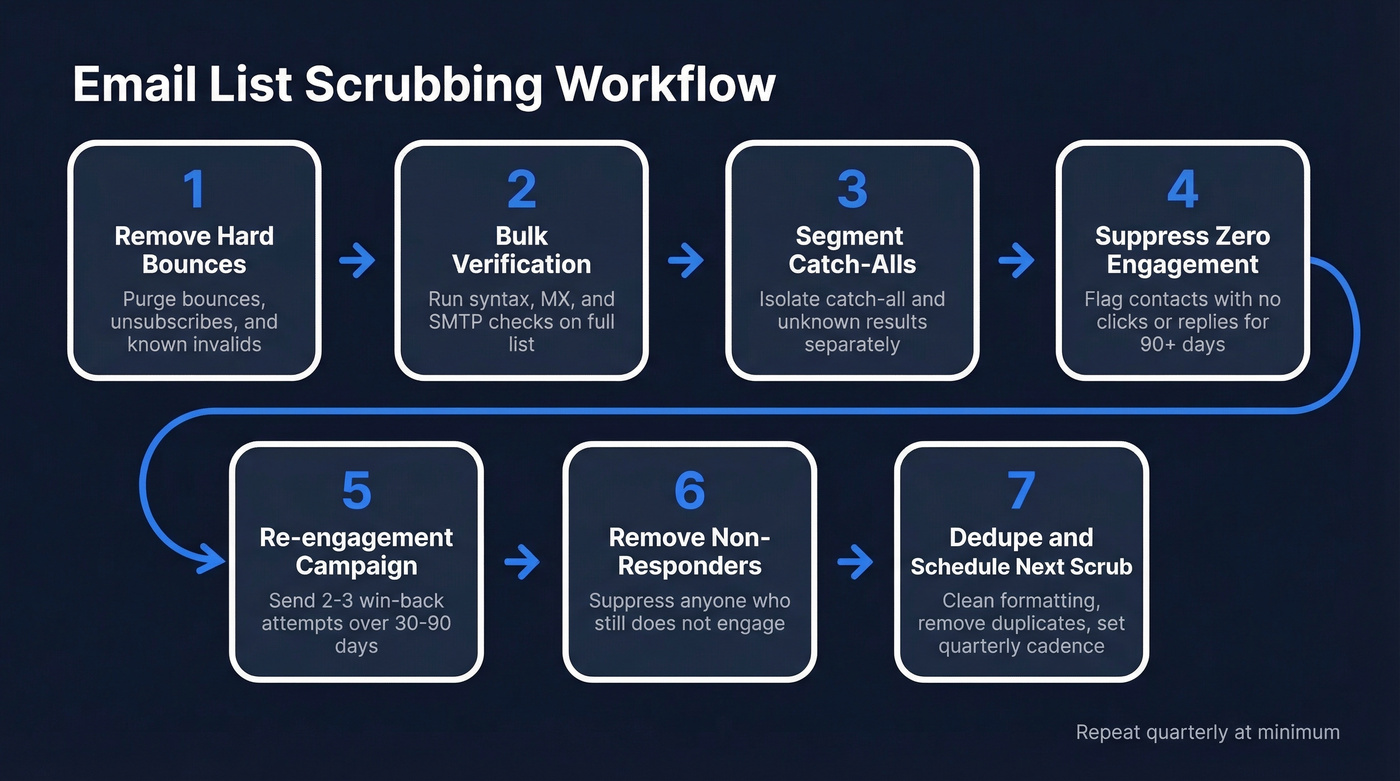
The workflow:
- Remove hard bounces and unsubscribes
- Run bulk verification - segment catch-all and unknown results
- Suppress zero-engagement contacts for 90+ days
- Send a re-engagement campaign to borderline contacts
- Remove non-responders after 2-3 attempts
- Deduplicate and normalize formatting
- Schedule your next scrub - quarterly minimum
What Email List Scrubbing Actually Means
Email list scrubbing is the process of removing invalid, risky, and unengaged addresses from your sending list before they damage deliverability. Simple concept. The confusion starts when people use "scrubbing," "cleaning," and "verification" interchangeably.
They aren't the same thing. Verification is the technical step: syntax checks, MX lookups, and SMTP handshakes to confirm a mailbox exists. Cleaning is broader - verification plus removing duplicates, fixing typos, and suppressing role addresses like info@ or sales@. Scrubbing is the full operational process: verification plus engagement-based pruning, re-engagement campaigns, and ongoing hygiene scheduling. Most tools market themselves as "cleaning" or "verification" services. What you actually need is a scrubbing workflow - the tool is just one step in it.
"Valid" doesn't mean "safe." A verification tool can confirm an address accepts mail. It can't tell you whether that address is a spam trap, whether the person opted in, or whether they'll mark you as spam. Scrubbing requires engagement data and technical verification - neither alone is enough.
Catch-all domains add another layer of ambiguity. These domains accept mail for any address, real or fake. A verifier flags them as "catch-all" but can't confirm whether the specific mailbox is monitored. You'll need a separate strategy for these - more on that below.
Why Scrubbing Matters Right Now
If you're not actively scrubbing on a regular cadence, you're sending to a list that gets worse every quarter. ISPs are paying attention.
A recurring question on r/Emailmarketing captures the problem perfectly: what do you do with a 40,000-person list that's been sitting for years while open rates crater? The answer starts with verification, but it doesn't end there.
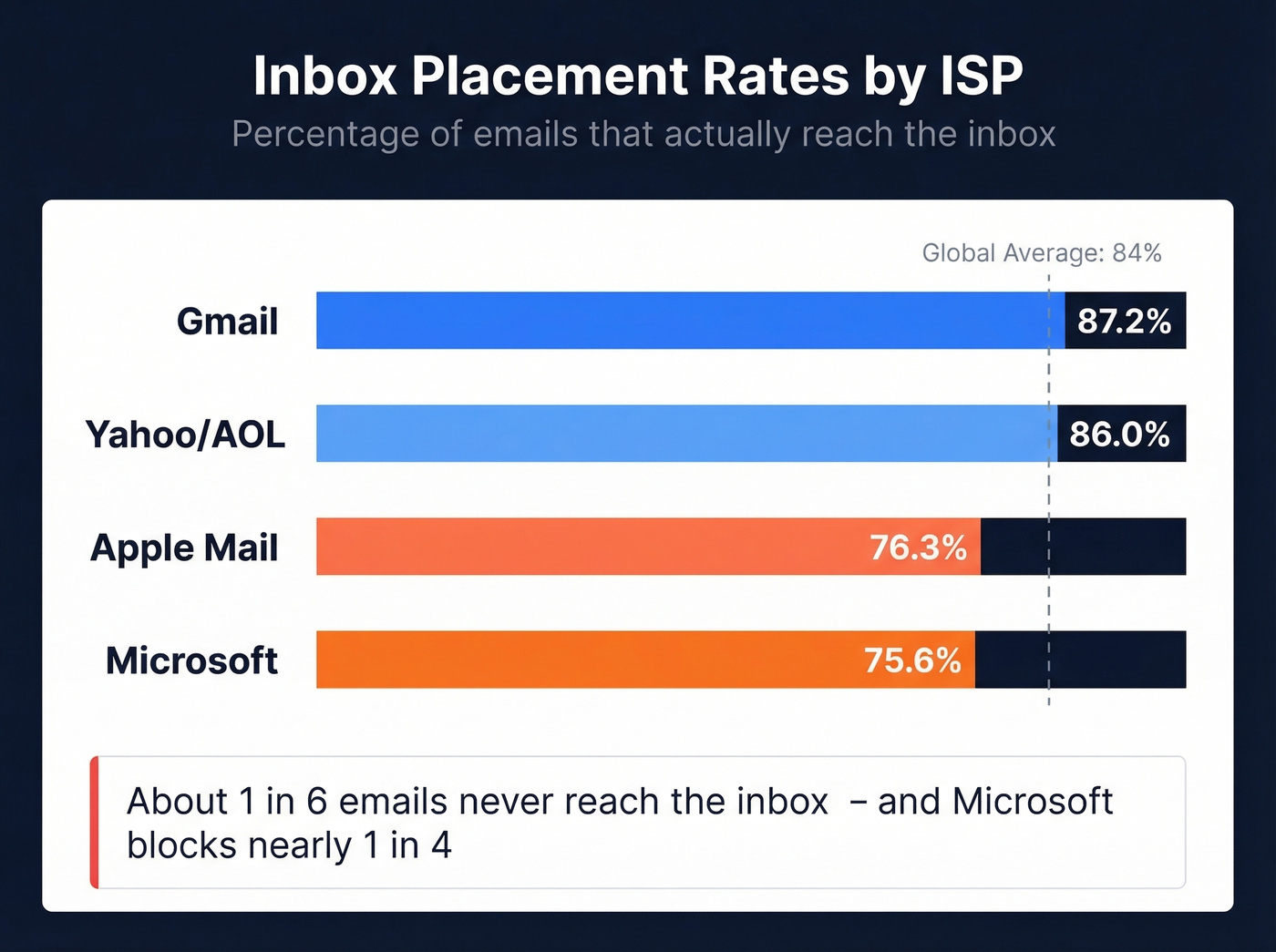
Recent Validity benchmark data shows inbox placement sitting around 84% globally - meaning about 1 in 6 emails never reach the inbox. The ISP breakdown is revealing:
- Gmail: 87.2% inbox placement
- Microsoft: 75.6% - the toughest gatekeeper
- Yahoo/AOL: 86%
- Apple Mail: 76.3%
Gmail starts throttling when spam complaints hit 0.3%. That's three complaints per thousand emails. A stricter industry rule of thumb: for every 10,000 emails, you should get fewer than 5 spam complaints - a 0.05% rate. Blow past either threshold with a single bad segment and you're in trouble.
The compounding effect is what kills you. Bad addresses trigger bounces. Bounces lower your sender score. A lower score means more of your good emails land in spam or hit a blocklist. Fewer opens and clicks further signal to ISPs that your mail isn't wanted. It's a death spiral that starts with addresses you could've removed in five minutes.
If you haven't scrubbed in over six months, assume 10-15% of your list is dead weight. For lists older than two years without maintenance, that number hits 30%+.
When to Scrub Your List
Not every list needs scrubbing on the same schedule. The right cadence depends on your bounce rate, list age, and how aggressively you're acquiring new contacts.
| Bounce Rate | Status | Action |
|---|---|---|
| Below 1% | Ideal | Maintain quarterly checks |
| 1-2% | Acceptable | Monitor; scrub if trending up |
| Above 2% | Problem | Scrub immediately |
Industry context matters here. Some verticals naturally run higher - construction averages 1.28%, while beauty and personal care sits at 0.33%. If you're in construction and seeing 1.3%, that's normal. If you're in beauty and seeing 1.3%, something's broken.
Triggers that should prompt an immediate scrub:
- You just imported contacts from a trade show, webinar, or purchased list
- You're migrating ESPs - clean before you move so you don't poison a fresh domain
- Open rates dropped more than 20% over two campaigns without an obvious content explanation
- You haven't sent to a segment in 6+ months
Don't forget point-of-entry verification. Double opt-in for all new signups is the single best preventive measure. It eliminates typo traps and ensures every address was intentionally submitted. Pair it with real-time API verification at signup forms and you'll dramatically reduce how often you need batch scrubbing.
We've seen teams ignore a creeping bounce rate for months, then get their sending domain suspended by an ESP overnight. The gap between "fine" and "suspended" is thinner than most people realize.
How Verification Works Under the Hood
Every reputable verification tool runs a similar pipeline. Understanding it helps you interpret results and pick the right tool.
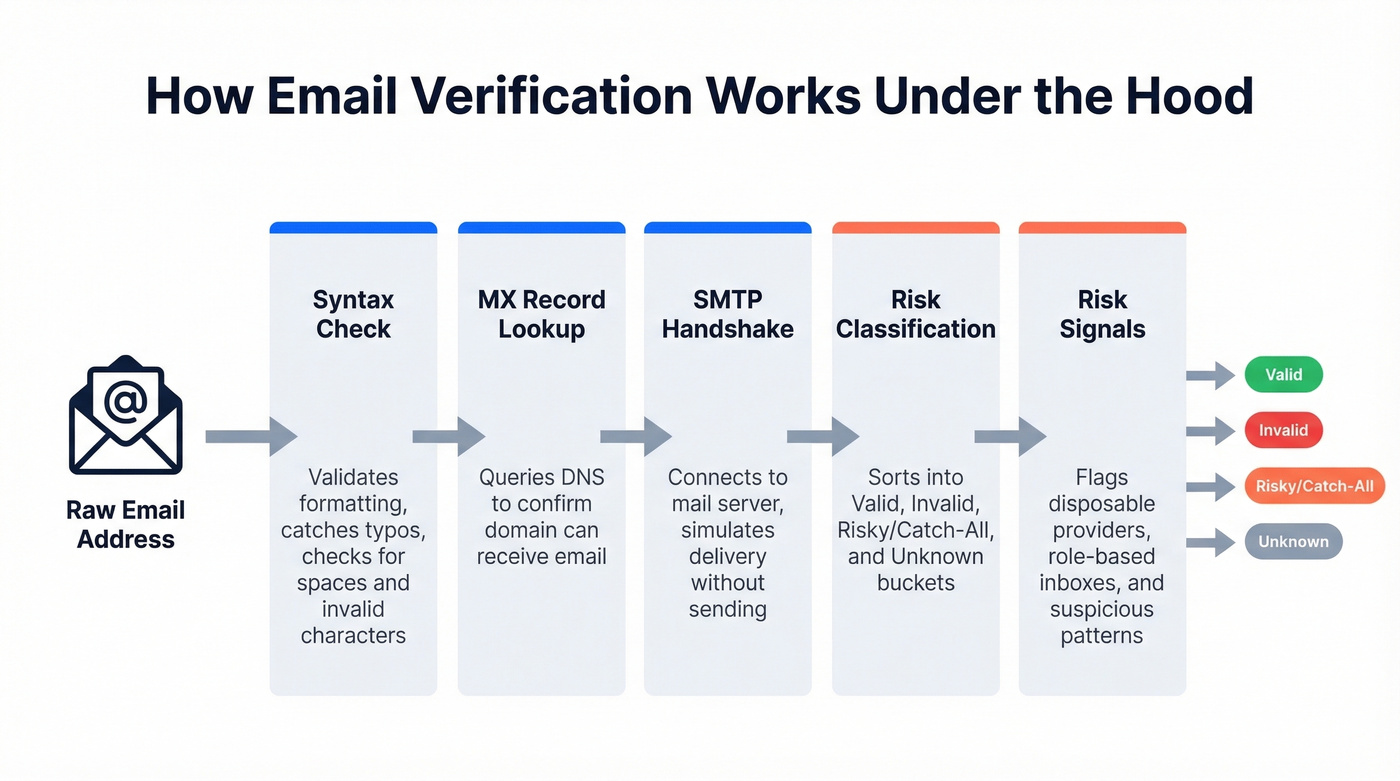
Step 1: Syntax check. Confirms the address follows valid formatting - no spaces, proper use of @, valid characters. Catches obvious typos and garbage entries.
Step 2: MX record lookup. Queries DNS to confirm the domain has mail exchange records, meaning it's configured to receive email. No MX records = can't accept mail.
Step 3: SMTP handshake. Connects to the mail server and simulates sending a message without actually delivering one. If the server responds with "this mailbox doesn't exist," the address is invalid.
Step 4: Risk classification. Good verifiers don't just return "valid" or "invalid." They categorize results into valid, invalid, risky/catch-all, and unknown buckets. The risky bucket is where the real decisions happen.
Step 5: Risk signals. Many tools also flag disposable email providers, role-based inboxes, and other patterns that correlate with low-quality or high-risk addresses.
What to do with catch-all results: You can't verify these definitively. Three options: run a small holdout test by sending to 10-20% and measuring bounces, lower your sending volume to those addresses, or route them to a secondary channel like retargeting ads. Don't bulk-send to your entire catch-all segment on day one.
Unknown results mean the server didn't respond clearly during verification. Treat these like catch-alls - proceed with caution or suppress entirely.

Scrubbing fixes a dirty list. Prospeo prevents one. Every email in our 143M+ database passes 5-step verification - including catch-all handling, spam-trap removal, and honeypot filtering. Start with 98% accurate data and skip the cleanup.
Stop scrubbing dead addresses. Start with verified ones at $0.01 each.
Spam Traps: What Actually Matters
Spam traps are the bogeyman of email marketing, and most articles either oversimplify them or make them sound scarier than they are. Let's break this down.
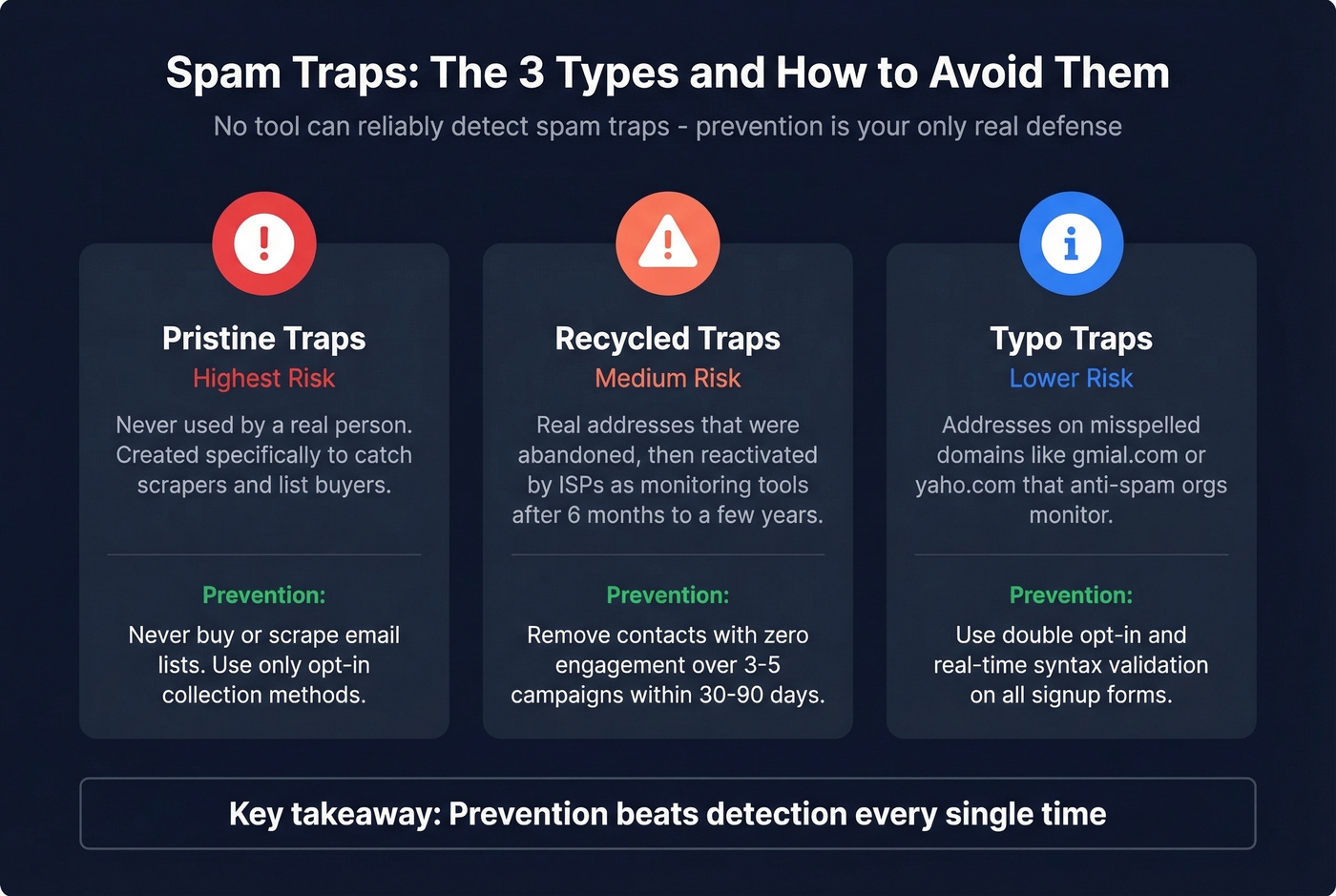
Pristine traps are addresses created specifically to catch spammers. They've never been used for real communication. If you're hitting these, you're scraping or buying lists - there's no legitimate way to acquire them.
Recycled traps are real addresses that were abandoned, then reactivated by ISPs or anti-spam organizations as monitoring tools. The gap between abandonment and reactivation is typically 6 months to a few years. If you're emailing someone who hasn't engaged in two years, you might be hitting one.
Typo traps sit on misspelled domains - gmial.com, gnail.com, yaho.com. A basic syntax check catches most of them.
No verification tool can reliably detect spam traps. Kickbox says this explicitly - trap detection "isn't truly possible to accurately identify these traps systematically." Traps are secret by design and continuously repurposed. Any vendor claiming 100% trap detection is overselling.
What you can do is prevent trap hits through good hygiene: use double opt-in to catch typos at collection, remove addresses with zero engagement over 3-5 consecutive campaigns within a 30-90 day window, and never buy or scrape lists. Prevention beats detection every time. (If you suspect you’ve already been hit, follow a dedicated spam trap removal process.)
How to Scrub an Email List: Step by Step
This workflow works whether you're scrubbing a 5,000-person newsletter or a 200,000-contact marketing database.
Step 1: Purge the obvious. Remove all hard bounces, unsubscribes, and addresses already flagged as invalid. Your ESP tracks these - export the suppression list and cross-reference. For soft bounces, suppress and retry. If the same address soft-bounces across 3+ campaigns, treat it as a hard bounce.
Step 2: Run bulk verification. Upload your remaining list as a CSV to a verification tool. Results come back categorized into valid, invalid, risky/catch-all, and unknown buckets. Verification commonly costs $0.003-$0.01 per email, so verifying a 10,000-contact list typically runs $30-$100.
Step 3: Segment by engagement. Verification tells you if an address exists. Engagement tells you if anyone cares. Pull contacts with zero clicks, zero replies, and zero site visits in the last 90 days into a separate segment. Don't delete them yet - but don't send your normal campaigns to them either. Apple Mail Privacy Protection makes open tracking unreliable for a significant chunk of your list, so rely on clicks, replies, site events, and purchases instead. (If you need a deeper deliverability baseline, use an email deliverability guide to audit the full funnel.)
Step 4: Re-engage borderline contacts. Send your disengaged segment a dedicated campaign: "Still want to hear from us? Click here to stay subscribed." Give them 2-3 attempts over 30-90 days.
Step 5: Remove non-responders. Anyone who doesn't engage gets suppressed. This is the hardest step emotionally - nobody wants to shrink their list. Do it anyway. A smaller, engaged list outperforms a bloated, disengaged one every single time.
Step 6: Deduplicate and normalize. Remove duplicate entries and fix formatting issues - obvious typos like gmial.com to gmail.com. Most verification tools catch these, but double-check.
Step 7: Schedule the next scrub. Quarterly is the minimum. Monthly is better if you're adding contacts regularly. The teams that treat this as a recurring process - not a one-time fix - are the ones with consistently high deliverability.
For teams sending to EU contacts, confirm your verification tool processes data in compliance with GDPR. Look for vendors with DPAs available and opt-out enforcement.
Why "Send and Remove Bounces" Backfires
The most common shortcut is skipping verification and just removing addresses after they bounce. This is a trap.
You send to an unverified list. 3-4% bounces. Your ESP flags the campaign. Your sender reputation drops. The next campaign - even to good addresses - lands in more spam folders. Fewer opens, fewer clicks, more complaints. Your ESP sends a warning. One more bad send and you're suspended. A sender got banned by Brevo after 20-30% of their emails bounced - that's an extreme case, but the pattern starts the same way every time.
Pre-send verification costs $0.003-$0.01 per email. A domain reputation recovery takes weeks and costs you every campaign you can't send during that window. Verification isn't an expense. It's insurance. (If you’re diagnosing the root cause, start with email bounce rate benchmarks and codes.)
Lists decay 22% per year. Prospeo's 7-day data refresh cycle means the contacts you pull are current - not 6 weeks stale like competitors. Pair that with real-time API verification at the point of entry and your bounce rate stays under 2% without quarterly scrub sessions.
Build lists that don't need scrubbing. 75 free emails to prove it.
Best Tools for Email List Scrubbing in 2026
Verification tools differ on one key axis: how aggressively they reject borderline addresses. Some are permissive and maximize reach; others are conservative and protect your reputation at the cost of suppressing valid contacts.
How we evaluated: pricing at standard volumes, accuracy in independent tests, free tier usefulness, and catch-all handling quality.
| Tool | Best For | 10k Price | Free Tier | Key Differentiator |
|---|---|---|---|---|
| Prospeo | Accuracy + B2B workflow | ~$100 | 75/mo | 98% accuracy, 5-step pipeline |
| ZeroBounce | Max reach, generous free | $65 | 100/mo | Unknown results are free; credits never expire |
| NeverBounce | Zero-bounce cold outbound | $50 | None | Conservative verification; auto-typo fix |
| Bouncer | Budget bulk verification | $60 | 100 credits | Cheapest entry at $35/5k |
| Kickbox | Transparent mid-market | $80 | None | Publicly honest about trap limits |
| Clearout | One-off small cleanups | - | 100 emails | $21 for 3,000 credits |
Prospeo
Prospeo runs a 5-step verification pipeline: syntax validation, MX checks, SMTP handshakes, catch-all handling, and spam-trap/honeypot filtering. The 98% accuracy rate has real-world proof - Meritt, an outbound agency, saw bounce rates drop from 35% to under 4% after switching their verification to Prospeo. Stack Optimize built to $1M ARR while maintaining 94%+ deliverability and sub-3% bounce rates across all their clients using the same infrastructure.
Pricing runs roughly $0.01 per email with a free tier of 75 verifications per month plus 100 Chrome extension credits. No contracts. Beyond pure verification, it's a full B2B data platform with 300M+ profiles and a 7-day data refresh cycle, so you can find contacts and verify them in the same workflow - no juggling separate platforms. (If you’re building lists from scratch, see how to generate an email list without poisoning deliverability.)
Pick this if you want the highest accuracy and a platform that handles both prospecting and verification. Skip this if you only need a bare-bones verifier and don't care about prospecting features.
ZeroBounce
ZeroBounce is the safe pick for teams that want generous free mechanics and maximum reach. The 100 free monthly verifications are useful for small lists or ongoing maintenance. Unknown results don't cost credits - a meaningful differentiator when verifying lists with lots of ambiguous addresses. Credits never expire, so you can buy in bulk without a use-it-or-lose-it clock.
In a real-send test of 563 emails, ZeroBounce approved 453 addresses and only 2 bounced - a 99.6% accuracy rate on addresses it marked safe. The tradeoff: it's more permissive than NeverBounce, approving more borderline addresses.
Pick this if you want the best free tier and don't mind a slightly permissive approach.
NeverBounce
NeverBounce takes the opposite approach. In that same 563-email test, it approved only 392 addresses but achieved a 0% bounce rate on the ones it cleared. If you're running cold outbound and every bounce directly impacts your domain reputation, that conservatism is a feature, not a bug.
Pricing starts at $0.008 per credit on pay-as-you-go, or $49/month for up to 10,000 verifications on the Growth plan. Credits expire after 12 months, so the subscription makes more sense for teams verifying monthly. NeverBounce also auto-fixes common typos, which saves a manual cleanup step.
| ZeroBounce | NeverBounce | |
|---|---|---|
| Approved (563-email test) | 453 | 392 |
| Bounces on approved | 2 | 0 |
| Philosophy | Maximize reach | Minimize risk |
| Best for | Marketing lists | Cold outbound |
Bouncer
The budget pick. At $35 for 5,000 verifications, Bouncer has the cheapest entry point on this list. The interface is clean and no-frills - upload a CSV, get results, move on. For teams that need reliable bulk verification without extra features, it gets the job done. (If you want more options in the same category, compare Bouncer alternatives.)
Kickbox
Slightly pricier at $80 for 10k. The interesting thing about Kickbox is their intellectual honesty: they publicly state that spam trap detection isn't truly possible. That transparency is refreshing in a market where competitors claim trap detection as a headline feature.
Clearout
Clearout offers 100 free email verifications and pay-as-you-go starting at $21 for 3,000 credits. Good for very small lists or one-off cleanups where you need to verify a batch quickly without committing to a subscription.
Accuracy Reality Check
Every verification vendor claims high accuracy. Independent testing tells a different story.
The Sparkle.io comparison tested 563 emails through both ZeroBounce and NeverBounce, then actually sent to the verified addresses. ZeroBounce approved 61 more emails as safe. On the real send, ZeroBounce's approved set had 2 bounces; NeverBounce's had zero. This illustrates the core tradeoff: permissive tools give you more reach but accept slightly more risk.
How to interpret your results:
- 60%+ valid = normal for a well-maintained list
- 20%+ risky/catch-all = you have lots of corporate domains with catch-all configurations; run a holdout test before bulk-sending
- 10%+ invalid = significant decay; scrub more frequently
Unsure about your results? Compare two tools on the same list. The overlap in "valid" results is your high-confidence segment.
FAQ
How often should you scrub an email list?
At minimum once per quarter, or monthly if you're adding new contacts regularly. Lists decay by roughly 22% per year, so waiting longer than 90 days means accumulating dead addresses that hurt deliverability. Always scrub before migrating ESPs or emailing a dormant segment.
What's the difference between scrubbing and verification?
Verification checks whether an email address exists via syntax, MX, and SMTP checks. Email list scrubbing is the full process: verification plus engagement-based pruning, re-engagement campaigns, deduplication, and ongoing scheduling. Verification is one step; scrubbing is the complete workflow.
What should I do with catch-all and unknown results?
Don't bulk-send to them immediately. Run a holdout test - send to 10-20% of the catch-all segment and measure bounce rates. If bounces stay under 2%, gradually increase volume. Suppress entirely if your domain reputation is already fragile or you're warming a new sending domain.
Can I scrub my list for free?
With limits, yes. ZeroBounce offers 100 free verifications per month, Prospeo provides 75 free verifications monthly with full catch-all handling, and Bouncer gives 100 free credits to start. For lists under a few hundred contacts, free tiers work fine. For anything larger, expect to pay $0.003-$0.01 per email.
How do I know it's time to scrub my email list?
Watch for bounce rates climbing above 2%, spam complaint rates approaching 0.3%, or open rates dropping more than 20% across consecutive campaigns. If you just imported contacts from a new source or haven't sent to a segment in six months, those are also clear signals to act immediately.