

Email MTA: How Mail Transfer Agents Actually Work
Every email you send passes through at least one email MTA - a Mail Transfer Agent - before it reaches the recipient's inbox. Most people never think about this layer of infrastructure until something breaks. A misconfigured MTA silently drops messages, tanks your sender reputation, or bounces 15% of a campaign you spent weeks building. If you're running outbound at any scale, understanding how MTAs work isn't optional.
The Short Version
An MTA is the SMTP engine that relays email between servers - the postal truck of the internet. Postfix is the default choice for most self-hosting in 2026: modular, secure, well-documented. If deliverability matters more than infrastructure control, use a cloud SMTP relay like Postmark, SendGrid, or Amazon SES and verify your lists before sending. Bad addresses cause more deliverability damage than bad server configs ever will.
What Is a Mail Transfer Agent?
A Mail Transfer Agent is the server process responsible for relaying messages from one SMTP hop to the next until the recipient's domain accepts delivery. It operates on a store-and-forward model: accept a message, queue it, attempt delivery, retry on failure, and eventually bounce or expire if delivery proves impossible.
The canonical architecture comes from [RFC 5598](https://datatracker.ietf.org/doc/html/rfc5598), which defines the roles in the email ecosystem. Your email client - the MUA, or Mail User Agent - composes the message. The MSA, or Mail Submission Agent, accepts it for sending. The MTA relays it across the internet. The MDA, or Mail Delivery Agent, drops it into the recipient's mailbox. Each role is distinct, though in practice a single piece of software often handles multiple roles.
Think of the MTA as the routing layer. It doesn't care about your message content. It cares about where the message needs to go, whether the destination is reachable, and what to do when it isn't.
The Email Delivery Chain
Let's walk through what happens when you hit send.
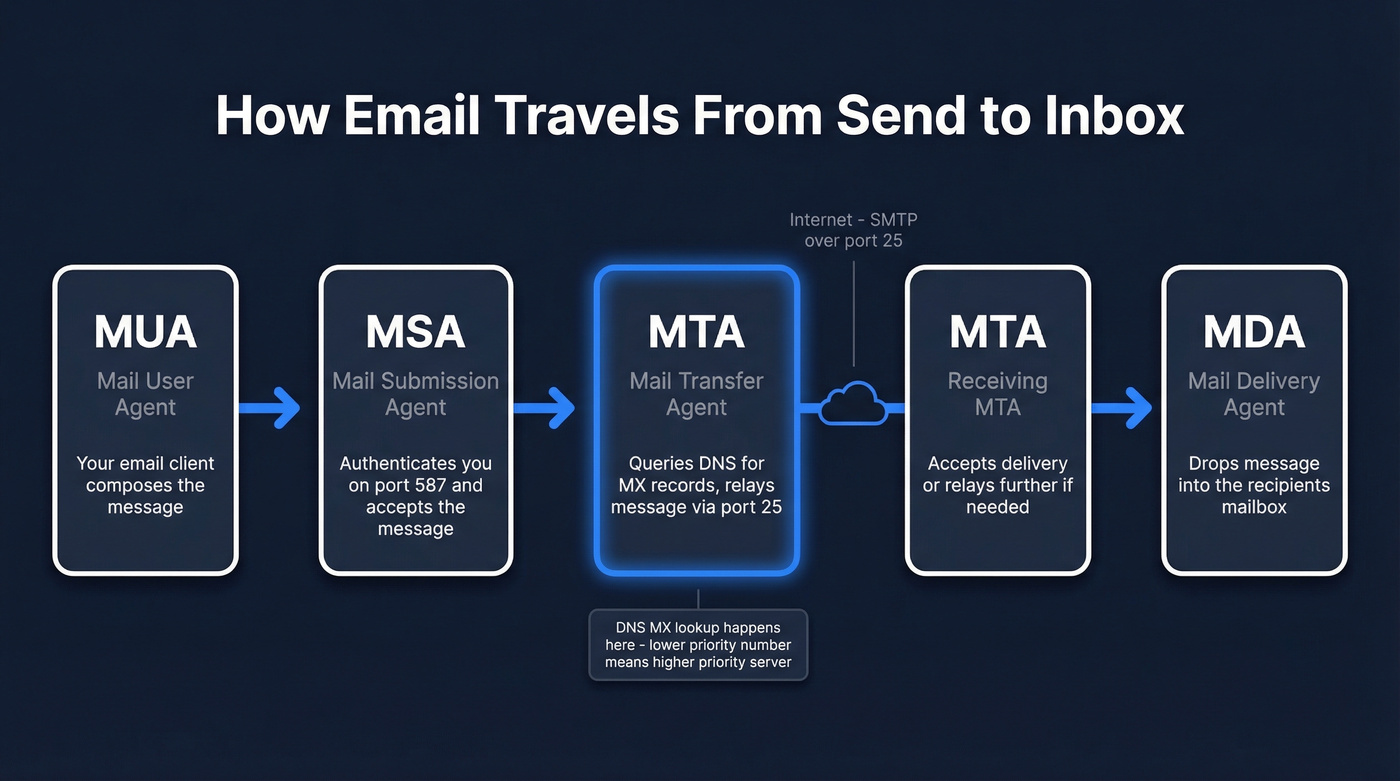
Your email client connects to your outgoing mail server's MSA on port 587 - the designated submission port. The MSA authenticates you, accepts the message, and hands it to the MTA process. This is where the real work begins.
The MTA queries DNS for the recipient domain's MX records. MX records come with priority values - lower numbers mean higher priority. If the primary MX server at priority 10 is unreachable, the MTA falls back to the secondary at priority 20, and so on. This failover mechanism is why email is remarkably resilient despite running on infrastructure designed in the 1980s.
Once the MTA identifies the target server, it opens a connection on port 25 - the standard server-to-server relay port. The two servers negotiate via SMTP, the message transfers, and the receiving side either accepts it for local delivery by handing off to the MDA, or relays it further if needed.
Inside an SMTP Session
Here's what a basic SMTP conversation looks like between two mail transfer agents:
S: 220 mx.recipient.com ESMTP ready

C: EHLO mail.sender.com

S: 250-mx.recipient.com Hello

S: 250-STARTTLS

S: 250 OK

C: MAIL FROM:<alice@sender.com>

S: 250 OK

C: RCPT TO:<bob@recipient.com>

S: 250 OK

C: DATA

S: 354 Start mail input

C: Subject: Meeting tomorrow

C: From: alice@sender.com

C: To: bob@recipient.com

C:

C: Hey Bob, confirming 2pm tomorrow.

C: .

S: 250 OK: queued as 12345

C: QUIT

S: 221 Bye
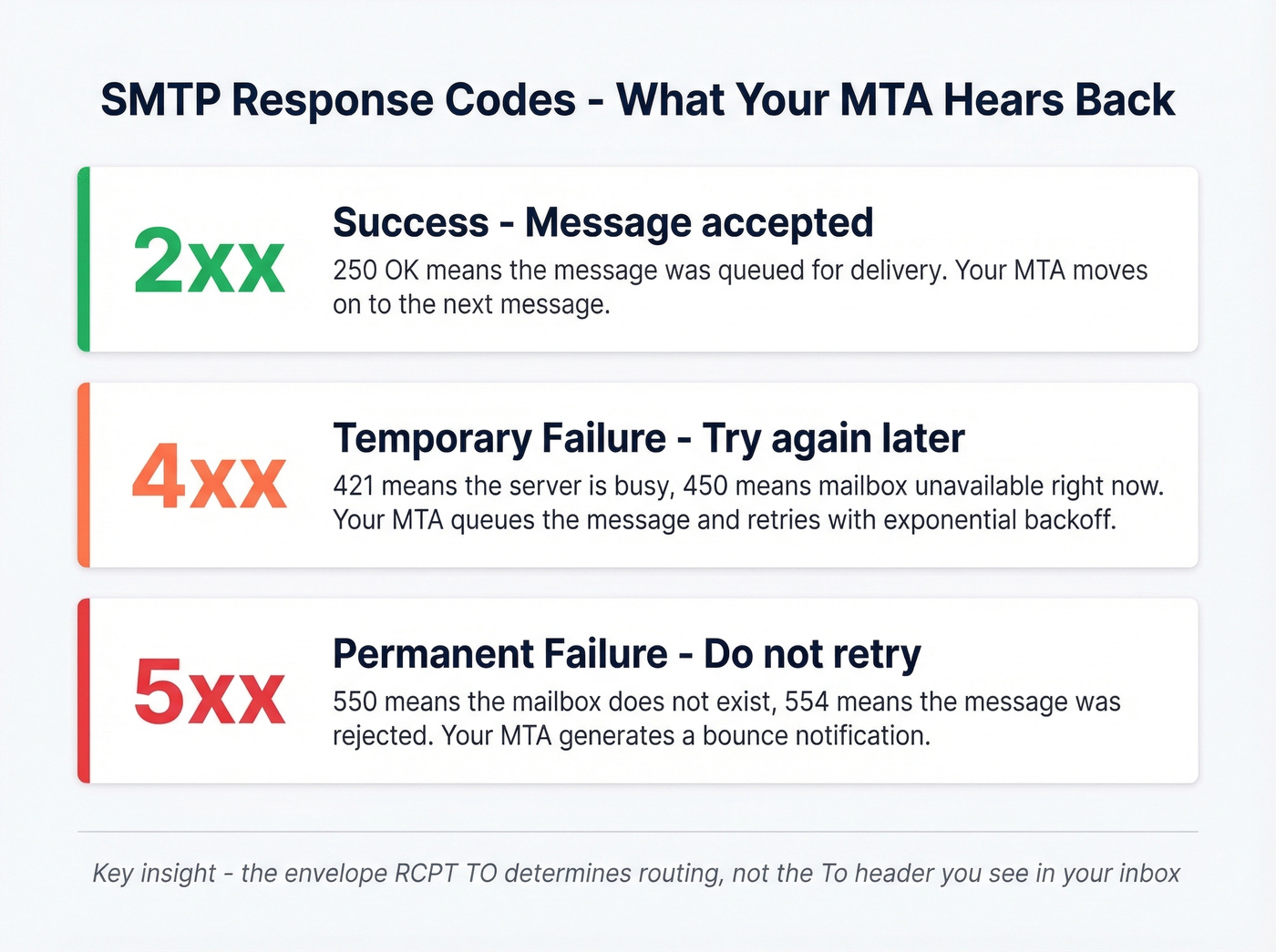
Every response from the server starts with a three-digit code. The first digit tells you the category: 2xx means success, 4xx means temporary failure (try again later), and 5xx means permanent failure (don't bother retrying). When your MTA gets a 4xx, it queues the message for retry. A 5xx generates a bounce notification back to the sender.
One critical distinction most guides skip: the envelope recipient, set by the SMTP RCPT TO command, determines where the message actually goes. The To: header you see in your email client is just message content - it's cosmetic. An MTA routes based on the envelope, not the headers. This is how BCC works, and it's why phishing emails can appear addressed to someone else entirely.
The EHLO command (Extended HELLO) is where the two servers negotiate capabilities - STARTTLS for encryption, authentication mechanisms, size limits. If the receiving server advertises STARTTLS, the sending server should upgrade the connection to TLS before transmitting the message body. Opportunistic TLS is common, but "opportunistic" means it can be downgraded - which is exactly the problem MTA-STS and DANE solve.
What an Email MTA Actually Does
Beyond the basic relay function, a production mail transfer agent handles a surprising amount of operational complexity.
Queue management and retry logic. When delivery fails temporarily, the MTA doesn't just try again immediately. A typical configuration retries after 5-15 minutes on the first attempt, then uses exponential backoff - doubling the interval each time. The total retry window runs 24-72 hours, with 10-30 attempts depending on configuration. After that, the message expires and the sender gets a bounce notification.
Bounce classification. Hard bounces (permanent failures like non-existent mailboxes) trigger immediate suppression. Soft bounces (temporary issues like a full inbox) get retried within the retry window.
Authentication enforcement. Modern MTAs check SPF, DKIM, and DMARC alignment on inbound messages and sign outbound messages with DKIM. This isn't optional anymore - Google's bulk sender guidelines and Microsoft both use authentication results as major inputs to spam filtering. (If you want the deeper mechanics, start with DMARC alignment and a practical SPF record example.)
Received header chain. Every MTA that touches a message adds a Received: header, creating a traceable chain from origin to destination - invaluable for diagnosing delivery delays or identifying where a message got stuck.
Rate limiting and throttling. Production MTAs enforce per-domain connection limits and sending rates. Gmail will defer your messages if you open too many simultaneous connections, and a well-configured server respects these limits automatically, pacing delivery to avoid triggering rate-based blocks. (Related: email velocity is the lever most teams underestimate.)
Delivery telemetry. Metrics feed into monitoring systems, tracking delivery rates, bounce rates, and queue depth in real time. Without this visibility, a queue backup or spike in deferrals can go unnoticed for hours.

Your MTA's retry logic can't fix a bad list. Every hard bounce damages your sender reputation - and no amount of Postfix tuning recovers it. Prospeo's 5-step email verification catches invalid addresses, spam traps, and honeypots before they hit your queue. 98% accuracy. 143M+ verified emails. $0.01 per address.
Fix deliverability at the source - verify every address before your MTA touches it.
MTA Software Compared (2026)
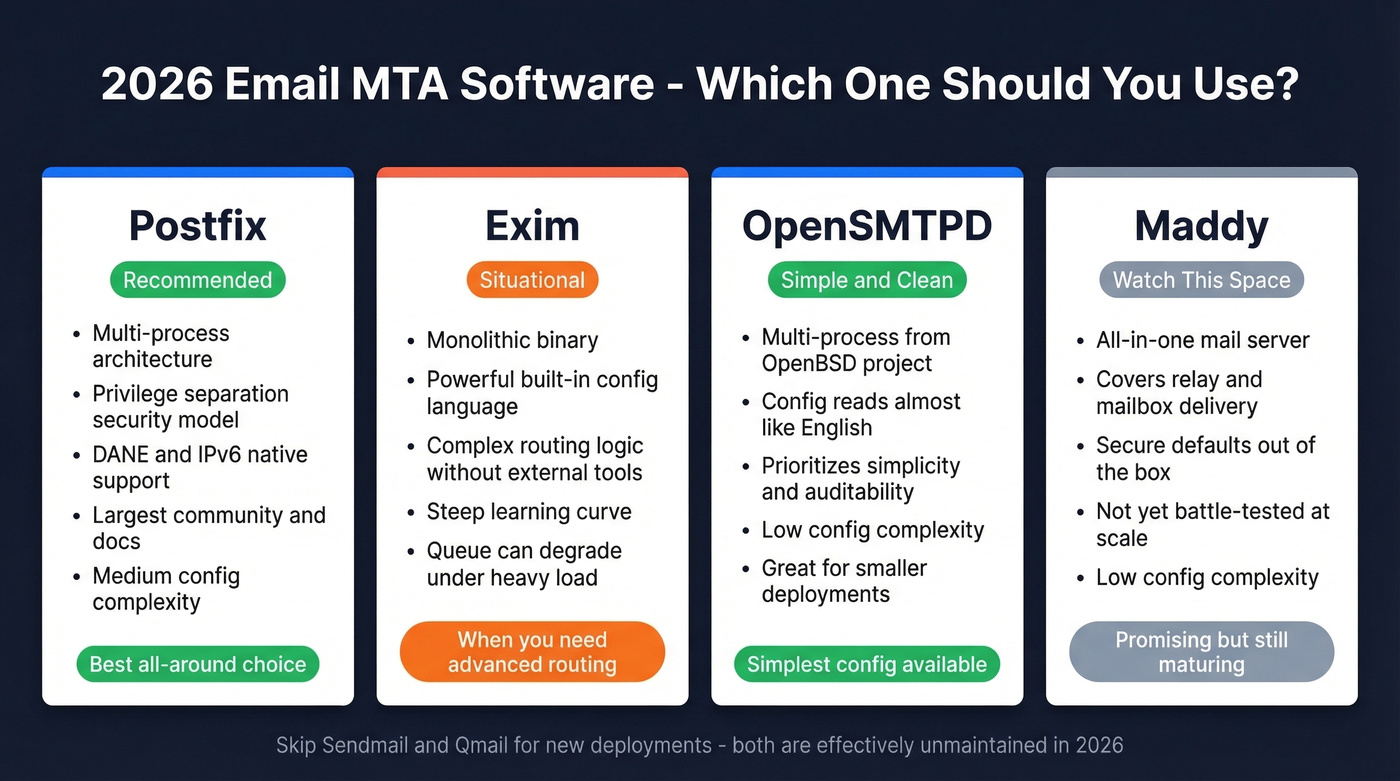
Many older guides still recommend Sendmail. Don't.
Postfix: The Default Choice
Postfix is the right answer for most self-hosted deployments. Created by Wietse Venema in 1997, it uses a multi-process modular architecture where each component - queue manager, SMTP server, delivery agent - runs as a separate process with minimal privileges. This privilege separation model means a vulnerability in one component doesn't compromise the entire system.
Postfix supports DANE (TLSA/DNSSEC), handles IPv6 natively, and has the largest ecosystem of documentation and community support. Configuration is sane: a main.cf file with readable key-value pairs, not a Turing-complete scripting language. Nearly three decades of production hardening make it the MTA we recommend unless you have a specific reason to choose something else.
Exim: Routing Flexibility
Exim takes the opposite architectural approach - a monolithic binary with an incredibly powerful built-in configuration language. You can implement complex routing logic, content filtering, and policy decisions directly in the Exim config without external scripts.
That flexibility comes at a cost. The config language has a steep learning curve, and queue performance can degrade under heavy load compared to Postfix's dedicated queue manager process. Choose Exim when you need routing logic that would require bolting external tools onto Postfix.
Skip These for New Deployments
Sendmail dominated email in the 1990s - roughly 80% market share in 1996, now down to around 4%. Qmail is similarly unmaintained. For servers that only need to forward system mail to a real MTA or relay service, lightweight tools like msmtp or nullmailer do the job without the overhead of a full mail server.
The New Wave
Several modern options are worth tracking. Maddy and Mox aim to be all-in-one mail servers covering relay and mailbox delivery with secure defaults and simpler operations. Chasquid focuses on being a simple, modern SMTP server. OpenSMTPD, from the OpenBSD project, prioritizes simplicity and auditability - its config syntax reads almost like English. These aren't battle-tested at the scale of Postfix, but for smaller deployments or privacy-focused setups, they're compelling.
| Feature | Postfix | Exim | OpenSMTPD | Maddy |
|---|---|---|---|---|
| Architecture | Multi-process | Monolithic | Multi-process | All-in-one |
| IPv6 | Yes | Yes | Yes | Yes |
| Config complexity | Medium | High | Low | Low |
| Active development | Yes | Yes | Yes | Yes |
| 2026 recommendation | ✅ Best all-around | Situational | ✅ Simplest config | Watch |
Modern Transport Security
Standard SMTP uses opportunistic STARTTLS - the sending server asks the receiving server if it supports encryption, and if so, upgrades the connection. The problem: a network attacker can strip the STARTTLS advertisement from the server's response, forcing a plaintext fallback. Two standards exist to fix this, and transport security is a two-sided dependency - it only works when both sides support the same standard.
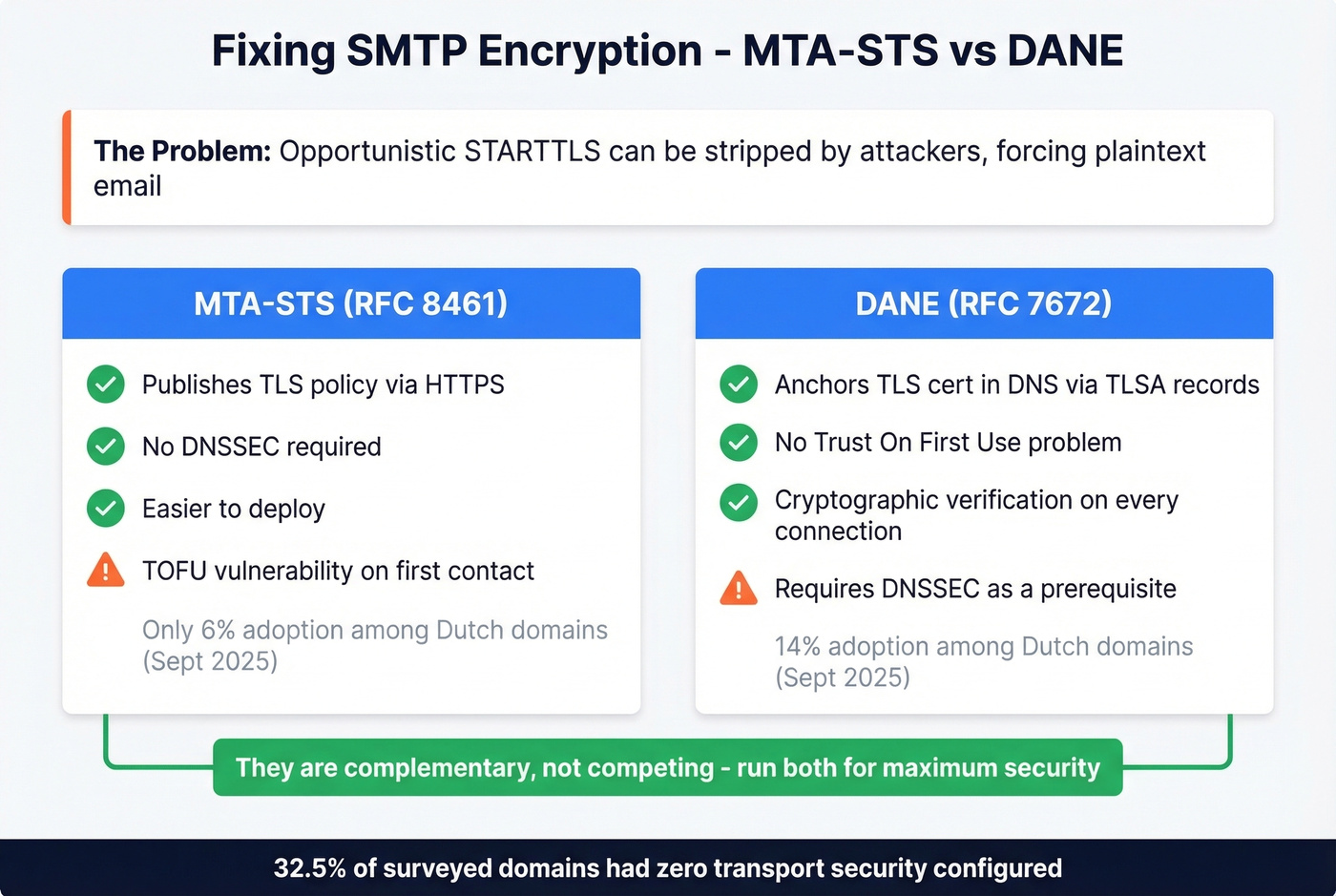
MTA-STS (RFC 8461) lets a domain publish a policy via HTTPS declaring that senders must use TLS. No DNSSEC required, which makes deployment easier. The weakness is TOFU (Trust On First Use) - the first time a sender contacts your domain, it hasn't cached your policy yet and the connection can still be downgraded.
DANE (RFC 7672) anchors the receiving server's TLS certificate in DNS using TLSA records, validated through DNSSEC. No TOFU problem - every connection is cryptographically verified. The tradeoff: DNSSEC deployment is a prerequisite, and DNSSEC adoption remains patchy.
They're complementary, not competing. Run MTA-STS for broad compatibility and DANE where DNSSEC is available.
Real-world adoption tells the story. A September 2025 study of Dutch email domains found 14% supporting DANE and just 6% supporting MTA-STS. A full 32.5% had no transport security standard configured at all. Traffic-weighted numbers look better - 25% of email volume was DANE-secured and 19.1% MTA-STS-secured - but 13.6% of traffic still flowed to completely unprotected domains. The Netherlands is ahead of most countries on email security adoption, which makes these numbers sobering.
Self-Hosted vs Cloud SMTP Relay
Here's the thing about self-hosting email: the software is the easy part. Postfix installs in minutes. The hard part is deliverability - and it's a problem that never fully goes away.
The baseline infrastructure cost is modest. A VPS with 2GB RAM runs $10-20/month, enough for Postfix plus spam filtering. But the hidden tax is operational. We've seen teams budget 5-10 hours per month just managing IP reputation, monitoring blocklists, and troubleshooting delivery issues with Gmail and Microsoft's opaque filtering systems. If you're actively trying to improve sender reputation, this is where most of the time goes.
The consensus on r/selfhosted is blunt. One practitioner running a perfectly configured server with SPF, DKIM, and DMARC reported: "My hosting provider's entire IP range got flagged - OVH, in this case - and there was nothing I could do about my own config." Another put it more colorfully: "Three companies control 90%+ of email infrastructure," and if they decide your IP range is suspicious, your recourse is limited. Even experienced sysadmins describe self-hosted email deliverability as a full-time reputation management job.
Look, if your monthly send volume is under 100,000 emails, self-hosting outbound email is almost never worth the operational overhead. The cost savings over a cloud relay are negligible, and the deliverability risk is enormous. Self-host inbound, relay outbound - that's the pragmatic answer for most teams.
Here's what the major relay services cost:
| Service | 10k emails/mo | 50k emails/mo | 100k emails/mo |
|---|---|---|---|
| Amazon SES | ~$1 | ~$5 | ~$10 |
| SMTP2GO | $15 | $30 | ~$50 |
| Postmark | $15 | $55 | ~$90 |
| SendGrid | ~$15 | $19.95 | $34.95 |
| MailerSend | ~$12 | $30 | ~$55 |
| Mailjet | ~$17 | $37 | ~$60 |
Prices are estimates based on published pricing tiers and vary by plan.
Amazon SES is the cheapest by a wide margin, but it's bare-bones - you're building your own bounce handling and analytics. Postmark is widely known for strong transactional deliverability. SendGrid offers one of the broadest feature sets for marketing sends. Pick based on your use case, not just price.
Bounce Handling and Verification
Bounce management is where MTA configuration meets real-world consequences. Get it wrong and your sender reputation degrades fast.
Hard bounces - permanent failures like non-existent mailboxes or invalid domains - require immediate suppression. Repeatedly sending to hard-bounced addresses quickly damages sender reputation and can lead to blocking. Soft bounces - temporary issues like full inboxes or server outages - typically resolve within 24-72 hours. Your MTA's retry logic handles these automatically, but addresses that soft-bounce repeatedly should be suppressed too.
The thresholds that matter: keep your bounce rate under 2% for established lists. Up to 5% is tolerable for new lists or re-engagement campaigns. Above 5% signals serious data quality problems. Above 10% is a red flag that can trigger IP blocklisting. (More detail: email bounce rate.)
Here's the contrarian reframe most guides miss: the number one reason mail transfer agents cause deliverability problems isn't misconfiguration - it's bad input data. You can tune your retry logic, warm up your IPs, and configure perfect DKIM alignment, but if 8% of your list is invalid addresses, spam traps, and honeypots, none of that matters. If you're cleaning up after a bad send, spam trap removal is usually part of the remediation.
Email verification is the upstream fix. Run your list through a verification service before messages ever enter the queue. Prospeo's 5-step verification process catches invalid addresses, spam traps, and honeypots at 98% accuracy - including catch-all domains that most verifiers punt on. Verification costs roughly $0.01 per email. Rebuilding a wrecked sender reputation costs weeks of throttled sending and manual blocklist removal requests. The math isn't close.
Choosing the Right Setup
The right configuration depends entirely on what you're sending and why.
For transactional email - password resets, order confirmations, notifications - use a cloud relay like Postmark or Amazon SES. Deliverability and speed matter more than cost here, and these services maintain dedicated IP pools with strong reputations.
Personal or privacy-focused email is the one scenario where self-hosting makes sense. Use Postfix or Maddy, accept the deliverability overhead as the cost of independence, and budget the operational hours honestly. Skip this path if you aren't comfortable managing DNS records, monitoring blocklists, and debugging SMTP logs on a regular basis.
Enterprise teams should use a managed ESP with dedicated IPs, full analytics, and compliance tooling. The cost is justified by the risk reduction.
You just read how MTAs classify bounces and enforce rate limits. Now imagine feeding your server a list where 15% of addresses are dead. Prospeo customers like Snyk cut bounce rates from 35% to under 5% - not by reconfiguring their MTA, but by sending only to verified contacts. 300M+ profiles, refreshed every 7 days.
Stop tuning your MTA around bad data. Start with clean contacts.
FAQ
What's the difference between an MTA and an MDA?
An MTA relays messages between servers via SMTP - it's the routing layer. An MDA delivers the message into the recipient's actual mailbox using LMTP or local delivery protocols. Think of the MTA as the postal truck moving mail between sorting facilities, and the MDA as the carrier who puts it in your mailbox.
Is port 25 still used for email?
Yes - port 25 handles server-to-server relay between MTAs. Port 587 is for client submission (your email app connecting to your outgoing server). Most ISPs block outbound port 25 on residential connections to prevent spam, which is one reason self-hosting from home is impractical.
Can I run my own mail server in 2026?
You can, but deliverability is the hard part. Even with perfect SPF, DKIM, and DMARC, your hosting provider's IP range may already be blocklisted by Gmail or Microsoft. Budget 5-10 hours per month for reputation management and expect occasional frustrating delivery failures.
What's the best MTA software for a new server?
Postfix. It's modular, secure by design, well-documented, and the most widely deployed open-source option. OpenSMTPD is a strong second choice if you prioritize configuration simplicity. Avoid Sendmail and Qmail - both are effectively unmaintained.
How do I prevent bounces from damaging sender reputation?
Verify addresses before sending. Keep bounce rates under 2%, warm up new IPs gradually, and enforce per-domain rate limits to avoid triggering throttling from major mailbox providers.